










Introduction
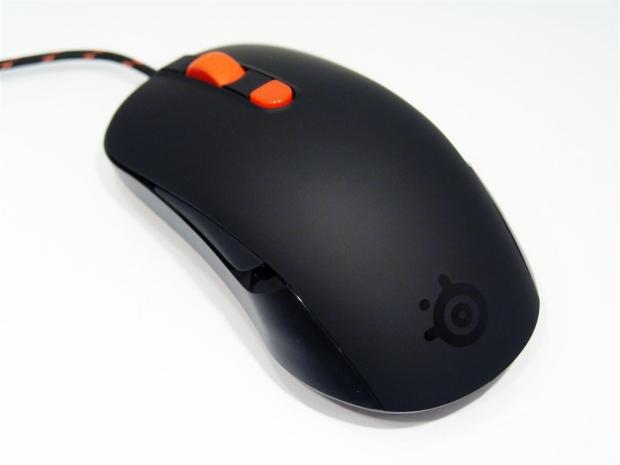
During one of my busiest days at CES I had a meeting to make, that I was very late for, with SteelSeries. As I got to the hotel I realized that I didn't even have a room number or a telephone number to make contact with them once I made it to the lobby. Out came the phone and I made a call to Chris and Cameron who sent off an email informing them that I was waiting in their lobby. Just as I was about to give up hope, a young lady walks around the corner and introduces herself as Tori from SteelSeries. I thought I had all but blown the opportunity, but they welcomed me into the suite, "after hours", to take the time to explain to me what that had in mind when designing products.
As it pertains to mice, the logic was very simply put to me. I was told that SteelSeries has the concept of lighter mice, with personally adapted sensors for their needs working with Pixart to perfect their needs. After I was asked to waive a few mice around on the mats of the samples they had on the desk, at first I thought to myself these are super light and are almost effortless to move. As I said it out loud grins went around the table, as they could tell I was picking up on what the concept was here. Never mind the fact that I saw these mice can be balanced on a finger and that all of the samples I touched just "felt right" when I messed around with them.
I briefly mentioned the adapted sensors, but to add to that, there is also a bit of software to add some really cool functionality to what is already an impressive mouse to use. With the software in action you can create custom game profiles with various bindings to the buttons, you can add macros and you can swap the right and left handed controls because their mice are ambidextrous in design. The sensor itself is made to be more accurate with less DPI/CPI. Where most companies offer 6000+ DPI sensors and a mouse with added weight that feels like pushing a brick, SteelSeries goes for light, lean and accurate to give you the edge in competitive or armature level gaming, for a good price.
Today we are going to be looking at the Kana in the black and orange variation. There is also a white variant, but I do believe it is this black on orange combination that won the Facebook competition for the user's pick of best looking combination. There is a lot that this middle child of the smaller Kinzu, which we will see real soon and the larger Sensei mice. I've taken the pictures, I've played many hours of FPS games and used it daily - stick around and see what I think about the SteelSeries Kana Black 1.1 gaming mouse.
Specifications, Availability and Pricing
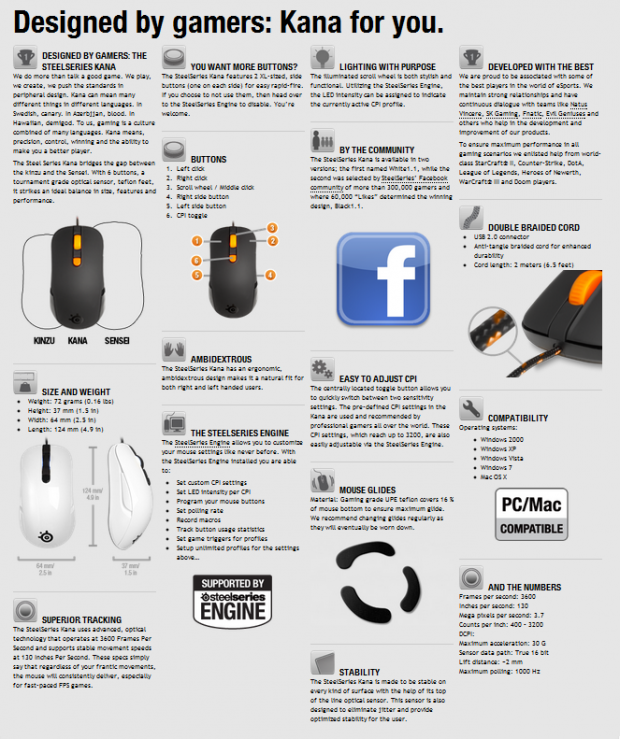
Typically you would get a more generalized listing of the specifications, but there wasn't really that sort of offering. I covered that the mouse uses a Pixart Optical Sensor to obey your every command. Backing this is the 3600 FPS of the sensor, meaning how many readings it handles per second to track your movement. If you think you might be too fast for this mouse, you will need to be able to move faster than 130 inches per second before this mouse loses sight of your movements. Dimensionally the mouse is 37mm tall, 64mm wide and 124mm long and weighs in at a measly 72 grams. The Kana also offers a whole list of features like the Teflon feet, being ambidextrous, on the fly CPI adjustment and meaningful LED lighting built in as well.
Adding to the mouse's simplicity in design is the very easy to use SteelSeries Engine driver and control panel to make this mouse fit your needs not only in basic functionality, but almost unlimited control of what it can do. The mouse offers six buttons including right and left click, mouse scroll, CPI, left side and right side buttons. Now in each game you can create a profile and keep a list that you can activate for each game and if you set it up right, it will change the profile with the games .exe initiating. Then of course there is the whole other angle of making the buttons do more and that is with macro functionality. So as you can see, this is a little more than just a gamers mouse, it can be utilized by anyone who demands precision and comfort in their devices.
With what I am finding, the white 1.1 version of the Kana seems to be the one everyone is stocking at something like seventy various Google hits. Now I also know these mice are new and getting stock of both versions may have hit some bumps in the road. I was able to locate the black 1.1 Kana at somewhere I have never been to before, but with the pricing of $54.95, Gameworld can accept my PayPal funds the same as anyone else! Depending on your location, you may have a tough time finding the black one, but in my opinion, the fans were right, it is the better choice of the two options.
Our Latest Mice Review Coverage
- Razer Viper V4 Pro Wireless Gaming Mouse Review - Built for Competition
- Corsair SABRE v2 PRO CARBON FIBER Wireless Gaming Mouse Review - The Premium Option
- Corsair SABRE v2 PRO Wireless MG Gaming Mouse Review - A Strong Contender
- Logitech G PRO X2 SUPERSTRIKE Wireless Gaming Mouse Review - Competitive Gaming Perfected
- ASUS ROG Harpe II Ace Wireless Gaming Mouse Review - Performance, Comfort, and Versatility
Now let's look at the box so we can get to the Kana Black 1.1 gaming mouse.
Packaging and Contents
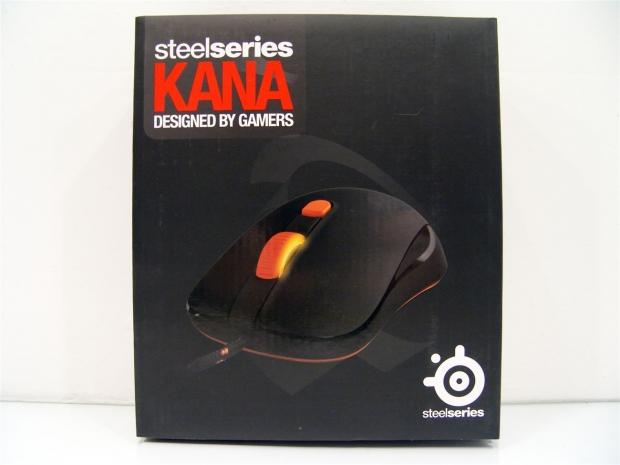
The packaging is done in flat black to allow the white and red naming as well as the image of the front of the Kana to pop right off the packaging by contrast.

Opening the front cover that is kept closed with Velcro, you will find a couple of small paragraphs in four languages. Here SteelSeries covers this fact. No matter the meaning of the word Kana, the real truth is it will make you a better gamer, while the second part covers coloration and that we have the Facebook winning version.

Under the cover you will be able to see the mouse on the right half covered in a thin plastic. Above the mouse the key features such as its ambidextrous shape, the programmable LED and the SteelSeries Engine driver and control panel are listed.

Both of the thinner sides of the packaging offer the same information. You have the name at the top, an image of the side of the Kana and a smaller image of the back of the Kana at the bottom (left side as it is in the image).

The back starts off with the specifications and moves right into the button locations with descriptions of them and their functions below.

The top of the packaging also offers a not only that this mouse was designed with gamers input; it also shows the four professional gaming teams that SteelSeries worked with on the Kana.

To remove the mouse, you need to slide the inner packaging out and the inner packaging opens like a book to allow you under the plastic to retrieve the mouse while the cabling is tied up in the large compartment with SteelSeries printed on the side of it.
SteelSeries Kana Black 1.1 Gaming Mouse
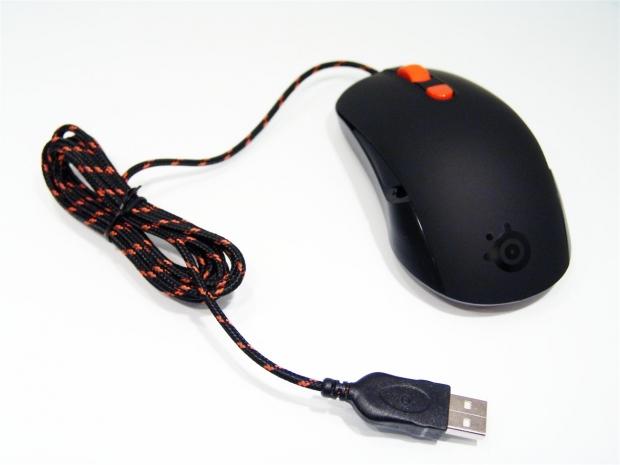
Once the Kana was removed from the box, I go an idea of the eye to detail with the Kana. Not only is there an orange strand laid in the braid on the USB cable, it is easy to tell that this is a dual-braid and will leave a smoother cord as not to grab on the edge of the mouse mat. This is just the cable; we haven't even touched on the Kana yet.

The Kana, just like the box, comes in a mat finish on the plastic. At the palm of the mouse there is the SteelSeries logo by leaving that area as glossy finished plastic.

On the left side of the Kana there is a long button that is very easy to find and use. When in the right-handed setup, this would be the page back button. The contour here really lends to your hand caressing the Kana for a natural feel in the hand.'

The front of the Kana offers both the right and left click all mice should have, but also offers an orange scroll wheel that is backlit along with an on the fly CPI selector. The scroll wheel has a rubberized feel that makes it easy to use as it almost grips your finger when you slide it along the wheel.
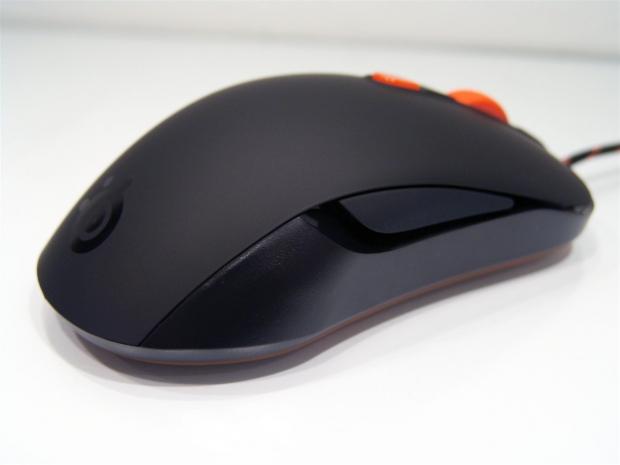
The right side of the mouse looks just like the left, lending to its ambidextrous nature in the design. With the right-handed setup, this is the page forward button. For lefties, these two buttons will swap functions.

Flipping the Kana on its back you can see the entire base of the mouse is made of orange plastic and it does glow with the LEDs in the mouse. The mouse is supported with three Teflon feet giving the Kana an effortless glide across any surface. In the middle you can see the specially designed Pixart optical sensor that offers the 400 - 3200 CPI and incredibly fast tracking speeds.
Paperwork and Software
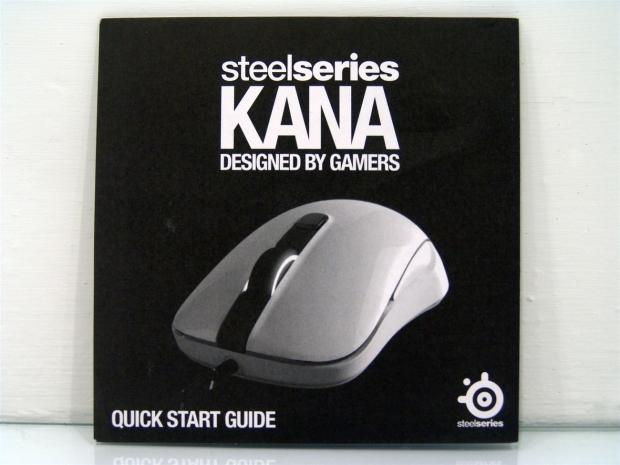
The paperwork is a black and white pamphlet with an image of the white 1.1 Kana on the front. Keep in mind this is just a quick start guide and most of the information about functionality can be found in the SteelSeries Engine software.

Opening up the guide shows the system requirements for functionality with the Kana and carries on into the software and where to get the SteelSeries Engine. Then at the bottom they tell you step by step how to get your Kana working with your PC.

Excuse the distortion in these images as the resizing really did a number on them. Here is the main page of the SteelSeries Engine software. Here you can select the device in the left column, select profiles or create them. The bulk of the screen is a look at the Kana mouse and the button layout.
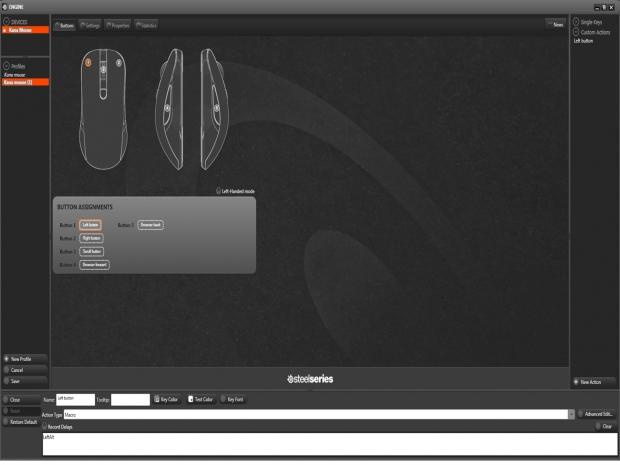
By clicking on any of the selectable buttons on the mouse, it opens the macro settings screen at the bottom. Here you can make the mouse do almost anything that doesn't require delayed timing in the macro combination.

Under the settings tab found across the top of the software's window, this is where you can personalize the on the fly CPI setting and the LED intensity behind the scroll wheel. This way at a glance, you can tell by the intensity of the lit scroll wheel which of the two profiles you are using. Of course one of the boxes needs to be less than 100% as in the image to be effective. The last bit is a controllable polling rate with the software that will allow you to gain an input lag free gaming experience.

If I understood what I was doing here correctly, when I created macros and profiles on the previous pages, here is where I would go to set the profiles to auto load with the game EXE loading up the start of the game. This way you don't have to point and click every time you change a game or want to work at desktop level in an application with preset macros.

The last section of Statistics is more of a check to see if the Kana is functioning mixed with a benchmark to brag about the amount of clicks you can do and still get the timer stopped in eleven seconds. To be fair, I cheated and used two fingers on button one. As you can see it is also a built in checker to see that all of the switches are still functioning correctly.
Final Thoughts
At first I wasn't too sure what to expect with SteelSeries. While I was in Vegas, I was told a lot of things, most of them true, some I am still waiting to see for myself what is in store for us, but with SteelSeries, everything they told me was true. The mouse is super light, ergonomically correct in its natural feel in your hand, it is very easy to use for both the right and left handed users and my days of pushing bricks across my desk to game or browse the web are long behind me! I had my doubts while I was sitting across the table flinging mice around that weren't even connected. Seeing, feeling, using and experiencing what the Kana Black 1.1 has to offer, I for one am sold on it.
You can go out and buy a mouse with 6000 DPI, it can have up to 78 programmable keys, it can have weights, and I mean the list is really endless for mouse add-ons. What you get for your money with SteelSeries comes from a different approach altogether. They aren't grabbing mediocre parts from a bin and slamming them into an uber-awesome looking mouse that looks something like an erector set for a point and click device.
Of course that sells and sells well, but with SteelSeries, it's about the feel and lack thereof that puts them at the top of my list. Being aided by professional gamers for input of form and function and then allowing Facebook users to vote on a winning design just speaks volumes of the effort and thought that goes into delivering a mouse that offers the perfect feel in a game without you even realizing the mouse is in your hand. It is an odd concept to wrap your mind around I know, but with my heavier mice, I was always reminded with every move that my brick was still there.
The public release of these mice has just hit the internet so locating the Kana in either the White 1.1 version or the Black 1.1 we just looked at, the feel and functionality is all the same, it is truly just a color and LED difference. The SteelSeries Engine software is very intuitive, functions well and takes just a few seconds to dial in as long as we aren't programming the macros. I spent a lot of hours gaming and using the Kana Black 1.1 and I really can't see myself moving back to any bulky, weighty mice for the long term. I used to be a fan of bigger and more included goodies makes for a better product. SteelSeries flipped my thoughts on their ear and delivered a precision gaming mouse that works great in games and at the desktop level. I really can't say enough about this mouse, if you are in the market for a new one, I strongly suggest you look at the SteelSeries Kana for your next purchase.


 IQUNIX Magi96 Pro Aluminum Low Profile Mechanical Keyboard Review - Premium Build, Satisfying Sound
 Razer Pro Type Ergo Wireless Split Ergonomic Keyboard Review - Built for Comfort and Support
 ASUS ROG Strix Morph 96 Wireless Gaming Keyboard Review - Great Performance, More Affordable
 Corsair MAKR PRO 75 Hall Effect DIY Keyboard Review - Pre-Built and Ready for Action
 Razer Viper V4 Pro Wireless Gaming Mouse Review - Built for Competition
 Anthropic releases state-of-the-art AI model Claude Fable 5, and it's safe to use
 Nintendo showcase FromSoftware's next title 'The Duskbloods' in new mysterious trailer
 Razer Seiren V3 Pro is a new professional-grade microphone for gamers and creators
 Xbox is rethinking its Project Helix strategy as memory prices continue to soar
 Control Resonant arrives in September with DLSS 4.5 and Path Tracing on PC
 NZXT unveils aesthetically pleasing cases, fans and coolers at Computex 2026
 NVIDIA GeForce Hotfix 610.52 driver released, fixes issues related to G-SYNC, Smooth Motion, and stability
 3DMark adds native Windows on Arm support for ray-tracing benchmarks
 MSI showcases its next-gen GPU cooling tech and it could be for the GeForce RTX 60 Series
 'Radically different' business models coming to Xbox, CEO Asha Sharma says
 Navman MiVue Smart True 4K Surround Dashcam Review - Seeing In All Directions At Once
 Asetek Forte S-Series Racing Simulator Bundle Review
 SAPPHIRE Radeon RX 9070 GRE PULSE OC Review - A New 1440p Challenger Has Arrived
 NZXT H6 RGB+ Compact Dual-Chamber Chassis Review
 ASRock Radeon RX 9070 GRE Steel Legend Review - The RDNA 4 Mid-Range Reshuffle
 ASRock Z890 Taichi Aqua Motherboard Review - Flagship features without the flagship price
 GIGABYTE Z890I AORUS Ultra Motherboard Review - Mini-ITX with surprisingly good thermals
 The PowerToys utilities I keep enabled on every Windows 11 PC, and the ones I turned off within a week
 TweakTown's Best of Computex 2026 Awards - The Best Hardware, Gaming Gear, and AI
 Phison E37T SSD Controller Exclusive Preview - The Fastest DRAMless SSD Platform Yet
 USB Ports Not Working in Windows 11? Try These Fixes
 ASUS WiFi Routers and Networking Solutions Deliver Long-term Security and Reliability with No Additional Cost
 Second Monitor Not Detected in Windows 11? Try These Fixes
 Turn Your Old Smartphone Into a Dedicated Webcam for Your Windows PC
 The Send To menu is the right-click feature on Windows 11 that nobody bothers to customize
 Windows 11 will not let you pin a folder to the taskbar, but a 30-second workaround does
 ASUS ProArt Displays Unlock Creativity with Professional Monitors for Everyone