

Introduction

ViewSonic is most known for its range of TVs, PC displays and digital picture frames. The company has been making all sorts of computer displays for years now and has just started branching out into the notebook arena. Interestingly, the ViewSonic ViewBook Pro at first glance doesn't look like a freshman offering.
In fact, if you look at the ViewSonic ViewBook Pro too quickly, you might actually mistake the thing for an Apple MacBook Pro. The minimalist design, silver on black colors and elegant looks of the machine certainly appeal to the same senses that draw many to the MacBook line.
The ViewSonic ViewBook Pro packs lots of features into a machine in its sub-$1000 price range and there are lots of road warriors out there who need to sit up and take notice. The ViewSonic ViewBook Pro is on the test bench today, so let's check it out.
Specifications, Availability, and Pricing
The ViewSonic ViewBook Pro I am checking out today can be picked up at several online stores including Amazon.com for about $950. The notebook is very well provisioned for its class. Check out all the specifications below.

The ViewSonic ViewBook Pro
[img]2[/img]
The top of the notebook has the ViewSonic logo and nothing else. The machine is finished in metallic silver that is flat, offering good looks and much less smudges and fingerprints than the glossy notebooks I typically see.
[img]3[/img]
The bottom of the notebook has the cooling grates we expect to see and the battery. The large screw under the battery releases the modular bay device.

This is a close-up of the screw you rotate with a coin or screwdriver to release whatever you happen to have in the modular bay at the time.

The left side profile gives you an idea of just how thin the ViewSonic ViewBook Pro is. This side has the AC port, Ethernet, VGA out, HDMI out, expansion card slot and a memory card reader.

The keyboard is very nice with some rather odd looking keys. The key tops are a bit smaller than the base to provide more room between the keys. Beneath the keyboard are the track pad and the fingerprint reader.

The screen is a glossy 13.3-inch unit with LED backlighting.

The right side of the ViewSonic ViewBook Pro has headphone and mic ports, two USB ports and the modular bay with the optical drive in this picture. You can put an extra battery in this bay or a blank to reduce weight a bit.

The front edge of the notebook is thin and has three indicator LEDs on the left corner.

The back of the machine has nothing to see but shiny hinges for the screen.

These three devices are the modular units you can put into the modular bay. On the far left, you have the DVD burner, while the middle is the second battery and the far right is the blank.
Benchmarks - Battery Life, Audio and Video Encoding
The ViewSonic ViewBook Pro will go through my standard test regime consisting of iTunes encoding, movie encoding and Battery Eater Pro. I will start with iTunes Encoding.
iTunes Encoding
Version and / or Patch Used: 7.1.1.5
Developer Homepage: http://www.apple.com
Product Homepage: http://www.apple.com/itunes
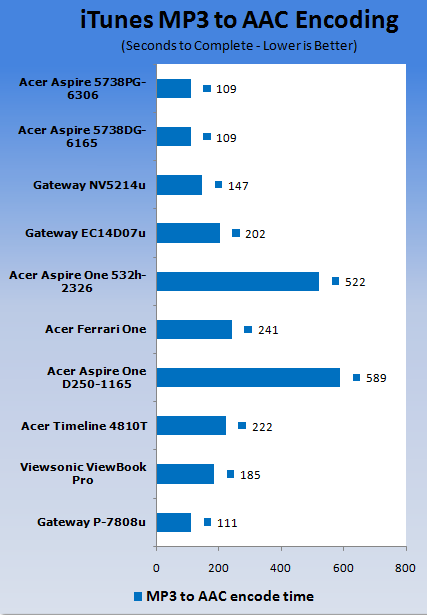
For the iTunes encoding test I take the Stone Temple Pilots Core CD in MP3 format and encode it to AAC format using iTunes and time the results with a stopwatch. The ViewSonic ViewBook Pro turned in a good performance result in this benchmark considering how thin the machine is and that it uses a ULV CPU. Check out the chart below for all the details.
Windows Media Encoder
Version and / or Patch Used: 9
Developer Homepage: http://www.microsoft.com
Product Homepage: http://www.microsoft.com/windows/windowsmedia/forpros/encoder/default.mspx
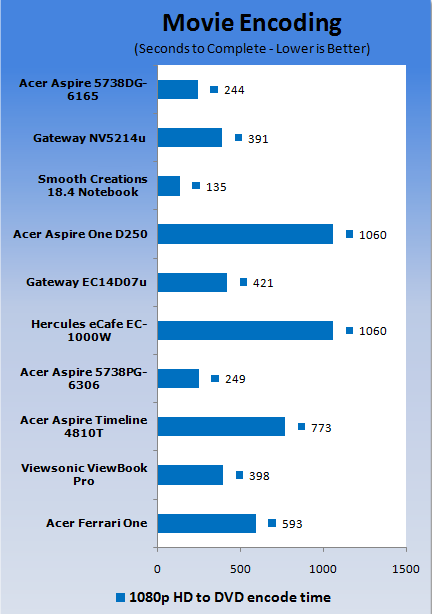
For the movie encoding test I take the HD Microsoft Magic of Flight video and encode it to DVD quality video with CD quality audio using Windows Media Encoder. The ViewSonic ViewBook Pro did well in the movie encoding benchmark; it is very powerful for its class.
Battery Eater Pro
Version and / or Patch Used: 2.70
Developer Homepage: http://batteryeater.com/development.html
Product Homepage: http://batteryeater.com
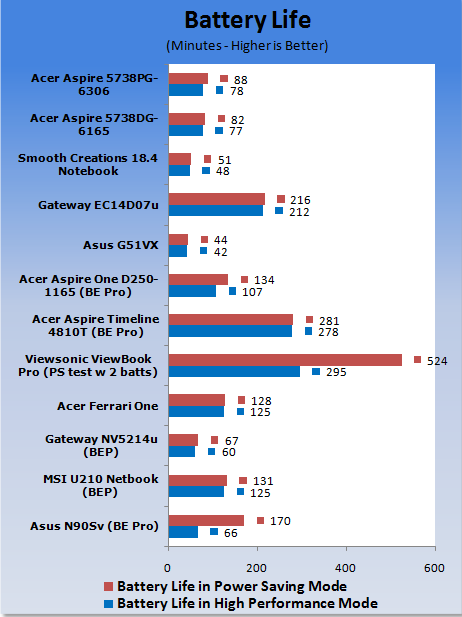
Battery Eater Pro is very hard on batteries so you are likely to get more run time in the real world, depending on how you use the machine. Since the ViewSonic ViewBook Pro is the first machine I have tested that has two batteries, I am testing this machine a bit differently.
I turned off all power saving features of the notebook and the high performance score will be with the screen at 100% brightness and only the main battery installed. The power saver test will be run with the screen at 100% and both the primary and secondary battery installed.
Battery life for the machine was decent with just the main battery; the extra battery just ads icing to the cake. Check out the chart below for the results.
Hands On
The thing that impresses me most about the ViewSonic ViewBook Pro is that the machine is very well priced considering the options you get. At about $950 you get the optical drive and the secondary battery. The machine is dead sexy to look at with the silver finish and thin profile. The entire package is very impressive considering ViewSonic is not what we think of as a computer company.
The 13.3-inch screen is glossy and has its share of glare. It performs well, though, and after working on smaller machines for a while, the 13.3-inch screen seems gargantuan. The little notebook works well for watching online video and DVDs thanks to the optical drive with good color and smooth playback.
The keyboard is a strange looking job that ViewSonic calls "floating island". What that means is that it's the standard chicklet keyboard with keys that are wider on the bottom than the top. It looks a bit odd, but the keys are still well sized and typing feedback is just what you expect. The keyboard is of normal size for a notebook.
Under the keyboard is the track pad, which is also well sized and has a scroll area on the right side. Between the two track pad buttons is a fingerprint reader for security. The machine has software that will let you log into Windows and other apps using a swipe rather than typing passwords. The ViewSonic ViewBook Pro has a lot of features that you might not expect to find on an ultraportable machine.
The most obvious is the optical drive. The machine also has dual video outputs, an ExpressCard/34 slot and the AC outlet on the computer glows when plugged in to make it easier to find in the dark. Changing the devices in the module bay out is very easy to do. You turn the silver screw on the bottom and the device in the bay pops out enough for you to grab it easily.
The machine ships with the extra battery, the optical drive and a blank that you can put in the bay if you don't need the battery or the optical drive. Honestly, just picking the machine up with any of the three options in the modular bay, I can't tell any real world weight difference in the notebook.
Final Thoughts
When all is said and done, I am very impressed with the ViewSonic ViewBook Pro. The thin little ultraportable has tons of features and comes with an optical drive, which is rare in the thin ultraportable range.
When you add all those features up with the under $1000 price tag you can find the ViewSonic ViewBook Pro for online, the machine is a fantastic buy that is worthy of checking out for sure.

 United
States: Find other tech and computer products like this
over at
United
States: Find other tech and computer products like this
over at  United
Kingdom: Find other tech and computer products like this
over at
United
Kingdom: Find other tech and computer products like this
over at  Australia:
Find other tech and computer products like this over at
Australia:
Find other tech and computer products like this over at  Canada:
Find other tech and computer products like this over at
Canada:
Find other tech and computer products like this over at  Deutschland:
Finde andere Technik- und Computerprodukte wie dieses auf
Deutschland:
Finde andere Technik- und Computerprodukte wie dieses auf 


 EA CEO says next-gen Battlefield has 'the largest Battlefield team in franchise history'
 Apple apologies for new iPad Pro ad that 'missed the mark' and pulls it from airing on TV
 Intel places orders to secure ALL of ASML's High-NA EUV machines built this year
 China's imports from Netherlands skyrocket 32% in April, and we all know what they're buying
 Resident Evil 4 Path Tracing looks incredible running on a RTX 4080, but the performance...
 Corsair MP700 Pro SE 4TB SSD Review - As Fast as They Come
 Corsair MP600 Mini 2024 Edition 1TB SSD Review - Fastest Tiny Drive on the Planet
 Lexar SL500 1TB Portable SSD Review - The best of native USB
 Corsair Platform:6 Elevate Modular Desk Review
 True Lies (1997) 4K Blu-ray Review
 Fractal Design North XL Full-Tower Chassis Review
 Western Digital WD Gold 24TB HDD Review - High-Capacity Masterpiece
 AOC U27G3X 27-inch Gaming Monitor Review - 4K 160Hz for $500
 MSI Vector GP68HX Gaming Laptop Review
 Dell UltraSharp 40 5K Curved Thunderbolt Hub Monitor (U4025QW) Review
 Building the Ultimate Home Entertainment Server with an ASUSTOR NAS and Viper Gaming NVMe SSDs
 Everything you need to know about the latest ASUS NUC Mini PCs - NUC 14 Pro and ROG NUC
 How to Overclock Your GPU and Boost Your PC Gaming with ASUS GPU Tweak III
 ASUS's AMD Radeon RX 7000 Series GPU lineup has something for every gamer
 ASUS OLED Premium Care defends the ROG Swift OLED PG32UCDM gaming monitor from burn-in