

Introduction
 15
15We've already provided a fair bit of coverage on the new FX-8150 CPU from AMD and it hasn't all been favorable for the team over at AMD. If you haven't looked yet, I highly recommend you check out our other pieces that cover the CPU testing side of things, VGA testing side of things and my editorial Shi**y Marketing Killed the Bulldozer Star which has really gained traction over the last few days.
Today we test the video card side of things a bit more and see what goes on when we start to make use of CrossFireX on the 990FX platform. The 990FX chipset shows some good potential and it's going to be interesting to see what happens when we start to make use of all those PCIe lanes that are on offer.
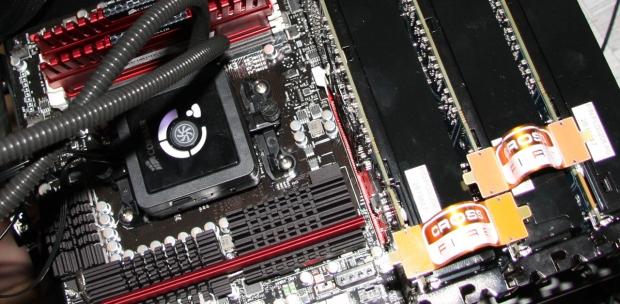
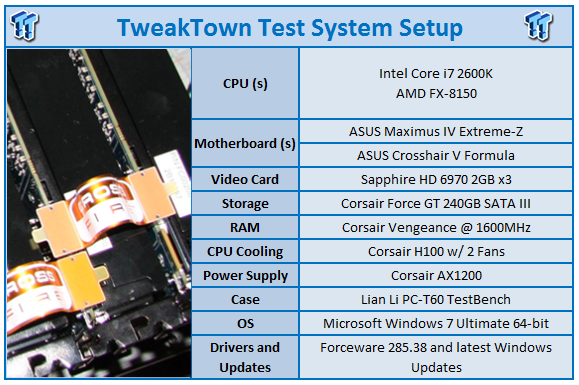
The approach we've taken here today is pretty simple; we've got our two CPUs, the Intel i7 2600k and AMD FX-8150. We've thrown three Sapphire HD 6970 video cards in our Maximus IV Extreme-Z and Crosshair V Formula. Then we've benched them in our standard video card line-up with both CPUs running at what their maximum OC is.
We won't go into too much detail on that, though. Instead we'll cover the hardware side of things on the next page before we get into the benchmarking side of things.
Test System Setup
 15
15We would like to thank the following companies for supplying and supporting us with our test system hardware and equipment: Intel, ASUS, Sapphire, Western Digital and Corsair.
Why do you use a Z68 platform with x8 / x8 instead of an X58 one with x16 / x16? Z68 vs X58 - Which is The Better Gaming Platform?
As for what we're dealing with today when it comes to the hardware side of things, you're not going to see anything out of the ordinary for the most part. Of course, saying that, there is one major change and that comes in terms of the video card. Instead of the MSI GTX 580 we've been using for our launch coverage, we've swapped that out for not one Sapphire HD 6970, but three.
We've again opted to use both our processors here today at their maximum overclock. While some may argue it's unfair for AMD as clock for clock Intel is already faster, others will argue that it's unfair for Intel to be clocked down because the AMD can't clock as high.
If you're going to go with one of these setups, you're going to want to clock it as high as you can and that's the reason we're using our i7 2600k @ 5.2GHz verses the FX-8150 @ 4.76GHz.
The only other thing we've changed here is that we've dropped 1680 x 1050 testing; instead we've just stuck to 1920 x 1200 and probably the more realistic, 2560 x 1600 which is the kind of resolution you'd be opting for with a three card setup. I'd say more important than Eyefinity for the simple reason EF hasn't got the same traction as larger, high resolution monitors.
With that said, make sure you keep an eye out for some Eyefinity testing soon.
Let's get started!
The FPS Numbers Explained
When we benchmark our video cards and look at the graphs, we aim to get to a certain level of FPS which we consider playable. While many may argue that the human eye can't see over 24 FPS or 30 FPS, any true gamer will tell you that as we climb higher in Frames Per Seconds (FPS), the overall gameplay feels smoother. There are three numbers we're looking out for when it comes to our benchmarks.
30 FPS - It's the minimum number we aim for when it comes to games. If you're not dropping below 30 FPS during games, you're going to have a nice and smooth gaming experience. The ideal situation is that even in a heavy fire fight, the minimum stays above 30 FPS making sure that you can continue to aim easily or turn the corner with no dramas.
60 FPS - It's the average we look for when we don't have a minimum coming at us. If we're getting an average of 60 FPS, we should have a minimum of 30 FPS or better and as mentioned above, it means we've got some smooth game play happening.
120 FPS - The new number that we've been hunting down over recent months. If you're the owner of a 120 Hz monitor, to get the most out of it you want to get around the 120 FPS mark. Moving from 60 FPS / 60 Hz to 120 FPS / 120 Hz brings with it a certain fluidity that can't really be explained, but instead has to be experienced. Of course, if you're buying a 120 Hz monitor to take advantage of 3D, an average of 120 FPS in our benchmark means that in 3D you will have an average of 60 FPS, which again means you should expect some smooth gameplay.
3DMark 11
Version and / or Patch Used: 1.1
Developer Homepage: http://www.futuremark.com
Product Homepage: http://www.3dmark.com/3dmark11/
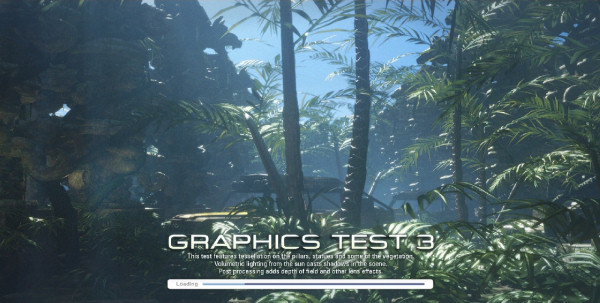
3DMark 11 is the latest version of the world's most popular benchmark. Designed to measure your PC's gaming performance 3DMark 11 makes extensive use of all the new features in DirectX 11 including tessellation, compute shaders and multi-threading. Trusted by gamers worldwide to give accurate and unbiased results, 3DMark 11 is the best way to consistently and reliably test DirectX 11 under game-like loads.
 15
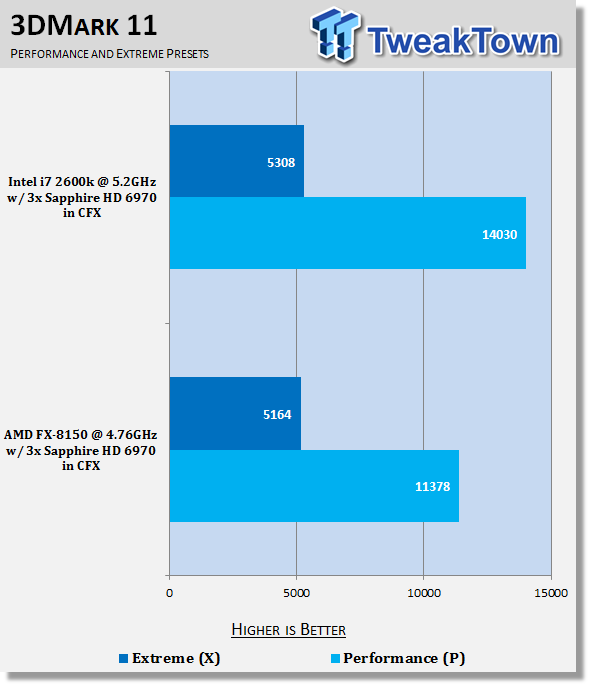
15Under the Performance Preset we can see a huge difference between the two setups. The i7 2600k comes out well ahead. It's no doubt due to a combination of the higher clock speeds and the CPU just being more efficient at each MHz here. You can see that the Extreme preset closes the gap by a huge margin and there's little difference. The 2600k still manages to sneak out ahead, though.
Unigine Heaven Benchmark
Version and / or Patch Used: 2.5
Developer Homepage: http://www.unigine.com
Product Homepage: http://unigine.com/press-releases/091022-heaven_benchmark//
New benchmark grants the power to unleash the DirectX 11 potential in the gift wrapping of impressively towering graphics capabilities. It reveals the enchanting magic of floating islands with a tiny village hidden in the cloudy skies. With the interactive mode emerging experience of exploring the intricate world is ensured within reach. Through its advanced renderer, Unigine is one of the first to set precedence in showcasing the art assets with tessellation, bringing compelling visual finesse, utilizing the technology to the full extend and exhibiting the possibilities of enriching 3D gaming.
 15
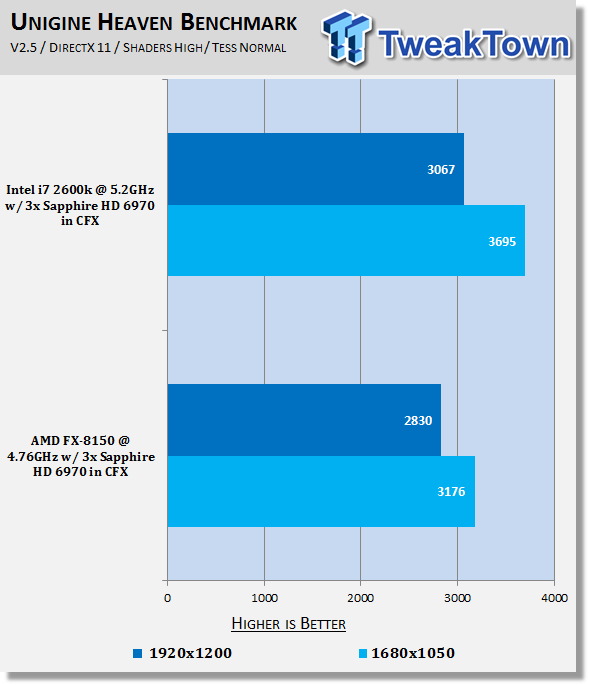
15We can again see quite a difference at 1920 x 1200 and we even see a bit of a difference at 2560 x 1600 with the 2600k clearly showing it's the faster platform in this instance.
Benchmarks - Tom Clancy's H.A.W.X. 2
Tom Clancy's H.A.W.X.2
Version and / or Patch Used: Benchmark Demo
Timedemo or Level Used: Built-in Test
Developer Homepage: http://www.ubi.com/UK/default.aspx
Product Homepage: http://www.hawxgame.com/
Tom Clancy's H.A.W.X. 2 is an arcade-style flight action game developed by Ubisoft Romania and published by Ubisoft. The game is the sequel to Tom Clancy's H.A.W.X., released in 2009.
The game begins with Colonel David Crenshaw participating in a routine patrol mission in the Middle East. After halting an insurgent attack, a volley of missiles is fired at the Air Force base that Crenshaw was stationed at, with one of the missiles disabling Crenshaw's aircraft, resulting Crenshaw being in enemy captivity. A joint strike force composed of the U.S. Navy, U.S. Air Force, and a Ghost Recon squad executes an operation to rescue Crenshaw. In Scotland, Royal Navy Pilot Colin Munro encounters an unidentified passenger aircraft that explodes from an on-board bomb when undergoing training exercise. In Russia, an air force squadron led by Colonel Denisov and Captain Dmitri Sokov engages separatist aircraft but is ordered to retreat from the region after numerous Russian military installations have been attacked.
 15
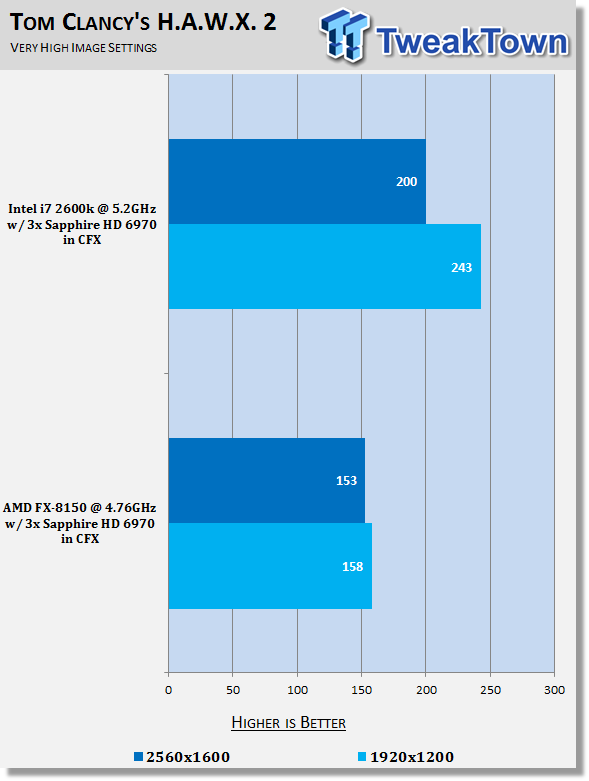
15Sure, we've got great FPS from both setups, but you can see that we hit a CPU limitation so early with the FX-8150 rig. Ultimately you're not going to see much difference when it comes to actually playing the game, but it's still really important to see the difference here.
Benchmarks - Mafia II
Mafia II
Version and / or Patch Used: Latest Steam Update
Timedemo or Level Used: Built in Benchmark
Developer Homepage: http://www.2kczech.com/
Product Homepage: http://www.mafia2game.com/
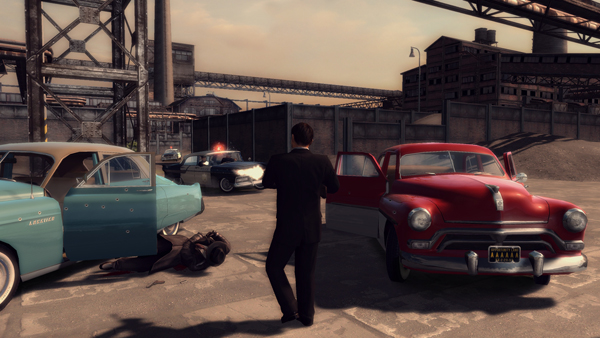
Mafia II is a third-person action-adventure video game, the sequel to Mafia: The City of Lost Heaven. It is developed by 2K Czech, previously known as Illusion Softworks, and is published by 2K Games. The game is set from 1943 to 1951 in Empire Bay (the name is a reference to New York's state nickname "The Empire State"), a fictional city based on San Francisco and New York City, with influences from Chicago and Detroit. The game features a completely open-ended game map of 10 square miles. No restrictions are included from the start of the game. There are around 50 vehicles in the game, as well as licensed music from the era.
 15
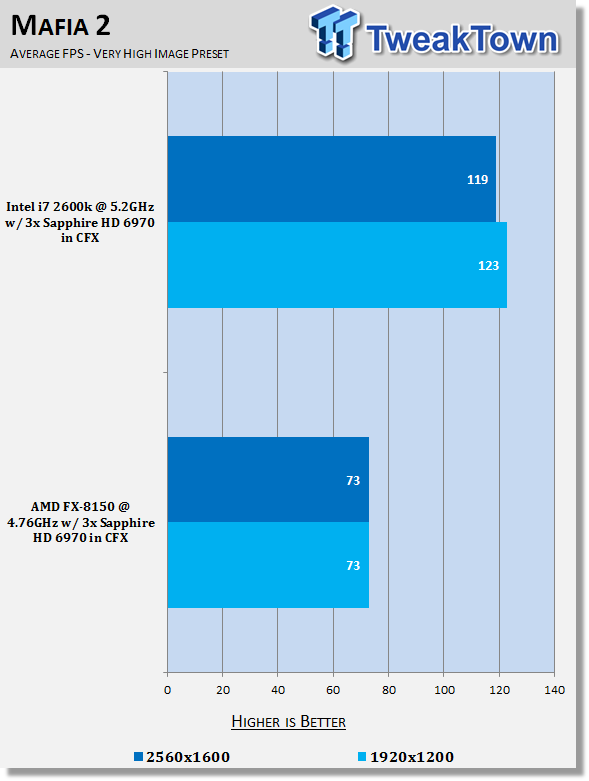
15Now this is more of a worry. Ok, we're above that 60 FPS mark; that's fine. The CPU continues to hit this wall so early, though, when it comes to getting FPS. So much so that it's kind of a problem that if you wanted to get a 120Hz monitor, your CPU wouldn't be able to keep up like you'd hope.
Benchmarks - Lost Planet 2
Lost Planet 2
Version and / or Patch Used: Benchmark Demo
Timedemo or Level Used: Built in Benchmark - Test A Scene 1
Developer Homepage: http://www.capcom.com/
Product Homepage: http://www.lostplanet2game.com/
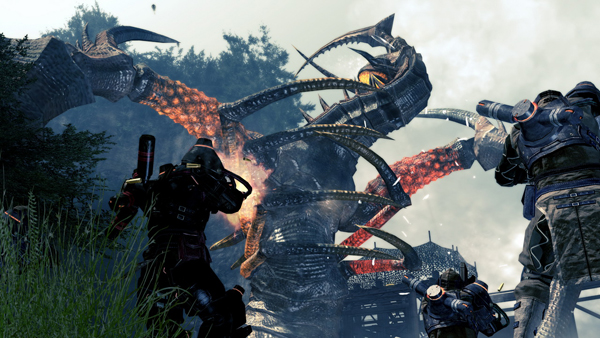
Lost Planet 2 is a third-person shooter video game developed and published by Capcom. The game is the sequel to Lost Planet: Extreme Condition which is also made by Capcom, taking place ten years after the events of the first game, on the same fictional planet. The story takes place back on E.D.N. III 10 years after the events of the first game. The snow has melted to reveal jungles and more tropical areas that have taken the place of more frozen regions. The plot begins with Mercenaries fighting against Jungle Pirates. After destroying a mine, the Mercenaries continue on to evacuate the area, in which a Category-G Akrid appears and attacks them. After being rescued, they find out their evacuation point (Where the Category-G appeared) was a set-up and no pick up team awaited them. The last words imply possible DLC additions to the game, "There's nothing to be gained by wiping out snow pirates... unless you had some kind of grudge."
 15
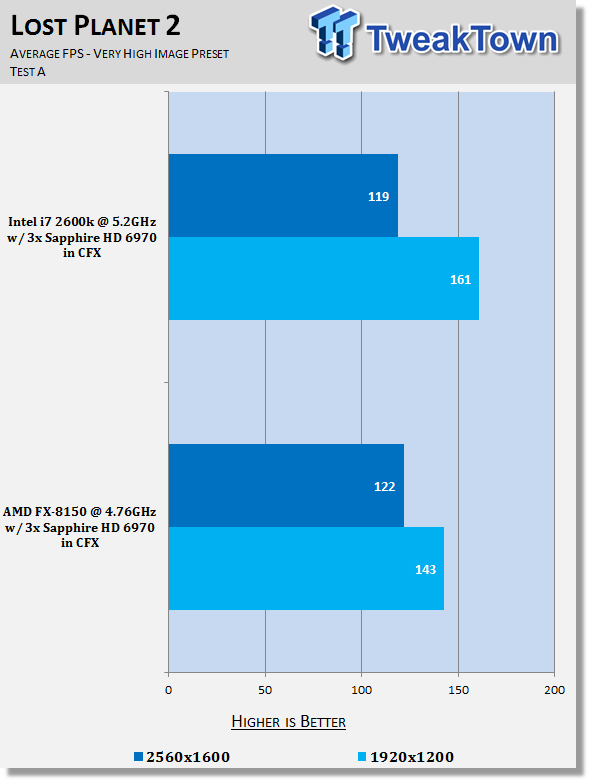
15When you start to see stuff that is really intensive, we can see the gap at 1920 x 1200 closes significantly and at the highest resolution you can see our AMD FX-8150 setup is able to sneak out a few extra FPS.
Benchmarks - Aliens vs. Predator
Aliens vs. Predator
Version and / or Patch Used: Standalone Benchmark
Timedemo or Level Used: Built in Benchmark
Developer Homepage: http://www.rebellion.co.uk/
Product Homepage: http://www.sega.com/games/aliens-vs-predator/
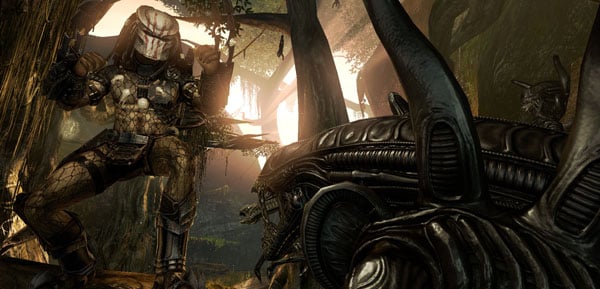
Aliens vs. Predator is a science fiction first-person shooter video game, developed by Rebellion Developments, the team behind the 1999 original PC game, and published by Sega for Microsoft Windows, the PlayStation 3 and the Xbox 360. The game is based on the Alien vs. Predator franchise, a combination of the characters and creatures of the Alien franchise and the Predator franchise. There are three campaigns in the game, one for each race/faction (the Predators, the Aliens and the Colonial Marines), that, while separate in terms of individual plot and gameplay, form one overarching storyline.
Following the storyline of the campaign modes comes the multiplayer aspect of the game. In this Multiplayer section of the game, players face off in various different gametypes in various different ways.
 15
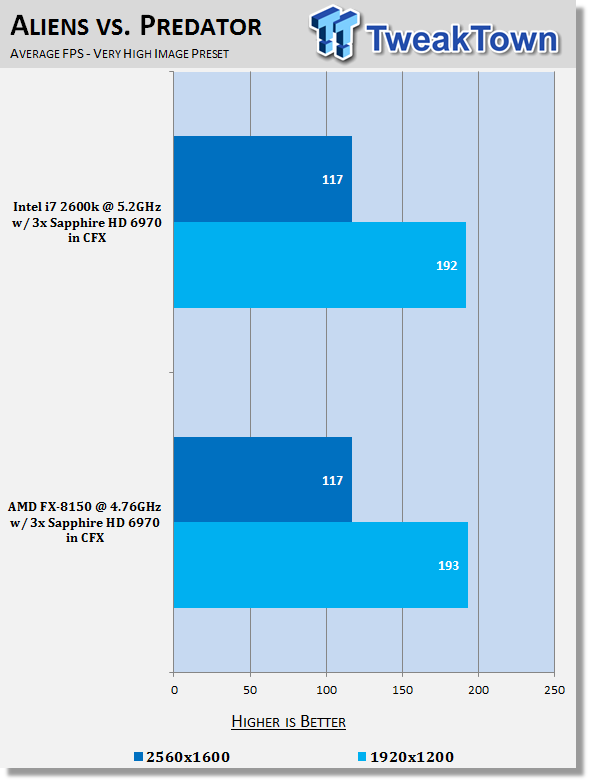
15Again, something really intensive and we see that performance between both setups is nearly identical.
Benchmarks - Metro 2033
Metro 2033
Version and / or Patch Used: Latest Steam Update
Timedemo or Level Used: Built in Benchmark
Developer Homepage: http://www.4a-games.com/
Product Homepage: http://www.thqnordic.com/
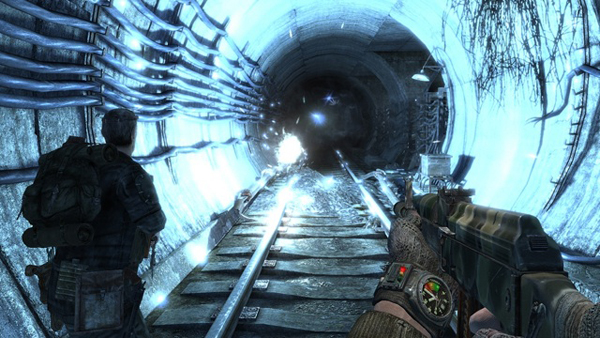
Metro 2033 is an action-oriented video game with a combination of survival horror and first-person shooter elements. The game is based on the novel Metro 2033 by Russian author Dmitry Glukhovsky. It was developed by 4A Games in Ukraine and released in March 2010 for Microsoft Windows and Xbox 360.[3] In March 2006, 4A Games announced a partnership with Glukhovsky to collaborate on the game.[4] The game was announced at the 2009 Games Convention in Leipzig;[5] a first trailer came along with the announcement.[6] A sequel was announced, currently titled Metro: Last Light.
 15
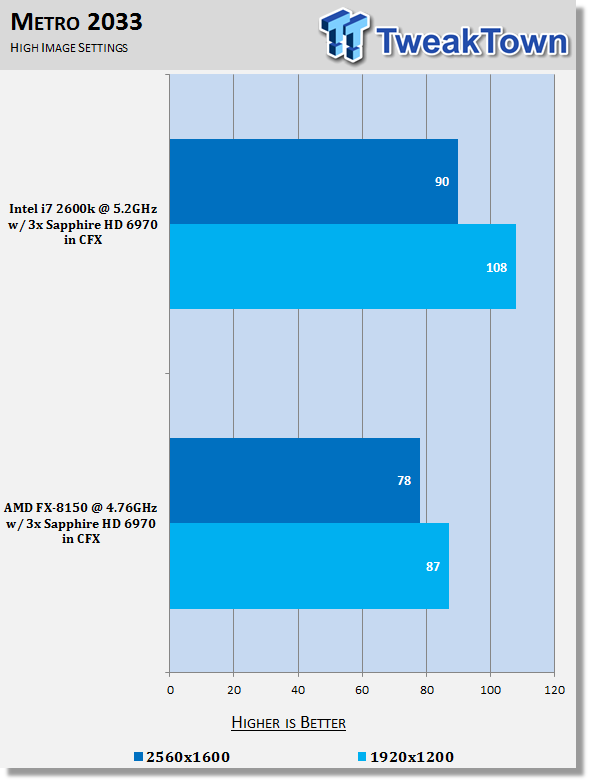
15Metro 2033 is a really intensive game like the last few we looked at, but you can see there's a clear gap between the two setups. You'd be hard pressed to suggest the AMD FX-8150 system.
Benchmarks - Dirt 3
Dirt 3
Version and / or Patch Used: Latest Steam Update
Timedemo or Level Used: Built in Benchmark
Developer Homepage: http://www.codemasters.com/
Product Homepage: http://www.dirt3game.com/
DiRT 3 boasts more cars, more locations, more routes and more events than any other game in the series, including over 50 rally cars representing the very best from five decades of the sport. With more than double the track content of 2009's hit, DiRT 3 will see players start at the top as a professional driver, with a top-flight career in competitive off-road racing complimented by the opportunity to express themselves in Gymkhana-style showpiece driving events.
 15
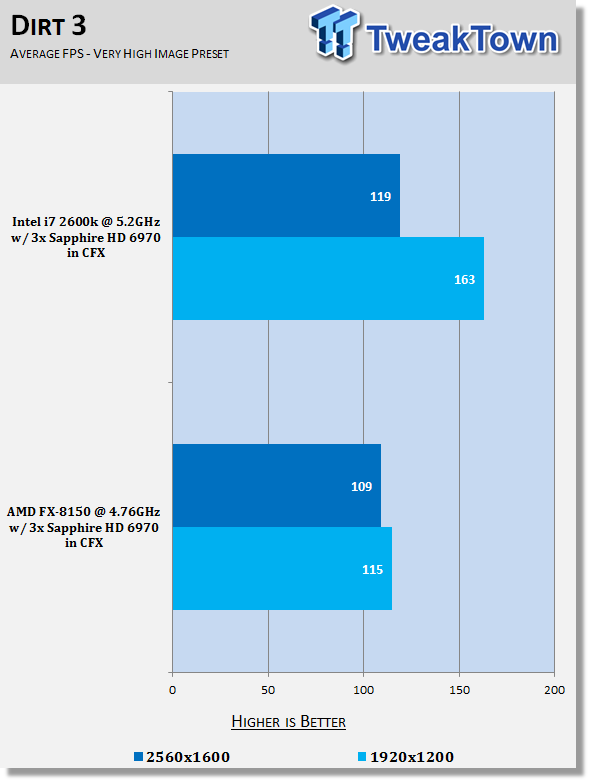
15Good FPS for both setups and the gap at the highest resolution isn't very large, but you can clearly see that the FX-8150 is just putting up this wall a lot earlier than we'd like. The 120FPS region at 1920 x 1200 is important as we start to see more companies jump on the 120Hz bandwagon as well.
Benchmarks - Far Cry 2
Far Cry 2
Version and / or Patch Used: 1.01
Timedemo or Level Used: Ranch Long
Developer Homepage: http://www.ubi.com/
Product Homepage: http://www.farcry2.com/
The Dunia Engine was built specifically for Far Cry 2 by the award-winning Ubisoft Montreal development team. It delivers the most realistic destructible environments, amazing special effects such as dynamic fire propagation and storm effects, real-time night-and-day cycle, dynamic music system, non-scripted enemy A.I. and so much more.
 15
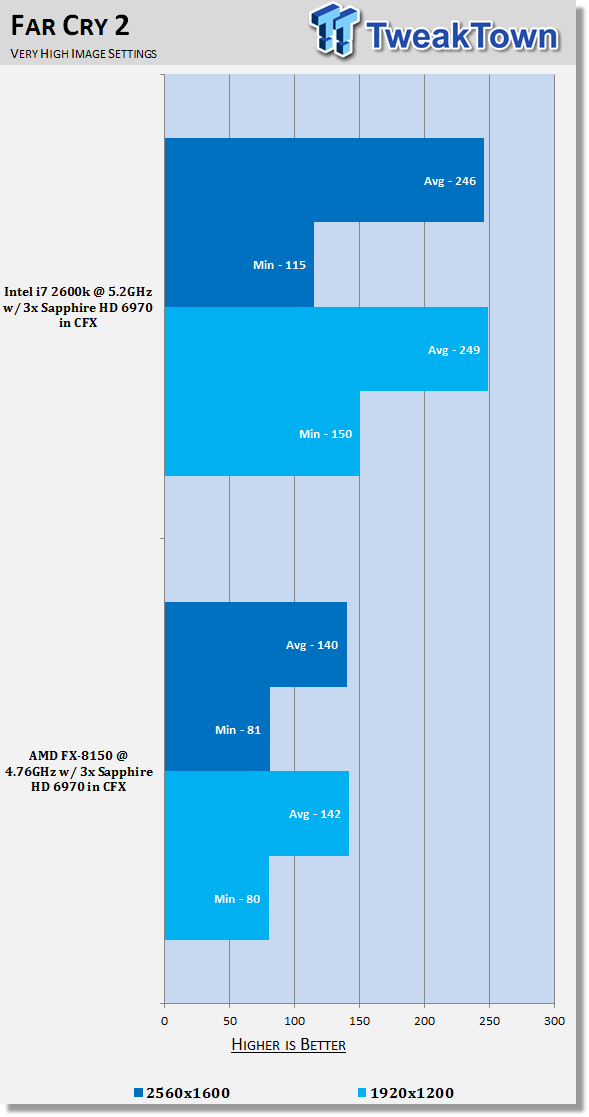
15We again see that wall present under Far Cry 2. Again, the numbers are extremely playable for both setups, but you're clearly not going to get the power out of three cards like you would with an Intel based 2600k system.
Benchmarks - High Quality AA and AF
High Quality AA and AF
Our high quality tests let us separate the men from the boys and the ladies from the girls. If the cards weren't struggling before they will start to now.
 15
15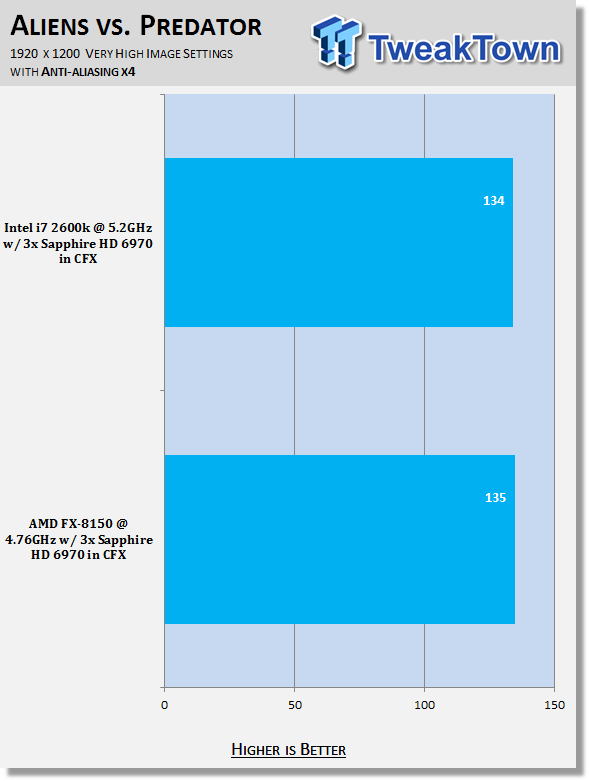 15
15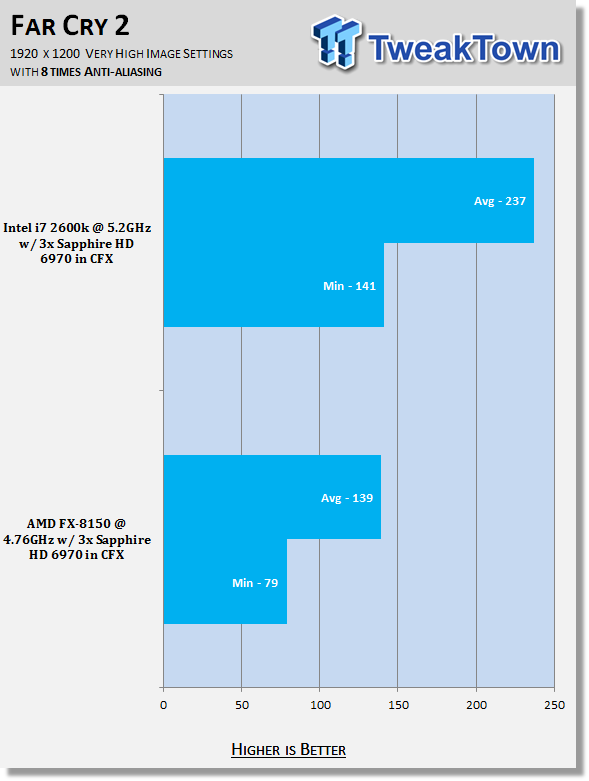 15
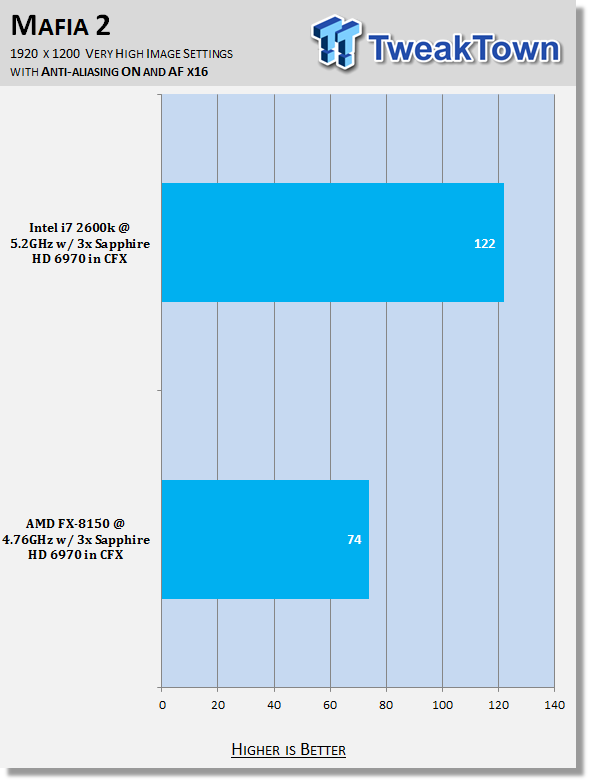
15With the detail cranked up, we continue to see that wall present in games like Mafia II and Far Cry 2. Aliens vs. Predator paints a good picture and these are great numbers for 120Hz monitor owners, but it's disappointing to see what's going on.
Power Consumption Tests

Using our new PROVA Power Analyzer WM-01 or "Power Thingy" as it has become quickly known as to our readers, we are now able to find out what kind of power is being used by our test system and the associated graphics cards installed. Keep in mind; it tests the complete system (minus LCD monitor, which is plugged directly into AC wall socket).
There are a few important notes to remember though; while our maximum power is taken in 3DMark06 at the same exact point, we have seen in particular tests the power being drawn as much as 10% more. We test at the exact same stage every time; therefore tests should be very consistent and accurate.
The other thing to remember is that our test system is bare minimum - only a SSD hard drive is used with a single CD ROM and minimal cooling fans.
So while the system might draw 400 watts in our test system, placing it into your own PC with a number of other items, the draw is going to be higher.
 15
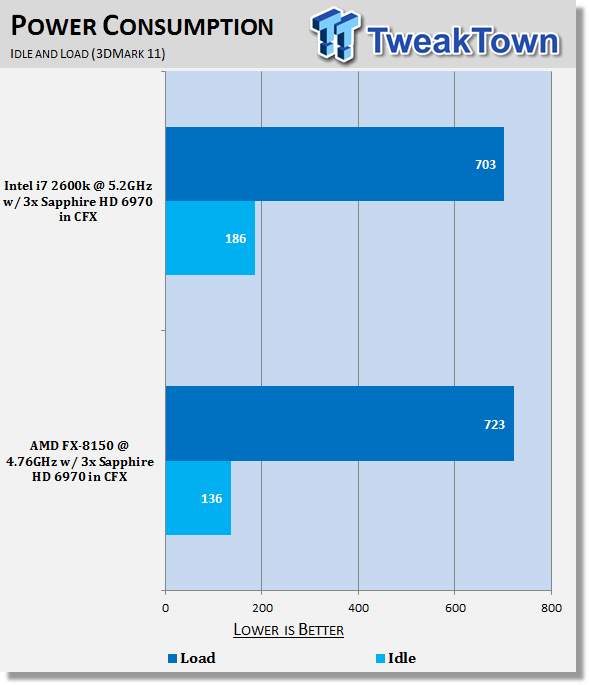
15Power draw is something that a lot of people have been quite negative about with the new FX-8150. We can see that idle is significantly stronger than the 2600k here, though, and load comes in only 20 watts more.
Final Thoughts
Talk about disappointed. I really thought as we throw in some more video cards, let those lanes breathe a bit and send the cards to work, we'd start to see some more positive results for AMD. If some of the numbers looked like 300 FPS on the 2600k and 200 FPS on the FX-8150, we'd say "Sure, there's a big difference, but the numbers are so high it's irrelevant really."
The problem is, when we see a wall in Mafia II at 73 FPS verses 123 FPS on the 2600k, even 87 FPS under Metro 2033 verses 108 FPS - as we see a push for these 1920 x 1080 120Hz monitors, with V-Sync on, the game play is just so smooth at 120 FPS. Any gamer that uses a 120Hz monitor will tell you that there's a clear difference over 60Hz ones and that's not good for AMD.
We also understand that the 2600k has got 440MHz on the FX-8150, but like we've said already, if you're going for this kind of setup, you're going to run the CPU at the maximum you can. For 2600k users with something like a Corsair H100, that means over 5GHz with little drama, while for FX-8150 users, it's a few hundred MHz shy of 5GHz.
I walk away from this going, "why do we even have boards with more than two PCIe x16 slots on it?" - That's really disappointing. It's sad for AMD that the best machine for someone to install three HD 6970s into isn't an AMD based one, by a long way.
The only thing you can talk about is the price. The 2600k comes in at $314.99 US while the FX-8150 comes in at $279.99 US. That's a $35 US difference. It's not much, and it's certainly not enough to stop you from buying one board over another. The motherboard department is a bit different; to make use of three cards you're going to want to go down the path of a NF200 equipped board.
The Maximus IV Extreme-Z is going to set you back $349.99 US while the Crosshair V Formula will cost you $120 US less at $229.99 US. The difference between the two setups is $155 US and that's a decent chunk of change. It's probably not so much when you're talking about buying three video cards, but if you are buying two, the price difference is the same if you stick with an NF200 board.
The thing is, though, move to a FX-6100 and the gap becomes $245 US and that's some serious money now. Especially when talking a two card setup. After all this today, though, it really just reaffirms my thoughts on the way AMD have handled this launch. We need that FX-6100!
 United
States: Find other tech and computer products like this
over at
United
States: Find other tech and computer products like this
over at  United
Kingdom: Find other tech and computer products like this
over at
United
Kingdom: Find other tech and computer products like this
over at  Australia:
Find other tech and computer products like this over at
Australia:
Find other tech and computer products like this over at  Canada:
Find other tech and computer products like this over at
Canada:
Find other tech and computer products like this over at  Deutschland:
Finde andere Technik- und Computerprodukte wie dieses auf
Deutschland:
Finde andere Technik- und Computerprodukte wie dieses auf 


 Apple's entry-level iPad could get a new, cheaper refresh in 2024
 Apple's May 7 iPad event - here's what we expect to be announced
 Global data generation: 660ZB by 2030, so SK hynix pre-announces insane 300TB future SSD for AI
 X users will now get AI-generated news summaries
 NVIDIA's next-gen GeForce RTX 5090 and RTX 5080 Laptop GPUs rumored to BOTH have 16GB VRAM
 Fractal Design North XL Full-Tower Chassis Review
 Western Digital WD Gold 24TB HDD Review - High-Capacity Masterpiece
 AOC U27G3X 27-inch Gaming Monitor Review - 4K 160Hz for $500
 MSI Vector GP68HX Gaming Laptop Review
 Dell UltraSharp 40 5K Curved Thunderbolt Hub Monitor (U4025QW) Review
 XPG Core Reactor II VE 850w 80 PLUS Gold ATX 3.0 PSU Review
 SteelSeries Arctis Nova 4X Wireless Gaming Headset Review
 ACEMAGIC AD08 "Core i9 11900H" Mini PC Review
 Lenovo ThinkPad X1 Carbon Gen 12 Review
 ASUS ROG Swift Pro PG248QP Gaming Monitor Review - Frames, frames, and more frames
 Building the Ultimate Home Entertainment Server with an ASUSTOR NAS and Viper Gaming NVMe SSDs
 Everything you need to know about the latest ASUS NUC Mini PCs - NUC 14 Pro and ROG NUC
 How to Overclock Your GPU and Boost Your PC Gaming with ASUS GPU Tweak III
 ASUS's AMD Radeon RX 7000 Series GPU lineup has something for every gamer
 ASUS OLED Premium Care defends the ROG Swift OLED PG32UCDM gaming monitor from burn-in