Our Verdict
Pros
- Versatility with dual mode
- Great color performance
- Sturdy build quality
- Remote
Cons
- Forked feet stand
Should you buy it?
Introduction & Specification Details and Close-up
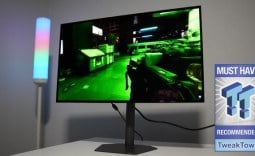
Dual-mode gaming monitors aim to bridge the gap between cinematic and competitive gaming displays, and Acer has released a new variant that targets that very sweet spot in the market. Introducing the Acer Predator XB273K V5, a 27-inch 4K 160Hz and 1080p 320Hz IPS gaming monitor.

The XB273K V5, which will be referred to as the V5 for the remainder of the review, is a gaming monitor that features aggressive gaming aesthetics while maintaining a minimal approach. Its dual-mode feature enables users to easily switch between 4K at 160Hz and 1080p at 320Hz, with the idea being that a gamer will utilize the 4K resolution mode when playing slower cinematic titles that benefit from an increased resolution, and the 320Hz mode when switching to competitive titles that benefit from a high refresh rate.
The dual mode feature is bound to a button on the rear of the display, which users can press to switch between modes. The screen will briefly go black for a few seconds and then automatically change the display to the desired resolution and refresh rate. The V5 uses an IPS panel and will typically be priced around $400, depending on the retailer's sales.
Specifications
| Item | Details |
|---|---|
| Model | Predator XB273K V |
| Size | 27-inch |
| Resolution | 3840 x 2160 / 1920 x 1080 |
| Pixels Per Inch (PPI) | 168 / 81 |
| Panel Type | IPS |
| Refresh Rate | 160Hz / 320Hz |
| Response Time | 0.5ms |
| Brightness | 400 nits |
| Contrast Ratio | 100,000,000:1 |
| Aspect Ratio | 16:9 |
| Viewing Angle | 178° horizontal / 178° vertical |
| Color Coverage | 95% DCI-P3 |
| HDR Support | VESA DisplayHDR 400 |
| Video Ports | 2 x HDMI 2.1, 1 x DisplayPort 1.4, 3.5mm headphone jack |
| USB Ports | None |
| VESA Mounting | 100 x 100 |
| Adjustments | Height, Tilt, Swivel, Pivot |
| Warranty | 3-years |
Close-up


Best Deals: Acer Predator XB273K V5 Gaming Monitor
Price Trend:
Prices last scanned 6 hours and 33 minutes ago

7 days ago: $299.99 USD30 days ago: $299.99 USD
7 days ago: $399.99 CAD30 days ago: $349.99 CAD
7 days ago: £488.2330 days ago: £488.93


Design
The V5 keeps to the same Acer design aesthetic we have seen in previous Predator gaming monitors, with the physical aesthetic really embodying everything "gamery". It features sharp accents, jagged edges, and an angular approach. The design is also quite minimal despite being obviously "gamery", and while it isn't to my personal taste, as I personally prefer a much more subtle and minimalistic aesthetic, I can really appreciate the complete package of the V5.

The V5 has a mostly matte-black finish across its frame and stand, but there is definitely some grey hue to the black as well, especially in darker lighting. The 27-inch panel features narrow bezels on three sides, and a chin that measures just below an inch in diameter. The chin also features the branding "Predator" and an LED status indicator in the bottom right-hand corner.
Moving to the back of the display, Acer has kept things simple and minimal with a black brushed plastic shell that is split by V-shaped ventilation slits. These slits provide airflow to the back of the panel to cool the components within the monitor. In the top right-hand corner of the monitor is the branding "Acer" that is separated from the brushed plastic by being indented and smooth.

Keeping to the back of the monitor, Acer has equipped the V5 with 2x HDMI 2.1 ports, 1x DisplayPort 1.4, and 1x headphone jack. Each of these connectivity options is highlighted by naming above the ports, including the HDMI version (2.1), which is a nice touch. The stand features a discreet cable-routing junction that allows users to run their cables through the stand, minimizing cable clutter and creating a cleaner setup.
Our Latest Monitors Review Coverage
- ASUS ROG Strix OLED XG34WCDMS Review: Tandem OLED Takes Ultrawide Gaming Further
- GIGABYTE MO27Q2A Gaming Monitor Review: 1440p, 280Hz, and QD-OLED is a winning combination
- ASUS ROG Strix XG129C Review: A $199 Gaming Monitor You Don't Play Games On
- KTC H49S66 5K2K (5120x1440) 49-inch 180Hz Gaming Monitor Review
- GIGABYTE GO27Q24G Gaming Monitor Review: Glossy OLED Gaming at 240Hz
Keeping to the stand, this is one of the most impressive parts of the V5 as it's extremely sturdy, feels very well built in the hand, and provides a level of rigidness that doesn't cause the monitor to wobble very much at all when the desk is bumped. I can attribute this lack of wobble to the wide footprint of the stand's feet, which is a quad-forked design. The foot of the stand has two prongs at the rear and two feet at the front. The distance between each of the feet at the front is 45 cm (18 inches), making it one of the widest stands I have ever reviewed. Additionally, the feet of the stand protrude 3cm out from the front of the display.

Personally, these forked-feet stands are my least favorite when it comes to gaming monitors due to how much desk space they take up, and the additional risk of a competitive gamer who likes playing their titles with low mouse sensitivity and with the monitor closer than typical, swiping across their mouse mat and colliding with the foot of the stand. For these reasons, I always prefer a single-foot stand, as it accommodates the widest variety of gamers while maintaining the smallest possible footprint. However, the trade-off with a single-foot stand is that the monitor is more prone to wobbling.
Moving back to the stand, Acer has designed the V5 stand with ergonomics in mind, allowing users to adjust the display height by 13-14 cm (6 inches) and offering tilt, swivel, and pivot options. It should be noted that adjusting the monitor feels extremely premium, with no creaks from the display and a level of toughness that makes it feel as if the V5 will maintain the desired orientation it's placed in.
Panel Breakdown
The V5 uses an IPS panel, which means users will be getting excellent color accuracy in addition to wide viewing angles. That remains true here, as the color clarity remains the same on the V5 even at wide viewing angles. Additionally, the IPS panel also means the V5 provides very sharp text, clean-looking UI elements, and generally detailed textures. Colors don't pop or feel as vibrant as an OLED display, but that is a different panel technology that comes with a very different price tag.

Keeping to the panel, the 27-inch size paired with the 3840 x 2160 (4K) resolution means users get an impressive number of Pixels Per Inch (PPI), with the V5 measuring at 163 PPI. This level of density delivers even greater image clarity, particularly for text and finer image details. The V5 uses an edge-lit backlight system, meaning dark scenes will appear brighter than on VA panels or an OLED display.
Acer has calibrated this panel for gaming, meaning we get extremely fast response times of 0.5ms, presumably Gray-to-Gray (GtG). With a fast response time and the ability to switch the monitor to 1080p mode, which boosts the refresh rate to 320Hz, users can get quite a lot out of the V5 panel, especially if they are a competitive gamer who wants as many in-game frames as possible.

Motion performance in games was acceptable, and I can report that I didn't notice any smearing, ghosting, or any other motion-related problems. Additionally, for users who want to fiddle around in the On-Screen Display (OSD) or simply want to switch sources easily, Acer has included what it calls the Smart Dial, which is a small remote. The remote fits very well in the hand and uses an IR sensor to send instructions to the monitor, which is received through a small sensor located in the bottom right-hand corner of the V5.
The remote features source selection buttons and a joystick for navigating the OSD options. The OSD options include everything a general user needs to make small tweaks to their display to fit their personal preferences. Furthermore, the OSD options are well organized, making navigation between the categories very easy.
Performance
So, how does the V5 fare in what matters most - games? Firstly, with every monitor I test, I like to include several different genres of games to see where the monitor performs the best and to hopefully inform a gamer what their experience will be like if they played their favorite type of game on the display under the spotlight.

For the V5, I tested the following games: League of Legends, Apex Legends, Overwatch 2, Black Myth: Wukong, Cyberpunk 2077, The Witcher 3, God of War Ragnarok, Valorant, DOOM: The Dark Ages, Age of Mythology: Retold, Borderlands 4, Counter-Strike, and Battlefield 6.
The V5 provided a very stable and consistent gaming experience across all the titles I tested, and I was thoroughly impressed by the color reproduction, smooth motion, and, ultimately, image clarity. At 27 inches, the V5 is the ideal size for a dual-mode monitor, as it means you sacrifice much less pixel density when switching to 1080p mode than with the 32-inch dual-mode monitors widely available on the market.

Making the jump from 4K at 32-inches down to 1080p at 32-inches causes such a dramatic drop in pixel density that I deem the graphic hit not worth the increase in maximum refresh rate. However, at 27 inches, that decrease in pixel density is much, much more bearable. So much so, I can comfortably make the switch and, after a few minutes, be used to the in-game resolution.
In titles such as Battlefield 6, Overwatch 2, Valorant, Counter-Strike, and League of Legends, the V5 performed admirably. It kept up with my fast movements, camera spins, and overall, provided a very enjoyable gaming experience in both the 4K and 1080p modes. I can comfortably recommend the V5 to any competitive gamer looking for a new display.

However, I believe the V5 stood out most to me in cinematic titles, as I'm more impressed by image clarity than motion performance. In cinematic titles, the V5 stood out for the PPI it delivers in 4K mode. With a 168 PPI, God of War Ragnarok, Cyberpunk 2077, DOOM: The Dark Ages, Age of Mythology: Retold, Black Myth: Wukong, and every other game I played looked fantastic. Characters appeared very clear and crisp, with a level of detail that was genuinely impressive for a sub-$400 display.
Final Thoughts
So, should you buy the Acer Predator XB273K V5? The ideal owner of the V5 is looking for versatility in their gaming display; they would want a display that is good for both competitive titles and cinematic games.

The V5 truly represents what a versatile gaming monitor can achieve. It performed great in every test I threw at it, and a gamer shopping for a new monitor who plays a wide variety of games should definitely add it to their shortlist if they are ok with what I would consider its shortcoming - its wide foot stand. If you are ok with the V5 potentially taking up more desktop space than what is needed, enjoy the gamery, yet minimal aesthetic, then there is hardly any downside to this display.
However, there are other options on the market, such as the MSI MAG 275UPD E14, a 27-inch 4K dual-mode monitor that supports a 144Hz refresh rate in 4K mode and a 288Hz refresh rate in 1080p mode. That monitor is currently $269 on Newegg but typically sells for $309. The MSI MAG 275UPD E14 is a weaker performer than the V5, offering a reduced refresh rate, but at a lower price point.
That said, the V5 is typically sold for around $379. If I were buying a new gaming monitor with this budget and didn't care about the V5's stand, I would spend the extra $70 and go with the V5, as the increased refresh rate would be worth that little bit more in my eyes.