











Our Verdict
Pros
- Competitive price
- Great design
- Versatile in-game performance
Cons
- HDR performance
- No USB-C port
- No 3.5mm headphone jack
Should you buy it?
AvoidConsiderShortlistBuyIntroduction & Specification Details and Close-up
With the rise of OLED gaming monitors, we are seeing significant discounts on more affordable pixel technologies, such as VA and Fast IPS panels. One example of a gaming monitor with an excellent value proposition is Alienware's AW2725DM.

The AW2725DM is a 2560 x 1440p resolution gaming monitor that sports a 180Hz refresh rate and a 1ms (GtG) response time. All packaged within a 27-inch panel, it is one of my favorite physical designs of a gaming monitor currently available on the market. Essentially, the AW2725DM is everything that a gamer would be looking for when wanting to dive into the sweet spot of PC gaming - 1440p at above 120Hz.
Although there are a few concessions with the AW2725DM, they are overshadowed by the price tag Alienware has slapped on this display. For just $220, a PC gamer playing at 1080p can upgrade to a monitor that does everything a 1440p gaming monitor would do and looks good doing it. In this review, we will take a close look at the AW2725DM to see where it excels and where it falls short. Let's start with the physical design.
Specifications
| Item | Details |
|---|---|
| Model | AW2725DM |
| Size | 27-inch |
| Resolution | 2560 x 1440 |
| Panel Type | Fast IPS |
| Refresh Rate | 180Hz |
| Response Time | 2ms (GtG) |
| Brightness | 400 nits |
| Contrast Ratio | 1000:1 |
| Aspect Ratio | 16:9 |
| Viewing Angle | 178° |
| Color Coverage | 95% DCI-P3 |
| HDR Support | DisplayHDR 400 |
| Video Ports | 2x HDMI 2.1, 1x DisplayPort 1.4 |
| Ports | 1x USB 3.2 Gen 1 Type-B upstream, 2x USB 3.2 Gen 1 Type-A downstream |
| VESA Mounting | 100 x 100 |
| Adjustments | Height: Up to 110 mm (4.33"), Tilt: -5° to 21°, Swivel: ±20°, Pivot: ±90° |
| Warranty | 3 years |
| Net Weight (Kg) | 6.57 kg (14.48 lbs) |
Close-up


| Today | 7 days ago | 30 days ago | ||
|---|---|---|---|---|
 | $219.99 USD | $266.99 USD | ||
| $329.99 CAD | $269.99 CAD | ||
| £190.10 | £216.92 | ||
| $219.99 USD | $266.99 USD | ||
 | Check Price | Check Price | ||
* Prices last scanned 6/12/2026 at 12:48 pm CDT - prices may be inaccurate. As an Amazon Associate, we earn from qualifying purchases. We earn affiliate commission from any Newegg or PCCG sales. | ||||

Design
The AW2725DM is the little brother of the AW3225DM, a 32-inch version with a few different specifications, such as panel technology, refresh rate, and curvature. However, the physical design is identical, with both monitors rocking the same design language, the same number of ports, and the same weight.

Alienware recently debuted its new design language, and as I have written in my other Alienware gaming monitor reviews, I think it's the best design language for a gaming monitor currently available on the market. In what seems like a sea of predominantly black gaming monitors, Alienware separates itself from the competition with a nice indigo finish, which the company describes as Interstellar Indigo.
I believe this is aptly named as the color resembles the appearance of celestial space, which is complemented perfectly with the general aesthetic of the gaming monitor, as it has no sharp angles, a smooth spherical-shaped back, and a rounded stand and foot. All of which create this design language that makes the monitor look like its design was inspired by an extraterrestrial UFO.
Our Latest Monitors Review Coverage
- KOORUI 34E6UC Gaming Monitor Review - UltraWide Gaming at 180Hz on a Budget
- AOC U27G4 Gaming Monitor Review - Affordable Dual-Mode 4K and 320Hz Gaming in One Display
- MSI MPG 272QRF X36 Review - NVIDIA Pulsar Powers the Peak of 1440p Esports Gaming Monitors
- ASUS ROG Swift PG32UCDM3 Gaming Monitor Review - Unbeatable OLED Just Got Even Better
- ASUS ROG Strix Pulsar XG27AQNGV Review - The Bleeding Edge of 1440p Gaming Monitors is Here

To kick things off with the back of the monitor, Alienware previously informed me that all of their redesigned monitors will feature the new 360-degree ventilation system, which can be seen as the holes that are dotted all around where the stand mounts to the display. Again, these ventilation holes fit perfectly into the monitor's general aesthetic and are incredibly subtle.
On one side of the monitor is the Alienware logo, while the other features a small alien head, which also features RGB lights. The color of the RGB can be changed by downloading the Alienware Command Center or using the On-Screen Display (OSD) options.
Moving down to the connectivity options, Alienware has equipped the AW2725DM with the following: 2 × HDMI 2.1, 1 × DisplayPort 1.4, 2 x USB 3.2 Type-A downstream ports, and 1 x USB Type-B upstream ports. There aren't any built-in speakers, which is good to see in my book, as, at this price point, I usually find these to be of extremely poor quality and ultimately useless. Their abdication means the cost of the monitor can be kept down.
Keeping to the connectivity options. It's great to see Alienware leading the charge with its adoption of USB ports on the underside of the chin of the monitor. As I have stated in my other gaming monitor reviews, I believe this location for the ports is great and is somewhat of a game changer, as users now don't have to stand up, pick up their monitor, swivel it, and try to locate the USB port next to the DisplayPort or HDMI. Users can now simply outstretch their arm and locate the ports on the underside of the display's chin.
My one gripe with AW2725DM's USB ports is the lack of USB Type-C. I would have loved to have seen a 15W USB-C charging port instead of an additional USB-A port. This would have meant users could get power delivery charging for smaller devices such as smartphones, tablets, etc. Additionally, there isn't a 3.5mm headphone jack, which may bug some console gamers who have a nice sound system and want to utilize this port for an audio out.

A big win for the AW2725DM is the stand, as it offers quite a lot of versatility with great height, swivel, and tilt adjustment. I believe the versatility of this stand will be more than enough to accommodate the various orientations gamers like. I must award additional points to Alienware for its use of a small footprint base, which means the AW2725DM doesn't take up a lot of desktop real estate, making the AW2725DM a perfect display for even smaller desks.
Panel Breakdown
Fast IPS panels are a step down from the gorgeous OLED pixel technology, and while OLED is far and away better, it also comes with an intense jump in price compared to Fast IPS. This is why Alienware can price the AW2725DM at just $220. So, what does the AW2725DM panel offer?

Firstly, the AW2725DM is a 2560 x 1440p (QHD) resolution monitor with various response times that can be changed in the OSD settings. The AW2725DM has 4ms GtG on Fast, 2ms GtG on Super Fast, and 1ms GtG on Extreme. As you can probably imagine, I switched the AW2725DM to Extreme immediately.
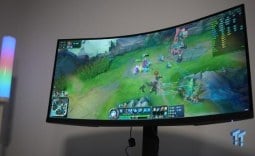
Throughout my testing, I found the AW2725DM performed best on Extreme, especially in fast-paced competitive titles such as League of Legends, Valorant, and Counter-Strike. The super low response time provided great motion clarity, something that is imperative for a display with this refresh rate and price, as it will most likely be used for a variety of different titles, competitive games included.
With a 27-inch size and 1440p resolution, the AW2725DM offers 108 Pixels Per Inch (PPI), which is a measurement used to determine how much image clarity the display can offer. The higher the PPI = the higher the image clarity, as there are simply more pixels to create the image. While PPI isn't the only specification to determine the image clarity of a monitor, it's a great barometer for how the display is going to perform when producing any given image.
This is why I recommend getting a display with at least 100 PPI, as any lower, there are too few pixels to produce an image sufficient enough for most situations. While 108 PPI is on the lower side, it's more than enough for the average gamer who is shopping at this price point. Twenty-seven inches is basically the cutoff point for 1440p displays because, as you get to 32 inches and above, the image begins to look blocky.
As for other mentions about the AW2725DM's panel, Alienware has equipped this display, along with every other one of its displays, with a great OSD menu. The options are a breeze to get through, with each of the most-used settings, such as brightness, game modes, and color options, being front and center. This is great to see, as nothing is more annoying than having simple OSD options such as brightness buried under pages of options.
One point of contention I have with AW2725DM's panel is the HDR performance. This isn't fantastic at all, and I cannot recommend it in the slightest. With only 400 nits of brightness, no local dimming, and IPS panel contrast limitations, I just can't recommend the HDR mode at all. This is hardly surprising as the AW2725DM is a $220 monitor, which is a price one shouldn't expect for fantastic HDR performance.
Performance
As with all of my gaming monitor reviews, I like to run the display I have under the spotlight through a variety of different games to see which type of gamer would best enjoy the display. That way, you can rule yourself in or out, depending on what type of games you play. Here are the games I tested on the AW2725DM: League of Legends, Apex Legends, Overwatch 2, Black Myth: Wukong, Cyberpunk 2077, The Witcher 3: Wild Hunt, God of War Ragnarok, Valorant, DOOM: The Dark Ages, and Age of Mythology: Retold.

Right off the bat, the AW2725DM excelled the most in games that could take full advantage of that 180Hz refresh rate. However, that doesn't mean it performed poorly in games that were more cinematic and slower, which would be your God of War Ragnarok's, Cyberpunk 2077's, and Black Myth: Wukong-type games. In those titles, the AW2725DM's color profile shone the most, with each of the individual colors being bright and rich.

As for the competitive titles, this is where the AW2725DM really showed what it could do. In titles such as Overwatch 2, Apex Legends, DOOM: The Dark Ages, and League of Legends, the AW2725DM performed incredibly, given its price point. The 180Hz refresh rate paired with the 1ms GtG response time meant I was able to quickly adapt to various scenarios in-game and track fast-moving objects such as enemy projectiles, enemies themselves, and ally help.
I can confidently say the AW2725DM is angled more toward competitive gamers, but I can also say that for $220, gamers who lean more toward cinematic titles aren't going to be disappointed. This is a bargain gaming display and is truly versatile. The only downside I could say for cinematic gamers would be the lack of HDR, as some titles, such as Cyberpunk 2077, really take on another level when they are played on an HDR600+ display due to their cinematic lighting. However, as I previously stated. You are paying $220, so you can't expect everything.
Final Thoughts
So, should you buy the AW2725DM? I would recommend the AW2725DM to someone who is looking to upgrade from a 1080p setup to 1440p and isn't looking to break the bank.

In short, the AW2725DM is a value buy. What you are going to get is a very versatile, aesthetically pleasing, slick gaming monitor that leans more toward excelling in fast-paced competitive games but can also provide adequate performance in your slower-paced, cinematic titles.
I would say a gamer who is currently rocking a 1920 x 1080p setup but is looking to make the jump to 1440p at a reasonably high refresh rate (180Hz), but doesn't want to cash out on a 240Hz display or an OLED variant of the same specifications, would be more than happy with their purchase of the AW2725DM.
So, if you are in the market for a 1440p monitor with a high refresh rate, awesome aesthetics, and angled slightly to play more competitive titles, but it can also give you some great experiences in your odd, slower-paced game, definitely check out the AW2725DM. For $220, you are really getting a good deal and can't ask for much more than what it will provide you. Once again, great work here, Alienware.


 KOORUI 34E6UC Gaming Monitor Review - UltraWide Gaming at 180Hz on a Budget
 AOC U27G4 Gaming Monitor Review - Affordable Dual-Mode 4K and 320Hz Gaming in One Display
 MSI MPG 272QRF X36 Review - NVIDIA Pulsar Powers the Peak of 1440p Esports Gaming Monitors
 ASUS ROG Swift PG32UCDM3 Gaming Monitor Review - Unbeatable OLED Just Got Even Better
 ASUS ROG Strix Pulsar XG27AQNGV Review - The Bleeding Edge of 1440p Gaming Monitors is Here
 Elon Musk is the world's first trillionaire - enough to spend $1 million a day for nearly 3,000 years
 Anthropic's latest AI model 'Fable' was so powerful the US government banned the world from it
 Xbox prioritizes Elder Scrolls VI, Fallout, and Halo in new strategy shift
 Xbox exec wants to use ads to open up new access points, not just to collect money
 Redditor buys RTX 2080 Ti Super engineering sample on eBay, has the same number of cores as an RTX Titan but half the VRAM
 Report: Xbox may be spun off into subsidiary or joint venture with another company
 Microsoft is reportedly cutting hundreds of Azure jobs in China for the third time in two years
 The Trump Mobile T1 teardown reveals it's basically an HTC phone wearing gold paint
 Game Pass is subsidizing parts of Xbox's business, subscriber loss caused major damage
 Framework delays first Laptop 13 Pro shipments by a month over touchpad and display issues
 MOAIPLAY ORA PRO G1 850W ATX 3.1 PSU Review: high efficiency and 10-year warranty for $119.99
 Navman MiVue Smart True 4K Surround Dashcam Review - Seeing In All Directions At Once
 IQUNIX Magi96 Pro Aluminum Low Profile Mechanical Keyboard Review - Premium Build, Satisfying Sound
 Asetek Forte S-Series Racing Simulator Bundle Review
 Razer Pro Type Ergo Wireless Split Ergonomic Keyboard Review - Built for Comfort and Support
 ASUS ROG Strix Morph 96 Wireless Gaming Keyboard Review - Great Performance, More Affordable
 SAPPHIRE Radeon RX 9070 GRE PULSE OC Review - A New 1440p Challenger Has Arrived
 NZXT H6 RGB+ Compact Dual-Chamber Chassis Review
 ASRock Radeon RX 9070 GRE Steel Legend Review - The RDNA 4 Mid-Range Reshuffle
 ASRock Z890 Taichi Aqua Motherboard Review - Flagship features without the flagship price
 This Windows security feature protects Documents from ransomware, but it is off by default
 Windows 11 already has a voice typing tool, and it is the one most people are not using
 Quick Assist is the only remote-support tool I open when a relative calls about their PC
 The PowerToys utilities I keep enabled on every Windows 11 PC, and the ones I turned off within a week
 TweakTown's Best of Computex 2026 Awards - The Best Hardware, Gaming Gear, and AI
 Phison E37T SSD Controller Exclusive Preview - The Fastest DRAMless SSD Platform Yet
 USB Ports Not Working in Windows 11? Try These Fixes
 ASUS WiFi Routers and Networking Solutions Deliver Long-term Security and Reliability with No Additional Cost
 Second Monitor Not Detected in Windows 11? Try These Fixes
 Turn Your Old Smartphone Into a Dedicated Webcam for Your Windows PC