Battlemode cheating is a big problem in Doom Eternal--gamers are using the Cheat Engine to do all sorts of crazy things. id and Bethesda responded by slapping Denuvo Anti-Cheat into the game, triggered lots of concern from fans.
Doom Eternal just got a new update on PC that adds some nifty features like empowered demons and new unlockables, but also includes Denuvo's somewhat controversial anti-cheat tech. Denuvo Anti-Cheat isn't the same as Denuvo Anti-Tamper, though. The anti-cheat is a kernel-based driver at the base ring 0 level, meaning it has full and unfettered access to your operating system. That means technically the game can collect data on everything your OS is doing, as well as interfere with critical functions and cause errors like blue screens and even lowered game performance. Some see this as a security risk and are aggravated at the move.
id has been transparent about DAC's inclusion in Doom Eternal with the recent patch notes, and promises the game won't be collecting any sensitive info and shipping it out. id also lays out easy un-installation instructions if you want to play offline. But DAC is required to play Battlemode and I can't actually start Doom Eternal on Steam without updating the game to the newest patched version.
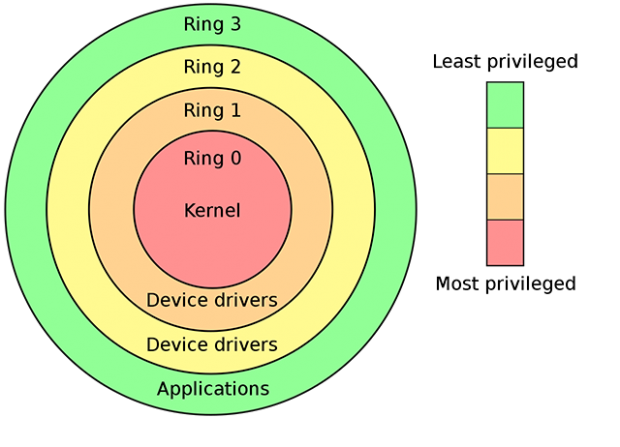
Ring kernel access diagram by extant_dinero.
Added Denuvo Anti-Cheat software required for playing BATTLEMODE on PC
- Denuvo Anti-Cheat uses a kernel-mode driver
- Use of the kernel-mode driver starts when the game launches and stops when the game stops for any reason
- Denuvo Anti-Cheat does not take screenshots, scan your file system, or stream shellcode from the internet
- Denuvo Anti-Cheat can be uninstalled at any time through the "Add or remove programs" dialog
- For more information, please see https://help.bethesda.net/ or refer to Denuvo's launch day blog here
If you've updated Doom Eternal with the latest patch, here's how to remove DAC:
- In your "Uninstall Programs" application on Windows look for "Denuvo Anti-Cheat".
- Uninstall it.
- Verify it's uninstalled by: Press WindowsKey+R -> type services.msc and press enter.
- Look for Denuvo Anti-Cheat Updater in the list.