











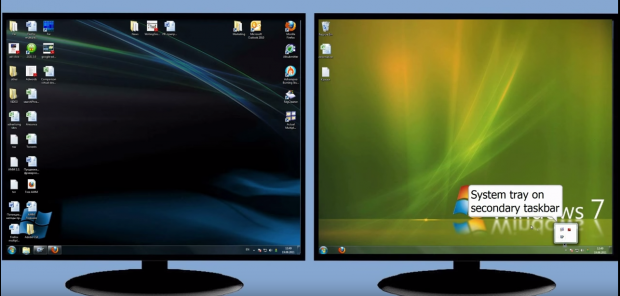
If you're a fan of multiple monitor setups and enjoy the productivity that it gives, you may sometimes run into taskbar related issues, seeiong as you're only able to utilise the taskbar on your primary monitor.
Released by Actual Tools for Microsoft Windows OS only, 'Actual Multiple Monitors' software allows you to put a fully functional taskbar on any other monitor, including a fully functional recycling bin, start button and system tray.
As a celebration for its 13th anniversary, Actual Tools is offering this window manager for 40% off - priced at $29.95 for a limited time. Although possibly quite useful, is it worth that amount of money? The answer to this question is up to you to decide.
More information can be found here.
 You can debloat Windows 11 in just 2 clicks with this new intuitive tool
 Opinion: Game Pass tier with first-party games won't fix the subscription's biggest problem
 Windows 11 taskbar is getting a built-in speed test
 Xbox Mode on Windows 11 does not support multiple monitors, full screen gaming mode disables secondary screens when active
 Corsair's Multi Frame Pegboard PC is a showpiece system, supports 3D-printed component mounts
 Giveaway: 12 Winners Will Score MONTECH NX400 and NX600 CPU Coolers
 GTA 6 leaks have reportedly led to a morale drop at Rockstar, with Netflix frustrated as well
 The Blood of Dawnwalker won't hit 60 FPS on any console, PS5 Pro tops out at 40 FPS
 AMD claws back ground against Intel in the CPU market, climbs to 35% share in desktop CPUs
 Redditor receives not one but TWO empty boxes of Ryzen 5 9600X from Amazon
 Xbox Series X25 Limited Edition Console is priced at $900, arrives November 2026
 Dave Bautista officially cast as Kratos in Amazon's 'God of War' TV Series, replaces Ryan Hurst
 Take-Two begins the hunt for GTA 6 leaker CyberLeek, subpoenas Microsoft and Discord
 PlayStation 6 handheld not expected to stay under $600, warns leaker
 AMD confirms the Radeon RX 9050 4GB will have a tiny 64-bit bus and just 16MB Infinity Cache
 Intel 'Nova-Lake-S' 28-core CPU with bLLC reportedly draws 296W at PL2
 Cooler Master MasterFan A120 Fan Review
 GIGABYTE MO27Q2A Gaming Monitor Review: 1440p, 280Hz, and QD-OLED is a winning combination
 Cooler Master V8 ACE 3DHP BLACK CPU Cooler Review
 ASUS ROG Strix XG129C Review: A $199 Gaming Monitor You Don't Play Games On
 Cooler Master HAF II 500 Mid-Tower Chassis Review
 Corsair HS35 v3 Wireless Gaming Headset Review - An Affordable Winner
 D-Link F518 5G Wi‑Fi 6 AX1800 Mobile Hotspot Review: All-Day Mobile Hotspot
 Bose Lifestyle Ultra Speaker Review - Impressively Detailed Room-Filling Sound
 MSI Z890 Gaming Plus WIFI6E Review - Z890 for under $200
 Mortal Kombat (1995) 4K Ultra HD Blu-ray Review
 Using Multiple Monitors? Change these Windows settings for a Better Experience
 Windows Sandbox is The Windows Security Feature Most People Never Use
 I ditched the Windows 11 context menu for this open-source tool, and here's why
 Windows 11 may be encrypting your drive already, and I checked where my recovery key went
 GIGABYTE's 40 Days of INFINITY celebrates 40 Years of Innovation with stunning GeForce RTX graphics cards and rewards
 I swapped File Explorer for this free file manager and finally got the layout I wanted
 How to tell if someone has been using your Windows PC without your permission
 6 Task Manager tips for troubleshooting Windows performance problems
 ASUS ROG's 20th Anniversary Line-up of Premium PC Gaming Gear has Arrived - Here's Everything You Need to Know
 Six File Explorer tips every Windows user should know