













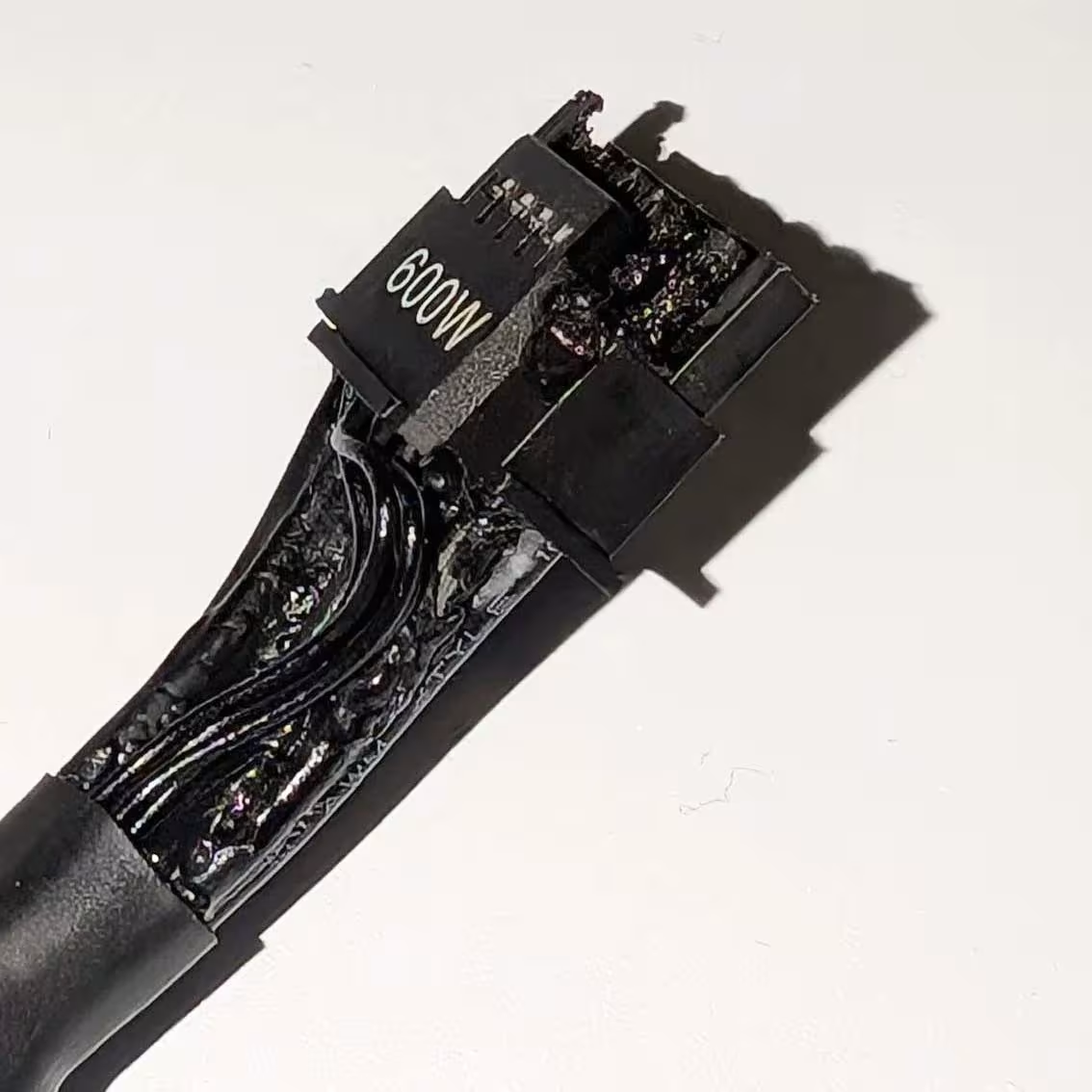
The infamous RTX 5090 power connectors just keep melting, and even a dedicated safety feature couldn't stop this latest one. VideoCardz reports that a user who goes by the name of Riptide just had their PSU native power connectors melted, while being plugged into an RTX 5090 with the TempGuard cable.
Apparently, the user also had their ASRock PG1000-PSF power supply keep running after its native 12V-2x6 connector started melting, despite the PSU's TempGuard cable being installed specifically to catch this kind of failure. The setup paired an MSI GeForce RTX 5090 GAMING TRIO OC with ASRock's TempGuard cable, a product built to monitor connector temperature and shut the PSU down before things get bad.

That's exactly what didn't happen in this case. The protection never triggered, and the user only noticed the burned connector after the fact. Making things worse, this was reportedly the same user's second RTX 5090 connector failure, with the first involving a Founders Edition card and a Corsair SF1000 PSU. That's some serious bad luck.


This connector's reputation precedes it at this point. We first flagged the RTX 5090 hitting over 150°C at the connector shortly after launch, and the failures haven't slowed down since. We've covered a Founders Edition melting with a third-party cable, the issue spreading to the RTX 5080, and even a properly seated cable taking out both a 5090 and a PSU at Club386 despite no user error involved.
Der8auer's thermal imaging work has previously shown a single pin on this connector absorbing far more current than the others, which is the root cause behind most of these stories. Many fail-safe solutions have been developed by various companies, but none have actually successfully managed to curtail the issue.
The part that stings here is that TempGuard exists for exactly this scenario. ASRock built it as a two-pin thermal sensor at the GPU end of the cable, designed to cut power before temperatures reach a dangerous point, and it's actually worked before in earlier reported cases. It joins a small pile of aftermarket fixes, including Thermal Grizzly's WireView Pro 2 and MSI's GPU Safeguard PSUs, all trying to patch around a connector design that keeps failing on its own. Even ASUS's $50 ROG Equalizer cable, built specifically to fix the current imbalance, has reportedly melted too.


Frequently Asked Questions
TweakBot answers common questions about this news using TweakTown's own coverage from this page and related content from our archive. Tap a question to reveal the answer, or type your own below.
How can I tell if my RTX 5090's 12V-2x6 connector is starting to overheat before visible melting occurs?
Do any of the aftermarket protection solutions (TempGuard, Thermal Grizzly WireView Pro II, MSI GPU Safeguard, ASUS ROG Equalizer) have documented failure modes or limitations in TweakTown's coverage?
Are there documented cases in TweakTown of a melted 12V-2x6 connector causing permanent damage to GPUs or PSUs, and what repairs/replacements were reported?
Have teardown or thermal-imaging analyses (e.g., Der8auer) in TweakTown explained exactly which pin configurations or current imbalances lead to the hotspots on the 12V-2x6 connector?
Have a question not listed here? Ask below and TweakBot will answer it.

At some point, it's fair to ask whether any of these band-aids can actually fix a connector that keeps finding new ways to fail, sensors and load balancing included. NVIDIA may just need to walk away from this design for the next generation instead of asking the rest of the industry to keep engineering around it.


 Club386 is the latest victim of melted 12V-2x6 cable connectors, RTX 5090 and PSU both damaged
 GeForce RTX 5090 power connector spotted at 150+ Celsius, prone to melting
 Enthusiast attempts to install second 12V-2x6 connector on RTX 5090, is rewarded with a hole punched through the PCB
 ASRock's new 16-pin GPU power cable eliminates the risk of melting cables
 AMD graphics card with 12VHPWR connectors are now melting
 Apple sues OpenAI, accusing it of engaging in a 'strategy to extract Apple's confidential information'
 EA quickly folds after College Football 27 got review bombed on Steam for invasive microtransactions
 Reverse scam: Redditor orders a Ryzen 7 7800X3D but gets blessed with a 9800X3D instead
 Colorful iGame Shadow II DDR5 memory with CXMT ICs hits 8600 MT/s
 ASRock says there are no plans to sell its Taichi 10th anniversary concept components
 Sony CEO sells $4.7 million worth of stock days after PlayStation announces disc phase out
 Black Flag Resynced is a win for Ubisoft, pirate remaster achieves 2 million sales in 24 hours
 Giveaway: Win an NZXT H6 RGB+ Case, Kraken Elite AIO, RGB Fans and 1200W PSU
 Ubisoft responds to Black Flag Resynced DLC critics by telling them they're 'not a requirement'
 NVIDIA is reportedly preparing the GeForce RTX 5090 SE to sit between the RTX 5080 and 5090
 Micron 6600 ION 245.76TB Enterprise SSD Review - Best in Class Programming Speeds
 MOZA MA3F EFCM Flight Control Module Review: authentic Airbus A320 autopilot panel for simulators
 Turtle Beach Stealth Pro II Wireless Gaming Headset Review - Premium Sound, Fantastic Features
 MOZA MGX1000 Instrument Panel Review: a realistic Garmin G1000 replica for immersive flight sims
 Simagic Zeus Formula Steering Wheel Review: premium build and advanced inputs for F1 racing
 GIGABYTE X870E Aero X3D Dark Wood Review - A woody goody
 The Super Mario Galaxy Movie (2026) 4K Ultra HD Blu-ray Review
 KTC H49S66 5K2K (5120x1440) 49-inch 180Hz Gaming Monitor Review
 HighPoint Rocket 1604L Gen5 x16 NVMe Software RAID AIC Review: half the price with full 59 GB/s speed
 Next Level Racing ERS3 Haptic Seat Review: immersive sim racing comfort with integrated haptics
 Don't sell your Windows laptop until you do these things
 6 PC cleaning mistakes to avoid for safer hardware maintenance
 Phison and Intel Take Aim at Local AI's Memory Wall with aiDAPTIV
 How to Remap Keyboard Keys in Windows using Microsoft PowerToys
 7 tips to organize your Windows files for faster, easier access
 Intel Arc G3 Extreme first impressions with MSI's Claw 8 EX AI+ - Incredible power for an extreme price
 How to fix Wi-Fi Adapter Not Working on Windows laptops: troubleshooting tips
 Hisense U7SG 4K TV: Modern Entertainment for the New Age
 6 underrated Microsoft Word features worth using to boost your productivity
 Level Up Your PC Gaming with these Fantastic ASUS Prime Day Deals on GPUs, Motherboards, and More