

Introduction and Package
 37
37It's going to take a couple of weeks, but we're going to get through the mountain of Intel Z77 Express based motherboards that we've got sitting here in our office. We've already seen a couple of offerings including the ASRock Z77 Extreme6, ASUS P8Z77-V Deluxe and Gigabyte Z77X-UD5H. Today it's about an offering from MSI.
The particular model we're looking at today is the Z77A-GD65 which sits currently at the top of the Z77 pile when it comes to offerings from MSI. Carrying with it a price tag of $169.99, it's one of the cheapest Z77 boards we've looked at. As we've discovered over the years, though, cheap doesn't always mean bad.
As always, though, there are a few things we need to do before we find out just how well the MSI Z77A-GD65 can perform. The first thing we want to do is take a closer look at the package to see just what MSI is bundling with the board here today.
From there we'll move onto the motherboard itself to see what's going on with it before we head into the BIOS and see how Click BIOS II is looking. Once we've done that we'll check out our test system quickly and cover the overclocking side of things before we finally get into the performance of the board.
Package
 37
37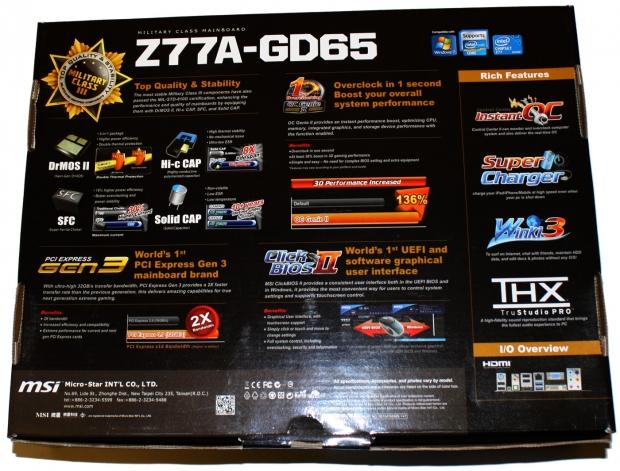 37
37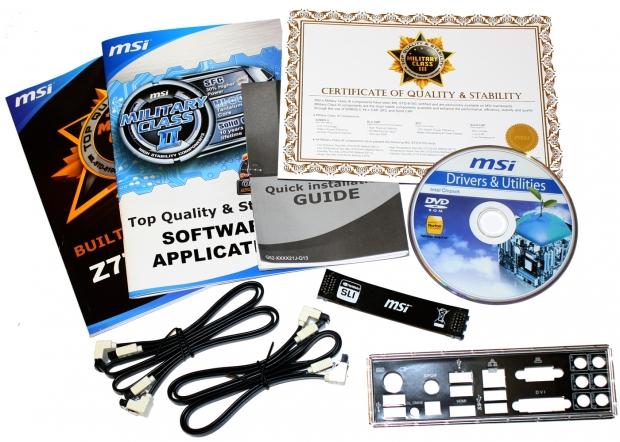 37
37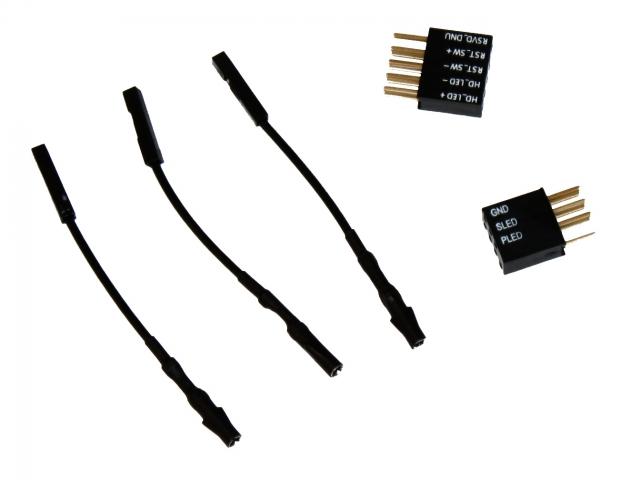 37
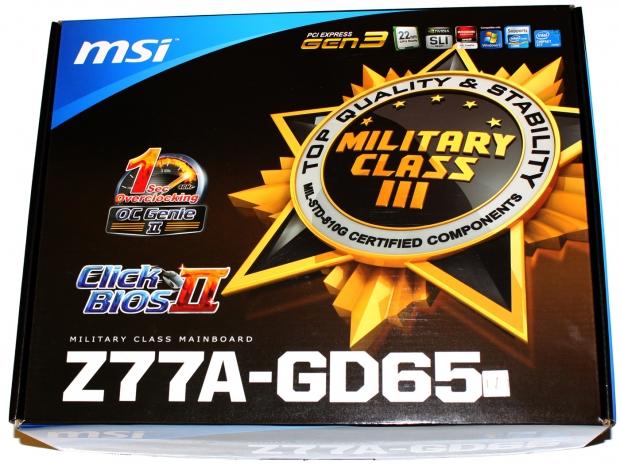
37Looking at the box we can see the normal run down of information which highlights some of the main features on the board with the Military Class III standard and OC Genie II being the major ones.
Inside the box we've got the normal line up of paperwork including the Military Class III certificate along with the driver CD, four SATA cables, SLI bridge and the I/O back plate.
Along with all that we've got a couple of extra cables in the V-Check cables which we'll cover in the next page along with our easy header connectors to help round off the bundle.
MSI Z77A-GD65 (Intel Z77) Motherboard
 37
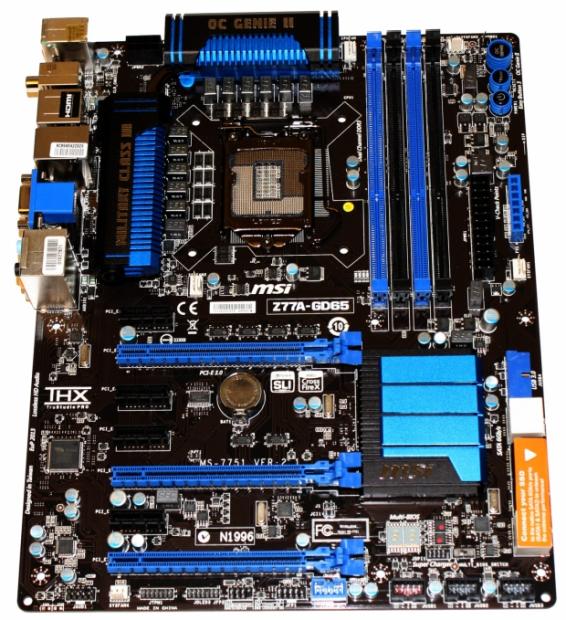
37Looking straight on we can see the board looks very typical of MSI with that black and blue theme we love to see from them. We get a good idea of where everything is, but let's move in a bit closer and get down to some specifics.
 37
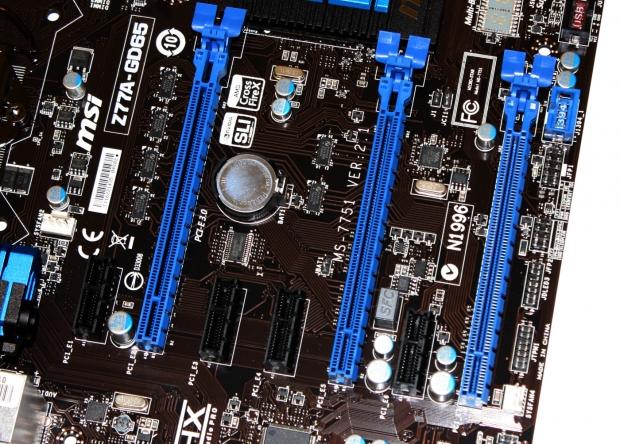
37On the PCIe front you can see we've got a total of four PCIe x1 slots and three PCIe x16 slots. Like other Z77 boards, though, if you go down the path of CrossFire or SLI, you will only be able to operate both video cards at x8 / x8. If you're using just one video card it can be operated at x16.
 37
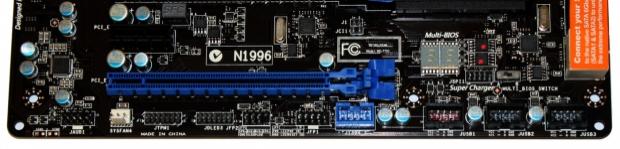
37Moving across the bottom of the board we've got the standard line up of audio, Firewire, USB 2.0 and front panel headers here. On the right hand side and up slightly you can see a switch that lets you change between the two BIOSs that are installed and to the left of that you can see the LED debug meter.
 37
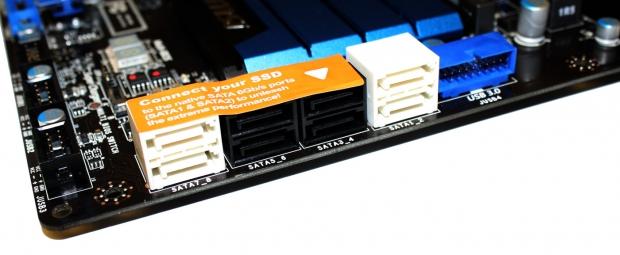
37Turning the corner you can see we've got a total of eight SATA ports present. We've got four SATA II ports running off the Intel Z77 chipset, two SATA III running off the same chipset along with two more SATA III connectors running off the ASMedia ASM 1061 chipset. To the right of the SATA ports you can also see we've got a USB 3.0 header present.
 37
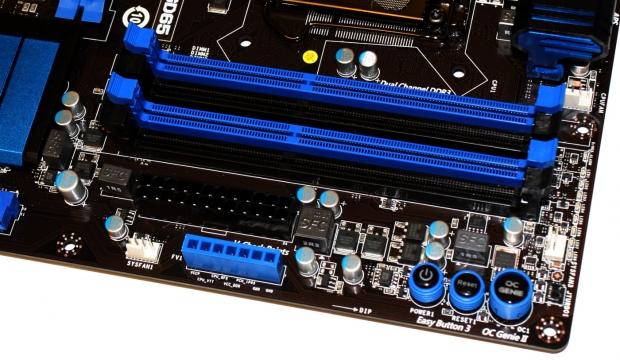
37Heading towards the top of the board we've got a lot going on. As usual we've got four DDR3 DIMM slots supporting up to 32GB of RAM at 2800MHz DDR via overclocking and below that we've also got the main 24-pin ATX power connector.
Sitting below that connector we've got the V-Check points which with the included cables give us the ability to check the voltage of certain areas. Finally we've also got the Easy Button 3 set which consists of a power and reset button alongside the OC Genie II button. Pressing the OC Genie II button will automatically overclock your CPU and in our case our 3770k would get pushed to a 42x multiplier resulting in a 4.2GHz clock speed.
 37
37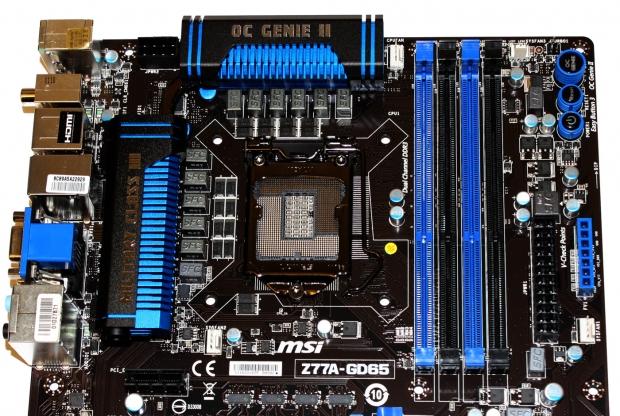 37
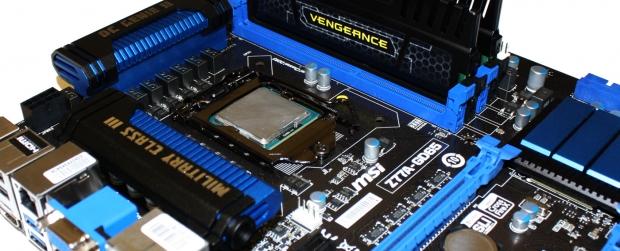
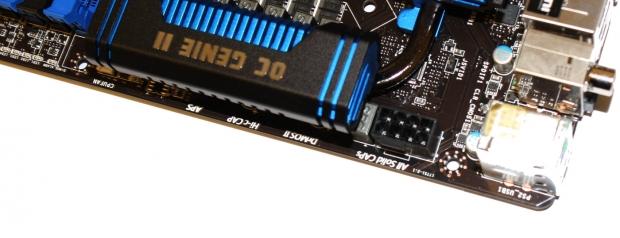
37Moving across the top of the board you can see the main 8-pin CPU power connector in the cop corner and moving back a bit we get a good look at the CPU area and the heatsink design. This area looks clean and you can see we've got Military Class III and OC Genie II branding present on the heatsinks, which look great.
 37
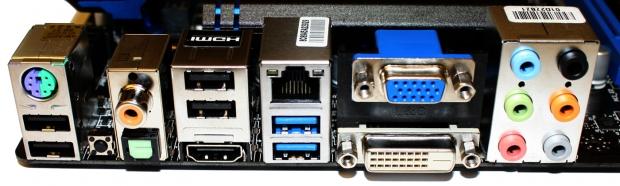
37Finally we finish of with the I/O side of things and starting on the left we've got two USB 2.0 ports and a PS2 combo port. Moving across we've got a clear CMOS switch, coaxial and optical out, two more USB 2.0 ports and HDMI. Gigabit networking is offered via the Intel 82579V chipset and below that we've got two USB 3.0 ports running natively off the Intel Z77 chipset.
Moving across we've got two more display outputs in the form of a VGA and DVI-D port and next to that we finish off with six auxiliary audio ports that run off the Realtek ALC898 chip.
BIOS - Click BIOS II
 37
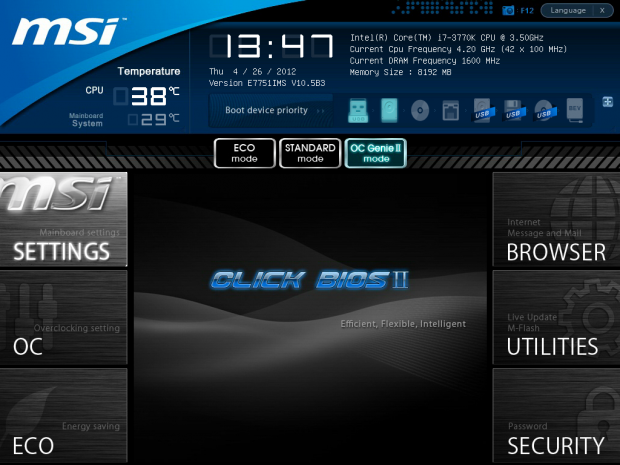
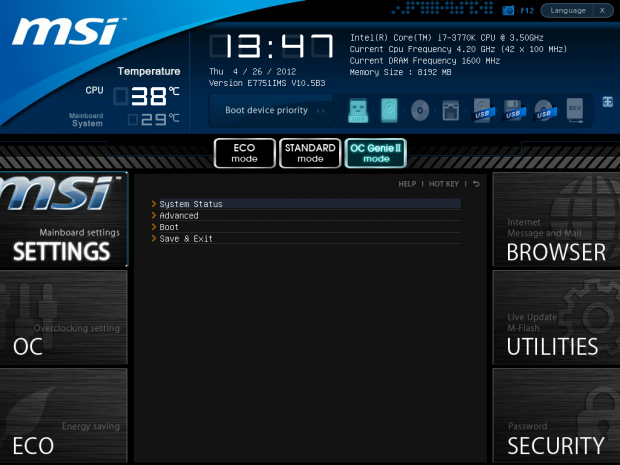
37Click BIOS II was such an improvement over the original Click BIOS and for the most part you can see there are no major differences when compared to other MSI boards that are using the Click BIOS II setup.
We've got a fair bit of information when you enter and across the top we've got our CPU information, temperatures of the CPU and motherboard along with your boot device priority which can be adjusted by just dragging and dropping the icons.
 37
37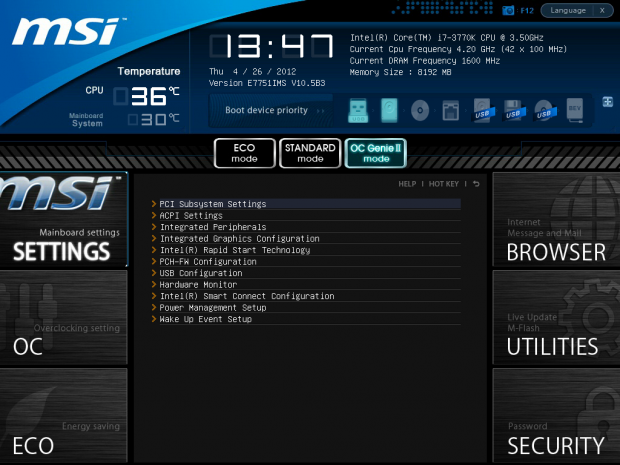 37
37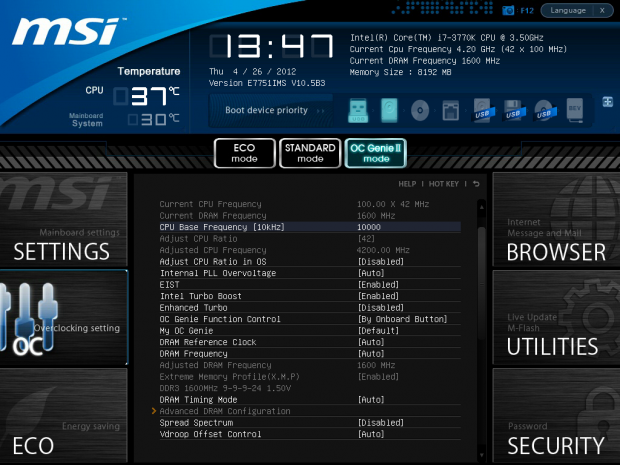 37
37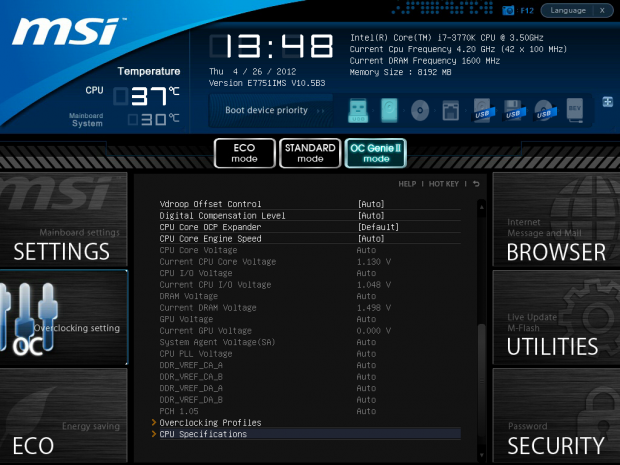 37
37As always if you're heading into the BIOS the chances are you're going to be doing some overclocking and you'll no doubt be heading over to the Overclocking Setting area which provides a strong run down of everything we need.
 37
37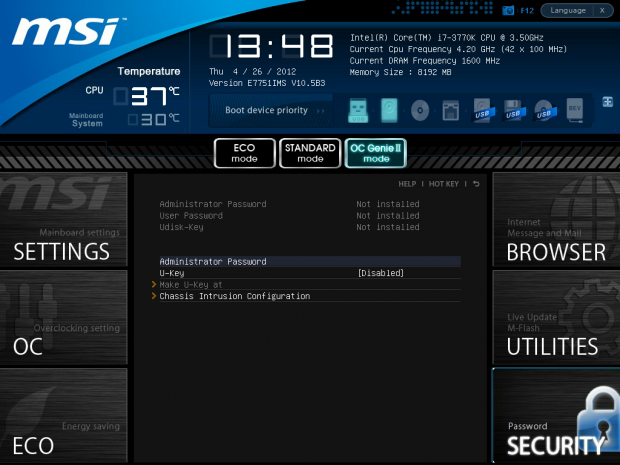 37
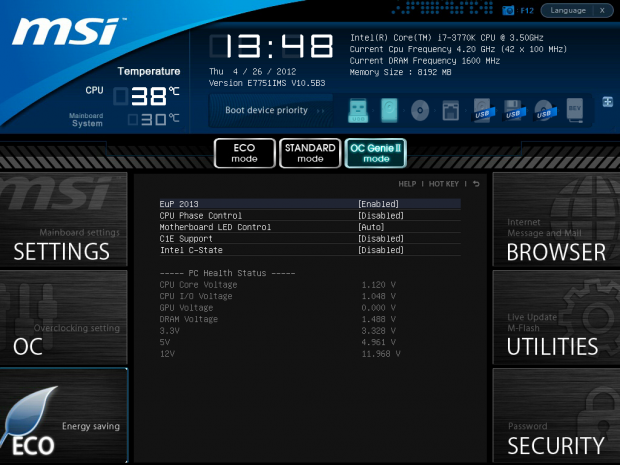
37Moving through the rest of the BIOS we've got some energy saving options, a pointless browser that you'll never use, M-Flash under the Utilities which is great for updating your BIOS with ease and finally the security section.
Benchmarks - Test System Setup and Overclocking
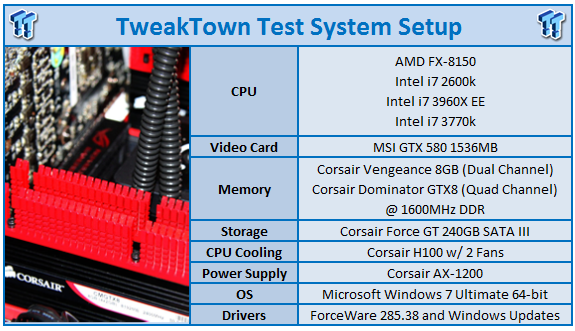 37
37We would like to thank the following companies for supplying and supporting us with our test system hardware and equipment: Intel, ASUS, MSI, Western Digital and Corsair.
On the testbed front you're not going to find anything that you haven't really seen in our other Z77 motherboard reviews. So with everything above really painting the picture of our testbed, we can get into the overclocking side of things to see just what the MSI Z77A-GD65 was capable of achieving.
When it comes to overclocking we head back into the BIOS and adjust our voltages to where they need to be and then push our multiplier up to 46x which brings us in at 4.6GHz when combined with the 100 BCLK.
Straight away we got into Windows, so we rebooted and headed back to the BIOS and tried the 47x multiplier. Again we got straight into Windows, so I thought we'd try our luck for the 48x multiplier to run at 4.8GHz.
Our machine booted straight away and we got into Windows. With everything looking good we fired up MediaEspresso, probably the most intensive CPU benchmark we run and got started. Within a few seconds MediaEspresso crashed.
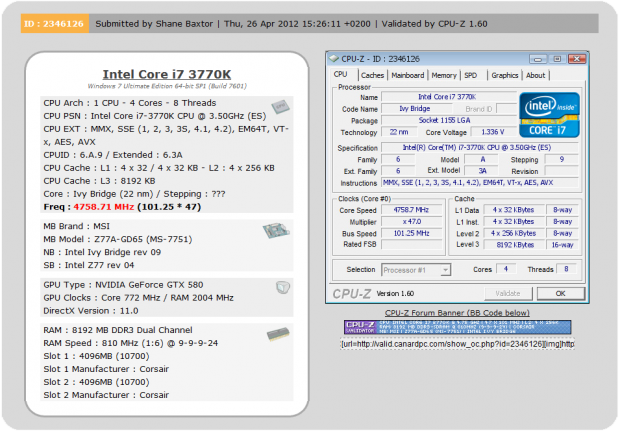
So we headed back to the BIOS, move back to the 47x multiplier and then pushed our BCLK up to get 4.8GHz thinking maybe the system just didn't like the 48x multiplier. We also boosted the voltage slightly to 1.35v on the vCore. While we got back into Windows and got a little further in MediaEspresso, it did eventually crash again. 4.8GHz just wasn't going to happen for us today, so it was time to just do a bit of fine tuning with the BCLK to find that sweet spot.
 37
37As you can see above we ended up with a 101.25 BCLK alongside the 47x multiplier to give us a total speed of 4758MHz or 4.76GHz as illustrated in our graphs today.
Let's get started!
CPU Benchmarks
HyperPi 0.99
Version and / or Patch Used: 0.99
Developer Homepage: www.virgilioborges.com.br
Product Homepage: www.virgilioborges.com.br
 37
37AIDA64
Version and / or Patch Used: 1.00.1035BETA
Developer Homepage: http://www.aida64.com
Product Homepage: http://www.AIDA64.com
 37
37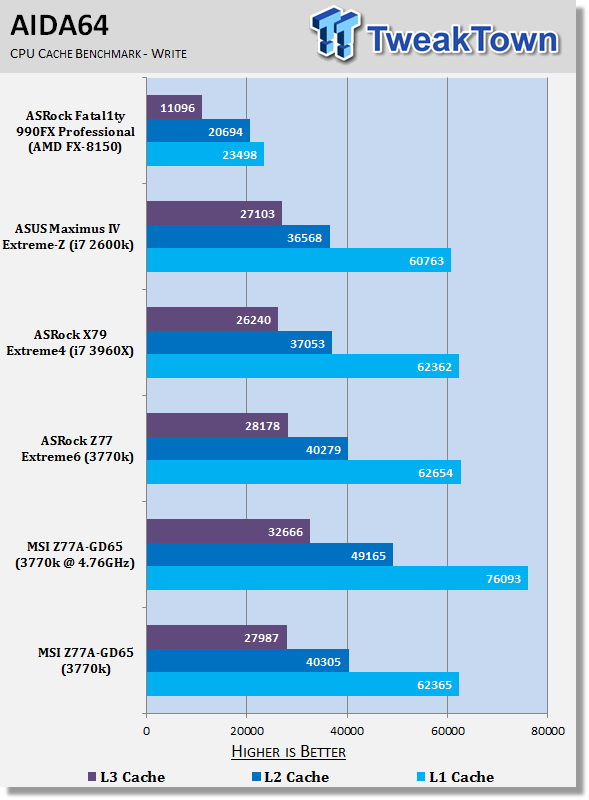 37
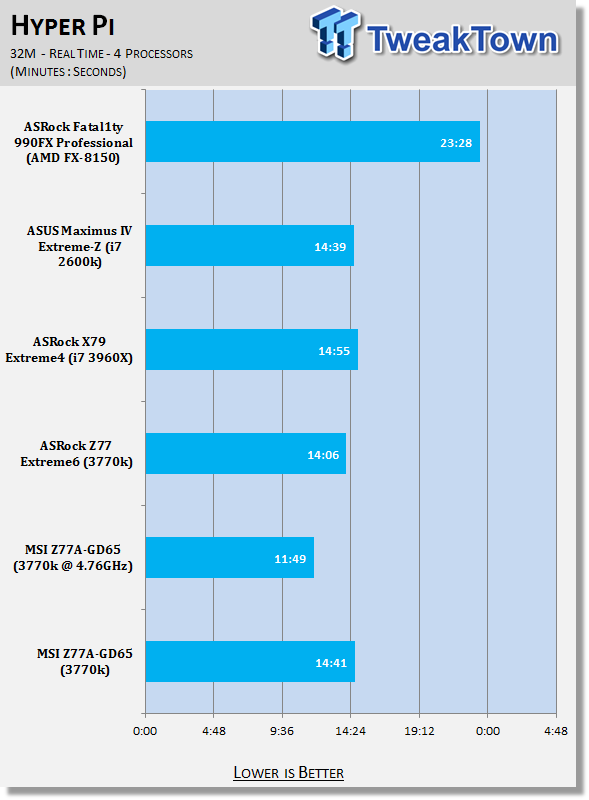
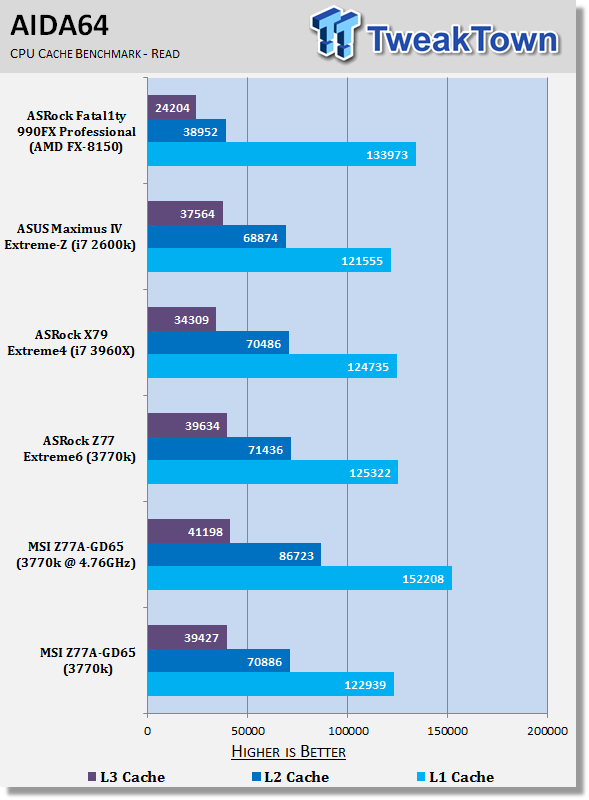
37Starting off with HyperPi and AIDA64 we can see out of the box the performance on the MSI Z77A-GD65 is a little lower than the ASRock Z77 Extreme6. Considering out of the box performance on the ASRock is also a little lower than our Gigabyte and ASUS offerings, this is a little disappointing.
Fortunately a strong overclock helps boost those numbers here, but let's hope that the out of the box performance picks up a little.
System Benchmarks
PCMark 7
Version and / or Patch Used: 1.04
Developer Homepage: http://www.pcmark.com
Product Homepage: http://www.pcmark.com
 37
37MediaEspresso
Version and / or Patch Used: 6.5
Developer Homepage: http://www.cyberlink.com/
Product Homepage: http://www.cyberlink.com/products/mediaespresso/overview_en_AU.html?fileName=overview&r=1
 37
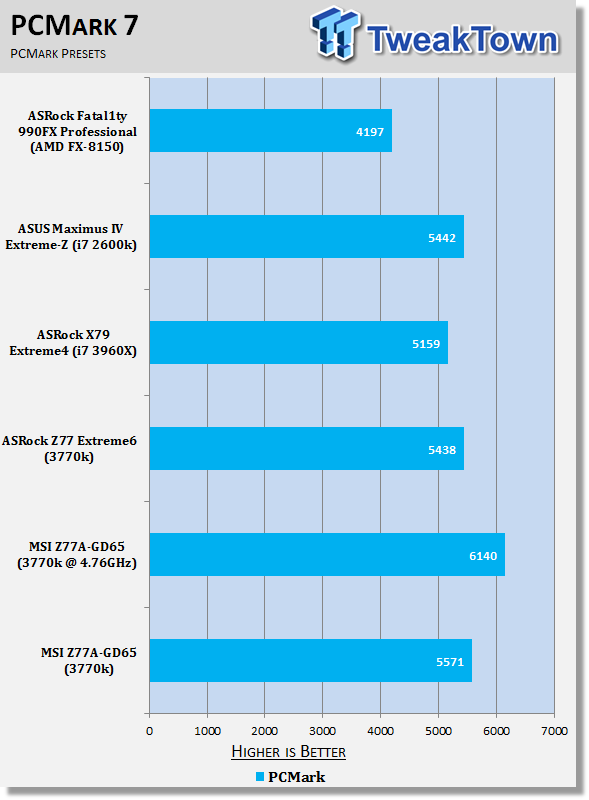
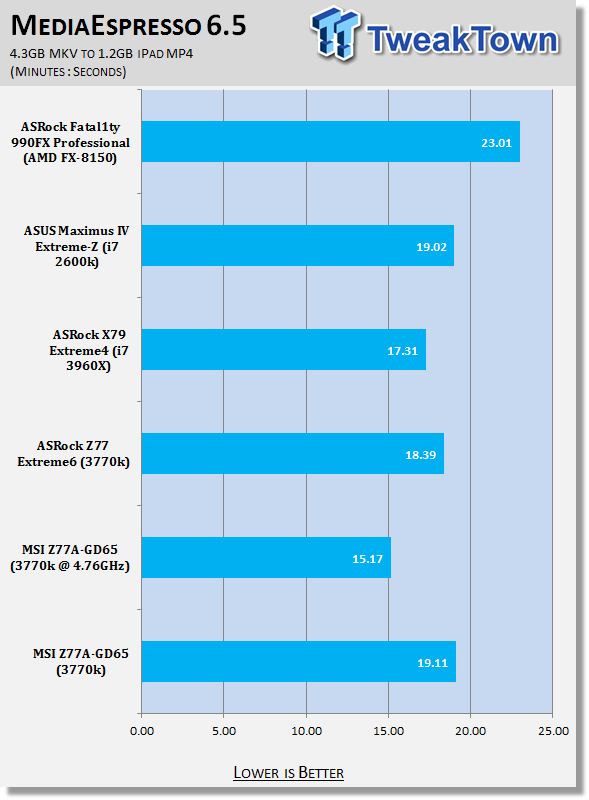
37While we can see that PCMark 7 performance is up compared to the ASRock offering we see our MediaEspresso encode time is a little behind it again when it comes to that stock out of the box performance.
Of course overclocking helps boost those numbers a good deal, but we'll see how the out of the box performance goes as we move onto some of our other tests.
USB 2.0 and 3.0 Benchmarks
AIDA64
Version and / or Patch Used: 1.70.1400
Developer Homepage: http://www.aida64.com
Product Homepage: http://www.AIDA64.com
 37
37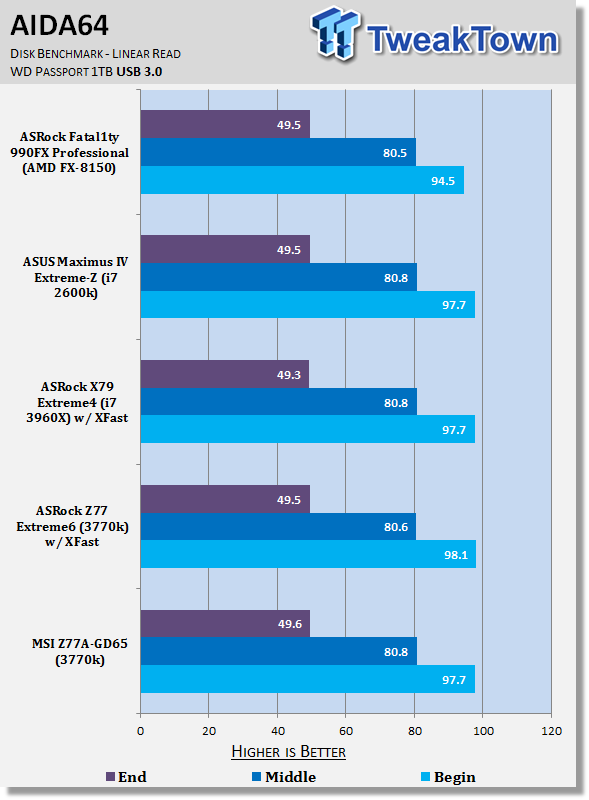 37
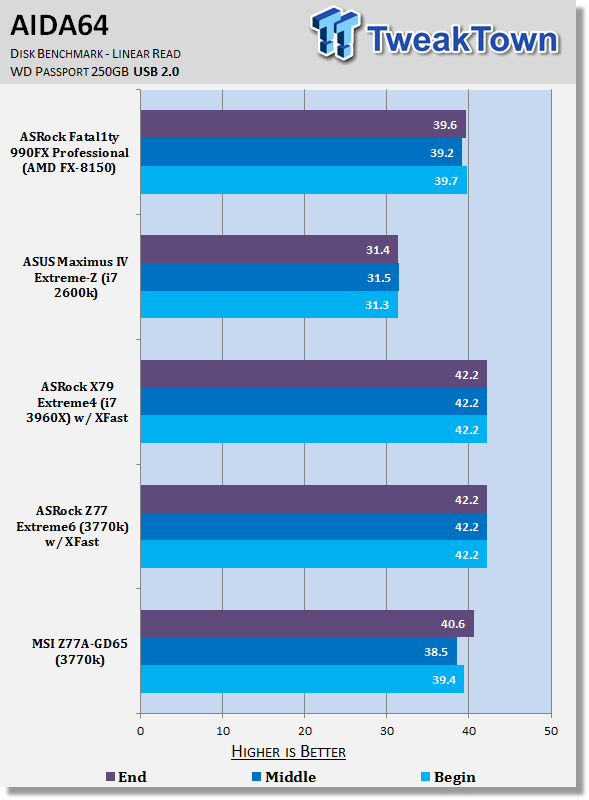
37Looking at USB 2.0 performance we can see that it sits as we'd expect a little below the ASRock offerings which make use of XFast technology.
As for USB 3.0 performance, you can see across the board performance sits just where you'd expect, with all our systems lining up together.
SSD Benchmarks
AIDA64
Version and / or Patch Used: 1.70.1400
Developer Homepage: http://www.aida64.com
Product Homepage: http://www.AIDA64.com
 37
37HD Tune Pro
Version and / or Patch Used: 4.61
Developer Homepage: http://www.hdtune.com
Product Homepage: http://www.hdtune.com
 37
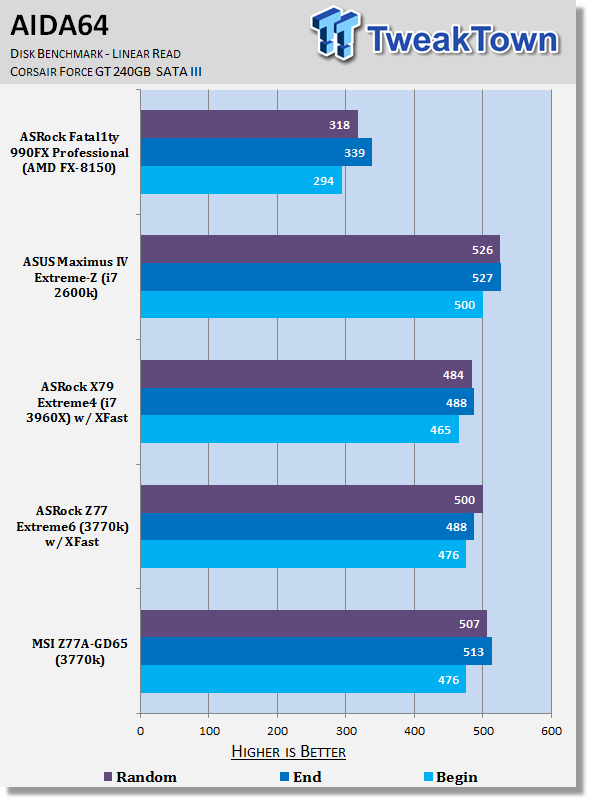
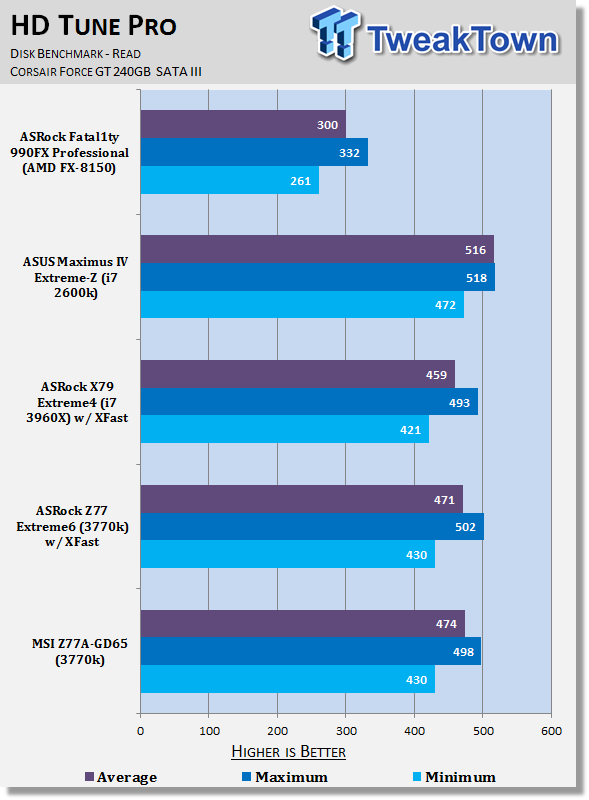
37SATA III SSD performance is where it should be looking against most of our other motherboards here. For the most part there's no real surprise and just all round solid performance coming out of the MSI Z77A-GD65.
Memory Benchmarks
AIDA64
Version and / or Patch Used: 1.00.1035BETA
Developer Homepage: http://www.aida64.com
Product Homepage: http://www.AIDA64.com
 37
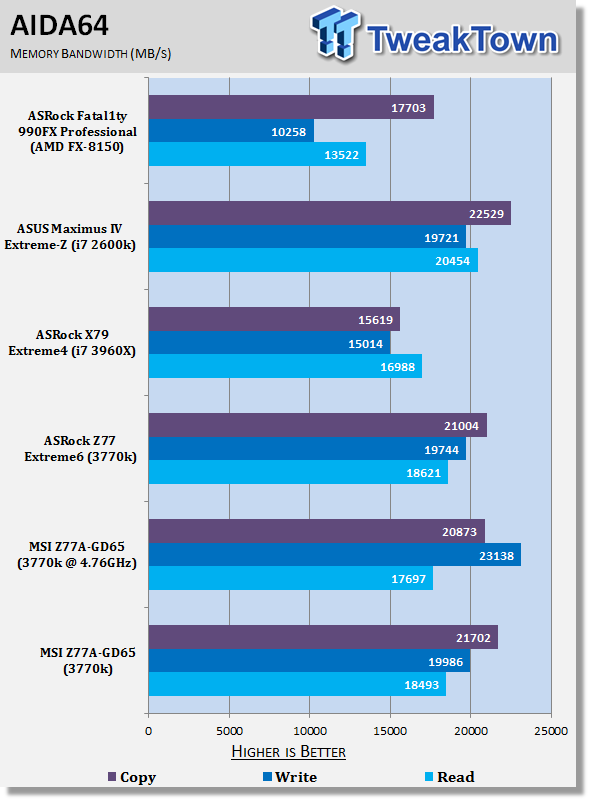
37Memory performance is a little funny; out of the box it lines up as we'd expect, but overclocked we see that Read and Copy performance actually takes a bit of a hit.
As always, though, the write performance jumps up a fair bit. We double checked the timings and speed. Everything lined up as it should and the write performance was correct. Multiple tests, though, found the lower Read and Copy speeds.
Gaming Benchmarks
3DMark 11
Version and / or Patch Used: 1.0
Developer Homepage: http://www.futuremark.com
Product Homepage: http://www.3dmark.com/3dmark11/
 37
37Metro 2033
Version and / or Patch Used: Latest Steam Update
Timedemo or Level Used: Built in Benchmark
Developer Homepage: http://www.4a-games.com//
Product Homepage: http://www.thqnordic.com/
 37
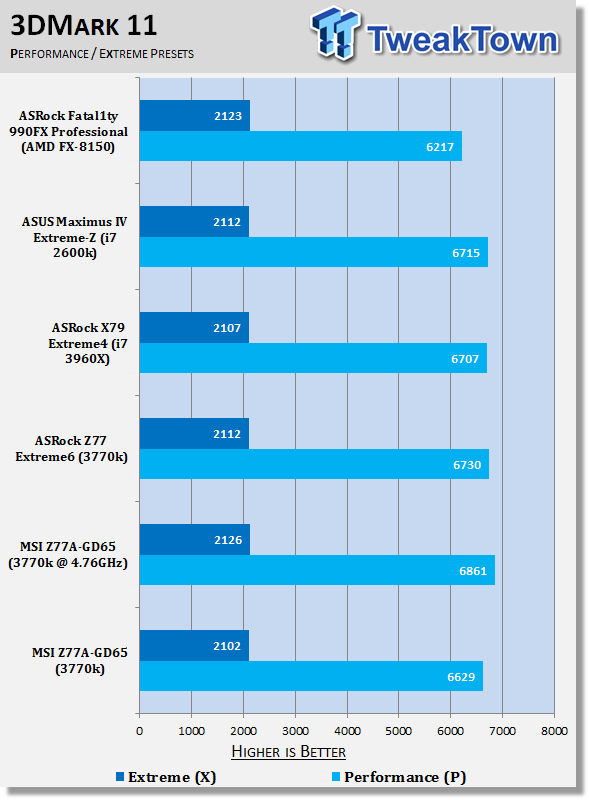
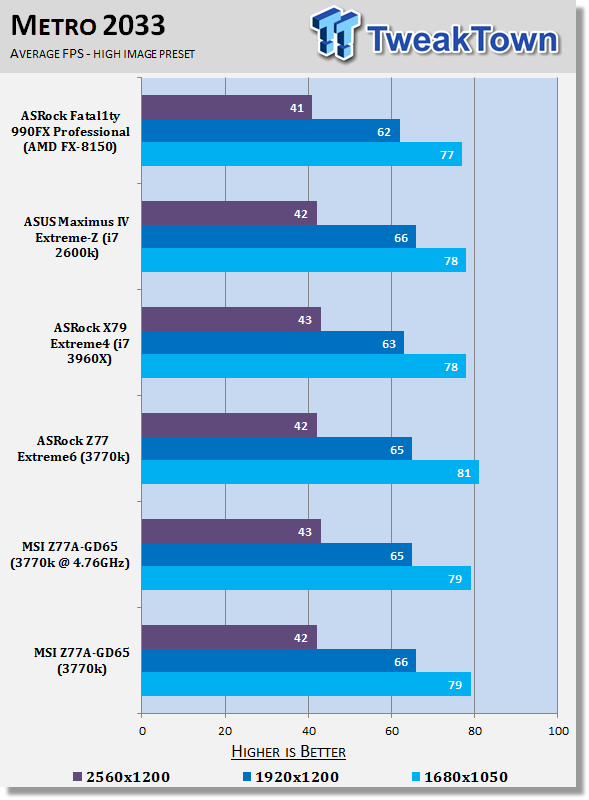
37When it comes to gaming performance the board for the most part performs as you'd expect. We see a slight boost in overall performance when it comes to the Performance Preset under 3DMark 11 thanks to the overclock, but for the most part everything else stays at around the same level.
Temperature and Power
Power Consumption
 37
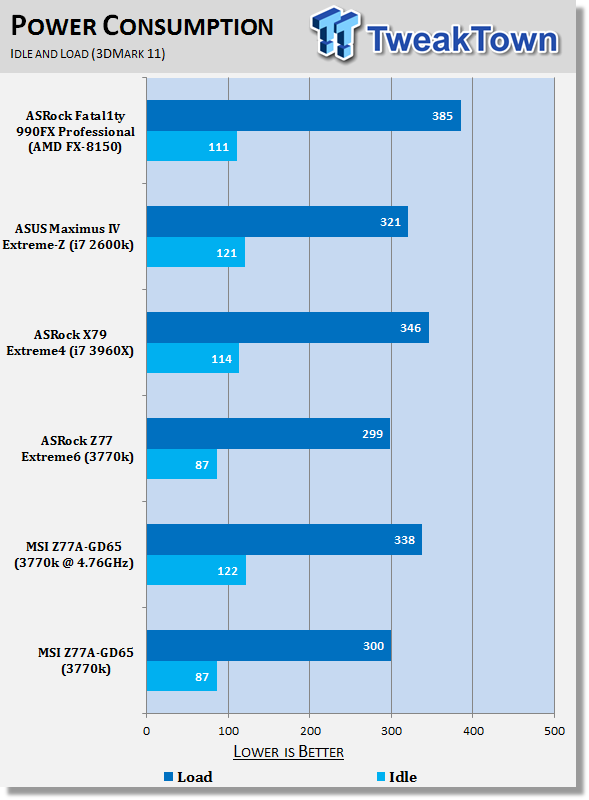
37Power numbers on the board look good and line up with where'd you expect them to be.
We're under 90 watts at idle and we're hitting an even 300 watts at load when it comes to stock performance.
Overclock boosts both those numbers slightly, but overall we're still under 350 watts at load.
Core Temperature
 37
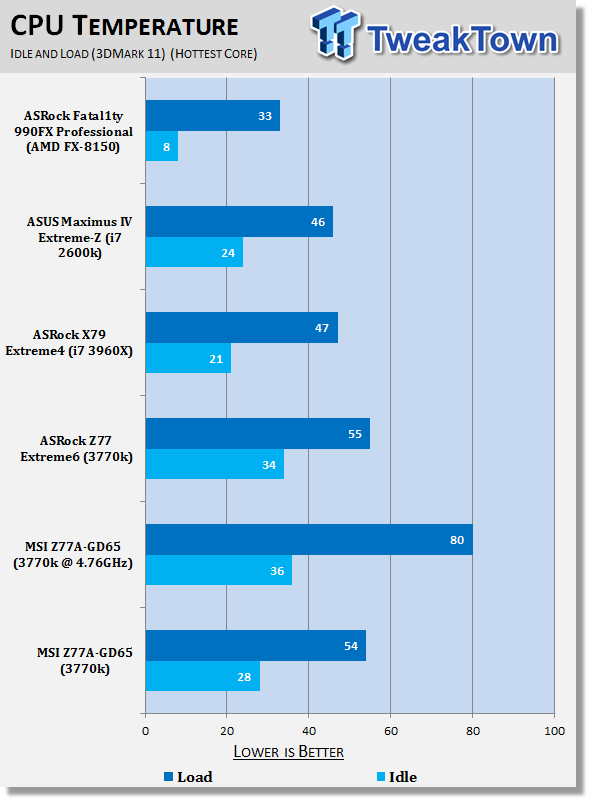
37Temperatures look good on the MSI board, we've got a strong idle at stock and at load we line up with our ASRock board.
When overclocked the numbers are pretty good as well considering this is actually the strongest overclock we've had so far; even if it is just by 20MHz.
Final Thoughts
I find myself really confused when it comes to the MSI Z77A-GD65. The fact that out of the box performance is a little lower than the ASRock board is a little disappointing and the AIDA64 RAM performance as well when we overclocked was a little weird. That's where my concerns stop for the board and the things I like about it take over - and to be honest, there's a lot to like.
For starters the overclock was really strong. Sure, it was only 20MHz higher than the ASUS P8Z77-V Deluxe, but that doesn't change the fact that it was the highest we've got out of our 3770k CPU. Not only that, it did it 5c cooler than the ASUS offering and 14c cooler than the GIGABYTE Z77X-UD5H. For us this is a big win.
Feature wise the board is also really strong, the Military Class components are clearly doing their job here and OC Genie II while just bumping your CPU to just a 42x multiplier for a 4.2GHz clock, it does bump your CPU to 4.2GHz at just a push of a button. It's not the most scientific method, but it's a quick, simple and free way to gain some extra MHz out of your processor.
If all that wasn't enough the $169.99 price tag lines it up with the ASRock Z77 Extreme6 which in turn ties it as the cheapest Z77 based motherboard we've tested so far. Considering the feature set and overclock, this is only a good thing. Outside of that, though, one of the things I love about the Z77A-GD65 is the color scheme. You expect a board that looks as cool as this to cost more, but MSI continue to make a good looking board, which comes in at a strong price.
While the out of the box performance is a little down, we do have to make note that the BIOS we're using came out literally 15 minutes before we started testing the board and is in BETA form. We're sure that MSI will see our data and no doubt look into it. If the board didn't do so well in the other areas we'd be more reluctant to give it an award, but the out of the box performance difference is only minor, and overall the board excels strongly in every other area including price, overclocking performance, design and looks.
The MSI Z77A-GD65 just feels like a really complete board and if you're looking for something in this color scheme and at this price point, it's a fantastic option to seat your Ivy Bridge CPU. The only thing we'd suggest is keep an eye on the MSI website for the most recent BIOS, unless of course you're overclocking, then it's not going to matter.
If there was a larger discrepancy in the out of the box performance then we'd pull the performance score right back. The fact it's only a little out, though, and the board offers the strongest overclock we've had so far means that the Editor's Choice award comes extremely well deserved for the MSI Z77A-GD65.

 United
States: Find other tech and computer products like this
over at
United
States: Find other tech and computer products like this
over at  United
Kingdom: Find other tech and computer products like this
over at
United
Kingdom: Find other tech and computer products like this
over at  Australia:
Find other tech and computer products like this over at
Australia:
Find other tech and computer products like this over at  Canada:
Find other tech and computer products like this over at
Canada:
Find other tech and computer products like this over at  Deutschland:
Finde andere Technik- und Computerprodukte wie dieses auf
Deutschland:
Finde andere Technik- und Computerprodukte wie dieses auf  LG's 32-inch gaming OLED monitor with 480Hz refresh rate is imminent, with pre-orders live now
 Google Pixel 8a leak boasts 7 years of security updates but leaves one question unanswered
 Apple has plummeted from first to fifth place in the Chinese smartphone market, analysts warn
 You can blame Tim Cook for 8GB Macs, it seems
 Apple removes three AI apps capable of creating nude images of people from the App Store
 SteelSeries Arctis Nova 4X Wireless Gaming Headset Review
 ACEMAGIC AD08 "Core i9 11900H" Mini PC Review
 Lenovo ThinkPad X1 Carbon Gen 12 Review
 ASUS ROG Swift Pro PG248QP Gaming Monitor Review - Frames, frames, and more frames
 FlexiSpot C7B-Mesh Ergonomic Office Chair Review
 Samsung G8 34-inch QD-OLED Gaming Monitor Review - 175Hz for $900
 ASRock NUCBOX-155H Mini PC Review
 NuPhy Air96 V2 Wireless Mechanical Keyboard Review
 TEAM T-FORCE Siren DUO360 RGB Liquid CPU Cooler Review
 AVerMedia Live Streamer ULTRA HD Review
 Building the Ultimate Home Entertainment Server with an ASUSTOR NAS and Viper Gaming NVMe SSDs
 Everything you need to know about the latest ASUS NUC Mini PCs - NUC 14 Pro and ROG NUC
 How to Overclock Your GPU and Boost Your PC Gaming with ASUS GPU Tweak III
 ASUS's AMD Radeon RX 7000 Series GPU lineup has something for every gamer
 ASUS OLED Premium Care defends the ROG Swift OLED PG32UCDM gaming monitor from burn-in