










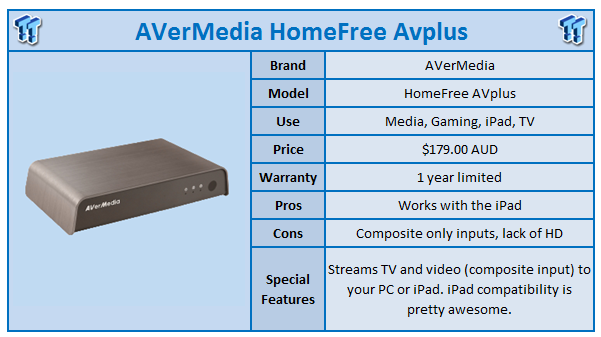
AVerMedia have been a giant in the video capture/TV tuner industry and have just recently started releasing the HomeFree AVplus range around the world. It's aimed at streaming TV and other TV-related goodies (like your Xbox, or PS3) and can broadcast digital TV, satellite TV and AV-in (as per the previously mentioned consoles) to your PC or iPad via your wireless home network, supporting two users accessing different TV sources simultaneously.
The device itself is not that large, about the size of a standard media player, maybe a bit taller. It has composite and S-video connectivity on the back (which is a downfall, very big downfall in this HD world we live in).
The AVerMedia website does a great job of letting you know what you can actually do with the device and in my opinion, comes off as a little too "yeah, baby", when it's more like "oh, really?". For example, the AVerMedia HomeFree AVplus only has composite inputs. For someone with an Xbox 360, PS3 or high-def TV, this is pretty bad.
But then you have to consider, the iPad only does 1024x768, which is sub-HD. So streaming video shouldn't be too much of a problem; but again, we do live in a full-HD world. It's not like 1080p is something new, it has been around for years now. If the AVerMedia HomeFree AVplus did full-HD, it would be much more impressive in my book.
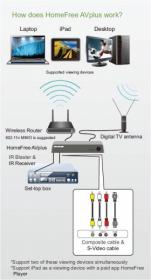
The HomeFree Player iPad app is available on the Apple App Store and includes a nice UI with built-in support for quick and simple changing of channels by a simple tap of the screen. Dragging is also supported. Included is EPG (Electronic Program Guide) which shows full channel and TV program information, right there on your iPad as well as an 'e-Shop list' which allows users to purchase a HomeFree device online instantly if they have installed HomeFree Player on their iPads already.
Because of hardware limitations, the iPad doesn't support the recording function - AVerMedia, please build support in for this in a future revision or next-gen version of your HomeFree devices. The ability to sit in my lounge and watch TV, something might pop up which will make me think "I want to record that!" and to just tap the screen to record; that would be quite an amazing feat.
The AVerMedia HomeFree AVplus also has compatibility built-in for Windows Media Center, which is great. The PC application from AVerMedia allows for the recording of TV (and of course, viewing) directly on your PC. The included IR blaster lets you control your set top box remotely though the PC application - as you can imagine, this comes in handy if your set top box is not in the same room as your PC.
Our Latest Players & Accessories Review Coverage
I did try some PS3 gaming with the iPad as a wireless gaming monitor - say what! And whilst it worked, it was really limited to SD because of the hardware limitation. Not only that, there was video lag because of the limitation of Wi-Fi, but it was not bad to use as a gaming monitor. Once technology is improved in future revisions of the HomeFree range - this will become a very cool option indeed.
Do you need an AVerMedia HomeFree AVplus in your house? Well, every setup in every house is unique. Do the features I've talked about interest you? Then yes. But right now, it feels like the HomeFree AVplus is a bit dated with its input sources.
I'm hoping future revisions include HDMI or at least VGA/DVI for some PC monitor action as well as built-in support for Android tablets, as they are becoming more and more popular.


 Speed Racer (2008) 4K Ultra HD Blu-ray Review: a stunning remaster of the cult classic
 The Super Mario Galaxy Movie Cinema Review
 Teenage Mutant Ninja Turtles III (1993) 4K Ultra HD Blu-ray Review
 TRON: Ares (2025) 4K Ultra HD Blu-ray Review
 Teenage Mutant Ninja Turtles II: The Secret of the Ooze (1991) 4K Ultra HD Blu-ray Review
 HDMI 2.2 products are coming in 2027 as chip makers begin sampling FRL2 silicon this year
 Solo dev tries to make his own GTA 6 with AI, as he got tired of waiting for Rockstar
 A HandBrake update just gave Threadripper owners up to a 215% performance boost for free
 Repair channel buys ASUS RTX 4090 for $222 and finds plastic die with fake NVIDIA markings
 Epic's gen AI use deters partners, Vampire Survivors x Fortnite might get cancelled
 Sony seems to confirm singleplayer first-party PlayStation games will remain console exclusive
 NVIDIA GeForce GTX 1650 modded with 8GB of GDDR6 memory doubles performance in God of War and Unigine Superposition
 Apple will be working with Intel to design and build its chips in the USA, confirms President Donald Trump
 GTA 6 pre-order date revealed by Rockstar
 Anthropic's CEO confirms he can be fired as CEO through the company's own authority
 MOAIPLAY ORA PRO G1 850W ATX 3.1 PSU Review: high efficiency and 10-year warranty for $119.99
 Navman MiVue Smart True 4K Surround Dashcam Review - Seeing In All Directions At Once
 IQUNIX Magi96 Pro Aluminum Low Profile Mechanical Keyboard Review - Premium Build, Satisfying Sound
 Asetek Forte S-Series Racing Simulator Bundle Review
 Razer Pro Type Ergo Wireless Split Ergonomic Keyboard Review - Built for Comfort and Support
 ASUS ROG Strix Morph 96 Wireless Gaming Keyboard Review - Great Performance, More Affordable
 SAPPHIRE Radeon RX 9070 GRE PULSE OC Review - A New 1440p Challenger Has Arrived
 NZXT H6 RGB+ Compact Dual-Chamber Chassis Review
 ASRock Radeon RX 9070 GRE Steel Legend Review - The RDNA 4 Mid-Range Reshuffle
 7 ways to transfer data from Android to Windows PC quickly and easily
 I read the Windows Backup app screen carefully, and it does not back up what most people think
 Low Sound Volume on Windows 11? How to fix audio issues and restore normal volume
 8 Critical Warning Signs You Should Never Ignore in Windows 11
 This Windows security feature protects Documents from ransomware, but it is off by default
 Windows 11 already has a voice typing tool, and it is the one most people are not using
 Quick Assist is the only remote-support tool I open when a relative calls about their PC
 The PowerToys utilities I keep enabled on every Windows 11 PC, and the ones I turned off within a week
 TweakTown's Best of Computex 2026 Awards - The Best Hardware, Gaming Gear, and AI
 Phison E37T SSD Controller Exclusive Preview - The Fastest DRAMless SSD Platform Yet