











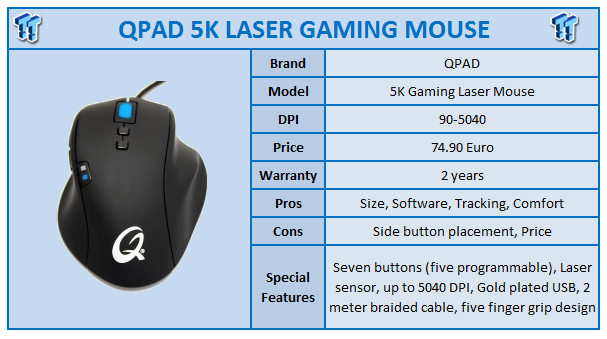
One of the best parts of being a product reviewer at TweakTown is getting to take a look at products from companies that I haven't been aware of before. Being based in Sweden and marketing primarily to the European crowd, QPAD is one of those companies that had not hit my radar until their 5K mouse, CT, and HeatoN mousepads hit my doorstep.
While not being a glamour name in the States, QPAD is a well known name in gaming across the pond. After doing a little homework on the company, I was interested to see what these products had to offer to expand my global knowledge.

The QPAD 5K mouse came packaged like most mice; cardboard box cut out to show off the mouse in a plastic shell. You'll notice right away upon first glance that the QPAD 5K has taken a little bit different approach to mouse design than you will see in a lot of other products. The "five finger" design of the mouse gives all of your fingers a place to sit on the mouse, rather than having to drag your pinkie finger across your mousepad. I wasn't sure I would like it at first, but the 5K was very comfortable for me and it's one of those things that you don't really notice until someone shows it to you. After using the 5K, I now notice my little finger dragging with other mice.
The rest of the top of the mouse gives you a scroll wheel that glows blue when in use, and two buttons below that control the DPI settings of the mouse. The bottom button gives you the low setting, while the top button gives you the high setting. At default and without software installed, the settings default to 450/1260 DPI. The two lights on the left correspond to those settings; bottom (blue) for low, top (red) for high.

The side of the mouse has a pretty good size and comfortable place for your thumb to sit, as well as two more buttons. I personally would have liked to have had the buttons pushed a little closer to the front (wire side) of the mouse as while it was easy to access the front button, the back button takes a little travelling to get to. The buttons are firm, easy clicking, and well sized.

The bottom of the mouse shows off QPAD's "Gaming Grade Laser" in the middle as well as four large feet at the four corners. The tracking seemed very nice and the mouse slid very well on the mousepads as well as my desk.

QPAD's software that comes bundled with the 5K offers just about anything you could want when it comes to customizing the mouse for your personal tastes. From vertical and horizontal DPI adjustments for the high and low settings to setting the functions for the programmable buttons, just about everything you could ask for is here.
Scroll and double click speed are adjustable as well as cursor acceleration, and all of the settings are well laid out for easy access. You can even turn off the scroll wheel light if you want. The only thing missing that you see with some others is the ability to save multiple profiles.

QPAD was also nice enough to include two of their mousepads in the package for testing: the QPAD CT, shown above, has been one of QPAD's staple mousepads since 2006 with its smooth gliding "Hybratek" coating. The mousepad pictured below is one of QPAD's newer creations, the HeatoN Gaming Mouse pad, which claims the title "biggest hard top gaming mouse pad in the world" and definitely eats up a lot of desk space at 43.5x36.5x0.35cm (17.12x14.37inches). There is a smaller version, the HeatoN M, available in a smaller size for those that don't have the real estate on their desk to accommodate this monster.
Both mousepads were very smooth and comfortable to use; the HeatoN mousepad does give you more of a "premium" feel when it comes to glide as using the mouse was a touch. This premium does come at a price as the HeatoN pad retails for 44.90 Euro (39.90 for the M version) as opposed to the 33 Euro pricetag on the CT.

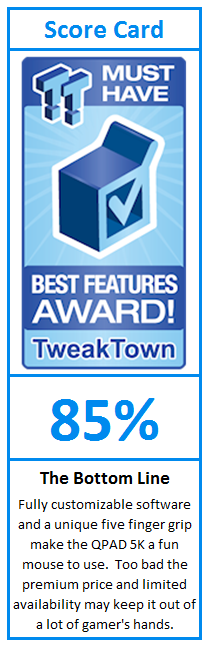
I used the QPAD 5K in both web browsing and gaming functions, playing a few different games like Borderlands, Left for Dead, L4D2, as well as GTA4 to get a feel of how the mouse handles in a few different settings. Overall the tracking was excellent; I did not notice any lag in cursor movement, clicking was solid and responsive, and the few times I had to pick up the mouse the cursor skip was minimal. Being able to adjust the settings in the software was definitely a boost and actually a lot of fun to tinker with. I really like the five finger design of the mouse; this made for a really comfortable design after about an hour or so of getting used to the slight difference in the way I hold this mouse compared to most others..
All of the button clicks are solid and give you the classic tactile feel without being overly noisy. The scroll wheel gives tactile clicks when scrolling as well, although it is nice and quiet and gives just enough feedback to let you know it's there; which is just the way I like it. Other than my small nitpick with the placement of the side buttons, the 5K is a very well laid out mouse.
Overall, I really enjoyed the time I've spent with the QPAD 5K mouse. With a unique and well thought out design, plenty of customization available through the software and a clean look, this is definitely a mouse that should be on customer's radar screens. The 5K does come with a price premium that may be a little rough to swallow for some. At 84.70 Euro/$117 USD shipped worldwide from QPAD's website with very limited availability elsewhere, this mouse is definitely an investment compared to other offerings out there. If you've got the money or can find a deal on one, the QPAD 5K is a mouse to take a chance on.
Our Latest Mice Review Coverage
- Razer Viper V4 Pro Wireless Gaming Mouse Review - Built for Competition
- Corsair SABRE v2 PRO CARBON FIBER Wireless Gaming Mouse Review - The Premium Option
- Corsair SABRE v2 PRO Wireless MG Gaming Mouse Review - A Strong Contender
- Logitech G PRO X2 SUPERSTRIKE Wireless Gaming Mouse Review - Competitive Gaming Perfected
- ASUS ROG Harpe II Ace Wireless Gaming Mouse Review - Performance, Comfort, and Versatility
 Logitech G316 X 98 Wired Gaming Keyboard Review - Retro-Inspired Board that Falls a Little Short
 Logitech G512 X 98 Analog Mechanical Gaming Keyboard Review - An Innovative Two-in-One
 ASUS ROG Raikiri II Xbox Wireless Controller Review - Ready to Take Control
 IQUNIX Magi96 Pro Aluminum Low Profile Mechanical Keyboard Review - Premium Build, Satisfying Sound
 Razer Pro Type Ergo Wireless Split Ergonomic Keyboard Review - Built for Comfort and Support
 Giveaway: 12 Winners Will Score MONTECH NX400 and NX600 CPU Coolers
 Sandisk NAS 800 NVMe SSD delivers PCIe Gen5 speeds for demanding NAS environments
 RayNeo announces new iO Smart Glasses and GT Series with 'cinema-grade' display
 IQUNIX launches premium EC75 Hall Effect keyboard with 0.01mm Rapid Trigger
 AVerMedia announces new pro-grade HDMI capture devices with up to 4K RGB24 True Color support
 Beyerdynamic announces new affordable MMX 100 and MMX 130 wireless gaming headsets with studio-grade sound
 AMD's latest Radeon driver adds support for Star Wars Zero Company, Call of Duty, and Radeon RX 9050 4GB GPU
 Razer's new Huntsman is the 'world's first low-profile analog optical esports keyboard'
 GTA 6 appears to have leaked from Rockstar India, also suspected to be a PC version
 Xbox struggles to move physical discs, accounts for only 4% of disc sales in the US this year
 Samsung Foundry raises manufacturing prices, may impact the Nintendo Switch 2
 GIGABYTE MO27Q2A Gaming Monitor Review: 1440p, 280Hz, and QD-OLED is a winning combination
 Cooler Master V8 ACE 3DHP BLACK CPU Cooler Review
 ASUS ROG Strix XG129C Review: A $199 Gaming Monitor You Don't Play Games On
 Cooler Master HAF II 500 Mid-Tower Chassis Review
 Corsair HS35 v3 Wireless Gaming Headset Review - An Affordable Winner
 D-Link F518 5G Wi‑Fi 6 AX1800 Mobile Hotspot Review: All-Day Mobile Hotspot
 Bose Lifestyle Ultra Speaker Review - Impressively Detailed Room-Filling Sound
 MSI Z890 Gaming Plus WIFI6E Review - Z890 for under $200
 Mortal Kombat (1995) 4K Ultra HD Blu-ray Review
 CPS PCCOOLER YS1200 ATX 3.1 80 PLUS Gold PSU Review
 Using Multiple Monitors? Change these Windows settings for a Better Experience
 Windows Sandbox is The Windows Security Feature Most People Never Use
 I ditched the Windows 11 context menu for this open-source tool, and here's why
 Windows 11 may be encrypting your drive already, and I checked where my recovery key went
 GIGABYTE's 40 Days of INFINITY celebrates 40 Years of Innovation with stunning GeForce RTX graphics cards and rewards
 I swapped File Explorer for this free file manager and finally got the layout I wanted
 How to tell if someone has been using your Windows PC without your permission
 6 Task Manager tips for troubleshooting Windows performance problems
 ASUS ROG's 20th Anniversary Line-up of Premium PC Gaming Gear has Arrived - Here's Everything You Need to Know
 Six File Explorer tips every Windows user should know