Introduction, Package and Contents

Introduction
Like every other motherboard maker on the planet, ASUS maintains multiple product lines and inside each of these lines they have different vertical markets. For example, ASUS has their Republic of Gamers line that runs at the very top of the heap while their mainstream line runs with the tag of Extreme Phase or gets the Deluxe tag to denote extra features.
Recently we have been playing with the top of the line and have found them to be very capable indeed. Now, it is time to return to the mainstream; well, the upper end of the mainstream anyway. We are taking a look at the ASUS P6X58D-E. this $229.99 (at NewEgg.com) motherboard packs a bit of a punch for a decent price. With USB 3.0 and SATA 3.0, 16+ 2 power phases, SLI and Crossfire X support, it looks to be a very capable board indeed.
So let's drop in our favorite Core i7 980X and some good triple channel DDR3 to see what we can get out of this board.
Package and Contents
The box a product ships in can tell you a lot about it as well as giving you an idea on what the manufacturer wants you to focus on. The big focus here is going to be ASUS' triad of claims; number one in performance, safety and reliability. These are the trifecta for the mainstream market. The boards have to perform and last for the average consumer. There are additional points of focus such as the 16+2 phase power, SLI and Crossfire support, and USB 3.0 and SATA 3.0.

If you are looking for more reasons to buy the P6X58D-E then you might want to lift up the front flap. Here we have two groupings of four "push" items. These are things like TurboV, MemOK!, DTS surround audio, True 16+2 Phase power, EPU, Express Gate, and then two features that we are pretty sure were added in to make things even.


The back of the box has a little more detail and also has a picture of the board complete with labels.

Inside the box the extras are limited, but not bad. You get a pair of better quality SATA cables (these are labelled SATA 3.0). You also get a Crossfire bridge and a Tri-SLI bridge.

The Motherboard
The Board
The P6X58D-E follows the ATX layout. It uses a heat pipe cooling system, but one that only connects the Northbridge and part of the power regulation setup. The Southbridge and the other half of the power regulation use stand-alone heatsinks to keep things cool.


Taking a look at the top of the board, we give you a good look at the six RAM slots. Unlike many of the ASUS boards we have played with recently, the P6X58D-E does not have one-armed RAM slots. However, this is not going to be a problem; the primary PCIe slot is far enough away from the RAM that you should not have any issues with installing or removing RAM. There is also enough clearance to allow an active RAM cooler to be used.
The MemOK! button is in this area as well. To use this you simply press it during POST and the board automatically sets the proper RAM timings for the best balance of performance and stability.

The CPU socket area is very clean. Looking at the row of capacitors, we can see that ASUS has left some space between the rows to allow for air flow. This should help keep things cool here. The EPU processor is barely visible on the left of this shot, but this helps to control the phases providing the right amount of power to keep everything stable. The 8-pin 12V Aux power connector is at the upper edge of the board. It is not hindered by either of the heatsinks in this area, but if you wait to connect power until after the board is mounted you might have an issue.

The lower half of the P6X58D-E has a combination of PCIe and PCI ports that are intriguing. The three PCIe x16 slots give you options for Tri-SLI and Crossfire X. The options are noteworthy; if you are running only two GPUs (in the blue slots) both will run at x16. When you load up all the slots, the primary GPU will be x16 and the other two will run at x8. In-between the PCIe slots ASUS has placed two PCI 2.0 slots to allow for good flexibility. There is a single x1 PCIe slot just in case you want to drop in a discrete audio card or TV tuner.

Moving over to the other side of the board, we see the IHC10R under its smaller passive heatsink. We also see the Marvell controller that runs the dual SATA 3.0 ports on the board. There are two SATA ports (ports 5 and 6) away from the rest of the SATA cluster.

The I/O ports on the board are not very exciting, but they do offer some nice options. You get two USB 3.0 ports, a single Firewire (1394a), Coaxial and Optical S/PDiF out along with the standard fare.
The P6X58D-E is a well laid out board which offers some good flexibility depending on the setup you want to run.
BIOS and Overclocking
BIOS
As with all ASUS products, the P6X58D-E uses an AMI BIOS layout with a few ASUS special features. If you are looking to tweak your CPU and memory then the place you want to head first is to the AITweaker Pages.


As you can see, with the Intel X58 and 1366 CPUs there are a larger array of voltage and CPU options. Thankfully they are almost all located on this page.

The RAM timing options also seem to be a little more detailed than what we have found on this level (upper end of the mainstream market) of motherboards for AMD.

The P6X58D-E also has the usual Advanced menu which includes items for adjusting advanced properties of the CPU, onboard devices, USB and a few other items.

In the power area we find the Q-Fan controls. We have talked about these before, but it is worth talking about them again here.


As you can see, the Q-Fan controls allow a few options for both the CPU and Chassis fans. You get an extra option with the CPU fan, though; manual control.

With manual control ASUS gives you some impressive options for your CPU fan. Now, this only work if you are using a single fan cooler, so our Hyper 212+ that we used to use would have problems with this single header option.
Overclocking
As you would expect, the P6X58D-E overclocks pretty well. You can still tell that it is not meant for extreme overclocking, though. There are warnings all over the place when you push outside normal tolerances. It was very odd to see a voltage of 1.4 turn red in the BIOS, indicating a dangerous voltage. This is a fairly regular voltage used when overclocking. In fact, to get our stable overclock we ended up pushing to 1.435V without any problems, but we typically use high-end cooling. Our final OC ended up being 172 x 25 for a nice 4.3GHz clock.

You can see the validation for the ASUS P6X58D-E here.
TurboV EVO
The TurboV software on the P6X58D-E is rather light weight. We were expecting the usual compliment of features including an Auto Tuning option, but this was not available.
Still, for what it is worth, the TurboV software that was present on the P6X58 was still very functional.


As all overclocking results are dependent on the hardware you use, your results may vary. Results of our overclocking tests are included in the performance section with the stock scores.
Important Editor Note: Our maximum overclocking result is the best result we managed in our limited time of testing the motherboard. Due to time constraints we weren't able to tweak the motherboard to the absolute maximum and find the highest possible FSB, as this could take days to find properly. We do however spend at least a few hours overclocking every motherboard to try and find the highest possible overclock in that time frame. You may or may not be able to overclock higher if you spend more time tweaking or as new BIOS updates are released. "Burn-in" time might also come into play if you believe in that.
Test System Setup and Comments
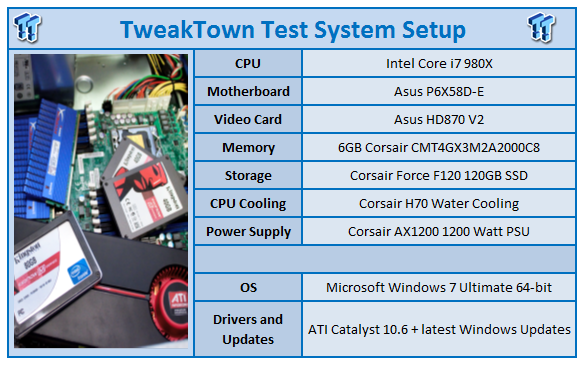
As with most modern motherboards, the P6X58D-E was easy to setup and also to get the drivers installed. ASUS has one of the better auto installers that we have played with, so things went very smoothly. As we mentioned, there was plenty of space between the primary GPU and the RAM (also the CPU), so we do not anticipate any cooling issues.

One odd problem that we did run into was with the EPU-6 software. Despite the fact that we had set the software to not put the system in stand-by, we found that every time we booted up these settings were changed back to defaults. This only happened when running on the Auto setting and did not affect performance in any way (other than the system would power off after 25 minutes).

Still, even with this issue, we would recommend installing this software as when active we noticed a reduction in heat generation, and of course power draw. The system still remained quick and responsive. We did not have to wait at all to go from the reduced power state at idle to running full blast.
Synthetic Tests - Part I
With any system you will want to see a combination of synthetic testing and real-world. Synthetics give you a static, easily repeatable testing method that can be compared across multiple platforms. For our synthetic tests we use Everest Ultimate, Sisoft Sandra, FutureMark's 3DMark Vantage and PCMark Vantage, Cinebench as well as HyperPi. Each of these covers a different aspect of performance or a different angle of a certain type of performance.
Memory Bandwidth
Memory is a big part of current system performance. In most systems slow or flakey memory performance will impact almost every type of application you run. To test memory we use a combination of Sisoft Sandra, Everest and HyperPi 0.99.
Sisoft Sandra
Version and / or Patch Used: 2010c 1626
Developer Homepage: http://www.sisoftware.net
Product Homepage: http://www.sisoftware.net
Buy It Here

You know, many people have claimed that there is no benefit to triple channel. Well, this might be true when you get down to day to day applications, but as you can see above, having the extra channel gives us some great memory performance. The P6X58D-E yields a little 22GB/s in raw memory bandwidth. This could bode very well for many of our more memory dependent tests later.
Everest Ultimate
Version and / or Patch Used: 5.30.1983
Developer Homepage: http://www.lavalys.com
Product Homepage: http://www.lavalys.com
Buy It Here
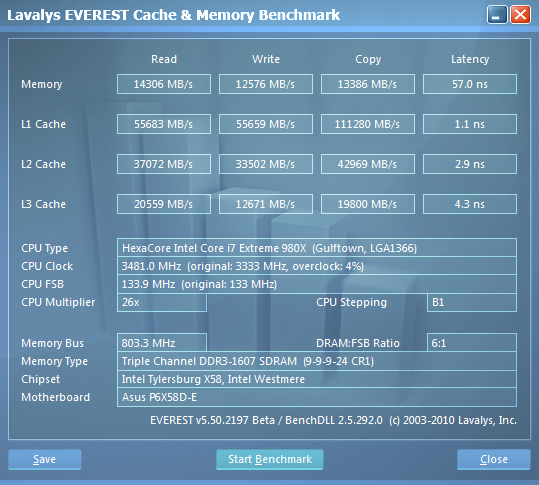
Everest Ultimate is a suite of tests and utilities that can be used for system diagnostics and testing. For our purposes here we use their memory bandwidth test and see what the theoretical performance is.
Stock Memory Performance

Overclocked Memory Performance
Everest backs up that same performance we saw with Sandra. The P6X58D-E certainly does have some room to maneuver in terms of memory performance.
HyperPi 0.99
Version and / or Patch Used: 0.99
Developer Homepage: www.virgilioborges.com.br
Product Homepage: www.virgilioborges.com.br
Download It Here
HyperPi is a front end for SuperPi that allows for multiple concurrent instances of SuperPi to be run on each core recognized by the system. It is very dependent on CPU to memory to HDD speed. The faster these components, the faster it is able to figure out the number Pi to the selected length.
For our testing we use the 32M run. This means that each of the four physical and four logical cores for the i7 and the four physical cores of the i5 is trying to calculate the number Pi out to 32 million decimal places. Each "run" is a comparative to ensure accuracy and any stability or performance issues in the loop mentioned above will cause errors in calculation.

Ok, let's start off by saying that while the stock numbers here are not extraordinary, they are still good. Each CPU core is running two full instances of SuperPi 32M. That is a lot of numbers being crunched.
When we kicked the CPU up to 4.3GHz things really took off. We were shocked to see the extreme drop in time, so much so that we ran the test three additional times to be sure of the accuracy.
Synthetic Tests - Part II
Disk Drive Controller
The system drive controller is an important part of system performance. In most modern boards your drive controller will run off of the PCI-e bus. The PCI-e bus performance can be affected by poor trace layout as well as many other design choices that show up on different boards.
For testing we use Sisoft's Sandra and Everest.
SiSoft Sandra

HDD performance on the P6X58D-E is good, but then again, the Intel IHC10R is a good SATA II controller. The rest of the performance is good, but we did find it odd that the HDD performance dropped when we overclocked the system.
Everest

Stock HDD Performance

Overclocked HDD Performance

Stock USB 3.0 Performance

Overclocked USB 3.0 Performance
Everest backs up our findings with Sandra.
Synthetic Tests - Part III
Here is where we dig out the FutureMark tests.
PCMark Vantage
Version and / or Patch Used: 1.0.0.0
Developer Homepage: http://www.futuremark.com/
Product Homepage: www.futuremark.com
Buy It Here
For overall system performance we use PCMark Vantage. This is run in both x86 and x64 mode to give the best indication of performance.
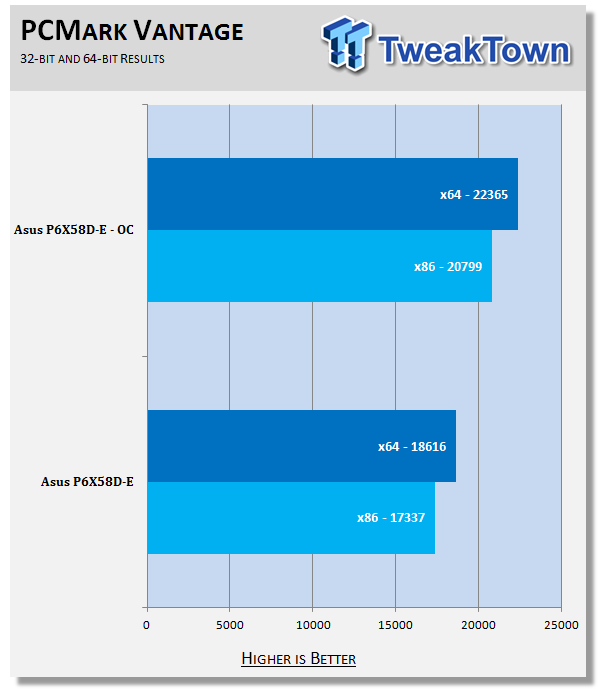
The P6X58D-E makes short work of PCMark Vantage. With the excellent memory and HDD speed (not to mention the 6 cores running at 3.3GHz with 2 threads per core), the performance numbers are well up there.
3DMark Vantage
Version and / or Patch Used: 1.0.1
Developer Homepage: http://www.futuremark.com/
Product Homepage: www.futuremark.com
Buy It Here
For synthetic gaming tests we used the industry standard and overlockers bragging tool 3DMark Vantage. This is a test that strives to mimic the impact modern games have on a system. Futuremark went a long way to change from the early days of graphics driven tests to a broader approach including physics, AI and more advanced graphics simulations.
3DMark Vantage uses the DX10 API in addition to having support for PhysX. As we are no longer using an NVIDIA GPU for testing (at least until we can get a GTX 4xx card) you will only see the CPU based PhysX results in the scores. For testing we use the Performance test run.

We see another excellent run on the P6X58D-E. Much of this is due to the factory overclocked HD5870 V2, but the board needs to be able to let this GPU do its work.
Cinebench R11. x64
Version and / or Patch Used: R11.5 x64
Developer Homepage: http://www.maxon.net/
Product Homepage: www.maxon.net
Download It Here
Cinebench is a synthetic rendering tool developed by Maxon. Maxon is the same company that developed Cinema4D, another industry leading 3D Animation application. Cinebench R11.5 tests your systems ability to render across a single and multiple CPU cores. It also tests your systems ability to process OpenGL information.

With Cinebench 11.5 we see that the ASUS P6X58 motherboard is able to keep with the demand of all 12 threads running on the 980X. Again, this is due to the excellent memory and HDD performance we saw earlier.
Real-World Tests - Part I
Real-world testing allows us to see how well a product will perform when used in the same manner as it would be in your house or office. It is an important side to performance testing as it can uncover hidden glitches in the way a product performs.
It is especially true when testing a mainboard; there are so many components of a board that have to interact that any problems between parts can cause a failure of the whole.
For real-world testing we use some common applications and functions. We test with LightWave 3D for rendering performance, AutoGK for transcoding from DVD to AVI and two games for gaming testing.
Rendering
Rendering of 3D Animation is a system intensive endeavor. You need a good CPU, memory and HDD speed to get good rendering times. For our testing we use LightWave 3D. This software from Newtek is an industry standard and has several pre-loaded scenes for us to use.
LightWave 3D
Version and / or Patch Used: 9.6
Developer Homepage: http://www.newtek.com
Product Homepage: http://www.newtek.com/lightwave/
Buy It Here

Our LightWave 4K render test gets completed in under 9 minutes at stock speeds and under 7 when we pushed the system. Now this is an impressive bit of performance. True, it is not a full render (around 960 frames for the average 30 second project), but it is still impressive.
AutoGK
Version and / or Patch Used: 2.55
Developer Homepage: http://www.autogk.me.uk/
Product Homepage: http://www.autogk.me.uk/
Download It Here
AutoGK stands for Auto Gordian Knot; it is a suite of transcoding tools that are compiled into an easy to install and use utility. It allows you to transcode non-protected DVDs and other media to Xvid or Divx format. For our testing purposes we use a non-DRM restricted movie that is roughly 2 hours in length. This is transcoded to a single Xvid AVI at 100% quality.

Not much to say here really; it is once again a reflection of HDD, memory and of course CPU performance.
Real-World Tests Part II
Here we have our real gaming tests. Each of the games we chose uses multiple cores and GPUs. They are able to stress the system through use of good AI. Both have decent positional audio that adds impact to the sound subsystem of the board. We ran each game through the level or parts listed and recorded frame per second using FRAPS. This brings the whole game into play.
*** A word on gaming as a motherboard test; ***
Despite the fact that most games are very GPU limited, we are still noticing HDD and even audio creating issues in gaming performance. Because of this you may see differences in the number of frames rendered per second between different boards. Usually the difference is very small but occasionally, because of bad tracing, poor memory or HDD performance this difference is significant. The issues are often more prevalent in older versions of DirectX but can still pop up in DX10 and 11.
Call of Duty Modern Warfare 2 (DX9)
Version and / or Patch Used: 1.0
Timedemo or Level Used: First combat until the school is cleared
Developer Homepage: http://www.infinityward.com
Product Homepage: http://modernwarfare2.infinityward.com
Most of you know about the game Modern Warfare 2, it caused quite a bit of controversy in the latter half of 2009. The game is a first person shooter with a heavy combat emphasis. It follows the events in the first Modern Warfare very closely and brings back several characters from the original.
As with most games in the Call of Duty franchise, it features a heavy AI load. This is not because of a complex AI routine, but more due to the sheer number of enemies in any given combat situation. It is also our single DX9 based game in our testing suite. Settings are shown below.


Hmmm, the performance numbers we see here seem to fly in the face of my usual comment that CPU speed does not affect gaming much. But with a 12 FPS difference at minimum, I have to wonder about that when we use a much faster GPU like the HD 5870 V2.
Far Cry 2 (DX10)
Version and / or Patch Used: V1.00
Timedemo or Level Used: Clearing the Safe house through to the Rescue
Developer Homepage: http://www.ubi.com
Product Homepage: http://farcry.us.ubi.com
Far Cry 2 is a large sandbox style game. There are no levels here, so as you move about the island you are on you do not have to wait for the "loading" sign to go away. It is mission driven so each mission is what you would normally think of as the next "level".
In the game you take the role of a mercenary who has been sent to kill the Jackal. Unfortunately your malaria kicks in and you end up being found by him. Long story short you become the errand boy for a local militia leader and run all over the island doing his bidding. Settings we used for testing are shown below.


With Far Cry 2 we are back to business. As usual there is very little difference between the overclocked and stock speeds here. In fact, the overclocked test run is slightly behind the stock speeds.
Battlefield Bad Company 2 (DX11)
Version and / or Patch Used: V1.00
Timedemo or Level Used: From washing up on the beach to the mine fields.
Developer Homepage: http://www.ea.com/
Product Homepage: http://badcompany2.ea.com/
Battlefield Bad Company is another sequel and also another game "franchise". Bad Company 2 is also our DX11 Shooter game. The game follows a fictitious B company team on a mission to recover a Japanese defector. This puts you back in World War II (at least for the beginning of the game) while the multi-player game is centered on much more modern combat. For our testing we used the single player mode. Settings are shown below.


Bad Company 2 performance is up there, but again we find that the overclocked performance is a little behind the stock run. Not enough to be a concern, but interesting to see.
Gaming Conclusion
The ASUS P6X58D-E seems to be aimed at the gamer right out of the box. With three x16 PCIe slots for Tri SLI or Crossfire (at x16/x8/x8), you have flexibility for a very powerful gaming setup. As we mentioned in the layout section and the system comments, we found that there was a nice amount of room for air flow. The audio quality for gaming was also more than acceptable. The P6X58D-E really does have the makings of an excellent gaming option.
Power Usage, Heat Tests and Final Thoughts
Power Consumption
We are now able to find out what kind of power is being used by our test system and the associated graphics cards installed. Keep in mind; it tests the complete system (minus LCD monitor, which is plugged directly into an AC wall socket).


With its EPU and the EPU-6 software running at stock speeds, the P6X58D-E is pretty energy efficient. Of course, if you are going to overclock the system, then the EPU cannot do much for you.
Heat Generation
As a new measure, we are now monitoring the heat generation from the key components on the motherboard; this being the Northbridge, Southbridge (if it contains one) as well as the Mosfets around the CPU. The results are recorded at idle and load during the power consumption tests.


When we first looked at the P6X58D-E we felt there would be no cooling issues with the board. However, we noted that even at stock speeds and at idle the Northbridge does get a little warm. We do not think that this will be a problem, though, as there was not much of a delta between idle and load temps (around 2C). Even when overclocked things did not get out of hand.
Final Thoughts
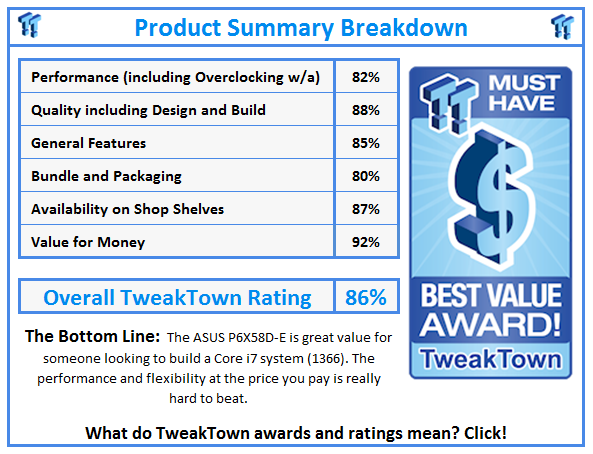
The ASUS P6X58D-E is a very good board. It shows that it deserves its place at the upper end of the ASUS mainstream line-up. With options for overclocking, Tri-SLI and Crossfire, along with excellent memory performance, you could really use this in any role you wanted (multiple Quadros for graphics work etc.).
On the gaming front we found that the P6X58D-E was more than capable. The audio was well done with clean sound while once again the memory and HDD performance showed in the time it took levels to load. On the workstation side the P6X58D-E was able to deal with our professional level apps with ease. With a price tag of $229.99 from NewEgg.com the P6X58D-E is great value for gamers and prosumers alike.
Our Latest Socket LGA 1366 Review Coverage