

Introduction

The other week we had a look at a GTX 260 from GIGABYTE which sat in the company's new Super Overclock series. One of our main concerns about the new series was that what might be a "Super Overclock" to GIGABYTE, might not be to us. Considering we see some companies really give us some serious MHz out of these high-end models, GIGABYTE really had their work cut out for them.
When it came to testing, however, the GTX 260 did nothing but offer us the best performance we've seen out of the model. Finding ourselves quickly getting excited, we were happy to see that the higher end GTX 275 was going to get the same SOC treatment.
Now, what we hope here is that the company hasn't given us a bit of false hope with the GTX 260 and that the same love can be shown towards the higher end GTX 275. If GIGABYTE manages to impress us with this model, we hope to see more and more cards enter the new series from the company. Let's get into the package now and see what exactly is going on with the GTX 275 Super Overclock.
The Package
Having a look at the front of the box, we can see the same overall design as the GTX 260 Super Overclock we looked at recently. Across the top we have the GIGABYTE logo while below that we have the Super Overclock one taking up the majority of the box and below that we have a bit of a motto.

Going to the bottom, we have the model, in this case the GTX 275. Next to that we have a graph which lets us know how this compares to a stock model. Above this we have a few logos; the GPU Gauntlet one which lets us know the GPUs are cherry picked and also the Ultra Durable VGA logo.

Looking at the back of the box, we have a big run down on what the two logos on the front of the box mean. We can see there's a fair bit of information about GPU Gauntlet and how it benefits you along with also letting us know what the Ultra Durable VGA series means.

Looking at the paperwork, there isn't much going on here. We've got our typical manual which is the same as the GTX 260 Super Overclock. We've also got a CD which carries with it the drivers. As always, though, we recommend that you go to the NVIDIA website and grab the latest.

The cable department doesn't hold any surprises. Starting from the left, we have two Dual Molex to 6-Pin PCI E connectors, an S/PDIF loopback cable, HDMI to DVI and DVI to VGA connectors.
Video Card
With the package out of the way it's time to have a look at the card and you can see there isn't anything too special about it. As fancy as the card sounds with its Super Overclock naming, we can see that GIGABYTE has opted for the stock cooler like we saw with the GTX 260.

We can of course see that GIGABYTE has added its own sticker to the cooler. On the fan we have the GIGABYTE logo while on the left side we have the brand, model and again the mention that the card is part of the Super Overclock series.


Taking a quick spin around the card, there continues to be no surprises. At the back of the card we have two 6-Pin PCI E connectors, while next to these we also have a little white connector which is used in conjunction with the S/PDIF loop back cable. Staying across the top but moving closer to the front, we have our two SLI connectors which give us the ability to run up to three of these cards together.

In the I/O department we can see that GIGABYTE has decided to mix it up a bit. Across the top we have our vents to let the hot air escape. Moving down and starting from the right we have a Dual-Link DVI connector, VGA port and a native HDMI port. If you need two DVI ports, though, don't forget that GIGABYTE was kind enough to include a HDMI to DVI connector in the bundle as well.
Specifications
Having a look at the specifications, we can see that GIGABYTE haven't disappointed when it comes to clocks. The first number we're looking at is 715MHz; this is way up from the stock 633MHz that the GTX 275 normally carries. This has in turn boosted the shader clock to 1550MHz from the stock 1404MHz.
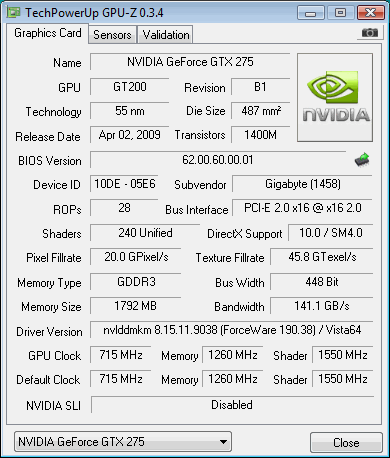
What we can also see is that GIGABYTE have doubled the memory from 896MB of GDDR3 to 1792MB. They've then cranked the MHz up on that to 2520MHz DDR which like the other clocks is way up from the stock clock which comes in at 2268MHz DDR.
Test System Setup and 3DMark Vantage
Test System Setup
Processor(s): Intel Core i7 920 @ 3.8GHz (190MHz x 20)
Cooling: Noctua NH-U12P (Supplied by Noctua)
Motherboard(s): GIGABYTE EX58-UD5 (Supplied by GIGABYTE)
Memory: 3 X 2GB OCZ Technology PC-12800 DDR-3 8-8-8-24 (OCZ3G1600LV6GK)
Hard Disk(s): Western Digital 300GB Velicorapter (Supplied by Western Digital)
Operating System: Windows XP Professional SP2 and Windows Vista SP1 64-bit
Drivers: ForceWare 190.38
Today we'll see how the GTX 275 Super Overclock from GIGABYTE compares against a number of other GTX models from NVIDIA including the GTX 260 Super Overclock we looked at recently and also the Palit GTX 275 to see what kind of extra performance we get over a card of the same model. We'll also throw in the GTX 285 which GIGABYTE say this should be able to outperform.
Let's get started!
3DMark Vantage
Version and / or Patch Used: 1.0.1
Developer Homepage: http://www.futuremark.com
Product Homepage: http://www.futuremark.com/products/3dmarkvantage/
Buy It Here

3DMark Vantage is the new industry standard PC gaming performance benchmark from Futuremark, newly designed for Windows Vista and DirectX10. It includes two new graphics tests, two new CPU tests, several new feature tests, and support for the latest hardware.
3DMark Vantage is based on a completely new rendering engine, developed specifically to take full advantage of DirectX10, the new graphics API from Microsoft.
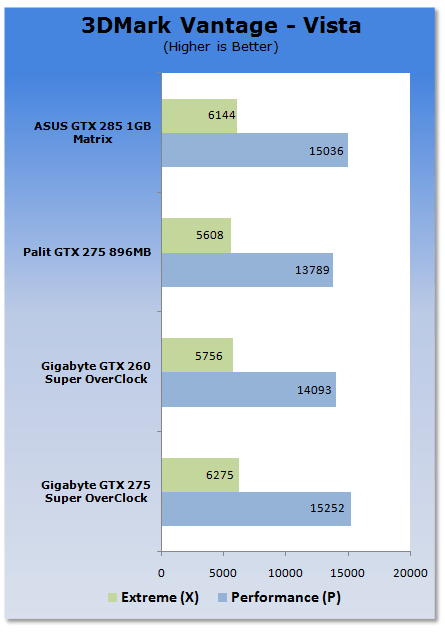
Straight away we see some excellent numbers from the GTX 275 with it pulling out a win at both presets.
Benchmarks - PT Boats: Knights of the Sea
PT Boats: Knights of the Sea
Version and / or Patch Used: Benchmark Demo
Developer Homepage: http://en.akella.com/
Product Homepage: http://www.pt-boats.net/

PT Boats: Knights of the Sea is a naval action simulator that places gamers in charge of a mosquito fleet of the Allied Forces, Russia or Germany during the height of World War II.
Using the latest Direct X 10 technology PT Boards - Knights of the Sea manages to apply a lot of stress to the components of today which in turn gives us quite an intensive benchmark.
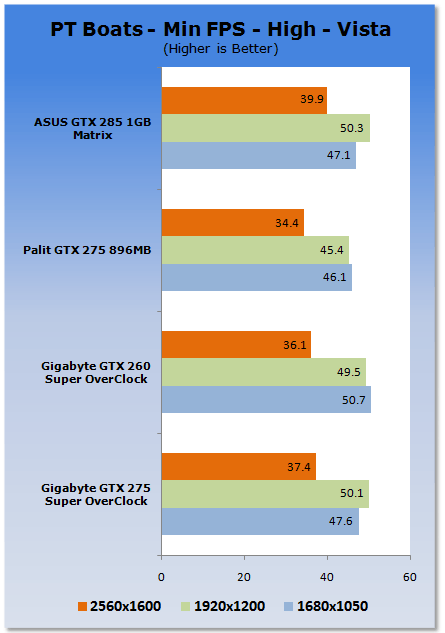
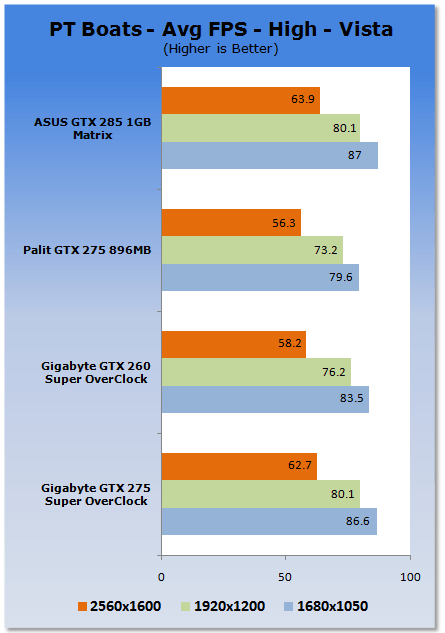
We can see the GTX 275 Super Overclock again puts out some very good numbers; it sits right on the tail of the GTX 285; ahead at one point, slightly behind in another.
Benchmarks - CINEBENCH R10
CINEBENCH R10
Version and / or Patch Used: Release 10
Developer Homepage: http://www.maxon.net/
Product Homepage: http://www.maxon.net

CINEBENCH is a real-world test suite that assesses your computer's performace capabilities. MAXON CINEBENCH is based on MAXON's award-winning animation software, CINEMA 4D, which is used extensively by studios and production houses worldwide for 3D content creation. MAXON software has been used in blockbuster movies such as Spider-Man, Star Wars, The Chronicles of Narnia and many more.
MAXON CINEBENCH runs several tests on your computer to measure the performance of the main processor and the Video Card under real world circumstances. The benchmark application makes use of up to 16 CPUs or CPU cores and is available for Windows (32-bit and 64-Bit) and Macintosh (PPC and Intel-based).
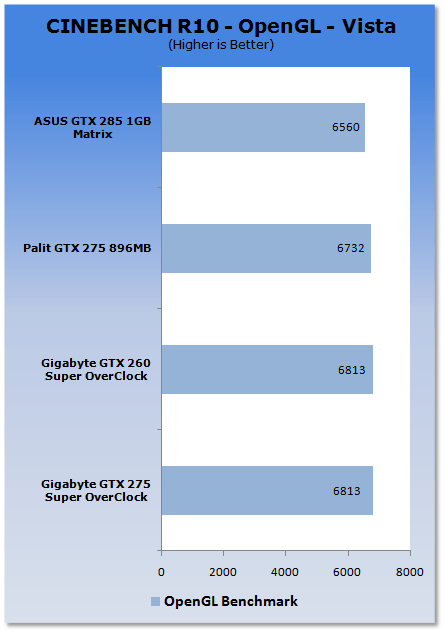
The numbers across the board are pretty similar with very little separating all the cards.
Benchmarks - World in Conflict
World in Conflict
Version and / or Patch Used: 1.0.0.5
Timedemo or Level Used: Built-in Test
Developer Homepage: http://www.massive.se
Product Homepage: http://www.worldinconflict.com

World in Conflict is a real-time strategy video game by Massive Entertainment and to be published by Sierra Entertainment for Windows (DX9 and DX10).
The game is set in 1989 where economic troubles cripple the Soviet Union and threaten to dissolve it. However, the title pursues a "what if" scenario where, in this case, the Soviet Union does not collapse and instead pursues a course of war to remain in power. It is an intensive new game is sure to put plenty of stress on even the latest Video Cards and we use the built-in benchmarking for our testing.
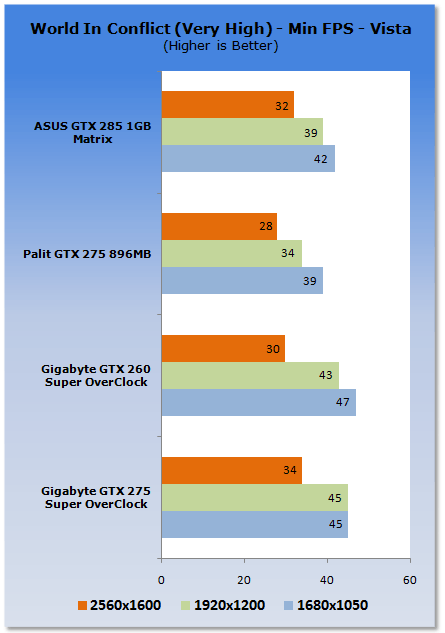
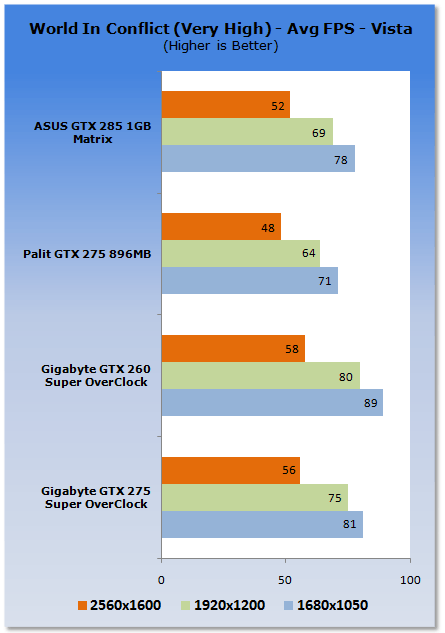
We continue to see very impressive numbers with the GTX 275 Super Overclock. You can see as we climb higher up in the resolution table the GTX 275 from GIGABYTE is able to outperform the other three cards here.
Benchmarks - Crysis Warhead
Crysis Warhead
Version and / or Patch Used: Unpatched
Timedemo or Level Used: Airfield
Developer Homepage: http://www.crytek.com
Product Homepage: http://crysiswarhead.ea.com/
Buy It Here

Crysis Warhead updates and refines the gameplay of the original game through a sidestory plot involving Psycho, one of previous protagonist Nomad's allies. The game is a parallel story that follows Sergeant Michael "Psycho" Sykes, a character from the original Crysis, as he faces his own trials and challenges on the other side of the island during the time period of the first game.
It also showcases a new, enhanced and optimized version of CryEngine 2 using full DX10 extensions and is the first game developed by Crytek's Budapest studio.
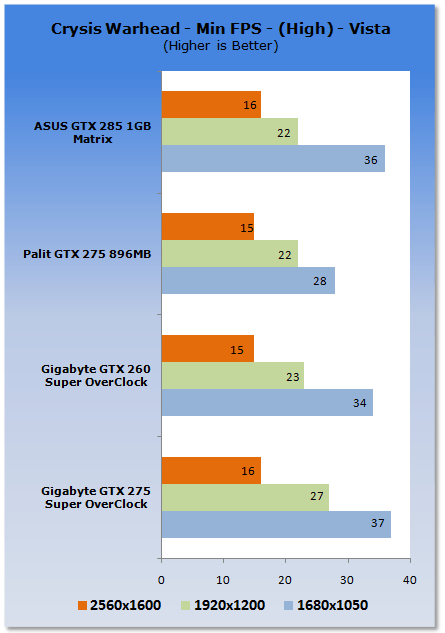
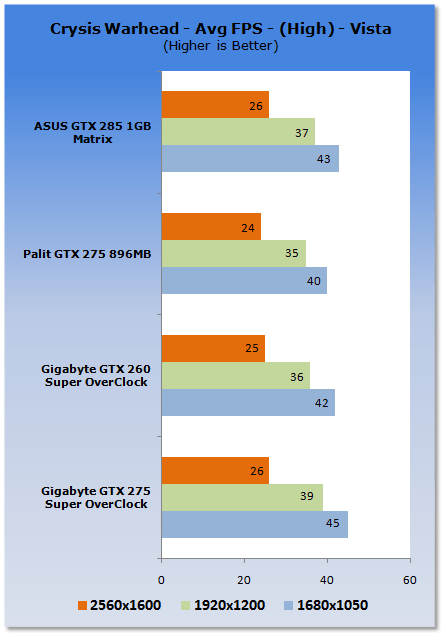
Again we see the GTX 275 from GIGABYTE is able to pull out a win. The only time it doesn't come out in front is at 2560 x 1600 against the GTX 285 and at that point both cards scored exactly the same.
Benchmarks - Far Cry 2
Far Cry 2
Version and / or Patch Used: 1.01
Timedemo or Level Used: Ranch Long
Developer Homepage: http://www.ubi.com/
Product Homepage: http://www.farcry2.com/
Buy It Here

The Dunia Engine was built specifically for Far Cry 2 by the award-winning Ubisoft Montreal development team. It delivers the most realistic destructible environments, amazing special effects such as dynamic fire propagation and storm effects, real-time night-and-day cycle, dynamic music system, non-scripted enemy A.I. and so much more.
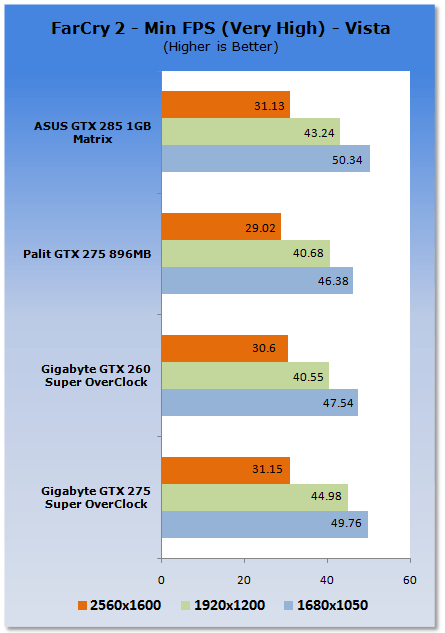
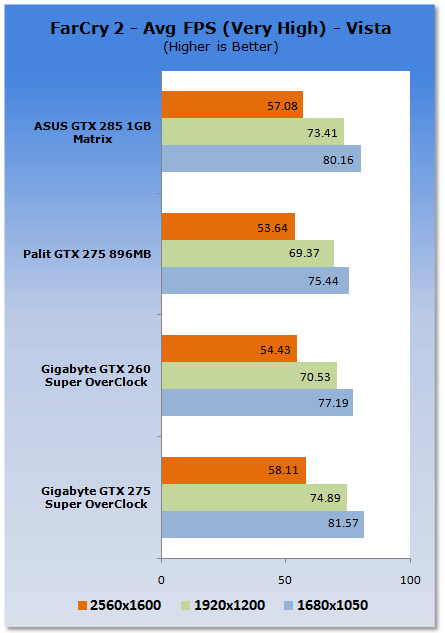
Good numbers with the GTX 275 SOC again getting a win against the GTX 285. More importantly, though, we're above that 30 FPS minimum which is something the other GTX 275 wasn't able to do at 2560 x 1600.
Benchmarks - S.T.A.L.K.E.R. - Clear Sky
S.T.A.L.K.E.R. - Clear Sky
Version and / or Patch Used: 1.5.07
Timedemo or Level Used: Custom Timedemo
Developer Homepage: http://www.gsc-game.com/
Product Homepage: http://cs.stalker-game.com/en/
Buy It Here
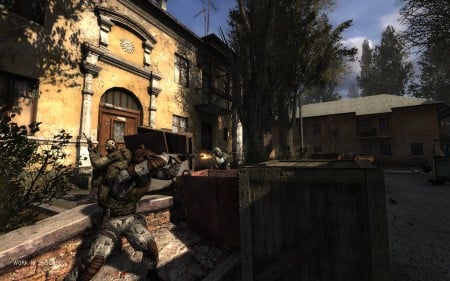
S.T.A.L.K.E.R.: Clear Sky, is the stand-alone prequel for S.T.A.L.K.E.R.: Shadow of Chernobyl, a first-person shooter computer game by Ukrainian developer GSC Game World.[3] The game consists of a roughly 50/50 mix of new areas and old, remodeled areas from the previous game. The X-ray graphics engine has been updated to version 1.5 and includes DirectX 10 support (later patch 1.5.06 included DirectX 10.1). Additionally, the AI received an overhaul to accommodate the new faction wars feature.
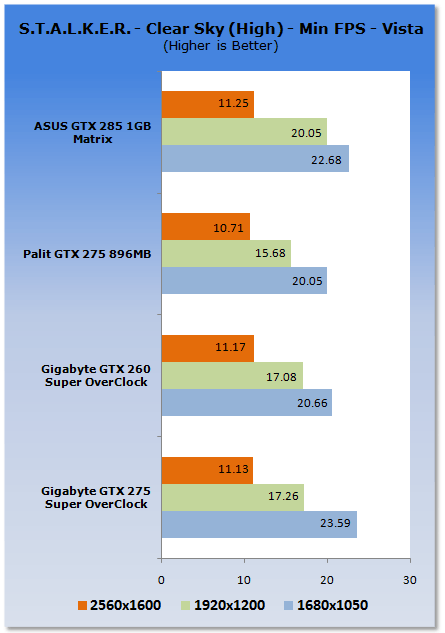
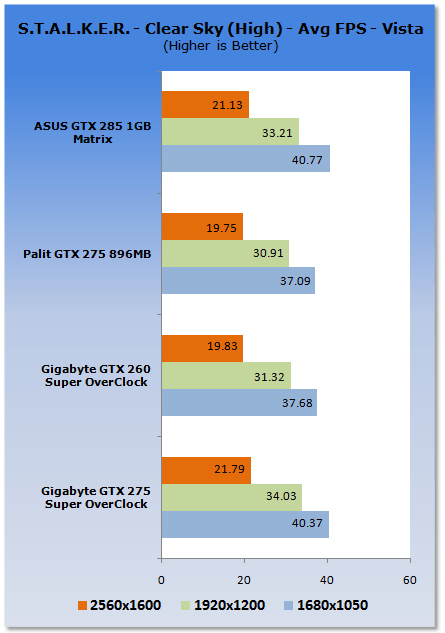
Under Clear Sky the numbers are a bit all over the place. At the lower resolution we see it pulls out a win; at 1920 it falls back a little, while at 2560 it's again right on the tail of the GTX 285.
Benchmarks - Left 4 Dead
Left 4 Dead
Version and / or Patch Used: Latest Steam Update
Timedemo or Level Used: Custom Timedemo
Developer Homepage: http://www.valvesoftware.com/
Product Homepage: http://www.l4d.com/
Buy It Here

Left 4 Dead uses the latest version of Valve's Source engine, with improvements such as multi-core processor support and physics-based animation to more realistically portray hair and clothing, and to improve physics interaction with enemies when shot or shoved in different body parts. Animation was also improved to allow characters to lean realistically when moving in curved paths.
Rendering and artificial intelligence were scaled up to allow for greater number of enemies who can navigate the world in better ways, such as climbing, jumping or breaking obstacles. Lighting has been enhanced with new self-shadowing normal mapping and advanced shadow rendering that is important to convey information about the environment and player actions.
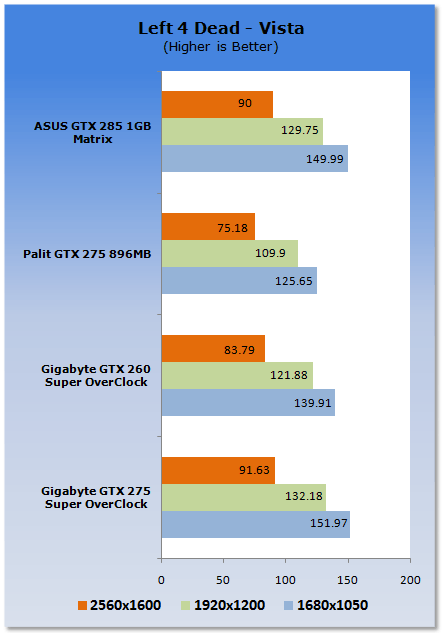
Across the board we can see that the GTX 275 from GIGABYTE was again able to pull out a win against all the cards we have pit it against.
Benchmarks - High Quality AA and AF
High Quality AA and AF
Our high quality tests let us separate the men from the boys and the ladies from the girls. If the cards weren't struggling before they will start to now.
Far Cry 2
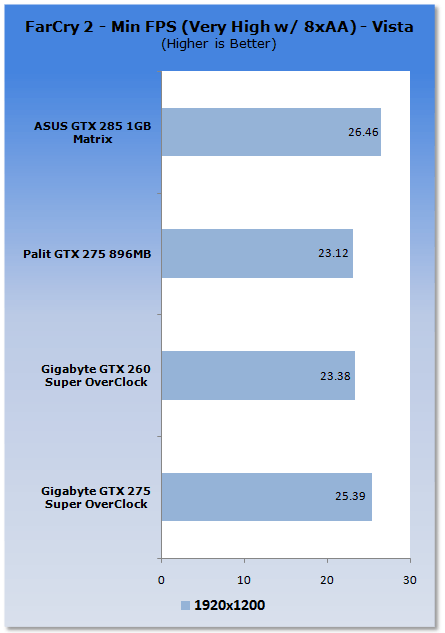
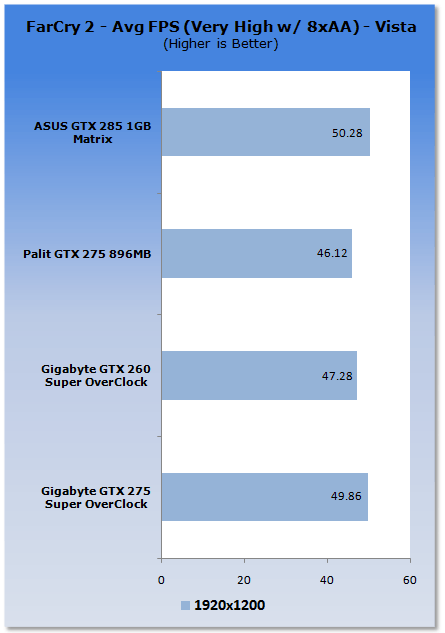
We see a good jump in performance; unfortunately in this case we're just a little behind the GTX 285. We're also below that 30 FPS minimum we need to see.
World In Conflict
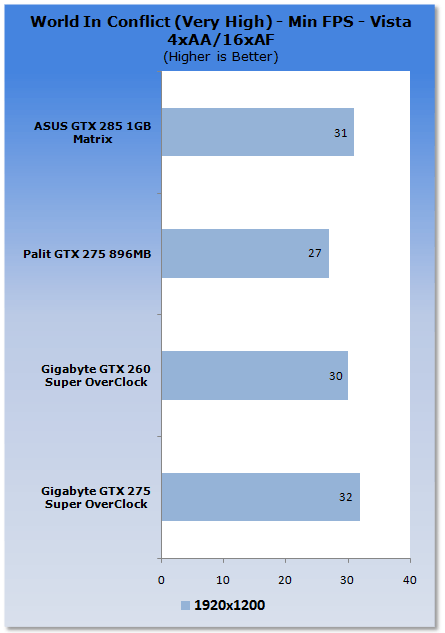
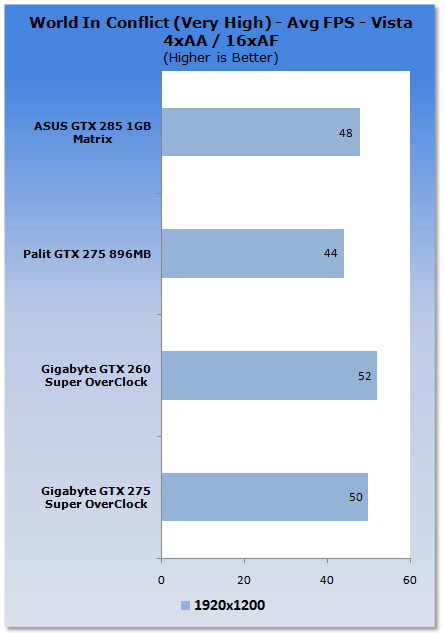
Good performance and we can see in the minimum department the GTX 275 SOC is able to pull out another win for GIGABYTE.
Left 4 Dead
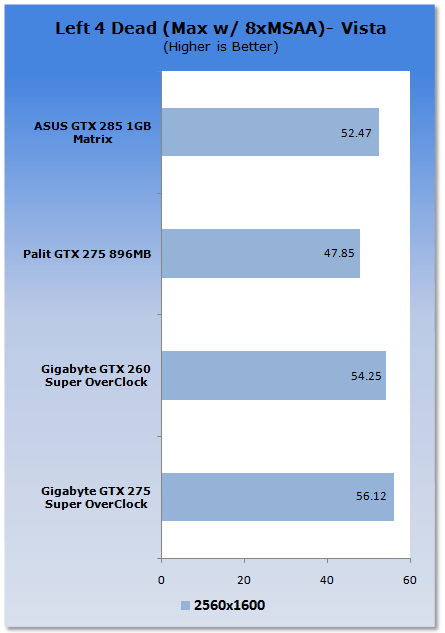
In our last HQ test we can see that GIGABYTE again manages to pull out a win with the card outperforming the GTX 285.
Benchmarks - World in Conflict - XP
World in Conflict
Version and / or Patch Used: 1.0.0.5
Timedemo or Level Used: Built-in Test
Developer Homepage: http://www.massive.se
Product Homepage: http://www.worldinconflict.com
World in Conflict is a real-time strategy video game by Massive Entertainment and to be published by Sierra Entertainment for Windows (DX9 and DX10) and the Xbox 360.
The game is set in 1989 where economic troubles cripple the Soviet Union and threaten to dissolve it. However, the title pursues a "what if" scenario where, in this case, the Soviet Union does not collapse and instead pursues a course of war to remain in power. It is an intensive new game is sure to put plenty of stress on even the latest Video Cards and we use the built-in benchmarking for our testing.
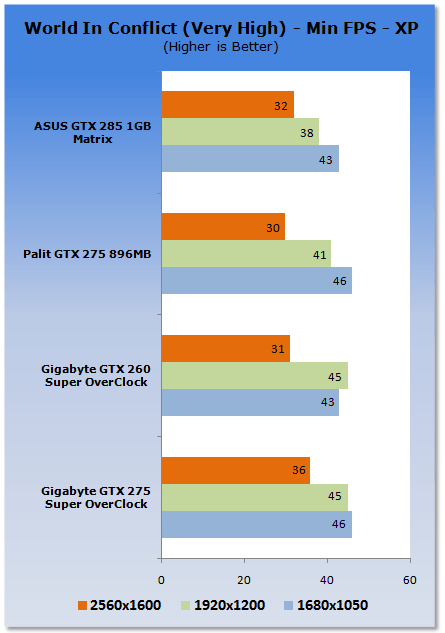
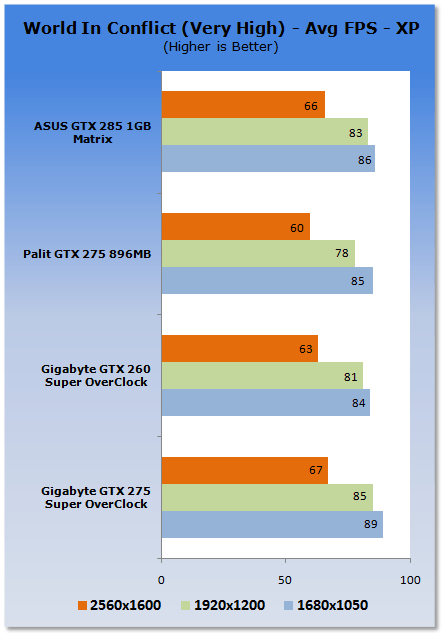
Moving to XP, we see some good gains again and the GTX 275 SOC manages to pull out a win against the GTX 285.
Benchmarks - Far Cry 2 - XP
Far Cry 2
Version and / or Patch Used: 1.01
Timedemo or Level Used: Ranch Long
Developer Homepage: http://www.ubi.com/
Product Homepage: http://www.farcry2.com/
Buy It Here
The Dunia Engine was built specifically for Far Cry 2 by the award-winning Ubisoft Montreal development team. It delivers the most realistic destructible environments, amazing special effects such as dynamic fire propagation and storm effects, real-time night-and-day cycle, dynamic music system, non-scripted enemy A.I. and so much more.
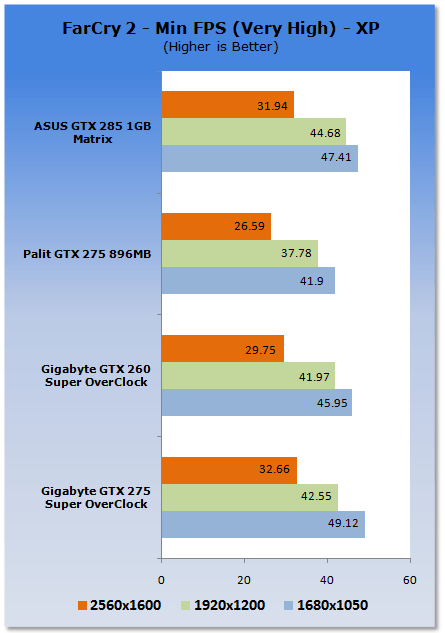
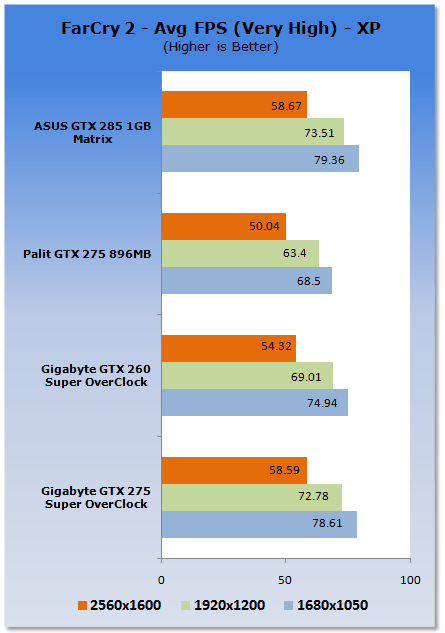
Looking at Far Cry 2 performance under XP we can see that the numbers are impressive. At 2560 x 1600 we're able to beat the GTX 285 and break the 30 FPS minimum which the GTX 260 SOC and the Palit GTX 275 wasn't able to do.
Benchmarks - S.T.A.L.K.E.R. - Clear Sky - XP
S.T.A.L.K.E.R. - Clear Sky
Version and / or Patch Used: 1.5.07
Timedemo or Level Used: Custom Timedemo
Developer Homepage: http://www.gsc-game.com/
Product Homepage: http://cs.stalker-game.com/en/
Buy It Here
S.T.A.L.K.E.R.: Clear Sky, is the stand-alone prequel for S.T.A.L.K.E.R.: Shadow of Chernobyl, a first-person shooter computer game by Ukrainian developer GSC Game World.[3] The game consists of a roughly 50/50 mix of new areas and old, remodeled areas from the previous game. The X-ray graphics engine has been updated to version 1.5 and includes DirectX 10 support (later patch 1.5.06 included DirectX 10.1). Additionally, the AI received an overhaul to accommodate the new faction wars feature.
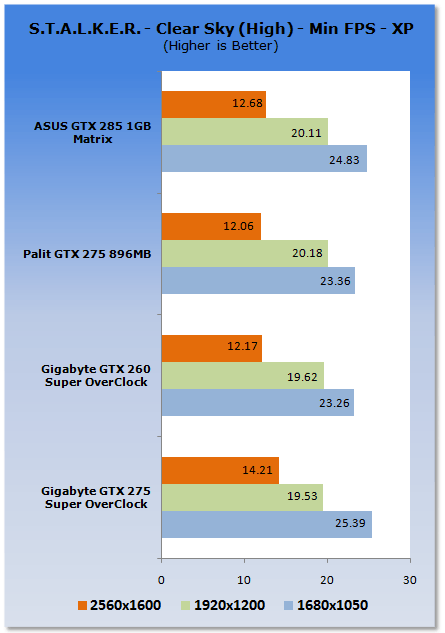
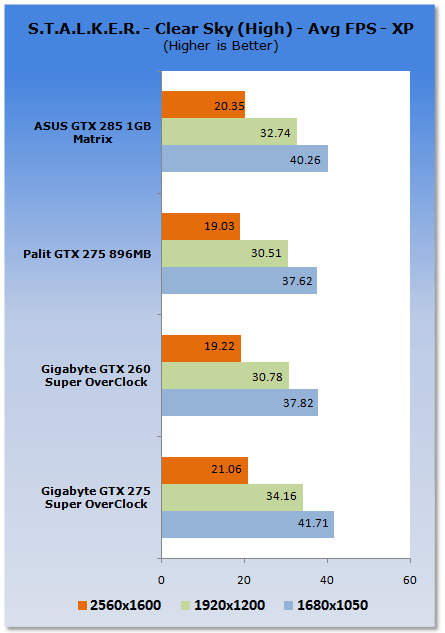
We again see at the middle resolution the GTX 275 falls back slightly in Clear Sky. At the other resolutions, though, the model is able to pull out another win.
Temperature and Sound Tests
Temperature Tests

With the TES 1326 Infrared Thermometer literally in hand we found ourselves getting real-world temperatures from the products we test at load (3D clock speeds).
There are two places we pull temperature from - the back of the card directly behind the core and if the card is dual slot and has an exhaust point we also pull a temperate from there, as seen in the picture.
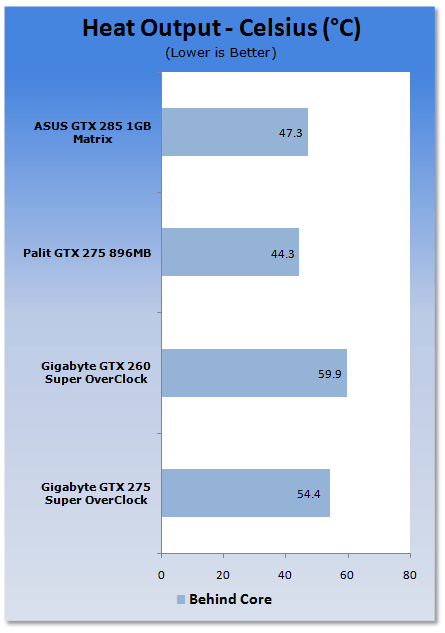
No real surprises with the temperatures; it runs a little warmer than the non SOC models, but nothing to be worried about.
Sound Tests

Pulling out the TES 1350A Sound Level Meter we find ourselves quickly yelling into the top of it to see how loud we can be.
After five minutes of that we get a bit more serious and place the device two CM away from the fan on the card to find the maximum noise level of the card when idle (2D mode) and in load (3D mode).
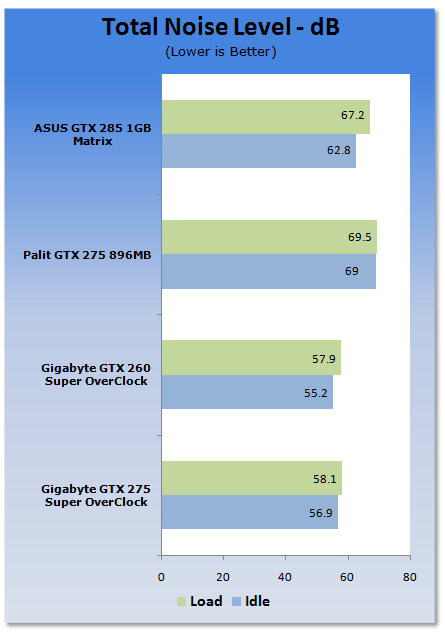
Noise levels like the GTX 260 SOC are pretty impressive, sitting in the bottom half of the pack.
Power Consumption Tests

Using our new PROVA Power Analyzer WM-01 or "Power Thingy" as it has become quickly known as to our readers, we are now able to find out what kind of power is being used by our test system and the associated Video Cards installed. Keep in mind; it tests the complete system (minus LCD monitor, which is plugged directly into AC wall socket).
There are a few important notes to remember though; while our maximum power is taken in 3DMark06 at the same exact point, we have seen in particular tests the power being drawn as much as 10% more. We test at the exact same stage every time; therefore tests should be very consistent and accurate.
The other thing to remember is that our test system is bare minimum - only a 7,200RPM SATA-II single hard drive is used without CD ROM or many cooling fans.
So while the system might draw 400 watts in our test system, placing it into your own PC with a number of other items, the draw is going to be higher.
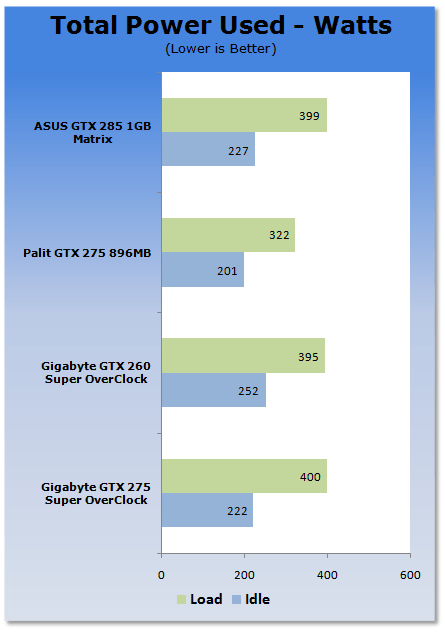
Power draw is up with the card taking about the same power as the GTX 285. This isn't a huge concern, though, as the numbers aren't too worrying.
Final Thoughts
After what we saw from the GTX 260 Super Overclock, the bar had seriously been raised before checking out this GTX 275 which sits in the same series. The good news is that it manages to clear the bar with no dramas. The bad news is that the bar is set higher than ever before.
The bundle is a bit on the light side of things, but the Super Overclock Series is about one thing; Performance! Since that is what GIGABYTE are aiming for, they have to do it well and we're glad to say they did. Something that you have to remember as well is that the GTX 285 we compared the card against today comes pre-overclocked out of the box, giving GIGABYTE a tougher fight. But for the most part we're still able to see it come out on top.
If the GTX 260 SOC is able to perform like a GTX 275 and a GTX 275 SOC is able to perform like a GTX 285, we have to wonder if a GTX 285 can perform like a GTX 295. While we know it's simply not possible due to the dual GPU configuration the 295 card uses, you have to wonder if they will attack the fastest single GPU video card from the company, or simply wait for the GT 300 series that are due out before year's end.
We love to see that GIGABYTE are stretching their legs when it comes to overclocking video cards. The thing is that they've not just snagged an exit seat in economy; they're up in first class where there's loads of room and we're glad to say they're making use of every bit of space they have.
I'll say it again; I didn't think that GIGABYTE had this kind of series in them. We're so glad they do and hopefully we'll see the series stay while being expanded over the years.
If you're after a GTX 275 that does nothing but kick ass, this is the one to get. The package might not be anything fancy, but once you slide it into your system you'll be shocked with the amount of power this GTX 275 has to offer.

 United
States: Find other tech and computer products like this
over at
United
States: Find other tech and computer products like this
over at  United
Kingdom: Find other tech and computer products like this
over at
United
Kingdom: Find other tech and computer products like this
over at  Australia:
Find other tech and computer products like this over at
Australia:
Find other tech and computer products like this over at  Canada:
Find other tech and computer products like this over at
Canada:
Find other tech and computer products like this over at  Deutschland:
Finde andere Technik- und Computerprodukte wie dieses auf
Deutschland:
Finde andere Technik- und Computerprodukte wie dieses auf 


 Synopsys and Samsung achieve production tapeout of next-gen Exynos SoC on new 3nm process node
 Windows 11 could get some big changes: Start menu 'companions' and Copilot in Settings
 The iPhone 16 Pro could have a 20% brighter display than your boring old iPhone 15 Pro
 New iPhone 16 dummy unit leak shows off its refreshed camera design and more
 Analysts expect an iPad Pro sales slowdown despite new models, here's why
 Corsair 6500X Mid-Tower Dual Chamber Chassis Review
 Corsair MP700 Pro SE 4TB SSD Review - As Fast as They Come
 Corsair MP600 Mini 2024 Edition 1TB SSD Review - Fastest Tiny Drive on the Planet
 Lexar SL500 1TB Portable SSD Review - The best of native USB
 Corsair Platform:6 Elevate Modular Desk Review
 True Lies (1997) 4K Blu-ray Review
 Fractal Design North XL Full-Tower Chassis Review
 Western Digital WD Gold 24TB HDD Review - High-Capacity Masterpiece
 AOC U27G3X 27-inch Gaming Monitor Review - 4K 160Hz for $500
 MSI Vector GP68HX Gaming Laptop Review
 Building the Ultimate Home Entertainment Server with an ASUSTOR NAS and Viper Gaming NVMe SSDs
 Everything you need to know about the latest ASUS NUC Mini PCs - NUC 14 Pro and ROG NUC
 How to Overclock Your GPU and Boost Your PC Gaming with ASUS GPU Tweak III
 ASUS's AMD Radeon RX 7000 Series GPU lineup has something for every gamer
 ASUS OLED Premium Care defends the ROG Swift OLED PG32UCDM gaming monitor from burn-in