

Shine on you, Crazy Diamond
Well Logitech, you have done it again; you have made another product that I simply must own...
Your introduction of the G19 Uber-Keyboard just makes me want to break down and throw all my life's savings at you again.
Let's check over the specs:
- Tiltable, color GamePanel™ LCD (320x240pixels)
- User-selectable backlit characters
- Twelve fully programmable G-keys with three macros per key
- Multi-key input
- Game/desktop mode
- Two powered Hi-Speed USB 2.0 ports
- Intelligent cable management
- Instant media access
We can see from the specs and the layout that this keyboard means business. The LCD is Windows side-show compatible and also supports Logitech written applications.
The G19 is also supplied with an additional power supply connector to power the LCD, backlight and the two USB extension ports.

A button for everything
With a similar layout to the G15, the full sized keys are a welcome feeling for anyone who has been frustrated using laptop style keyboards. With the LCD nestled neatly at the top of the keyboard on a pivotal base, it allows you to adjust it to the ideal viewing angle.

A full numeric on the right is good to see along with the media controls above the numeric. They provide play/pause, stop, skip, mute and a nice implementation of a volume adjuster in the form of a scroll wheel.

On the right we have a double row of G keys; these are the customisable macro keys that allow you to assign whatever you wish to them. You could have a set for Windows that opens certain apps, or you could have a set for your favourite game. These are easily swapped into by using the M keys that allow up to three sets of assignments per key.

Moving swiftly to the left of the LCD, we see the Logitech favourite game-mode switch which locks your Windows key to prevent accidental screaming. There are also navigational keys to allow you to use the LCD like a miniature interface in its own right.

Let there be light!
On the right of the LCD there's a button that allows you to turn the backlighting on and off. Unfortunately they have forgone brightness levels this time because that is a feature that can be enabled under software so that each M setting delivers a different colour of your choosing.

The LCD itself is housed in a tilting gloss casing and really is the centre piece of the keyboard with your eyes always drawn towards it (especially when it's on).

Around the back next to the cables are two standard powered USB ports for your peripheral enjoyment. It's good to see Logitech not making the same mistake of the G15 and recessing them into little nooks so that nothing would ever plug into them.

Following the cable back somewhat, we can see it's a combo USB and power jobby so your power cord piggy backs in on the USB cable from behind your PC. Out of sight, out of mind.

Stacking the G15 and the G19 up, we can see that they're almost identical in width with only the G15's key layout being about 1cm wider over all.

And in terms of height with the wrist rests on, they're pretty much the same.

Lights out
It's time to fire this bad boy up. Turning off the lights and drawing the curtains to get the full effect (not to mention the photographs), we can see that the whites are crisp as well as all the other colours during boot up.

Into the menu system and we see you have a list of pre-installed applications waiting for you to fiddle with.

The system monitor has been updated with some nice graphics to show you how much your system is sweating.

The obligatory TT logo shot...

Moving on to the software now; the G-Panel manager lets you assign anything you like to the 12 G keys as well as changing the colour of every M setting so that each one is a different flavour.

Likewise, the LCD panel manager lets you tweak your heart out on the available apps and how you can interact with them.

And finally, Windows' own sideshow application lets you assign Microsoft written apps to display and control through the keyboards LCD.

And that's all she wrote
Final Thoughts
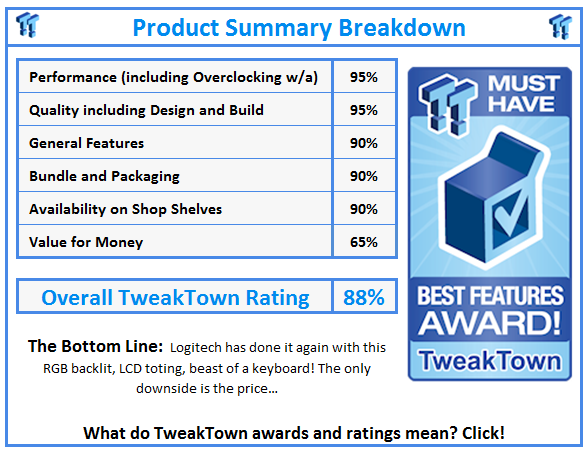
Summing up now, we have the awesomeness of the LCD providing you with more geek than you could possibly imagine. There are a good number of applications out there and the ability to link up with Windows sideshow, while not totally amazing, does give good room for expandability.
The one thing I love about this keyboard is the ability to change the backlight colour to anything under the RGB rainbow! It really does make me grin wildly just playing with such a nifty feature.
Now for the bad news, I just plain have an issue with the price tag. It's stupidly expensive for even the hardcore gamers out there who want it. Newegg are currently shifting it at $205.99 U.S. plus shipping. I know it has an LCD and full controller and RGB LED backlighting control, but still, it's just not justifiable no matter how you look at it.
 United
States: Find other tech and computer products like this
over at
United
States: Find other tech and computer products like this
over at  United
Kingdom: Find other tech and computer products like this
over at
United
Kingdom: Find other tech and computer products like this
over at  Australia:
Find other tech and computer products like this over at
Australia:
Find other tech and computer products like this over at  Canada:
Find other tech and computer products like this over at
Canada:
Find other tech and computer products like this over at  Deutschland:
Finde andere Technik- und Computerprodukte wie dieses auf
Deutschland:
Finde andere Technik- und Computerprodukte wie dieses auf 


 This idiot-proof thermal paste applicator will make applying TIM easy, even for noobs
 MSI no longer interested in under performing AMD Radeon GPUs, now exclusive to NVIDIA
 SDC's new 27-inch 4K 165Hz Nano-IPS monitor features DisplayPort 2.0, costs just $415
 Sabrent wants you to enhance your tech with special savings on SSD, RAM, and enclosure bundle
 LG's 32-inch gaming OLED monitor with 480Hz refresh rate is imminent, with pre-orders live now
 SteelSeries Arctis Nova 4X Wireless Gaming Headset Review
 ACEMAGIC AD08 "Core i9 11900H" Mini PC Review
 Lenovo ThinkPad X1 Carbon Gen 12 Review
 ASUS ROG Swift Pro PG248QP Gaming Monitor Review - Frames, frames, and more frames
 FlexiSpot C7B-Mesh Ergonomic Office Chair Review
 Samsung G8 34-inch QD-OLED Gaming Monitor Review - 175Hz for $900
 ASRock NUCBOX-155H Mini PC Review
 NuPhy Air96 V2 Wireless Mechanical Keyboard Review
 TEAM T-FORCE Siren DUO360 RGB Liquid CPU Cooler Review
 AVerMedia Live Streamer ULTRA HD Review
 Building the Ultimate Home Entertainment Server with an ASUSTOR NAS and Viper Gaming NVMe SSDs
 Everything you need to know about the latest ASUS NUC Mini PCs - NUC 14 Pro and ROG NUC
 How to Overclock Your GPU and Boost Your PC Gaming with ASUS GPU Tweak III
 ASUS's AMD Radeon RX 7000 Series GPU lineup has something for every gamer
 ASUS OLED Premium Care defends the ROG Swift OLED PG32UCDM gaming monitor from burn-in