Introduction
Intel's low power consuming and low-cost Atom processor has been all the rage in the tech industry for the past year or more. ASUS helped make it famous and successful by implementing it into its extensive range of Eee PC netbook computers - but that was just the beginning.
Now there are countless manufacturers producing netbooks based on the Atom processor and many of these products have been very well received in the market, with truckloads being sold to consumers, who crave small systems with good battery life - and ones that won't make a mess of their bank accounts.
Soon after the netbook craze really set it and some smart folk thought, "Hey, we can apply the same principles of the netbook to a desktop system". In came nettop systems using the same hardware as the popular Eee PC style small notebooks, but in a desktop form.
Today we have one such system in for testing, but with a difference. Instead of using just the Intel Atom processor, it makes use of NVIDIA's ION technology, which packs in a GeForce 9400M graphics processor chipset to really extend the capabilities of the system for HD video playback and some basic gaming. Regular nettop systems come with an Atom 230 single core processor, Intel 945G chipset and single channel memory. This is fine for basic office type computing, such as surfing the Internet or sending emails. However, if you want to do anything remotely entertaining with the system, purely Intel based nettops at this time just don't have the hardware features or horsepower under the hood to do it.
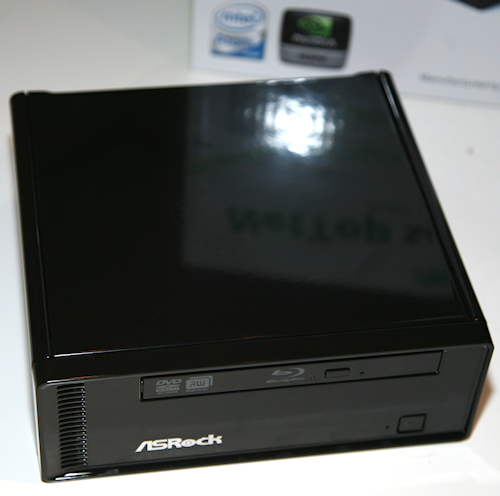
ASRock realized this and recently announced the ION 330-BD Nettop system. This sexy baby built by Pegatron and designed by ASRock is the most high-end nettop system we've seen or laid our hands on. Not only does it pack in the ION processor, but it also comes with the more expensive Atom 330 dual-core processor and dual channel memory support. Compared to a full sized modern gaming desktop system, it cannot even begin to compare against it, but for the tiny size of this system and the low cost, we got quite a surprise by what it could do.
Let's take a close look at this system now and see exactly what it can do!
Specifications, Availability and Pricing
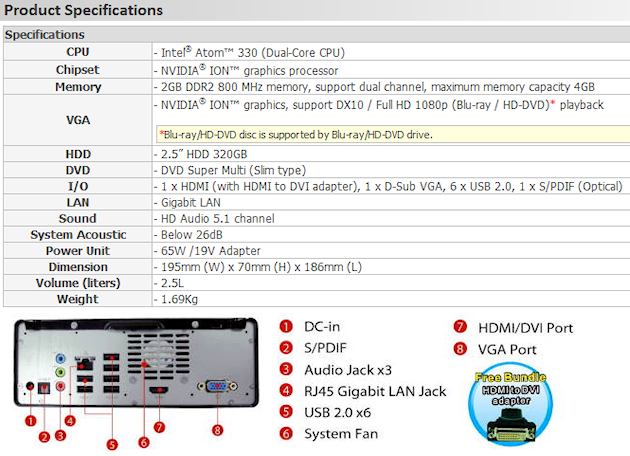
Above we get a good look at the full product specifications of the ASRock ION system. The only thing we need to mention is that we are actually testing the ION 330-BD model, which is exactly the same as the ION 330 (listed above), except it replaces the standard DVD Super Multi drive with a Sony BC-5500S SATA Blu-ray slim type reader drive.
As far as availability goes, it is still a brand new system and we couldn't find it listed online at this stage. The only place we saw it listed was on eBay and selling for $439 CAD, which works out to be $390 USD at the time of writing.
We asked ASRock for the RRP and it is listed at $399 USD, for the non Blu-ray model. The Sony BC-5500S SATA Blu-ray drive lists for $260 USD on Newegg, so it will obviously increase the price if you want Blu-ray playback ability on this system to roughly $650 USD.
ASRock also has a cut-down version of its nettop, the S330, without the NVIDIA ION chipset, and it has its RRP set at $329 USD. This means that you're only paying $70 USD for the ION chipset, which right now we would say is easily worth the extra price for what it brings to the table.
It is also worth noting that ASRock does not bundle an operating system. You'll need to buy a copy of Windows Vista or install a copy of Windows 7 RC1 as we did. You could also install a free Linux OS, too.
The Package
We have taken a slightly different approach with this review and have introduced the package on video.
As far as the overall package goes, there is nothing too exciting. However, you do have everything included that you will need to get the show on the road. The addition of the anti-slip pad by ASRock is a good idea and extra points must be added on for the added thought. It also works very well and the system does not move an inch with it applied.
On the included CD ASRock includes an electronic copy of the manual, as well as drivers, Acrobat Reader and Norton Internet Security, which we did not install as it's shocking and chews system resources like mad. What we did like was the inclusion of ASRock's OC Tuner software, which allows you to overclock the ION 330 in Windows.
This nettop also support ASRock's clever Instant Boot feature that allows the system to boot up in four seconds according to the makers, as long as the AC power remains connected to the system. The system enters a type of power saving mode, it doesn't fully turn off, but uses very little power. You can watch a video of exactly how it works below.
Lovely inclusion, especially for a device of this kind where you don't want to be waiting around forever for the system to boot up to watch a movie.
The System
Now we get to move on to the more exciting stuff and get our first look at the system.
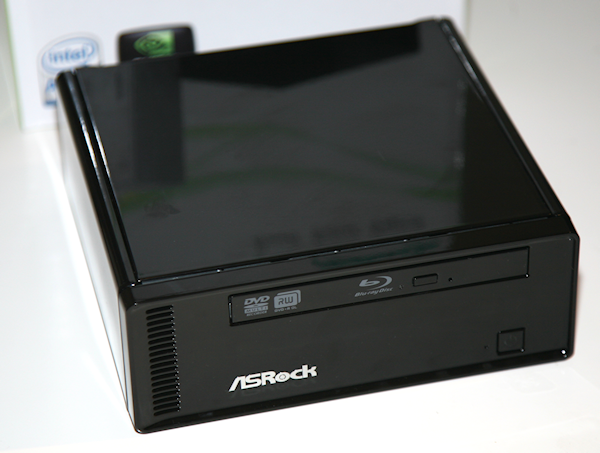
First impressions are great. After you unpack the ION 330 out of the box, which is packaged safely for shipping, you are greeted by the tiny system. It comes shipped with plastic covers on each side of the system to protect the fancy glossy finish.
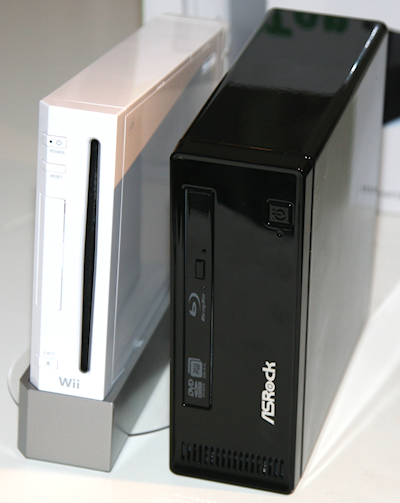
As far as size goes, it's small - a capacity of only 2.5 liters. The exact dimensions are 195mm (W) x 70mm (H) x 186mm (L). Compared to the size of a Nintendo Wii, it is about double the thickness, as you can see in the picture above.
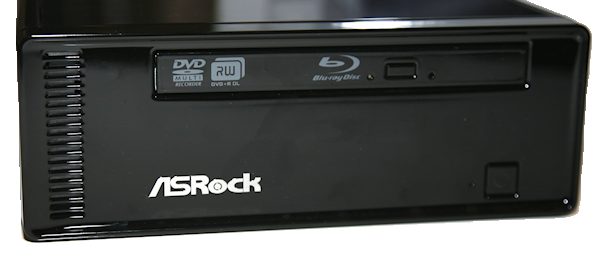
Looking at the front of the system, from the top we see the Blu-ray drive. On the left side front of the unit are some air vent holes, which extract hot air generated by the Atom processor. Moving over we see the ASRock logo.
One bad point from a usability standpoint that we discovered while testing is that there are no front accessible USB 2.0 ports. In our opinion this is a bad design flaw since it is crucial to have at least one USB port at the front of a system, not only for easy access swapping out pen drives, but also for USB receivers for cordless keyboards and mice. We were lucky in that we use a powerful USB receiver with our I/O Gear wireless keyboard and mice combo, but for those users products without as much range, they may run into issues by having the receiver plugged into one of the six USB ports on the back of the system. This could be remedied by using a USB extension cable, but you shouldn't need to.
We can see how ASRock wanted to keep the front nice and clean from a design prospective, but usability suffers a little here. Next time we'd like to see the same style, but with a couple USB 2.0 ports at the front, which could be covered by a small door flap design mechanism.
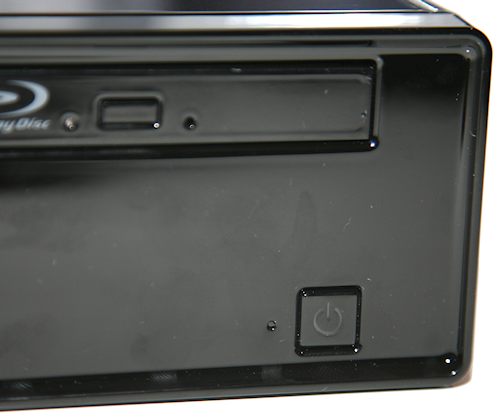
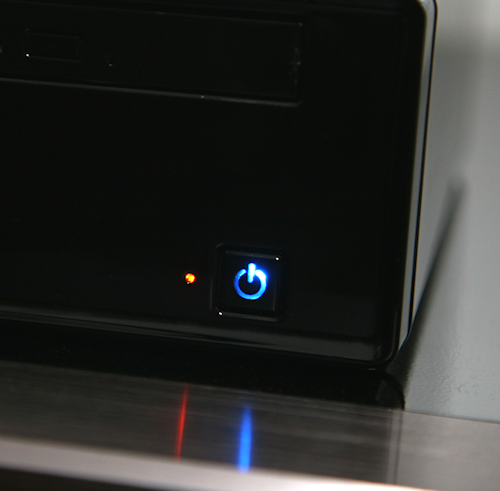
On the right side at the front of the unit is the hard drive activity LED which flashes in a nice orange color. To the right of that is the power on switch, which glows blue when the system is turned on.
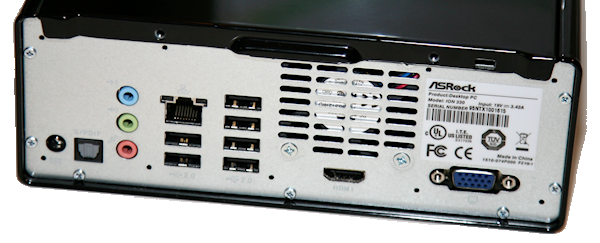
On the back of the system we have from left to right - power, S/PDIF (optical) output, analog audio output jacks, gigabit Ethernet LAN port, six USB 2.0 ports, fan cooling extraction point, HDMI output and finally VGA output. Using the included HDMI to DVI adapter in the package, you also add in the ability for DVI output.
As far as noise goes, the system is super quiet at default settings at around 25db. We used the ASRock EZ Overclocking feature in the BIOS to overclock the Atom CPU from 1.6GHz to 2.1GHz and to be safe we increased the fan speeds by using the "Overclocking" fan speed option. This does increase the volume from the system, but it's not that loud and cannot even be noticed at all whilst playing a game or watching a movie.
We have a snazzy little box here and it is sure to impress. Just be sure to keep a cloth nearby as the glossy finish does mean that finger prints and marks add up real quick!
Inside The System
Inside the System
We thought it would be interesting to provide a video look inside the system, so you can see exactly what makes up the ASRock ION 330.
It's incredible what ASRock was able to squeeze into such a small little case. ASRock throws in one of their AMCP7A-ION based motherboards into this system, which is more than likely purpose built only for this nettop product. As for the memory, ASRock throws in two 1GB PC2-6400 modules from Elixir and of course they are configured to work in dual channel memory mode for optimal performance.
For longer life and system stability, ASRock also use all solid capacitors, which is another great sign of high quality. There are two small fans inside the system - a tiny one that cools the Atom heatsink and another on the other side, which also extracts air out the back of the unit.
The hard drive included is a Seagate 2.5-inch Momentus 5400.6 320GB HDD which spins at 5,400 RPM and includes 8MB of cache and supports SATA 3Gb/s with Native Command Queuing. As we mentioned before, the model we are testing today is the ASRock ION 330-BD and that means it comes equipped with a Sony BC-5500S SATA Blu-ray slim type reader drive rather than a standard DVD drive. ASRock designed SATA cables for the system which don't ruin airflow inside the system; another good addition rather than just using standard SATA system cables.
Testing - Blu-ray CPU Usage
Testing
Now we get up to the fun part - testing the system to see what it can do.
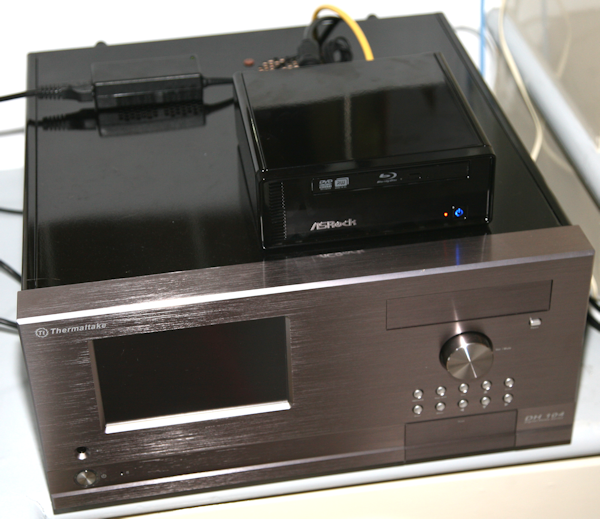
Today we are going to compare the ASRock ION 330-BD nettop against the mighty big AMD HTPC system, which we built earlier this year. Back then the total system cost came to around $1800 USD, but it will be cheaper now. It is important to remember that as we are comparing against a nettop, which costs only $650 USD. The full specs of the AMD HTPC system can be found here for comparison sakes.
We will be using the results we obtained using the AMD Athlon X2 4850E 2.5GHz processor. Keep in mind that the AMD HTPC system was running Windows Vista SP1 64-bit and the ASRock nettop is using Windows 7 RC1 build 7100 64-bit.
Drivers Used on the ASRock ION 330-BD: Latest Windows 7 updates and NVIDIA ForceWare 186.08 BETA
To even up the playing field a little bit, we enabled the ASRock EZ Overclocking feature that is found in the BIOS. You can increase the Atom 330 CPU clock speed from 1.6GHz up to a maximum of 2.1GHz. We were surprised to find any type of overclocking at all on this system, and in this case, a 500MHz jump in CPU clock is quite big - almost 24% faster, in fact. All of our tests were completed with the CPU at 2.1GHz, since this proved to be rock solid stable.
Blu-ray CPU Usage

In our first test we measure CPU usage whilst playing back the "hospital" scene from the Blu-ray movie Harold & Kumar Go to White Castle.
The swear-happy hospital scene is not super intensive, but it's probably a good indication of standard movie playback in a typical conversation type scene. Hardware acceleration was enabled, which means that work was off-loaded to the NVIDIA ION processor, thankfully. We measured CPU utilization (maximum and average) using Windows 7 Performance Monitor.
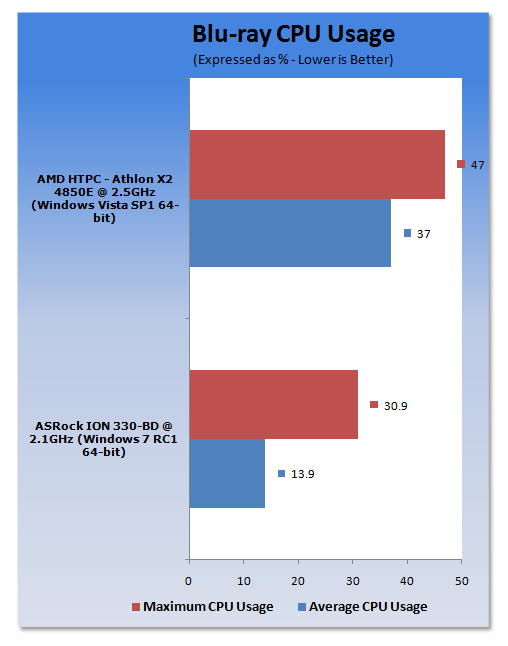
The ASRock ION 330-BD nettop had no issues at all playing back 1080p HD content and it did it amazingly well for a system this size. Compared to the AMD HTPC, it actually showed better results in the CPU usage department, which means ION is doing its job very well here indeed.
Playback was silky smooth with no missed frames, overall very impressive.
Testing - PCMark Vantage 64-bit
PCMark Vantage 64-bit
Version and / or Patch Used: Nov 2007 Hotfix
Developer Homepage: http://www.futuremark.com
Product Homepage: http://www.futuremark.com/benchmarks/pcmark-vantage/
Buy It Here

PCMark Vantage is the first objective hardware performance benchmark for PCs running 32 and 64 bit versions of Microsoft Windows Vista. PCMark Vantage is perfectly suited for benchmarking any type of Microsoft Windows Vista PC from multimedia home entertainment systems and laptops to dedicated workstations and high-end gaming rigs. Regardless of whether the benchmarker is an artist or an IT Professional, PCMark Vantage shows the user where their system soars or falls flat, and how to get the most performance possible out of their hardware. PCMark Vantage is easy enough for even the most casual enthusiast to use yet supports in-depth, professional industry grade testing.
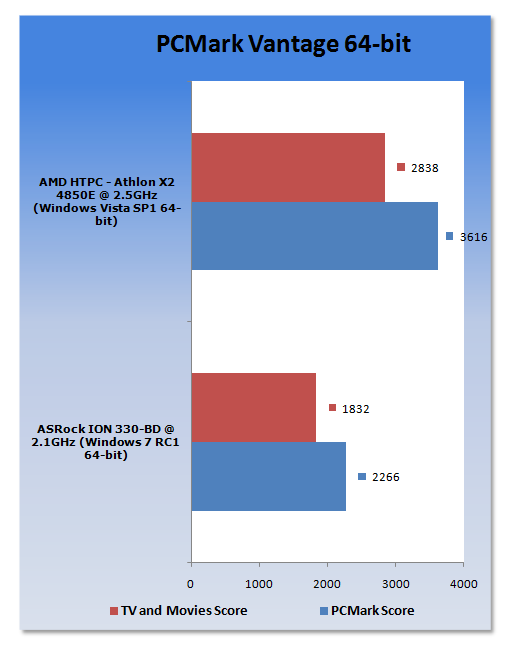
Without too many surprises here, we can see that the AMD HTPC is out in front - and so it should be. The ASRock ION 330-BD performs fairly well - not great, but we've seen worse.
Testing - CINEBENCH R10 64-bit
CINEBENCH R10 64-bit
Version and / or Patch Used: Release 10
Developer Homepage: http://www.maxon.net/
Product Homepage: http://www.maxon.net

CINEBENCH is a real-world test suite that assesses your computer's performance capabilities. MAXON CINEBENCH is based on MAXON's award-winning animation software, CINEMA 4D, which is used extensively by studios and production houses worldwide for 3D content creation. MAXON software has been used in blockbuster movies such as Spider-Man, Star Wars, The Chronicles of Narnia and many more.
MAXON CINEBENCH runs several tests on your computer to measure the performance of the main processor and the graphics card under real world circumstances. The benchmark application makes use of up to 16 CPUs or CPU cores and is available for Windows (32-bit and 64-Bit) and Macintosh (PPC and Intel-based).
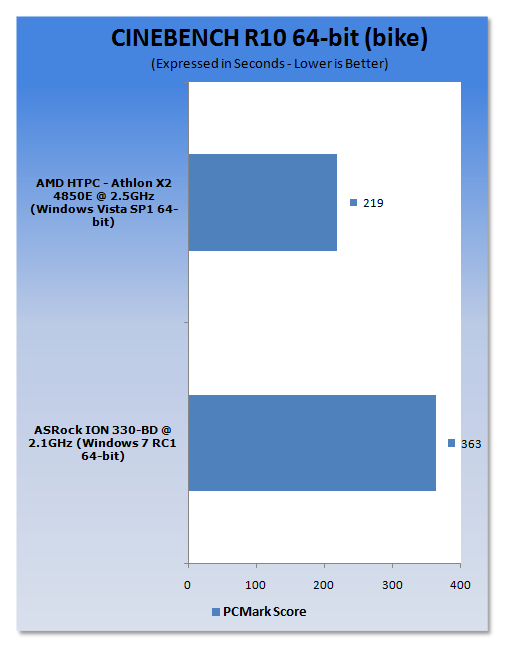
Intel's Atom processor takes a bit of a beating here, but at least it has four threads to work with thanks to ASRock going with the bigger dual-core brother rather than the single-core Atom 270.
Testing - Super PI
Super PI
Version and / or Patch Used: 1.5 Mod XS
Developer Homepage: http://pw1.netcom.com/~hjsmith/Pi/Super_Pi.html
Product Homepage: http://pw1.netcom.com/~hjsmith/Pi/Super_Pi.html
Developed by some folks from the University of Tokyo (yes, Japan), Super PI is a small utility that does just as the name implies. It figures PI to a set number of decimal places. Since PI is an infinite number to the right of the decimal point, the utility measures the time it takes to figure a set number of places. It runs the calculations a set number of times and gives a time for the completion of the task. This is a simple and effective way to measure the raw number crunching power of the processor being used to compile the results.
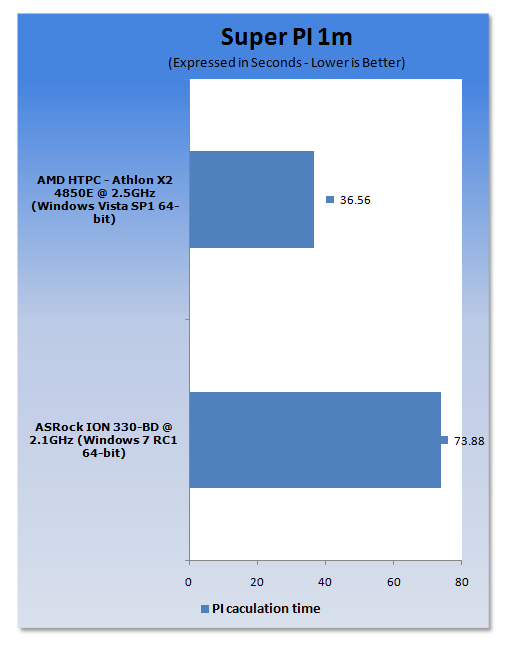
Here NVIDIA's ION processor doesn't get to come out and play and we can see that the Intel Atom 330 CPU struggles (even at 2.1GHz, let alone 1.6GHz stock), being much slower than the AMD Athlon X2 4850E processor.
Testing - Power Consumption, Boot Time
Power Consumption Testing
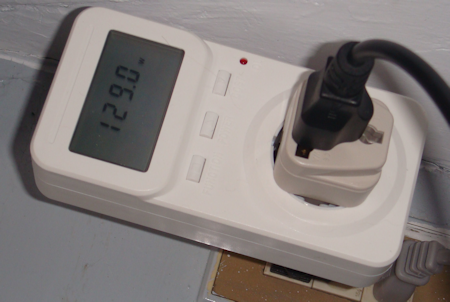
Now we come to probably one of the most important sections of our testing and that is power consumption!
Using the power tester you can see in the picture above, we measured power coming from the wall - it is measuring the full system, everything inside the box.
We used prime95 to fully load the CPU processor cores and a score was recorded after five minutes of loading. We recorded the highest wattage level hit and rounded up to the nearest decimal point. An idle wattage level was recorded after staying idle on the desktop for five minutes and here again we also rounded up to the nearest decimal point.
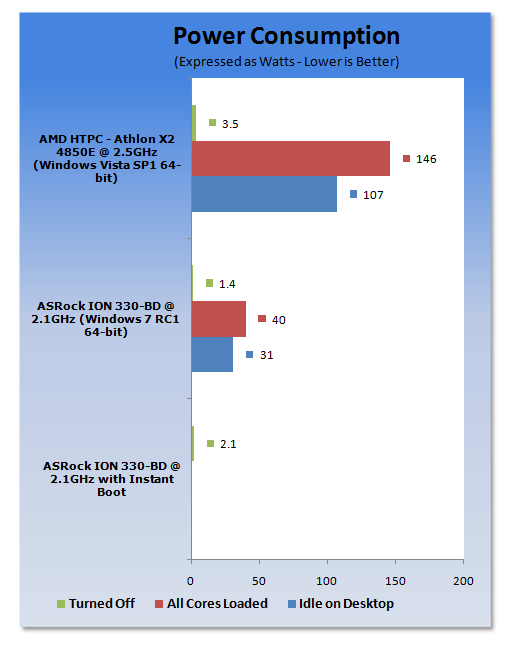
Wow! We couldn't get the ASRock ION 330-BD over 40-watts, no matter what we tried. Also, sitting idle in Windows at 31 watts is very impressive; just compare it to the AMD HTPC system for reference.
We also measured power consumption during Blu-ray playback and again it never went over 40 watts, at maximum it hit 39.8 watts.
Boot Time Testing
We measured using a stopwatch and timed from the point we turned the system on until the very first point the desktop was reached and fully loaded.
We have enabled ASRock's Instant Boot Fast Mode AC feature for this test to show just what it can do.
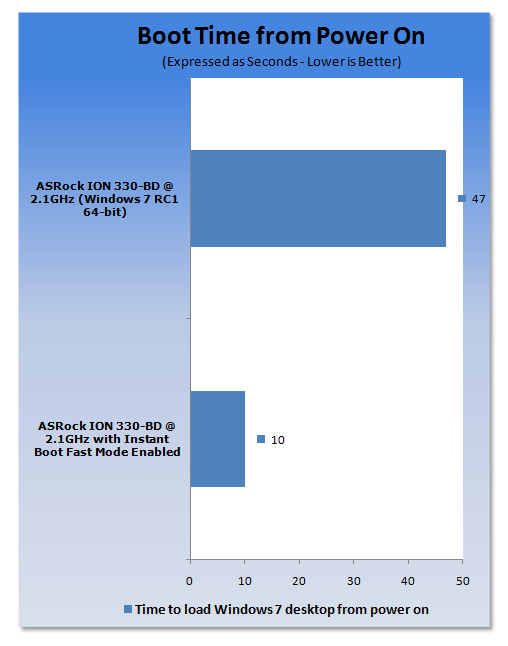
Well, ASRock Instant Boot works a treat. Around 10 seconds to boot up from its unique sleeping mode and 47 seconds to boot up from a normal turn on. That's not too bad either.
The only thing that is a little annoying with the Instant Boot feature is that it's an extra piece of software you need to run and when you shut down, it actually has to reboot once first and then shut down. Just small issues, but other than that, impressive!
Final Thoughts
Now that we've fully put the ASRock ION 330-BD through its paces, we get an idea of just how good it is and what it can do.
The good points? It's tiny! Being not much bigger than a Nintendo Wii, it can be placed next to your TV and not look out of place like a big old beige computer case of the 90's. And on that note, it also looks great. Its black glossy finish is stunning and suits it very well. It's quiet too, barely audible from a distance and silent whilst playing movies or games. It never gets that hot either, with only luke warm air being exhausted from the back of the unit. That's not enough? As far as power consumption goes, we were super impressed - no more than 40 watts of power used! Hey, don't forget the ASRock Instant Boot feature for booting up the system in 10 seconds and also the EZ Overclocking BIOS feature that allowed us to take the CPU from 1.6GHz to 2.1GHz with ease - stable, too.
The bad points? There are no USB 2.0 ports at the front of the system. This could be an issue for users with cordless keyboards and mice with a poor USB receiver with little range. The issue could be resolved by using a USB extension cable, but you shouldn't really have to do that. In upcoming models, ASRock please add a couple USB ports to the front. Another small issue is that no operating system is bundled with the system, which means you'll need to pay extra to get one. You could just download and use Windows 7 RC1 like we did for the time being or use an alternative free Linux OS, too.
We were super impressed with the Blu-ray 1080p HD playback - it was silky and smooth and didn't miss a beat at all. Audio quality is also impressive. One thing that should be noted is that the ION 330-BD doesn't support HD audio pass-through for Dolby TrueHD and DTS-HD Master Audio, only regular DVD audio such as Dolby Digital 5.1 and others that use 640kbit rate audio. It will still playback these audio tracks on your Blu-ray discs, but compressed down. If you are an audiophile this will likely end up annoying you, but if you aren't, you probably won't even notice.
As far as gaming goes on the ASRock ION 330-BD, don't expect too much, but you can get some basic gaming in on the system. Remembering that the ION uses an NVIDIA GeForce 9400M GPU, you can play the latest games such as Left 4 Dead and Call of Duty 4 at 1024 x 768 with low quality graphics settings. For serious gaming stick to your fully powered desktop PC.
The ASRock ION 330-BD nettop model will set you back around $650 USD when it is ready to buy, which should be soon. The addition of the Sony Blu-ray drive does add on to the price - you can pick up the ION 330 with standard DVD drive for $399 USD RRP - but we still think it's worth it. You could go out and pickup a standalone Blu-ray player set top box for movie playback and it will do the same as this system or more. However, it still cannot replace a PC which can play games, fully surf the Internet, check e-mail and so on.
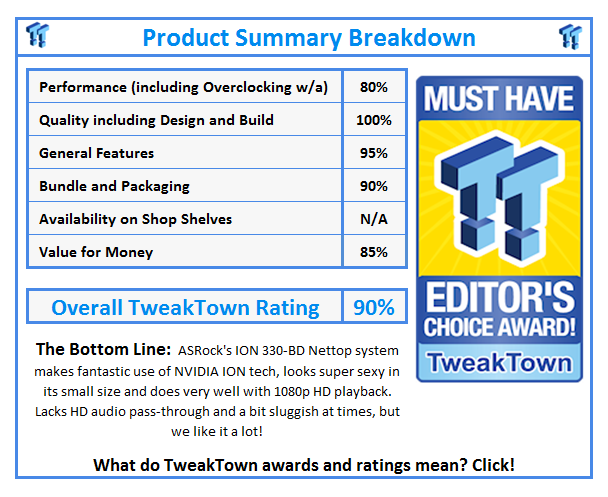
We really enjoyed the ASRock ION 330-BD nettop - it has plenty going for it and easily gets our recommendation for consumers wanting an affordable, but capable home theater PC or simply a small PC that doesn't use a lot of power, but still has some decent hardware under the hood to do more than a standard low-end nettop, which is only for basic office computing.
Nice job ASRock for your first attempt at a nettop! Next time how about we see a premium ION model with an SSD installed? That should help give the Intel Atom processor the kick it needs to get its speed up for overall responsiveness.