

Introduction
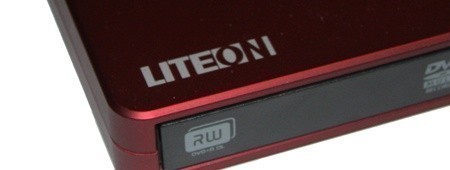
I have to admit that when I received the eSAU108 External DVD Drive from Lite-On, I wondered, "do people still have a use for these?" - Most laptops these days carry with them a ROM drive and as for using one with a standard PC, it just seems silly.
If there wasn't a market for the device, though, we would like to think Lite-On wouldn't have created one. But since they have, I'm sure that they first did their research and discovered that there are people out there who want one. So today we're going to take the time to have a look at an external DVD Drive from Lite-On with the model number eSAU108.
Before we have a look at the actual performance of the device, we will have a quick look at what exactly Lite-On has done with the package before taking a closer look at the design of the external drive.
The Package
The front of the box gives us a pretty standard run down on information. Across the top we have the model brand and below that a description on what exactly we're looking at here; in this case, an 8x external Slim DVD Writer. We can also see here that the drive is portable and USB powered, providing the USB ports are of course 2.0.

Moving further down the box, we have a picture of the drive and below that some logos. Towards the bottom left we have some specs on the drive which includes 8x DVD-/+R, 6x DVD-/+R DL, 5x DVD-/+RAM, 8x DVD+RW, 6x DVD-RW and 8x DVD-ROM. Further to the right we have the mention of a vertical stand being included in the package, some notes about the power and finally a mention of what color drive is included.

Inside the package we have a quick installation leaflet that lets you know how to get the drive up and running alongside a CD that includes Nero 7 Essentials so that you can get up and burning in no time.

Also included inside is the vertical stand we saw mentioned on the front of the box alongside a mini USB to dual USB connector. What was also supposed to be included, but not present in our package, was an AC adapter. We will talk about this more on the next page.
The ROM Drive
With the package out of the way, it's now time to have a closer look at the drive itself and Lite-On clearly have the "Slim" part down pat with it taking up only slightly more room than a notebook ROM drive would take.


We can see the particular unit we have is burgundy and has a bit of design to it with the black strip running down the right side and around the back, while also have a bit of a round cut-off at one end. It's nice to see that Lite-On hasn't just strapped a ROM drive inside some plain casing.

Looking at the back of the unit, there isn't a whole lot going on here. We have two connectors; the USB one which is needed no matter what, along with the AC adapter plug which is needed in the event that you don't have USB 2.0 ports. It's worth noting that Lite-On said the performance isn't impacted if you don't use the AC adapter, so if the drive powers up with the USB cable then you're ready to go at full speed.

Having a look at the bottom, we can see the standard ROM information here. We have a number of logos along with information on the model, serial number and manufacture date. We can also see in each corner we have four little rubber stoppers that help the drive stay in the one spot when it's sitting on your desk.

Finally, looking at the front of the drive reveals nothing that you probably haven't seen on a notebook ROM drive before. To the right we have the CD logo, while the left side has the RW / DL logo and in the middle we have the DVD one along with an LED and eject button. We also have a small hole here in the event you need to open the drive without power.
Test System Setup and Nero Disc Speed
Test System Setup
Processor(s): Intel i7 920 @ 3.8GHz (190MHz x 20)
Cooling: Noctua NH-U12P (Supplied by Noctua)
Motherboard(s): GIGABYTE EX58-UD5 (Supplied by GIGABYTE)
Memory: 3 X 2GB OCZ Technology PC-12800 DDR-3 8-8-8-24 (OCZ3G1600LV6GK)
Hard Disk(s): Western Digital 300GB Velocirapter (Supplied by Western Digital)
Operating System: Windows Vista SP1 64-Bit
Today we'll see how the external USB 2.0 powered eSAU108 drive from Lite-On performs against our trusty internal Pioneer DVR-215. The DVR-215 is a significantly faster drive as far as specifications go, this due to the plain fact that it's internal and uses SATA connectivity. With that said, though, we will see how the eSAU108 competes against the drive in a number of tests under Nero Disc Speed.
Nero Disc Speed 4
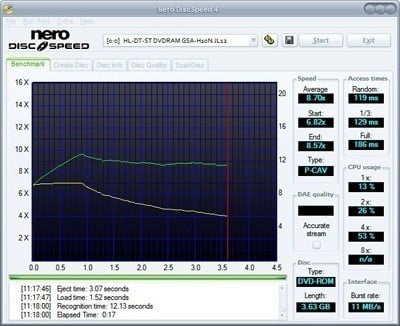
Nero Disc Speed is a software created by the developers of Nero that can benchmark CD and DVD drives and check media quality. Benchmarking tools in general are not used that often, but they can reveal some interesting information about a hardware component or the system in general. Nero Disc Speed is no exception from the rule although it provides disc media quality checks which are useful if you want to test the quality of a disc.
- Access Time
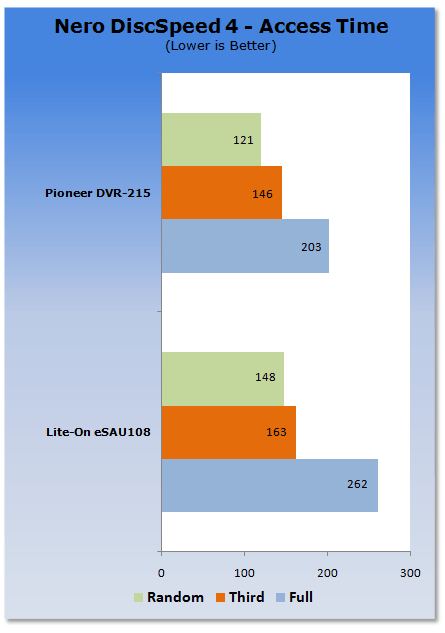
It doesn't come as much of a surprise that the DVR-215 offers better access times. What does come as a surprise, though, is just how close the USB 2.0 powered eSAU108 from Lite-On is. For the most part it trails only just behind the internal drive, which is great.
- CPU Usage
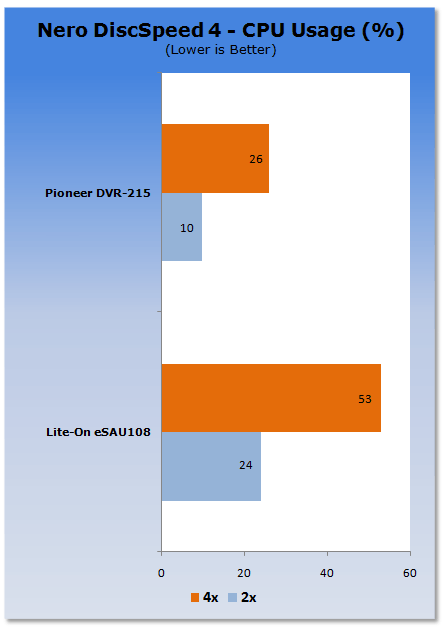
Anything that uses USB is going to use more CPU usage. We can see that under this test the eSAU108 uses about twice as much CPU power when compared to the DVR-215 which is an internal drive.
Nero Disc Speed - Continued
Nero Disc Speed 4
- Spin Test
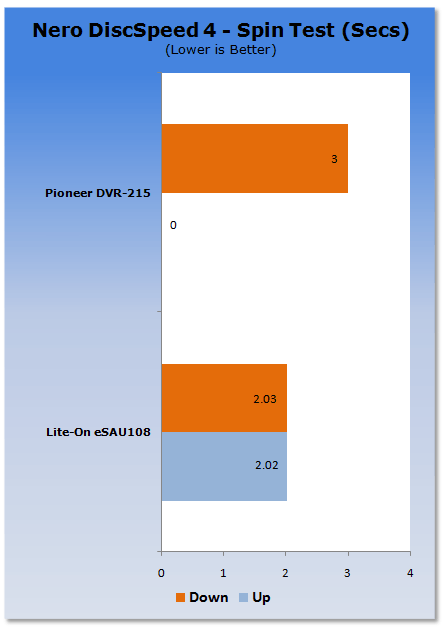
We can see here that the spin up and down speed of the eSAU108 is very similar, while the up time on the DVR-215 is instant but the down time is a second slower.
- Recognition Test
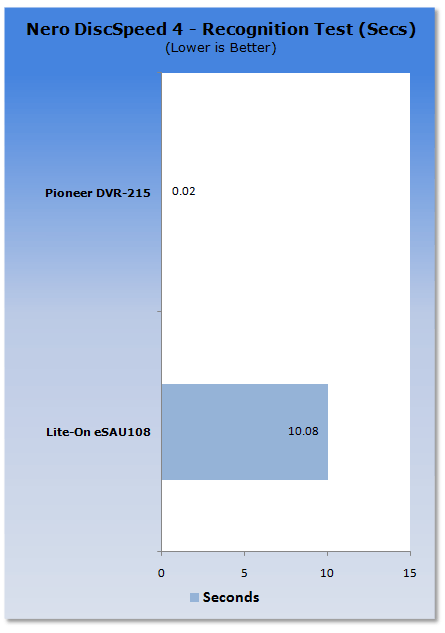
This test tells us how long it takes the drive to detect the disc once it's in the ROM drive. As you can see, with the internal DVR-215 it's almost instant, while it does take just over 10 seconds with the external USB powered Lite-On eSAU108.
Nero Disc Speed - Continued
Nero Disc Speed 4
- Burst Rate
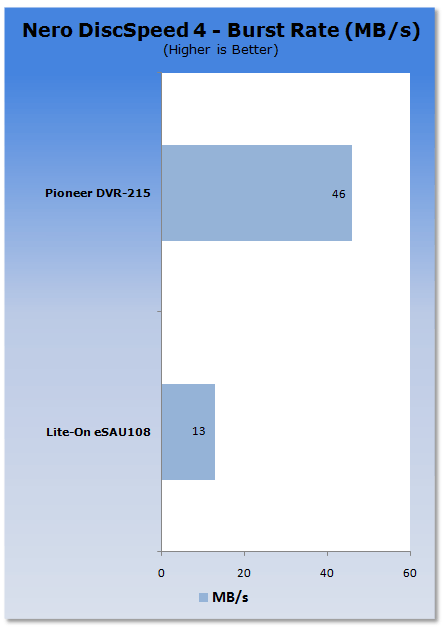
We can see that the burst rate on the eSAU108 is a fair bit slower than the faster spec'd Pioneer DVR-215.
- Average Read Speed
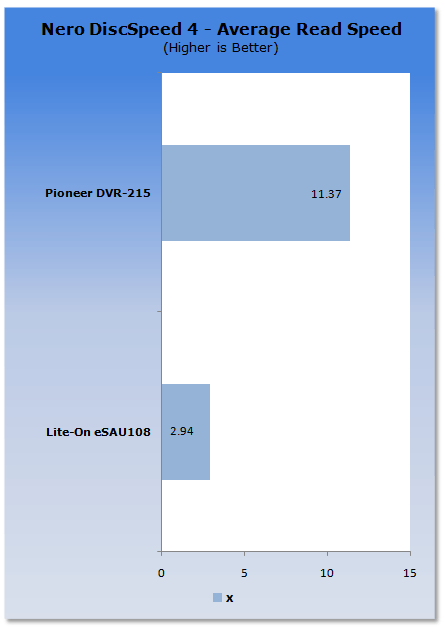
While the drive is an 8x, we can see that the average Read Speed was just under 3x. The thing worth noting, however, is while the DVR-215 came in at a much higher 11x, the drive is actually rated for 16x.
Final Thoughts
An external drive that was running off USB 2.0 was never going to be as fast as an internal drive that used a SATA interface. But what does the slower speeds ultimately mean? - Installing applications is going to be one of the biggest things; it's simply going to take longer on the eSAU108 than it would on an internal drive.
Burning times are also going to be slower, but this is because its burn speeds are rated lower and this also makes perfect sense because the drive is external and runs off USB 2.0. The thing is that apart from these two reasons, the drive is going to do everything else just as well as an internal drive, such as playing music and DVDs.
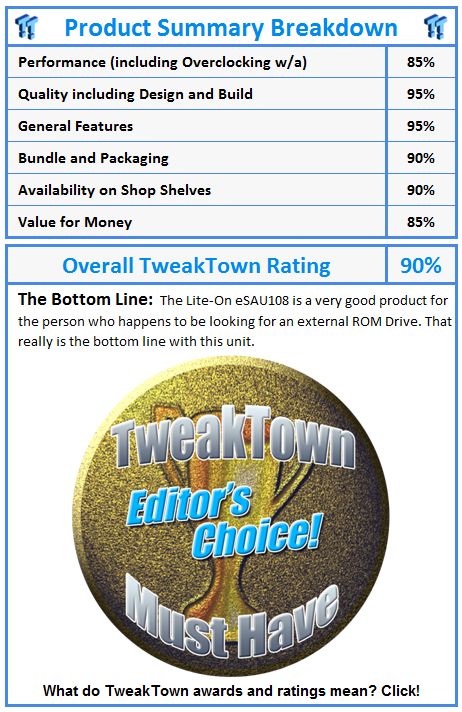
If you find yourself wanting a well built external ROM drive that is capable of running off only USB 2.0 while also having a bit of flair to the overall look, you can't go wrong with the eSAU108 from Lite-On. It's small, portable and looks great. Sure, it's not as fast as the drive you probably have in your main PC, but you can't expect it to be for aforementioned reasons.
The eSAU108 is a good all-round external ROM drive which is going to be perfect for people looking for such a device. Of course, don't expect the device to be cheap with a price tag of around the $150 AUD mark in Australia. You were always going to be paying more for an external slim drive, though.
 United
States: Find other tech and computer products like this
over at
United
States: Find other tech and computer products like this
over at  United
Kingdom: Find other tech and computer products like this
over at
United
Kingdom: Find other tech and computer products like this
over at  Australia:
Find other tech and computer products like this over at
Australia:
Find other tech and computer products like this over at  Canada:
Find other tech and computer products like this over at
Canada:
Find other tech and computer products like this over at  Deutschland:
Finde andere Technik- und Computerprodukte wie dieses auf
Deutschland:
Finde andere Technik- und Computerprodukte wie dieses auf 


 This idiot-proof thermal paste applicator will make applying TIM easy, even for noobs
 MSI no longer interested in under performing AMD Radeon GPUs, now exclusive to NVIDIA
 SDC's new 27-inch 4K 165Hz Nano-IPS monitor features DisplayPort 2.0, costs just $415
 Sabrent wants you to enhance your tech with special savings on SSD, RAM, and enclosure bundle
 LG's 32-inch gaming OLED monitor with 480Hz refresh rate is imminent, with pre-orders live now
 SteelSeries Arctis Nova 4X Wireless Gaming Headset Review
 ACEMAGIC AD08 "Core i9 11900H" Mini PC Review
 Lenovo ThinkPad X1 Carbon Gen 12 Review
 ASUS ROG Swift Pro PG248QP Gaming Monitor Review - Frames, frames, and more frames
 FlexiSpot C7B-Mesh Ergonomic Office Chair Review
 Samsung G8 34-inch QD-OLED Gaming Monitor Review - 175Hz for $900
 ASRock NUCBOX-155H Mini PC Review
 NuPhy Air96 V2 Wireless Mechanical Keyboard Review
 TEAM T-FORCE Siren DUO360 RGB Liquid CPU Cooler Review
 AVerMedia Live Streamer ULTRA HD Review
 Building the Ultimate Home Entertainment Server with an ASUSTOR NAS and Viper Gaming NVMe SSDs
 Everything you need to know about the latest ASUS NUC Mini PCs - NUC 14 Pro and ROG NUC
 How to Overclock Your GPU and Boost Your PC Gaming with ASUS GPU Tweak III
 ASUS's AMD Radeon RX 7000 Series GPU lineup has something for every gamer
 ASUS OLED Premium Care defends the ROG Swift OLED PG32UCDM gaming monitor from burn-in