









Introduction and Package

When it comes to motherboards, ECS probably isn't one of the first names that pop into your head. Instead it will be companies like ASUS, ASRock, GIGABYTE and MSI. Earlier in the year, though, we checked out the A75 based ECS A75F-A and it did a good job of impressing us and being a pretty nice all round board.
Today, though, we take the time to check out something a lot higher end in the form of the Intel X79 based X79R-AX. We saw ECS do a pretty good job with the lower end A75 board; it will be interesting to see how they handle the new high end chipset from Intel along with our high end i7 3960X CPU.
As always, we'll start by checking out the package to see what ECS are offering us before we move inside to see the bundle that's available. Once we've done that we'll move onto the board itself before we head into the BIOS, check out our testbed, talk about overclocking potential a bit and finally get into the performance side of things to see just what the ECS X79R-AX can do for us today with our i7 3960X CPU.
That just about covers everything, so let's just get stuck into the package to see what's going on here today.
The Package


ECS has put together a really big box with a wealth of information including the ability to get a bit of a sneak peak at the actual motherboard. Throughout the whole box, though, we've got a long list of what's going on with the board and I've got to say I love the bright color scheme going on, as it really helps it stand out.

Moving inside the box, you can see the normal array of paperwork that sits alongside a driver CD, I/O back plate and single extended SLI bridge at the bottom.

In the SATA cable department we've just got a mammoth amount of them included. As you can see above, the total SATA cable count comes in as a massive 12. More than we see on most boards - hopefully we've got enough SATA ports included on the board.
Our Latest Socket LGA 2011 Article Coverage


Along with all that, we've also got a USB 3.0 header in the bundle that can go on the front of your PC or via the bracket we can install it at the rear. Along with that we've also got all these little protectors that can go in the USB ports to protect them from any damage. You don't have to use them, but they're here if you do.
The Motherboard
Moving out of the bundle and onto the motherboard, we see a combination that we don't see very often in the Black / White setup along with a bit of grey. I'm a big fan of the color combination ECS opt for and we've seen it before from them in other Black Series motherboards.
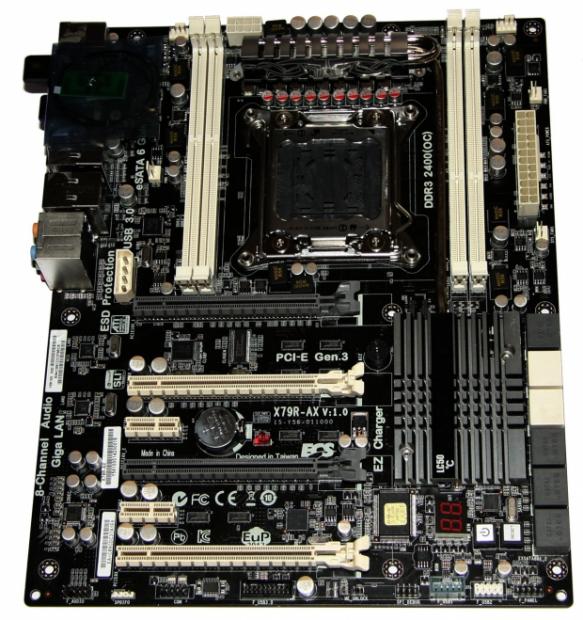

Moving in closer to the board, you can see we've got a fairly simple setup in terms of having just two PCIe x1 connectors and four PCIe x16 connectors that are actually in a position that makes installing four dual slot video cards possible.
The configuration is x16 / x8 / x16 / x8 from a wired point of view. If you're going to go with a two card setup you would use the two grey slots, if you want to move over to a three or four card setup, then you add the white ones into the mix and we move to a x16 / x8 / x16 or x8 / x8 / x8 / x8 setup. We can also see to the left of the top slot a Molex connector in the event you want to go with a bigger VGA setup.

Moving across the bottom of the board, you can see the normal array of headers with our audio, S/PDIF, COM 1, USB 3.0, two USB 2.0 and our main front panel connector.
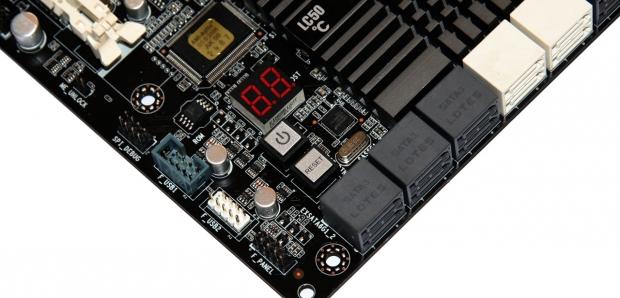
Tucked up just a little back we can there's also a power and reset button present along with a LED Debug reader which always comes in handy if your system starts to head south.
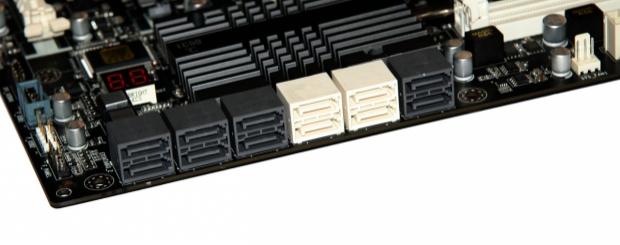
Finally, we finish up with the SATA side of things and it's nice to see that we can actually make use of the 12 SATA cables included thanks to the 12 SATA ports on the board. We've got a combination of four SATA II ports in white and eight SATA III ports in grey with the controllers being the onboard Intel X79 chip and the ASMedia ASM1061 chip. You'll generally want to try and stick to the Intel ones on the right hand side for your main devices.
The Motherboard Continued
Moving to the top of the motherboard, we've got very little going on here with our main 24-Pin ATX power connector being present alongside three CPU headers. The only other noteworthy stand-out is our DIMM slots; we'll look at them closer in just a moment.

Moving around towards the very top of the board you can see our main 24-Pin CPU power connector along with another fan header. We also get a good look at the heatsink here and can see the heatpipe coming out of it.

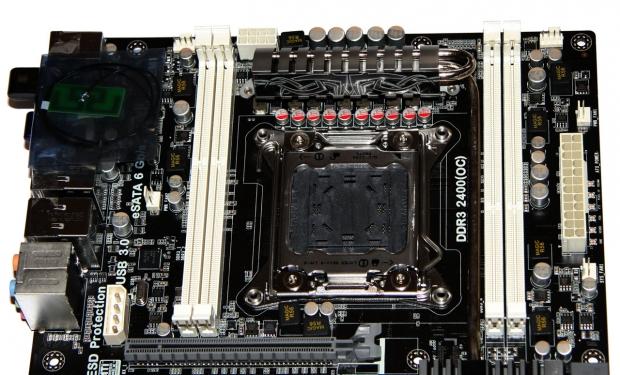
Moving back a bit, we can see our four DIMM slots which support up to 32GB of DDR3 at 2400MHz DDR via overclocking. Just like our other X79 motherboards, we've got a really clean setup present here around the CPU area with no real shocks.

Getting into the I/O side of things, it's pretty full on here with the far left offering us a clear CMOS button, PS/2 combo port and two USB 2.0 ports. We've then got three more USB 2.0 ports, two eSATA 6GB/s ports along with a Bluetooth Dongle and WiFi Dongle.
Moving across again, we've got four USB 3.0 ports via the Texas Instruments TUSB7340 controller, two Gigabit LAN ports from the Realtek 8111E controller and five auxiliary plugs alongside an optical out controlled via the Realtek ALC892 codec.
BIOS
Arghhhh...no screenshot button. It feels like a while since we've had to take pictures of the BIOS screen, but the ECS BIOS still lacks the ability to take a screenshot and save it to a USB drive. Along with that, we can't flash the BIOS within the BIOS. I might be a little more annoyed with that if the Windows flash wasn't so easy, but it is. Still, it would be nice to see the ability to update the BIOS with in the BIOS like most other companies.
Moving through the BIOS is pretty simple and all the standard options are there. It goes along smooth enough and everything you'd hope was there is ultimately present.

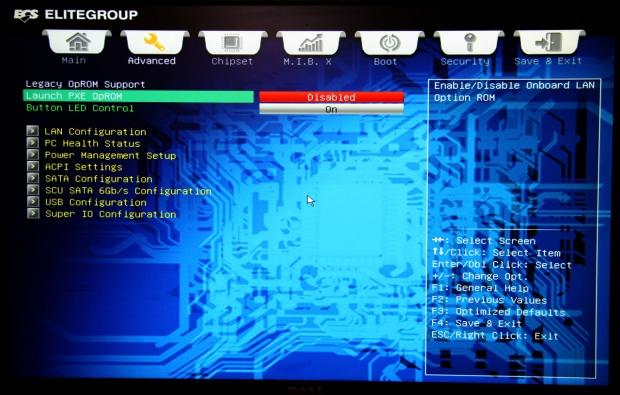

If you want to do any overclocking you'll want to head on over to the M.I.B. X section of the BIOS.


Moving through it, you've got all the usual options you expect to see with voltages, memory, CPU and profiles. The options are actually pretty good; fingers crossed that we're able to get a decent overclock out of the board.


Moving through the rest, we've got a few more standard options while we've also got an EZ Mode area. You can't do a whole lot here, though, which is probably why it's called EZ Mode.
Test System Setup

We would like to thank the following companies for supplying and supporting us with our test system hardware and equipment: Intel, ASUS, MSI, Western Digital and Corsair.
In typical fashion we'll ignore going into any real detail on our testbed as most of the information is above. As for the boards we'll be comparing today, we'll see all that in the coming pages as we look at our graphs. Instead we'll just get into the overclocking side of things to see just what kind of performance we can get out of our i7 3960X today in the new ECS X79R-AX.
That performance over stock today would actually be nothing! Well, that's not completely true to be honest - before this happened...

We were up and running in HyperPi bouncing around 4.6GHz - 4.7GHz which was a nice overclock....and then the above happened. Not only did it take the ECS X79R-AX with it...it took our i7 3960X. Let's give a moments silence for our beloved 3960X.
*insert moments silence*
Because of the fact there's now no overclocking testing, we'll just get into the benchmarks. While we'd normally break down all our benchmarks individually, we won't today because of the lack of overclocking. Instead we'll talk about the USB 2.0, USB 3.0 and SSD performance along with power and heat numbers before we summarize everything in the final thoughts.
Let's get started!
CPU Benchmarks
HyperPi 0.99
Version and / or Patch Used: 0.99
Developer Homepage: www.virgilioborges.com.br
Product Homepage: www.virgilioborges.com.br
HyperPi is a front end for SuperPi that allows for multiple concurrent instances of SuperPi to be run on each core recognized by the system. It is very dependent on CPU to memory to HDD speed. The faster these components, the faster it is able to figure out the number Pi to the selected length.
For our testing we use the 32M run. This means that each of the four physical and four logical cores for the i7 and the four physical cores of the i5 is trying to calculate the number Pi out to 32 million decimal places. Each "run" is a comparative to ensure accuracy and any stability or performance issues in the loop mentioned above will cause errors in calculation.

AIDA64
Version and / or Patch Used: 1.00.1035BETA
Developer Homepage: http://www.aida64.com
Product Homepage: http://www.AIDA64.com
Replacing Everest in our labs is AIDA64. This new testing suite is from the core development team from Lavalys and continues that tradition. The guys have thrown in better support for multithreaded CPUs as well as full 64 bit support. We use this to test memory and HDDs for now, but may find ourselves opening this up to other areas of the motherboard.


System Benchmarks
PCMark 7
Version and / or Patch Used: 1.04
Developer Homepage: http://www.pcmark.com
Product Homepage: http://www.pcmark.com
PCMark 7 includes a range of tests that give different views of your system's performance. In the Advanced Edition you can choose which tests to run. The common use and hardware component tests are unavailable in the Basic Edition.
Overall system performance is measured by the PCMark test. This is the only test that returns an official PCMark score. The Lightweight test measures the system capabilities of entry-level systems and mobility platforms unable to run the PCMark test, but it does not generate a PCMark score. Common use performance is measured by the scenario tests - Entertainment, Creativity and Production - each of which results in a scenario score. Hardware component performance is measured by the hardware tests - Computation and Storage - each of which results in a hardware score.

MediaEspresso
Version and / or Patch Used: 6.5
Developer Homepage: http://www.cyberlink.com/
Product Homepage: http://www.cyberlink.com/products/mediaespresso/overview_en_AU.html?fileName=overview&r=1
MediaEspresso is a blazingly fast media universal converter that can transcode your videos, photos and music files and out put them to a huge range of portable devices including mobile phones, portable media players and even game consoles. With technologies like Smart Detect, Direct Sync and CyberLink's TrueTheater™ video enhancements, you can not only forget about complicated format, resolution and output settings, but your converted file will come out the other side looking better than when it went in!

USB 2.0 and 3.0 Benchmarks
AIDA64
Version and / or Patch Used: 1.70.1400
Developer Homepage: http://www.aida64.com
Product Homepage: http://www.AIDA64.com
Replacing Everest in our labs is AIDA64. This new testing suite is from the core development team from Lavalys and continues that tradition. The guys have thrown in better support for multithreaded CPUs as well as full 64 bit support. We use this to test memory and HDDs for now, but may find ourselves opening this up to other areas of the motherboard.


USB 2.0 performance sits a little back and lines up around the ASUS Z68 board, while USB 3.0 performance lines up just as you'd expect.
SSD Benchmarks
AIDA64
Version and / or Patch Used: 1.70.1400
Developer Homepage: http://www.aida64.com
Product Homepage: http://www.AIDA64.com
Replacing Everest in our labs is AIDA64. This new testing suite is from the core development team from Lavalys and continues that tradition. The guys have thrown in better support for multithreaded CPUs as well as full 64 bit support. We use this to test memory and HDDs for now, but may find ourselves opening this up to other areas of the motherboard.

HD Tune Pro
Version and / or Patch Used: 4.61
Developer Homepage: http://www.hdtune.com
Product Homepage: http://www.hdtune.com
HD Tune Pro gives us accurate read, write and access time results and for the last couple of years has been gaining popularity amongst reviewers. It is now considered a must have application for storage device testing.

Checking out our SSD, we can see the performance is strong. Our minimum was a little low under HD Tune Pro, but not too bad at all.
Memory Benchmarks
AIDA64
Version and / or Patch Used: 1.00.1035BETA
Developer Homepage: http://www.aida64.com
Product Homepage: http://www.AIDA64.com
Replacing Everest in our labs is AIDA64. This new testing suite is from the core development team from Lavalys and continues that tradition. The guys have thrown in better support for multithreaded CPUs as well as full 64 bit support. We use this to test memory and HDDs for now, but may find ourselves opening this up to other areas of the motherboard.

If you want to find out more about Quad Channel / Dual Channel memory performance, I'd recommend you read our Intel X79 Quad Channel and Z68 Dual Channel Memory Performance Analysis.
Gaming Benchmarks
3DMark 11
Version and / or Patch Used: 1.0
Developer Homepage: http://www.futuremark.com
Product Homepage: http://www.3dmark.com/3dmark11/
3DMark 11 is the latest version of the world's most popular benchmark. Designed to measure your PC's gaming performance 3DMark 11 makes extensive use of all the new features in DirectX 11 including tessellation, compute shaders and multi-threading. Trusted by gamers worldwide to give accurate and unbiased results, 3DMark 11 is the best way to consistently and reliably test DirectX 11 under game-like loads.

Metro 2033
Version and / or Patch Used: Latest Steam Update
Timedemo or Level Used: Built in Benchmark
Developer Homepage: http://www.4a-games.com//
Product Homepage: http://www.thqnordic.com/
Metro 2033 is an action-oriented video game with a combination of survival horror and first-person shooter elements. The game is based on the novel Metro 2033 by Russian author Dmitry Glukhovsky. It was developed by 4A Games in Ukraine and released in March 2010 for Microsoft Windows and Xbox 360.[3] In March 2006, 4A Games announced a partnership with Glukhovsky to collaborate on the game.[4] The game was announced at the 2009 Games Convention in Leipzig;[5] a first trailer came along with the announcement.[6] A sequel was announced, currently titled Metro: Last Light.

Temperature and Power
Power Draw Tests

Core Temperature

Looking at power and heat numbers at stock, you can see they line up with our other X79 boards. Nothing too out of the unusual at all, so we're pretty happy with where the board sits at stock.
Final Thoughts
I really feel disappointed about what happened here today. ECS hasn't always had the best wrap when it comes to motherboards. They've struggled to gain momentum in this dog eat dog world, but I really found myself happy with what ECS was offering us here today with the X79R-AX.
It was a great looking board that used a really cool black and white color scheme, something we don't see very often. It supported four dual slot VGA cards, something that continues to be rare amongst most manufacturers at the moment and it offered us a huge amount of SATA ports with ASRock so far being the only company that has offered us as many.
The issue is, we can't recommend a board that when overclocked, takes not only itself out, but also our $1000 i7 3960X. This is no doubt a combination of the extremely poor way the voltage adjustment is done for starters and probably a not so great heatsink over the back of the board.
The voltages, though, are horrible with only a + system in place and not an option to simply pick a fixed voltage, eg. to get 1.4v on the CPU we need to go to +200mv. To date, though, the only board that has been pushed hard with voltages is the ASUS Rampage IV Extreme which we've gone to 1.525v on and the ASRock Extreme9 which we went to 1.5v on. Everything else we push around the 1.4v - 1.45v mark because we don't have any active cooling on offer.
The overclocking process is also a nightmare; you've got to manually adjust the turbo cores individually. This results in having to adjust a CPU multiplier six times instead of once to set it to 45x or anything else.
Everything just went south with this board when we started to overclock and to be honest, I don't have a problem taking responsibility for dead hardware sometimes, but honestly, when you've done 10 X79 motherboards in four weeks and this is your 11th one, you find yourself pretty comfortable working with the hardware.
Because of how well ECS does in the other areas like features and bundle, we won't be scoring the board today. Instead we'll leave it as a bit of an open book for the moment. We've already spoken to ECS and we've got a replacement board on the way and we'll check it out in the new year when we get some time, because the X79R-AX seems like it can be a good board. We've got to get past this issue we had today, though, and hope it doesn't happen again.

 ASRock Z890 Taichi Aqua Motherboard Review - Flagship features without the flagship price
 GIGABYTE Z890I AORUS Ultra Motherboard Review - Mini-ITX with surprisingly good thermals
 GIGABYTE Z890 AORUS Elite WiFi7 Plus Motherboard Review - Right in the sweet spot
 ASUS ROG Strix X870E-E Gaming WiFi7 NEO - A Crosshair by any other name
 MSI MAG B850 Tomahawk Max WiFi II Motherboard Review - Leveling up
 Xbox is rethinking its Project Helix strategy as memory prices continue to soar
 Control Resonant arrives in September with DLSS 4.5 and Path Tracing on PC
 NZXT unveils aesthetically pleasing cases, fans and coolers at Computex 2026
 NVIDIA GeForce Hotfix 610.52 driver released, fixes issues related to G-SYNC, Smooth Motion, and stability
 3DMark adds native Windows on Arm support for ray-tracing benchmarks
 MSI showcases its next-gen GPU cooling tech and it could be for the GeForce RTX 60 Series
 'Radically different' business models coming to Xbox, CEO Asha Sharma says
 GEEKOM's new GeekBook M16 brings a Core Ultra 9 and a 99.9Wh battery to the business laptop market for $899
 AMD warns DDR5 prices won't recover until 2028 as AI demand continues pulling supply away from consumers
 SEGA under fire for using gen AI in new Crazy Taxi game
 Navman MiVue Smart True 4K Surround Dashcam Review - Seeing In All Directions At Once
 IQUNIX Magi96 Pro Aluminum Low Profile Mechanical Keyboard Review - Premium Build, Satisfying Sound
 Asetek Forte S-Series Racing Simulator Bundle Review
 Razer Pro Type Ergo Wireless Split Ergonomic Keyboard Review - Built for Comfort and Support
 ASUS ROG Strix Morph 96 Wireless Gaming Keyboard Review - Great Performance, More Affordable
 SAPPHIRE Radeon RX 9070 GRE PULSE OC Review - A New 1440p Challenger Has Arrived
 NZXT H6 RGB+ Compact Dual-Chamber Chassis Review
 ASRock Radeon RX 9070 GRE Steel Legend Review - The RDNA 4 Mid-Range Reshuffle
 The PowerToys utilities I keep enabled on every Windows 11 PC, and the ones I turned off within a week
 TweakTown's Best of Computex 2026 Awards - The Best Hardware, Gaming Gear, and AI
 Phison E37T SSD Controller Exclusive Preview - The Fastest DRAMless SSD Platform Yet
 USB Ports Not Working in Windows 11? Try These Fixes
 ASUS WiFi Routers and Networking Solutions Deliver Long-term Security and Reliability with No Additional Cost
 Second Monitor Not Detected in Windows 11? Try These Fixes
 Turn Your Old Smartphone Into a Dedicated Webcam for Your Windows PC
 The Send To menu is the right-click feature on Windows 11 that nobody bothers to customize
 Windows 11 will not let you pin a folder to the taskbar, but a 30-second workaround does
 ASUS ProArt Displays Unlock Creativity with Professional Monitors for Everyone