Introduction
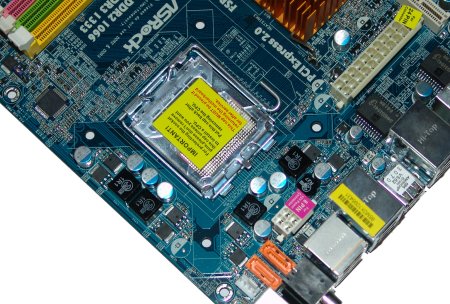
At the 2008 Computex event, Intel officially took the curtains off its 4 series PCI Express chipset range which is set to replace the original 3 series of chipsets. Intel's 4 series not only brings Crossfire support to the mainstream, thanks to its ability to run two PCI Express x8 slots for GPUs, but it also adds PCI Express 2.0 to all of its 4 series of chipsets. That's right, even the low-end of the 4 series gets a new PCI Express controller hub.
To this end, we are starting to see quite a few new boards hitting the market and it's good to see. While the 4 series is no revolution on the 3 series, it does upgrade a few features, especially if you're aiming for a dual graphics card system setup. No longer are we stuck with the older 16/4 configuration we had to put up with on the older P35. Now Intel has finally given the all clear to a split 8/8 system; similar to how the 975X was given its Crossfire certification.
Today we have been sent two of the newest members of the 4 series family from ASRock, and they are loaded with features for the home user along with some nice overclocking for the enthusiast. Today we take a look at the ASRock P45R2000-WiFi and the P43R1600Twins-WiFi. How do they stack up? - Come and see with us.
Specifications - P45R2000-WiFi
Specifications of the P45R2000-WiFi
CPU
Supports Intel Core 2 Series (Extreme/Quad/Duo)
Supports Intel Pentium Dual Core Series
Supports Intel Pentium D Series
Supports Intel Pentium 4 5xx/6xx Series
Supports Intel Celeron D 3xx/4xx Series
Supports Intel 45nm Series CPU
Chipset
Intel P45 Express Chipset
P45 Express Northbridge
ICH10R Southbridge
DMI @ 2GB/s
System Memory
2 DDR2 SDRAM 240 Pin DIMM Sockets
Supports DDR2-533/667/800
4 DDR3 SDRAM 240pin DIMM Sockets
Supports DDR3-667/800/1066/1333MHz
64/128Bit Dual Channel
Supports up to 8GB DDR3 Memory (4x 2GB) or
Supports up to 4GB DDR2 Memory (2x2GB)
Bus Frequency
100/133/200/266/333/400MHz Internal
400/533/800/1066/1333/1600MHz External
P4 Bus Architecture
Expansion Slots
3 PCI Express x16
2 PCI Express x1
3 PCI
Connectivity
1 Parallel ATA port supporting 2 IDE Drives
6 Serial ATA ports
2 e.SATA port
2 Gigabit Ethernet Port
Expansion Ports
1 PS2 Keyboard Port
1 PS2 Mouse Port
12 USB 2.0 Ports (6 rear accessible, 6 via expansion bracket)
6 Stereo Audio Ports
1 RCA SPDIF Port
1 Toslink SPDIF Port
2 e.SATA Port
2 RJ45 Ethernet Ports
2 Firewire ports (1 rear accessible, 1 via expansion bracket)
Specifications - P43R1600Twins-WiFi
Specifications of the P43R1600Twins-WiFi
CPU
Supports Intel Core 2 Series (Extreme/Quad/Duo)
Supports Intel Pentium Dual Core Series
Supports Intel Pentium D Series
Supports Intel Pentium 4 5xx/6xx Series
Supports Intel Celeron D 3xx/4xx Series
Supports Intel 45nm Series CPU
Chipset
Intel P43 Express Chipset
P43 Express Northbridge
ICH10R Southbridge
DMI @ 2GB/s
System Memory
4 DDR2 SDRAM 240 Pin DIMM Sockets
Supports DDR2-533/667/800
2 DDR3 SDRAM 240pin DIMM Sockets
Supports DDR3-667/800/1066/1333MHz
64/128Bit Dual Channel
Supports up to 8GB DDR2 Memory (4x2GB) or
Supports up to 4GB DDR3 Memory (2x2GB)
Bus Frequency
100/133/200/266/333/400MHz Internal
400/533/800/1066/1333/1600MHz External
P4 Bus Architecture
Expansion Slots
1 PCI Express x16
3 PCI Express x1
3 PCI
Connectivity
1 Parallel ATA port supporting 2 IDE Drives
7 Serial ATA ports
1 e.SATA port
1 Gigabit Ethernet Port
Expansion Ports
1 PS2 Keyboard Port
1 PS2 Mouse Port
12 USB 2.0 Ports (6 rear accessible, 6 via expansion bracket)
6 Stereo Audio Ports
1 RCA SPDIF Port
1 Toslink SPDIF Port
1 e.SATA Port
1 RJ45 Ethernet Ports
2 Firewire ports (1 rear accessible, 1 via expansion bracket)
The Package - P45R2000-WiFi
Package and Contents of the P45R2000-WiFi

First off, we'll start with the package and contents of the top board here; the P45R2000-WiFi. This is the mainstream board from ASRock that is packed with features to the hilt. The box that the board is shipped in is of the standard size for the ATX motherboards; no over the top packaging. The company logo and the model number dominate the front with some fancy art work.

On the back of the box there is a lot of fancy marketing info on the boards' features including the benefits of PCI Express 2.0 as well as the WiFi controller. One thing that is missing is a colour photo of the board. For this level of manufacturing and marketing that ASRock are trying to push into, at least a small colour picture of the product would be nice. Bit disappointed here.

One thing that didn't disappoint was the documentation and software bundle that came with the board. In the P45R2000 series box, you get two user manuals. One of them is for the board itself with a lot of useful setup data, info on the BIOS as well as the driver and software installation.
The second manual is for the WiFi card and gives you setup instructions for the software app that is included. The Driver DVD contains XP and Vista Drivers for both 32-bit and 64-bit variations, but again, no Linux support. This is very disappointing for alternate OS users who have to go and chase down drivers.

Moving along to the cables supplied, there are a total of four SATA data cables. While the board does support six, if you want to use them all you will have to go and get two extra cables from a retailer, but it's still nice to see at least four included. However, the power cable side was skimped on. There's only one Molex to SATA power converter included, so you'd better hope your PSU can support more than one drive. Lastly, there are the ribbon cables and these are a single FDD cable that supports one drive and an IDE cable supporting two drives.

Last on the agenda is the WiFi add-on card. This card is actually USB powered, so if you want to use it, one of the three extra USB headers is sacrificed. The card contains a Realtek USB WiFi controller chip that supports the 802.11b/g wireless networking protocol; no WiMAX yet.
The Motherboard - P45R2000-WiFi
The Board - P45R2000-WiFi


Now we start on the first board. The P45R2000-WiFi is built on a full sized 24x30cm ATX motherboard layout coloured blue, similar to that of the GIGABYTE series of boards, just not quite as deep in colour. First off, the placement of the connectors and unfortunately this board has a major flaw.
The 24-pin power connector is located on the left hand side of the board, below the CPU and behind the stereo audio ports. Coming from an enthusiast background, where this board is aimed towards, this means that the large ATX power cable needs to be routed over and around the CPU heatsink area; not good guys, not good at all.
The 4/8 pin power connector luckily is placed in the normal spot behind the PS/2 ports, keeping it up and away from the CPU area. The main reason that this board doesn't have the ATX power connector behind the memory slots is because it has two extra slots. That's right, this board has a total of six memory slots. There are a total of four DDR3 memory slots and two DDR2 memory slots. This is a combo board.
One of the things that was a bit annoying with this board is the way eSATA is configured. If you want to use the eSATA ports, you need to bridge the orange SATA ports at the bottom of the board with the SATA ports behind the PS/2 ports.

The CPU area of the ASRock P45R2000-WiFi is extremely clean; there are no high rise components stopping the installation of a large aftermarket heatsink. For the power supply to the CPU, there's a solid state 4 phase voltage regulation system. This is enough for the 45nm dual core when overclocking, but quad core processors may struggle.

On the rear I/O ports, we get a pretty good layout here. Digital audio is handled through either a Toslink S/PDIF or RCA S/PDIF port, so it's good to see both are included. The two eSATA ports are not functional unless you connect two of the internal SATA ports to the bridge ports behind the PS2 ports.

Moving to the expansion slots, we have quite a good arrangement. First off, we have two PCI Express x16 slots; one blue and one green. In between the two PCI Express x16 slots is an old school paddle card that we are used to seeing on older nForce 4 chipset boards. This card is used to set the PCI Express bandwidth between the two x16 slots. In its default configuration, all 16 lanes are set to the green slot while the blue slot is inactive. If you swap it around, you split the 16 lanes between the two slots so that both get eight lanes each. Two PCI Express x1 slots running off the ICH10R Southbridge make up the last of the PCI-E slots and three PCI slots are the expansion possibilities for legacy devices.
The Package - P43R1600Twins-WiFi
Package and Contents of the P43R1600Twins-WiFi

Now we move onto the second board in our arsenal; the P43R1600Twins. First as always, we look at the package that the board comes to us in. Like the P45 board, the P43R1600Twins comes in the same box, size and colour scheme. Only the model info gets changed.

On the back we see the exact same marketing info from the P45R2000-WiFi board being carried over to the P43R1600Twins-WiFi, so again, there is no colour photo of the board; disappointing.

The documentation and software side is a mirror image of the P45R2000; only the board user manual changes. It's still full of info on the board in multiple languages with nothing important left unmentioned.

Cables; these are also identical in quality and quantity. There's four SATA data, one Molex to SATA, one IDE and one FDD cable making up the bundle.

The WiFi card included on the P43R1600Twins is the exact same one that is included on the P45R2000 series.
The Motherboard - P43R1600Twins-WiFi
The Board - P43R1600Twins-WiFi


Moving right along, it's time to look at the board itself. The layout of the connectors on the board is almost identical to the P45R2000, which is disappointing as the placement of the 24-pin power connector is located in the same spot. Another cable nightmare here guys.
This board is also a combo board; it supports DDR2 and DDR3. However, where the P45R2000 had more DDR3 slots, the P43R1600Twins has more DDR2 slots. It has a total of four DDR2 and two DDR3 slots. The board still supports the same FSB and DDR2/DDR3 speeds, so there are no advantages of bus speed support by either board.

The same voltage regulation components are used. Solid state is good by us and any board swapping to solid state gets the TweakTown thumbs up. Four phases keeps the CPU fed and the space around the CPU is ideal for large coolers.

The rear I/O panel changes from the P45R2000 series. Firstly, there is only a single eSATA port which uses the same bridge design that the P45R2000 uses; quite annoying to say the least. The other major difference is this board loses an RJ45 Ethernet connector. This board only comes with one, though I find one Gigabit port enough for my needs at this point in time, as I'm sure most of you will, too.

Moving to the expansion slots and this is where we get another change between the P45 and P43 board. The P43 chipset does not carry the same Crossfire support that the P45 does. While you can still do Crossfire with it, you have to have it configured in the older 16/4 configuration with no splitting of the channels. To this end, ASRock has not included a second x16 PCI-E slot on this board; rather, they go for a single GPU option. This gives the board an extra PCI-E x1 slot to make up three in total and three older PCI slots.
BIOS and Overclocking
BIOS

Both boards use an identical BIOS layout which resembles the ASUS BIOS menu used on their current generation. All of the features for overclocking are under the Advanced main tab. From there you have to go to three different menus to find the settings. Both boards have identical settings.

Buses
CPU Frequency: 100MHz - 800MHz in 1MHz Increments
PCI Express: 50MHz to 150MHz in 1MHz Increments
Voltages
CPU Voltage: 0.81875v to 1.60v in various increments
DRAM(DDR3): 1.47v to 2.375v in various increments
NB Core: Auto, Low, Middle, High, Highest
SB Core: Auto, Low, Middle, High, Highest
SB 1.1v: Auto, Low, Middle, High, Highest
VTT Voltage: Auto, Low, Middle, High, Highest
GLTREF Voltage: x0.615, x0.63, x0.65, x0.67
PLL Voltage: Auto, Low, Middle, High, Highest
Overclocking
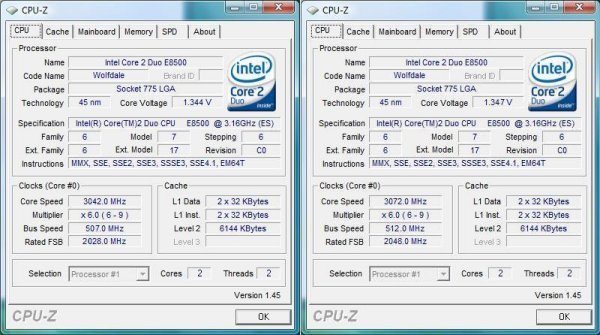
With both boards having the exact same settings, we expected to see a similar result in the FSB department and we weren't wrong. We managed a total of 507MHz out of the P43 and just a little higher of 512MHz out of the P45 board; very impressive results here.
Important Editor Note: Our maximum overclocking result is the best result we managed in our limited time of testing the motherboard. Due to time constraints we weren't able to tweak the motherboard to the absolute maximum and find the highest possible FSB, as this could take days to find properly. We do however spend at least a few hours overclocking every motherboard to try and find the highest possible overclock in that time frame. You may or may not be able to overclock higher if you spend more time tweaking, or as new BIOS updates are released. "Burn-in" time might also come into play if you believe in that.
Test System Setup and Memory Performance
Test System
Processor: Intel Core 2 Duo E8500 @ 3.16GHz (9.5x333MHz)
Memory: 2x 1GB DDR3-1600XMP OCZ (Supplied by OCZ)
Hard Disk: 500GB Western Digital SE16 (Supplied by Western Digital)
Graphics Card: GIGABYTE 9800GX2 (Supplied by GIGABYTE)
Cooling: GIGABYTE 3D Galaxy II (Supplied by GIGABYTE)
Operating System: Microsoft Windows Vista SP1
Drivers: nForce Driver 15.17, Forceware 175.16
Now we get stuck into the testing phase of the review. Today we are using only the ASRock boards against each other to see just which one is the better choice.
Stock settings were run with the CPU at 9.5x333MHz and with a DDR3 memory ratio of 1333MHz. At overclocked speeds, the divider was lowered to 6x and the bus speeds were 507MHz for the P43 and 512MHz for the P45 with a memory ratio set to 1:1.
EVEREST Ultimate Edition
Version and / or Patch Used: 2006
Developer Homepage: http://www.lavalys.com
Product Homepage: http://www.lavalys.com
Buy It Here
EVEREST Ultimate Edition is an industry leading system diagnostics and benchmarking solution for enthusiasts PC users, based on the award-winning EVEREST Technology. During system optimizations and tweaking it provides essential system and overclock information, advanced hardware monitoring and diagnostics capabilities to check the effects of the applied settings. CPU, FPU and memory benchmarks are available to measure the actual system performance and compare it to previous states or other systems.
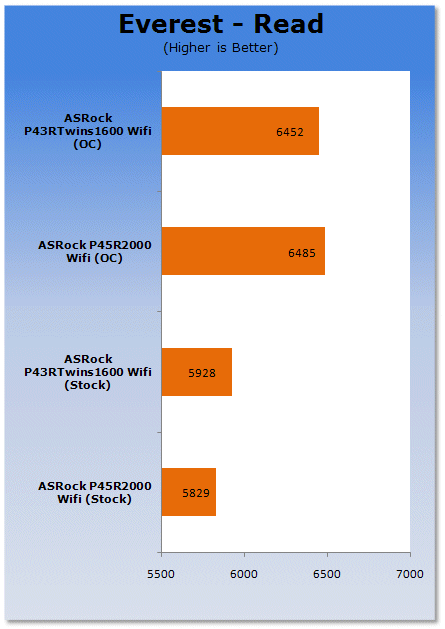
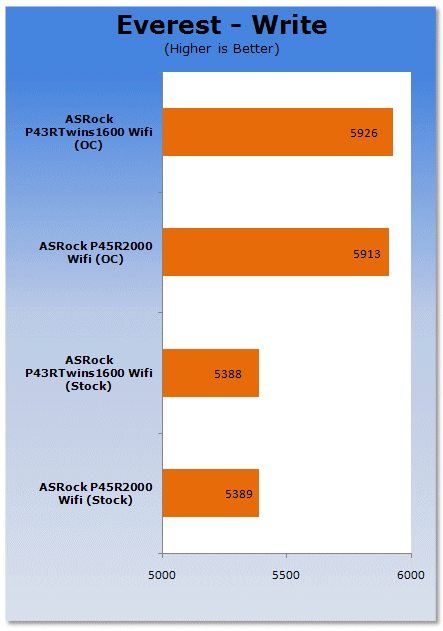
First on the list is our synthetic benchmark run for the memory subsystem. Both boards use an identical memory controller, so at stock speeds we see identical results. At overclocked speeds we see only a tiny increase in speed to the P45.
Benchmarks - PCMark Vantage
PCMark Vantage
Version and / or Patch Used: Unpatched
Developer Homepage: http://www.futuremark.com
Product Homepage: http://www.futuremark.com/benchmarks/pcmark-vantage//
Buy It Here

PCMark Vantage is the first objective hardware performance benchmark for PCs running 32 and 64 bit versions of Microsoft Windows Vista. PCMark Vantage is perfectly suited for benchmarking any type of Microsoft Windows Vista PC from multimedia home entertainment systems and laptops to dedicated workstations and high-end gaming rigs. Regardless of whether the benchmarker is an artist or an IT Professional, PCMark Vantage shows the user where their system soars or falls flat, and how to get the most performance possible out of their hardware. PCMark Vantage is easy enough for even the most casual enthusiast to use yet supports in-depth, professional industry grade testing.
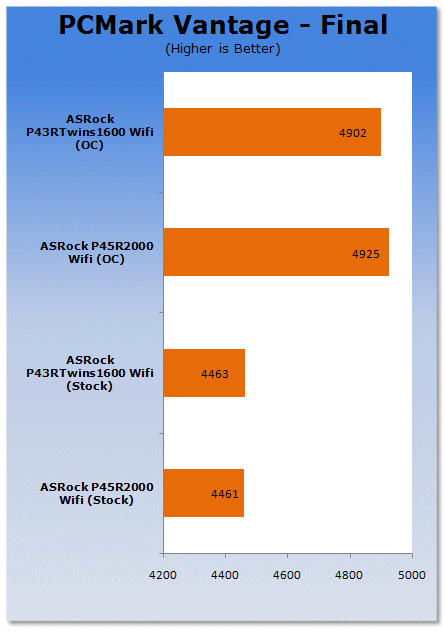
PCMark Vantage shows no difference at stock and only a marginal increase at OC levels.
Benchmarks - SYSmark 2007 Preview
SYSmark 2007
Version and / or Patch Used: 1.04
Developer Homepage: http://www.bapco.com/
Product Homepage: http://www.bapco.com/products/sysmark2007preview/>

SYSmark 2007 Preview is the latest version of the premier performance metric that measures and compares PC performance based on real world applications.
SYSmark 2007 Preview extends the SYSmark family, which has been widely accepted by IT Managers, PC OEMs, press and analysts worldwide to support Windows Vista™.
SYSmark 2007 Preview allows users to directly compare platforms based on Windows Vista™ to those based on Windows XP Professional and Home.
The new release also incorporates numerous new features and enhancements such as an improved GUI allowing streamlined start-up and run along with a heads-up-display (HUD) and automated error reporting.
SYSmark 2007 Preview is an application-based benchmark that reflects usage patterns of business users in the areas of Video creation, E-learning, 3D Modeling and Office Productivity. This new release includes a robust and refreshed set of applications.
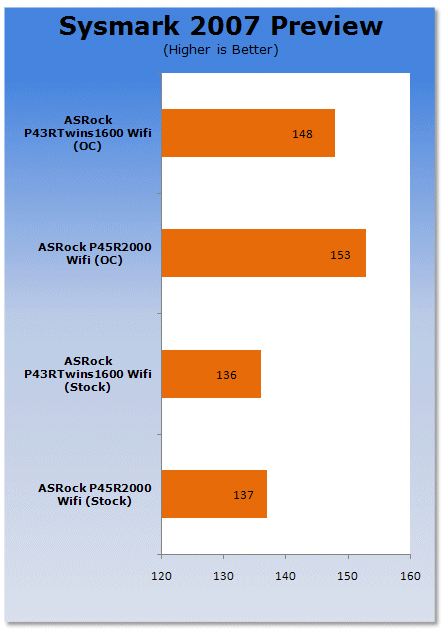
SYSmark's test suite shows the same trend as PCMark with the P43 and P45 sitting together at stock and only a few marks between them at OC levels.
Benchmarks - Adobe Premiere Elements 4.0
Adobe Premiere Elements 4.0
Version and / or Patch Used: 4.0
Developer Homepage: http://www.adobe.com
Product Homepage: http://www.adobe.com/products/premiereel/
Buy It Here

Our test with Adobe Premiere Elements 4.0 is performed with a raw two hour AVI file. It is then compressed into DivX format using the latest version codec. We measure the time it takes to encode .
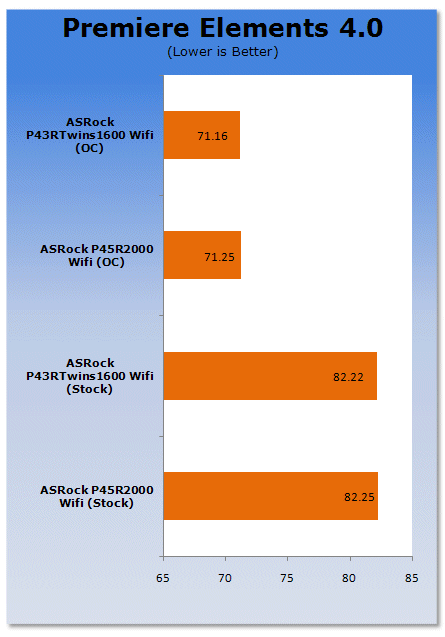
Premiere Elements; our first real world test puts both platforms right on top of each other. Even at OC settings there is less than a second difference between the two platforms.
Benchmarks - HDD Performance
HD Tach
Version and / or Patch Used: 3.0.1.0
Developer Homepage: http://www.simplisoftware.com
Product Homepage: http://www.simplisoftware.com/Public/index.php?request=HdTach
Buy It Here
HD Tach has been around for a long time and is excellent when it comes to testing hard drive performance. It is also a very handy program when it comes to testing the controller used on particular motherboards. Tests such as Read, CPU Utilization and Burst are available at a click of the button and give you a good idea of how the hard drive can perform from system to system.
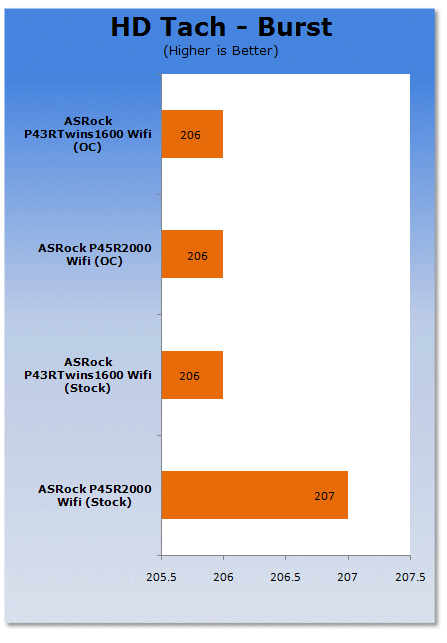
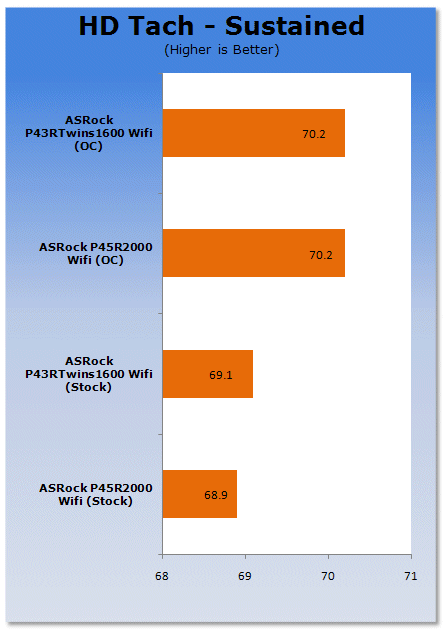
Both boards use an Identical ICH10R controller for the SATA interface, so there is no difference here.
Benchmarks - 3DMark Vantage
3DMark Vantage
Version and / or Patch Used: 1.01
Developer Homepage: http://www.futuremark.com
Product Homepage: http://www.futuremark.com/products/3dmarkvantage/
Buy It Here

3DMark Vantage is the new industry standard PC gaming performance benchmark from Futuremark, newly designed for Windows Vista and DirectX10. It includes two new graphics tests, two new CPU tests, several new feature tests, and support for the latest hardware.
3DMark Vantage is based on a completely new rendering engine, developed specifically to take full advantage of DirectX10, the new graphics API from Microsoft.
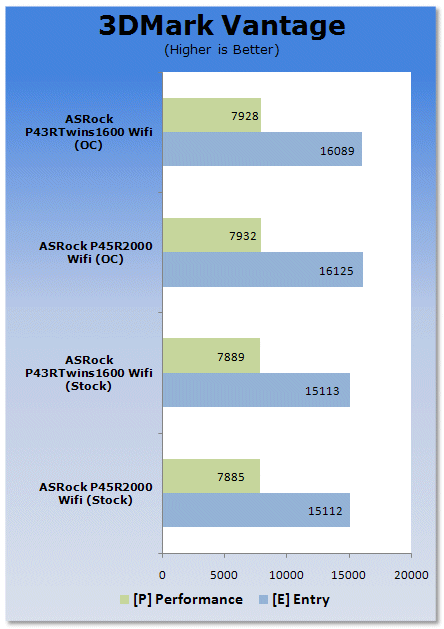
First in the gaming arsenal is the synthetic 3DMark Vantage. At stock speeds there is no discernable difference. However, at OC speeds we get a couple of extra marks to the P45, thanks to a slightly higher clockspeed.
Benchmarks - Crysis
Crysis
Version and / or Patch Used: 1.1
Timedemo or Level Used: Custom Timedemo
Developer Homepage: http://www.crytek.com/
Product Homepage: http://www.ea.com/crysis/
Buy It Here

From the makers of Far Cry, Crysis offers FPS fans the best-looking, most highly-evolving gameplay, requiring the player to use adaptive tactics and total customization of weapons and armor to survive in dynamic, hostile environments including Zero-G.
Real time editing, bump mapping, dynamic lights, network system, integrated physics system, shaders, shadows and a dynamic music system are just some of the state of-the-art features the CryENGINE™ 2 offers. The CryENGINE™ 2 comes complete with all of its internal tools and also includes the CryENGINE™ 2 Sandbox world editing system.
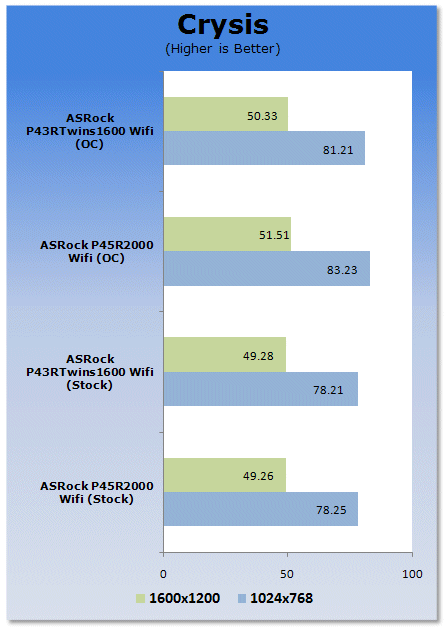
Real world gaming through Crysis shows no difference at all at stock or OC speeds.
Power Usage and Heat Tests
Power Consumption
We are now able to find out what kind of power is being used by our test system and the associated graphics cards installed. Keep in mind; it tests the complete system (minus LCD monitor, which is plugged directly into an AC wall socket).
There are a few important notes to remember though; while our maximum power is taken in 3DMark Vantage at the same exact point, we have seen in particular tests the power being drawn as much as 10% more. We test at the exact same stage every time; therefore tests should be very consistent and accurate.
The other thing to remember is that our test system is bare minimum - only a 7,200RPM SATA-II single hard drive is used without CD-ROM or many cooling fans.
So while the system might draw 400 watts in our test system, placing it into your own PC with a number of other items, the draw is going to be higher.
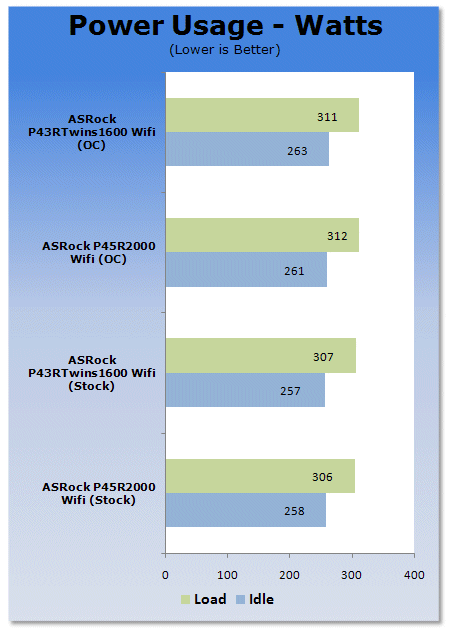
Power wise; both chipsets perform identically. They are mirror images of each other.
Heat Generation
As a new measure, we are now monitoring the heat generation from the key components on the motherboards, this being the Northbridge, Southbridge (if it contains one) as well as the Mosfets around the CPU. The results are recorded at idle and load during the power consumption tests.
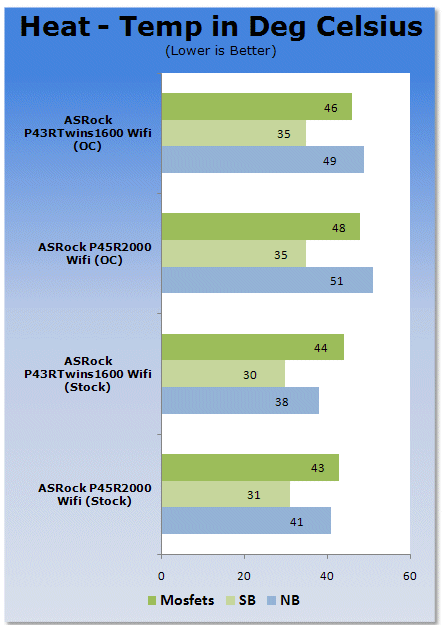
The P45 board runs slightly hotter on the MCH, but this could be due to its dual PCI Express x8 capabilities.
Final Thoughts
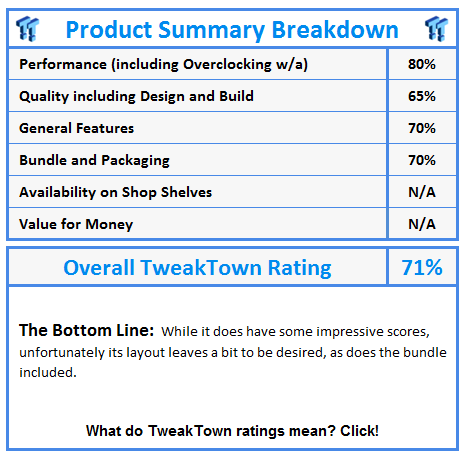
First off, we talk about the P45R2000-WiFi. In all, it's a board that while having all the bells and whistles you could want, some of them come at a price. This for instance is the dual memory support. While great for the upgraders in us, the placement of the power connectors suffer; not good at all for overclockers.
The other major gripe is that if you want to use eSATA, you have to run two cables from the bottom of the board to the top left of the board. This not only gives you two less SATA ports internally, but again, you're getting more cable clutter. With digital switching readily available, why wasn't this used? - Or better yet, a two port SATA controller to run the eSATA system independently?
Last on the list of complaints is again the lack of digital switching for the PCI Express slots. If you want to use Crossfire, you have to use an old style paddle card that splits the bandwidth.
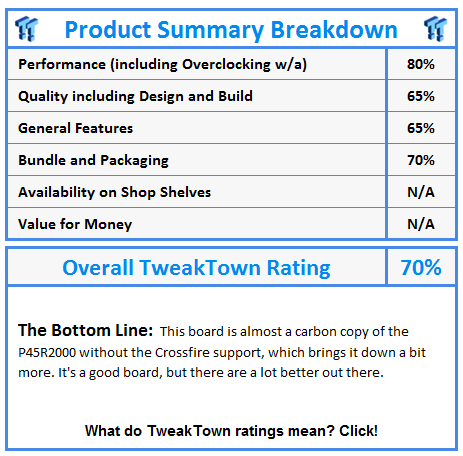
The P43R1600Twins-WiFi board, while almost a mirror image of the P45R2000-WiFi, it lacks Crossfire support. So this is eliminated for dual GPU users unless you settle on a HD 3870X2 or HD 4870X2 (when it arrives). Next; again due to the dual memory controllers, you lose out on power connector placements. And the routing of the SATA cable to run the single eSATA port means more cable clutter and the loss of one internal SATA port.
ASRock P45R2000-WiFi
ASRock P43R1600Twins-WiFi