











Introduction
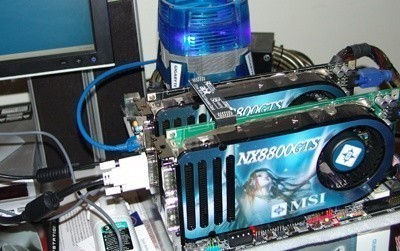
We have had a look at the 320MB nVidia GeForce 8800GTS graphic card offering a few times here at TweakTown in the past - we have looked at it in its stock form, overclocked and in SLI. It's a fantastic card and doesn't disappoint but in our first article we mainly focused on how it compared against the 640MB in single card configuration. Today we are going to be re-focusing on this situation but when the cards are used together in SLI mode.
With in excess of 1.2GB of memory on offer when the 640MB cards are enabled in SLI mode, you have to wonder are we simply at a point of overkill. Are the 640MB cards for non-SLI and the 320MB cards for SLI? These are some of the questions we hope to answer today.
While some companies have pulled the 640MB card from production, there are still a large number of companies offering them till this day. We almost had everything we needed for the article originally, with a couple 320MB cards from MSI in hand and a single 640MB we were close but not close enough. With an email or two later to MSI, a second 640MB arrived on our door step and we had only just one single mission for it - test it in SLI with our originally 640MB from MSI and see if moving to SLI dual graphics technology is actually worth it or not.
We won't be going into any detail on the cards as we have seen what they are capable of more than a few times now (here and here); this is purely a performance analysis and we won't be wasting anytime messing around with the usual particulars.
So we will have a quick look at our test system setup and get stuck straight into the benchmarks results from the different configurations.
Benchmarks - Test System Setup and 3DMark05
Test System Setup
Processor(s): Intel Core 2 Duo E6600 @ 3.33GHz (366MHz x 9 and FSB 1:1)
Motherboard(s): ABIT IN9 32X-MAX Wi-Fi (Supplied by Universal ABIT)
Memory: 2 X 1GB Crucial PC8000 5-5-5-15 in Dual Channel(Supplied by Crucial)
Hard Disk(s): Hitachi 80GB 7200RPM SATA 2
Operating System: Microsoft Windows XP Professional SP2
Drivers: nVidia ForceWare 97.92 and DX9c
As we mentioned, as this is a performance analysis, we will be getting straight into the benchmarking, bypassing all the usual pleasantries.
We will be using our normal line up of games and as the graphics cards are clearly at the higher end of the table we are testing at the maximum PC resolution of 2560 x 1600 to really see what the different configurations are capable of producing.
All of the graphics cards on hand today are from our friends at MSI - two utilize 320MB of memory while the other two utilize 640MB. We saw that the 640MB consistently took the lead of the 320MB counterpart in our single non-SLI testing. We are here today to find out what happens when we put the same cards into an SLI mode configuration. All the graphics cards are exactly the same (same clock speeds and so on) just the amount of memory is different.
Is a combined 640MB of memory fine or do we want to get crazy and have in excess of 1.2GB of video memory? There is only one way to find out! Keep in mind that in Australia and at time of publishing a couple MSI GeForce 8800GTS 320MB cards will cost you about $980 AUD (or roughly $786 USD) and a couple MSI GeForce 8800GTS 640MB cards will cost you about $1300 AUD (or roughly $1042 USD) - so about a 33% price increase for the 1280MB SLI option.
Let's get started!
3DMark05
Version and / or Patch Used: Build 130
Developer Homepage: http://www.futuremark.com
Product Homepage: http://www.futuremark.com/products/3dmark05/
Buy It Here
3DMark05 is now the second latest version in the popular 3DMark "Gamers Benchmark" series. It includes a complete set of DX9 benchmarks which tests Shader Model 2.0 and above.
For more information on the 3DMark05 benchmark, we recommend you read our preview here.
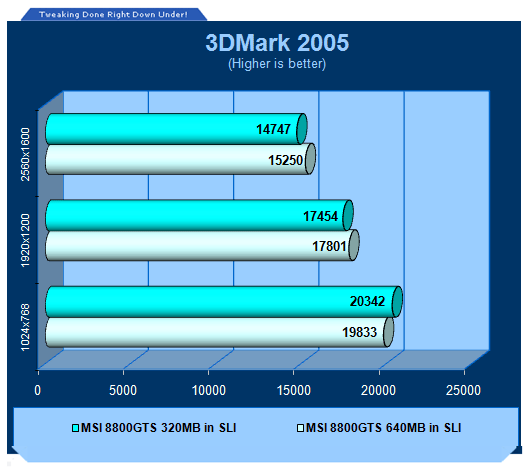
At the lower resolution the 640MB cards sit just behind but when we move up in the resolution table we can see that it is able to take a slight lead over the 320MB variant.
Benchmarks - 3DMark06
3DMark06
Version and / or Patch Used: Build 110
Developer Homepage: http://www.futuremark.com
Product Homepage: http://www.futuremark.com/products/3dmark06/
Buy It Here

3DMark06 is the very latest version of the "Gamers Benchmark" from FutureMark. The newest version of 3DMark expands on the tests in 3DMark05 by adding graphical effects using Shader Model 3.0 and HDR (High Dynamic Range lighting) which will push even the best DX9 graphics cards to the extremes.
3DMark06 also focuses on not just the GPU but the CPU using the AGEIA PhysX software physics library to effectively test single and Dual Core processors.
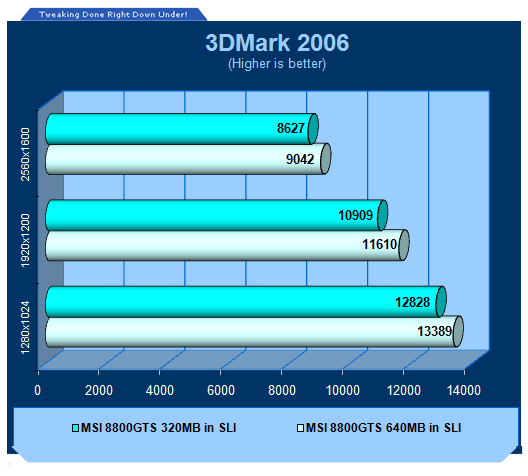
We can see here across the board that the 2 x 640MB 8800GTS combination is faster, and quite significantly, its more than just fluctuation... and it's consistent at this stage.
Benchmarks - Half Life 2 (Lost Coast)
Half Life 2 (Lost Coast)
Version and / or Patch Used: Latest from Steam
Timedemo or Level Used: Custom Timedemo
Developer Homepage: http://www.valvesoftware.com
Product Homepage: http://www.half-life2.com
Buy It Here

By taking the suspense, challenge and visceral charge of the original, and adding startling new realism, responsiveness and new HDR technology, Half-Life 2 Lost Coast opens the door to a world where the player's presence affects everything around him, from the physical environment to the behaviors even the emotions of both friends and enemies.
We benchmark Half Life 2 Lost Coast with our own custom timedemos as to avoid possible driver optimizations using the "record demo_name" command and loading the timedemo with the "timedemo demo_name" command - For a full list of the commands, click here.
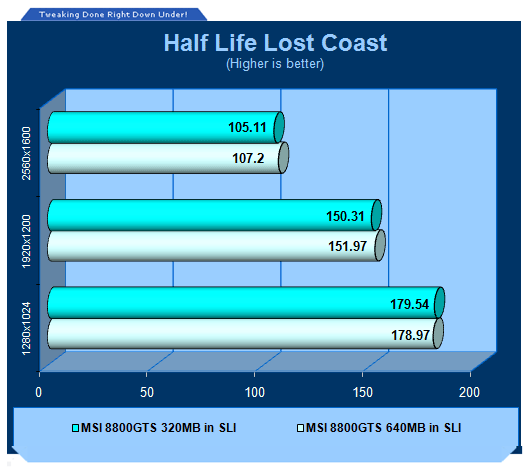
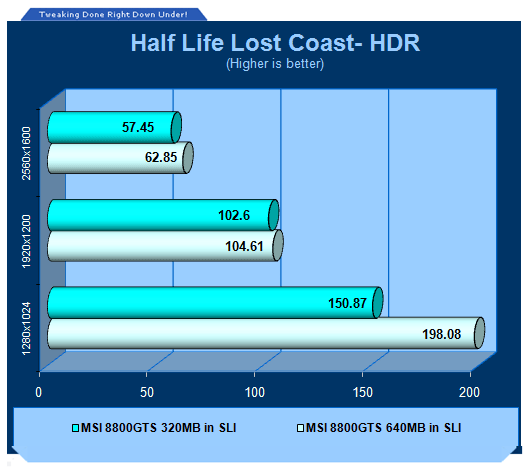
Non-HDR tests don't really see a difference but our HDR tests see again the 640MB combination take a lead with it being quite a significant one at the lower resolution.
Benchmarks - PREY
PREY
Version and / or Patch Used: Unpatched
Timedemo or Level Used: HardwareOC Custom Timedemo
Developer Homepage: http://www.humanhead.com
Product Homepage: http://www.prey.com
Buy It Here

PREY is one of the newest games to be added to our benchmark line-up. It is based off the Doom 3 engine and offers stunning graphics passing what we've seen in Quake 4 and does put quite a lot of strain on our test systems.
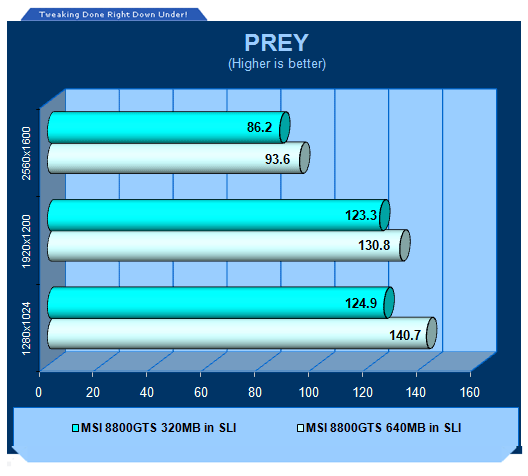
PREY being as intensive as it is sees that the extra memory comes in handy and again gives us a nice lead over the 320MB cards but both configurations offer quite a playable experience.
Benchmarks - F.E.A.R.
F.E.A.R.
Version and / or Patch Used: Unpatched
Timedemo or Level Used: Built-in Test
Developer Homepage: http://www.vugames.com
Product Homepage: http://www.whatisfear.com/us/
Buy It Here
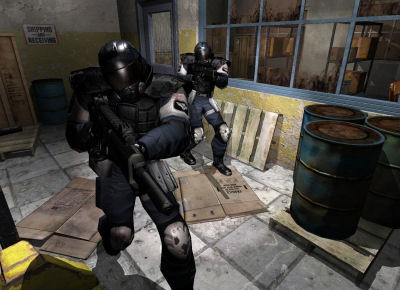
F.E.A.R. (First Encounter Assault Recon) is an intense combat experience with rich atmosphere and a deeply intense paranormal storyline presented entirely in first person. Be the hero in your own spine-tingling epic of action, tension, and terror...and discover the true meaning of F.E.A.R.
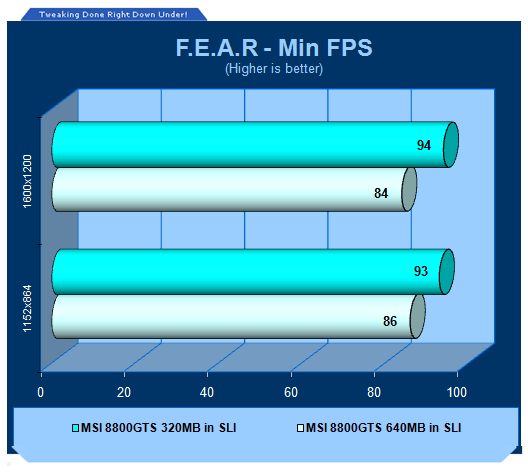
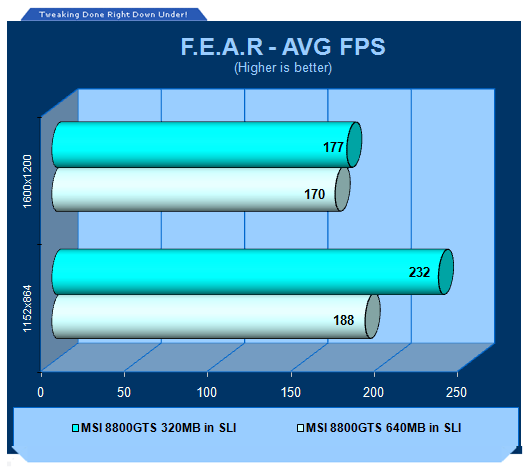
For the first time we see a bit of a role reversal here, the 320MB offerings seems to be consistently faster in both resolutions which is quite unexplainable (probably driver issue).
Benchmarks - Company of Heroes
Company of Heroes
Version and / or Patch Used: Demo
Timedemo or Level Used: Built-in Test
Developer Homepage: http://www.relic.com
Product Homepage: http://www.companyofheroesgame.com
Buy It Here
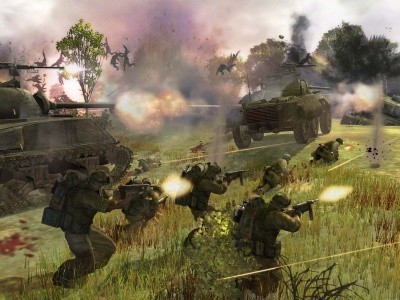
Company of Heroes, or COH as we're calling it, is one of the latest World War II games to be released and also one of the newest in our lineup of benchmarks. It is a super realistic real-time strategy (RTS) with plenty of cinematic detail and great effects. Because of its detail, it will help stress out even the most impressive computer systems with the best graphics cards - especially when you turn up all the detail. We use the built-in test to measure the frame rates.
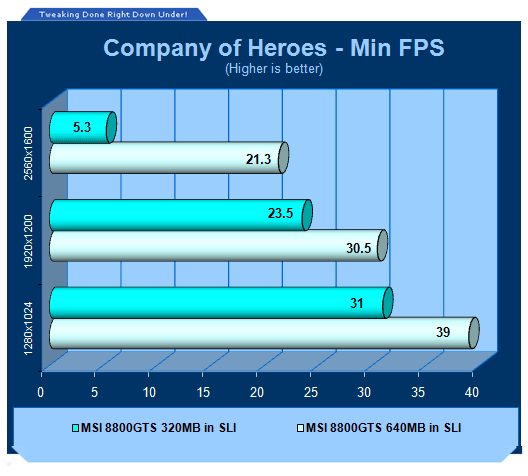
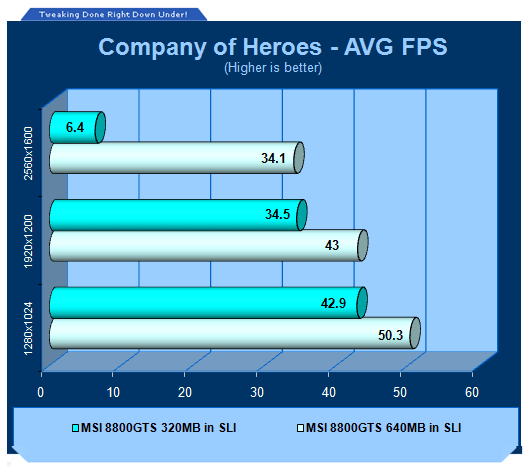
The extra memory again comes in to play in Company of Heroes and especially at 2560 x 1600 we can see that the cards can actually perform fairly well unlike the 320MB configuration, which doesn't really offer a pleasing gaming experience.
Benchmarks - High Quality AA and AF
High Quality AA and AF
Our high quality tests let us separate the men from the boys and the ladies from the girls. If the cards weren't struggling before they will start to now.
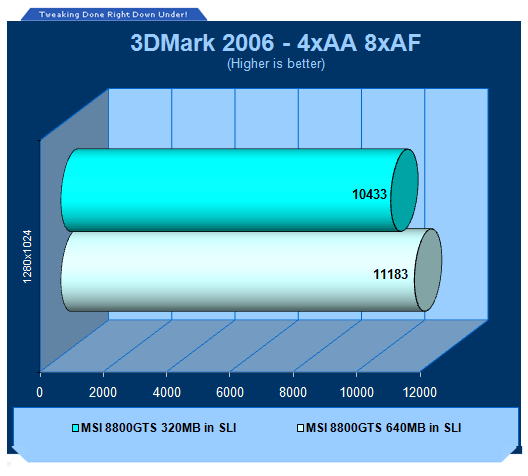
As you would expect with AA and AF enabled we continue to see an increase in performance for the 2 x 640MB 8800GTS graphics cards but probably not as large as we expected.
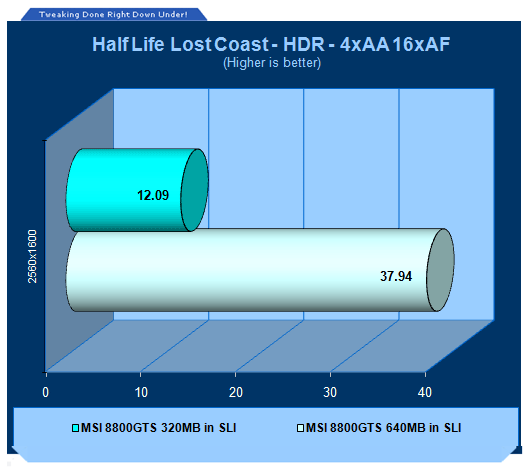
Lost Coast HDR performance again sees performance in leaps and gains with the 640MB cards. Here the 2 x 320MB cards are unable to cut the cheese and do not offer a solid gaming experience.
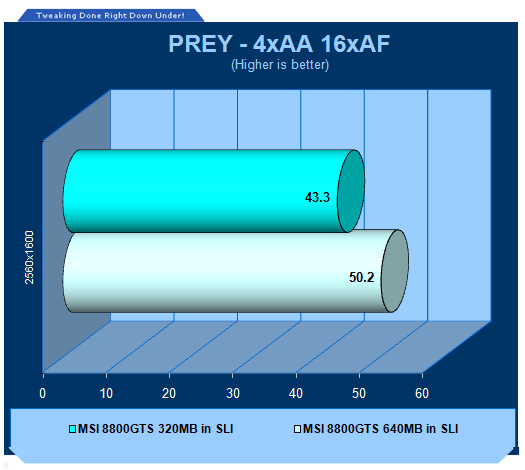
We leave with PREY and as you would expect like our non HQ tests it sees a performance gain as well when the 3D intensive load is increased.
Final Thoughts
To be completely honest, we didn't really know what to expect performance wise going into this article. While the 640MB graphics card did perform better in a single card showdown, when you move to SLI mode and give the 320MB an extra 320MB via the second card, are we going to be maxing out the amount of memory we really need? Surely hitting in excess of 1200MB of onboard memory would just be useless?
Actually, it doesn't seem that way. We can pretty much see across the board that the 640MB cards in SLI continue to give us a performance increase when compared to the 320MB versions. Money permitting we would always suggest that you make the move to the 640MB card if you're running resolutions in excess of 1600 x 1200, closer to 1920 x 1200 and above.
If you're serious about gaming, the chances are the 640MB cards are what you want, but if you're hardcore to the extreme, the chances are you're going to be looking down the barrel of a pair of uber high-end 8800GTX cards. The 640MB cards in SLI mode are perfect for users of 1920 x 1200 and want to crank up the AA and AF and other high quality image settings. On the other hand, the 320MB cards in SLI mode are better for 1600 x 1200 users who want to crank up the AA and AF. In a single card situation the cards work similar except without AA and AF, for example - the 640MB is better suited for a 1920 x 1200 gamer who doesn't want AA or AF enabled with other fancy settings and the 320MB for 1600 x 1200 and below users with normal image quality.
It is all very interesting though considering you have graphics cards with the same chip, exactly the same core and memory speeds with the only difference being the amount of onboard memory but of course about a 33% price difference. It's clear a difference can be seen at these higher levels even when SLI comes into the picture.
Consumers listen up...the problem though is that people may well read this and then go out and buy the 512MB Radeon X1300 instead of the 256MB Radeon X1600 (for example) because the first model has more onboard memory. Yes, more memory does make a difference BUT... and this is a big BUT, you'll only see a difference when the right amount of power (clock speeds) is behind it. As most low-end graphics cards don't have any real advantage with the extra memory, think about this and listen to us and not the sales person who thinks they know everything.
Our Latest NVIDIA SLI Articles Article Coverage
 SAPPHIRE Radeon RX 9070 GRE PULSE OC Review - A New 1440p Challenger Has Arrived
 ASRock Radeon RX 9070 GRE Steel Legend Review - The RDNA 4 Mid-Range Reshuffle
 ASUS ROG Strix GeForce RTX 5070 Ti 16GB OC Edition Review - Premium Design, Premium Performance
 SAPPHIRE Radeon RX 9070 XT NITRO+ PhantomLink Review - RDNA 4's Beast Mode
 COLORFUL iGame GeForce RTX 5070 Ultra OC Review - When Style and Performance Meet
 Half of Xbox Series discs need downloads to work properly, and PlayStation is not far behind, report shows
 Xbox consoles get more expensive in Europe, Series S now costs as much as Series X did at launch
 Memory shortages will get only worse in 2027 and 2028, warns Samsung
 VPS vs. Shared vs. Dedicated Hosting: Which One Actually Fits a UK Power User in 2026?
 Qualcomm is raising chip prices from September 1, and Android phones could get more expensive
 Google's AI patched more Chrome bugs in two releases than it had in two years, including a 13-year-old flaw
 A missing underscore in a Skyrim-inspired username sent an innocent man to prison for 18 months
 Microsoft improves Windows 11 optimization for PCs with 8GB RAM
 Steam Deck LCD battery returns to iFixit, but costs $50 more now
 Redditor scores a working GTX 1050 Ti for just $2 at Goodwill
 Montech TG3 Mid-Tower Chassis Review
 ASUS ROG Strix X870E-A Gaming WiFI7 Neo Review - A New Enticing Option
 Noctua NL-LC1-36 Liquid CPU Cooler Review
 Logitech G316 X 98 Wired Gaming Keyboard Review - Retro-Inspired Board that Falls a Little Short
 Biwin M560 2TB SSD Review - Best Overall Retail-Ready DRAMless SSD
 Logitech G512 X 98 Analog Mechanical Gaming Keyboard Review - An Innovative Two-in-One
 Thrustmaster T.Flight HOTAS 5 MSFS Edition Review
 SteelSeries Arctis Nova Pro Omni Wireless Headset Review - One Headset to Rule Them All
 SteelSeries Arctis Nova 7 Wireless Gen 2 Headset Review - New and Improved, But Is It Enough?
 AMD Ryzen 7 7700X3D Review - Days of Future Past
 How to tell if someone has been using your Windows PC without your permission
 6 Task Manager tips for troubleshooting Windows performance problems
 ASUS ROG's 20th Anniversary Line-up of Premium PC Gaming Gear has Arrived - Here's Everything You Need to Know
 Six File Explorer tips every Windows user should know
 I switched my PC to encrypted DNS in Windows 11, and browsing felt more private
 Printer Not Working in Windows? How to fix detection, print queues and drivers
 The Ultimate Guide to Personalizing Your Windows 11 Taskbar
 How to Turn Your Windows Laptop Into a Second Monitor with Miracast and Wireless Display in Minutes
 6 Mistakes to Avoid When Buying a Windows Laptop
 I capped Windows Update's bandwidth with Delivery Optimization, and my downloads stopped choking