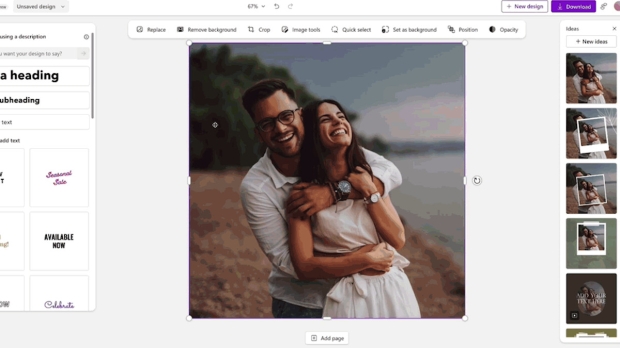




Microsoft is testing a new idea for the Photos app in Windows 11, namely the ability to directly send an image you're editing in the client to Microsoft Designer.
The idea is to implement a 'Designer' button in the Photos application which when clicked sends the current image straight over to the Microsoft Designer site.
Designer is an online app that allows for considerable exercising of various AI abilities, so you can go to town on the image in question in that respect.
As Microsoft explains: "We are introducing the ability to send an image from the Photos app to Microsoft Designer, a cloud based graphic design app that helps you create professional quality social media posts, invitations, digital postcards, graphics, and new visuals with the power of generative AI."
For example, you'll be able to have Designer strip away the existing background, then entirely replace it with an AI-generated background.
Designer will open in your default web browser (which Microsoft will do its best to ensure is Edge, naturally).
The new link through to Designer is just for Windows Insiders at the moment, but we'd imagine this is a change that'll make it through to the stable release of the Photos apps in Windows 11.
Testers who want to give this a whirl now should make sure that their Photos app is updated to version 2024.11040.16001.0 or better (and note you'll need to be signed into a Microsoft Account to use Designer's AI trimmings - which are also in preview).
Windows Latest, which spotted this development, tried out the new feature but it didn't work for them yet - the canvas was blank in Designer, instead of importing the image as it should. As ever, especially with early testing, bugs and other wonkiness can be expected (that goes for the results of the AI's manipulation of your photos, too).
Read more: It looks like Microsoft could cram more adverts veiled as 'recommendations' into Windows 11
![Photo of the $25 PlayStation Store Gift Card [Digital Code]](https://m.media-amazon.com/images/I/41cEZpeUA1L._SL160_.jpg)