












Aerocool has just unveiled a true surprise in the PC case market with the introduction of their new Skribble case, which features "drawable tempered glass front and side panels". Yeah... you can draw on them, with any design you choose to draw onto the Scribble case.
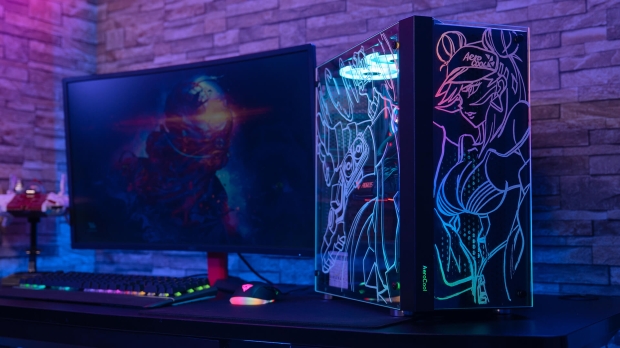
The glass side and front panels on the Aerocool Skribble PC case can be drawn onto with the included market inside of the box, so you can draw something onto the case right out of the box. Some of the designs that Aerocool is showing off look awesome, if that's the kind of design you wanted to go with.
The case itself features a regular-sized 210 x 453 x 441mm, where on top of the Aerocool Skribble you've got USB 3.0 ports, an LED control button, the usual 3.5mm audio ports, and a power button. But we do have a lack of USB-C connectivity, which is disappointing... especially as we're rushing into the last months of 2022.


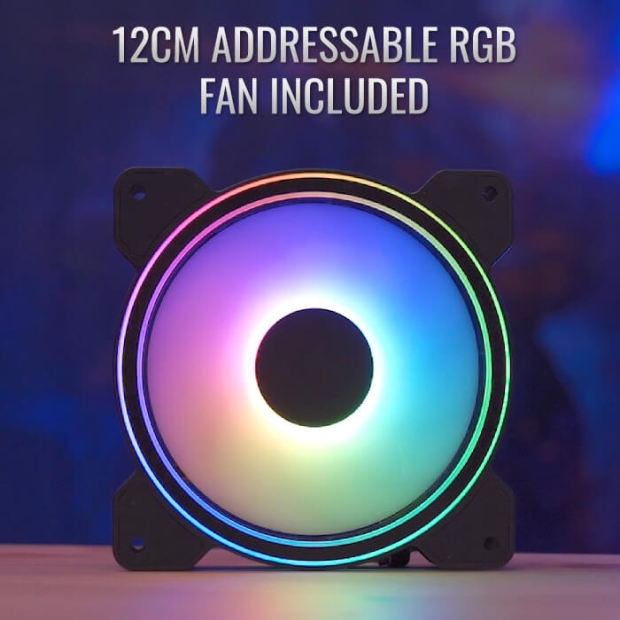

Aerocool lets you connect and control up to six addressable RGB fans, as it includes a 6-port ARGB control hub with the Skribble case, as well as a single 120mm ARGB PWM-controlled fan.
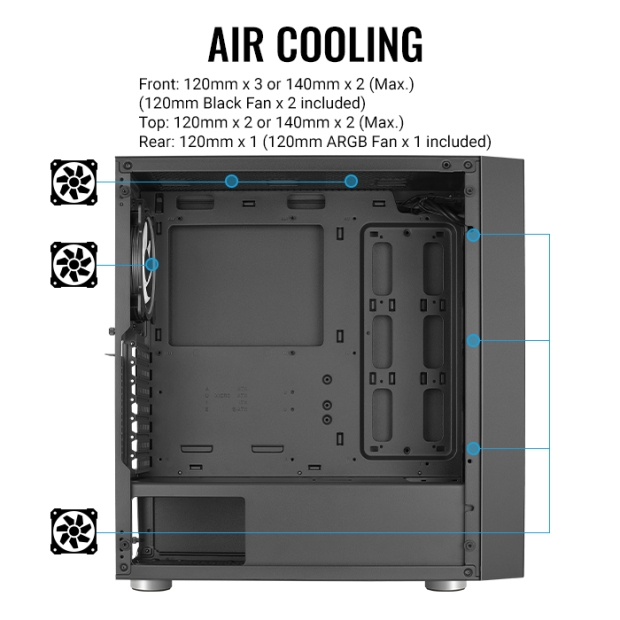
If you wanted to install as many fans as you could into the Aerocool Skribble PC case, then you can cram in 3 x 120mm fans, or 2 x 140mm fans in the front of the case, 2 x 120mm fans or 2 x 140mm fans on the top of the case, while a single 1 x 120mm on the rear of the Skribble is included in the case.
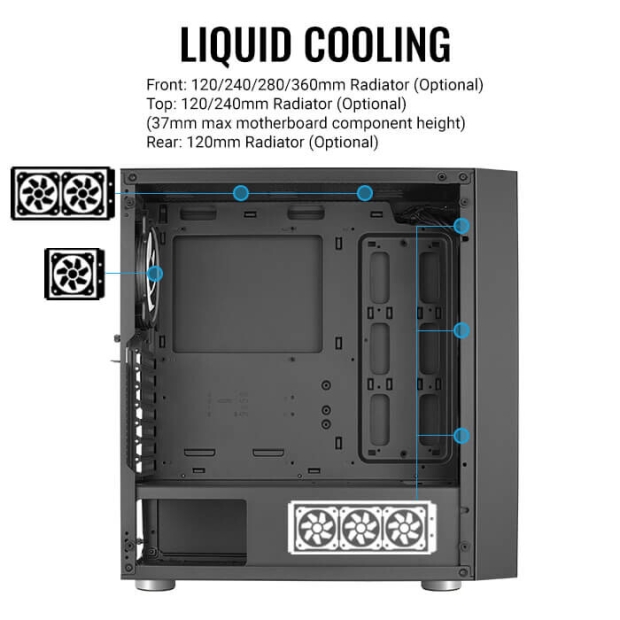
If you're using an AIO cooler inside of the Aerocool Skribble, then you can use virtually anything you want: 120/240/280/360mm AIO radiators will fit in the front of the case, while a 120/240mm radiator will fit at the top, and a 120mm radiator at the back.
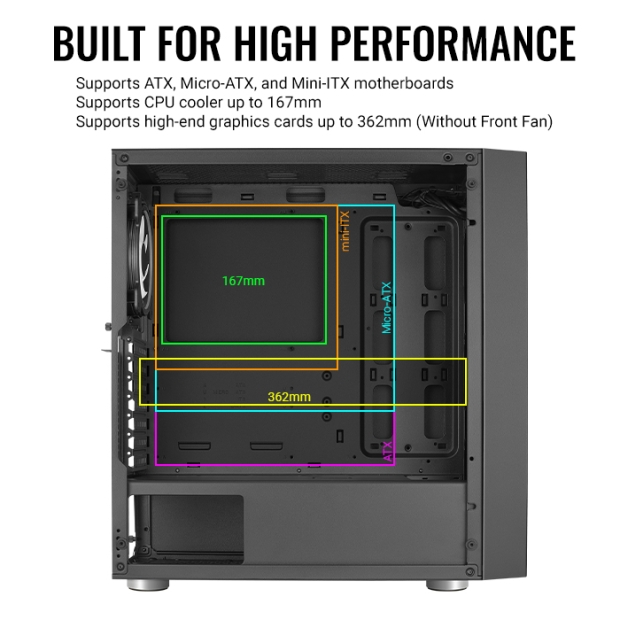
You can install nearly any motherboard you want, ranging from Mini-ITX, Micro-ATX, to full-sized ATX motherboards inside of the Aerocool Skribble PC case, while it can take graphics cards as long as 362mm in length. That means you'll be able to fit most graphics cards inside of the Skribble, without worrying about hitting other hardware.
Storage-wise, the Aerocool Skribble can handle 2 x 3.5-inch drives and 5 x 2.5-inch drives.


 InWin showcases a range of new PC cases at CES, including the full-tower Covalent
 HAVN's HS 360 case is lighter, smaller, and enhances airflow to keep your GPU nice and cool
 LIAN LI's stunning LANCOOL 4 panoramic glass case has been improved ahead of its launch
 GAMDIAS' new ATLAS M4 PC chassis offers panoramic views and a front-mounted PSU
 GAMDIAS launches new ATLAS M5 Series cases all about showcasing your hardware with panoramic views
 007 First Light ditches Denuvo DRM just as first patch arrives packing a ton of bug fixes and some new content
 Microsoft's still working on Windows 11 File Explorer improvements, and it's now making deleting large files speedier
 Hacking group Anonymous targets Sony over deciding to kill PlayStation discs
 Top 5 PS Store pre-orders in US are all $100+ games
 Anthropic responds after Claude conversations appeared in Google Search results
 Steam Workshop maps infected players with malware and took over a 100,000-member Discord
 MSI launches compact PRO MAX EDGE AI+ desktops, with up to Ryzen AI Max+ 395 and 128GB of memory
 ASRock launches new 27-inch QHD QD-OLED Phantom Gaming monitors
 Framework says current memory prices are 'far beyond anything we're able to absorb'
 US data centers on track to use up 20% of the entire country's power by 2035
 Thrustmaster T.Flight HOTAS 5 MSFS Edition Review
 SteelSeries Arctis Nova Pro Omni Wireless Headset Review - One Headset to Rule Them All
 SteelSeries Arctis Nova 7 Wireless Gen 2 Headset Review - New and Improved, But Is It Enough?
 AMD Ryzen 7 7700X3D Review - Days of Future Past
 Samsung 990 2TB SSD Review - Ninth Gen QLC at PCIe Gen4 Speeds
 ASUS ExpertBook Ultra (Panther Lake) 14" Business Laptop Review
 ASUS ROG Raikiri II Xbox Wireless Controller Review - Ready to Take Control
 MOZA FMP18 Panel Bundle Review: authentic F/A-18 Hornet cockpit controls for flight sims
 Micron 6600 ION 245.76TB Enterprise SSD Review - Best in Class Programming Speeds
 MOZA MA3F EFCM Flight Control Module Review: authentic Airbus A320 autopilot panel for simulators
 Printer Not Working in Windows? How to fix detection, print queues and drivers
 The Ultimate Guide to Personalizing Your Windows 11 Taskbar
 How to Turn Your Windows Laptop Into a Second Monitor with Miracast and Wireless Display in Minutes
 6 Mistakes to Avoid When Buying a Windows Laptop
 I capped Windows Update's bandwidth with Delivery Optimization, and my downloads stopped choking
 I use this decade-old free tool that finds files faster than Windows Search does
 I install and update most of my apps with this Windows command now, and I stopped downloading sketchy installers
 Hisense U6SF 65-inch MiniLED TV: High Performance Meets Leisurely Convenience
 I stopped digging through Windows menus after I set up this one folder
 Don't sell your Windows laptop until you do these things