









Introduction
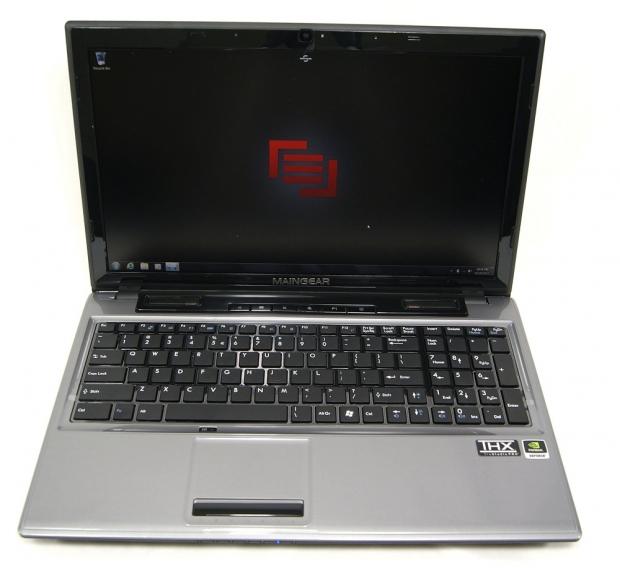
Maingear is another American boutique builder that focuses on gaming laptops, desktops and workstations. The company was originally founded in 2002 when the founder and CEO and his partner decided to move towards gaming systems and customer service.
Maingear has since been growing strongly every year. In 2010, they were one of the first system builders to have a gaming machine based upon Intel's new i7-980X, which is a pretty big deal. Maingear is a truly enthusiast company with a focus on the customer rather than the bottom line.
The direct competition that the Maingear Vybe 15 will be in today is with the GIGABYTE P2542G that we reviewed a few weeks ago. Both are quad-core systems based upon the 660M and both utilize a full HD 1080P screen, so the benchmark numbers should come out fairly close together.
With that in mind, let's take a look at the Maingear Vybe and see how it compares to the other systems we've had through the lab.
Specifications, Configurations, Pricing and Packaging
Specifications, Configurations and Pricing

The system we're running in today's benchmarks is rather powerful for a 15-inch configuration. It sports an Intel Core i7-3840QM quad-core CPU that is clocked at 2.7GHz. It can TurboBoost all the way up to 3.7GHz if the 45 TDP is not all taken.
The Vybe 15 features Intel's HD4000 graphics as well as an NVIDIA 660M with 2GB of GDDR5 video RAM. The 660M runs the 1920 x 1080 15.6-inch screen without much trouble.
The system features 16GB of Corsair Vengeance RAM running at 1600MHz. It also boots off of a 256GB Crucial m4 mSATA SSD drive, which Maingear says will provide 500MB/s. In a couple of pages, we'll put that claim to the test. Users also get a secondary 750GB 7200 RPM drive for storing games, music and other large files.
Our Latest Gaming Laptops Review Coverage
- HP Omen 16 (Core i9-14900HX + RTX 5070) Gaming Laptop Review
- MSI Crosshair 16 HX AI (Core Ultra 9 275HX + RTX 5070) Gaming Laptop Review
- Acer Predator Helios 18 AI (Core Ultra 9 275HX + RTX 5090) Gaming Laptop Review
- MSI Raider A18 HX A9W (Ryzen 9 9955HX3D + RTX 5090) Gaming Laptop Review
- ASUS TUF Gaming A14 (Strix Point + RTX 4060) Laptop Review
The Maingear Vybe comes with onboard Gigabit Ethernet, 802.11b/g/n wireless and integrated Bluetooth. It sports a 1.3 MP webcam, a 3-in-1 card reader, and a DVD drive to make installing games easier.
The Maingear Vybe 15 that I have sitting here today for review is a pre-built model, which means it is available to ship within 24 hours. It will set you back $1999, which isn't too bad when you start looking at the benchmarks.
For those looking to customize their own, it appears that there are very few customization options. Mainly, it looks like the internals of the laptop are set in the four different configurations available. These configurations range in price from $1099 all the way to the $1999 model we have here today.
Packaging
The system was generally packaged in a manner that would survive the common bumps and bangs that occur during shipping. I only have one real qualm about how it was packaged, and I'll let you take a look at the picture below to see if you spot it.
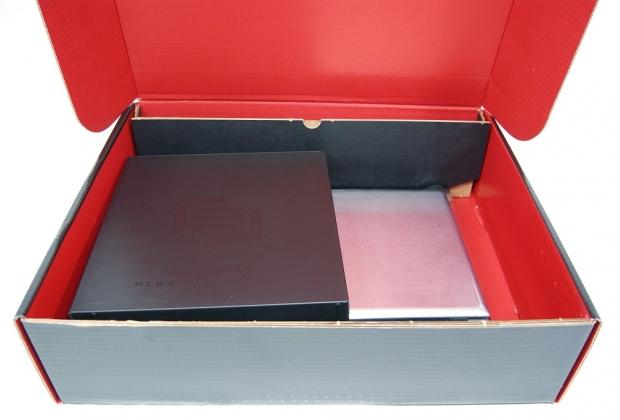
Yes, as you can see, the "binder" which contains reinstall CDs, manuals, and some other goodies was just left inside the box to bounce around and possibly damage the laptop. It's not clear why this isn't secured down, but it's definitely something to be aware of. If you purchase the Maingear Vybe and find the binder not secured down, it's worth checking out the machine to make sure it wasn't damaged.
Temperatures, Cooling and Noise
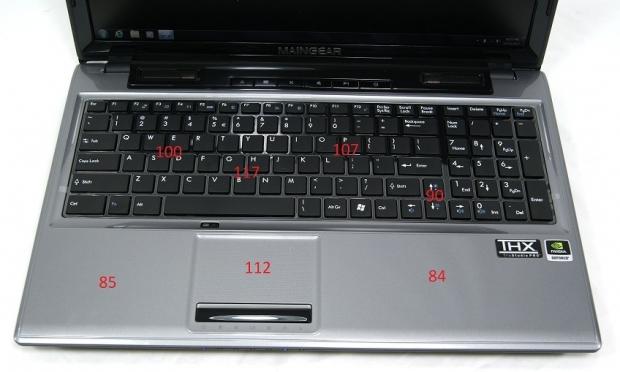
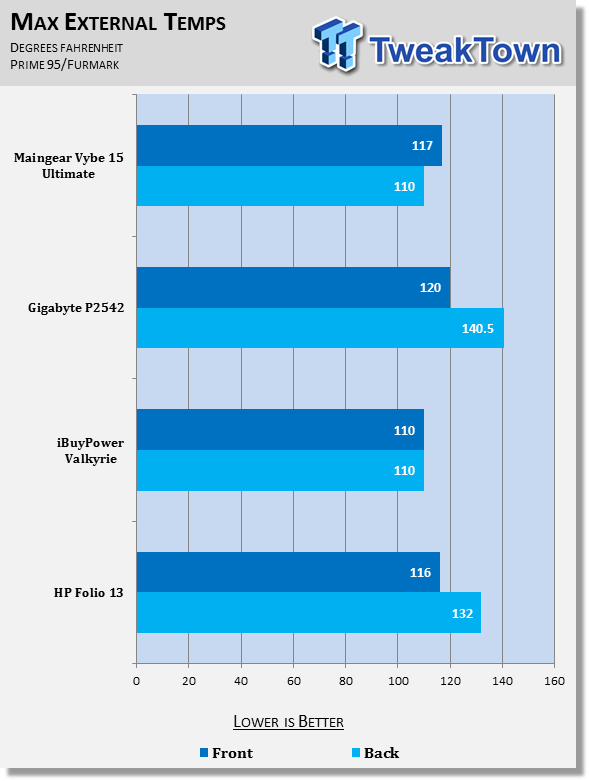
As you can see in the picture below, the keyboard gets pretty toasty when the system is under load and this can cause some discomfort during use. It reached a maximum temperature of 117, which is on the high-end of all of our systems. It's definitely something to be aware of if you plan to use the system while fully loaded.
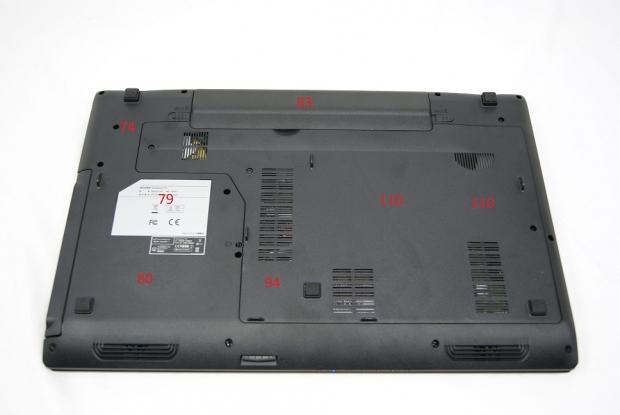
The backside of the system fairs better, though not by much. We recorded a maximum of 110 degrees Fahrenheit, which can definitely do damage to your legs if just set there during hard use. It's important that this system be used on a hard surface during gaming or other intensive tasks.
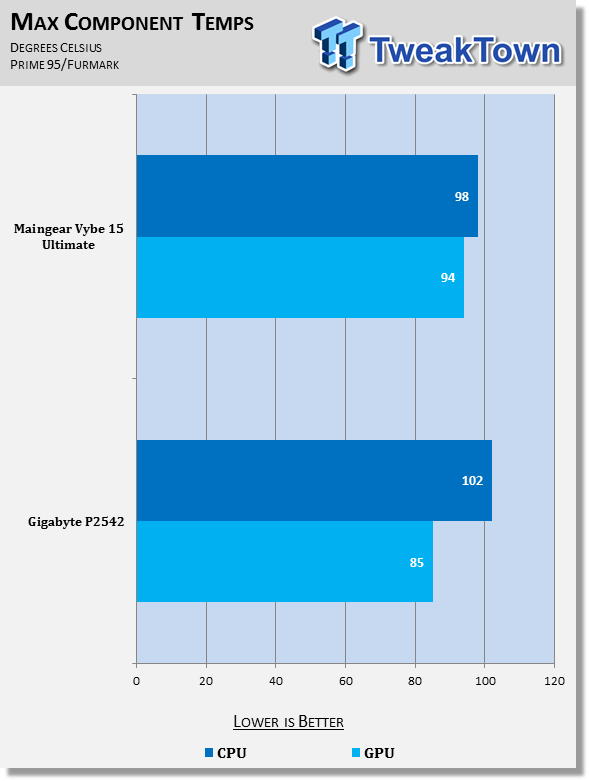
During normal use, however, the system's cooling fans generally managed to keep system temperatures under control. When loaded, the system component temperatures spiked up to near 100 Celsius, which is near the boiling point of water.
The GPU reached 94 degrees Celsius, which is within specification for a video card. The CPU, however, shot up to 98 degrees Celsius, which is something that should be a bit worrying. It's not quite as bad as the GIGABYTE P2542G, though, as that reached 102 degrees Celsius.
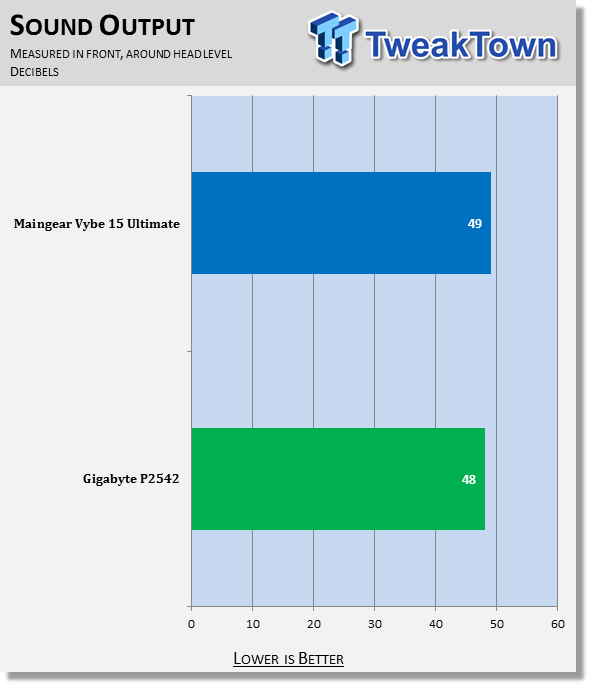
This Maingear laptop produced a sound level of 49 decibels in our measurement. Our measurement is taken in front of the laptop at roughly head level. For comparison, 30dB is a totally quiet night time in the desert, 40dB is whispering and 60dB is a normal conversation.
Keyboard, TouchPad, Screen and other User Interfaces
Keyboard and TouchPad
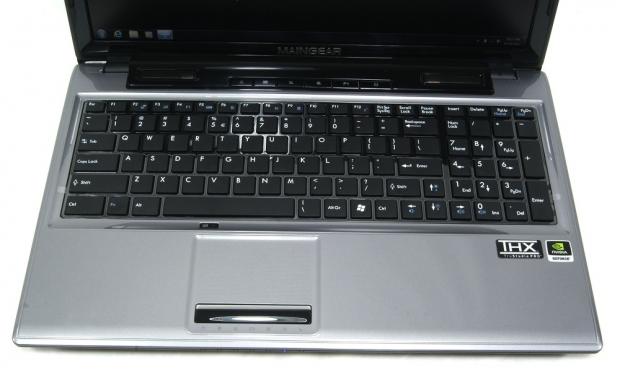
Maingear has opted to go with the trends and equip the Vybe 15 with one of those Island-style or Chiclet keyboards that are all the rage right now. It seems to be a good implementation too, as it was comfortable to type on, and provided very few typos.
There's quite a bit of flex near the semi-colon on the keyboard, but at the all-important gamer-used WSAD keys and arrow keys, there is nearly no flex. It appears that there is some reinforcement in this area, which results in a better gaming experience.
The full-size keyboard and number pad resulted in a very nice typing experience. I was able to quickly adjust to the system and utilize the keyboard at near my maximum typing speed, without putting in a bunch of unneeded typos.
The keys are slightly rough and feature an ever-so-slight curve to them, which is only noticeable when looking for this sort of thing. The keys feature little resistance and bottom out nicely, along with making a good clicking noise. It's not too loud, but it's definitely audible.
It's sad to see that Maingear did not put a backlit keyboard on their "Ultimate" Vybe 15. I can't understand these companies that don't put a backlit keyboard on near every machine they sell. It's not that expensive of a feature, at least that's my understanding, and it adds so much usability to the system.
The touchpad is a two-piece assembly. The touchpad portion and click buttons are two different pieces. The left and right click buttons are a single piece of plastic, which makes clicking towards the middle somewhat difficult. I'd prefer two separate and distinct buttons for left and right click.
The touch-sensitive area of the touchpad has small bumps over the surface, which sets the touch-sensitive area off from the rest of the system. It is also indented into the palm rest ever so slightly, but this is barely noticeable. The touchpad is centered on the keyboard and features a button to disable input, which is a nice touch.
Screen
The Maingear Vybe 15 Ultimate is fitted with a 15.6-inch, 1080P screen. The screen is of the matte variety, so as to reduce glare, and overall quality of the screen is impressive. The one area I feel could be improved is the brightness as it seems rather dark compared to other screens.
Viewing angles are rather impressive, since I believe the panel to be of the TN variety. When moving your head to the left or right, it results in a very slight change in color and brightness, even to extreme angles. Moving vertically, the panel doesn't fare quite as well, though it does better looking down from above than it does looking up from below.
Testing Methodology
View our full testing methodology article.
- Accessory Port Testing
Ports to which an external storage device can be connected to are tested using HD Tune Pro to obtain their maximum, minimum and average read and write speeds. USB 2.0, USB 3.0 and eSATA ports are tested using a Corsair Neutron GTX 240GB SSD that is capable of saturating the theoretical bandwidth available.
The Corsair Neutron GTX is housed inside an Icy Dock external enclosure which features a SATA I/II/III to USB 3.0 and eSATA converter.
- Gaming Tests
3DMark Vantage is ran on the Performance preset to get a feel for how the computer would manage gaming. The CPU, GPU and combined scores are reported. A higher overall score is the best and a high GPU or CPU score shows particular prowess with tasks that use that part of the computer.
3DMark 11 is run on the Performance preset and the Physics, GPU and combined scores are reported. This test is only run if the system supports DirectX 11. A higher overall score is the target, though a high individual result shows prowess in a particular area.
- System Tests
PCMark 7 is run to get an overall idea of how the system performs as a whole. It tests all aspects of the PC and puts a score on how well it performs overall. In this test, a low scoring area can affect the overall score, so it's important to read the analysis. A higher score is better.
MobileMark 2012 is another test run to get a feeling for the system performance taken as a whole. MobileMark 2012 uses real-world applications as part of the benchmark. We use the Office Productivity suite which includes applications like Adobe Acrobat and Microsoft Word. The test also reports battery life as all tests are run on battery. Higher is better for both results.
CrystalDiskMark is run to put a number on how well the system hard disk drive / SSD runs. It measures five different metrics, of which higher is better for all. The higher the numbers, the snappier the operating system will feel, especially if the "4K" number is high, as most operating system files are small files.
- Battery Life
PowerMark is used to measure battery life of the system when set to "Balanced" and "Performance" power plans. This test simulates several different activities, but uses custom built applications.
Accessory Port Layout and Performance
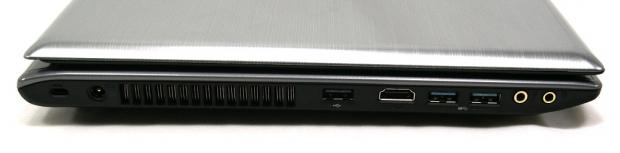
The left side, from back to front, features the Kensington lock, power port, exhaust, USB 2.0 port, HDMI port, two USB 3.0 ports, a mic jack and a headphone jack.
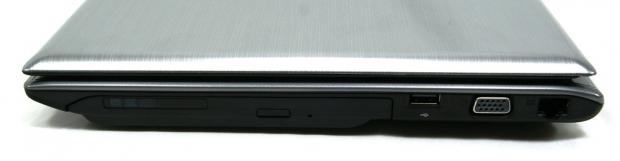
The right side, from back to front, features the Ethernet port, VGA port, one USB 2.0 port, and the CD drive.
HD Tune Pro
Version and / or Patch Used: 5.00
Developer Homepage: http://www.efdsoftware.com
Product Homepage: http://www.hdtune.com
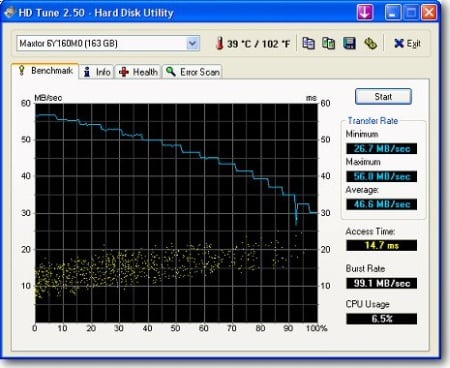
HD Tune is a Hard Disk utility which has the following functions:
Benchmark: measures the performance
Info: shows detailed information
Health: checks the health status by using SMART
Error Scan: scans the surface for errors
Temperature display
HD Tune Pro gives us accurate read, write and access time results and for the last couple of years has been gaining popularity amongst reviewers. It is now considered a must have application for storage device testing.
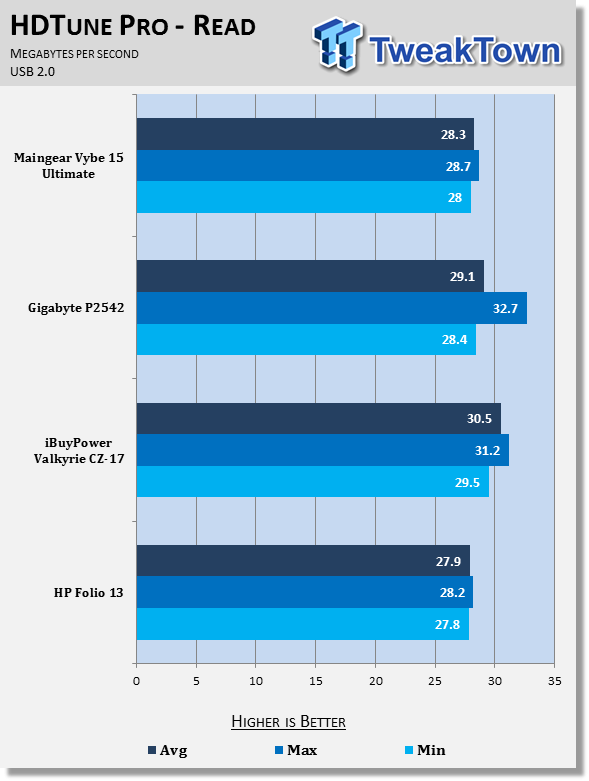
The Maingear Vybe's USB 2.0 implementation doesn't really offer any surprises. It's in the range of values that can be considered not statistically significant and performs roughly on par with the rest of the systems.
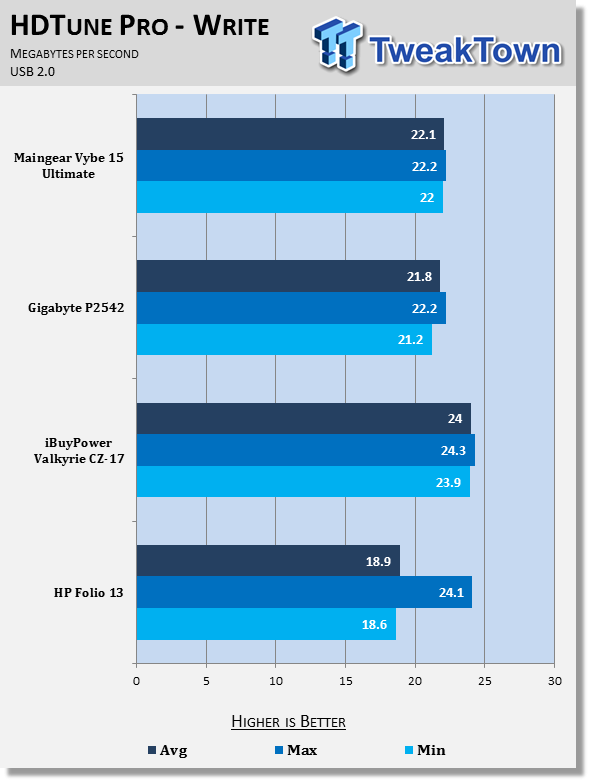
The Maingear pulls in numbers for USB 2.0 write that put it in second place behind the iBUYPOWER Valkyrie.
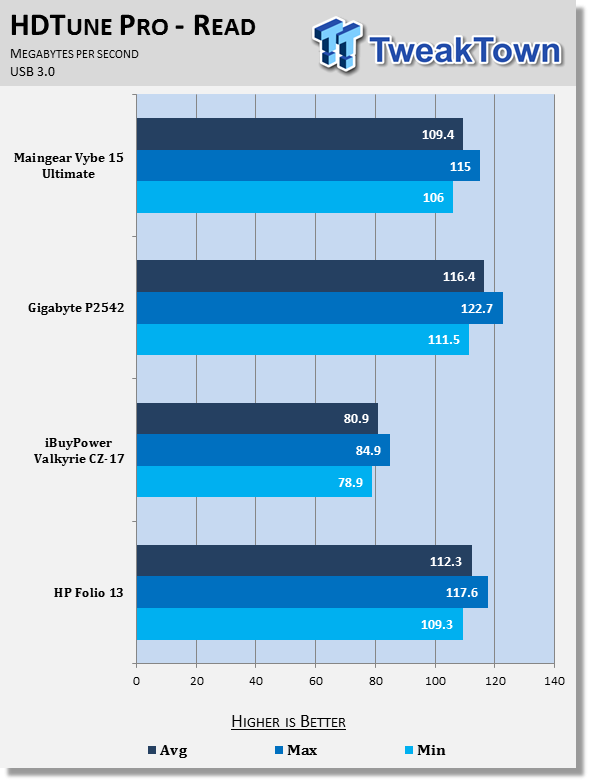
Moving to USB 3.0, however, the Maingear Vybe moves towards the back of the pack, coming in third out of four systems. It only manages to beat the iBUYPOWER Valkyrie, which performed terribly in the USB 3.0 read test.
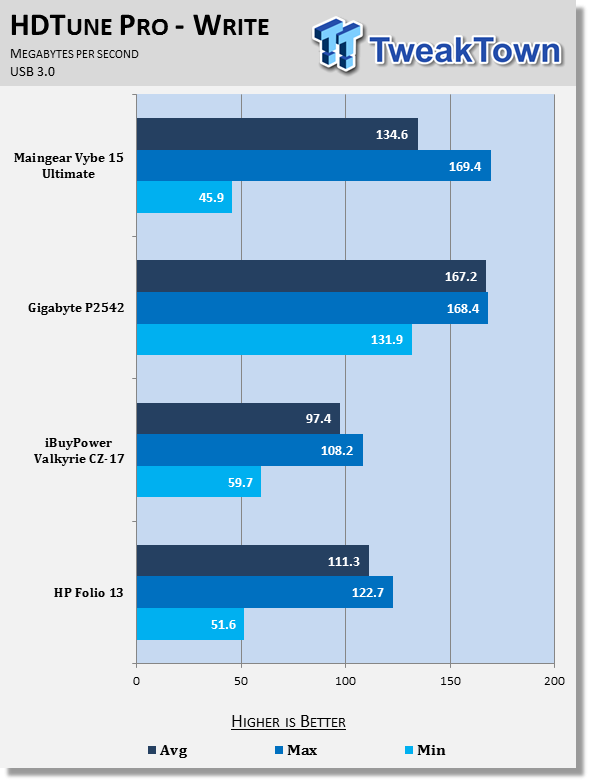
For USB 3.0 write performance, the Maingear picks up its game and manages to come in second place behind the GIGABYTE laptop. Both feature nearly the same maximum, but the GIGABYTE system maintains that speed better and pulls out a higher average rate.
Gaming Performance
3DMark Vantage
Version and / or Patch Used: 1.1.0
Developer Homepage: http://www.futuremark.com
Product Homepage: http://www.3dmark.com/3dmarkvantage

3DMark Vantage tests both processor and graphics performance and is a good indication of how systems compare. The results are generally more repeatable and consistent than other forms of benchmarking. Vantage uses DirectX 10 and can handle multi-core CPUs.
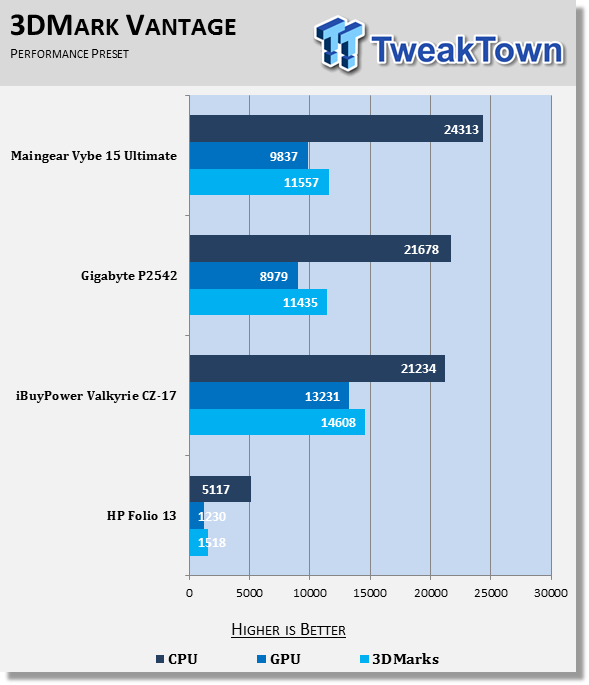
Maingear managed to squeeze nearly an extra 900 points out of the 660M, which could be due to higher clocks, better RAM, or numerous other variables. 900 points isn't too statistically significant, but it will make a slight difference in games.
The CPU Maingear chose to use in the Vybe 15 Ultimate has higher clock speeds than the CPUs used by the GIGABYTE P2542G and iBUYPOWER Valkyrie, and it comes with a higher individual CPU score due to this selection.
The overall scores between the competing 15.6-inch machines don't differ by much: 11557 for the Vybe 15 and 11435 for the GIGABYTE P2542G.
3DMark 11
Version and / or Patch Used: 1.0.1.0
Developer Homepage: http://www.futuremark.com
Product Homepage: http://www.3dmark.com/3dmark11
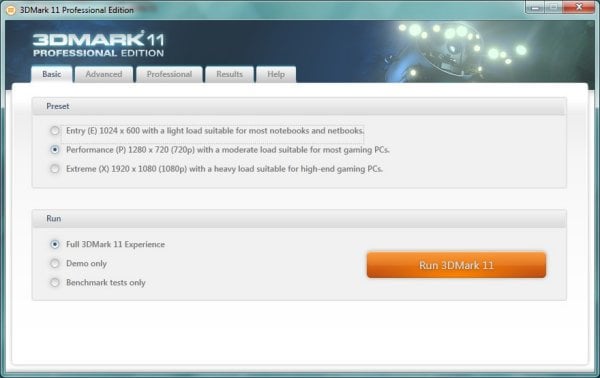
3DMark 11 is the latest version of the world's most popular benchmark. Designed to measure your PC's gaming performance 3DMark 11 makes extensive use of all the new features in DirectX 11 including tessellation, compute shaders and multi-threading. Trusted by gamers worldwide to give accurate and unbiased results, 3DMark 11 is the best way to consistently and reliably test DirectX 11 under game-like loads.
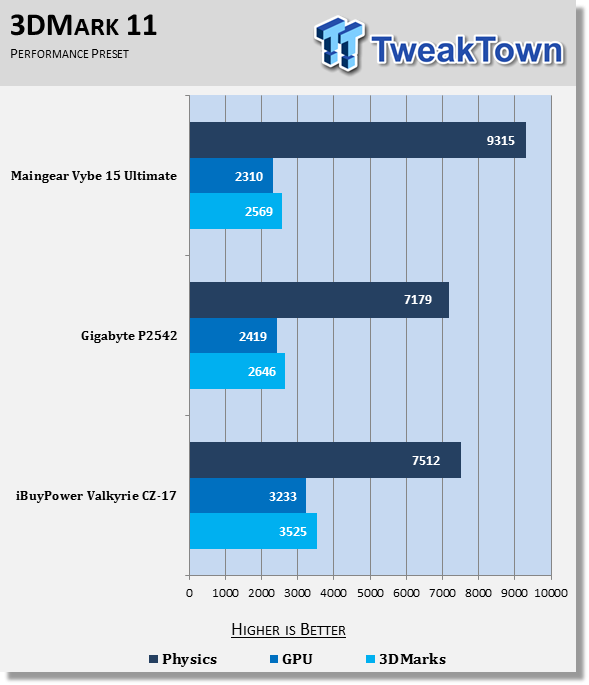
Here we see a switch in the leader of the two. The GIGABYTE laptop posts a better GPU score by about 100 points, which is close to significantly insignificant. The CPU in the Vybe 15 still outperforms both other systems, which is to be expected.
The slightly higher graphics performance of the GIGABYTE in this test allows it to pull out a win, though that win is by a slight margin: 2646 for the GIGABYTE and 2569 for the Maingear. Overall, the results tell us that the systems are near identical, in terms of graphics and gaming performance as the faster CPU won't help you in most games.
System Performance
PCMark 7
Version and / or Patch Used: 1.0.4.0
Developer Homepage: http://www.futuremark.com
Product Homepage: http://www.pcmark.com/benchmarks/
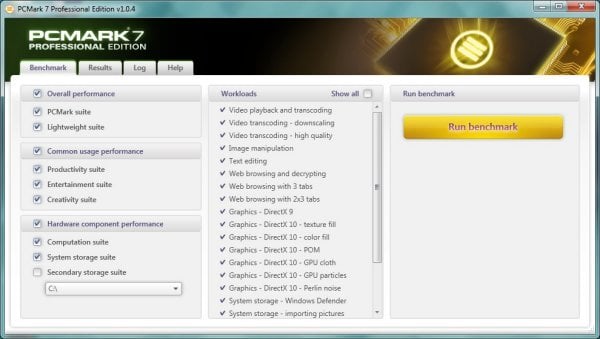
PCMark 7 is a great utility for testing a PC's all-around capabilities. It tests all aspects of the computer, from graphics performance to hard disk performance and attempts to put a score on it, which is not an easy task.
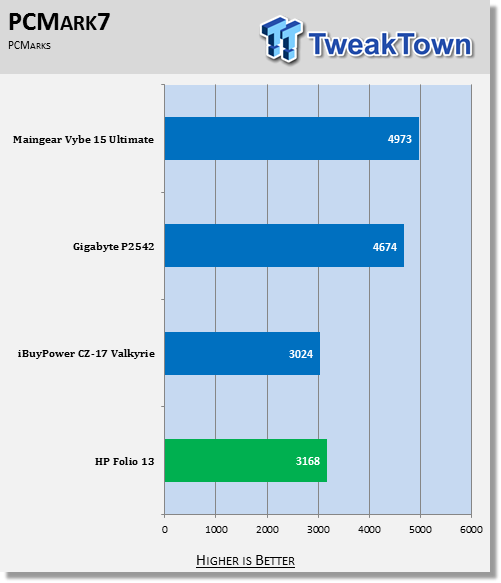
The Maingear Vybe 15 has taken the lead as our best "all-around" system, posting a score of 4973, beating out the previous leader by 300 points. Both the GIGABYTE and the Maingear are benefited by a quad-core processor, coupled with a solid-state drive.
Mobile Mark 2012
Version and / or Patch Used: 1.0.0.118
Developer Homepage: http://www.bapco.com
Product Homepage: http://bapco.com

MobileMark 2012 is a premier benchmarking tool produced by BAPCo. It has several different scenarios built-in and allows you to choose which to run. It runs the test on battery life so that it produces both a score for the performance aspect and a run time for battery life.
For our testing, we chose the Office Productivity line of testing. The "Performance Qualification Rating" and battery life (in minutes) is reported below in the charts.
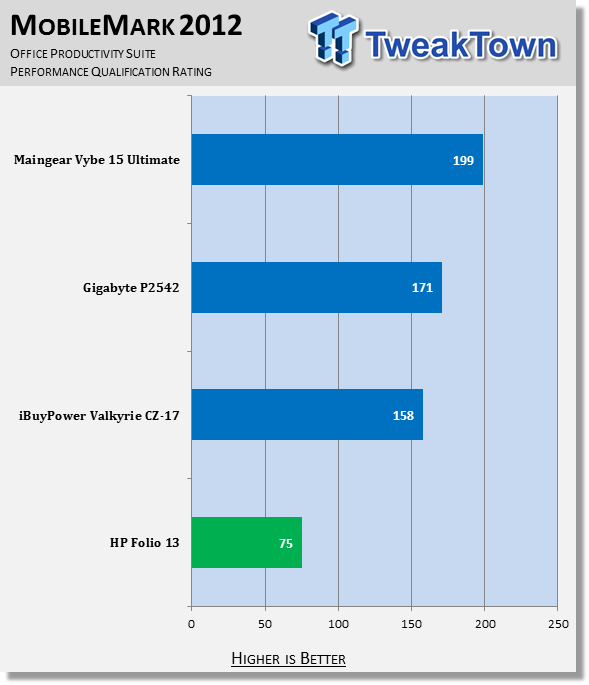
Again supporting the results that the Maingear Vybe 15 makes a great all-around system, it's MobileMark score is 199 versus the next highest at 171. MobileMark tests the system using Office and other productivity programs, best designed to show an all-around system.
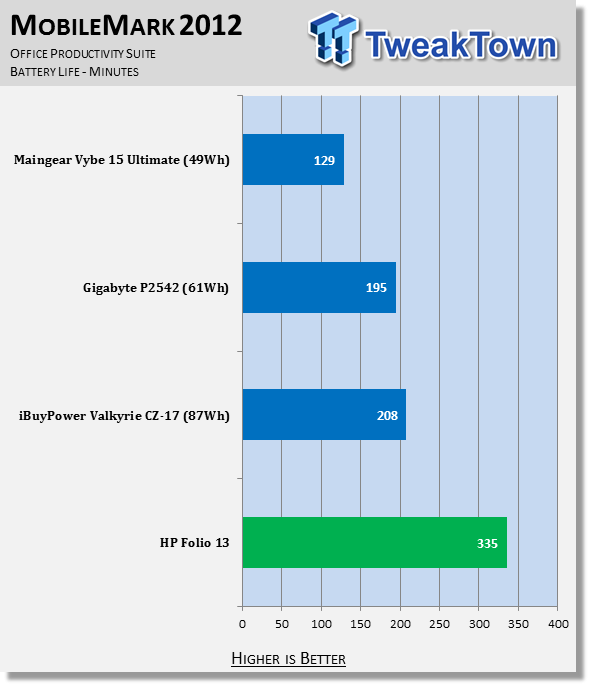
That extra performance comes at a price, though. The Maingear's battery life is the worst we've seen by far. It manages to run for only 129 minutes before tiring out. This is only 2 hours and 9 minutes, compared to the over three hours provided by the GIGABYTE. This reduction in battery life can be chalked up to Maingear using a 49Wh battery, as opposed to the GIGABYTE's 61Wh.
CrystalDiskMark
Version and / or Patch Used: 3.0 Technical Preview
Developer Homepage: http://www.crystalmark.info
Product Homepage: http://crystalmark.info/software/CrystalDiskMark/index-e.html
Download here: http://crystaldew.info/category/software/crystaldiskmark
CrystalDiskMark is a disk benchmark software that allows us to benchmark 4K and 4K queue depths with accuracy.
Key Features:-
* Sequential reads/writes
* Random 4KB/512KB reads/writes
* Text copy
* Change dialog design
* internationalization (i18n)
Note: Crystal Disk Mark 3.0 Technical Preview was used for these tests since it offers the ability to measure native command queuing at 4 and 32.
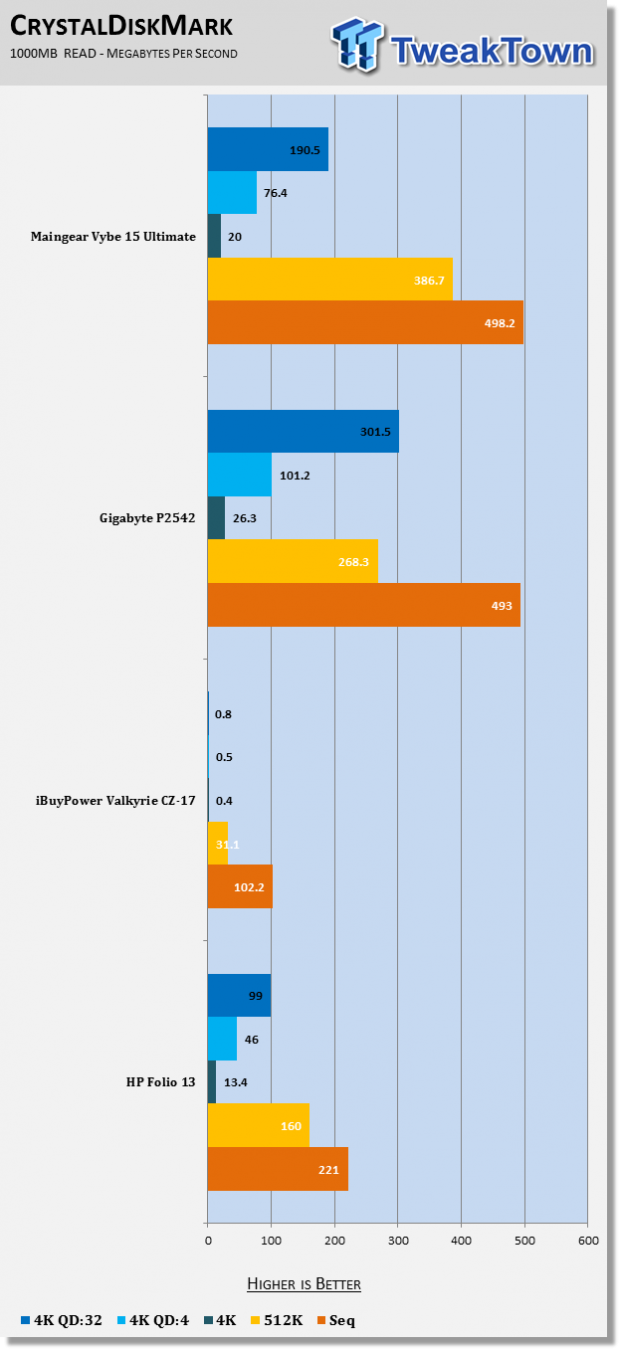
The solid state drive used by the Vybe 15 provides good competition for the GIGABYTE P2542G and leads in the larger read tests. However, when the file size shrinks to 4k and the queue depth starts increasing, the GIGABYTE's solid state drive pulls out the win. For all intents and purposes, the two systems have very similar performing drives.
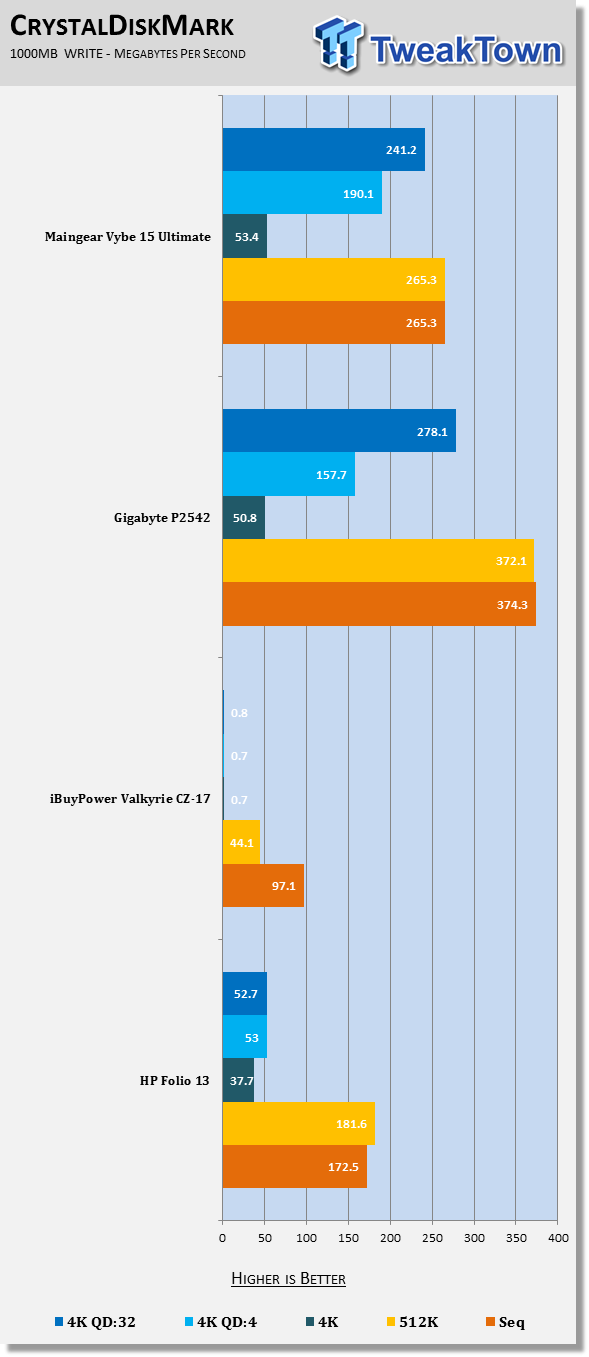
In write tests, the GIGABYTE pulls out the win in three of the five categories, with the Vybe winning the 4k write and 4k QD4 write tests by a small margin. Here we can see that the GIGABYTE solid state drive is a bit better than the mSATA used in the Vybe 15.
Battery Life Performance
PowerMark
Version and / or Patch Used: 1.1.1
Developer Homepage: http://www.futuremark.com
Product Homepage: http://www.futuremark.com/benchmarks/powermark/
Download here: http://www.futuremark.com/benchmarks/powermark/
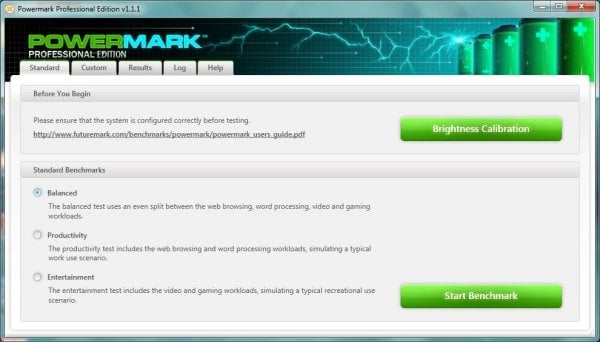
PowerMark is a benchmark produced by Futuremark that simulates different usage scenarios in order to determine battery life. It loops these different scenarios infinitely until the battery hits 15% and then gives us an estimated battery life time. For our testing, we use all four different scenarios. These are video playback, gaming, web browsing and word processing.
Tests are ran twice, once with the computer's Power Options set to Balanced and another with the computer's Power options set to High Performance.
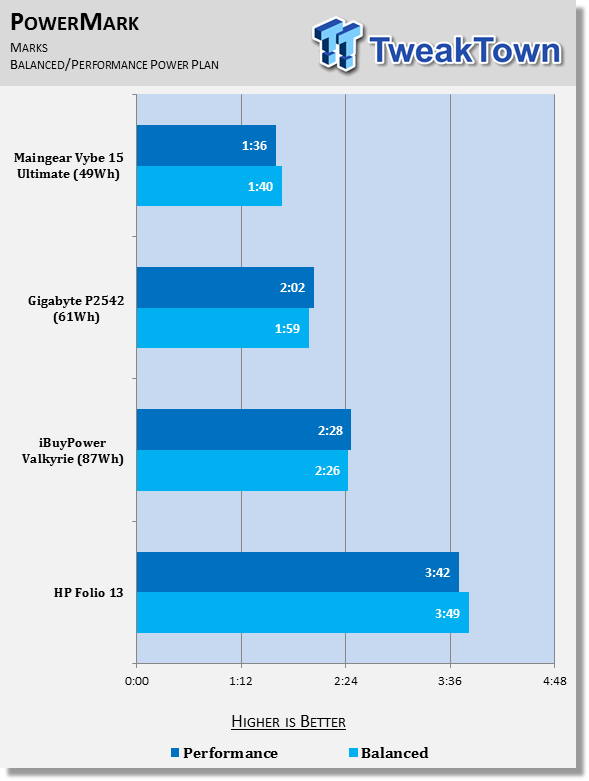
The Maingear laptop really provides pitiful battery life. It almost seems as though the battery included is an over glorified battery backup system. 1 hour and 40 minutes of battery life is absolutely atrocious for systems anymore.
With Ultrabooks being able to push six or more hours, a system like this should at least be able to achieve two or more hours. The battery life is this poor due to the inclusion of a 49Wh battery. Maingear really needs to get a larger battery for this system.
Without battery life, the portability aspect of going to a 15.6-inch system is completely lost. It's hard for me to recommend a system that can't last for at least two hours.
Final Thoughts
When it comes down to the finish line, I'm just not that impressed with the Maingear Vybe 15 Ultimate. Sure, it provides great performance from a 15-inch chassis and it will handle most day-to-day tasks without blinking, and most games without stumbling, but I really can't get over the issue of battery life.
Through all of our tests, the Maingear Vybe 15 performs like a top-notch machine. That is, until you get to the battery life tests at the end of the review. I can live with it only having a 660M if it were to provide better battery life, but considering the machine can't even manage two hours in PowerMark, I'm not willing to settle. I would expect two hours of battery life from a machine like the iBUYPOWER Valkyrie since it has a 17-inch screen and older 675M GPU, but even that blows this system out of the water.
The performance, from a usage standpoint, is everything you could want out of a machine, save a 680M. However, you'll have trouble finding a 15.6-inch machine that crams a 680M into it. In fact, to the best of my knowledge I'm not sure of a single machine that has accomplished that feat as yet.
As long as you don't mind being tied to an AC outlet, the Maingear Vybe 15 Ultimate is a great choice. It excels at productivity tasks as well as gaming. You'll just never be able to use it while moving around for any decent amount of time. But considering most people are looking at gaming laptops to save space and be easy to carry to LAN parties, I'm not sure that this lack of battery life would prove much of an issue for that type of buyer.
If you're like me, however, you'll like having a long-lasting battery so that you can work outside in the lovely weather, or be able to make it through a three hour plane trip without needing to charge up somewhere onboard your flight.
It's really rather hard for me to recommend this machine as a must buy. For just shy of $2000 I would expect it to either provide a bit more performance or a bit more battery life. The GIGABYTE P2542G that I have been comparing this system to the entire way through is roughly $750 cheaper and provides near the same performance with better battery life.
I'm not saying it's a bad machine, because it isn't. It's just not the best bang-for-your-buck. If I were out looking to pick up a 15.6-inch gaming machine, I'd probably have to give this one a miss-at least this configuration. If you step down to the $1599, you'd be getting a better value.
However, with alternatives like the GIGABYTE P2542G out there, and plenty of new systems coming out with Windows 8, I just can't say this is a must buy. Sure, it will have its market and I'm sure some of you will buy it. That's fine because it really is a good system. But at this point, I feel you're paying for the Maingear brand and pizazz that comes with it.
With that said, it's incredible to me that they crammed a 256GB solid state drive, 750GB 7200 RPM disk drive, and a CD drive into a 15-inch chassis. That is an impressive feat, though it doesn't change my position on the machine.
It's a solidly-built machine and definitely worth taking a look at, though the money saved by going for an alternative could be put towards more games, something every gamer is always in need of.
To summarize, I think you're better off taking a look at the GIGABYTE P2542G unless you have your heart set on owning a Maingear machine, in which case this machine will deliver the performance you need and want.

 HP OmniBook 7 (Panther Lake) 16" Laptop Review
 GEEKOM GeekBook X14 Pro (Intel Core Ultra Series 1) Laptop Review
 HP OmniBook 5 14" AI PC (Snapdragon X) Laptop Review
 HP Omen 16 (Core i9-14900HX + RTX 5070) Gaming Laptop Review
 Lenovo Yoga 7 2-in-1 Gen 10 (Krackan Point | Radeon 860M) Laptop Review
 Kingdom Hearts IV release date possibly leaked online following Switch 2 confirmation
 Anthropic releases state-of-the-art AI model Claude Fable 5, and it's safe to use
 Nintendo showcase FromSoftware's next title 'The Duskbloods' in new mysterious trailer
 Razer Seiren V3 Pro is a new professional-grade microphone for gamers and creators
 Xbox is rethinking its Project Helix strategy as memory prices continue to soar
 Control Resonant arrives in September with DLSS 4.5 and Path Tracing on PC
 NZXT unveils aesthetically pleasing cases, fans and coolers at Computex 2026
 NVIDIA GeForce Hotfix 610.52 driver released, fixes issues related to G-SYNC, Smooth Motion, and stability
 3DMark adds native Windows on Arm support for ray-tracing benchmarks
 MSI showcases its next-gen GPU cooling tech and it could be for the GeForce RTX 60 Series
 Navman MiVue Smart True 4K Surround Dashcam Review - Seeing In All Directions At Once
 IQUNIX Magi96 Pro Aluminum Low Profile Mechanical Keyboard Review - Premium Build, Satisfying Sound
 Asetek Forte S-Series Racing Simulator Bundle Review
 Razer Pro Type Ergo Wireless Split Ergonomic Keyboard Review - Built for Comfort and Support
 ASUS ROG Strix Morph 96 Wireless Gaming Keyboard Review - Great Performance, More Affordable
 SAPPHIRE Radeon RX 9070 GRE PULSE OC Review - A New 1440p Challenger Has Arrived
 NZXT H6 RGB+ Compact Dual-Chamber Chassis Review
 ASRock Radeon RX 9070 GRE Steel Legend Review - The RDNA 4 Mid-Range Reshuffle
 ASRock Z890 Taichi Aqua Motherboard Review - Flagship features without the flagship price
 GIGABYTE Z890I AORUS Ultra Motherboard Review - Mini-ITX with surprisingly good thermals
 The PowerToys utilities I keep enabled on every Windows 11 PC, and the ones I turned off within a week
 TweakTown's Best of Computex 2026 Awards - The Best Hardware, Gaming Gear, and AI
 Phison E37T SSD Controller Exclusive Preview - The Fastest DRAMless SSD Platform Yet
 USB Ports Not Working in Windows 11? Try These Fixes
 ASUS WiFi Routers and Networking Solutions Deliver Long-term Security and Reliability with No Additional Cost
 Second Monitor Not Detected in Windows 11? Try These Fixes
 Turn Your Old Smartphone Into a Dedicated Webcam for Your Windows PC
 The Send To menu is the right-click feature on Windows 11 that nobody bothers to customize
 Windows 11 will not let you pin a folder to the taskbar, but a 30-second workaround does
 ASUS ProArt Displays Unlock Creativity with Professional Monitors for Everyone