

Introduction and Package
 40
40I really like Sapphire as a company, they create some of the best video cards on the market and over the last 12 months we've seen them expand into different segments to try and increase the brand around the world.
The company's entry into the motherboard market hasn't been a smooth one, even though, it started off well with the PURE Black X58. Following the X58 we saw the PURE Platinum P67 Hydra miss the mark. The release of the new AMD A75 chipset and the Sapphire PURE Platinum A75 saw the company again shine in the motherboard market. The shine was quickly taken off as the delayed Intel Z68 offering of the Sapphire PURE Platinum Z68 again lagged behind its competitors. From a pure statistics standpoint with the on again off again relationship we've had with Sapphire motherboards, the new PURE Black X79N based on the new Intel X79 chipset which we are looking at today should be on the mark.
Before we find out just how performance on the board goes, though, we need to first take the time to check out the package that Sapphire are offering us here. From there we'll take the time to have a closer look at the motherboard itself to see how the design of it all is. After that it's time to get into the BIOS, an area that Sapphire has been a bit weak in since launch. With the move over to UEFI for the X79, we hope that Sapphire has been able to do something here that moves its BIOS in a positive direction. Once we've done all that, though, it's time to really get down and dirty with the BIOS to see what kind of overclocking potential the new board has before we of course check out the performance of it.
The Package
 40
40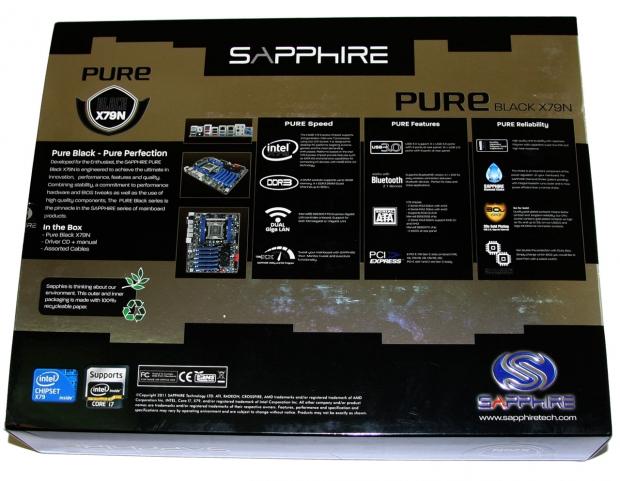 40
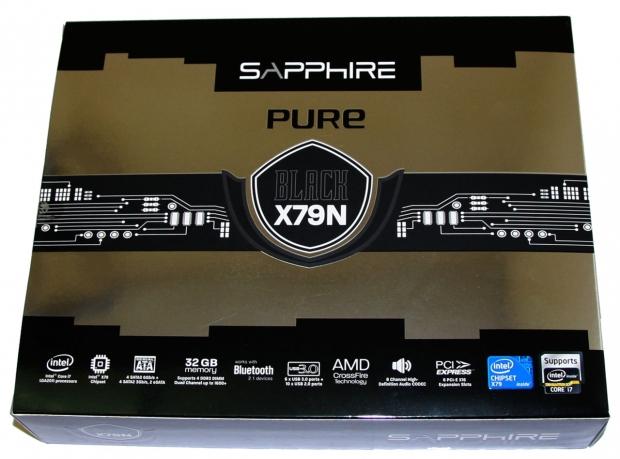
40Looking at the box design it follows the same Black / Silver setup we've seen on all the Sapphire motherboards before. It's a pretty nice setup and across the bottom of the box we've got some of the main features that are on offer. Looking at the back we can see a picture of the board along with a bit of an expansion of some of the main features explaining exactly what they do for us.
 40
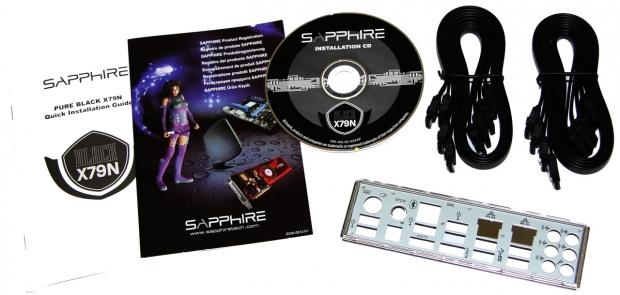
40Moving inside the box we've got a fairly standard bundle which includes some paperwork, driver CD, eight SATA cables and rear I/O panel.
 40
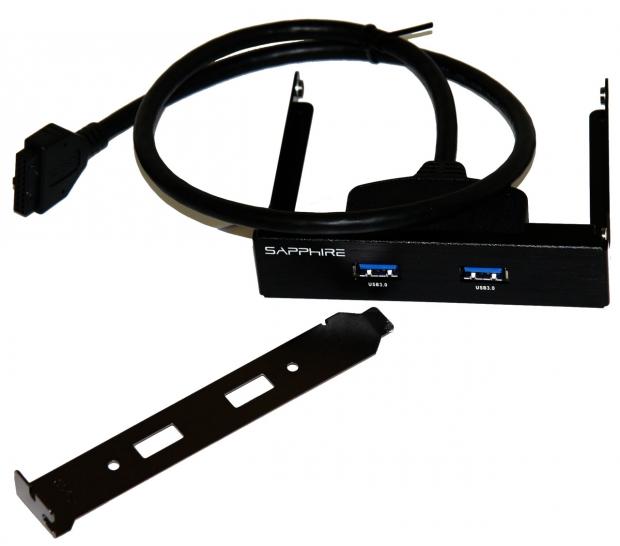
40Along with that we've also got a dual port USB 3.0 header that can be installed in the front of your case or the rear via the included back panel.
The Motherboard
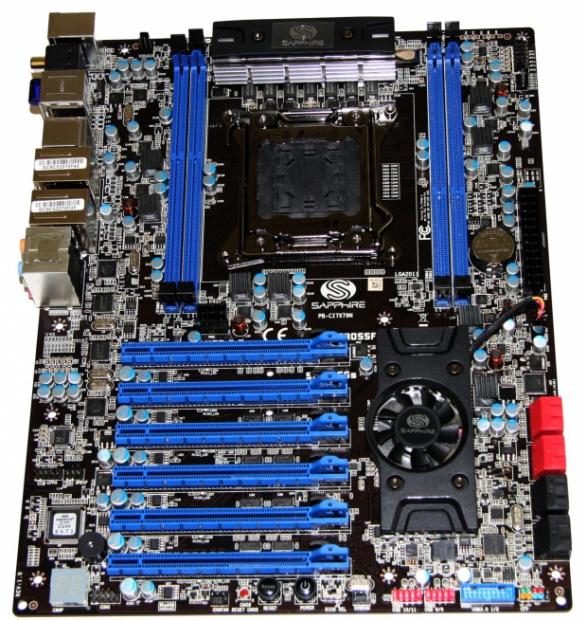
Moving onto the board we've got that similar design we've seen from most of Sapphire boards in the past with the black PCB and dark blue highlights throughout the board. One thing that really stands out here, though, is the inclusion of a fan over the X79 chipset, something we've seen companies do with this chipset, but not all.
 40
40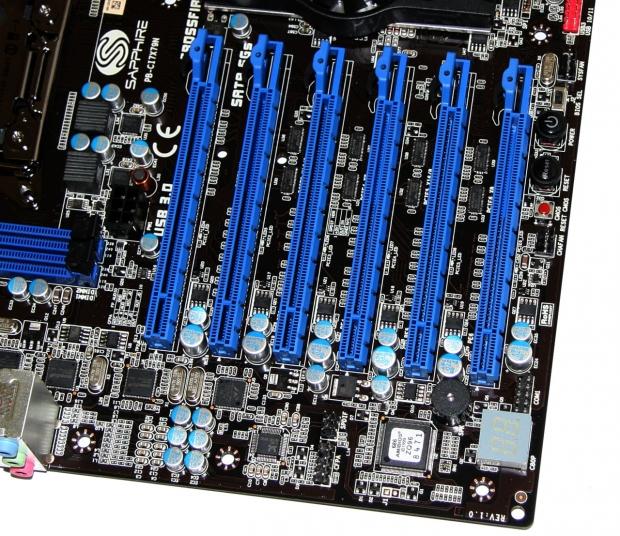 40
40Moving in a bit closer to the board we can see what's going on with the PCIe setup which consists of only PCIe x16 slots. Of course not all are running at x16, instead we've only got slots 1, 3 and 4 while the others are wired to only x8. When I heard that Sapphire was offering six PCIe x16 slots I thought we'd be able to use four video cards in Quad SLI / CrossFireX. Unfortunately that's not possible due to the layout of the slots.
It's worth remembering that while all the slots are laid out in an x16 format, PCIe x1, x4 and x8 cards can be installed in all the slots. Moving to an all x16 layout really gives us more options when it comes to the expansion slots, which is only a good thing. The only thing lacking is a legacy PCI slot, but it's something I wish more and more companies would start to ignore.
 40
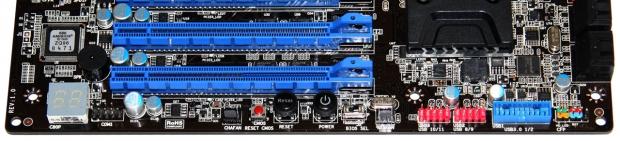
40Moving to the bottom of the board you can see on the left we've got a debug meter with a COM port next to that, CMOS reset button and next to that we've got easy to access reset and power button. Moving over a little more we've got a little switch that lets us choose between one of the two BIOS chips available followed up with two USB 2.0 headers, a single USB 3.0 header and our main front panel header.
 40
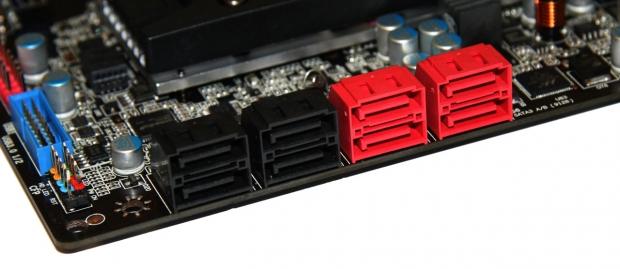
40Turning the corner we've got a total of eight SATA ports on offer with the left four black ones being SATA II running off the X79 chip and the four red ones being SATA III. The two closest to the black ones also run off the X79 chip while the extra two run off the Marvell 88SE9128 controller.
The Motherboard Continued
Moving away from the bottom of the board and starting to head north we actually don't have a whole lot going on thanks to the fact that our power and reset buttons are running across the bottom of the board instead of this top corner which is where we see most companies install them.
 40
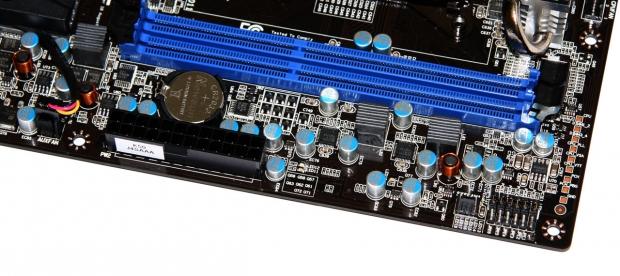
40Instead up the top here we've just got the main 24-Pin ATX power connector and you can see the CMOS battery tucked behind that with a couple of DIMM slots.
 40
40 40
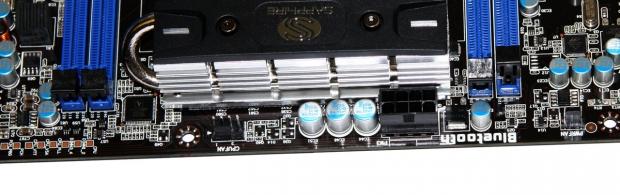
40Moving around the back you can see our main 8-Pin CPU power connector and moving out we can see our four DDR3 DIMM slots which support up to 32GB of DDR3 in Quad Channel at speeds exceeding 1600MHz+ DDR. We also get a good look at the CPU area which like most X79 boards we've seen is extremely clean.
 40
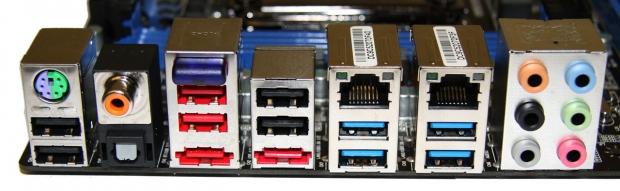
40Finally we finish up with the I/O side of things which starts off with a pair of USB 2.0 ports and a combo PS2 port. Next to that we've got an optical and coaxial out. Moving along again we've got four USB 2.0 ports along with two eSATA ports and a Bluetooth 2.1+ header running off the Atheros AR3011 controller.
Continuing along we've got dual Gigabit networking running off the Marvell 88E8057 Gigabit controller and four USB 3.0 ports running off the ASMedia controller. Finally we finish off with six audio ports which like the other two audio outputs run of the Realtek ALC892 codec.
BIOS
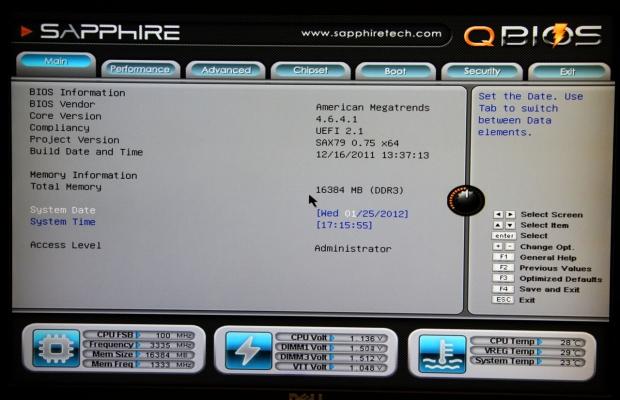
Hitting the delete button to get into the BIOS for the first time I had my eyes closed as I was prepared to be greeted with a horrible UEFI BIOS from a company that hadn't done anything in this area yet. Inside and eyes wide open, though, I really found myself pleasantly surprised to see what Sapphire had done with the American Megatrends BIOS.
From the moment you entered it looked good and across the bottom of each page we have some of our main system information being displayed like frequencies, voltages and temperatures.
 40
40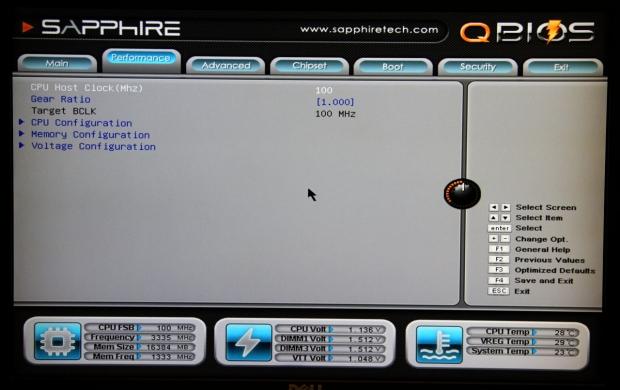 40
40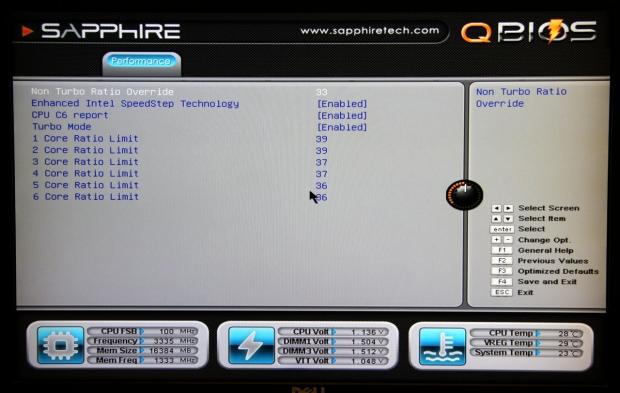 40
40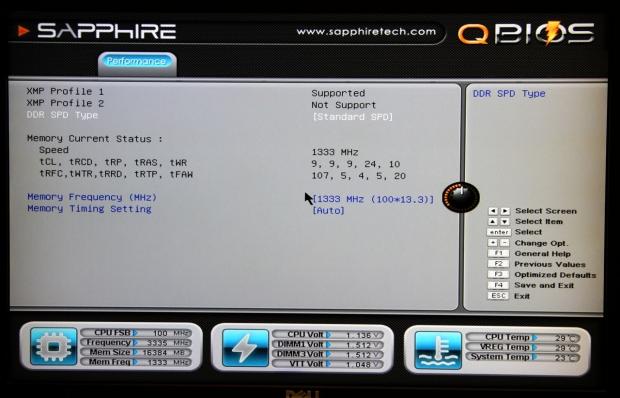 40
40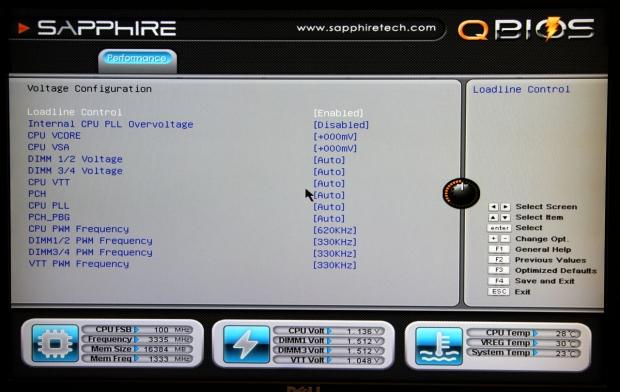 40
40If you're in the BIOS the chances are the main area you want to be in is the performance section and the setup is actually really basic and easy to navigate. While basic, though, the options are pretty strong and you can see we've got a good line up of voltage and RAM options.
 40
40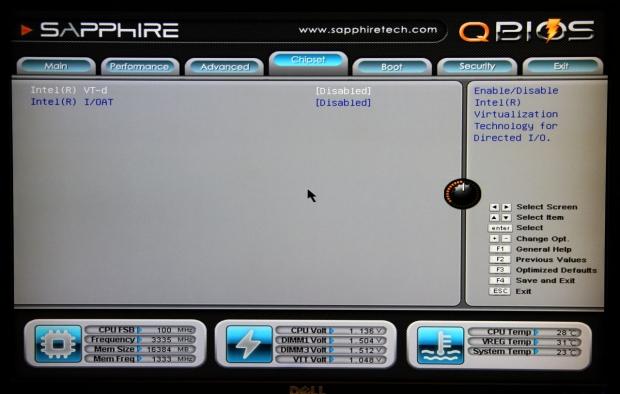 40
40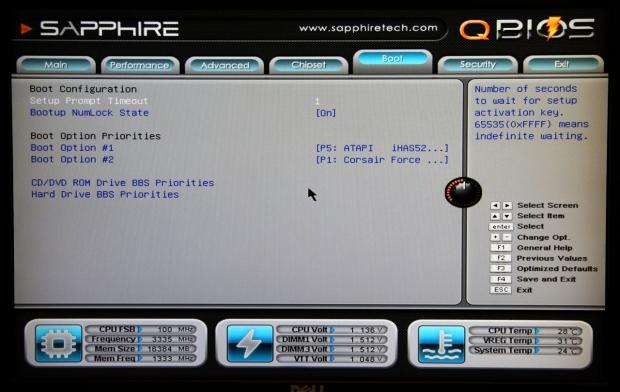 40
40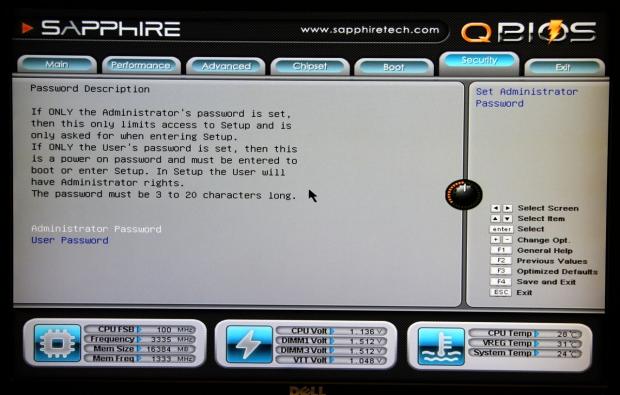 40
40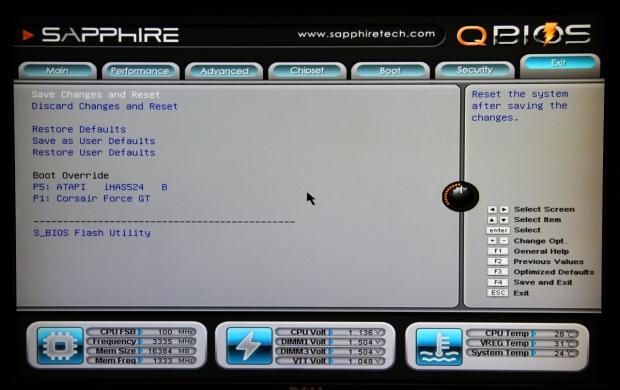 40
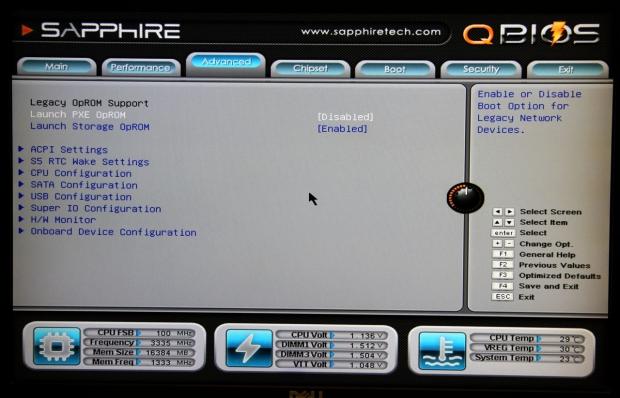
40As for the rest of the BIOS there's no real surprise as you've got your normal line up of options that let you disable features, setup boot options and gives you the ability to save the current settings as the user defaults. Moving throughout the BIOS, though, it looks good and the fact that it's just really easy to navigate is exactly what you want in a BIOS.
Benchmarks - Test System Setup and Overclocking
 40
40We would like to thank the following companies for supplying and supporting us with our test system hardware and equipment: Intel, ASUS, MSI, Western Digital and Corsair.
On the testbed front you shouldn't see anything out of the ordinary as we use our i7 3960X CPU along with our 2600k and FX-8150 to help round out the CPUs needed for the motherboards in our comparison line up today.
There's not much else that needs to be said as everything above is fairly self-explanatory and the boards we're using today in our comparison will be seen in the graphs for the next page. So with that said let's get into the overclocking side of things to see just what the Sapphire PURE Black X79N was capable of doing.
Heading into the BIOS, the first thing we tried to do was move to a 1.25 BCLK divider that pushes our BCLK to 125. Like a lot of motherboards we test, this didn't want to work, so we just headed back and moved in on fine tuning the multiplier instead.
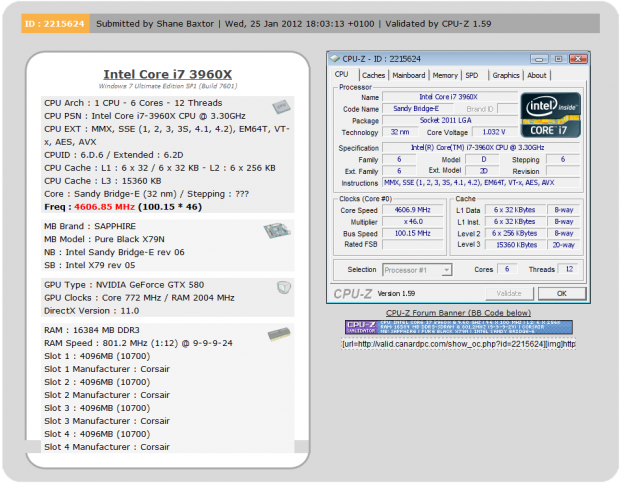
The first number we jumped to was 45x and that brings our CPU in at 4.5GHz which wasn't an issue for the board. We started to move up 1x at a time on the multiplier and as you can see below we ended up at 4.6GHz.
 40
40While 4.6GHz was what we ended up with when it came to our system being 100% stable, we found ourselves getting into Windows as high as 4.8GHz via a 48x multiplier. While we had some success in some applications, MediaEspresso which is the one that tends to kill our overclocked CPUs due to the immense load it places on all the cores.
Overall, though, a 4.6GHz overclock is a good one and it lines up with a lot of other companies that see an Intel X79 based overclock of between 4.5GHz to 4.7GHz.
Let's get started!
CPU Benchmarks
HyperPi 0.99
Version and / or Patch Used: 0.99
Developer Homepage: www.virgilioborges.com.br
Product Homepage: www.virgilioborges.com.br
HyperPi is a front end for SuperPi that allows for multiple concurrent instances of SuperPi to be run on each core recognized by the system. It is very dependent on CPU to memory to HDD speed. The faster these components, the faster it is able to figure out the number Pi to the selected length.
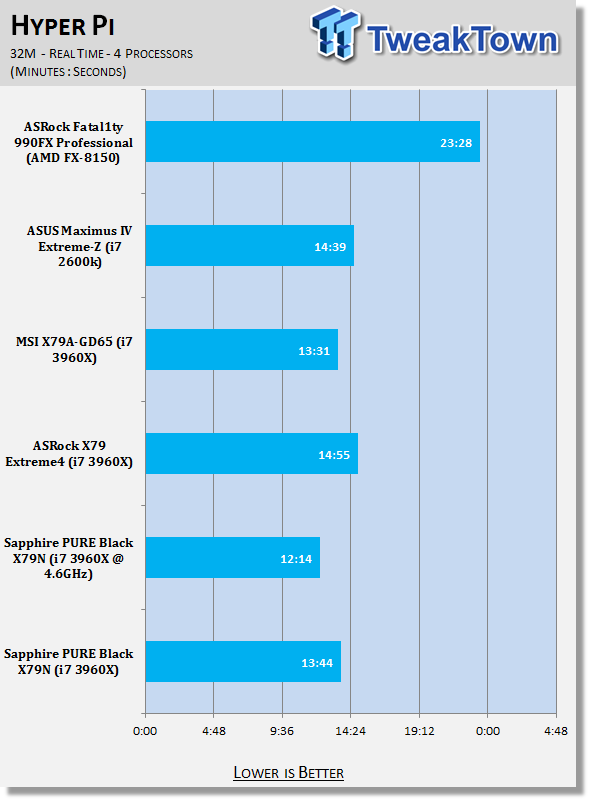
For our testing we use the 32M run. This means that each of the four physical and four logical cores for the i7 and the four physical cores of the i5 is trying to calculate the number Pi out to 32 million decimal places. Each "run" is a comparative to ensure accuracy and any stability or performance issues in the loop mentioned above will cause errors in calculation.
 40
40AIDA64
Version and / or Patch Used: 1.00.1035BETA
Developer Homepage: http://www.aida64.com
Product Homepage: http://www.AIDA64.com
Replacing Everest in our labs is AIDA64. This new testing suite is from the core development team from Lavalys and continues that tradition. The guys have thrown in better support for multithreaded CPUs as well as full 64 bit support. We use this to test memory and HDDs for now, but may find ourselves opening this up to other areas of the motherboard.
 40
40 40
40Getting into HyperPi and AIDA64 we can see that performance out the box is strong for the Sapphire board with it lining up with our other X79 offerings as we would hope.
Moving into the overclocked performance you can see a nice little boost across all the benchmarks here which is always a good thing. Hopefully this translates into some nice gains in our other benchmarks.
System Benchmarks
PCMark 7
Version and / or Patch Used: 1.04
Developer Homepage: http://www.pcmark.com
Product Homepage: http://www.pcmark.com
PCMark 7 includes a range of tests that give different views of your system's performance. In the Advanced Edition you can choose which tests to run. The common use and hardware component tests are unavailable in the Basic Edition.
Overall system performance is measured by the PCMark test. This is the only test that returns an official PCMark score. The Lightweight test measures the system capabilities of entry-level systems and mobility platforms unable to run the PCMark test, but it does not generate a PCMark score. Common use performance is measured by the scenario tests - Entertainment, Creativity and Production - each of which results in a scenario score. Hardware component performance is measured by the hardware tests - Computation and Storage - each of which results in a hardware score.
 40
40MediaEspresso
Version and / or Patch Used: 6.5
Developer Homepage: http://www.cyberlink.com/
Product Homepage: http://www.cyberlink.com/products/mediaespresso/overview_en_AU.html?fileName=overview&r=1
MediaEspresso is a blazingly fast media universal converter that can transcode your videos, photos and music files and out put them to a huge range of portable devices including mobile phones, portable media players and even game consoles. With technologies like Smart Detect, Direct Sync and CyberLink's TrueTheater™ video enhancements, you can not only forget about complicated format, resolution and output settings, but your converted file will come out the other side looking better than when it went in!
 40
40Looking at PCMark 7 performance we can see we've got a lower performance number that sits below the other X79 offerings. This isn't the first time we've seen the X79 platform perform a little weird under PCMark 7 and it probably won't be the last time. Overclocked we do see a nice boost in performance, but it's not as strong as it should be.
On the MediaEspresso front we can see that out of the box performance is strong coming in a bit quicker than the other X79 offerings. Overclocked of course also sees a nice boost and this is one of the more appreciated boosts as it shows us the real-world improvement that comes with the overclock.
USB 2.0 and 3.0 Benchmarks
AIDA64
Version and / or Patch Used: 1.70.1400
Developer Homepage: http://www.aida64.com
Product Homepage: http://www.AIDA64.com
Replacing Everest in our labs is AIDA64. This new testing suite is from the core development team from Lavalys and continues that tradition. The guys have thrown in better support for multithreaded CPUs as well as full 64 bit support. We use this to test memory and HDDs for now, but may find ourselves opening this up to other areas of the motherboard.
 40
40 40
40Starting to look at USB performance we can see that USB 2.0 performance isn't bad and lines up with the other boards that don't use any kind of "boost" technology.
As for USB 3.0 performance we can see it sits a little behind the other setups in the "Begin" and "Middle" tests. Fortunately it's nothing major with just a couple of MB/s being lost, none the less it's noteworthy.
SSD Benchmarks
AIDA64
Version and / or Patch Used: 1.70.1400
Developer Homepage: http://www.aida64.com
Product Homepage: http://www.AIDA64.com
Replacing Everest in our labs is AIDA64. This new testing suite is from the core development team from Lavalys and continues that tradition. The guys have thrown in better support for multithreaded CPUs as well as full 64 bit support. We use this to test memory and HDDs for now, but may find ourselves opening this up to other areas of the motherboard.
 40
40HD Tune Pro
Version and / or Patch Used: 4.61
Developer Homepage: http://www.hdtune.com
Product Homepage: http://www.hdtune.com
HD Tune Pro gives us accurate read, write and access time results and for the last couple of years has been gaining popularity amongst reviewers. It is now considered a must have application for storage device testing.
 40
40Moving into the SSD side of things we can see performance sits at a strong level that is higher than we saw on the MSI motherboard. Comparing the Sapphire board to the ASRock offering we can see that while SSD performance starts off a little slow, average and maximum performance is very strong.
Memory Benchmarks
AIDA64
Version and / or Patch Used: 1.00.1035BETA
Developer Homepage: http://www.aida64.com
Product Homepage: http://www.AIDA64.com
Replacing Everest in our labs is AIDA64. This new testing suite is from the core development team from Lavalys and continues that tradition. The guys have thrown in better support for multithreaded CPUs as well as full 64 bit support. We use this to test memory and HDDs for now, but may find ourselves opening this up to other areas of the motherboard.
 40
40Checking out memory performance we haven't got anything out of the ordinary with all our X79 setups lining up with each other and overclocking performance getting a nice little boost. As always, though, we can see that Quad Channel performance sits behind our Dual Channel Z68 performance. If you want to find out more about Quad Channel / Dual Channel memory performance I'd recommend you read our Intel X79 Quad Channel and Z68 Dual Channel Memory Performance Analysis article.
Gaming Benchmarks
3DMark 11
Version and / or Patch Used: 1.0
Developer Homepage: http://www.futuremark.com
Product Homepage: http://www.3dmark.com/3dmark11/
3DMark 11 is the latest version of the world's most popular benchmark. Designed to measure your PC's gaming performance 3DMark 11 makes extensive use of all the new features in DirectX 11 including tessellation, compute shaders and multi-threading. Trusted by gamers worldwide to give accurate and unbiased results, 3DMark 11 is the best way to consistently and reliably test DirectX 11 under game-like loads.
 40
40Metro 2033
Version and / or Patch Used: Latest Steam Update
Timedemo or Level Used: Built in Benchmark
Developer Homepage: http://www.4a-games.com//
Product Homepage: http://www.thqnordic.com/
Metro 2033 is an action-oriented video game with a combination of survival horror and first-person shooter elements. The game is based on the novel Metro 2033 by Russian author Dmitry Glukhovsky. It was developed by 4A Games in Ukraine and released in March 2010 for Microsoft Windows and Xbox 360.[3] In March 2006, 4A Games announced a partnership with Glukhovsky to collaborate on the game.[4] The game was announced at the 2009 Games Convention in Leipzig;[5] a first trailer came along with the announcement.[6] A sequel was announced, currently titled Metro: Last Light.
 40
40Looking at the gaming side of things we've got typical results with performance on all our boards lining up with in each other.
As always when it comes to overclocking we see a bit of a bump in the performance test under 3DMark 11, apart from that we don't see any real change across the board.
Temperature and Power
Power Draw Tests
 40
40When looking at power draw we can see that the Sapphire option sits higher in both the idle and load area. Moving to our overclocked numbers we can see a bit of a bump in idle, but the biggest gain is seen in load which comes as no surprise as we bump all the voltages up in the BIOS.
Core Temperature
 40
40On the CPU temperature side of things we can see that out of the box the numbers look good with idle and load numbers sitting a little lower. Overclocked we continue to see no change on the idle front while load jumps significantly due to the extra voltage running throughout the CPU.
Final Thoughts
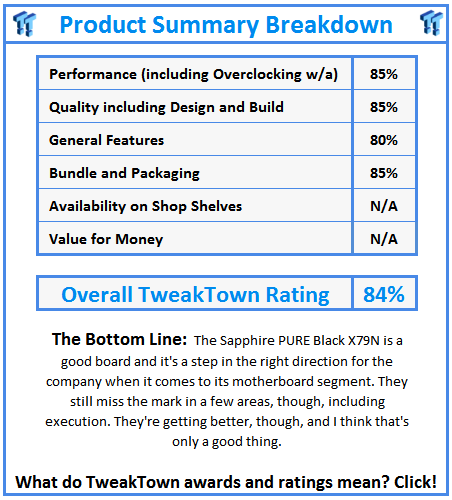
The Sapphire PURE Black X79N I feel is a great addition to the motherboard line up from Sapphire and working with the board, it just worked straight out of the box. None of the issues that we've experienced with some of the less friendly Sapphire boards were present this time around.
The layout is strong, although I would've liked to have seen a board with 6x PCIe x16 slots support four dual slot video cards. Overall it's a strong layout, though, and the fact we are dealing with physical PCIe x16 slots really expands our PCIe options as other PCIe sized cards can be installed in the slots.
On the bundle side of things there's not heaps going on, but the addition of the USB 3.0 header is a nice one and it's still something we see a lot of companies ignore. Apart from that we've got all the normal culprits in the bundle including a bunch of SATA cables.
On the performance side of things we again see the board is also very solid. Out of the box we've got some strong performance and you can see we had the ability to overclock at 4.6GHz without issue. To be honest as well I feel we've got more performance under the hood as we found ourselves getting into Windows at 4.8GHz. I think we need to see some more work on the BIOS and that end of things and we'll see even higher stable overclocks out of the board.
This is my problem with the Sapphire PURE Black X79N, though, it's a good board. That's about it, though. At the moment it's not listed on Newegg, so we can't get a price, it also means we're not sure on availability. We know that these are two areas lacking for Sapphire as they continue to get their name into the market as a serious motherboard contender. I wish we knew the price it would hit the channel at, but to be honest with the range from companies like ASRock and Gigabyte, the chances are they're hitting that price point strong.
The other issue for Sapphire was that the board was delayed. If I got this board at launch and it was the second X79 board I looked at I probably would've found myself a lot more impressed with it. The issue is since launch this is the 13th X79 board I have looked at and we've seen boards from companies hit at every price point with every kind of highlight including strong OC performance, fantastic price or a massive feature list. I'm recommending this board over something like the Intel X79 offering, anything from companies like Biostar and a few others. But with ASRock, MSI, Gigabyte and ASUS hitting at multiple price points due to the massive range, it's a struggle for Sapphire.
I would like to see Sapphire shift focus over to a segment that isn't as heavily populated, mainly something like performance mATX motherboards. This is an area that creates cheaper boards and is also more lenient to maximum overclocking potential. It's an emerging market, though, and that's obvious by the fact we're seeing Gigabyte start to move over to performance mATX boards. I feel that if Sapphire could cement themselves as a contender in an area that isn't as heavily populated, they could then start to use the name they've created in that area to expand out of.
The Sapphire PURE Black X79N is a good board and I'd recommend it over some other boards I've looked at. The issue for Sapphire continues to be that there are boards from other companies I'd recommend over it. Until they can kind of break into that area where people can recommend a Sapphire board with the same confidence as the big four; they're always going to be lagging behind a bit. It can happen, though, a few years ago I didn't think ASRock would be a brand I'd be recommending to so many people, but they've come an extremely long way since their introduction and now create some of the best motherboards on the market.
Sapphire need time, I'm just not sure if the upper levels of Sapphire management are going to give them that. Let's hope so, if they can bring some the passion and focus into the motherboard segment as they do the VGA one, I think we can expect good things from the company in this area in the future.
 United
States: Find other tech and computer products like this
over at
United
States: Find other tech and computer products like this
over at  United
Kingdom: Find other tech and computer products like this
over at
United
Kingdom: Find other tech and computer products like this
over at  Australia:
Find other tech and computer products like this over at
Australia:
Find other tech and computer products like this over at  Canada:
Find other tech and computer products like this over at
Canada:
Find other tech and computer products like this over at  Deutschland:
Finde andere Technik- und Computerprodukte wie dieses auf
Deutschland:
Finde andere Technik- und Computerprodukte wie dieses auf  Windows 11 could get some big changes: Start menu 'companions' and Copilot in Settings
 The iPhone 16 Pro could have a 20% brighter display than your boring old iPhone 15 Pro
 New iPhone 16 dummy unit leak shows off its refreshed camera design and more
 Analysts expect an iPad Pro sales slowdown despite new models, here's why
 WhatsApp announces a design refresh for its iPhone and Android apps
 Corsair 6500X Mid-Tower Dual Chamber Chassis Review
 Corsair MP700 Pro SE 4TB SSD Review - As Fast as They Come
 Corsair MP600 Mini 2024 Edition 1TB SSD Review - Fastest Tiny Drive on the Planet
 Lexar SL500 1TB Portable SSD Review - The best of native USB
 Corsair Platform:6 Elevate Modular Desk Review
 True Lies (1997) 4K Blu-ray Review
 Fractal Design North XL Full-Tower Chassis Review
 Western Digital WD Gold 24TB HDD Review - High-Capacity Masterpiece
 AOC U27G3X 27-inch Gaming Monitor Review - 4K 160Hz for $500
 MSI Vector GP68HX Gaming Laptop Review
 Building the Ultimate Home Entertainment Server with an ASUSTOR NAS and Viper Gaming NVMe SSDs
 Everything you need to know about the latest ASUS NUC Mini PCs - NUC 14 Pro and ROG NUC
 How to Overclock Your GPU and Boost Your PC Gaming with ASUS GPU Tweak III
 ASUS's AMD Radeon RX 7000 Series GPU lineup has something for every gamer
 ASUS OLED Premium Care defends the ROG Swift OLED PG32UCDM gaming monitor from burn-in