Introduction

In almost all of our networking reviews we have talked about Quality of Service or QoS. This handy little feature allows you to adjust priority for different types of network traffic. It makes keeping a network from becoming congested, easy.
However, the traditional setup for QoS is not always an easy task. You have to know the data types and packet tags (in many cases). You also have to understand how to set up the levels of QoS per data type. It is true there are some pieces of hardware with a more broad-based QoS, but they tend to be limited to a "per-port" type of QoS and are not efficient.
Enter the NETGEAR GS605AV; it is a 5-port GBe (Gigabit Ethernet) switch that has all the QoS done internally for you at the low price of $46.99 from NewEgg.com. All you have to do is connect your network to it in the proper fashion. To make things even simpler, they have also color coded the ports on the back so you almost can't screw up.
So let's dive in and see if it is as effective as it is simple.
The Box and What's Inside
Package and Contents
The box that the GS605AV comes in is not bad looking, but there is something about it that makes you cringe a little. Maybe it is the choice of colors or just the general layout, but it is just not pleasing to look at. Of course, it is a 5 port switch and not a work of art, so the packaging is not a deal breaker.
NETGEAR does include an image of the product on the front as well as highlighted features. One that is a nice touch is the "green" logo announcing that this switch uses up to 15% less power than others in its class.

The back has an odd diagram. It shows using this in place with a set of 200Mbps PowerLine adapters. I am not sure that doing that is a good idea. You are going to reduce a 1Gbps connection down to an effective 85Mbps pipe. This on its own will be a huge bottleneck. We have a pair of the NETGEAR XAV101 PowerLine adapters in house and will let you know if this is the case in another review.

Inside the box the goodies are very light. You get the GS605AV, a power adapter, a quick install guide and a single page on warranty information.

The NETGEAR GS605AV
The GS605AV is a very small switch. It is not really much bigger than my iPhone. I was a little surprised at this, but to be honest I am not sure why I expected it to be bigger.
The front has a nice design that gives it a retro feel in a way. There is a "lip" at the front which allows you to view the status lights even if you cannot see the front directly.


One item that I am not impressed with about this design is the humped top. This makes stacking this almost impossible, which is a big downside for many people.

The back is also pretty simple, but it has an interesting twist. Remember how we told you that NETGEAR has made this very simple? Well, the ports on the back are all color coded. The port colors range from a single dark green to yellow. Each color has a priority level associated with it. For example, the single green port is the highest priority, the two light green are next with medium priority and the two yellow are the lowest priority. NETGEAR has also thrown in a real power button on the GS605AV.

The bottom has another label for the ports which does make setup pretty easy. Of course, once you mount or put the GS605AV in place the bottom label is not as much use, but it is still a nice touch.

Setup
The setup of the GS605AV is extremely simple. All you really have to do is plug it into power and then connect your systems to the switch. According to the quick setup guide you plug in your router or modem into the yellow ports, then your higher end gear into the light green and dark green ports. After that, well, you are done and ready to go.
Performance
Bandwidth
We used PerformanceTest 6.1 by PassMark which you can find out more information about here. It has a handy Advanced Networking section which is perfect for our testing.
For our testing of the NETGEAR GS605AV we did things a little different. I set up a NAS appliance with a few HD encoded movies (MKV files at 1080p) and then connected my media playback system to different ports on the GS605AV. At the same time I also threw in a large (6.5GB) file transfer to see what the results would be.
In the graph below you see best possible speeds recorded using PassMark. However, we also wanted to gauge real world use to see how the different pre-set levels of QoS would work.
- Raw Bandwidth
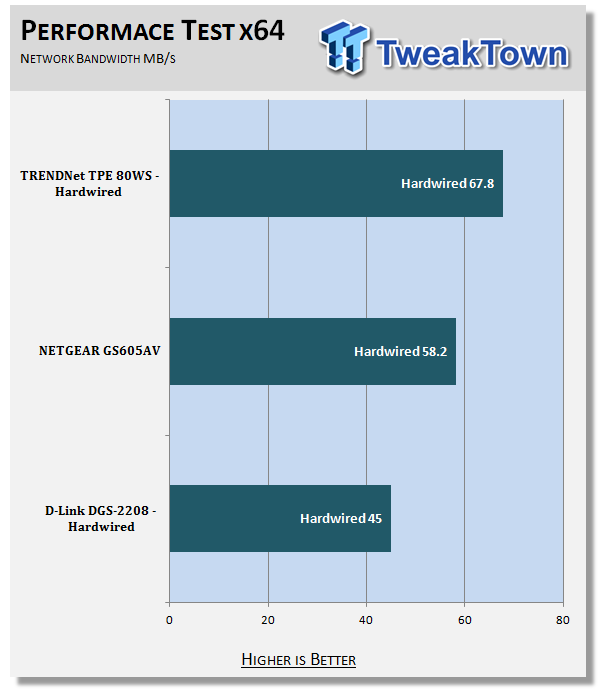
As everything was hardwired, you can see the speeds in our best possible setup testing are very good. They are what you would expect a gigabit switch to be able to give you.
However, we found some interesting items once we started our real-world test. The GS605AV worked flawlessly with the Seagate BlackArmor NAS-220 as the media storage device (plugged into the dark green port) and our two "work systems" plugged into the two light green ports. I was very impressed with the way it handled traffic. As soon as I started up a movie the file transfer slowed down to allow smooth playback of the video I had selected. This is exactly what you would expect from a switch with a QoS function and shows that the QoS levels are setup pretty well.
When I began to move things around I noted different results (of course) and encountered an issue. With the Download system in the dark green port and the NAS and Media Playback system in the light green I saw both media and file transfer impacted. I started to note stuttering and the occasional jump in the MKV file while the file transfer also slowed down. The reduction in speed was not as large as when the download system was in the light green port, but it was still noticeable.
As you would expect, when I moved things down to the yellow ports I began to have more issues when I loaded up the switch with traffic. If I was doing one or the other, everything was fine no matter where the items were plugged in. It was only when I started up other items that we saw the QoS kick in, which is as it should be.
Final Thoughts
We have talked more and more about the way home networking is getting just as complex as some corporate networks and how the line between consumer and enterprise is blurring rapidly. We are seeing this as the home becomes a place where large media files are zipping back and forth through Ethernet cables or through the air. The need for something to prioritize this kind of traffic is growing daily and devices like the GS605AV will be very important to current and future home networks.
In practice we found the NETGEAR GS605AV to be laughably simple to setup and use. Just about anyone can set this up; there are labels and color codes to make this a snap. We do wish there was a version with more than five ports (and more than three levels of QoS), but in reality most homes will not need more than this (yet).
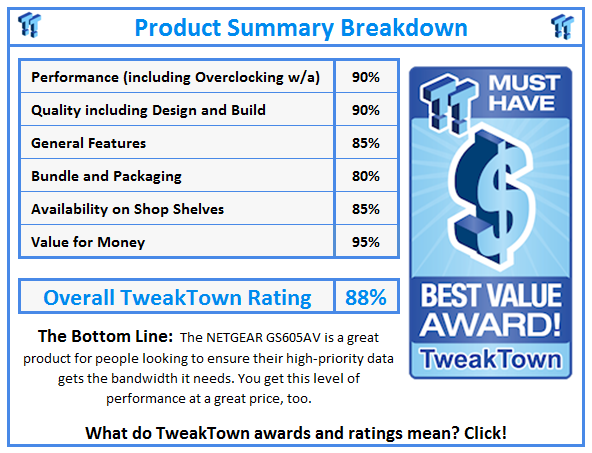
The speeds we recorded and the performance we observed when the GS605AV was set up correctly were more than sufficient to make this a worthwhile product. When you add in the $46.99 price from NewEgg.com it becomes even more attractive for anyone interested in controlling their internal bandwidth.
Our Latest Switches Review Coverage