


Introduction

As of late we have had plenty of new age small computers coming into our labs for testing. The tech industry call these new small computers 'nettops', piggybacking off the name of the netbook computer; which became famous due to its low-power consumption, low-price and small size.
These desktop netbook type things, or nettops as we call them, were the next logical step for low-cost computing after the great success Intel saw when it launched and sold truckloads of its Atom processors. These nettop systems will not render you any new 3DMark records or the like, nor will they play the latest games at high quality graphics settings and they for sure won't be used for anything remotely intensive.
That is the thing, though; once you understand the nettop for its intended purpose, you begin to grow to appreciate this small platform PC. It's kind of like a fine Barossa Valley red wine you adore now, but screwed your face up to when you were younger. NVIDIA helped improve the taste of that red wine with its Ion chipset - a chip designed to bring the slow Intel Atom to life in terms of visual related performance. Now nettops are able to be hooked up with a Blu-ray ROM drive and playback the latest movies in glorious 1080p high definition resolution and even get some basic gaming in with new titles, just without the quality settings turned all the way up.
We have seen our fair share of nettops here at TweakTown, but the latest one that has come in and put its hand up to be the best we have tested so far is from ViewSonic and it is the VOT132 NVIDIA Ion nettop or 'PC mini computer' as called by the folks who love colorful Taiwanese Gouldian finch birds. We have been testing some really small 'small computers' recently, but so far the VOT132 is the smallest we have come across measuring a mere 24 millimeters in the thickness department. Yep, wow! Small.
We put the ViewSonic VOT132 through the complete paces and hope to come out at the other end with an answer if this is the nettop to buy this holiday season.
Specifications, Availability and Pricing
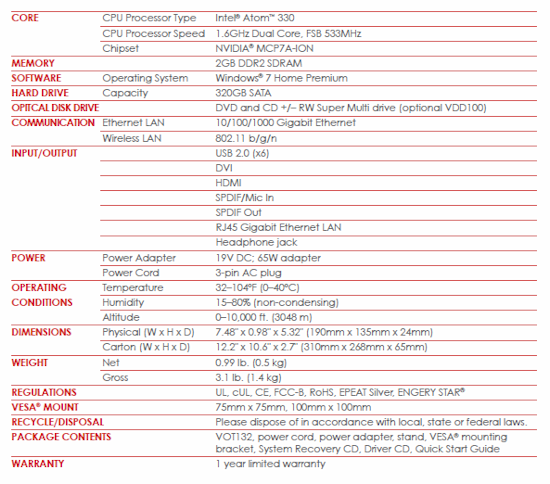
Above we get a look at the specifications of the ViewSonic VOT132 nettop and basically they mimic the spec listing of pretty much all Ion based systems out there, except there are a few important points to take away before we move on.
This is the first nettop we have seen that currently comes shipped with Windows 7 installed; the specific flavor you get is Home Premium. It comes decked out with a dual-core Intel Atom 330 processor that is clocked at 1.6GHz. Of course, in there is the GeForce 9400M or MCP7A-ION chipset from NVIDIA that provides the platform with its 1080p HD capabilities.
Moving down the list, the VOT132 comes installed with 2GB of DDR2-800 memory. The big shame here is that there is only a single DIMM slot, which means there is a performance penalty since dual-channel is not possible. Sure, ViewSonic wanted a tiny system, but next time they have to find a way to add in two DIMM slots as this type of platform needs every tweak possible, since it's far from a speed demon.
And while we are on the negative points, we will say now that the decision to include a slow 5,400 RPM hard drive was silly. As I just said, the Atom and Ion platform need all the best options available to it. We would have much rather seen a 7,200 RPM drive installed, but you'll have to deal with a Western Digital 320GB drive as standard. Of course, you can rip it out and install in a super duper new fast SSD and we would highly recommend that if you have the spare funds... but we like all things to be fast.
Fortunately, on the spec list, that is about all we can fault. On the good side of things, the VOT132 comes with wireless and not just any old wireless, it gets 802.11n. Also for the wired networking, you get gigabit ethernet LAN and that's great. With many systems we see that they only get 10/100 LAN and 802.11b/g wireless and that just sucks.
One of the biggest selling points for the VOT132, though, is the size of the unit. It is the smallest computer we have ever tested here at TweakTown and is only 24mm thick. In the weight department, this thing is a light weight coming in at only half a kilogram, or about one pound.
As far as availability goes, we couldn't see the VOT132 listed in many places, but we did see it listed at one particular store for about $470 USD, down from its list price of $499 USD. It's not cheap, but it's pretty high-end as far as Ion based nettops go with solid specs in the networking department, as well as HDD size. Besides the ASRock ION 330HT, it's one of the more expensive nettops you will find. You will need to pay extra for the external ViewSonic VDD100 DVD burner we are covering, too - we saw that listed from about $80 to $100 USD.
Package and the System
Now we can move onto the exciting part of the review where we get an unboxing of the product and then a look around the system and inside the ViewSonic VOT132. Hit play on the video below and then continue reading on.
Only a week or so ago did we get finished testing and reviewing the Giada Slim-N10 NVIDIA Ion nettop and it took the claim as the smallest system we had tested, but then along comes the ViewSonic VOT132.

The VOT132 measures just 190mm (L) x 135mm (H) x 24mm (W) as compared to the Giada system that comes in at 190mm (L) x 150mm (H) x 25mm (W). So it is thinner than and not as tall as the Slim-N10, but shares the exact same length. It is really a sight to be seen and small PC lovers are going to really love this thing to bits. In the video above, we opened up the system and exposed the inside. The engineering and designing that has gone into this system is like an art form. For a PC that can run Windows 7 Ultimate, they have managed to squeeze all the parts inside such a small space - it's rather remarkable in my opinion. This is the way of the future, though, don't kid yourself. And we are only beginning to touch the surface of ultra small and extremely low one watt or less power consuming computers that are capable of some full desktop system tasks.

On the front of the system as you can see above, there are an assortment of things going on. From the left we have the headphone and microphone jacks, a card reader, a couple USB 2.0 ports, HDD activity LED, a mono speaker and the sleep and power buttons. What is really interesting about the speaker is that it actually outputs sound from the operating system. It's not for BIOS system alarms or the like. Sure, the volume emitted is not very loud, but is still pretty cool nevertheless.

On the back of the system as you can see above, there are also a bunch of options here like the front. Starting from the left, we have the wireless antenna connector for the built-in 802.11n, four more USB 2.0 ports for a total of six, a DVI connector (you also have standard VGA output thanks to the included DVI to VGA adapter), HDMI port, gigabit LAN connector and finally the power input.

With the ViewSonic VDD100 DVD and CD +/- RW Super Multi drive attached to the system, as you can see in the shot above, it only makes the whole system a little thicker. The design and thought by ViewSonic is great as the VOT132 and the VDD100 both have magnets on one side of each unit and they attach to each other and match up really well. It's the small yet impressive features that count. Watch the video above for a detailed look.

If you don't want to use the included stand, you can use the provided VESA monitor mount that is provided by ViewSonic. As long as your monitor or TV has the VESA mounts on the back of it, you can mount the nettop and / or nettop and external DVD burner drive to the back of your display unit to save some space on your desk. Again, watch the video above for a detailed look.
Benchmarks - Note on 1080p HD and Blu-ray Playback
Now that we have had a good close look inside and outside of the system, we can move onto the benchmarking side of things and see how the ViewSonic VOT132 performs.
Before we move onto the actual benchmarks, though, I want to make a couple notes about 1080p HD playback as well as Blu-ray playback.
We tested SDTV, 720p and 1080p playback on the system and we can happily report that the system had no issues playing back this sort of HD content. Playback was smooth without dropping frames and the image quality produced was fine. We can notch all this up to the NVIDIA Ion chipset taking charge and offloading the work from the CPU.
As for Blu-ray playback, unfortunately we were unable to do any tests since we no longer have a USB 2.0 Blu-ray optical drive handy. However, based on our testing with the ASRock ION 330-BD nettop system back in June of this year, thanks again to the NVIDIA Ion chipset, we can say that the ViewSonic VOT132 won't have any issues with Blu-ray playback. You can see our CPU usage results here with the ASRock system for rough comparison. That means that the movies will playback smooth and look fine, but it does not mean you will get the full HD audio experience since these types of system are not capable of outputting Dolby TrueHD and DTS-HD MA as bitstream. This is normal for most computers, so don't let it concern you too much.

Now let's move onto our first benchmark on the next page. We will be comparing the ViewSonic nettop system against the Giada Slim-N10 we tested recently and the ASRock ION 330-BD nettop system that we tested back in June of this year, which you can read more about here. All three systems have Windows 7 Ultimate x64 installed, but the ViewSonic and Giada nettops use newer drivers including the NVIDIA GeForce/ION Driver 195.62 and NVIDIA ION Chipset Driver 15.51.
You can see the CPU-Z screenshot of the Viewsonic system above and the validation link for reference is here.
Benchmarks - PCMark Vantage 64-bit
PCMark Vantage 64-bit
Version and / or Patch Used: Nov 2007 Hotfix
Developer Homepage: http://www.futuremark.com
Product Homepage: http://www.futuremark.com/benchmarks/pcmark-vantage/
Buy It Here

PCMark Vantage is the first objective hardware performance benchmark for PCs running 32 and 64 bit versions of Microsoft Windows Vista. PCMark Vantage is perfectly suited for benchmarking any type of Microsoft Windows Vista PC from multimedia home entertainment systems and laptops to dedicated workstations and high-end gaming rigs. Regardless of whether the benchmarker is an artist or an IT Professional, PCMark Vantage shows the user where their system soars or falls flat, and how to get the most performance possible out of their hardware. PCMark Vantage is easy enough for even the most casual enthusiast to use yet supports in-depth, professional industry grade testing.
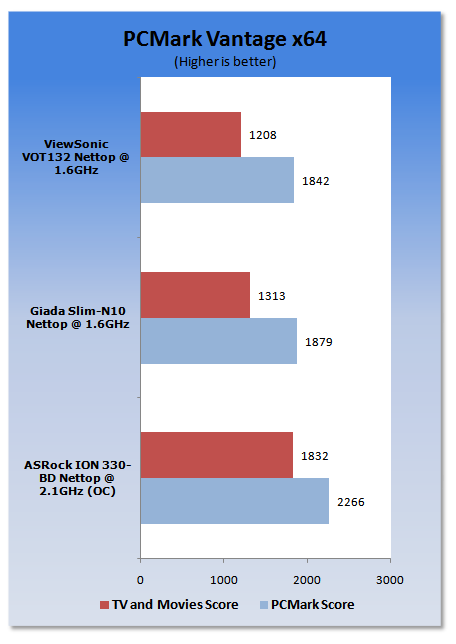
In our first test we can see that the ViewSonic VOT132 struggles against the ASRock nettop that is able to be overclocked with its included OC software. The VOT132 is also a little behind the Slim-N10 from Giada, but not by a huge margin.
Benchmarks - CINEBENCH R10 64-bit
CINEBENCH R10 64-bit
Version and / or Patch Used: Release 10
Developer Homepage: http://www.maxon.net/
Product Homepage: http://www.maxon.net

CINEBENCH is a real-world test suite that assesses your computer's performance capabilities. MAXON CINEBENCH is based on MAXON's award-winning animation software, CINEMA 4D, which is used extensively by studios and production houses worldwide for 3D content creation. MAXON software has been used in blockbuster movies such as Spider-Man, Star Wars, The Chronicles of Narnia and many more.
MAXON CINEBENCH runs several tests on your computer to measure the performance of the main processor and the graphics card under real world circumstances. The benchmark application makes use of up to 16 CPUs or CPU cores and is available for Windows (32-bit and 64-Bit) and Macintosh (PPC and Intel-based).
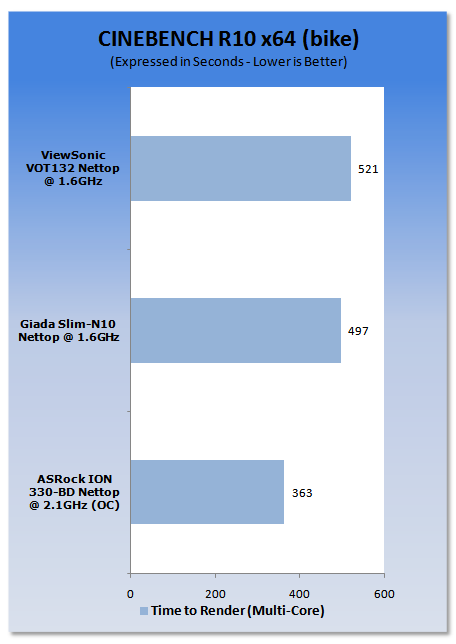
In our next test under CINEBENCH we use the 64-bit version with the bike rendering and the multi-core option and again we can see that the ViewSonic is at the back of the pack, but not far behind the Giada system. The Giada system is able to complete the render about 5% quicker and the ASRock system about 30% quicker.
The CPU on the ASRock nettop is clocked about 24% faster than the 1.6GHz clock speed with the VOT132, so there are some extra things at play here (such as the dual-channel memory support) with the ASRock nettop system that is making the roughly 6% difference in performance.
Benchmarks - Super PI
Super PI
Version and / or Patch Used: 1.5 Mod XS
Developer Homepage: http://pw1.netcom.com/~hjsmith/Pi/Super_Pi.html
Product Homepage: http://pw1.netcom.com/~hjsmith/Pi/Super_Pi.html
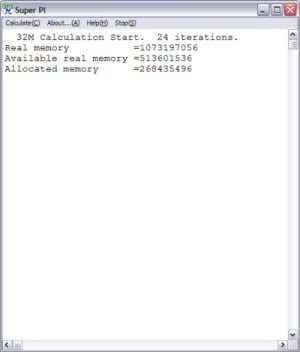
Developed by some folks from the University of Tokyo (yes, Japan), Super PI is a small utility that does just as the name implies. It figures PI to a set number of decimal places. Since PI is an infinite number to the right of the decimal point, the utility measures the time it takes to figure a set number of places. It runs the calculations a set number of times and gives a time for the completion of the task. This is a simple and effective way to measure the raw number crunching power of the processor being used to compile the results.
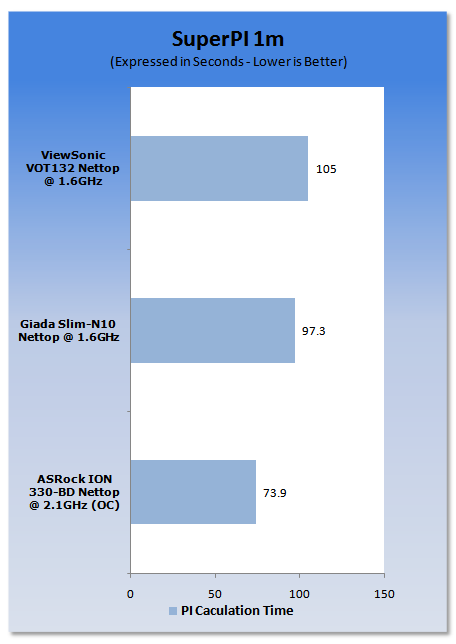
Under SuperPI here we can see the same trend as we saw in the two previous benchmarks with the ViewSonic VOT132 at the back of the pack.
Power Consumption and Boot Time Testing
Power Consumption Testing
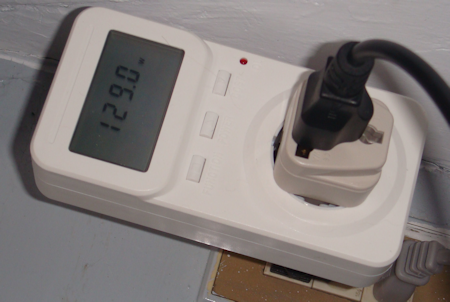
Now we come to probably one of the most important sections of our testing and that is power consumption!
Using the power tester you can see in the picture above, we measured power coming from the wall - it is measuring the full system, everything inside the box.
We used prime95 to fully load the CPU processor cores and a score was recorded after five minutes of loading. We recorded the highest wattage level hit. An idle wattage level was recorded after staying idle on the desktop for five minutes.
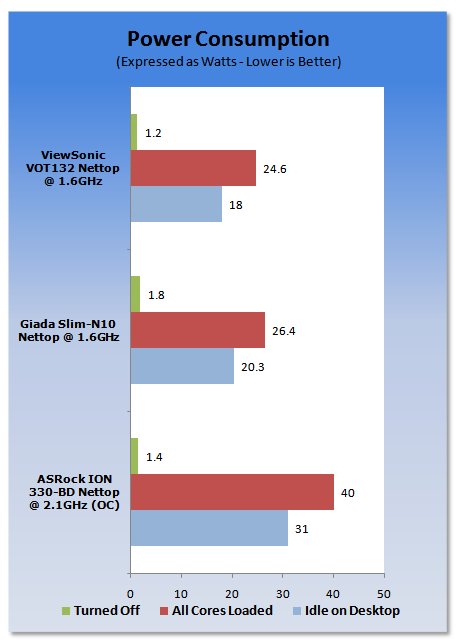
Not only is the ViewSonic VOT132 small, but it is also green! As you can see by the numbers above, ViewSonic excels here and offers the best power wattage numbers in all areas. At the lowest point, we noted the system using only 16.9 watts of power!
As far as heat and noise goes, there are good things to note here, too. The system runs whisper quiet as you saw on the video and is hardly audible. As far as heat goes, the system gets a little warm on both sides of the unit near where the CPU and chipset is located, but not hot. There is a little heat generated on one side of the unit where the HDD is located, but it was really only luke warm. We didn't experience any stability issues whilst testing the VOT132.
Boot Time Testing
We measured using a stopwatch and timed from the point we turned the system on until the very first point the desktop was reached and fully loaded.
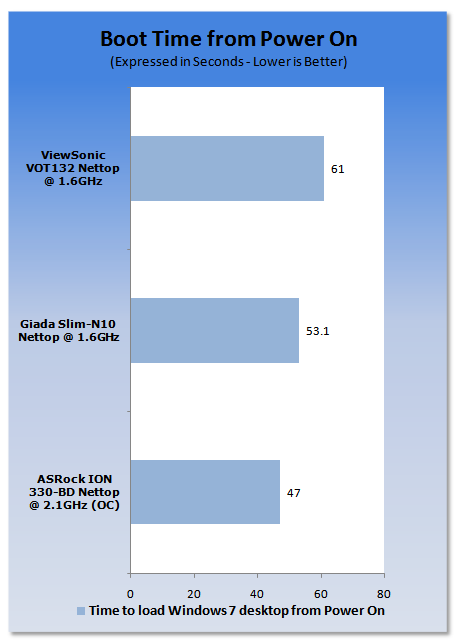
Same type of story here again as we saw on the last few pages. The ViewSonic VOT132 isn't a speedster.
Final Thoughts

After a fairly exhausting look at the ViewSonic VOT132, I'm able to deliver you my final thoughts on the product and am able to tell you if I think it's the right nettop for you to buy this holiday season.
Do you want the good news or the bad news first? Alright, we'll start with the bad. On the negative side, whoever made the decision at ViewSonic to include a slow 5,400 RPM hard drive should be...well, they should have just included a faster 7,200 RPM hard drive. The Intel Atom and Ion platform isn't a speed machine and it needs every option possible to help make it perform as fast as possible. Similarly, there is only one DDR2 DIMM slot on the motherboard, so that of course means you only get single-channel memory support. 2GB of DDR2-800 is installed with fairly good timings (besides the 2T part that doesn't help performance), but next time ViewSonic, make it dual-channel.
More bad news? Nope, that is it. Having said that, though, the ViewSonic is one of the worst performing nettops that we have tested falling to the back of the pack in all of our tests. That is why, what I'm about to say over the next couple of paragraphs, may make me sound a little crazy to you. Performance doesn't always have to be the be all and end all, right?
The ViewSonic VOT132 is one of the best nettops we have used and easily the smallest PC that we have ever tested here at TweakTown - it is only 24mm thin! It practically weighs nothing as well at only half a kilogram or around one pound. The motherboard and chips are enclosed by the stylish looking white (or black if you want that color) case which uses a high grade of plastic that looks and feels almost like one million dollars. Once we break the casing open and get a look inside, we again see more class from ViewSonic in one of the most compact and well designed systems we have ever seen. It's amazing what was able to be fitted inside such a small space.
ViewSonic also tick all the right boxes when it comes to networking. We can't stand getting new, modern systems and other devices in and they don't use the latest standards. The VOT132 includes 802.11n wireless as well as gigabit LAN. You also get six USB 2.0 ports that are well placed around the system and also a card reader on the front of the unit. Not only that, but depending on where you buy this nettop from, it also comes pre-installed with Windows 7 Home Premium.
As far as the price goes, it seems to be listed at around $500 USD, but we saw it listed online at one shop in the States for $470 USD. Keep in mind this price doesn't include the $80 to $100 USD extra you'll need to fork out for the ViewSonic VDD100 DVD burner. But with its joint magnetism ability, they suit each other really well. So, as long as performance doesn't mean everything to you and you are willing to spend a bit more than usual compared to other less impressive nettops, this is the perfect nettop for the holidays and the perfect gift for a student or one of your kids. Heck, it will even fit in their Christmas stocking - literally!

 United
States: Find other tech and computer products like this
over at
United
States: Find other tech and computer products like this
over at  United
Kingdom: Find other tech and computer products like this
over at
United
Kingdom: Find other tech and computer products like this
over at  Australia:
Find other tech and computer products like this over at
Australia:
Find other tech and computer products like this over at  Canada:
Find other tech and computer products like this over at
Canada:
Find other tech and computer products like this over at  Deutschland:
Finde andere Technik- und Computerprodukte wie dieses auf
Deutschland:
Finde andere Technik- und Computerprodukte wie dieses auf 


 Windows 11 could get some big changes: Start menu 'companions' and Copilot in Settings
 The iPhone 16 Pro could have a 20% brighter display than your boring old iPhone 15 Pro
 New iPhone 16 dummy unit leak shows off its refreshed camera design and more
 Analysts expect an iPad Pro sales slowdown despite new models, here's why
 WhatsApp announces a design refresh for its iPhone and Android apps
 Corsair 6500X Mid-Tower Dual Chamber Chassis Review
 Corsair MP700 Pro SE 4TB SSD Review - As Fast as They Come
 Corsair MP600 Mini 2024 Edition 1TB SSD Review - Fastest Tiny Drive on the Planet
 Lexar SL500 1TB Portable SSD Review - The best of native USB
 Corsair Platform:6 Elevate Modular Desk Review
 True Lies (1997) 4K Blu-ray Review
 Fractal Design North XL Full-Tower Chassis Review
 Western Digital WD Gold 24TB HDD Review - High-Capacity Masterpiece
 AOC U27G3X 27-inch Gaming Monitor Review - 4K 160Hz for $500
 MSI Vector GP68HX Gaming Laptop Review
 Building the Ultimate Home Entertainment Server with an ASUSTOR NAS and Viper Gaming NVMe SSDs
 Everything you need to know about the latest ASUS NUC Mini PCs - NUC 14 Pro and ROG NUC
 How to Overclock Your GPU and Boost Your PC Gaming with ASUS GPU Tweak III
 ASUS's AMD Radeon RX 7000 Series GPU lineup has something for every gamer
 ASUS OLED Premium Care defends the ROG Swift OLED PG32UCDM gaming monitor from burn-in