












Introduction
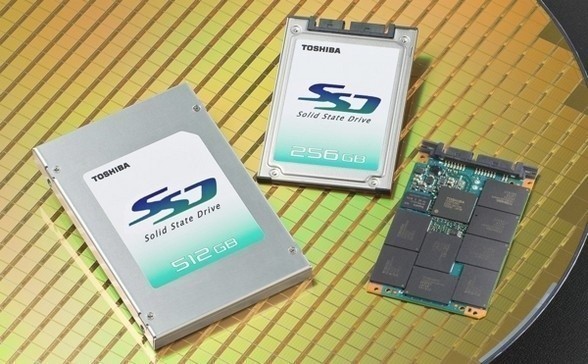
If you frequent the storage review section here at TweakTown then you already know that I am fond of my Lenovo T61p portable, do it all, sits next to the bed when I sleep, workstation. A couple of weeks ago the T61p that has survived my brutality every day for the last three years was retired and replaced with a new Lenovo W701ds that features USB 3.0, dual monitors (on a notebook!!!!), dual 2.5" HDD bays and shipped with a Lenovo branded Toshiba controlled SSD. Lenovo sells more notebooks than most SSD manufacturers sell drives and they were also one of the first notebook manufacturers to offer an SSD option to consumers.
The OEM market doesn't move as rapidly as the enthusiasts market and disk drives are generally qualified and sold for several years before being replaced with the next technological leap. It is quite common to find a platter drive that was released on the market in a new notebook on the shelves of Best Buy or other big box store. For most enthusiasts a three year old part, if still in their possession has been sitting on a shelf for two years.
You have to be wondering why I am looking at the Lenovo branded 128GB SSD in the first place, since you can't really just order it at Newegg and since it is based on older Toshiba technology borrowed from JMicron. The reason is really quite simple; there are thousands of these on the market and anyone purchasing a new notebook from Lenovo has the option to upgrade the base HDD to one of these 128GB SSDs. For the W701ds, this upgrade has a cost of 320 USD if you pass on the 320GB HDD. If you add the 128GB Lenovo SSD to your system and keep the 320GB drive, you are adding 470 USD to the total cost of the notebook.
Today we are going to look at some of the available HDD options from Lenovo and see if the 128GB SSD currently offered is worth the investment.
Specifications, Pricing and Availability
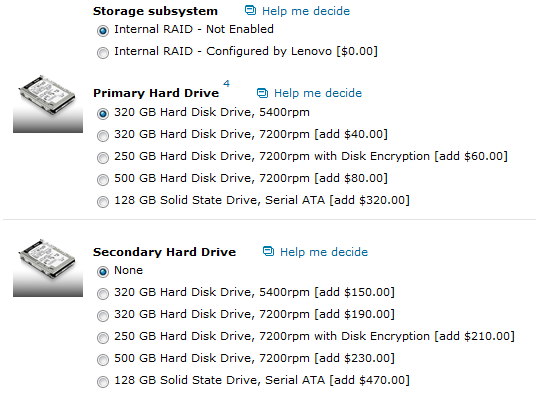
In the image above we see the available options for the Lenovo W701ds, AKA the biggest, most bad ass notebook available on the market right now. The base drive is a simple 320GB, 5,400 RPM drive that will work fine for most users. This is an ultra-high performance notebook that when configured to 11 can bust the 6 thousand Dollar price point and in some cases the base drive isn't going to satisfy the needs of someone looking to actually run CAD, CAM or another data intensive app on the system like it was designed for. For those users Lenovo has listed a nice, progressive list of options that go all the way up to the 128GB SSD like the one we are looking at today.
From what I could gather, it appears Lenovo is offering two different SSDs, but end users are not able to choose when ordering. The drive that we are looking at today was originally made by Toshiba, but Lenovo also uses some Samsung drives as well. There may be others too, but I was able to confirm both the Toshiba and Samsung based options.
In a few of our other reviews we tested some other drives based on Toshiba technology. Both Kingston and Western Digital has used Toshiba controllers before. From what I recall in those tests, the Toshiba controllers were based on modified JMicron hardware and used a larger cache module than what we were seeing at the time from JMicron branded controllers.
Let's take a look at the Lenovo (Toshiba OEM) THNS128GG4BAAA and see what it has to offer.
The Lenovo (Toshiba OEM) THNS128GG4BAAA

Here we see the 1.8 inch form factor Lenovo drive in its 2.5" adapter. All of the labeling is on the front of the drive and it fits snugly in the adapter.

The back of the drive shows the rest of the mounting system used by the adapter.

The SATA power and data connectors are kept within SATA specifications in the adapter. The adapter was designed to keep these in place so there wouldn't be an issue installing the 1.8" form factor drive into a standard notebook.

On one end the locking arm can be released and the smaller drive slid out from the adapter.

Here we see the three pieces of the drive when separated. Just like the Kingston drive we tested several months ago, Toshiba has once again used thermal transfer material to keep the internals cool.

All of the chips are located on one side of the drive. The drive uses eight NAND flash modules, a single controller and a single cache module.

The back of the drive is free of major components, but does have a few surface mount parts.
Now let's see how it performs!
Test System Setup and ATTO Baseline Performance
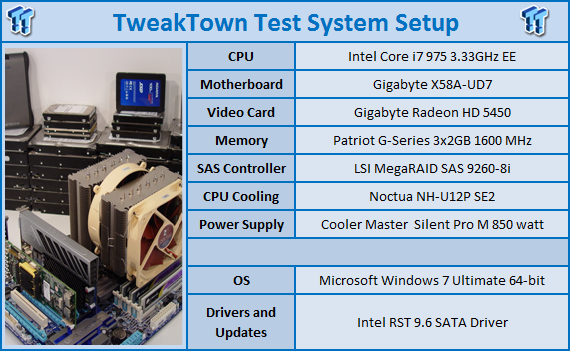
We would like to thank the following companies for supplying and supporting us with our test system hardware and equipment: AVADirect, GIGABYTE, Cooler Master, LSI and Noctua.
You can read more about TweakTown's Storage Product Testing Workstation and the procedures followed to test products in this article.
The Lenovo 128GB SSD option comes in as a 320 USD upgrade or a 470 USD add on. Today we are looking at the performance of the drive and comparing it to some of the best aftermarket drives on the planet.
ATTO Baseline Performance
Version and / or Patch Used: 2.34
ATTO is used by many disk manufacturers to determine the read and write speeds that will be presented to customers.
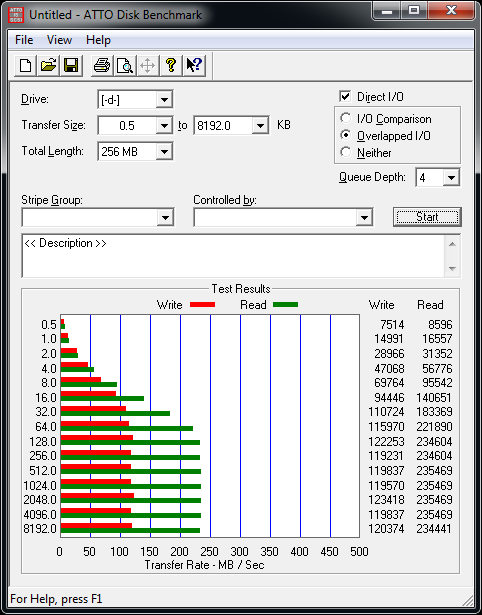
The ATTO read performance of 234MB/s is actually pretty good for an OEM drive, but reading data is only half of the story. Our sample drive only has a write speed of 120MB/s at peak and that may end up limiting some of our real world tests later on.
Benchmarks - HD Tune Pro
HD Tune Pro
Version and / or Patch Used: 4.00
Developer Homepage: http://www.efdsoftware.com
Product Homepage: http://www.hdtune.com
HD Tune is a Hard Disk utility which has the following functions:
- Benchmark: measures the performance
- Info: shows detailed information
- Health: checks the health status by using SMART
- Error Scan: scans the surface for errors
- Temperature display
HD Tune Pro gives us accurate read, write and access time results and for the last couple of years has been gaining popularity amongst reviewers. It is now considered a must have application for storage device testing.
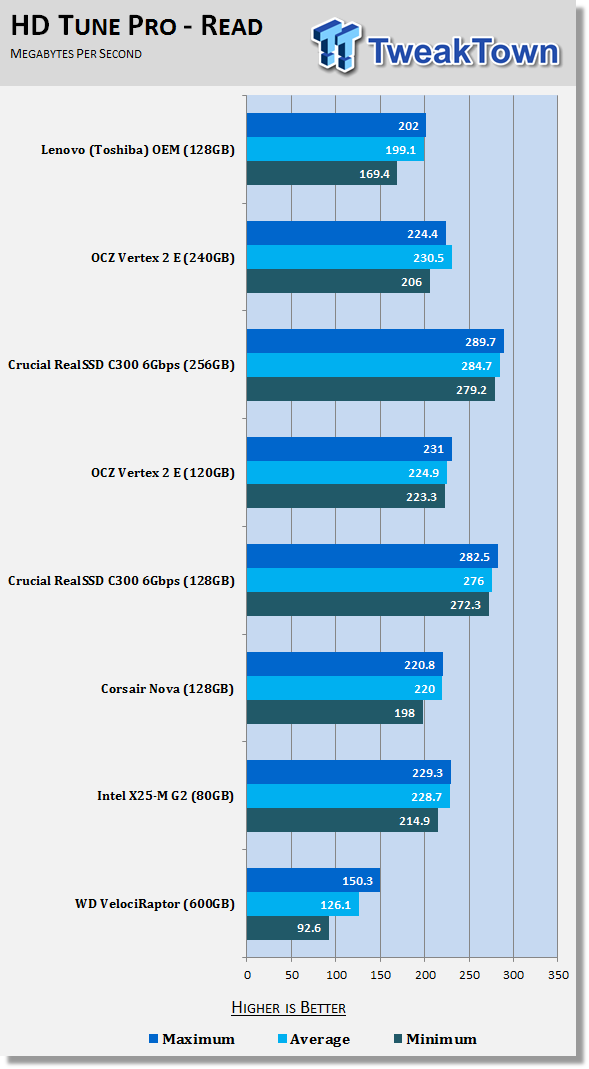
In HD Tune we get a chance to break down the speeds even further and see the minimum, average and maximum speeds of the drive. For the most part the speeds stayed right around the 200MB/s mark, but there was one small dip that drove performance down to just under 170MB/s.
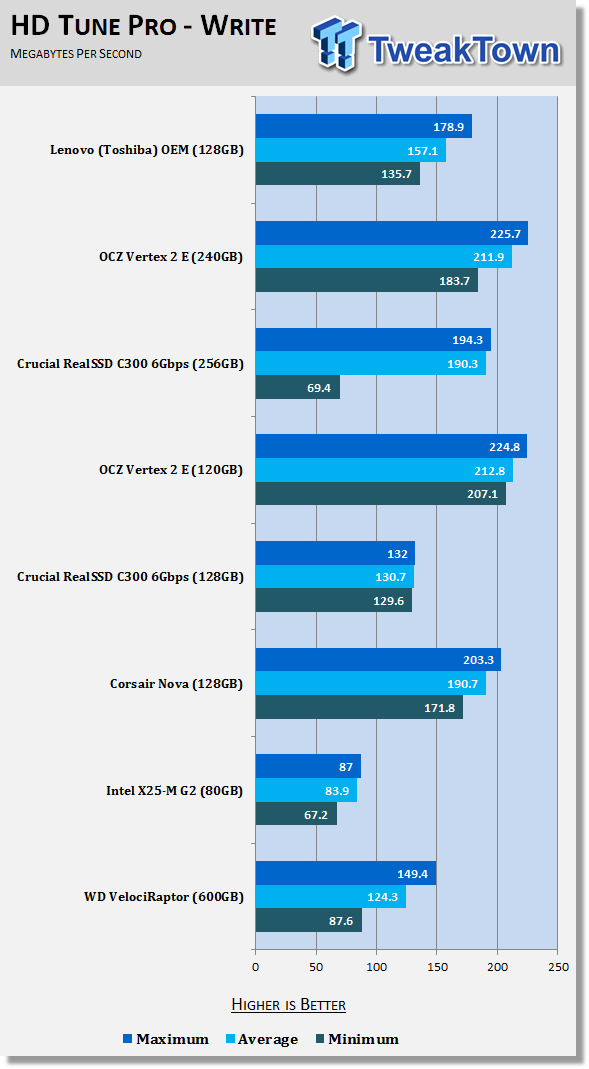
The write test was a little less stable. The maximum write speed was just under 180MB/s, but the minimum went down to 135MB/s, leaving the average right around 157MB/s. This is actually much more than I expected given the ATTO numbers we just looked at.
Benchmarks - Everest Random Access Time
Everest Random Access Time
Version and / or Patch Used: 4.60
Developer Homepage: http://www.lavalys.com
Product Homepage: http://www.lavalys.com
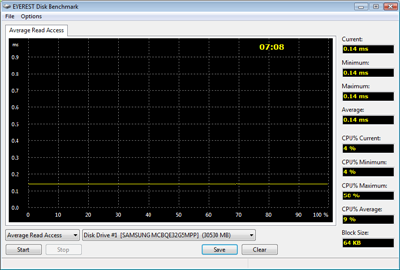
Everest Ultimate and Corporate Edition offer several different benchmarks for testing and optimizing your system or network. The Random Access test is one of very few if not only that will measure hard drives random access times in hundredths of milliseconds as oppose to tens of milliseconds.
Drives with only one or two tests displayed in write the write test mean that they have failed the test and their Maximum and possibly their Average Scores were very high after the cached fills. This usually happens only with controllers manufactured by JMicron.
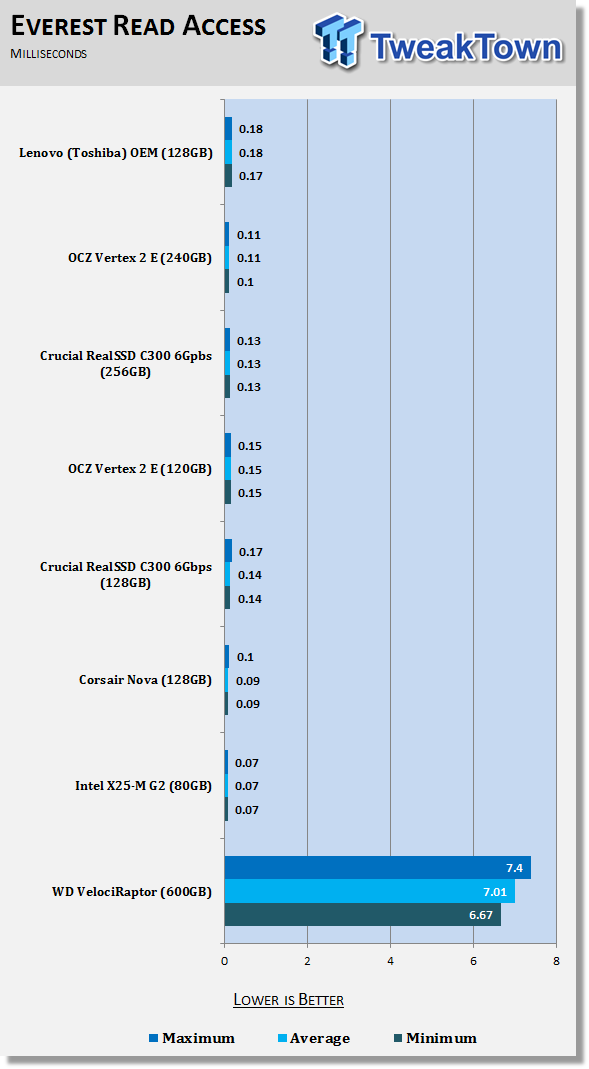
Access times are why solid state technology has such a performance advantage over traditional platter drives. Without the need to move a physical platter into position, SSDs are able to read and write data much faster.
In the read test we see the Lenovo OEM drive doing a really good job of keeping access times under .2 ms.
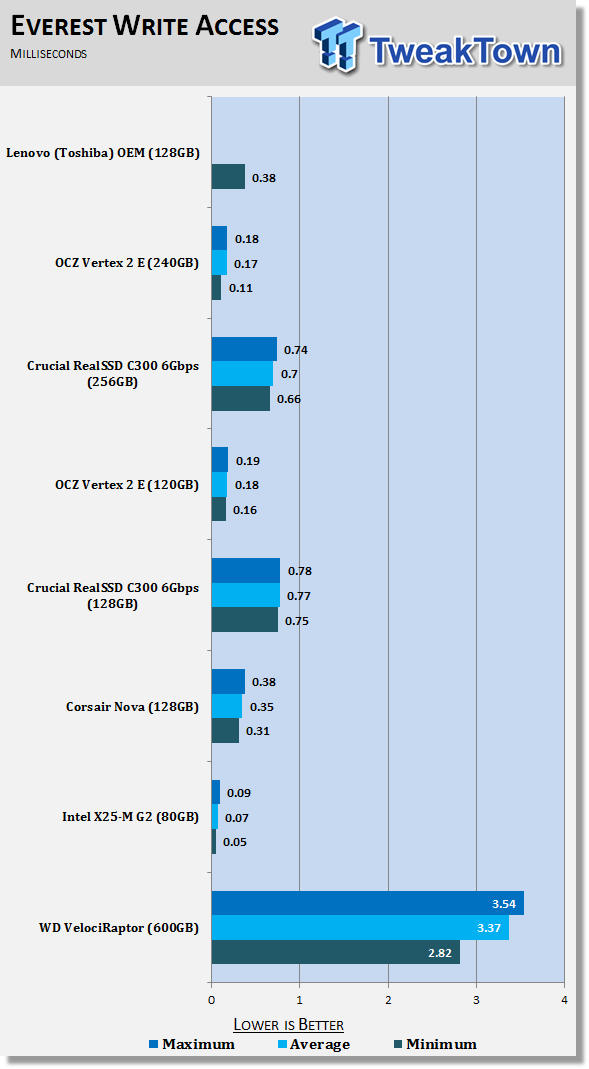
The write access tests were another story entirely. Just like every other JMicron based drive we have ever tested, the Lenovo (Toshiba OEM) drive ran into issues once its buffer was saturated.

Here we see the full graph with a nice .38 ms write access time, but then the buffer fills to capacity and sees all hell breaking loose. The maximum recorded time was just over 120ms or 1.2 seconds. If you end up in a situation where you are moving large amounts of data, you may hit a point where the drive appears to lock up. This isn't exactly something you would want to have happen in a workstation environment.
Benchmarks - Crystal Disk Mark
CrystalDiskMark
Version and / or Patch Used: 3.0 Technical Preview
Developer Homepage: http://crystalmark.info
Product Homepage: http://crystalmark.info/software/CrystalDiskMark/index-e.html
Download here: http://crystaldew.info/category/software/crystaldiskmark
CrystalDiskMark is a disk benchmark software.
Key Features:-
* Sequential reads/writes
* Random 4KB/512KB reads/writes
* Text copy
* Change dialog design
* internationalization (i18n)
Note: Crystal Disk Mark 3.0 is not available to the public yet, but the Technical Preview does allow us to test 4K performance at queue depths of 4 and 32 in addition to 1. The current release Crystal Disk Mark only shows us QD 1.
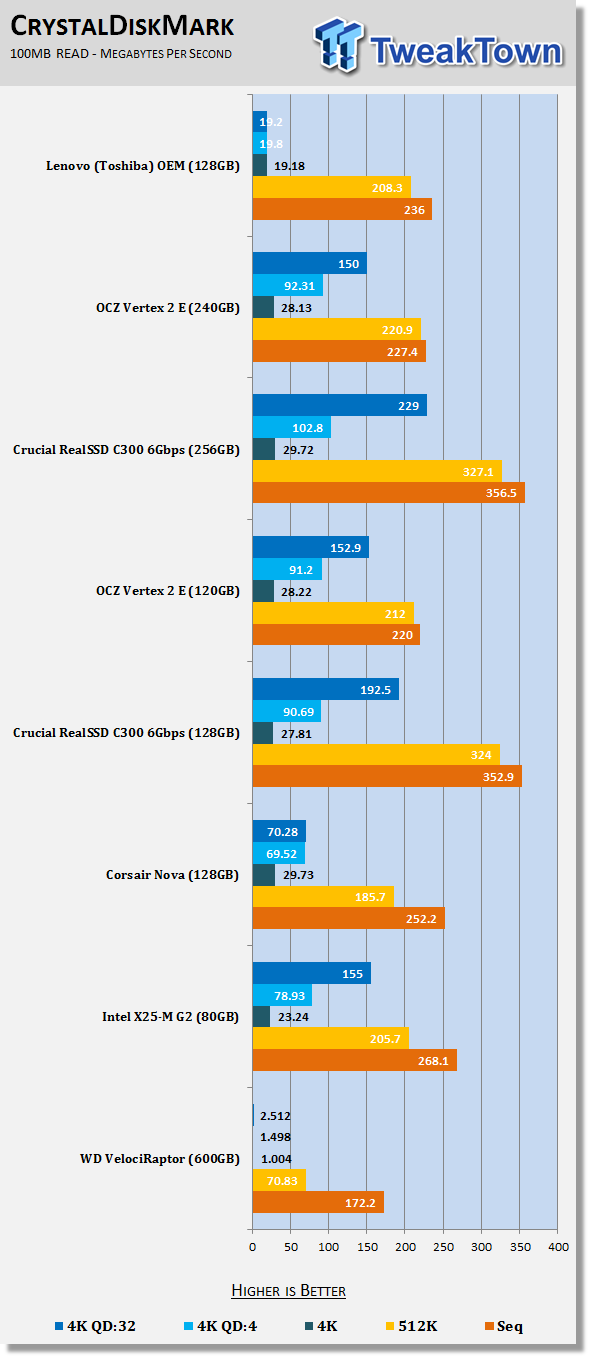
In CDM we are looking at the 4K and queue depth performance. The Lenovo drive shows near 20MB/s 4K performance which is very good for a low cost SSD, but we see that the Toshiba OEM drive does not support NCQ and 20MB/s seems to be the ceiling.
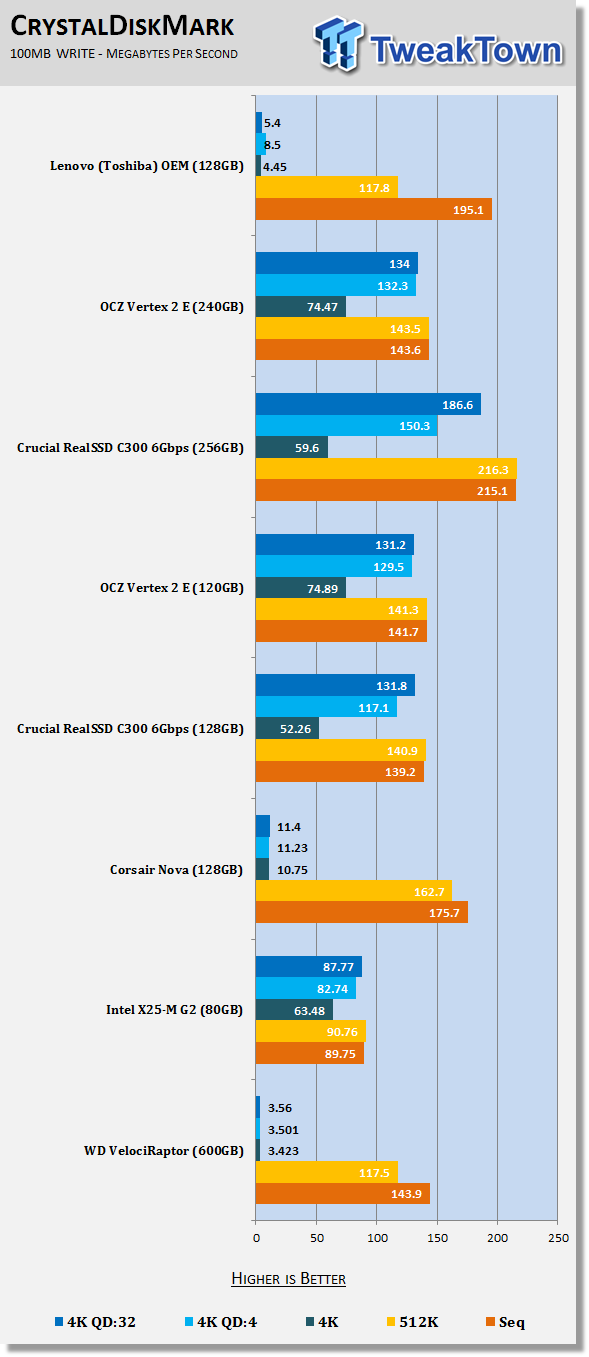
Once again we see that the write operations are where the drive has issues. When you look at the numbers we see that the Lenovo drive resembles the 4K performance of the WD VelociRaptor more than it does the SSDs.
That concludes our synthetic benchmarks. Let's take a look at the real world tests and see if what we learned from the synthetics carries over to the real world.
Benchmarks - PCMark Vantage Hard Disk Tests
PCMark Vantage - Hard Disk Tests
Version and / or Patch Used: 1.0.0
Developer Homepage: http://www.futuremark.com
Product Homepage: http://www.futuremark.com/benchmarks/pcmark-vantage/
Buy It Here

PCMark Vantage is the first objective hardware performance benchmark for PCs running 32 and 64 bit versions of Microsoft Windows Vista. PCMark Vantage is perfectly suited for benchmarking any type of Microsoft Windows Vista PC from multimedia home entertainment systems and laptops to dedicated workstations and high-end gaming rigs. Regardless of whether the benchmarker is an artist or an IT Professional, PCMark Vantage shows the user where their system soars or falls flat, and how to get the most performance possible out of their hardware. PCMark Vantage is easy enough for even the most casual enthusiast to use yet supports in-depth, professional industry grade testing.
FutureMark has developed a good set of hard disk tests for their PCMark Vantage Suite. Windows users can count on Vantage to show them how a drive will perform in normal day to day usage scenarios. For most users these are the tests that matter since many of the old hat ways to measure performance have become ineffective to measure true Windows performance.
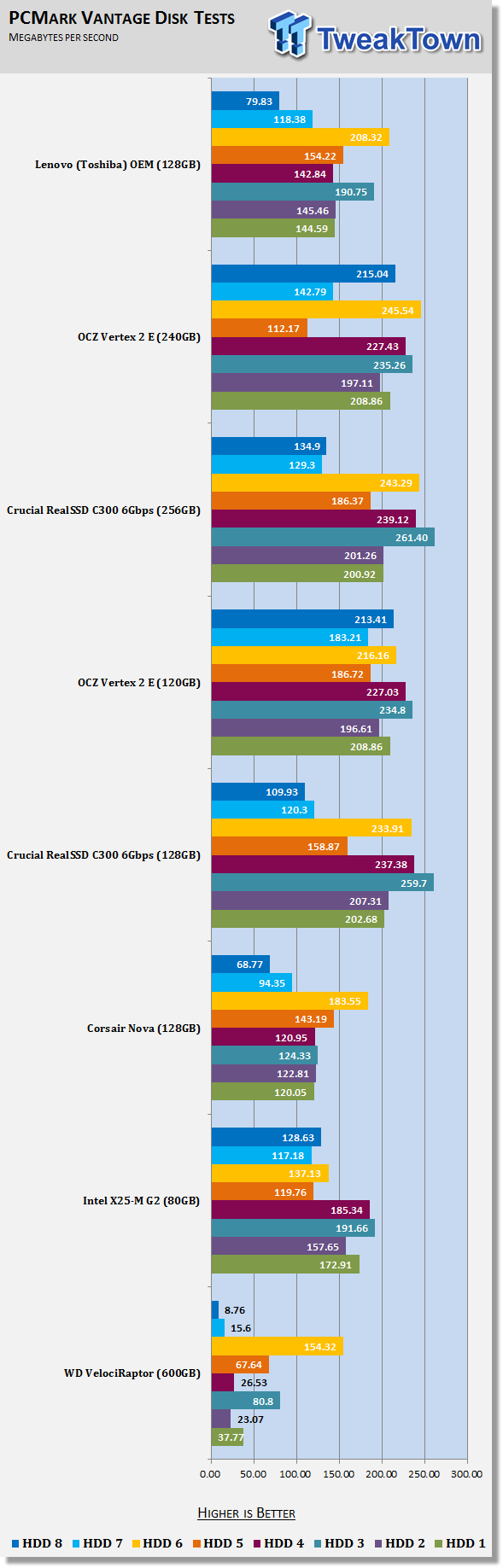
HDD1 - Windows Defender
HDD2 - Gaming
HDD3 - Windows Photo Gallery
HDD4 - Vista Startup
HDD5 - Windows Movie Maker
HDD6 - Windows Media Center
HDD7 - Windows Media Player
HDD8 - Application Loading
Vantage allows us to look at the tasks that we all perform daily on our notebooks and PCs. Granted, the W701ds isn't your typical Facebook surfing machine, but the daily grind is in many ways the same for all of us. Specialized applications may require additional performance and that is one of the reasons why the W701ds has an additional HDD bay.
Here we see solid performance, but a simple upgrade to something SandForce based will allow just about every task to be performed faster.
Benchmarks - AS SSD
AS SSD Benchmark
Version and / or Patch Used: 1.2.3577.40358
Developer Homepage: Alex Intelligent Software
Product Homepage: Alex Intelligent Software
Download here: http://www.alex-is.de/PHP/fusion/downloads.php?cat_id=4&download_id=9
AS determines the performance of Solid State Drives (SSD). The tool contains four synthetic as well as three practice tests. The synthetic tests are to determine the sequential and random read and write performance of the SSD. These tests are carried out without the use of the operating system caches.
In all synthetic tests the test file size is 1GB. AS can also determine the access time of the SSD, the access of which the drive is determined to read through the entire capacity of the SSD (Full Stroke). The write access test is only to be met with a 1 GB big test file. At the end of the tests three values for the read and write as well as the overall performance will be issued. In addition to the calculated values which are shown in MB/s, they are also represented in IO per seconds (IOPS).
Note: AS SSD is a great benchmark for many tests, but since Crystal Disk Mark covers a broader range of 4K tests and HD Tune Pro covering sequential speeds, we will only use the Copy Benchmark from AS SSD.
- Copy Benchmark
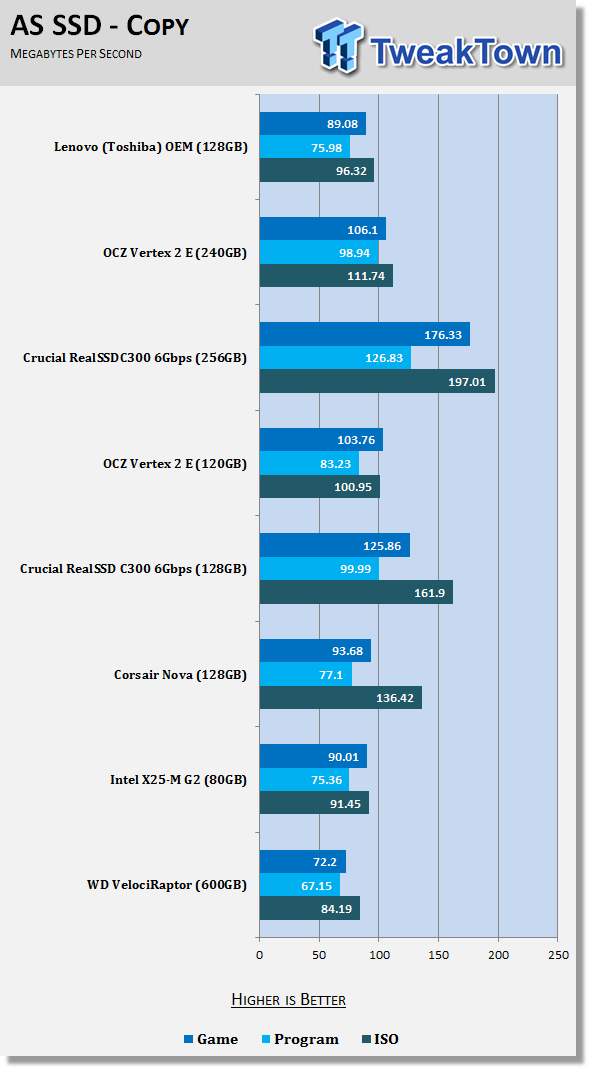
Transferring data from one area of the drive to another isn't much faster than doing it on a 600GB WD VelociRaptor. The speeds are quite a bit faster than standard 5,400 and 7,200 RPM drives, but the Lenovo SSD is no match for the Crucial or OCZ Vertex 2 drives.
Benchmarks - Passmark
Passmark Advanced Multi-User Tests
Version and / or Patch Used: 6.1
Developer Homepage: http://www.passmark.com
Test Homepage: http://www.passmark.com
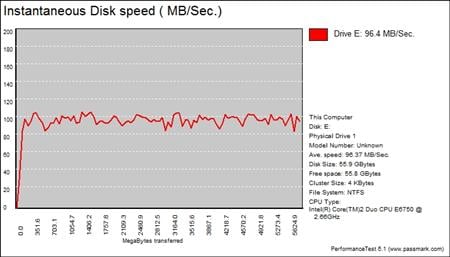
Many users complain that I/O Meter is too complicated of a benchmark to replicate results so my quest to find an alternative was started. Passmark has added several multi-user tests that measure a hard drives ability to operate in a multi-user environment.
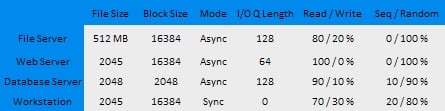
The tests use different settings to mimic basic multi-user operations as they would play out on your server. Variances is read / write percentage as well as random / sequential reads are common in certain applications, Web Servers read nearly 100% of the time while Database Servers write a small amount of data.
The Workstation test is the only single user environment and will be similar to how you use your system at home.
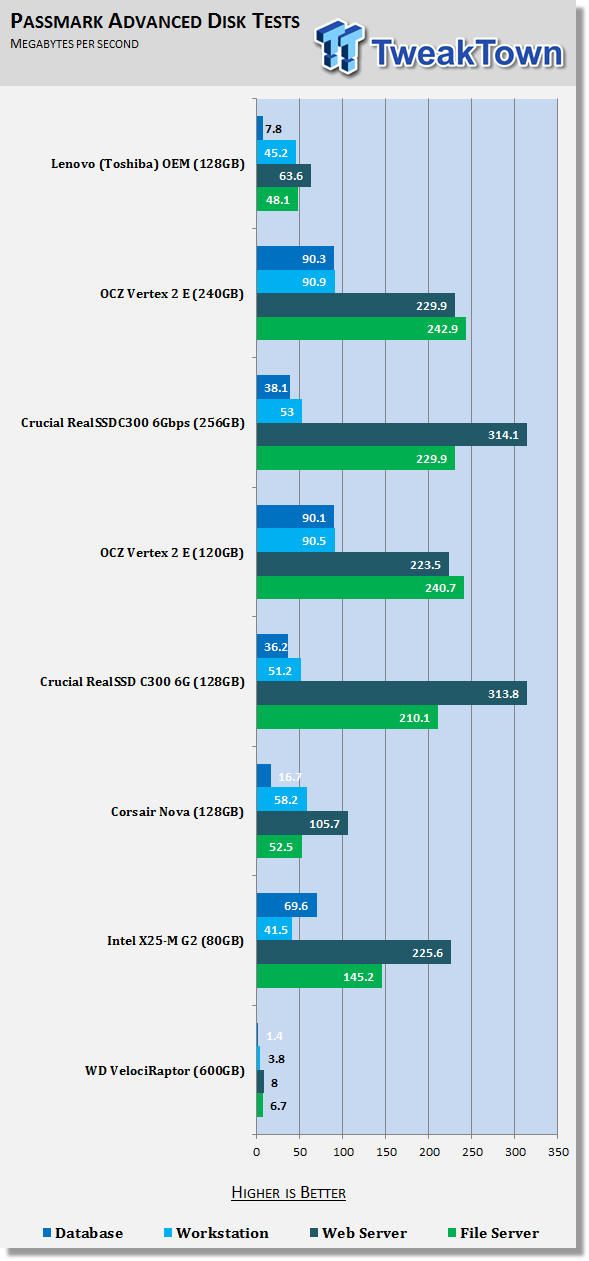
Even though the Lenovo W701ds is more powerful than most existing SOHO servers on the market, there is little chance the notebook will ever be used as a server. It is still always fun to run and report these tests and the workstation test does a very good job of simulating some workstation tasks. Here we see that the Vertex 2 is able to run this test at twice the speed of the Lenovo drive.
Final Thoughts
My new Lenovo W701ds is an amazing notebook that is awesome in every way, except for the one area that we took a look at today, data storage. Being the TweakTown Storage Product Editor, it was important for me to take a close look at this subsystem and to evaluate other options for other users looking to gain performance out of all modern notebooks.
It should be said that OEM builders like Lenovo shouldn't be swapping parts around as quickly as the market shifts and definitely not as fast as the solid state market is moving. Still, if you are in the market for a notebook that costs as much as 6K, having the highest performing notebook drive on the market may be an option you would want to be available.
When it really comes down to it, the Lenovo 128GB SSD that we tested today has a cost that is higher than the fastest, most feature rich SandForce SF-1200 based SSD on the market. If you are opting for a second drive and not trading in the base drive, the Lenovo 128GB SSD option actually costs nearly twice that of the OCZ Vertex 2, Agility 2, Patriot Phoenix, ADATA S599, Mushkin Callisto and any number of other drives that are now capable of being limited by the SATA II spec.
If you are on the market for a notebook, any notebook, you can't go wrong with a business class Lenovo unit. I put my notebooks through hell and these survive better than anything else on the market; their storage choices, though, are in desperate need of an update from the top to bottom.
Over the next couple of months we will continue to explore the Lenovo W701ds. In the next chapter we will discuss cloning the stock drive and installing a new, high performance SSD. This process is nearly universal for all notebooks, so stay tuned for more coverage.
Our Latest SSD Article Coverage
- Phison E37T SSD Controller Exclusive Preview - The Fastest DRAMless SSD Platform Yet
- Seagate FireCuda X1070 4TB SSD Review - A New Mainstream Contender
- Micron 3610 2TB SSD Review - DRAMless QLC at 11,000 MB/s
- SK hynix Platinum P51 2TB SSD Review - A Powerful Gen5 Alternative
- Biwin Black Opal X570 Pro 8TB SSD Review - Massive Capacity with Elite Performance
 HighPoint Rocket 1604L Gen5 x16 NVMe Software RAID AIC Review: half the price with full 59 GB/s speed
 UGREEN NASync DXP4800 GT Review: powerful 4-bay NAS with AMD Ryzen and dual 10GbE ports
 Phison E37T SSD Controller Exclusive Preview - The Fastest DRAMless SSD Platform Yet
 Seagate FireCuda X1070 4TB SSD Review - A New Mainstream Contender
 ASUSTOR Lockerstor 2 Gen2+ AS6702T v2 NAS Review - Fast Performance
 First 'agentic ransomware' run entirely by a large language model discovered
 PlayStation disc phaseout petition hits 120,000 signatures in just four days
 Epic Games settles court case against ex-contractor over Fortnite leaks
 Cyberpunk 2077 hits 100,000 concurrent players on Steam, highest since 2023
 KIOXIA begins sampling 10th-generation BiCS FLASH technology, more efficient and with an impressive 332 layers
 Razer unveils Wuthering Waves collection with a custom keyboard, mouse, and premium gaming chair
 Intel prepping Ryzen X3D rivals with new 22-core Nova Lake-S CPUs with 108MB of cache for PC gaming
 Lenovo starts shipping laptops with Chinese-made YMTC SSDs due to skyrocketing NAND Flash prices
 Gen Z would like esports and professional gaming taught in school, study finds
 OpenAI sued after man says ChatGPT fed his religious delusions before suicide attempt
 The Super Mario Galaxy Movie (2026) 4K Ultra HD Blu-ray Review
 KTC H49S66 5K2K (5120x1440) 49-inch 180Hz Gaming Monitor Review
 Next Level Racing ERS3 Haptic Seat Review: immersive sim racing comfort with integrated haptics
 ASUS TUF Gaming X870-Pro WiFi7 W NEO Review - Tuffed up
 GIGABYTE GO27Q24G Gaming Monitor Review: Glossy OLED Gaming at 240Hz
 Lian Li B4-mATX Review: a compact mATX SFF case with excellent airflow and premium features
 MSI MPG 322UR QD-OLED X24 Review: A Brighter, Tougher 4K 240Hz QD-OLED for $1099
 Dell XPS 14 (2026) Laptop Review - Premium Quality, Impressive Performance
 How to Remap Keyboard Keys in Windows using Microsoft PowerToys
 7 tips to organize your Windows files for faster, easier access
 Intel Arc G3 Extreme first impressions with MSI's Claw 8 EX AI+ - Incredible power for an extreme price
 How to fix Wi-Fi Adapter Not Working on Windows laptops: troubleshooting tips
 Hisense U7SG 4K TV: Modern Entertainment for the New Age
 6 underrated Microsoft Word features worth using to boost your productivity
 Level Up Your PC Gaming with these Fantastic ASUS Prime Day Deals on GPUs, Motherboards, and More
 GIGABYTE Wants to Kickstart Your New Gaming PC or Upgrade with These Limited-Time Deals
 7 Windows settings to change right after installation for better privacy, security, and performance
 I stopped Windows 11 notifications from interrupting me with Do Not Disturb, Focus, and a priority list