









Introduction
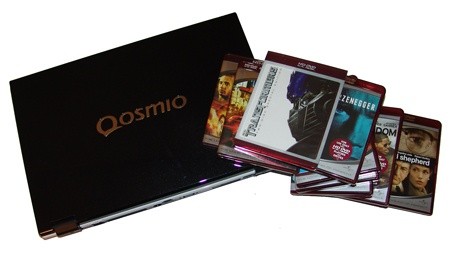
I love the media center; there's nothing better than kicking back in the lounge and watching a movie on the big TV. Setting up a good media center isn't cheap though, and it's not exactly a 5 minute task either.
Toshiba has released a line of notebooks under the Qosmio naming scheme. I don't know exactly how you would go about asking your local retailer for the particular model as I have enough trouble typing the name, let alone saying it. The thing about this series of notebooks is that they're aimed at people who are interested in not only a large desktop replacement notebook, but also something that offers some pretty cool multimedia specs.
The model of choice today is the G40. Now, you're sitting down aren't you? If not then please plop into that seat now. Why? The price. At $5,000, it isn't cheap. It's actually a bit scarey, but you have to wonder, can you put a price on pure sexiness?
The thing is, while a lot of people aren't going to be able to justify the price, if you're looking for something that offers that next-generation notebook experience then the chances are we've found what you're looking for.
While Toshiba market the notebook under the "home office" section of their website, it's so much more than that. It's a complete and utter portable media center, and a damn good one at that. Allow us to give you a full tour of this baby and show you what's so special about it.
The Specs
As far as main specs go we have an Intel Core 2 Duo T7500 clocked at 2.2GHz which carries with it 4MB of Cache and an 800MHz front side bus. We get 2GB of DDR2 667MHz memory in the form of two single 1GB modules, with the ability to upgrade to 4GB. The Chipset of choice is the Intel 965PM, and we have a discreet graphics card in the form of the 8600M GT implemented which has 512MB of memory, but it can pull a further 256MB from system RAM.

Features that make it a bit more media center orientated would include the two 200GB hard disk drives, giving us a grand total of 400GB. We also have a DVB-T Twin digital TV tuner supporting both HD and analogue TV.

Where it begins to get really cool though is with the inclusion of the five speaker harman/kardon setup, Intel HD Audio and a HD-DVD player built in. While we understand that HD-DVD has lost the format war, if you managed to pick up some bargains in the HD-DVD department then you might find yourself with over 50 HD-DVDs and no real time to watch them.
Thanks to the 1920 x 1200 17" widescreen display we're able to get full 1080P playback in the comfort of everywhere, from the bedroom to the plane.

What's so cool though is that if you find yourself at a mates' place who has a nice 1080P TV you can plug a HDMI cable from the notebook into the TV and enjoy those same movies on 40", 50" and bigger screens.
For a full list of specifications, grab this PDF from the Toshiba website.


You'll see we have the normal features like VGA Out, USB, Network, S-Video, Wireless, Bluetooth and so much more.
Hi-Def on the Go
Hi-Def in Bed
If you're one of those geeks that like to catch up on their daily TV in bed (guilty!), then you're all good to go. The huge 17" screen and five speakers work great for anyone who is looking to get a bit of TV in before it's bedtime.

With the built in wireless or onboard networking you can find yourself streaming content that you've recorded during the day on your server or main PC. If you're looking for something with a bit more clarity and punch then you may find yourself chucking a HD-DVD in the drive.
Hi-Def on the Desk
So, you've got a decent sized monitor but you still find yourself literally using every pixel on the screen. What you will probably find yourself quickly doing is setting the G40 just to the side of you and whacking on a HD-DVD to enjoy in all its 1080P glory.

If you want to kick it up a notch you can take the speaker cables out the back of your PC and run them into the G40 to get some real thumping sound happening, depending on your speakers of choice.
There are so many other places where you could get into watching HD content on the go, but there is a problem with the G40. With wanting to offer a screen that is capable of 1920 x 1080, you need to have a certain size screen. The 17" screen capable of 1920 x 1200 is nothing short of beautiful; and while you're not going to be complaining about watching a movie in all its 1080P glory, if you find yourself in a smaller location then the 4.8Kg of notebook might be a bit too much for you.

The whole foot print is actually quite large coming in at 44cm x 30cm x 4.5cm. The other thing is the large screen; all those pixels and multiple hard drives don't exactly do wonders for the battery life. With a movie in play and the brightness turned down on the screen you're going to find yourself with less than two hours play, so you might want to find yourself sticking to those 90 minute movies.
The G40 is a desktop replacement, and for that reason you can't expect the portability and battery life that a 13.1" notebook gives you.
Taking it to the Lounge Room
With the built in HDMI adapter, if you have yourself a HDMI AMP or display you can really get up and running in minutes to enjoy some Hi-Def goodness on your TV. All you have to do is plug the HDMI cable in and hit the function key, then switch the display button.

From here you have a choice to clone your desktop, expand it or use the external display as your only one. We chose the latter, and within a second we had our desktop display pop up on our 1080P projector.
With Shrek 3 HD-DVD in hand, it was time to chuck it into the HD-DVD drive and let PowerDVD fire up and do its thing.


A few minutes ago we were watching HD-DVDs on our Full HD 1080P notebook display, and now we're kicking back and enjoying Shrek 3 on our 100" Full HD 1080P projector.
There's some real versatility with the G40, but unless you have the right devices in the house or just feel the advantage of 1080P movies against DVD, then some people simply won't be able to make full use of the notebook.
Functionality
If you pull away from the media capabilities for the moment and get stuck into what the actual notebook is designed for, you will quickly discover just how capable a notebook the G40 is.

The big foot print of the notebook gives you a big keyboard which is an absolute dream to work with if you're doing a lot of typing. With the size of the keyboard it would have been nice to get a dedicated num pad which could have been done with a bit of re-modeling. With the location of the HD-DVD drive however, it doesn't look like it would have been possible to push the volume control down anymore.


The high 1920 x 1200 resolution also manages to give us some serious desktop real estate, which is always nice. This resolution is generally reserved for desktop monitors of at least 24", so the dot pitch on the 17" display is very small and just looks ultra sharp.
There are a number of other cool little features on the G40 though; these include the fingerprint reader which you can use instead of conventional passwords. The speakers are absolutely fantastic and manage to pump out some real volume which is very nice. They don't have that really tinny feeling that is so common with notebook speakers.
With the 2GB of RAM and Dual Core Centrino processor, Vista manages to run like a dream. Everything is very responsive and almost instantaneous when you click on it. The massive amount of hard drive space also gives you the ability to really go crazy when it comes to application installations.
Final Thoughts
I've used a lot of notebooks over my time, but I've always had a bit of a sweet spot for Toshiba. The only problem is that their quality does come at a price, and generally speaking they're one of the more expensive notebooks on the market.
Some people simply aren't going to need the features that the G40 offers. Toshiba have a number of other notebooks in their line-up that cover big resolutions, fast processors and loads of hard drive space without all the extra multimedia goodies such as the HD-DVD drive and built-in tuner.
What will be interesting is to see how much longer we see Toshiba release notebooks with the HD-DVD drive built inside, because while the format may no longer be in full swing there are a number of people out there who have a stack of movies and are just itching for the chance to really watch them.
You could quickly become very used to having the G40 on your desktop, but ultimately the high price tag puts it out of reach for most people. Toshiba continue to make some of the coolest notebooks on the market, but as always only a certain clientele are going to be able to justify the high costs that some of the top end models carry.
Our Latest Editorials Article Coverage

 The Super Mario Galaxy Movie Cinema Review
 Teenage Mutant Ninja Turtles III (1993) 4K Ultra HD Blu-ray Review
 TRON: Ares (2025) 4K Ultra HD Blu-ray Review
 Teenage Mutant Ninja Turtles II: The Secret of the Ooze (1991) 4K Ultra HD Blu-ray Review
 Teenage Mutant Ninja Turtles (1990) 4K Ultra HD Blu-ray Review
 NVIDIA RTX 5000 Super GPU refreshes could arrive Q4 2026, complete with 5060 Super - but don't expect RTX 6000 until 2028
 KIOXIA SSD technology will power data centers on the lunar surface
 Xbox needs help launching next-gen Helix console
 Xbox confirms hardware costs are exploding, and that's bad news for the next Xbox and PS6
 Ubisoft is closing two studios with hundreds of employees on the chopping block
 AMD says its next-gen EPYC 'Venice' processor is over 3X faster than NVIDIA Vera
 Fable's new 30-minute gameplay deep dive shows you how to buy property, fancy clothes, and get a date
 Logitech's new Mobi Fold is a portable mouse that looks like a flip phone
 Rampant fraud forces Valve to cut Steam gift card sales
 Microsoft sets a Patch Tuesday record with 206 fixes, and finally patches every zero-day Nightmare Eclipse disclosed
 MOAIPLAY ORA PRO G1 850W ATX 3.1 PSU Review: high efficiency and 10-year warranty for $119.99
 Navman MiVue Smart True 4K Surround Dashcam Review - Seeing In All Directions At Once
 IQUNIX Magi96 Pro Aluminum Low Profile Mechanical Keyboard Review - Premium Build, Satisfying Sound
 Asetek Forte S-Series Racing Simulator Bundle Review
 Razer Pro Type Ergo Wireless Split Ergonomic Keyboard Review - Built for Comfort and Support
 ASUS ROG Strix Morph 96 Wireless Gaming Keyboard Review - Great Performance, More Affordable
 SAPPHIRE Radeon RX 9070 GRE PULSE OC Review - A New 1440p Challenger Has Arrived
 NZXT H6 RGB+ Compact Dual-Chamber Chassis Review
 ASRock Radeon RX 9070 GRE Steel Legend Review - The RDNA 4 Mid-Range Reshuffle
 ASRock Z890 Taichi Aqua Motherboard Review - Flagship features without the flagship price
 Quick Assist is the only remote-support tool I open when a relative calls about their PC
 The PowerToys utilities I keep enabled on every Windows 11 PC, and the ones I turned off within a week
 TweakTown's Best of Computex 2026 Awards - The Best Hardware, Gaming Gear, and AI
 Phison E37T SSD Controller Exclusive Preview - The Fastest DRAMless SSD Platform Yet
 USB Ports Not Working in Windows 11? Try These Fixes
 ASUS WiFi Routers and Networking Solutions Deliver Long-term Security and Reliability with No Additional Cost
 Second Monitor Not Detected in Windows 11? Try These Fixes
 Turn Your Old Smartphone Into a Dedicated Webcam for Your Windows PC
 The Send To menu is the right-click feature on Windows 11 that nobody bothers to customize
 Windows 11 will not let you pin a folder to the taskbar, but a 30-second workaround does