









Introduction
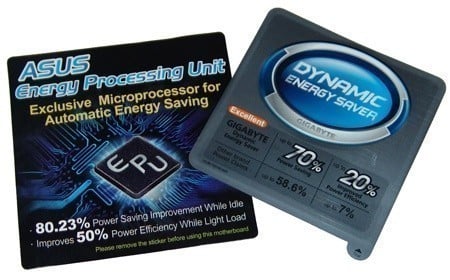
With the big focus on the environment and how much of a negative impact the 21st century society is having on it, it's not surprising we are seeing things moving towards "green". When we refer to green, we aren't talking about the colour, we are taking about measures used to reduce the devastating impact we are having on the environment because of our industrialised society. Unfortunately, there is no way of getting around the need for industry; however, the way we run it as well as the products that come from it can be tailored towards minimizing the harmful impact we are having.
So far we have seen companies embracing this; the auto industry is already introducing measures such as moving towards the Euro3 diesel initiative which reduces the amount of sulphur in the diesel fuels as well as embracing alternative fuels. Biodiesel is now available in quantities and ethanol blended fuels are helping to reduce the amount of harmful emissions as well.
Computer companies are now starting to take the green initiative very seriously with new production methods to make them more environmentally sound. The first stages have already been implemented with the RoHS designs from GIGABYTE and ASUS, this is accomplished by moving from lead based solder to a totally lead free substitute, thus reducing the overall amount of lead required. Furthermore, the move to solid state components has not only increased the efficiency of the board's power regulators, but has also led to a cooler running system as well.
Now ASUS and GIGABYTE has moved to the next stage of the green game, and it's about time to see something like this implemented; power saving technologies! - So far, only ASUS and GIGABYTE have taken it this far. While others have boards based on solid state components to help reduce the amount of power a board uses, none have features like GIGABYTE's DES system or the ASUS EPU. What are these power saving technologies and how do they work? - Today we hope to answer this along with finding out who has the better design.
GIGABYTE DES Explained
GIGABYTE DES

First we thought we would start off with a bit on the GIGABYTE implementation for saving power which they have called Dynamic Energy Saver or DES for short. On the technical side of things, DES looks and feels to be a more involved design when it comes to how it operates compared to the ASUS implementation.
GIGABYTE has a full range of boards that have from four Phases up to 12 phases of voltage regulators on board, depending on what model determines how many phases are implemented. So far, the DQ6 series of boards have 12 phases to work with, making it the ideal overclockers board, this allowing you to throw a much wider range of voltages at the system whilst keeping the flow from the PWM to the CPU as clean as possible, this without overload or extreme thermal interference that can come from boards with less voltage regulators.
From this design, GIGABYTE's integrated IC is able to turn off un-needed regulators on the fly, and when load is increased the board is able to again on the fly increase the voltage by enabling phases as needed. For the DQ6 series of boards, while technically there are a total of 12 phases, GIGABYTE's Dual Quad design uses the PWM in Parallel, meaning there are 2x six phases in total, so when we describe how the phases work we are speaking in their double rate terms.
When DES is enabled, the board works on a dynamic power scaling system that allows the board to shut down power phases when they aren't required. When at its idle state, the board runs on four phases; as the power requirements increase, the board turns on two extra phases at a time till the board reaches its full 12 phases (or dual six phases if you want to be technical). One of the biggest things we have seen with the GIGABYTE board is that you can actually monitor the phases as they turn off by using the DES software in Windows or by looking at the board itself. We showed you a while ago a GIGABYTE board working with LED's which we thought were Christmas lights, but actually indicate the amount of phases the board is running on.
During our tests we found that the board ran mostly on 10 phases when under load. Even when under Prime95 for 24 hours it only went to 12 a couple of times, but only for a few seconds. We were surprised to see that the board didn't hit the full 12 phases, but we surmised this was because the CPU wasn't drawing a huge amount of power, the extra phases really would only be beneficial for overclockers, as this is when the CPU generates more heat, and in turn requires more voltage and power to keep it stable. Our initial testing here shows that GIGABYTE DES does help, as if you didn't have DES enabled, all 12 phases would be unnecessarily running no matter what.
GIGABYTE has announced that all of its upcoming motherboards will feature DES as the company has gone the full green initiative. Making a difference really matters for this motherboard giant. So far we have only seen a couple of boards working with DES, mostly the top end boards; but within the next quarter we hope to see just about all of the new revisions out with DES technology.
UPDATE from GIGABYTE (March 20, 2008)
GIGABYTE contacted us today with word about support for DES in their motherboards. Here is the list of products that support DES. DES will be a feature of most of their motherboards from mid-range and up from now on.
GA-X48T-DQ6
GA-X48-DQ6
GA-X48-DS5
GA-EX38T-DQ6
GA-EX38-DQ6
GA-EX38-DS5
GA-EX38DS4
GA-P35-DS4 ver 2.1
GA-EP35-DS4
GA-P35-DS3P ver. 2.1
GA-EP35-DS3P
GA-P35C-DS3R ver 2.1
GA-EP35C-DS3R
GA-P35-DS3R Ver 2.1
GA-EP35-DS3R
GA-P35-DS3 ver 2.1
GA-EP35-DS3
ASUS EPU Explained
ASUS EPU

ASUS has also put power savings into practice on some of their new boards, and the P5E3 Wifi Deluxe we have been sent for testing has been incorporated with the EPU or Energy Processing Unit. In short, ASUS does what GIGABYTE's DES does, but in a somewhat simpler form. So far it has only been the higher end motherboards that have been fitted with EPU, and there is no word on whether or not the low end boards will get this. Hopefully they will, as it makes more sense for them to have it than on the high-end offerings, more on this later.
ASUS EPU works in conjunction with a simpler Intersil processor to the one that provides the power saving to the GIGABYTE DES based boards. ASUS' top end boards are given a generation eight phase power system that allows the board to power down in the event of idle and low power states, depending on the CPU load. Like the GIGABYTE board, the ASUS EPU when at idle or low load state shuts down to four phases. The ASUS board only has two states; four or eight phases. There is no stepping up to five, six, seven or eight phases; it's simply "on" (eight phases) or "off" (four phases) which limits its power saving by quite a bit.
What we mean is that if the CPU requires more power than the four phases are able to put out, ASUS turns on the extra four and the board is in full power stage. However, all eight may not be needed to run the system, resulting in power being wasted where five or six phases could do the job.
A Word on usefulness
We have now shown you how each system does its power handling, but what are the useful implications of this? - Firstly, we look at the boards that have been given the DES. So far, both companies have only put them onto their top of the line boards, mostly used by power users who are more into overclocking. This is where the EPU and DES really have no place.
Where DES and EPU come into their element are for computers of the garden variety such as workstations, general office PCs and even Digital Home PCs that sit in idle states or are run at minimal CPU usage. This makes them ideal candidates for energy saving technologies like DES and EPU.
So far, GIGABYTE has committed to bringing DES to upcoming low-end boards, but we haven't heard any details on where EPU is going with the ASUS company. Hopefully we will see their mid-range and low-end boards turn up with EPU, or even ones aimed at the Digital Home sector.
Test System Setup and Power Usage
Processor: Intel Core 2 Extreme Q6800 @ 3GHz (9x333MHz)
Memory: 2x 1GB DDR3-1800XMP OCZ (Supplied by OCZ)
Hard Disk: 500GB Seagate 7200.9 (Supplied by Seagate Australia)
Graphics Card: MSI GeForce 8800GTS 640MB (Supplied by MSI)
Cooling: GIGABYTE 3D Galaxy II (Supplied by GIGABYTE)
Operating System: Microsoft Windows XP SP2
Drivers: Intel INF 8.3.0.1013, Forceware 169
Today we have the GIGAYBE X48T-DQ6 motherboard which is the second board we have tested to host DES; the first was the X48-DQ6 supporting DDR2. Today's test candidate uses DDR3 which is even more energy efficient compared to its older counterpart, giving it a better power saving from the beginning. The Counterpart is the ASUS P5E3 Premium Wifi.
Power Usage - Windows XP
The power usage here was measured with our plug-in wall unit that gives us a low and high reading, depending on load. We aren't going to use the software to tell us, as this can be a bit misleading sometimes. Since both systems use different software and power usage monitors, we will use our trusted wall plug-in method.
Under XP we used both 3DMark06 running over five loops as well as Running Prime95 for 24 hours to get us a true high and low reading. Low was recorded when Windows was loaded and sat idle for a period of 10 minutes doing absolutely nothing.
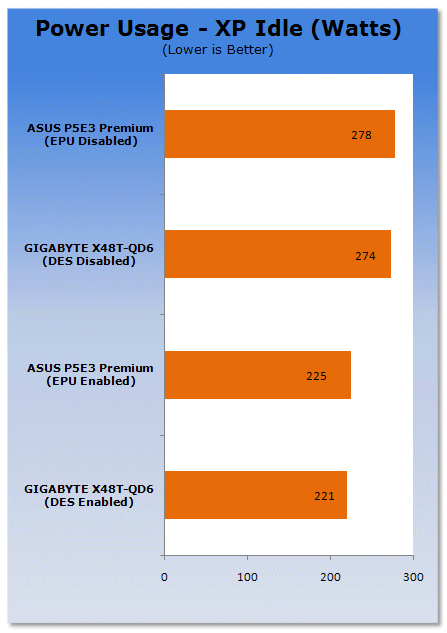
First we have Windows XP in idle mode. Comparing the two systems against each other the GIGABYTE boards and ASUS board are just about on top of each other. Since both boards are running on four phases (a true four for ASUS, Dual two phase for GIGABYTE) there isn't much difference. However, we do see DES giving a slightly lower power reading.
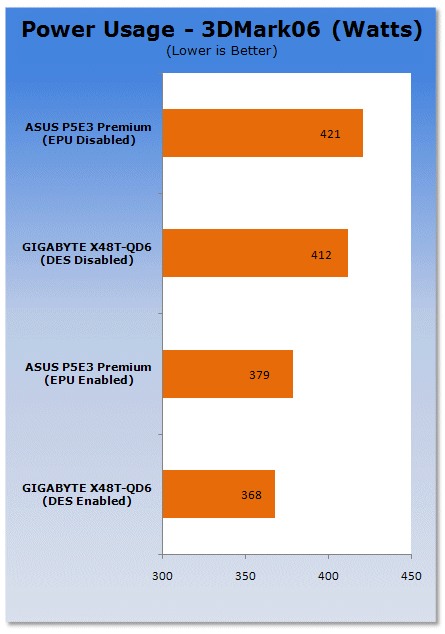
Next up, we have the system running 3DMark06 and here is where GIGABYTE managed to get a leg up on the ASUS board. During tests we noticed the ASUS board was at full power running all eight phases. The GIGABYTE board managed to run around 8-10 phases and only jumped to 12 once. Thanks to its more efficient power regulation system the GIGABYTE board was able to use less power under load.
While it was able to use less, it also stayed a lot more stable; the ASUS board when under load was jumping around quite a bit on our voltage monitor, spiking as high as it did and then dropping. We noticed a couple of lag jumps where it looked as if the CPU wasn't getting the right amount of power, but we can't be 100% sure on that. The GIGABYE board remained fully stable however.

Prime95 was the big test; we ran it at full number crunching power with the power systems enabled, and what we got was a good result. The GIGABYTE boards performed the Prime95 test with flying colours; it did not crash once or have any errors from the end result.
The ASUS board however caused a few errors as it seemed to be lacking some power at times and caused a system crash about two hours into one of the tests. We did a reset and started again; all worked fine, but there were still some errors in the results. It seems that the DES system has a more stable power flow than the ASUS EPU.
Final Thoughts
Going green is now becoming the big "in" thing for companies to score big points in the eyes of the conservationists, and quite honestly, it's about time. We have polluted the planet for so long that there has to be a side effect to what we have been doing, and now we are starting to see climate changes, smog over cities and the reduction in the amount of fossil fuels we are bringing up. Some things have to change, and even the computer industry is making its stand.
So far we have seen the RoHS standards bring motherboards down to a green level in the consumables they use such as lead free solder, the recycling of old PCBs allowing the reduction in plastics as well as various other savings going on in companies such as simple recycling of waste paper and cardboard. But it's now time to take it to the next level, helping the end users to do their part.
Power saving technologies on motherboards has been a long time coming. When you consider the amount of computers world wide, if all of them were to swap over to a DES, EPU or whatever similar technology comes from other companies done the track, even a 10% reduction in power usage by each computer would dramatically reduce the amount of power drawn, as well as reducing the amount of carbon dioxide released into the atmosphere as a result of burning fuels for power generation.
Where these technologies will make the most difference are in office environments and workstations. Most of these PCs are dedicated to running simple office applications like e-mail, web surfing and word processing; something that requires very little CPU time but will reduce the amount of power quite substantially. If they aren't running at full CPU cycles, there's no need to have all the voltage phases working to supply unneeded power.
The Digital Home environment is yet another area that will really make a difference. HTPC's sit in a corner connected to a monitor or large screen television allowing digital content playback using a PC. Most of the time these are sitting idle waiting for a movie to be uploaded to be played back; allowing them power savings like DES and EPU gives a huge power saving overall. Even when the system is playing back video, the CPU will usually sit around 30% of its total usage, something that will not require the full amount of regulators to work, increasing power savings across the board.
Today's tests put the DES system from GIGABYTE on a pedestal; a lot of research has gone into this and it really shows just what can be done to reduce energy requirements. Its stepping voltage regulation allows for a more flexible voltage draw as well as supplying more power to the CPU under load. There are more steps that the DES based boards are able to achieve compared to the EPU boards.
This is by no means saying that EPU is a losing technology, far from it, any power saving technology that proves to save even 5% of energy really has a good name. It's just that ASUS has a bit more to do if it wants to be a real contender compared to the DES system that not only managed to keep the system stable under test conditions, but passed all the hard voltage strains that Prime95 puts on a CPU. Where ASUS caused a few crashes, GIGABYTE kept up with the pace.
We hope you enjoyed our little dig into the world of DES and EPU power saving technologies.
Our Latest Editorials Article Coverage
- The Coolest Things at CES 2017 from GIGABYTE & AORUS
- OC with a Legend: Hicookie Interview and GIGABYTE's Z170 SOC Force LN2
- ASRock N3700M Braswell Micro-ATX SFF PC Motherboard Review
- How to make a motherboard (GIGABYTE Nanping Factory Tour)
- A Look #throughglass at GIGABYTE's Upcoming Z97X-SOC Force Motherboard

 ASRock Z890 Taichi Aqua Motherboard Review - Flagship features without the flagship price
 GIGABYTE Z890I AORUS Ultra Motherboard Review - Mini-ITX with surprisingly good thermals
 GIGABYTE Z890 AORUS Elite WiFi7 Plus Motherboard Review - Right in the sweet spot
 ASUS ROG Strix X870E-E Gaming WiFi7 NEO - A Crosshair by any other name
 MSI MAG B850 Tomahawk Max WiFi II Motherboard Review - Leveling up
 MSI showcases its next-gen GPU cooling tech and it could be for the GeForce RTX 60 Series
 'Radically different' business models coming to Xbox, CEO Asha Sharma says
 GEEKOM's new GeekBook M16 brings a Core Ultra 9 and a 99.9Wh battery to the business laptop market for $899
 AMD warns DDR5 prices won't recover until 2028 as AI demand continues pulling supply away from consumers
 SEGA under fire for using gen AI in new Crazy Taxi game
 Halo Studios quietly establishes innovative new business model for legacy game remakes
 Zelda Ocarina of Time remake confirmed for 2026 launch on Switch 2
 ID Cooling shows off wooden PC cases and matching AIO coolers at Computex 2026
 Formula V Line's Ice Nova Pro 3 air cooler could be perfect for brass-themed PC builds
 SAMA's Computex 2026 lineup includes a curved-glass case and AIO coolers with swappable screens
 Navman MiVue Smart True 4K Surround Dashcam Review - Seeing In All Directions At Once
 IQUNIX Magi96 Pro Aluminum Low Profile Mechanical Keyboard Review - Premium Build, Satisfying Sound
 Asetek Forte S-Series Racing Simulator Bundle Review
 Razer Pro Type Ergo Wireless Split Ergonomic Keyboard Review - Built for Comfort and Support
 ASUS ROG Strix Morph 96 Wireless Gaming Keyboard Review - Great Performance, More Affordable
 SAPPHIRE Radeon RX 9070 GRE PULSE OC Review - A New 1440p Challenger Has Arrived
 NZXT H6 RGB+ Compact Dual-Chamber Chassis Review
 ASRock Radeon RX 9070 GRE Steel Legend Review - The RDNA 4 Mid-Range Reshuffle
 The PowerToys utilities I keep enabled on every Windows 11 PC, and the ones I turned off within a week
 TweakTown's Best of Computex 2026 Awards - The Best Hardware, Gaming Gear, and AI
 Phison E37T SSD Controller Exclusive Preview - The Fastest DRAMless SSD Platform Yet
 USB Ports Not Working in Windows 11? Try These Fixes
 ASUS WiFi Routers and Networking Solutions Deliver Long-term Security and Reliability with No Additional Cost
 Second Monitor Not Detected in Windows 11? Try These Fixes
 Turn Your Old Smartphone Into a Dedicated Webcam for Your Windows PC
 The Send To menu is the right-click feature on Windows 11 that nobody bothers to customize
 Windows 11 will not let you pin a folder to the taskbar, but a 30-second workaround does
 ASUS ProArt Displays Unlock Creativity with Professional Monitors for Everyone