









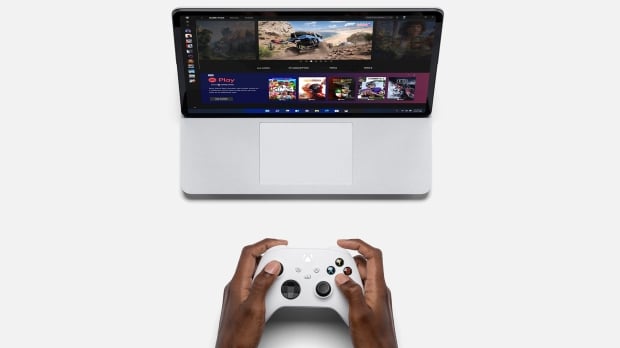




Windows 11 is getting a new layout for its virtual keyboard specifically tailored to allow those with a gamepad to type on it using the peripheral.

The nifty innovation for those of us who like to use an Xbox controller with their PC has been introduced with the latest Windows 11 preview build in beta. Build 22635 actually came out last week, but has just been updated with this additional piece of functionality.
Microsoft tells us:
"We're beginning to roll out a new Gamepad keyboard layout for the on-screen keyboard in Windows 11 that supports the ability to use your Xbox controller to navigate and type."
This includes 'button accelerators' meaning shortcuts, so using the X button for backspace, for example, or Y for the space bar, and Microsoft has rejigged the keyboard layout so the keys are vertically aligned for "better controller navigation patterns."
This will certainly be useful in certain scenarios, such as PC gamers playing on their living room TV, maybe using a long HDMI cable, so they can navigate Windows 11 with their wireless Xbox controller (without needing to worry about hooking up a keyboard, or mouse).
Beyond this, it could be another piece of the puzzle to make Windows 11 handhelds better, giving owners of devices like the ASUS ROG Ally a way of interacting more easily with the desktop operating system's interface via controller sticks and buttons. (Yes, you can use the touchscreen to type on the ROG Ally, and other portables with a touchscreen, but not everyone's keen on the idea, and some find it clunky unless the handheld is placed down on a stable surface).


 Good news for gamers - Windows 11 feature to allow typing with your Xbox controller is imminent
 Windows 11 just got new functionality for PC gaming handhelds and controllers
 Microsoft confirms that you can't uninstall its controversial Windows Recall AI feature
 Microsoft herds more Control Panel options into Windows 11's Settings app where they should be
 Windows 11's getting a new 'tear your hair out' screen, with redesigned BSOD now in testing
 Giveaway: 12 Winners Will Score MONTECH NX400 and NX600 CPU Coolers
 Dave Bautista officially cast as Kratos in Amazon's 'God of War' TV Series, replaces Ryan Hurst
 Take-Two begins the hunt for GTA 6 leaker CyberLeek, subpoenas Microsoft and Discord
 PlayStation 6 handheld not expected to stay under $600, warns leaker
 AMD confirms the Radeon RX 9050 4GB will have a tiny 64-bit bus and just 16MB Infinity Cache
 Intel 'Nova-Lake-S' 28-core CPU with bLLC reportedly draws 296W at PL2
 FSR 4 Frame Generation suffers from frame pacing issues causing the tech to be borderline unusable
 STALKER 2 receives massive performance boost with new 2.0 update, game gets upgraded to Unreal Engine 5.5.4
 Sandisk NAS 800 NVMe SSD delivers PCIe Gen5 speeds for demanding NAS environments
 RayNeo announces new iO Smart Glasses and GT Series with 'cinema-grade' display
 IQUNIX launches premium EC75 Hall Effect keyboard with 0.01mm Rapid Trigger
 Cooler Master MasterFan A120 Fan Review
 GIGABYTE MO27Q2A Gaming Monitor Review: 1440p, 280Hz, and QD-OLED is a winning combination
 Cooler Master V8 ACE 3DHP BLACK CPU Cooler Review
 ASUS ROG Strix XG129C Review: A $199 Gaming Monitor You Don't Play Games On
 Cooler Master HAF II 500 Mid-Tower Chassis Review
 Corsair HS35 v3 Wireless Gaming Headset Review - An Affordable Winner
 D-Link F518 5G Wi‑Fi 6 AX1800 Mobile Hotspot Review: All-Day Mobile Hotspot
 Bose Lifestyle Ultra Speaker Review - Impressively Detailed Room-Filling Sound
 MSI Z890 Gaming Plus WIFI6E Review - Z890 for under $200
 Mortal Kombat (1995) 4K Ultra HD Blu-ray Review
 Using Multiple Monitors? Change these Windows settings for a Better Experience
 Windows Sandbox is The Windows Security Feature Most People Never Use
 I ditched the Windows 11 context menu for this open-source tool, and here's why
 Windows 11 may be encrypting your drive already, and I checked where my recovery key went
 GIGABYTE's 40 Days of INFINITY celebrates 40 Years of Innovation with stunning GeForce RTX graphics cards and rewards
 I swapped File Explorer for this free file manager and finally got the layout I wanted
 How to tell if someone has been using your Windows PC without your permission
 6 Task Manager tips for troubleshooting Windows performance problems
 ASUS ROG's 20th Anniversary Line-up of Premium PC Gaming Gear has Arrived - Here's Everything You Need to Know
 Six File Explorer tips every Windows user should know