

Introduction and Package
 38
38I can't remember the last time I heard the name BIOSTAR. It was probably the last time I reviewed a board from them which was surprisingly only eight months ago with the BIOSTAR TZ77XE4 which performed well, but hardly left a lasting impression since I had to search TweakTown for the last time we looked at a board from them.
No one can deny, though, that when it comes to buying a motherboard, BIOSTAR isn't one of the first names that come to mind. As much as I hate to say it, they're probably a name I would struggle to think off if someone asked me to name some motherboard manufacturers off the top of my head. That's really not a good thing for BIOSTAR and shows that they seem to be lacking something in the advertising department.
Today, though, we're hoping that the Hi-Fi Z77X not only performs well, but also does a better job of leaving a lasting memory on our minds. As always there are a number of things we've got to do before we get into the performance side of things and the first is taking the time to look at the package.
Once we've checked out the package we'll move to the motherboard itself to see what exactly BIOSTAR is offering us in the Hi-Fi Z77X before we take a closer look at the board itself to see the layout and the main features it offers. Next we'll check out the BIOS, which is an area I can honestly say I'm not looking all that forward to checking out since BIOSTAR isn't exactly at the forefront of BIOS design. Finally we'll look at our testbed, cover the overclocking side of things and get stuck into the performance of the board at both stock speeds and overclocked.
Package
 38
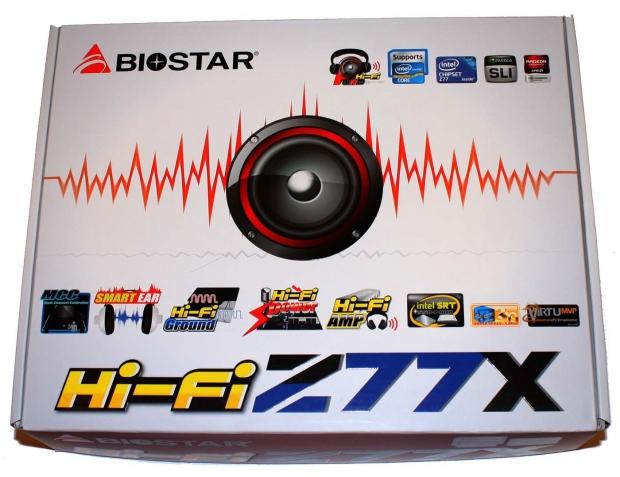
38Looking at the front and back of the box you can see there's a huge focus on the "Hi-Fi" name that BIOSTAR has given the board with a number of features that support that. The front gives us some familiar logos like LUCID VIRTU MVP, Intel SRT, SLI, CrossFire and a few others. But you can see a number of logos that don't mean a whole lot to us.
 38
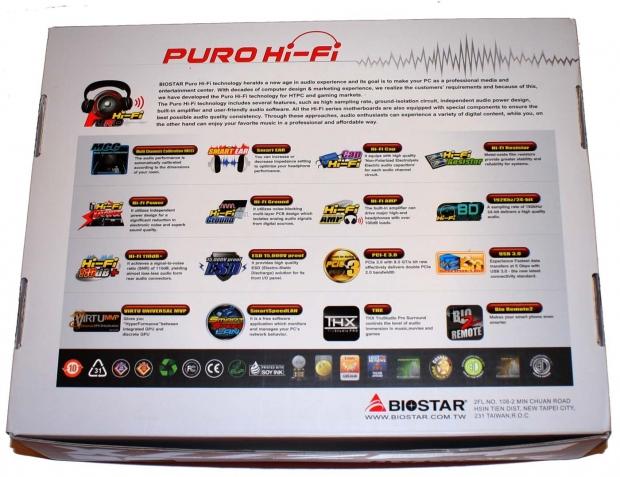
38If we flip over to the back of the box we get more of an idea when it comes to covering what exactly is going on with these logos and this board just in general. Here we see a number of logos again, but also a brief explanation on what exactly they are. Some of the main ones that take our attention are the built-in Hi-Fi AMP, 110dB+ Signal to Noise Ratio and Multi-Channel Calibration to just name a few.
Along with the audio focused features you can see a number of logos you'd expect including PCIe 3.0, USB 3.0 and support for Lucid VIRTU MVP, something we've seen on a lot of motherboards lately.
 38
38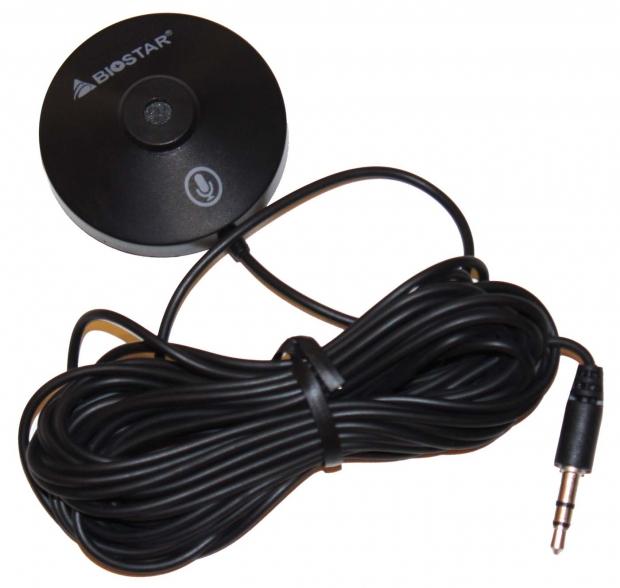 38
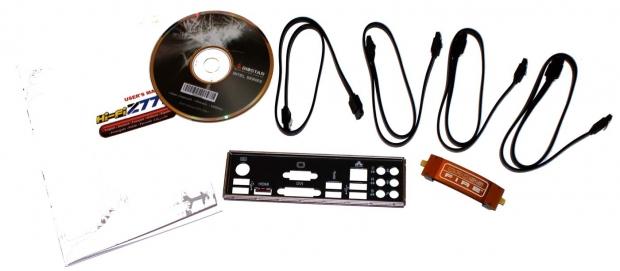
38When it comes to the bundle we've got a fairly standard setup with a driver CD, manual and I/O backplate all being present. Along with those we've also got four SATA cables and a CrossFire bridge. The main addition to the bundle is a microphone that is used to calibrate your audio. This comes in handy if you're using larger 4.1 or 5.1 speaker setups.
BIOSTAR Hi-Fi Z77X Motherboard
 38
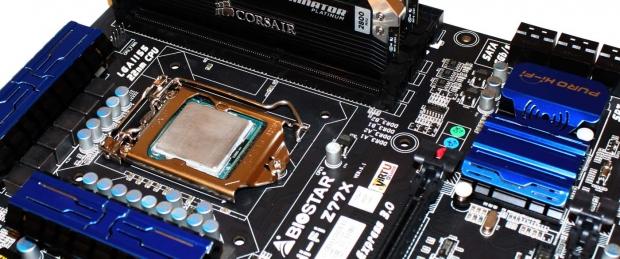
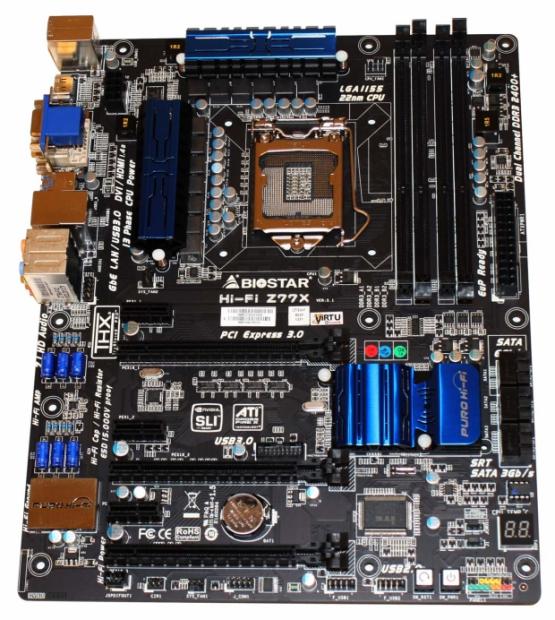
38Having a look at the board we've got to say straight away that the Hi-Fi Z77X is a really good looking motherboard with its matte black PCB and blue highlights throughout the heatsinks.
 38
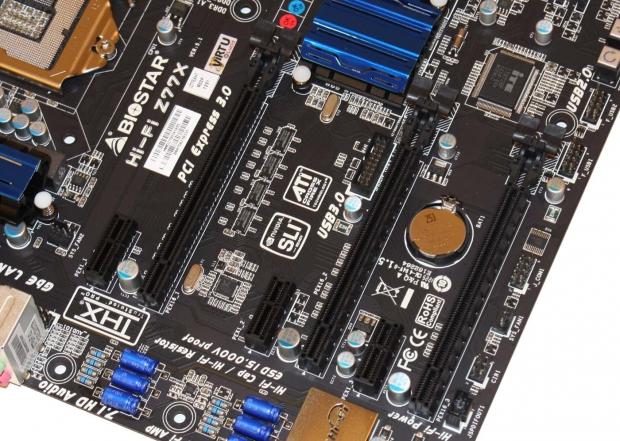
38We've got three PCIe x1 slots along with three PCIe x16 slots. As for the configuration of those three PCIe x16 slots we've got an x16 / x8 setup or x8 / x8 setup if you're making use of CrossFire / SLI. The bottom most slot comes in at just x4.
 38
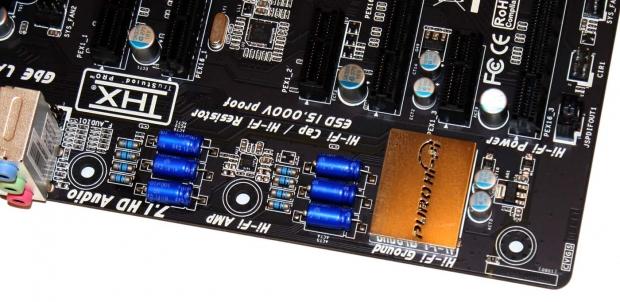
38As you may have figured out from the front of the box, a large focus on this board surrounds the Hi-Fi naming scheme which carries with it a number of features that are focused on improved audio performance. We can see an audio inspired setup with audio-orientated style capacitors and resistors. We've also got an insolation wrap around this area that goes through all layers of the PCB to prevent outside noise getting into this area.
 38
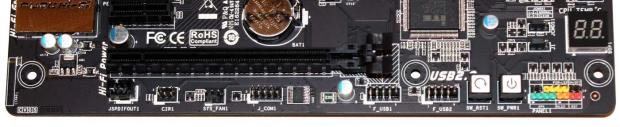
38Continuing to move around the board you can see a fairly standard setup with a number of headers being present including two USB 2.0 headers and the main front panel header. You can also see that BIOSTAR has included a power and reset button on the PCB.
 38
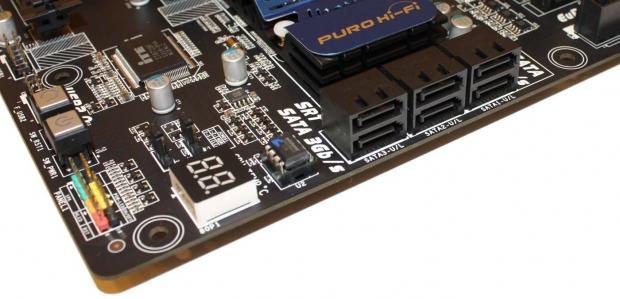
38If we turn the corner we can see the LED debug reader and heading north you can see a total of six SATA ports that run off the Intel Z77 chipset. The bottom four ports are SATA II, while the top two are both SATA III. With no color separating them and the ports simply being named SATA1, SATA2 and SATA3, we initially had our SSD plugged into "SATA3", which is only SATA II. Instead the "SATA1" labeled ports are SATA III. If you look closer there's a border going around the ports and we have SATA 3GB/s and 6GB/s branding at each end. But if you just quickly wanted to build the system, you'd probably feel safe to assume that the "SATA3" labeled ports are probably SATA III. We would have much rather seen color coding.
 38
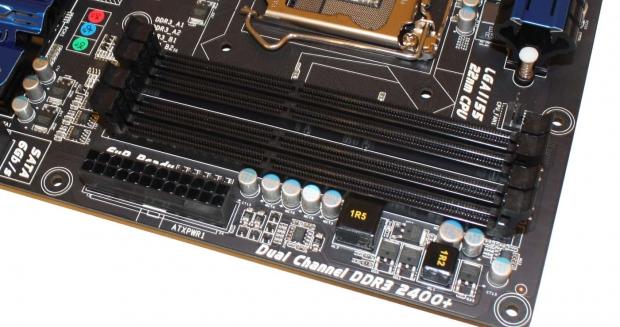
38Heading towards the top of the motherboard you can see we've got a fairly standard setup here with the main 24-pin ATX power connector present and above that we've got four DIMM slots supporting up to 32GB of DDR3 RAM in speeds ranging from 1066MHz DDR to 2600MHz DDR via overclocking.
 38
38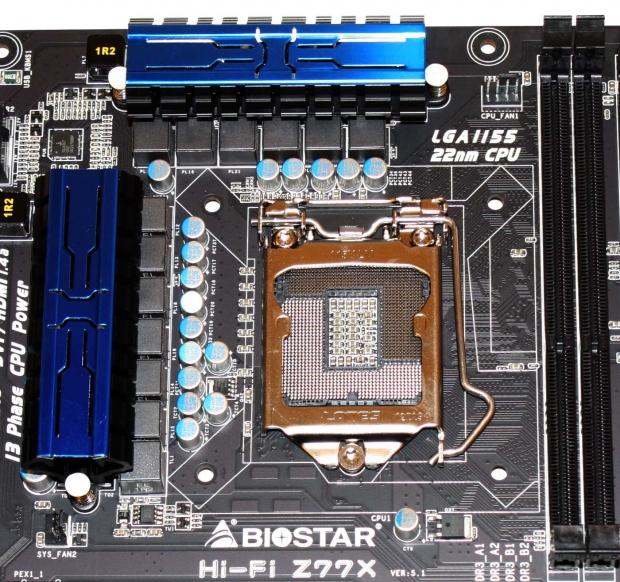 38
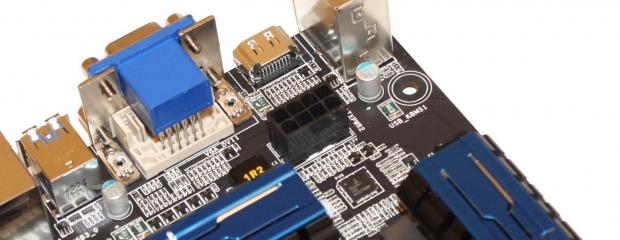
38Heading towards the top of the motherboard you can see the main 8-pin CPU power connector and we also get a better look at the socket area. Really like most motherboards these days, it's fairly clean with little to write about. We can see the heatsink setup along with a couple of fan headers, one towards the bottom left and the other towards the top right.
 38
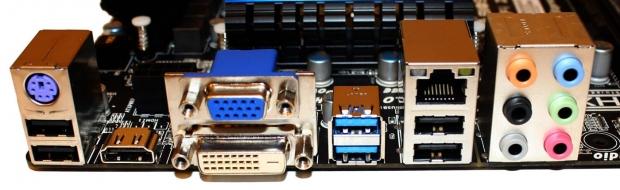
38Finishing off with the I/O side of things you can see we've got a PS/2 port along with four USB 2.0 connectors. Video output support comes from HDMI, DVI and a VGA connector. We've got two USB 3.0 ports, Gigabit networking via the Realtek RTL8111F chipset and six auxiliary audio connectors that run off the Realtek ALC898.
BIOS
 38
38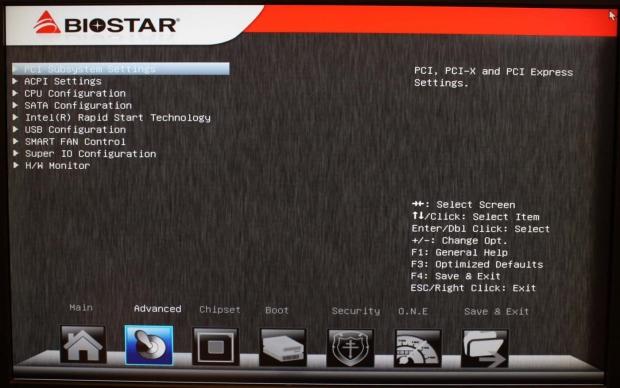 38
38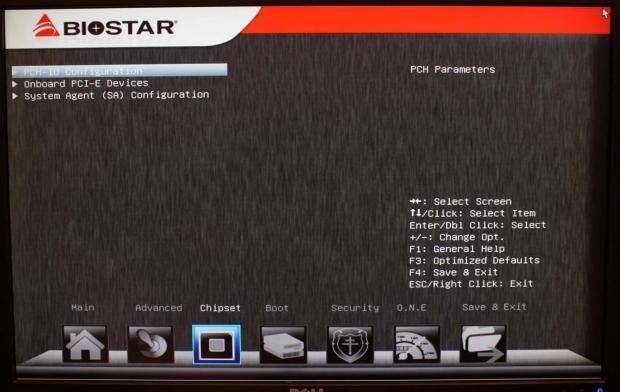 38
38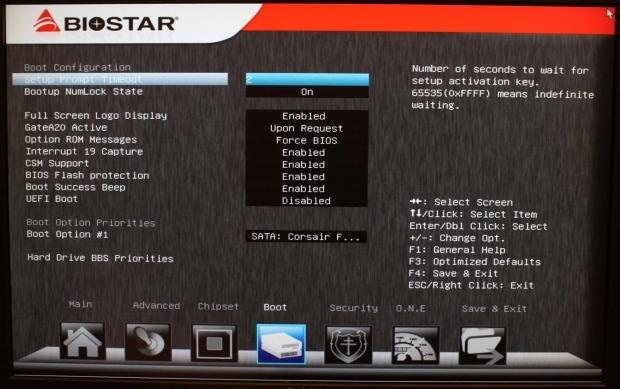 38
38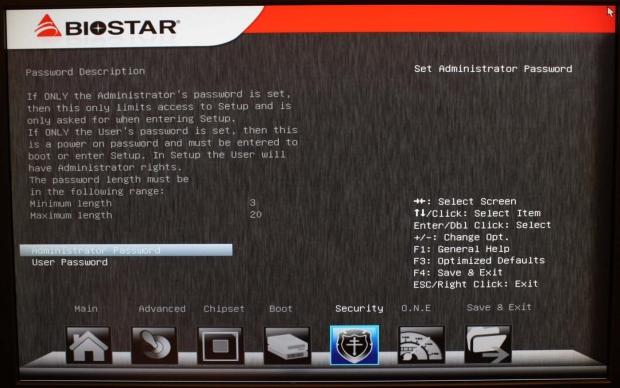 38
38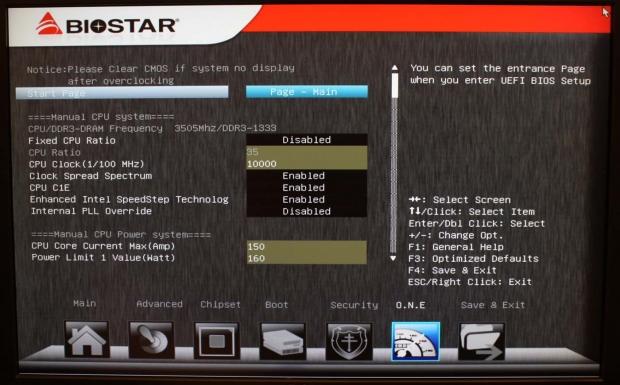 38
38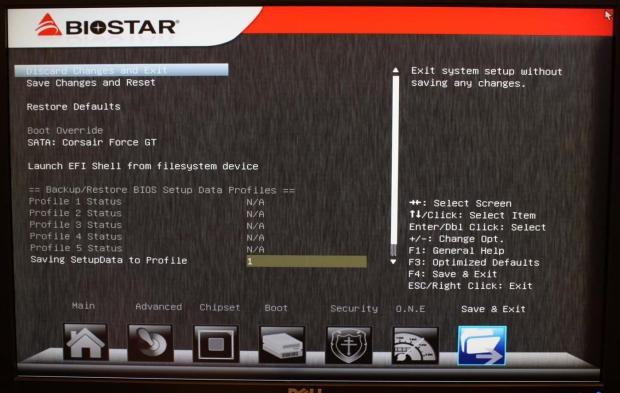 38
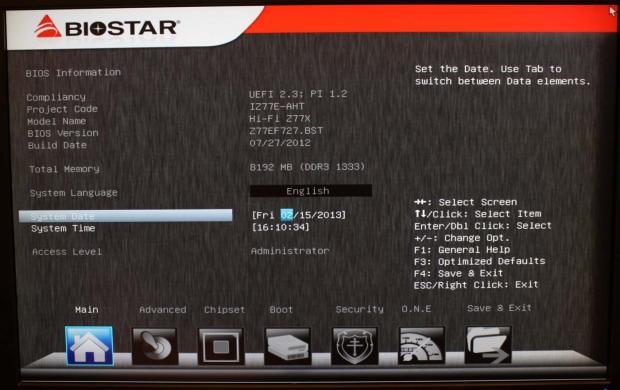
38While not the most advanced looking BIOS around, once we're in the Hi-Fi Z77X BIOS, it does offer you ultimately everything you need.
If you want to do any overclocking you can head on over to the O.N.E section. Here you're able to set the first screen you're greeted with when going into the BIOS along with all the normal overclocking options.
It felt like overclocking wasn't going to be "fun" at all with a generally untidy BIOS, but it was surprisingly good. We'll talk about it more in just a moment when we cover overclocking on the next page.
Benchmarks - Test System Setup and Overclocking
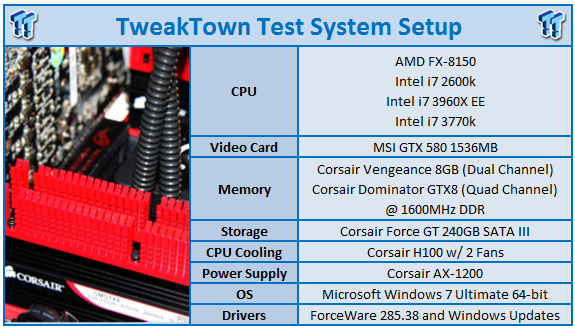 38
38We would like to thank the following companies for supplying and supporting us with our test system hardware and equipment: Intel, ASUS, MSI, Western Digital, MemoRight and Corsair.
The main motherboard featured in our graphs today is naturally this BIOSTAR option which we'll be looking at in both stock and overclocked performance. Along with that, though, we've got a couple of other Z77 motherboards including the ASRock Z77 OC Formula, GIGABYTE Z77X-UD4H and ASUS Maximus IV GENE. Along with these we've also got the recently looked at GIGABYTE X79S-UP5-WiFi.
When it came to the overclocking side of things, I can honestly say that not a whole lot was expected initially. Not only is the board not focused on overclocking, it's instead focused on a completely different segment due to the Hi-Fi audio features that are present.
Heading into the BIOS we're greeted with all the normal features you'd expect from a motherboard. What was added here, though, was the color coding that we see on mainly only ASUS boards. As you move up the voltages we have certain colors and it's clear as we move to more and more dangerous areas. We like this.
In this case you go from black to yellow and into red. Depending on the quality of your cooler ultimately depends on where you can go with the voltages, but with a strong air cooler or basic water cooling setup, you should have no issue at the end of the yellow section. Of course it's important to make sure that you keep an eye on the temperatures when you get into Windows.
Moving our voltages to just before the color red and the multiplier to 47x, we got into Windows at 4.7GHz with no issue. We started doing an encode test under MediaEspresso and while it looked to be going strong, it crashed after about five minutes.
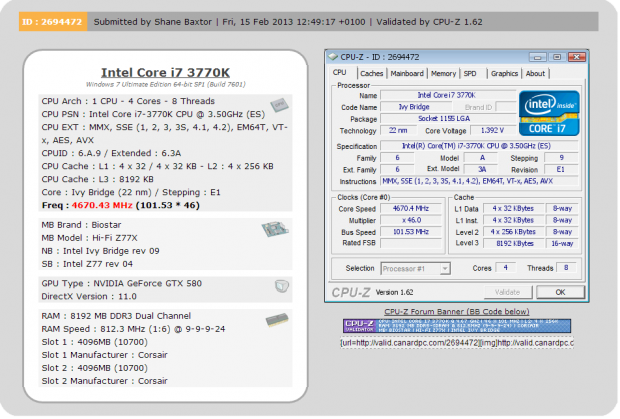
We headed back into the BIOS and moved to the 46x multiplier. If this is where we ended up at we would have been fairly satisfied. Our best tested boards tend to sneak a little over 4.7GHz, while a lot of them sit around the 4.6GHz mark - especially those that don't have a huge focus on overclocking. Back in Windows, though, with no issue at 4.6GHz, we decided to head back into the BIOS to see if we could do anything with the BCLK and squeeze a few more MHz out of the setup.
 38
38Pushing the BCLK up to 101.53 and leaving the multiplier running at 46x, we managed to have our machine running at a very solid 4670MHz or 4.67GHz as listed in our graphs here today. This is a really strong overclock and honestly higher than we expected out of this board.
CPU Benchmarks
HyperPi 0.99
Version and / or Patch Used: 0.99
Developer Homepage: www.virgilioborges.com.br
Product Homepage: www.virgilioborges.com.br
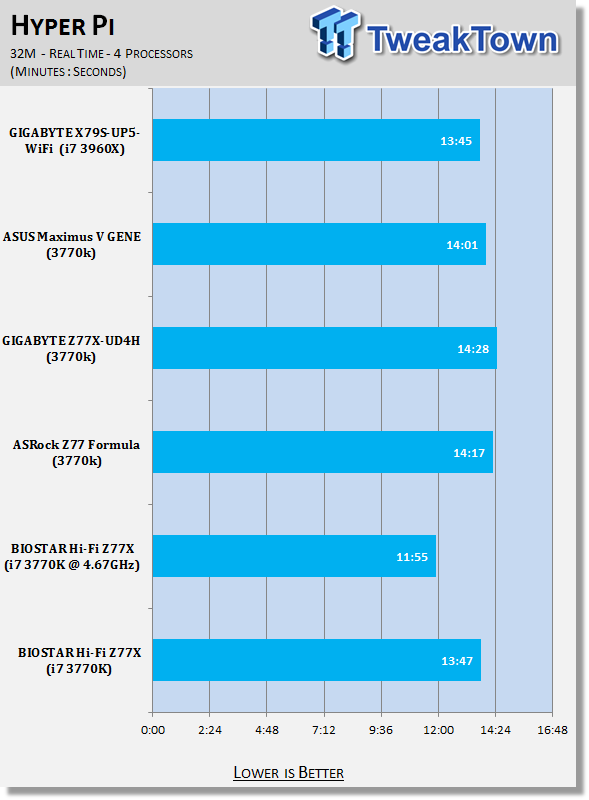
HyperPi is a front end for SuperPi that allows for multiple concurrent instances of SuperPi to be run on each core recognized by the system. It is very dependent on CPU to memory to HDD speed. The faster these components, the faster it is able to figure out the number Pi to the selected length.
For our testing we use the 32M run. This means that each of the four physical and four logical cores for the i7 and the four physical cores of the i5 is trying to calculate the number Pi out to 32 million decimal places. Each "run" is a comparative to ensure accuracy and any stability or performance issues in the loop mentioned above will cause errors in calculation.
 38
38AIDA64
Version and / or Patch Used: 1.00.1035BETA
Developer Homepage: http://www.aida64.com
Product Homepage: http://www.AIDA64.com
Replacing Everest in our labs is AIDA64. This new testing suite is from the core development team from Lavalys and continues that tradition. The guys have thrown in better support for multithreaded CPUs as well as full 64 bit support. We use this to test memory and HDDs for now, but may find ourselves opening this up to other areas of the motherboard.
 38
38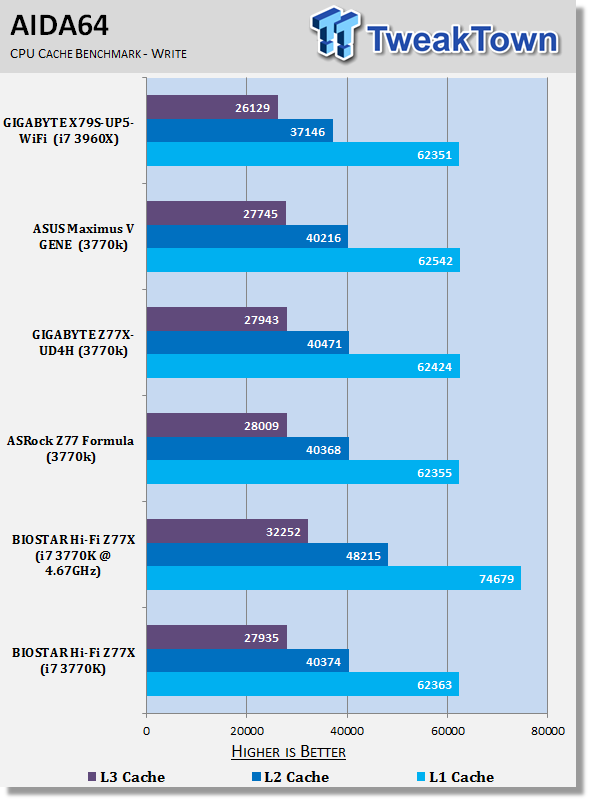 38
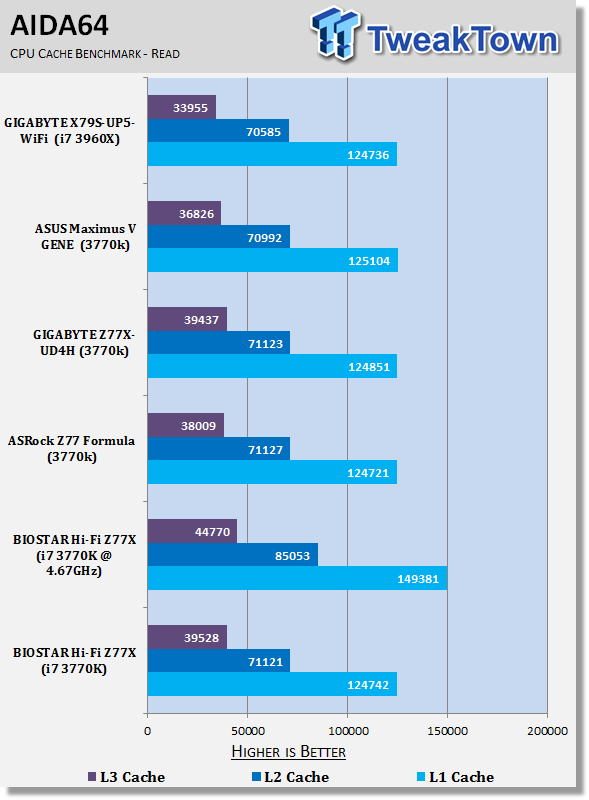
38Out of the box HyperPi and AIDA64 performance is strong.
AIDA64 numbers line up with our other setups for the most part while we can see that the HyperPi numbers are actually slightly ahead of the competition.
Overclocking as always helps increase performance and you can see the setup separate itself from the stock performance of the other boards.
System Benchmarks
PCMark 7
Version and / or Patch Used: 1.04
Developer Homepage: http://www.pcmark.com
Product Homepage: http://www.pcmark.com
PCMark 7 includes a range of tests that give different views of your system's performance. In the Advanced Edition you can choose which tests to run. The common use and hardware component tests are unavailable in the Basic Edition.
Overall system performance is measured by the PCMark test. This is the only test that returns an official PCMark score. The Lightweight test measures the system capabilities of entry-level systems and mobility platforms unable to run the PCMark test, but it does not generate a PCMark score. Common use performance is measured by the scenario tests - Entertainment, Creativity and Production - each of which results in a scenario score. Hardware component performance is measured by the hardware tests - Computation and Storage - each of which results in a hardware score.
 38
38MediaEspresso
Version and / or Patch Used: 6.5
Developer Homepage: http://www.cyberlink.com/
Product Homepage: http://www.cyberlink.com/products/mediaespresso/overview_en_AU.html?fileName=overview&r=1
MediaEspresso is a blazingly fast media universal converter that can transcode your videos, photos and music files and out put them to a huge range of portable devices including mobile phones, portable media players and even game consoles. With technologies like Smart Detect, Direct Sync and CyberLink's TrueTheater™ video enhancements, you can not only forget about complicated format, resolution and output settings, but your converted file will come out the other side looking better than when it went in!
 38
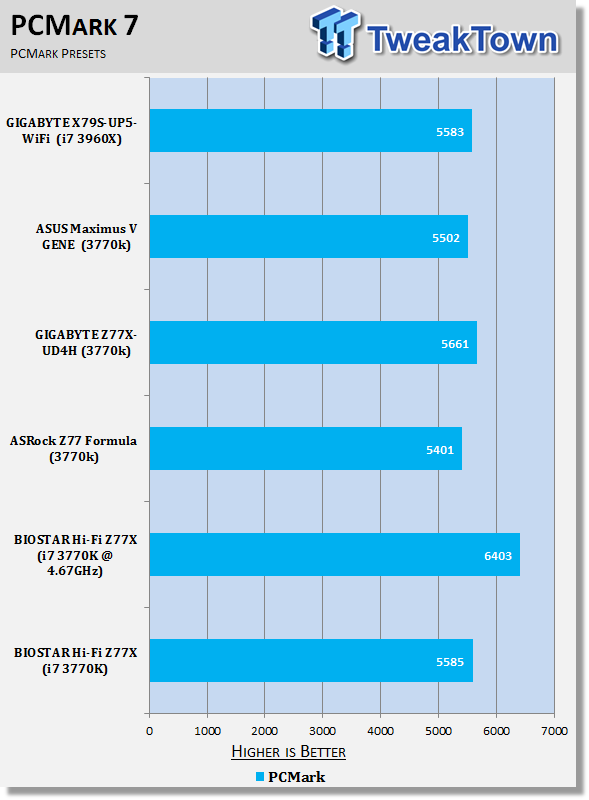
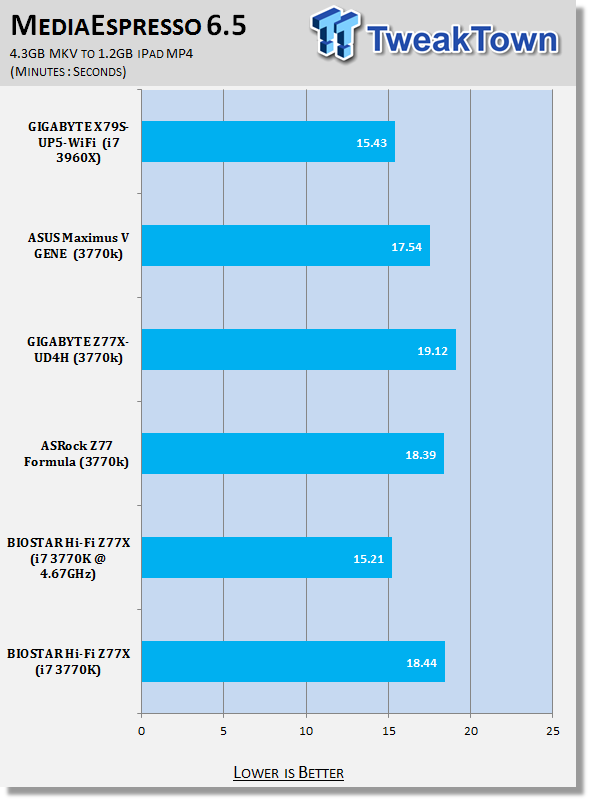
38Looking at the performance of our board under PCMark and MediaEspresso you can see the numbers sit in the middle of the pack when compared to our other setups.
Again overclocking helps yield some strong performance gains and it's extremely obvious under the real world MediaEspresso test.
USB 2.0 and 3.0 Benchmarks
AIDA64
Version and / or Patch Used: 1.70.1400
Developer Homepage: http://www.aida64.com
Product Homepage: http://www.AIDA64.com
Replacing Everest in our labs is AIDA64. This new testing suite is from the core development team from Lavalys and continues that tradition. The guys have thrown in better support for multithreaded CPUs as well as full 64 bit support. We use this to test memory and HDDs for now, but may find ourselves opening this up to other areas of the motherboard.
 38
38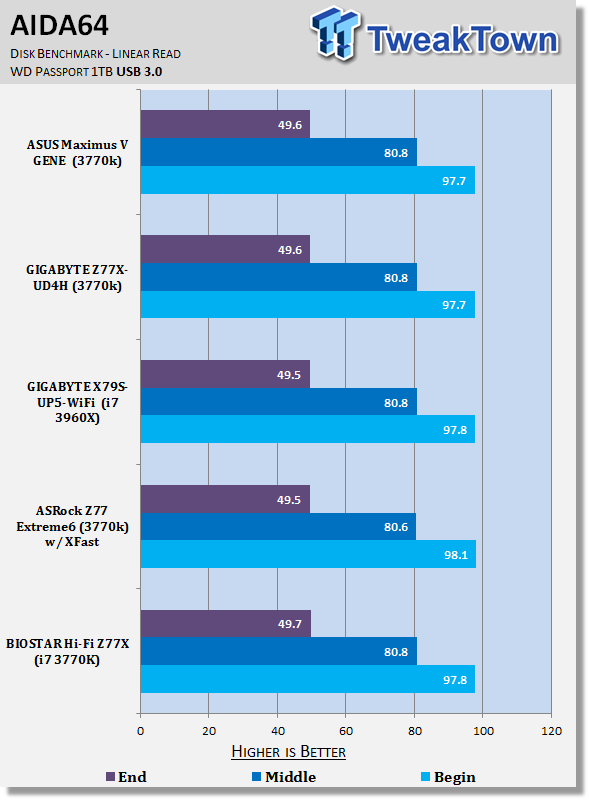 38
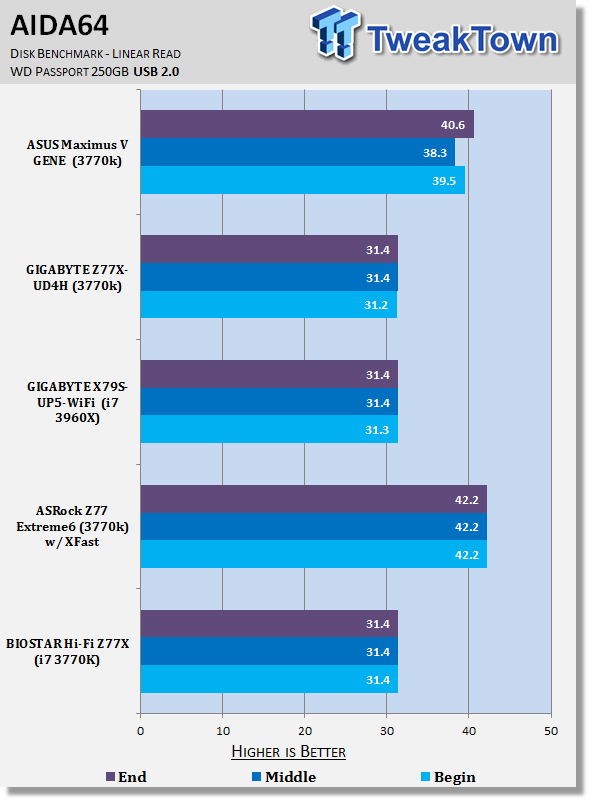
38Getting into the performance of USB 2.0 and USB 3.0 devices you can see that this BIOSTAR board lines up just as you'd expect. Apart from ASRock having a bit of a jump under the USB 2.0 numbers thanks to XFast, we can see everywhere else that the boards line up similarly to each other.
SSD Benchmarks
AIDA64
Version and / or Patch Used: 1.70.1400
Developer Homepage: http://www.aida64.com
Product Homepage: http://www.AIDA64.com
Replacing Everest in our labs is AIDA64. This new testing suite is from the core development team from Lavalys and continues that tradition. The guys have thrown in better support for multithreaded CPUs as well as full 64 bit support. We use this to test memory and HDDs for now, but may find ourselves opening this up to other areas of the motherboard.
 38
38HD Tune Pro
Version and / or Patch Used: 4.61
Developer Homepage: http://www.hdtune.com
Product Homepage: http://www.hdtune.com
HD Tune Pro gives us accurate read, write and access time results and for the last couple of years has been gaining popularity amongst reviewers. It is now considered a must have application for storage device testing.
 38
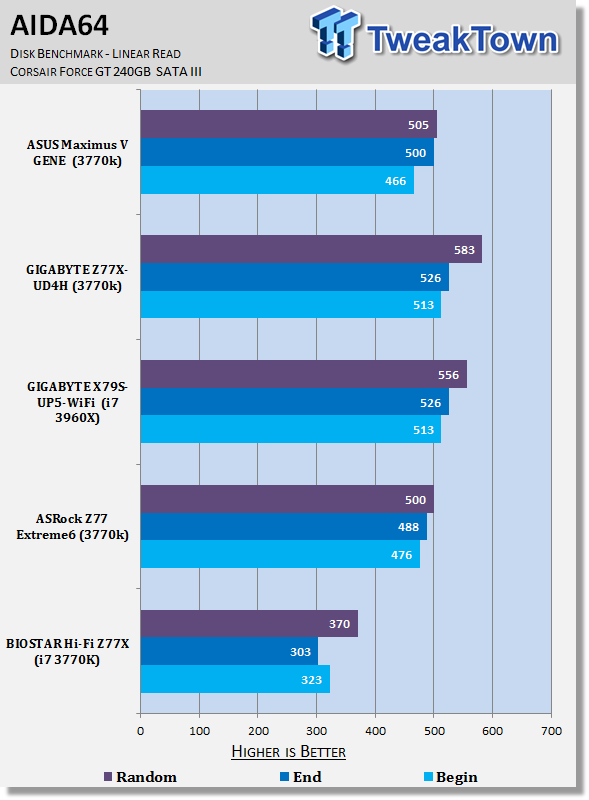
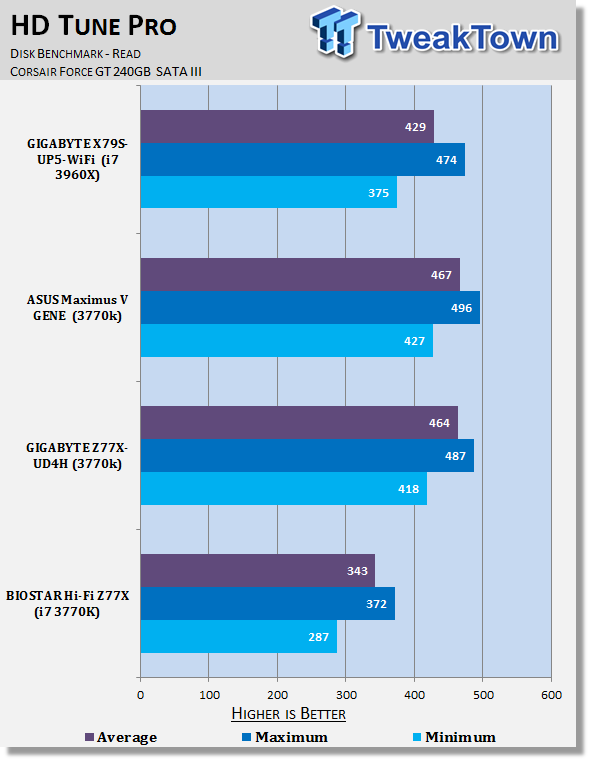
38When it comes to SATA III SSD Performance you can see the numbers seem to lag a little behind the competition. We're slightly down across the board.
Originally we were even lower, but we noticed that was because we had accidently plugged our drive into the SATA II ports, due to the lack of color coding on the SATA ports.
Memory Benchmarks
AIDA64
Version and / or Patch Used: 1.00.1035BETA
Developer Homepage: http://www.aida64.com
Product Homepage: http://www.AIDA64.com
Replacing Everest in our labs is AIDA64. This new testing suite is from the core development team from Lavalys and continues that tradition. The guys have thrown in better support for multithreaded CPUs as well as full 64 bit support. We use this to test memory and HDDs for now, but may find ourselves opening this up to other areas of the motherboard.
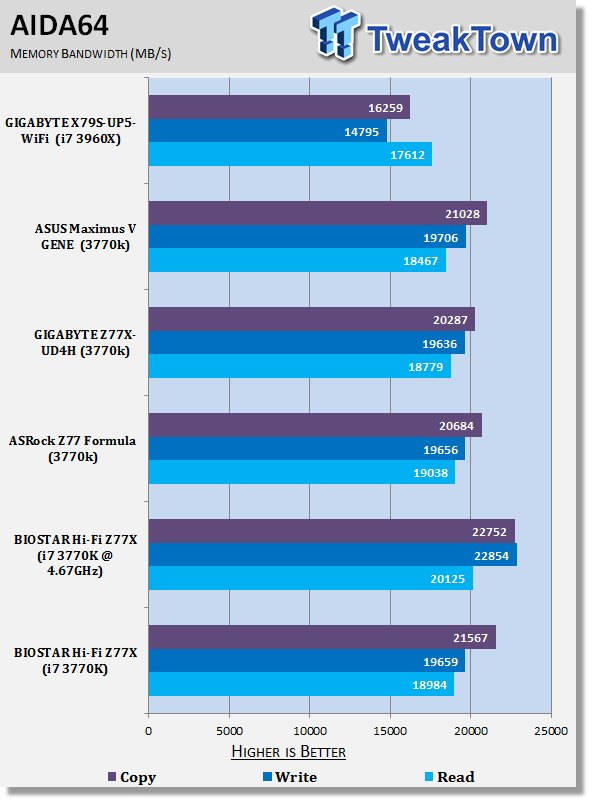 38
38Out of the box memory performance is quite strong at stock. Overclocking takes those numbers higher, but the stock numbers are quite impressive when compared to the other Z77 motherboards.
Gaming Benchmarks
3DMark 11
Version and / or Patch Used: 1.0
Developer Homepage: http://www.futuremark.com
Product Homepage: http://www.3dmark.com/3dmark11/
3DMark 11 is the latest version of the world's most popular benchmark. Designed to measure your PC's gaming performance 3DMark 11 makes extensive use of all the new features in DirectX 11 including tessellation, compute shaders and multi-threading. Trusted by gamers worldwide to give accurate and unbiased results, 3DMark 11 is the best way to consistently and reliably test DirectX 11 under game-like loads.
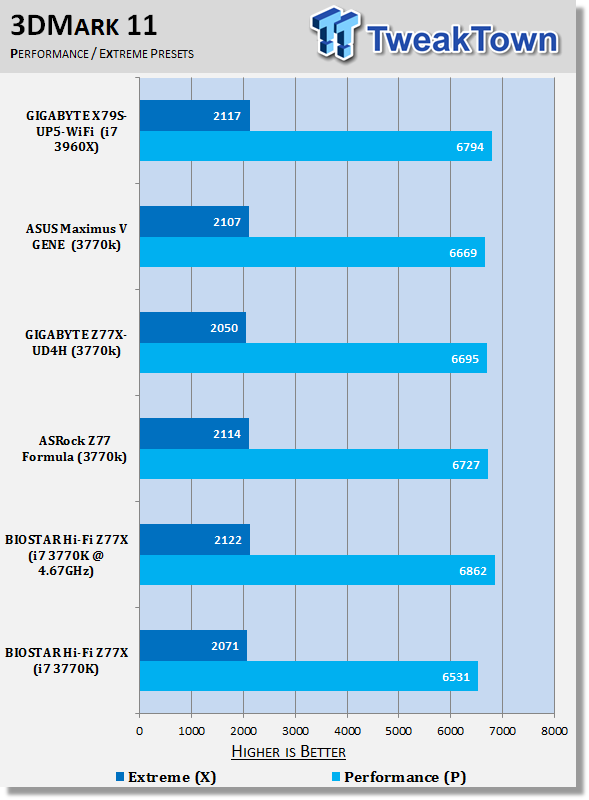 38
38Metro 2033
Version and / or Patch Used: Latest Steam Update
Timedemo or Level Used: Built in Benchmark
Developer Homepage: http://www.4a-games.com//
Product Homepage: http://www.thqnordic.com/
Metro 2033 is an action-oriented video game with a combination of survival horror and first-person shooter elements. The game is based on the novel Metro 2033 by Russian author Dmitry Glukhovsky. It was developed by 4A Games in Ukraine and released in March 2010 for Microsoft Windows and Xbox 360.[3] In March 2006, 4A Games announced a partnership with Glukhovsky to collaborate on the game.[4] The game was announced at the 2009 Games Convention in Leipzig;[5] a first trailer came along with the announcement.[6] A sequel was announced, currently titled Metro: Last Light.
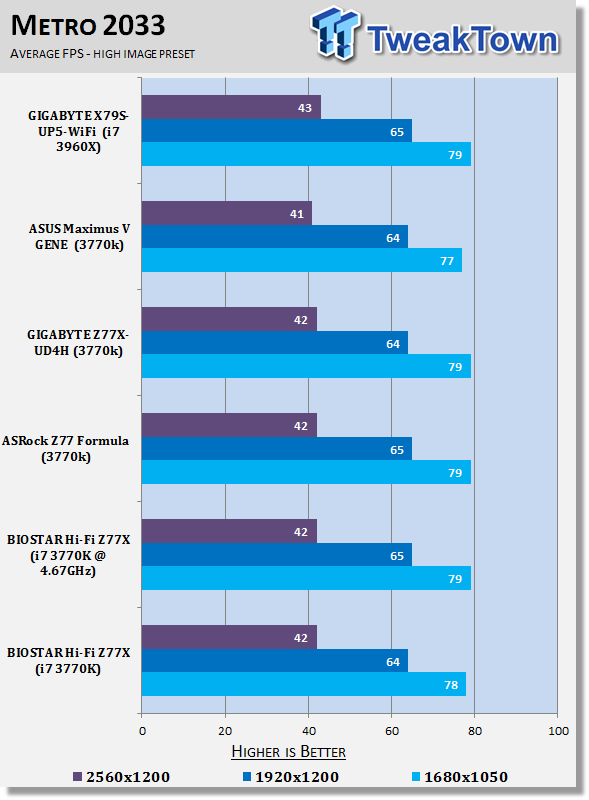 38
38Gaming performance is as you'd expect with little separating all our setups. We see a slight bit of movement in the Performance preset under 3DMark 11 and a bump at the lowest resolution under Metro 2033, but across the board, you can see the numbers line up just as you'd hope.
Temperature and Power
Power Consumption
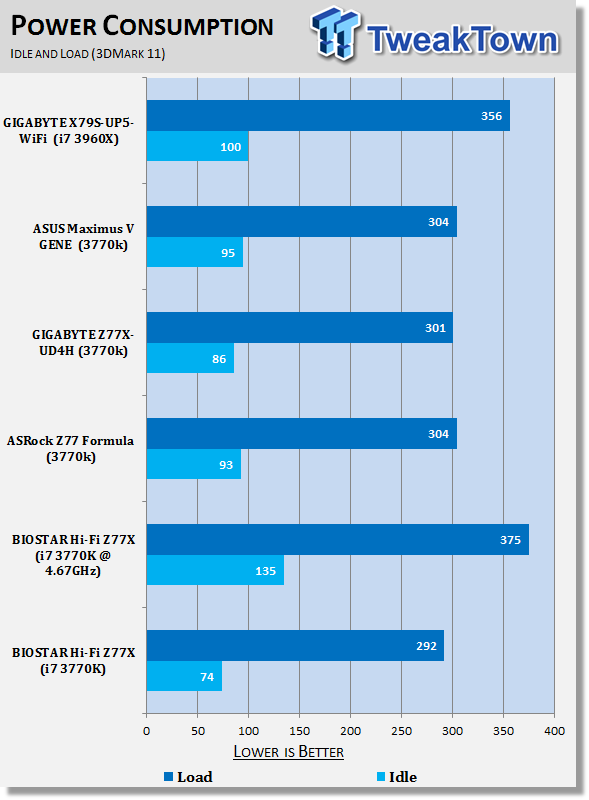 38
38Power draw out of the box is strong with the BIOSTAR offering having the lowest idle and load numbers out of the lot. You can see when we overclock we get a big jump in the numbers. When overclocked you can see the idle number almost doubles.
Core Temperature
 38
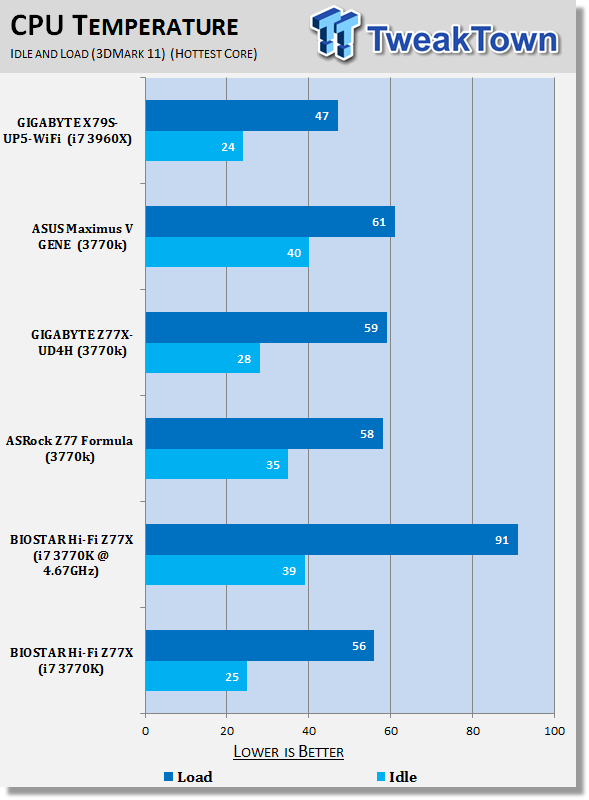
38Temperature numbers also look really strong with again the BIOSTAR offering running the lowest numbers out of the Z77 group when it comes to stock performance.
Overclocking increases those numbers a decent chunk, but the idle number still looks good. We can see at load we're hitting just above 90c.While okay, we really wouldn't want to go much higher than this.
Pricing, Availability and Final Thoughts
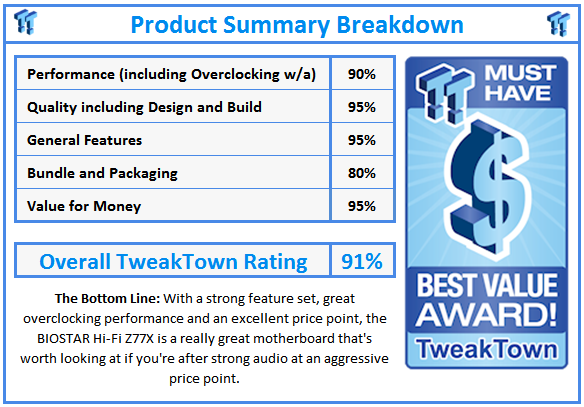
I find myself legitimately surprised with what BIOSTAR has put together here today. For $149.99 this is a really strong motherboard board that performs better than expected - especially when it comes to the overclocking side of things, which saw some really amazing performance, that put it ahead of a lot of boards priced at a similar level or even some priced at a higher level.
I think the next thing we need to do is cover the audio side of things since it's of course such a big part of the board. Using the Corsair SP-2500 speakers, audio performance was strong. Stronger than the performance I see out of the GIGABYTE G1.Sniper 3 I use which uses the Creative CA0132 chip? Probably not, but this is a board that costs $100 more than the BIOSTAR offering.
It feels like the board would shine in the situation where someone is looking for a HTPC based on an ATX motherboard that doesn't want to break the bank and is able to offer strong performance. Is the board going to provide better audio than others that come in at the mid-$100 range? Well, we wouldn't doubt that for a second.
The calibration software as well is something that is going to come in handy for someone wanting to setup a home theater PC and have the multi-channel audio setup running as finely tuned as possible. From an audio perspective this is a strong board. You can't forget, though, that for $149.99, you're not just getting an audio product, though, you're getting a full motherboard.
Moving away from the audio side of things and going over everything else, like we said at the start here, we've ultimately got a strong performing board that performed better than we thought when it came to overclocking. Pricing comes in strong, the features are great and performance is overall really strong. We're a little short in the bundle, but again at this price point, we're not expecting a large bundle.
 United
States: Find other tech and computer products like this
over at
United
States: Find other tech and computer products like this
over at  United
Kingdom: Find other tech and computer products like this
over at
United
Kingdom: Find other tech and computer products like this
over at  Australia:
Find other tech and computer products like this over at
Australia:
Find other tech and computer products like this over at  Canada:
Find other tech and computer products like this over at
Canada:
Find other tech and computer products like this over at  Deutschland:
Finde andere Technik- und Computerprodukte wie dieses auf
Deutschland:
Finde andere Technik- und Computerprodukte wie dieses auf  Commodore 64 PC runs AI to generate images: 20 minutes per 90 iterations for 64 pixels
 Synopsys and Samsung achieve production tapeout of next-gen Exynos SoC on new 3nm process node
 Windows 11 could get some big changes: Start menu 'companions' and Copilot in Settings
 The iPhone 16 Pro could have a 20% brighter display than your boring old iPhone 15 Pro
 New iPhone 16 dummy unit leak shows off its refreshed camera design and more
 Corsair 6500X Mid-Tower Dual Chamber Chassis Review
 Corsair MP700 Pro SE 4TB SSD Review - As Fast as They Come
 Corsair MP600 Mini 2024 Edition 1TB SSD Review - Fastest Tiny Drive on the Planet
 Lexar SL500 1TB Portable SSD Review - The best of native USB
 Corsair Platform:6 Elevate Modular Desk Review
 True Lies (1997) 4K Blu-ray Review
 Fractal Design North XL Full-Tower Chassis Review
 Western Digital WD Gold 24TB HDD Review - High-Capacity Masterpiece
 AOC U27G3X 27-inch Gaming Monitor Review - 4K 160Hz for $500
 MSI Vector GP68HX Gaming Laptop Review
 Building the Ultimate Home Entertainment Server with an ASUSTOR NAS and Viper Gaming NVMe SSDs
 Everything you need to know about the latest ASUS NUC Mini PCs - NUC 14 Pro and ROG NUC
 How to Overclock Your GPU and Boost Your PC Gaming with ASUS GPU Tweak III
 ASUS's AMD Radeon RX 7000 Series GPU lineup has something for every gamer
 ASUS OLED Premium Care defends the ROG Swift OLED PG32UCDM gaming monitor from burn-in