

Introduction

Over the last year or so we have shown you pieces of networking hardware that normally reside in the realm of the enterprise network; items like 24 port rack mounted switches, smart switches and of course Power over Ethernet devices. With each of these we have talked about the technology behind them and how this technology is slowly working its way into the home network environment.
Today we have another of these devices. This time it is a much smaller product, but no less advanced. It is the NETGEAR GS110TP 8-port POE Gigabit ProSafe Switch. This device has a full 8 ports that can supply up to a total of 46 Watts nominal power. But the GS110TP is more than just a power source; it is also a layer 2 managed switch with a very functional webUI for management and configuration. You can also setup and manage some very advanced switching and QoS (Quality of Service) options for VoIP (Voice over IP) data and much more. You also get the option to connect the GS110TP to a fiber backbone by using one of two SFP ports (fiber modules are extra).
The list of features is quite impressive on paper and the $274.99 price at NewEgg.com adds to its appeal to the corporate or small business. So let's take a look at the GS110TP and see how it fits into our enterprise network in the lab and also see if it can fit into the home network as well.
The Box and What's Inside
Package and Contents
The box that we received from NETGEAR was a "Press Only" box, so it did not have all of the usual imagery or coloration that your typical box has. However, to add to our testing NETGEAR also sent along a ProSafe GS108T 8-port switch that can be powered by POE. This was a much more representative package than what we received with the GS110TP.


As you can see, the NETGEAR boxes are clean and very able to catch your eye. The large image of the product on the front lets you know right away what you would be getting inside the box, while the product highlights in the yellow square detail the benefits of whatever is inside.

The back of the box usually has a more detailed description of what the product is and how/where it fits into your network. There is also a small chart to let you know how the product compares to others in the same general line.

Inside the box for the ProSafe GS110TP and the GS108T you find all of the things that you need to power up the GS110TP and the GS108T. As these are aimed at the Enterprise market, you do not get the freebie Cat5 cable. They expect you to have your own at this level.


In general with most SMB (small business) or enterprise products, the level of "loot" is going to be pretty low as most of the cost involved is the actual item and the features/quality of the device. We will talk a little more about this when we look at the GS110TP on the next page.
The GS110TP
The GS110TP is a small device. It is only 9.3 inches long by 4 inches deep and about1 inch tall. Yet it manages to pack quite a bit of features into this small box. In fact, this is the smallest full 8-port GBe POE managed switch that I have worked with.
I was very surprised to read all of the functions that are available to you when this is attached to your network. In this small box you get up to 46 Watts of nominal power across the 8 ports; each of these can have their own schedule for turning on and shutting off the power to the devices attached. This is great for anyone interested in lowering their power bill. Here you can also see a reset switch. This only power cycles the switch and does not reset any of your settings. It is like a power button, but one that is not easy to accidentally press.

Another feature that I found to be surprising is that fact that there are two independent (not shared) SFP ports for fiber connections. This means that you can connect this to a much faster fiber back bone for data uplink and still keep the other 8 ports available for use. In this shot you can see the factory defaults button. This is the one you press when you are ready to wipe all of your settings and start again.

The ProSafe GS110TP has a durable metal shell protecting the internal components and can also act like a heat sink to help keep the interior cool. Due to its size (and some extras thrown in according to NETGEAR) the GS110TP does not require any active cooling.

The back of the GS110TP has a small vent on it as well as the power port, a locking port (for a cable lock) and a grounding pin to make sure that this device is properly grounded (some sites require the unit to be grounded while in place). That is pretty much all there is to the outside; it is interesting because of its small design and construction, but it is not what you would call an attractive product.


Looking at the general specs, you see what you would expect from a typical GBe switch.


It is not until we take a look at the Administrative Management specs that we see just how much is packed into this little device. Some of the items of particular interest are that you can really lock down this switch to prevent unauthorized access to the network.
Setup
One thing about a managed switch (especially those with a WebUI) is that they have to have an IP address to work. It can be a pain to find out this address and then get everything configured from there. To help with this NETGEAR includes a utility that allows you to quickly find and configure any NETGEAR switch in your network. This is called the SmartControlCenterManager (quite a long name really). During this installation the system will install Adobe AIR. After the installation you may get an error saying that AIR cannot start, but after a quick update to AIR everything will be ok.

Once you get the software installed (a very simple installation) you can quickly find the NETGEAR switches on your network. The discovery takes very little time (about 2-3 seconds). After the discovery process you can begin the configuration process. When you click on the "configure device" button this is where you would setup a static IP right from this piece of software without ever having to open the WebUI. You can also change the password, reboot the device and open the WebUI all from this one page.

On the Maintenance page you can save or restore the system configuration to the selected device.

The Tasks page is supposed to show you any active tasks (for lack of a better word) that are scheduled for the devices available. The problem here is that although we setup a few tasks in the GS110TP (powering down the POE ports), we never did see them pop up here.

The Help page was no help at all. We clicked on the Apply button as directed and were treated to a page that told us that this product would be coming in Q1 2010......


WebUI Part I
WebUI
The WebUI on the GS110TP is very extensive, so we will break it down into sections to make things a little easier to follow.
The System Tab
This tab has quite a bit going on; you start off on the management page which all on its own has six items for you to look through. Most of these are pretty mundane (like the time setup, IP configuration and DNS settings), but there are a couple that are intended to help with more advanced networking issues.

The system information page is very self-explanatory and gives you some quick information about the status of the system. The IP configuration tab also does not need any more information; this is where you set or change the IP address for the system.

The Time setup options are interesting; you have a global page which controls how you want to have the GS110TP get its time information. Your options are local and SNTP (Simple Network Time Protocol). However, to choose SNTP you have to set up a server in the SNTP Server Configuration page. This is a handy little option, especially if you have an internal SNTP server that you want to use (to limit access to UDP port 123 on your network). As there is no option for daylight savings time, you will unfortunately have to adjust the UTC offset to make sure the time is correct on the GS110TP.

We talked about a few "more advanced" options on the management tab and the DOS (Denial of Service) page is one of them. Here you will find options to setup the DOS configuration automatically or to manually choose the DOS attack types you want to defend against.

The DNS configuration page is an interesting one. In it you can configure the GS110TP as a DNS server; you do have to manually add hosts to the DNS server, but it is capable of forwarding DNS requests to the primary servers on your network.

The green Ethernet configuration page gives you one option; to enable or disable the short cable mode. This mode checks the cable length and reduces the power used for any cables less than 10 feet long.
Device View
This one was a bust for us and Internet Explorer 8 and 9. When we tried to access this we only received an error saying that the publisher of the plug-in could not be identified. So it would not load the page. You would think that NETGEAR would setup a certificate for this plugin on this device to ensure that something like this would not happen.

Interestingly enough, when we ran Firefox 3.6.10 the WebUI was very slow and unresponsive, but after the manual installation of a Java plug-in the device view worked properly.


PoE
The Power over Ethernet pages are very nicely laid out and provide for excellent control over the PoE capabilities of the GS110TP. There is one item that needs some improvement, though. This is the PoE scheduling; the problem is that you can only associate one schedule with each port. I know this does not sound like a problem until you realize that each schedule can only work inside a 24 hour day. This means that you cannot tell it to power off a port from 22:00 (10PM) to 06:00 (6AM) the next morning.

Thankfully you can see what each port is doing (for PoE and other items) in the port configuration page. But you still have the overly complicated schedule page and its inability to handle what is probably the most common "off" time in a business (8PM to 7AM). The other problem I ran into was that when the system was supposed to turn off POE power to a single port, the switch failed to do so and would lock up the WebUI. The only way to correct this issue was to restore to factory defaults.


SNMP and LLDP
SNMP stands for Simple Network Management Protocol. This is a protocol that allows you to gather information about network devices and send them to a "trap" or computer that can catch the packets of data sent from the switch. LLDP on the other hand stands for Link Layer Discovery Protocol and is important for the discovery of network services. It is generally used to identify network access devices and as such help your network operate faster, as it is able to sort out what other devices are in the same network quickly.
LLDP has also been implemented in Windows Vista and Windows 7 (Server 2008 etc) to allow for much faster discovery of networked appliances. The GS110TP offers a large amount of flexibility in this configuration. You can opt to allow the GS110TP to only transmit, receive or to do both with LLDP information.

The Services page is reserved for items such as DHCP filtering and interface configuration. Here you can see the trusts relegated to the different ports or Link Aggregation Groups. You can also view all items in a single screen.

WebUI Part II
Switching
The Switching menu covers the heart of what the GS110TP does; this is switching so that data can get from point A to point B. But there are always things that can slow down or hinder data from getting to where it needs to be.

One of the nice things about the GS110TP is that you can configure each port individually for almost everything. As you can see above, you can even label each port in the WebUI. This can let you know exactly what should and what should not be running. You also have the option of configuring the max frame size on a per port basis when most switches run all or nothing.

The Link Aggregation Protocol page is also much more in depth than others in its price range and class. With the LAG settings you can choose the pairings and setup one of four groups (as there are only 8 ports). You have options for setting up things per port as well as tell the LAG grouping what version of the Spanning Tree Protocol you are using.

Speaking of the Spanning Tree Protocol (STP), that is where we find ourselves next. Here you can setup the type of Spanning Tree Protocol you want to use for your multi-node network. You can choose from the older (and slower) STP, the much quicker RSTP (Rapid STP), or MSTP (Multiple STP). With MSTP you can manage multiple legs and STP types with a Common Spanning Tree (CST). This allows you to incorporate multiple VLANs into a common spanning tree easily. For our purposes the RSTP was the best choice as we have it in place in our other smart switches.
Quality of Service

The QoS pages (like everything else) give you some very impressive per-port controls. True, you can also set this globally, but it is nice to be able to set the QoS type and priority for each individual port. You can also classify your traffic using the COS options available and map your ports based on 802.1p protocol or by DSCP (Differentiated Services Code Point).
Security


One of the biggest items that the ProSafe GS110TP brings to the table is the Security available to you. You have multiple levels and types of security to ensure that the traffic on your network is really yours.

In this way the ProSafe GS110TP would be an excellent choice for a network administrator that is interested in maintaining a secure network.
Monitoring

The monitoring tab is what you would expect; not much to talk about here. You can monitor the ports, LAGs, and other functions of the GS110TP like port mirroring (setting two ports to transmit identical data); this is useful for diagnosing network issues or to monitor suspicious data.
Maintenance
The last page we will talk about is the Maintenance page. Here you can reboot the GS110TP, reset to factory defaults, save the configuration file, or install a new one as well as manage the backup image the GS110TP keeps.

Like we said, the GS110TP has a ton of features and options stuffed into its small package. We have only scratched the surface of what it can really do. However, in the interest of time and you (our readers), we will leave this description brief.
Performance
For our performance testing we wanted to setup a configuration that would be a good representation of usage for the GS110TP. For this we also added in a GS108T (as we mentioned earlier). This switch can also be powered over PoE and we used this in addition to our other PoE devices (two PoE IP Cameras and a PoE Access Point).
From there we also attached three systems; our main test server was plugged directly into the GS110TP along with a single cable that lead back to the main lab network. Then we plugged in our test workstation into the GS108T along with a laptop.

Bandwidth
We used PerformanceTest 6.1 by PassMark which you can find out more information about here. It has a handy Advanced Networking section which is perfect for our testing.
Doing our best to emulate a real-world performance scenario, I setup a server running Windows 2008 R2 (x64) Server, (2x Xeon Quad Core 3.0 GHz 1333MHz FSB, 4GB DDR2 FB-DIMMS, 2x 146GB SAS drives in RAID 1) and the client PC; a custom built system (GIGABYTE H55N-USB3 with a Core i5 750 CPU). From there we sent data through the GS110TP to our test server and also to other servers on the rest of the network.
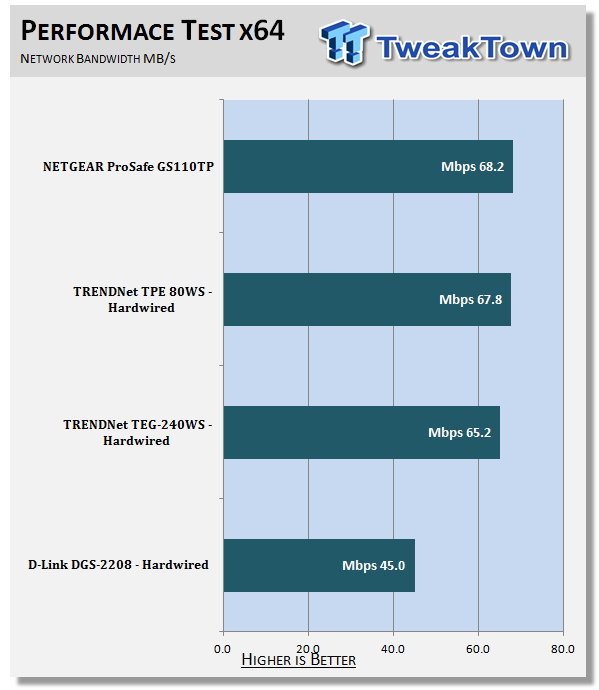
I wish I could tell you that dropping the GS110TP into my network significantly improved performance, but it did not. It kept it at the same level we have seen before. This is not to say that it did not have any impact; it did a great deal by bringing in LLDP as well as other features that were lacking in the existing network. We also found that even with POE devices installed we did not see any reduction in performance on the GS110TP.
One of the biggest things that it has brought is extra security. With the ability to add an ACL by MAC and even IP, the internal lab network can be much more secure and we can keep regular traffic out much easier than we have in the past.
PoE
Ok, the PoE performance on the ProSafe GS110TP was excellent. At least it was until I tried to start adjusting settings per port. When I set up two PoE IP cameras and a PoE Access Point and I wanted them to be on different schedules, things fell apart. For some reason the system did not turn any of the PoE devices off. However, it did affect the performance of the switch. This was evidenced by the fact that the GS108T that we used in our setup was not visible (even when it was plugged into wall power). This issue is still unresolved (even with a firmware update) and is concerning to us, as it is a big selling point.
Final Thoughts
In general the GS110TP performs very well and does almost everything that you would want it to do with the exception of the PoE scheduling. We found that most of the options would really not have a place in the home network (at least not yet), but in the near future as more devices are introduced that support the more advanced features (like Link Layer Discovery) these functions will be right at home in your house.
The PoE performance was only marred by the scheduling issues we ran into. Other than that it handled everything we threw at it and did not slow down. We were very impressed to see the level of security that the ProSafe GS110TP has. This is something that you usually have to pay quite a bit more to get. We really cannot say this enough; the GS110TP is simply loaded with options to adjust, tweak and control the network traffic in addition to its primary role of providing power to other devices. It was impressive and a little overwhelming to test this product and try to cover everything it can do.
If you are looking for a good PoE switch (or even just a good switch) for your office (home or other), then we have to say this is one that you should seriously look at. With a price tag of only $274.99 at NewEgg.com and more options than its size would indicate, it is a bargain!

 United
States: Find other tech and computer products like this
over at
United
States: Find other tech and computer products like this
over at  United
Kingdom: Find other tech and computer products like this
over at
United
Kingdom: Find other tech and computer products like this
over at  Australia:
Find other tech and computer products like this over at
Australia:
Find other tech and computer products like this over at  Canada:
Find other tech and computer products like this over at
Canada:
Find other tech and computer products like this over at  Deutschland:
Finde andere Technik- und Computerprodukte wie dieses auf
Deutschland:
Finde andere Technik- und Computerprodukte wie dieses auf  LG's 32-inch gaming OLED monitor with 480Hz refresh rate is imminent, with pre-orders live now
 Google Pixel 8a leak boasts 7 years of security updates but leaves one question unanswered
 Apple has plummeted from first to fifth place in the Chinese smartphone market, analysts warn
 You can blame Tim Cook for 8GB Macs, it seems
 Apple removes three AI apps capable of creating nude images of people from the App Store
 SteelSeries Arctis Nova 4X Wireless Gaming Headset Review
 ACEMAGIC AD08 "Core i9 11900H" Mini PC Review
 Lenovo ThinkPad X1 Carbon Gen 12 Review
 ASUS ROG Swift Pro PG248QP Gaming Monitor Review - Frames, frames, and more frames
 FlexiSpot C7B-Mesh Ergonomic Office Chair Review
 Samsung G8 34-inch QD-OLED Gaming Monitor Review - 175Hz for $900
 ASRock NUCBOX-155H Mini PC Review
 NuPhy Air96 V2 Wireless Mechanical Keyboard Review
 TEAM T-FORCE Siren DUO360 RGB Liquid CPU Cooler Review
 AVerMedia Live Streamer ULTRA HD Review
 Building the Ultimate Home Entertainment Server with an ASUSTOR NAS and Viper Gaming NVMe SSDs
 Everything you need to know about the latest ASUS NUC Mini PCs - NUC 14 Pro and ROG NUC
 How to Overclock Your GPU and Boost Your PC Gaming with ASUS GPU Tweak III
 ASUS's AMD Radeon RX 7000 Series GPU lineup has something for every gamer
 ASUS OLED Premium Care defends the ROG Swift OLED PG32UCDM gaming monitor from burn-in