

Introduction

Unless you have been under a rock, you have probably noticed that GIGABYTE has been ramping things up lately. Their latest round of products (from motherboards to add-in GPUs) have been very well put together and designed with performance in mind.
We have taken a look at all of the UD7 line-up and now have managed to get our hands on GIGABYTE's flagship board, the X58A-UD9. This colossal motherboard is designed with one thought in mind; getting the most out of your system. From the advanced "unlocked" 24-phase power design (with Dual Phase Switching) to the two extra NF200 chips making 4-way x16 SLI or Crossfire a reality, it is clear you are going to get a lot from this motherboard.
Of course, as this product is so obviously designed with overclocking and benchmarking in mind, we wonder if it can perform well under normal demands and some low grade simple water cooled overclocking. Well, that is what we are going to find out over the next few pages. Once we know what it can do here, then we will dive in and see what else we can find out about the massive beast that is the X58A-UD9.
The Box and What's Inside
Package and Contents
You know what they say about guys with big feet? They wear big shoes.
When I first unpacked the UD9 from that rather large shipping box, the above thought came to mind. It is a big box and of course it is covered with logos to let you know all of the extras you are going to get with the X58A-UD9.

As with almost all top of the line motherboards these days, the UD9 has a front flap that gives you a glimpse of the actual board and more hard sell items. These two panels show that the UD9 is a board crammed with some great features. The unlocked 24 phase power design should provide enough power to run the CPU and memory even at high clocks while the quad SLI/Crossfire support will give you some of the best 3DMark scores out there.

The back of the box looks like it is a repeat of the inside flap, but there is a little bit more information here.

Inside the outer box is a clean black box that contains what you are really interested in; the X58A-UD9 and all of the accessories needed to get it working.


Speaking of accessories; there are quite a few inside the box, including an eSATA bracket, multiple SLI bridges and a pair of Crossfire bridges.


GIGABYTE has also included their familiar SilentPipe II passive cooling system. However, there is a problem with this extra cooling. If you use the extra four-pin Molex connector above the PCIe slots for power, this cooler will not fit on the board. The power connector prevents its installation.


The Motherboard
The Board
Just looking at the X58A-UD9 straight up, you can tell that this is a board to be reckoned with. Although it is part of the ATX family, it is much longer (and a little wider) than your typical ATX board. GIGABYTE lists it as an XL-ATX board and has a listing of cases that the X58A-UD9 can fit into.

Starting at our usual spot, we do not see much that is out of the ordinary. In fact, for the most part in this image things are looking a lot like the X58A-UD7. We see the LOTES CPU hold down clamp along with the usual assortment of power regulation hardware and of course, heat dissipation hardware.

Where we find firm evidence that things are indeed very different is the extra eight-pin 12V Aux power connector. We have seen these before and they're always indications that the manufacturer wants to ensure clean and stable power and high clock speeds. GIGABYTE obviously intends for you to push the X58A-UD9 very hard.

The cooling at the board level has also been beefed up. As you can see, the passive heatsink over the Southbridge is quite large. The Southbridge cooler ties in with the dual-function Northbridge cooler by direct contact. Here we the first indication that something is not quite right.

In the image below you can see that a four-pin Molex connector is poorly placed on the board. If you use this power connector there is almost no possible way to use the included passive SilentPipe II cooler.


Here we see one of the big selling points of the X58A-UD9; there are seven x16 slots on the board. Four of these are fully x16. The other three are linked x8 slots. This means that if you have something in an x16 slot and something in its matching x8 slot (for example, x16_1 and x8_1) then both slots will operate at x8. We get another angle on that unfortunately placed four-pin Molex connector as well as seeing the included floppy port on this product.

Here we see the second of the extra PCIe power connectors. This is another four-pin Molex connector at the bottom of the board. It is rotated 90 degrees which could present an issue in some cases where the X58A-UD9 is a snug fit.

Moving to the other side of the UD9, we find a healthy number of SATA ports and a PATA port for backwards compatibility. The confusing thing here is that for some reason GIGABYTE has chosen to make both the SATA 3.0 and their "G-SATA" ports white. This can make for misconnections if you are in a rush. There are also two diagnostic LEDs here. If you are running on a test bench (or even in a case), these quickly get covered up once you start using multiple GPUs.


The ports on the UD9 are what you would expect from a high-end product. There are two GBe LAN ports, multiple USB 2.0 (powered and unpowered), two USB 3.0 ports, a pair of powered eSATA ports and the usual audio suspects. Interestingly, GIGABYTE has chosen to maintain the older PS/2 ports on this for your keyboard and mouse. This is possibly to allow the disabling of the USB controllers completely for better stability at higher clock speeds.

BIOS and Overclocking
BIOS
The BIOS on the X58A-UD9 is the same Award layout that GIGABYTE uses on all of their motherboards. There are a few extras, but in general the BIOS is not much different from that found on the X58A-UD7.


One of the items I like about the GB (short for GIGABYTE) BIOS setup is the M.I.T. (Motherboard Intelligent Tweaker) page. Here you have one of my favourite pages, the M.I.T. Current Status page. This page is great for an "at a glance" look at your system. By using this I found a couple of instances where my memory timings slipped which caused my OC to fail.


The rest of the pages in the MIT are all concerned with squeezing the most performance out of your board and CPU.

The Advanced BIOS Features page is becoming something of a misnomer. While there are some useful options here, it is no longer anything that is very advanced.

The Integrated Peripherals page does contain some nice options. The XHD (eXtreme Hard Drive) option is a nice way to get a quick RAID setup going while the rest of the page lets you remove unused or unneeded items for the best stability.


The last two pages we will cover are the power management pages. Not too much to see here, but nice to cover.
Overclocking
This is what you came to see, I am sure. The GIGABYTE X58A-UD9 was not a disappointment when it came to overclocking. I was concerned about the lack of extra cooling on the two NF200 chips and the Northbridge, but in the end that did not appear to be a factor. We were able to get our Core i7 980X up and running at 4.368GHz without much trouble at all.
I am sure with better cooling and more time this speed would jump up dramatically. We ended up with a BCLK of 168 and a final CPU voltage of around 1.4V. Not too bad for only 45 minutes or so of tinkering.

You can see the validation for the GIGABYTE X58A-UD9 here.
EasyTune 6
EasyTune 6 is GB's Windows based overclocking software. We have played around with this before and while it is a good piece of software, there are some things about it that make it a little bulky.
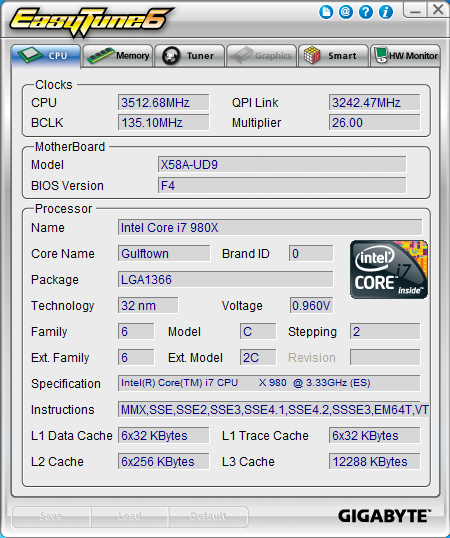
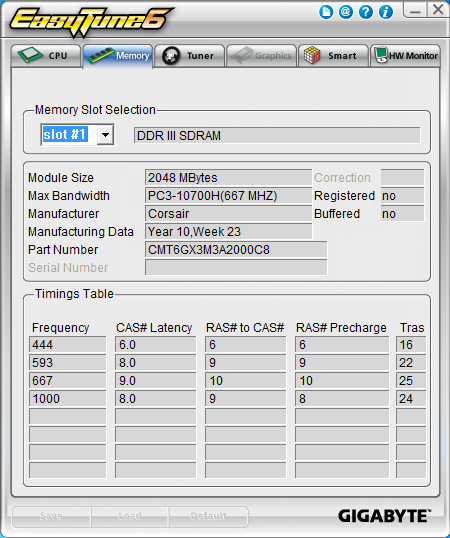
The first two tabs in EasyTune 6 show the current state of the CPU and Memory (speed etc). The third tab is much more interesting; it is the Tuner page and has three distinct modes of operation.
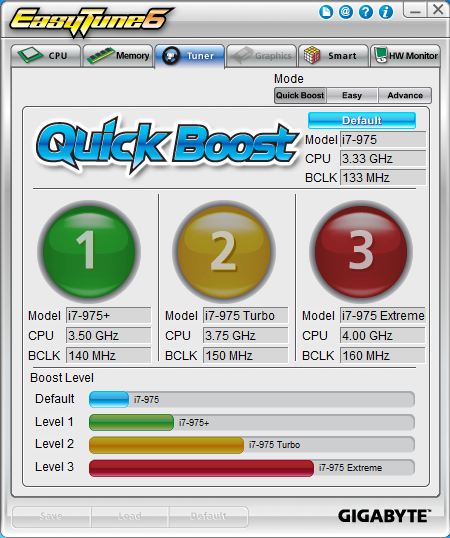
The first is the Easy Boost. This mode allows you quickly ramp up your CPU to one of three predefined settings.
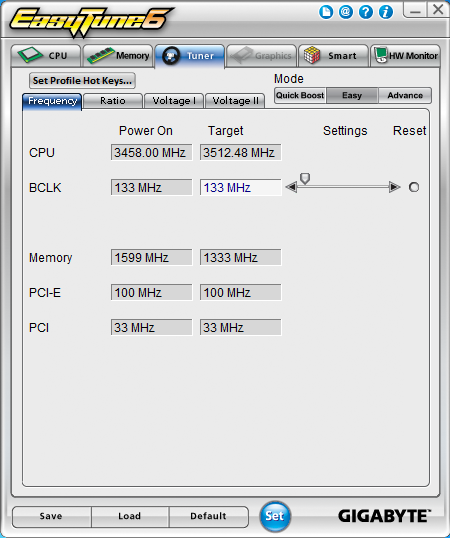
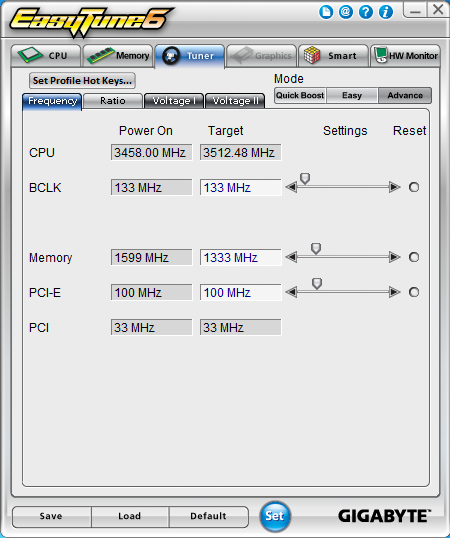
The easy mode of overclocking is simply an adjustment to the BLCK. The software and BIOS will do the rest for you to attempt to make that speed possible.
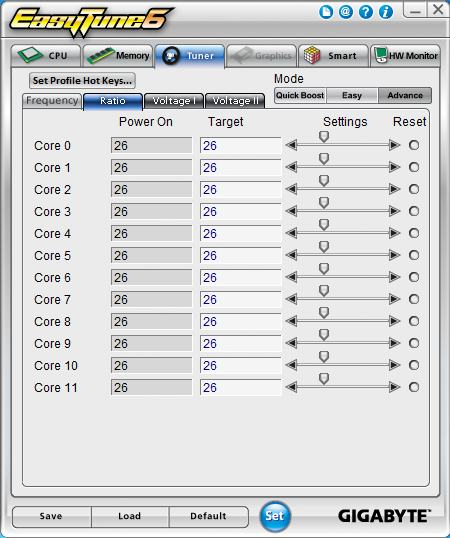
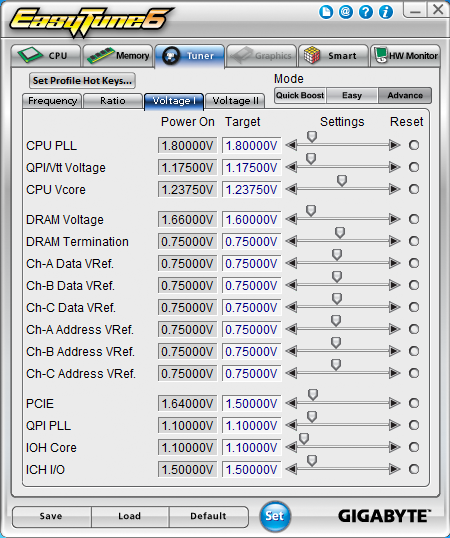
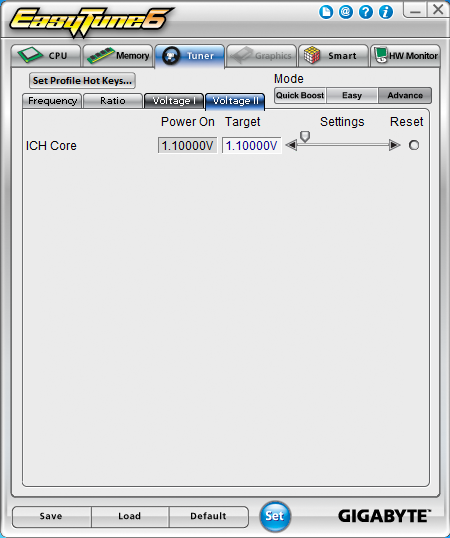
The Advanced mode contains almost all of the same overclocking options you have in the BIOS, with the exception of memory timings.
The last two pages handle the Smart Fan options and keep an eye on the system temperatures.
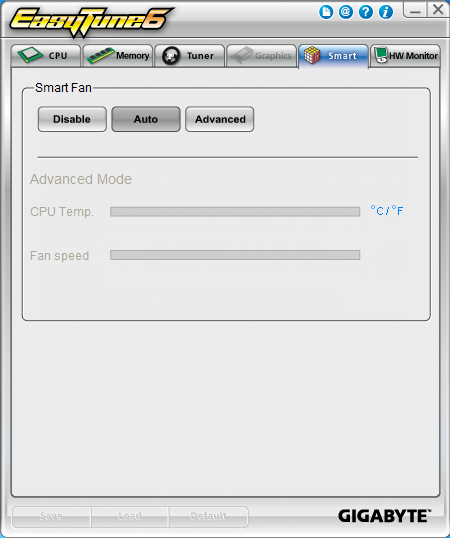
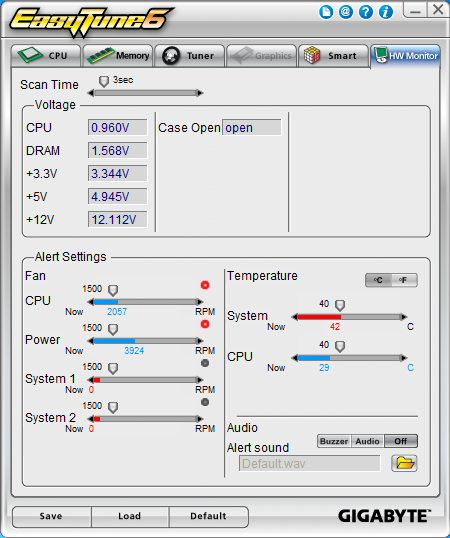
As all overclocking results are dependent on the hardware you use, your results may vary. Results of our overclocking tests are included in the performance section with the stock scores.
Important Editor Note: Our maximum overclocking result is the best result we managed in our limited time of testing the motherboard. Due to time constraints we weren't able to tweak the motherboard to the absolute maximum and find the highest possible FSB, as this could take days to find properly. We do however spend at least a few hours overclocking every motherboard to try and find the highest possible overclock in that time frame. You may or may not be able to overclock higher if you spend more time tweaking or as new BIOS updates are released. "Burn-in" time might also come into play if you believe in that.
Test System Setup and Comments
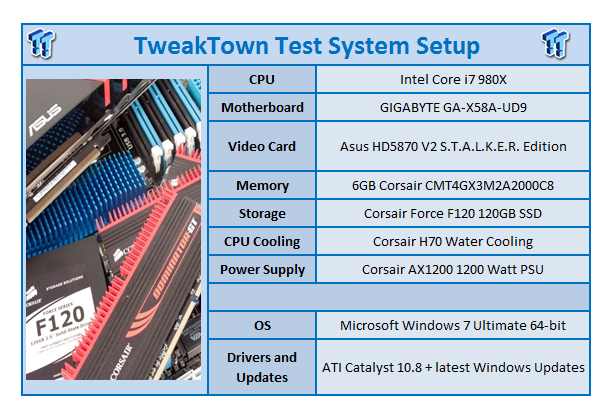
The X58A-UD9 is a big board, as we mentioned before. It is actually too big to fit on our old High Speed PC workbench. We had to move it back quite a bit to ensure that it would fit properly. It is also a rather heavy board and one that has a few surprises in store for anyone setting one of these up.
One of these we mentioned in the board layout section. If you are looking to use the extra power headers then you will more than likely not be able to use the SilentPipe II cooling and will either have to let the Northbridge try and stay cool as-is or you will need to run some water cooling to it. Thankfully it can do a pretty good job of keeping cool on its own without the SilentPipe, but it would be nice to have this option available.
Other items of interest relate to booting and installing software. If you are using a USB KVM (Keyboard, Video, Mouse) switch, you might not be able to boot from a USB thumb drive or from a USB DVD/CD-ROM drive. We ran into this and found that our model of KVM was not compatible with the USB ports on the UD9. As long as our KVM was plugged in we were not able to boot from any USB device. Fortunately this issue is not common; it is just something we felt you should be aware of.
After these minor issues things went very smoothly and we had the X58A-UD9 humming along fairly quickly.
Synthetic Tests - Part I
With any system you will want to see a combination of synthetic testing and real-world. Synthetics give you a static, easily repeatable testing method that can be compared across multiple platforms. For our synthetic tests we use Everest Ultimate, Sisoft Sandra, FutureMark's 3DMark Vantage and PCMark Vantage, Cinebench as well as HyperPi. Each of these covers a different aspect of performance or a different angle of a certain type of performance.
Memory Bandwidth
Memory is a big part of current system performance. In most systems slow or flakey memory performance will impact almost every type of application you run. To test memory we use a combination of Sisoft Sandra, Everest and HyperPi 0.99.
Sisoft Sandra
Version and / or Patch Used: 2010c 1626
Developer Homepage: http://www.sisoftware.net
Product Homepage: http://www.sisoftware.net
Buy It Here
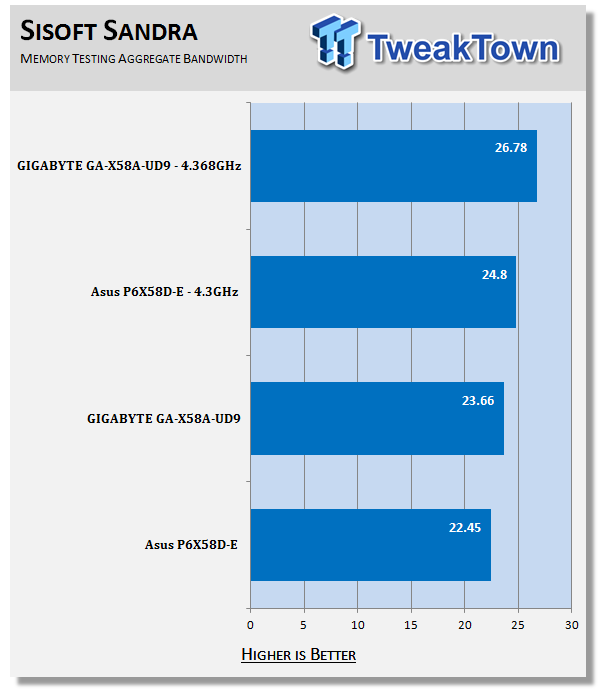
The X58-UD9 has some great tuning for memory. Even at stock speeds it is in the lead by over 1GB/s in aggregate bandwidth.
Everest Ultimate
Version and / or Patch Used: 5.30.1983
Developer Homepage: http://www.lavalys.com
Product Homepage: http://www.lavalys.com
Buy It Here
Everest Ultimate is a suite of tests and utilities that can be used for system diagnostics and testing. For our purposes here we use their memory bandwidth test and see what the theoretical performance is.
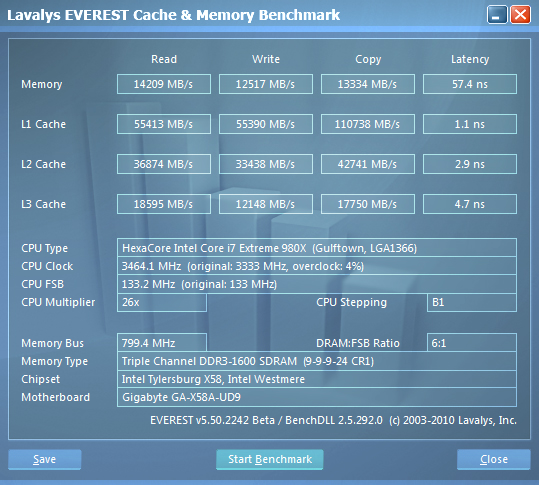
Stock Memory Performance
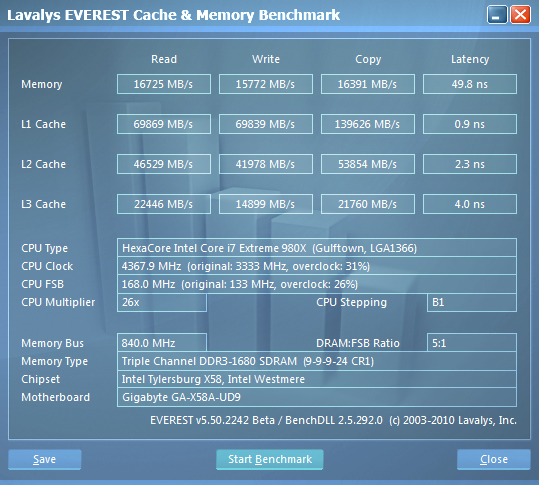
Overclocked Memory Performance
The Everest testing shows us that the X58-UD9 is just plain quick. Even some of the CPU cache numbers are faster than we are used to seeing.
HyperPi 0.99
Version and / or Patch Used: 0.99
Developer Homepage: www.virgilioborges.com.br
Product Homepage: www.virgilioborges.com.br
Download It Here
HyperPi is a front end for SuperPi that allows for multiple concurrent instances of SuperPi to be run on each core recognized by the system. It is very dependent on CPU to memory to HDD speed. The faster these components, the faster it is able to figure out the number Pi to the selected length.
For our testing we use the 32M run. This means that each of the four physical and four logical cores for the i7 and the four physical cores of the i5 is trying to calculate the number Pi out to 32 million decimal places. Each "run" is a comparative to ensure accuracy and any stability or performance issues in the loop mentioned above will cause errors in calculation.
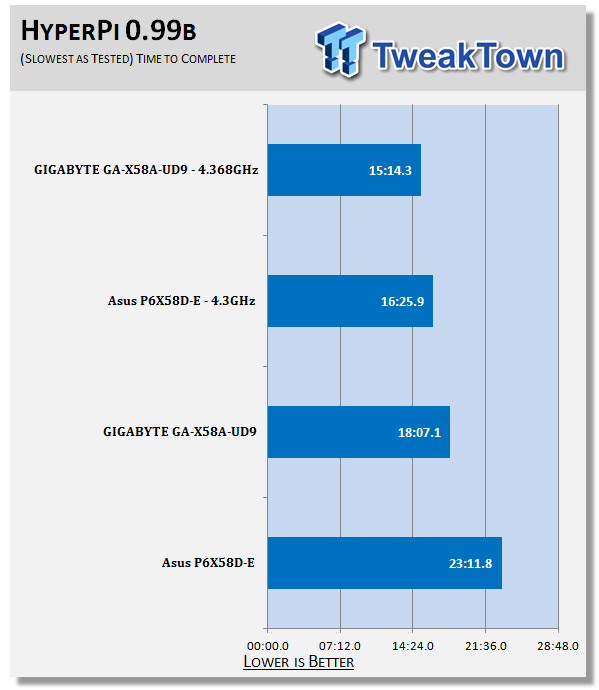
Ok, this is an odd score, but one that we did test more than once. The X58-UD9 was simply that much faster. But then again, we did see a large gulf in memory performance that could be the reason for this gap in performance.
Synthetic Tests - Part II
Disk Drive Controller
The system drive controller is an important part of system performance. In most modern boards your drive controller will run off of the PCI-e bus. The PCI-e bus performance can be affected by poor trace layout as well as many other design choices that show up on different boards.
For testing we use Sisoft's Sandra and Everest.
SiSoft Sandra
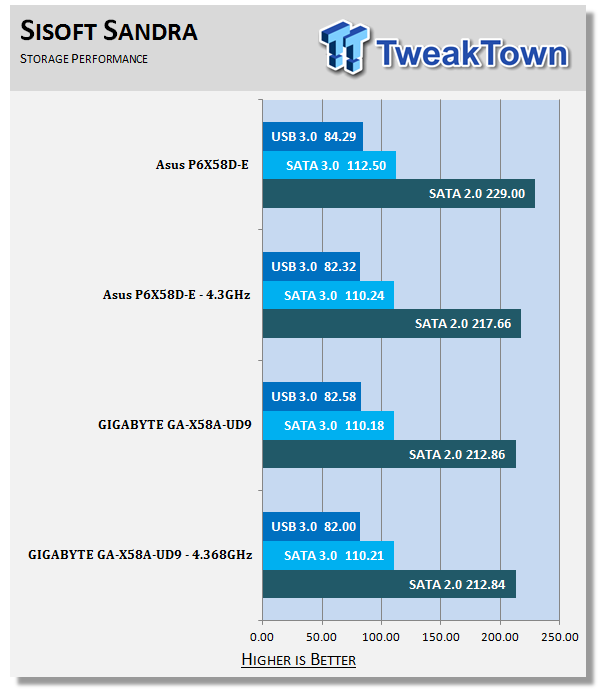
The X58A-UD9 was not the fastest performing motherboard for HDD (well, SSD) performance, but it was more consistent than others we have tested. We did not notice the usual slow down when overclocked as we have seen on many other boards.
Everest

Stock HDD Performance

Overclocked HDD Performance

Stock USB 3.0 Performance

Overclocked USB 3.0 Performance
Everest shows us more information on the X58A-UD9's HDD performance. It is also important to remember that much of this performance is based on the device attached. Still, these are some good numbers with the Corsair Force 120 SSD.
Synthetic Tests - Part III
Here is where we dig out the FutureMark tests.
PCMark Vantage
Version and / or Patch Used: 1.0.0.0
Developer Homepage: http://www.futuremark.com/
Product Homepage: www.futuremark.com
Buy It Here
For overall system performance we use PCMark Vantage. This is run in both x86 and x64 mode to give the best indication of performance.
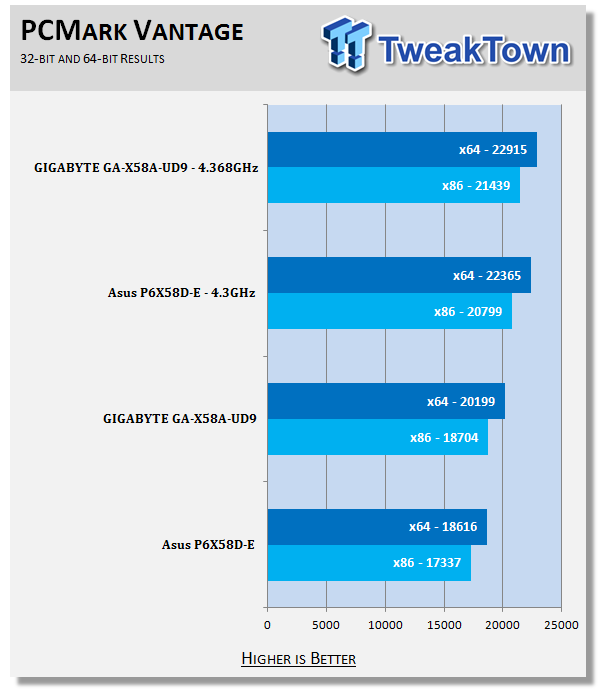
The X58-UD9 comes out on top here for both the stock and overclocked runs. In fact, even under the x86 suite the UD9 comes out over 1,000 points ahead.
3DMark Vantage
Version and / or Patch Used: 1.0.1
Developer Homepage: http://www.futuremark.com/
Product Homepage: www.futuremark.com
Buy It Here
For synthetic gaming tests we used the industry standard and overlockers bragging tool 3DMark Vantage. This is a test that strives to mimic the impact modern games have on a system. Futuremark went a long way to change from the early days of graphics driven tests to a broader approach including physics, AI and more advanced graphics simulations.
3DMark Vantage uses the DX10 API in addition to having support for PhysX. As we are no longer using an NVIDIA GPU for testing (at least until we can get a GTX 4xx card) you will only see the CPU based PhysX results in the scores. For testing we use the Performance test run.
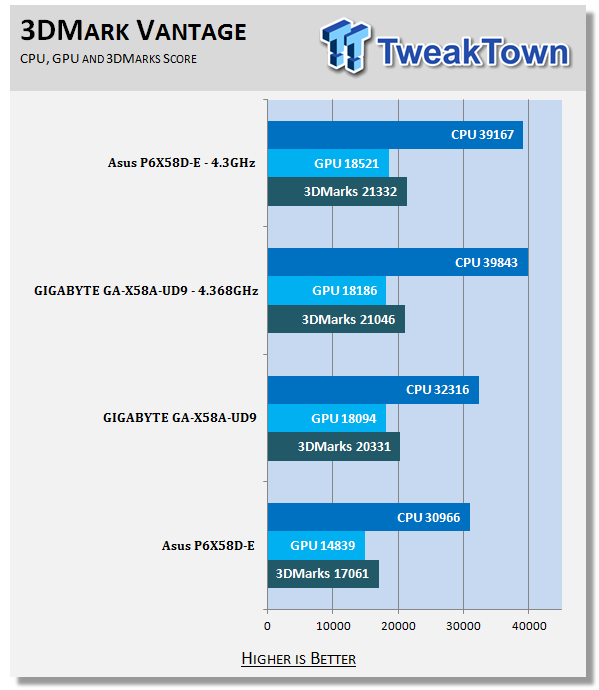
At stock speeds the X58A-UD9 gives us a great score. It is over 3,000 points higher than the P6X58D-E. However, for some reason when we overclocked the system the numbers did not scale in the same way. We see the lower clocked P6X58D-E scrape by the UD9.
Cinebench R11. x64
Version and / or Patch Used: R11.5 x64
Developer Homepage: http://www.maxon.net/
Product Homepage: www.maxon.net
Download It Here
Cinebench is a synthetic rendering tool developed by Maxon. Maxon is the same company that developed Cinema4D, another industry leading 3D Animation application. Cinebench R11.5 tests your systems ability to render across a single and multiple CPU cores. It also tests your systems ability to process OpenGL information.
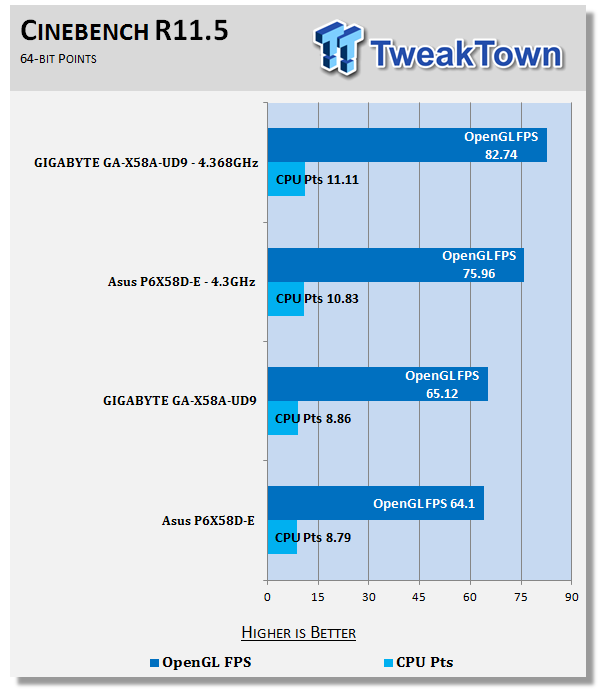
The Cinebench scores are close; they are close enough that although we can call a "winner", the overall performance difference between the two is probably negligible. That is unless the rendered scene is lengthy; then even minor differences in single frame renders can have a huge impact.
Real-World Tests - Part I
Real-world testing allows us to see how well a product will perform when used in the same manner as it would be in your house or office. It is an important side to performance testing as it can uncover hidden glitches in the way a product performs.
It is especially true when testing a mainboard; there are so many components of a board that have to interact that any problems between parts can cause a failure of the whole.
For real-world testing we use some common applications and functions. We test with LightWave 3D for rendering performance, AutoGK for transcoding from DVD to AVI and two games for gaming testing.
Rendering
Rendering of 3D Animation is a system intensive endeavor. You need a good CPU, memory and HDD speed to get good rendering times. For our testing we use LightWave 3D. This software from Newtek is an industry standard and has several pre-loaded scenes for us to use.
LightWave 3D
Version and / or Patch Used: 9.6
Developer Homepage: http://www.newtek.com
Product Homepage: http://www.newtek.com/lightwave/
Buy It Here
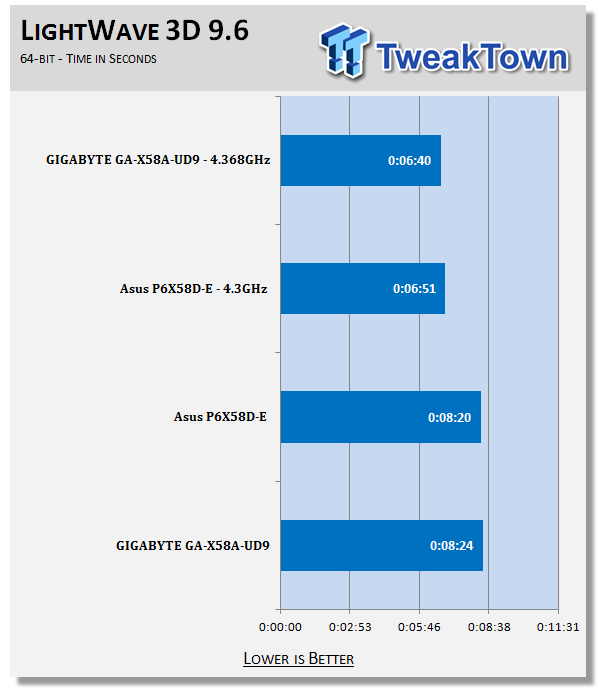
For LightWave 9.6 x74 we see the X58A-UD9 performing at the bottom of the pile. The difference was only 4 seconds on the frame rendered, but it is also very important to remember that LightWave is for 3D animation. This means that you are hardly ever going to render only one frame. When overclocked the UD9 does manage to perform much better though.
AutoGK
Version and / or Patch Used: 2.55
Developer Homepage: http://www.autogk.me.uk/
Product Homepage: http://www.autogk.me.uk/
Download It Here
AutoGK stands for Auto Gordian Knot; it is a suite of transcoding tools that are compiled into an easy to install and use utility. It allows you to transcode non-protected DVDs and other media to Xvid or Divx format. For our testing purposes we use a non-DRM restricted movie that is roughly 2 hours in length. This is transcoded to a single Xvid AVI at 100% quality.
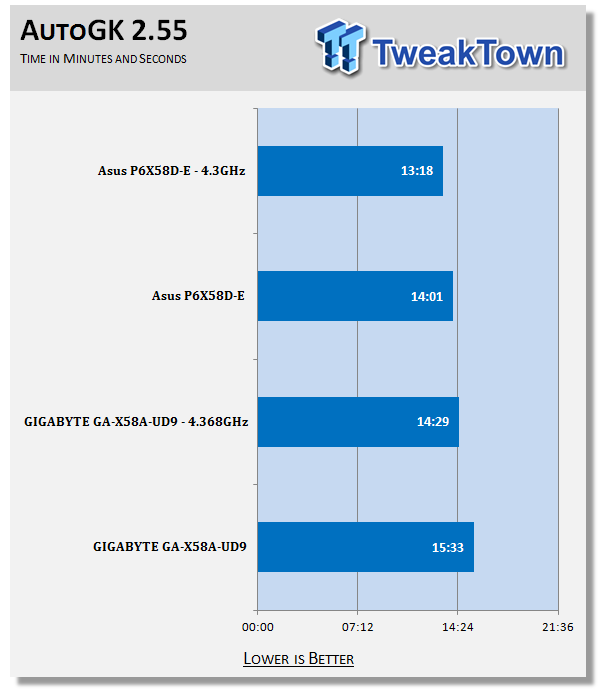
Simply put, the X58A-UD9 did not do so well at Transcoding with AutoGK. It seems to lag behind. This is most likely due to the slower than expected HDD performance we saw earlier.
Real-World Tests Part II
Here we have our real gaming tests. Each of the games we chose uses multiple cores and GPUs. They are able to stress the system through use of good AI. Both have decent positional audio that adds impact to the sound subsystem of the board. We ran each game through the level or parts listed and recorded frame per second using FRAPS. This brings the whole game into play.
*** A word on gaming as a motherboard test; ***
Despite the fact that most games are very GPU limited, we are still noticing HDD and even audio creating issues in gaming performance. Because of this you may see differences in the number of frames rendered per second between different boards. Usually the difference is very small but occasionally, because of bad tracing, poor memory or HDD performance this difference is significant. The issues are often more prevalent in older versions of DirectX but can still pop up in DX10 and 11.
Call of Duty Modern Warfare 2 (DX9)
Version and / or Patch Used: 1.0
Timedemo or Level Used: First combat until the school is cleared
Developer Homepage: http://www.infinityward.com
Product Homepage: http://modernwarfare2.infinityward.com
Most of you know about the game Modern Warfare 2, it caused quite a bit of controversy in the latter half of 2009. The game is a first person shooter with a heavy combat emphasis. It follows the events in the first Modern Warfare very closely and brings back several characters from the original.
As with most games in the Call of Duty franchise it features a heavy AI load. This is not because of a complex AI routine, but more due to the sheer number of enemies in any given combat situation. It is also our single DX9 based game in our testing suite. Settings are shown below.


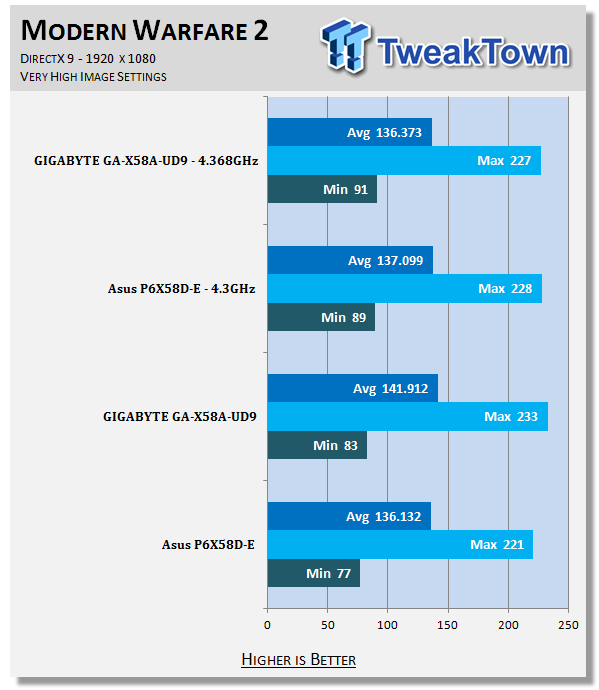
Ok, these numbers are impressive across the board. But again, things here are so close that you would never know which system was which if you were just looking at the monitors.
Far Cry 2 (DX10)
Version and / or Patch Used: V1.00
Timedemo or Level Used: Clearing the Safe house through to the Rescue
Developer Homepage: http://www.ubi.com
Product Homepage: http://farcry.us.ubi.com
Far Cry 2 is a large sandbox style game. There are no levels here so as you move about the island you are on you do not have to wait for the "loading" sign to go away. It is mission driven so each mission is what you would normally think of as the next "level".
In the game you take the role of a mercenary who has been sent to kill the Jackal. Unfortunately your malaria kicks in and you end up being found by him. Long story short, you become the errand boy for a local militia leader and run all over the island doing his bidding. Settings we used for testing are shown below.

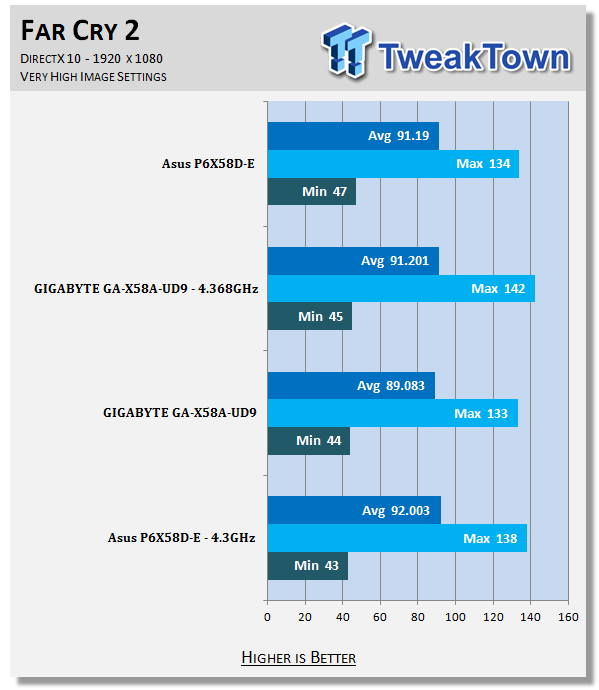
With Far Cry 2 the scores are even closer. Here we really cannot say which would be the fastest board as the delta is inside the normal range of deviation (about 1-2%). Still, both boards would be good for gaming with Far Cry2.
Battlefield Bad Company 2 (DX11)
Version and / or Patch Used: V1.00
Timedemo or Level Used: From washing up on the beach to the mine fields.
Developer Homepage: http://www.ea.com/
Product Homepage: http://badcompany2.ea.com/
Battlefield Bad Company is another sequel and also another game "franchise". Bad Company 2 is also our DX11 Shooter game. The game follows a fictitious B company team on a mission to recover a Japanese defector. This puts you back in World War II (at least for the beginning of the game) while the multi-player game is centered on much more modern combat. For our testing we used the single player mode. Settings are shown below.

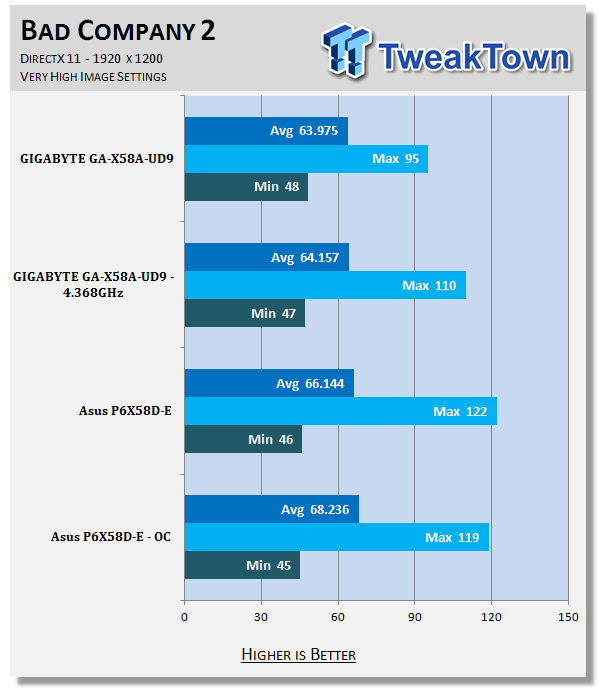
Bad Company 2 is in the same boat as Far Cry2. The frame rates here are way too close to call a real winner. But then again, that is the way most gaming tests go when all you change is the motherboard.
Gaming Conclusion
What can I really say about the gaming performance here? Not much; the GA-X58A-UD9 will give you a great gaming experience as long as you use the right GPUs. This is good news, but is only part of the picture. One of the major selling features here is that the UD9 can support more than the traditional two GPUs with full x16 lanes.
We plan to see what this will do for your gaming experience in the coming weeks with both the GTX 470 and the GTX 480. It should be a very interesting series of tests.
Power Usage and Heat Tests
Power Consumption
We are now able to find out what kind of power is being used by our test system and the associated graphics cards installed. Keep in mind; it tests the complete system (minus LCD monitor, which is plugged directly into an AC wall socket).
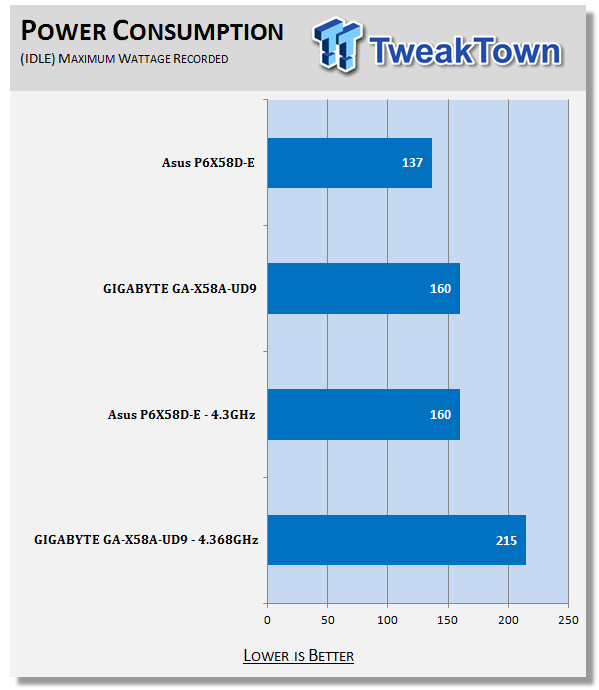
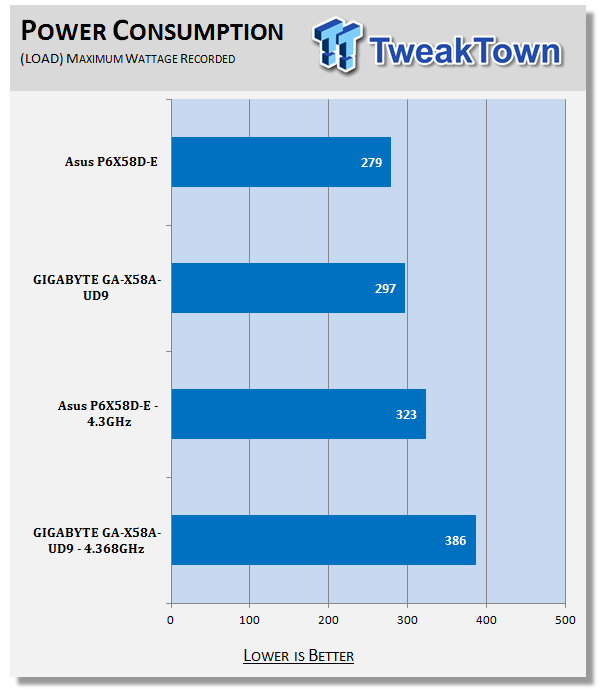
The X58A-UD9 can be a power hungry board. It consistently draws more power than our other X58 board, but then again, it has two NF200 chips to feed.
Heat Generation
As a new measure, we are now monitoring the heat generation from the key components on the motherboard; this being the Northbridge, Southbridge (if it contains one) as well as the Mosfets around the CPU. The results are recorded at idle and load during the power consumption tests.
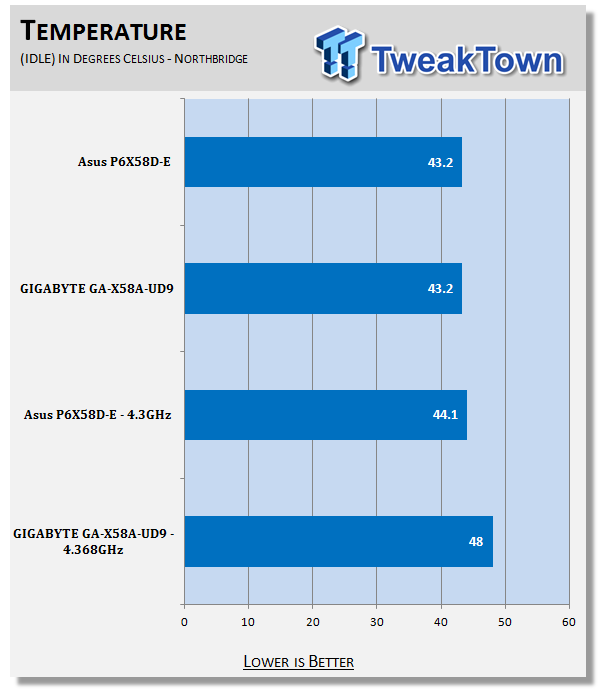
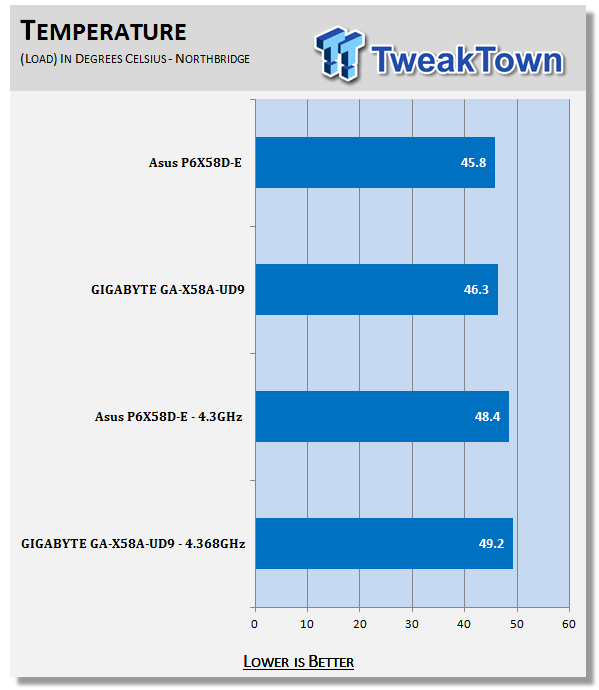
Remember how we were concerned about heat because we were not able to use the SilentPipe II? Well, it looks like we did not need to be that concerned. Even when overclocked we were not that far from our other test subject. Granted, I am sure that if we were able to use that extra cooling (or water) we would have gotten much better results, but the ones we achieved without it are not that bad at all.
Final Thoughts
The X58A-UD9 is a $649.99 board at NewEgg.com. That is quite a bit of money to lump out if all you are looking for is a simple gaming motherboard or workstation. Now, when you look at what you are really getting and consider the potential for performance under the hood here, it's somewhat more warranted.
Having the dual NF200 chips gives you the possibility of Quad SLI and Quad Crossfire with all four GPUs having 16 lanes of bandwidth to play with. This combined with USB 3.0, dual SATA 3.0 ports, Dual GBe LAN, the combination cooling system for the board and the dual 12 Phase power regulation all add up to match the cost asked for.
This is a board to try and punish; it is not a board that you want to dress up and put in a pretty case. With the X58A-UD9, GIGABYTE means business. They want you to run this board as hard and as fast as you can. It is true that with our current cooling solution we were not able to get very much out of our Core i7 980X, but we have a feeling that there is plenty of head room in the X58A-UD9 and if you start piling on the GPUs, well, then things will get very interesting.
We plan to dive deeper into the X58A-UD9 to see what adding more GPUs and better cooling can do. For now, though, we can honestly recommend this board not only for the audacity of its design, but also for the potential performance that you can get from it.

 United
States: Find other tech and computer products like this
over at
United
States: Find other tech and computer products like this
over at  United
Kingdom: Find other tech and computer products like this
over at
United
Kingdom: Find other tech and computer products like this
over at  Australia:
Find other tech and computer products like this over at
Australia:
Find other tech and computer products like this over at  Canada:
Find other tech and computer products like this over at
Canada:
Find other tech and computer products like this over at  Deutschland:
Finde andere Technik- und Computerprodukte wie dieses auf
Deutschland:
Finde andere Technik- und Computerprodukte wie dieses auf  This idiot-proof thermal paste applicator will make applying TIM easy, even for noobs
 MSI no longer interested in under performing AMD Radeon GPUs, now exclusive to NVIDIA
 SDC's new 27-inch 4K 165Hz Nano-IPS monitor features DisplayPort 2.0, costs just $415
 Sabrent wants you to enhance your tech with special savings on SSD, RAM, and enclosure bundle
 LG's 32-inch gaming OLED monitor with 480Hz refresh rate is imminent, with pre-orders live now
 SteelSeries Arctis Nova 4X Wireless Gaming Headset Review
 ACEMAGIC AD08 "Core i9 11900H" Mini PC Review
 Lenovo ThinkPad X1 Carbon Gen 12 Review
 ASUS ROG Swift Pro PG248QP Gaming Monitor Review - Frames, frames, and more frames
 FlexiSpot C7B-Mesh Ergonomic Office Chair Review
 Samsung G8 34-inch QD-OLED Gaming Monitor Review - 175Hz for $900
 ASRock NUCBOX-155H Mini PC Review
 NuPhy Air96 V2 Wireless Mechanical Keyboard Review
 TEAM T-FORCE Siren DUO360 RGB Liquid CPU Cooler Review
 AVerMedia Live Streamer ULTRA HD Review
 Building the Ultimate Home Entertainment Server with an ASUSTOR NAS and Viper Gaming NVMe SSDs
 Everything you need to know about the latest ASUS NUC Mini PCs - NUC 14 Pro and ROG NUC
 How to Overclock Your GPU and Boost Your PC Gaming with ASUS GPU Tweak III
 ASUS's AMD Radeon RX 7000 Series GPU lineup has something for every gamer
 ASUS OLED Premium Care defends the ROG Swift OLED PG32UCDM gaming monitor from burn-in