









Introduction

On March 10th Intel lifted the lid on the Core i7 980X. This is a 32nm, six-core, twelve-thread CPU that handily eats up the competition in threaded (and some non-threaded) applications. This CPU is almost drop-in compatible with existing X58 based motherboards (all you need is a BIOS flash). But is the current crop of X58 boards optimized for this new CPU?
We decided to take a look at GIGABYTE's high-end offering, the X58A-UD7. This board features advanced cooling for the chipset and power regulation areas. It also has built in support for SATA 3.0, including RAID support as well as USB 3.0 and Tri-SLI.
At a whisper under $350 on NewEgg.com, this is not an inexpensive product; but then again, when you are planning to potentially drop $1000 on a CPU, you are going to want to have the best board you can get a hold of.
So let's dive in and see how well the GIGABYTE X58A-UD7 performs with the new Gulftown at stock speeds and what you can reasonably expect out of it when you do a little overclocking.
The Box and What's Inside
Package and Contents
The X58A-UD7 comes in a very big box; the front of which is covered in icons expanding on the features of the board. You see the now familiar "333" logo which means that you have USB 3.0, SATA 3.0 and 3x the USB power.

It follows the trend of having a front flap on it that allows you to gaze (longingly) at the board. On the backside of that flap is even more information explaining why you should be buying this board.


The back of the box is more of the same that you find on the front, except maybe a little more cluttered. GIGABYTE has also chosen to use a reflective coating on the outside of the motherboard box. To me this is tacky and makes photographing the box more difficult. However, as GB is not alone in doing this, I cannot fault them for it too much.

Inside the box you get pretty much everything you need to get things up and running.

One additional item that is not a standard fare for a motherboard is the extra cooling fins for the X58 Northbridge. These bolt onto the heatsink and not only help keep the Northbridge cool, but also help with keeping the rest of the board components cool.


The Motherboard
The Board

The X58A-UD7 looks like it is simply way too cramped. When I first looked at it my thought was "what were they thinking?". However, after a closer look I think I understand what GIGABYTE was trying to do; even if I do not agree with it.

Let's start off looking at the top end of the board. The X58A has the usual layout for an Intel ATX board. We see the typical six DDR3 slots for up to 24GB of RAM, a 24-pin ATX power socket, the X58 Northbridge and of course the LGA 1366 socket.
Where things get interesting is with the Northbridge. GIGABYTE has given the option to passively cool this part or to use water to keep the heat under control. This is not a new feature and actually goes back to the X48 Extreme boards of a few years ago. Unfortunately the ID barbs are small; they are 1/8-inch. This means that without a reducer inline you are not going to be using your high-end Swiftech cooling system with this board.

Another oddly placed item is the Power Switch. For some reason GB has placed it up by the RAM slots. Now, normally this would be down on the lower edge of the board. However, taking a look at many of the newer benches the area is difficult to reach. Instead the front edge of the board is towards you. It looks like GB had this in mind.

One last item in the upper half of the X58A that I really cannot find a positive side to is the placement of the 4-pin aux power connector. It is just poorly placed, as is that little fan header up there. Once you get this board in a case (if that is what you plan to do) then that header and the 4-pin connector are nothing more than a great way to shave off some knuckle skin. I highly recommend an extension cable for this as otherwise you will have some difficulty getting this connected without injury.

Moving on to the lower half of the X58A-UD7, we see that GB has continued their tendency to drop in a couple of extra PCI-E x1 slots near the NB. I am still not sure why this is happening. If you use the extra passive cooler both are blocked and useless.
GB has included four PCI-E x16 mechanical slots. This does not mean you are going to get four full x16 slots for GPUs; it means that you get two at x16 (slots 1 and 3), two at x8 (slots 2 and 4). This is actually perfectly ok, unless you are trying to stuff a couple of Dual GPU cards in there.

Moving over, we find a large heatsink covering the SB and other components like the Marvell SATA 3.0 controller. Speaking of SATA 3.0 controllers, the SATA ports are a tad confusing on the X58A. If you look at them it looks like there are six SATA-II and four SATA 3.0 (based on color). However, looking in the manual we find that two of those ports are SATA-II but are used for GIGABYTEs XHD RAID setup. This is also marked on the board itself, but I think that perhaps an additional color would have been the best way to handle this.

The I/O ports are very good on the X58A. GB has always gone the extra mile when it comes to I/O. In fact, they are still one of the few motherboards to offer mini-1394a as a standard component. We also find two USB 3.0 ports in addition to an easily reachable Clear CMOS button. You may note that our board has what appears to be a small bend at the PS/2 connector. This flaw in the board did not cause us any issues during our performance testing and both PS/2 ports worked properly.

Over all the board looks cramped, but there are reasons for much of this. There are still a few items that GIGABYTE really do need to address, but for the most part this looks to be a fairly well laid out board considering what the GA-X58A-UD7 is intended for.
BIOS and Overclocking
BIOS
Getting into the BIOS is an easy task, as is finding and using the overclocking tools inside the BIOS.

For our testing we used the F6 version of the BIOS. This added some stability tweaks for memory and also fixed a very annoying issue we had installing Windows 7 (we will cover that under the system comments on the following page). After getting into the Motherboard Intelligent Tweaker page we found a wealth of options for getting the most performance out of your CPU.

Unfortunately to get to all of the areas you need to tweak your CPU and system, you do have to enter more than a few sub-menus. These are for the Advanced CPU features.

Advanced Clock Control (and QPI settings).

And Advanced Voltage control. I would have thought they would put the CPU PLL Voltage on the main M.I.T. page, but instead it got listed in the Advanced Voltage section.


The peripherals page is a rather long one and as you can see, has more than a few options for dealing with the extra ports and features of the X58A-UD7.

Overclocking
Our overclocking experience with the X58A-UD7 was not too bad. We did see some issues at higher clock speeds (over 163 BCLK), but they could have multiple causes including being memory related. Still, at our final clock of 4.238GHz the X58A-UD7 was very stable.

You can see the validation for the i5 661 with the GMA HD here.
Easy Tune 6
As a part of all of our reviews now we are going to touch on any software based overclocking tools that may be included. With GIGABYTE this is going to be Easy Tune.
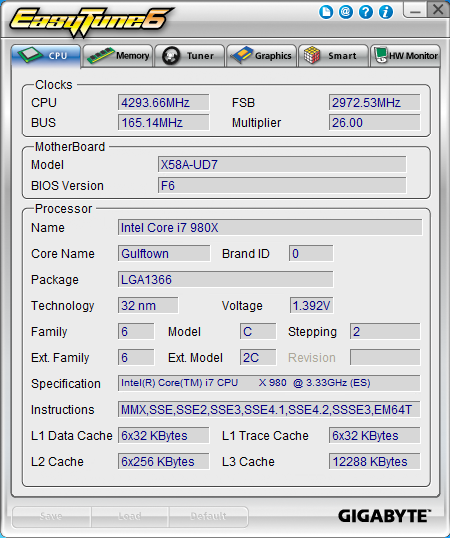
Here you can see your system status at a glance as well as overclock the CPU, memory and GPU fairly quickly.
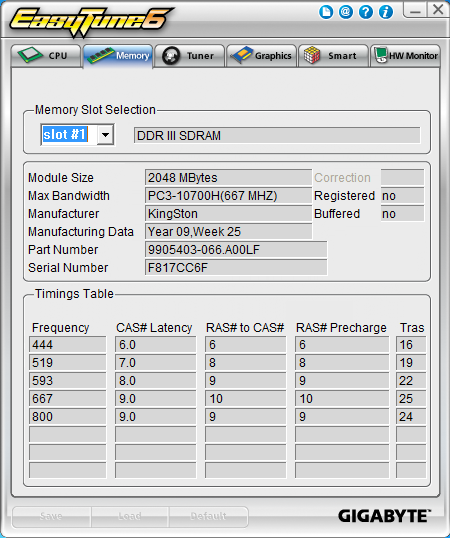
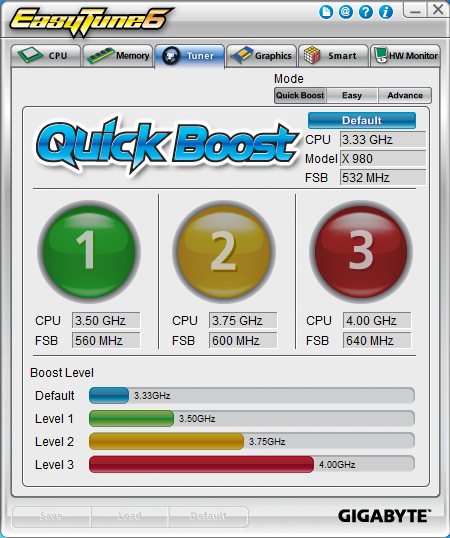
On the actual tuner page you have three options for how you want to work things. If you choose "QuickBoost" all you have to do is click one of the three buttons and reboot your system. We gave this a shot and very quickly had our 32nm Gulftown humming along at 4.0GHz.
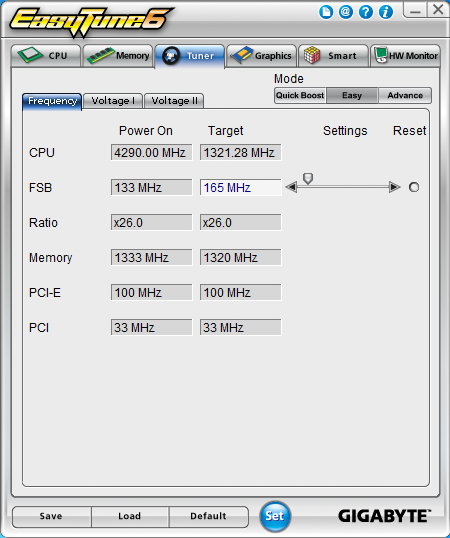
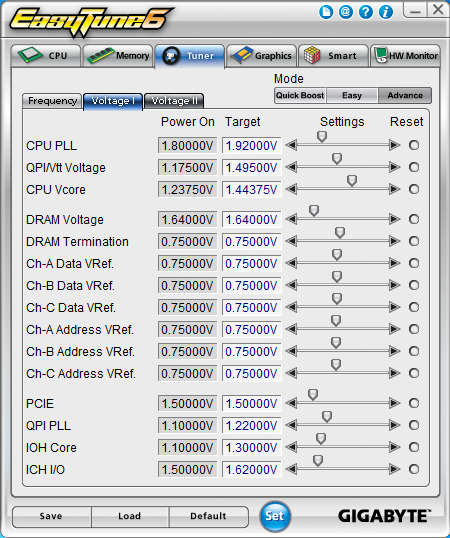
You also have options for both an easy and an advanced overclocking method. With the Easy you do not have options for voltage control. With the Advanced you have the options for all the same voltage options as you do in the BIOS.
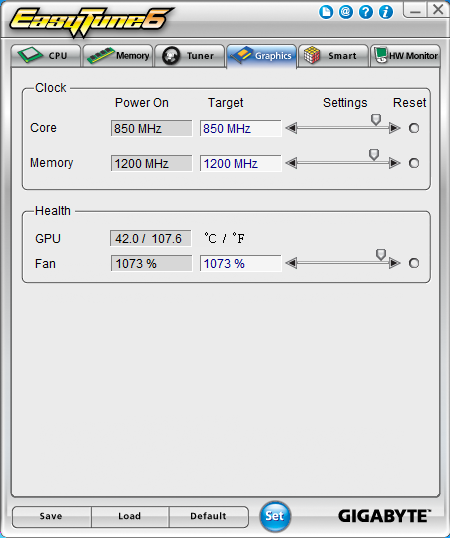
As we mentioned above, you can also kick up the clock on your GPU from this handy little tool.
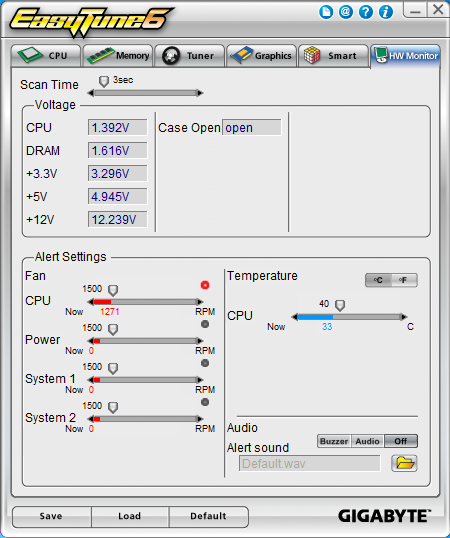
You also have a fairly decent monitoring utility.
As all overclocking results are dependent on the hardware you use, your results may vary. Results of our overclocking tests are included in the performance section with the stock scores.
Important Editor Note: Our maximum overclocking result is the best result we managed in our limited time of testing the motherboard. Due to time constraints we weren't able to tweak the motherboard to the absolute maximum and find the highest possible FSB, as this could take days to find properly. We do however spend at least a few hours overclocking every motherboard to try and find the highest possible overclock in that time frame. You may or may not be able to overclock higher if you spend more time tweaking or as new BIOS updates are released. "Burn-in" time might also come into play if you believe in that.
Test System Setup and Comments
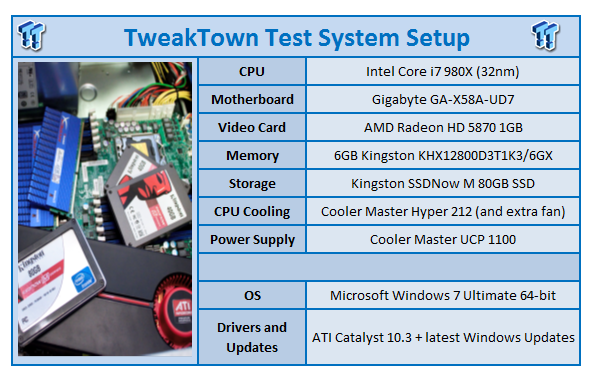
We would like to thank the following companies for supplying and supporting us with our test system hardware and equipment: Intel, GIGABYTE, AMD, Kingston and Cooler Master and Sceptre.
The X58A-UD7 was cramped. Yes, much of that has a reason or an alternate purpose, but there were some items that were just annoying. The placement of the 4-pin aux power connector resulted in more than a few cuts to my already scarred fingers. But overall, after getting past that I did not have too many headaches based on the layout.
However, I did have a rather odd one. When I first received the X58A-UD7 I installed the OS to it in the same way I always have. This is to just use my USB flash drive based copy of Windows 7 x64 Ultimate. When I did this, however, I began to have problems. The board would randomly reboot, the installation would crash with a blue screen and a number of other issues would occur. We tried a number of fixes but nothing seemed to help.
The really odd part was when we used a traditional DVD there were no problems at all. The install went through perfectly. However, with the release of the F6 version of the BIOS that annoying little issue was fixed. I am not sure what did it, but I can say that I have not had that problem with the board since.
If you do get this board, I would highly recommend flashing it to at least the F6 BIOS as soon as possible. Another important note is that the X58A-UD7 takes a while to boot up. It is much slower than other motherboards in its price range. This has to do with the Marvell SATA 3.0 RAID controller on the board. Still, it is annoying at times and more than once made me think that I had pushed my overclock too far.
Synthetic Tests - Part I
With any system you will want to see a combination of synthetic testing and real-world. Synthetics give you a static, easily repeatable testing method that can be compared across multiple platforms. For our synthetic tests we use Everest Ultimate, Sisoft Sandra, FutureMark's 3DMark Vantage and PCMark Vantage, Cinebench as well as HyperPi. Each of these covers a different aspect of performance or a different angle of a certain type of performance.
Memory Bandwidth
Memory is a big part of current system performance. In most systems slow or flakey memory performance will impact almost every type of application you run. To test memory we use a combination of Sisoft Sandra, Everest and HyperPi 0.99.
Sisoft Sandra
Version and / or Patch Used: 2010c 1626
Developer Homepage: http://www.sisoftware.net
Product Homepage: http://www.sisoftware.net
Buy It Here
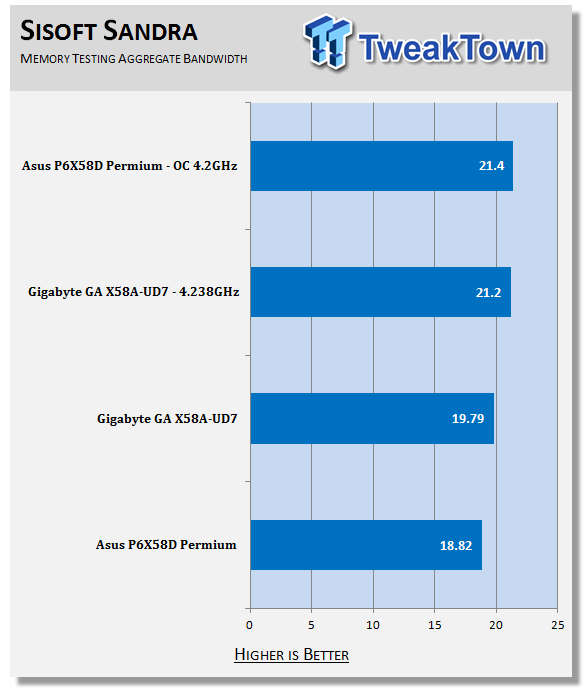
Interestingly we see GIGABYTE do quite well in memory performance. This is not always the case with their high-end overclocking boards. Many times we have seen them loosen the memory performance to get stability at higher clock speeds.
Everest Ultimate
Version and / or Patch Used: 5.30.1983
Developer Homepage: http://www.lavalys.com
Product Homepage: http://www.lavalys.com
Buy It Here
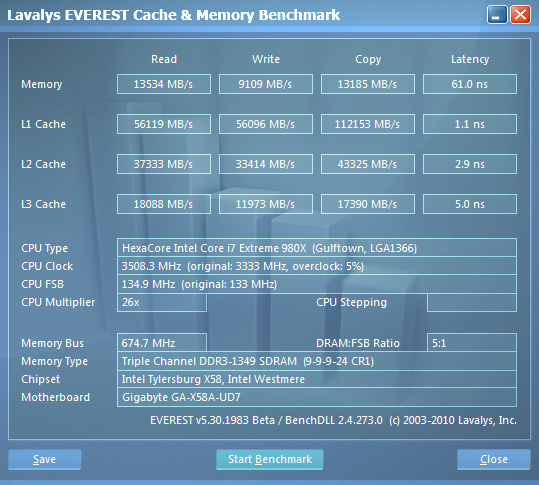
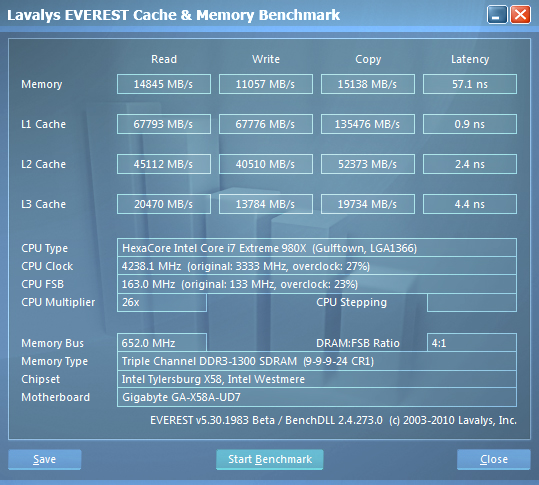
Everest Ultimate is a suite of tests and utilities that can be used for system diagnostics and testing. For our purposes here we use their memory bandwidth test and see what the theoretical performance is.
Stock Memory Performance
Overclocked Memory Performance
Our Everest numbers show us that you can expect decent memory bandwidth from the X59A-UD7.
HyperPi 0.99
Version and / or Patch Used: 0.99
Developer Homepage: www.virgilioborges.com.br
Product Homepage: www.virgilioborges.com.br
Download It Here
HyperPi is a front end for SuperPi that allows for multiple concurrent instances of SuperPi to be run on each core recognized by the system. It is very dependent on CPU to memory to HDD speed. The faster these components, the faster it is able to figure out the number Pi to the selected length.
For our testing we use the 32M run. This means that each of the four physical and four logical cores for the i7 and the four physical cores of the i5 is trying to calculate the number Pi out to 32 million decimal places. Each "run" is a comparative to ensure accuracy and any stability or performance issues in the loop mentioned above will cause errors in calculation.
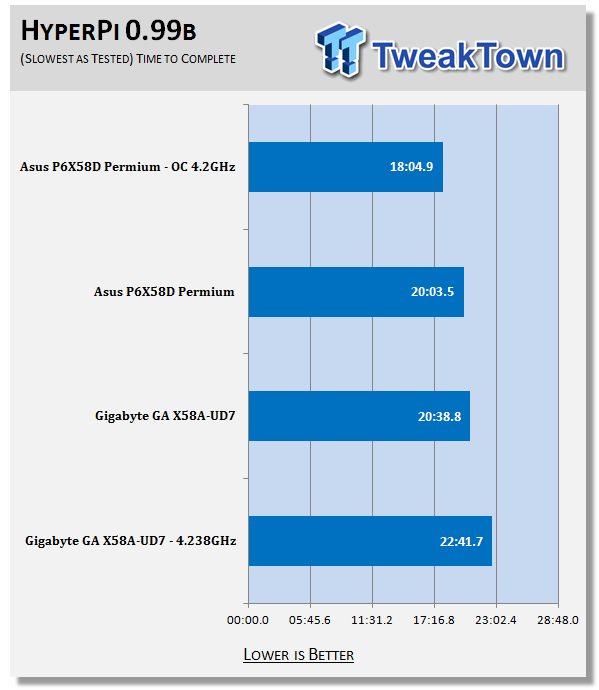
All I can say here is; Ouch! As the X58A has good memory performance this one has to be due to either the CPU or the HDD performance. I am betting that the CPU is not at fault here, but that we may have some issues with HDD performance.
Synthetic Tests - Part II
Disk Drive Controller
The system drive controller is an important part of system performance. In most modern boards your drive controller will run off of the PCI-e bus. The PCI-e bus performance can be affected by poor trace layout as well as many other design choices that show up on different boards.
For testing we use Sisoft's Sandra and Everest.
SiSoft Sandra
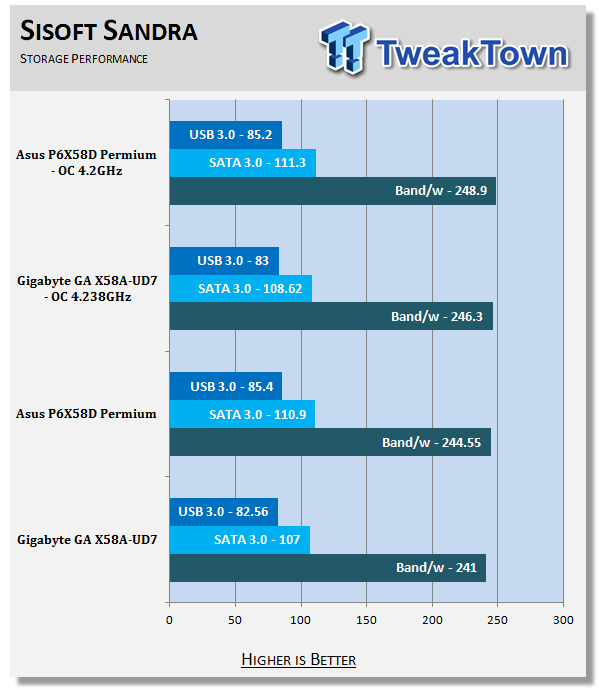
Ah, we do see an issue here with HDD performance. However, it is not great enough to account for the very poor HyperPi showing. Still, I would have thought to see better HDD performance from an X58 board.
Everest

Stock HDD Performance

Overclocked HDD Performance

Stock USB 3.0 Performance

Overclocked USB 3.0 Performance
Here is the reason we include both Sandra and Everest. As you can see, our Sandra scores show the X58A lagging behind the ASUS X58. That is not the case with Everest; instead we see performance where it should be for the drives we are using. So, now the mystery surrounding the poor HyperPi showing deepens even further.
Synthetic Tests - Part III
Here is where we dig out the FutureMark tests.
PCMark Vantage
Version and / or Patch Used: 1.0.0.0
Developer Homepage: http://www.futuremark.com/
Product Homepage: www.futuremark.com
Buy It Here
For overall system performance we use PCMark Vantage. This is run in both x86 and x64 mode to give the best indication of performance.
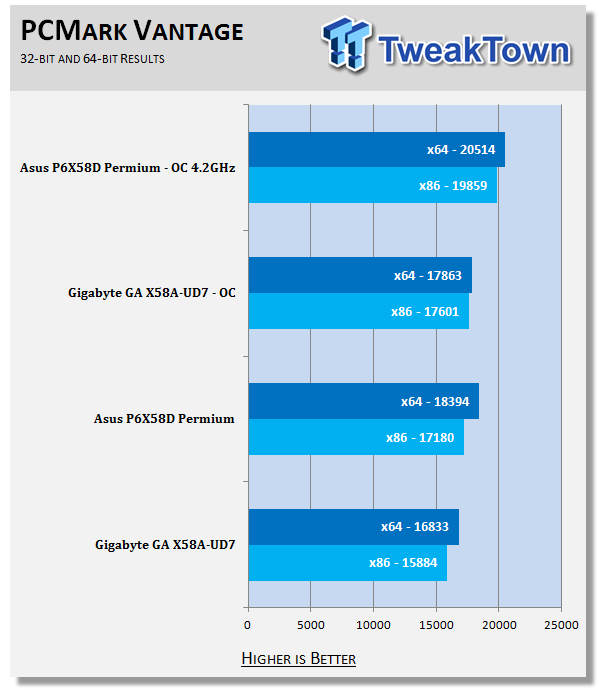
Again we see numbers that are just not right. The PCMark Vantage performance is just plain off from where it should be. We checked a few of the settings in the BIOS to make sure there was nothing set improperly for memory or for the CPU and did not find anything. But, it is important to remember that synthetic tests are not the whole story, so we are not overly concerned with the performance here.
3DMark Vantage
Version and / or Patch Used: 1.0.1
Developer Homepage: http://www.futuremark.com/
Product Homepage: www.futuremark.com
Buy It Here
For synthetic gaming tests we used the industry standard and overlockers bragging tool 3DMark Vantage. This is a test that strives to mimic the impact modern games have on a system. Futuremark went a long way to change from the early days of graphics driven tests to a broader approach including physics, AI and more advanced graphics simulations.
3DMark Vantage uses the DX10 API in addition to having support for PhysX. As we are no longer using an NVIDIA GPU for testing (at least until we can get a GTX 4xx card) you will only see the CPU based PhysX results in the scores. For testing we use the Performance test run.
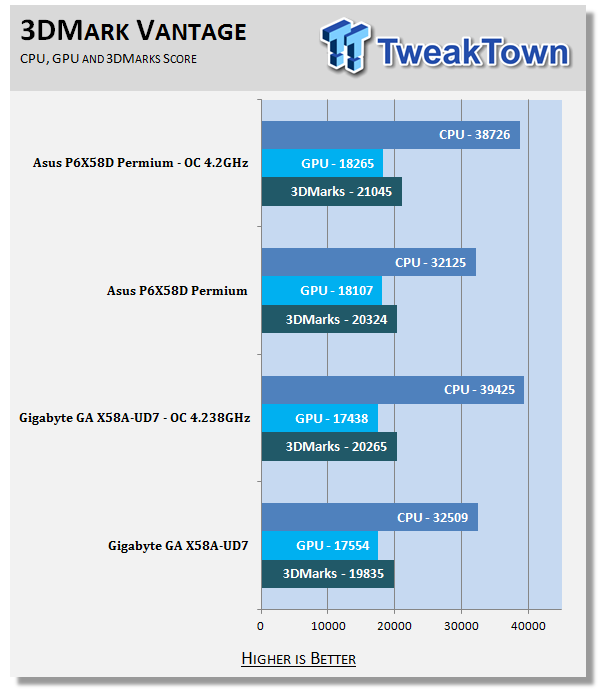
Hmm, this was actually not expected. Usually we see good performance from GIGABYTE in 3DMark Vantage. Unfortunately we are just not seeing that here.
Cinebench R11.5 x64
Version and / or Patch Used: R11.5 x64
Developer Homepage: http://www.maxon.net/
Product Homepage: www.maxon.net
Download It Here
Cinebench is a synthetic rendering tool developed by Maxon. Maxon is the same company that developed Cinema4D, another industry leading 3D Animation application. Cinebench R11.5 tests your systems ability to render across a single and multiple CPU cores. It also tests your systems ability to process OpenGL information.
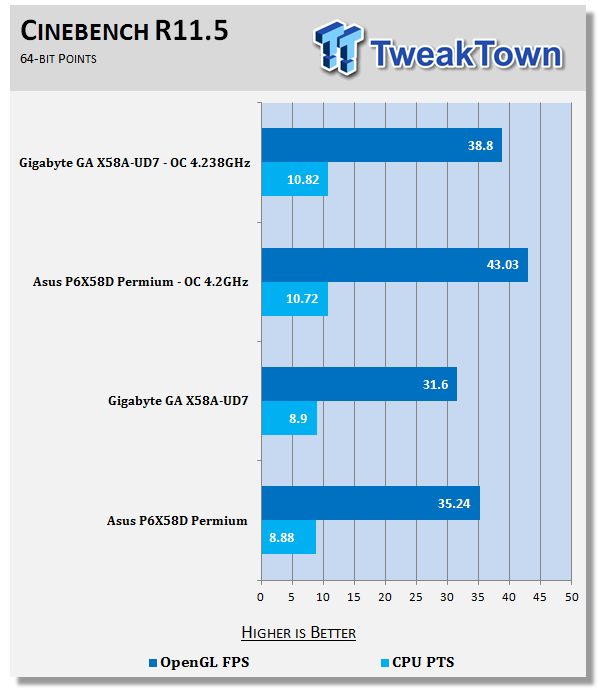
Ok, now this is more like it. Here we see performance that we expected from what is obviously supposed to be a top end board.
Real-World Tests - Part I
Real-world testing allows us to see how well a product will perform when used in the same manner as it would be in your house or office. It is an important side to performance testing as it can uncover hidden glitches in the way a product performs.
It is especially true when testing a mainboard; there are so many components of a board that have to interact that any problems between parts can cause a failure of the whole.
For real-world testing we use some common applications and functions. We test with LightWave 3D for rendering performance, AutoGK for transcoding from DVD to AVI and two games for gaming testing.
Rendering
Rendering of 3D Animation is a system intensive endeavor. You need a good CPU, memory and HDD speed to get good rendering times. For our testing we use LightWave 3D. This software from Newtek is an industry standard and has several pre-loaded scenes for us to use.
LightWave 3D
Version and / or Patch Used: 9.6
Developer Homepage: http://www.newtek.com
Product Homepage: http://www.newtek.com/lightwave/
Buy It Here
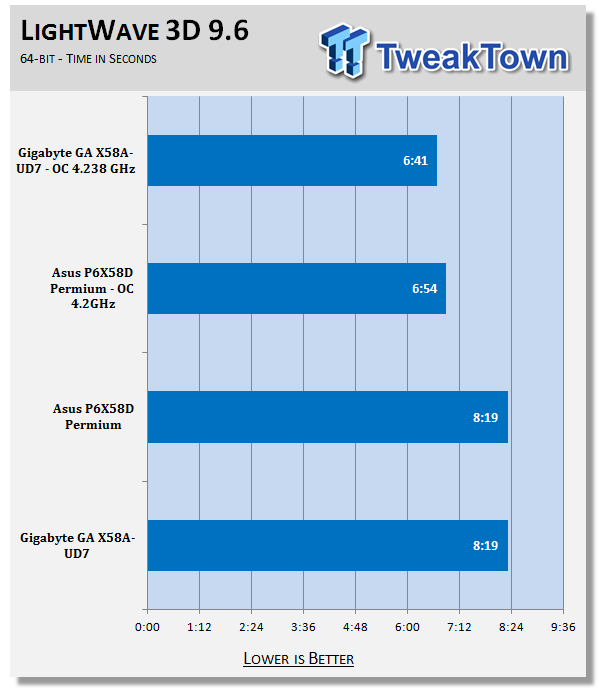
Looks like the GIGABYTE board may have the upper hand in terms of rendering 3D Animation. First we see good performance in Cinebench and now we see good times in LightWave 3D.
AutoGK
Version and / or Patch Used: 2.55
Developer Homepage: http://www.autogk.me.uk/
Product Homepage: http://www.autogk.me.uk/
Download It Here
AutoGK stands for Auto Gordian Knot; it is a suite of transcoding tools that are compiled into an easy to install and use utility. It allows you to transcode non-protected DVDs and other media to Xvid or Divx format. For our testing purposes we use a non-DRM restricted movie that is roughly 2 hours in length. This is transcoded to a single Xvid AVI at 100% quality.
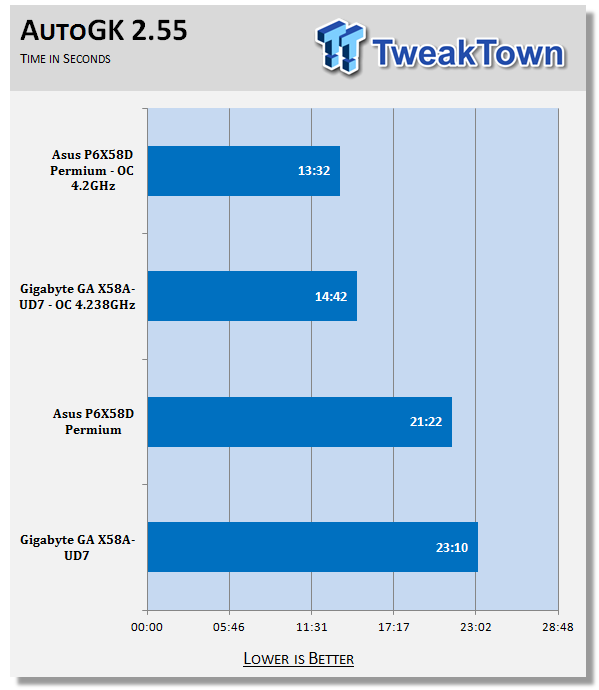
After the great showing for 3D animation rendering we were hoping for good performance in transcoding. Sadly this was not the case.
Real-World Tests Part II
Here we have our real gaming tests. Each of the games we chose use multiple cores and GPUs. They are able to stress the system through use of good AI. Both have decent positional audio that adds impact to the sound subsystem of the board. We ran each game through the level or parts listed and recorded frames per second using FRAPS. This brings the whole game into play.
*** A word on gaming as a motherboard test ***
Despite the fact that most games are very GPU limited, we are still noticing HDD and even audio creating issues in gaming performance. Because of this you may see differences in the number of frames rendered per second between different boards. Usually the difference is very small, but occasionally because of bad tracing, poor memory or HDD performance, this difference is significant. The issues are often more prevalent in older versions of DirectX, but can still pop up in DX10 and 11.
Call of Duty Modern Warfare 2 (DX9)
Version and / or Patch Used: 1.0
Timedemo or Level Used: First combat until the school is cleared
Developer Homepage: http://www.infinityward.com
Product Homepage: http://modernwarfare2.infinityward.com
Most of you know about the game Modern Warfare 2; it caused quite a bit of controversy in the latter half of 2009. The game is a first person shooter with a heavy combat emphasis. It follows the events in the first Modern Warfare very closely and brings back several characters from the original.
As with most games in the Call of Duty franchise, it features a heavy AI load. This is not because of a complex AI routine, but more due to the sheer number of enemies in any given combat situation. It is also our single DX9 based game in our testing suite. Settings are shown below.


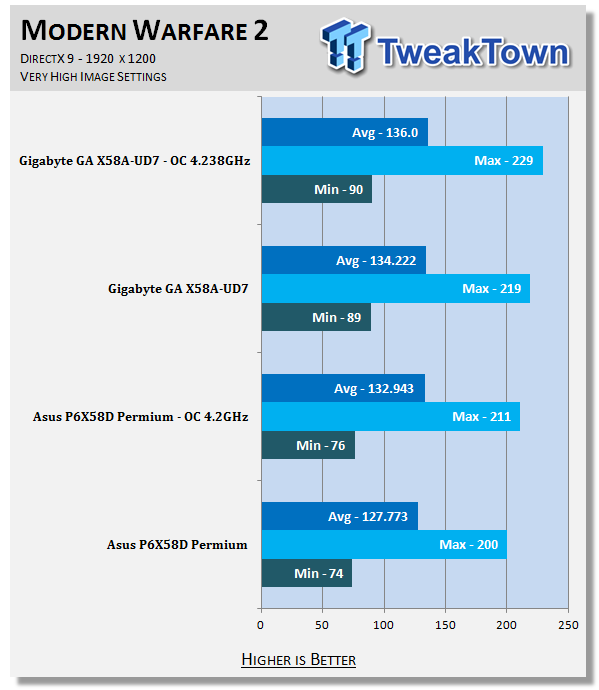
We see a nice return to the winner's circle with our Modern Warfare 2 testing. It is important to note that while this is most certainly a win, we are only talking about a difference of about 6FPS on average. But where things get really interesting is in the minimum FPS category. Here we are seeing a very noticeable difference of around 15 FPS.
Far Cry 2 (DX10)
Version and / or Patch Used: V1.00
Timedemo or Level Used: Clearing the Safe house through to the Rescue
Developer Homepage: http://www.ubi.com
Product Homepage: http://farcry.us.ubi.com
Far Cry 2 is a large sandbox style game. There are no levels here so as you move about the island you are on you do not have to wait for the "loading" sign to go away. It is mission driven so each mission is what you would normally think of as the next "level".
In the game you take the role of a mercenary who has been sent to kill the Jackal. Unfortunately your malaria kicks in and you end up being found by him. Long story short, you become the errand boy for a local militia leader and run all over the island doing his bidding. Settings we used for testing are shown below.

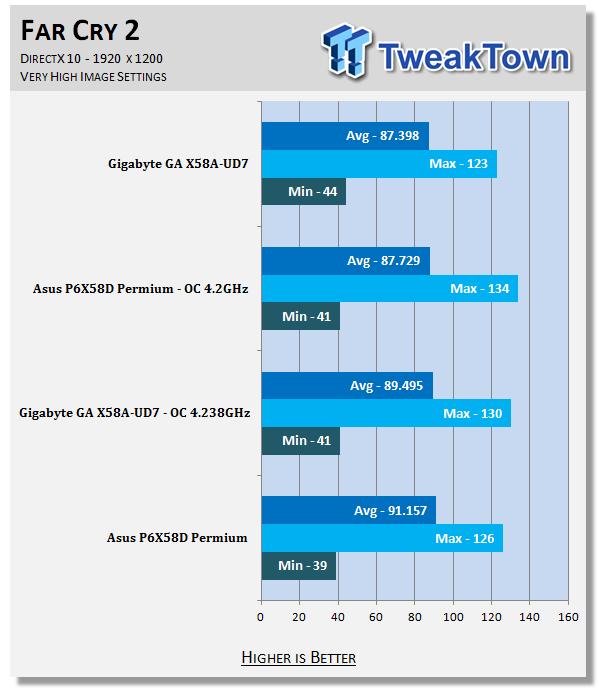
Here the numbers are so close together it is not even worth calling a winner. You could run these systems side-by-side and not notice a difference.
Battlefield Bad Company 2 (DX11)
Version and / or Patch Used: V1.00
Timedemo or Level Used: From washing up on the beach to the mine fields.
Developer Homepage: http://www.ea.com/
Product Homepage: http://badcompany2.ea.com/
Battlefield Bad Company is another sequel and also another game "franchise". Bad Company 2 is also our DX11 Shooter game. The game follows a fictitious B company team on a mission to recover a Japanese defector. This puts you back in World War II (at least for the beginning of the game) while the multi-player game is centered on much more modern combat. For our testing we used the single player mode. Settings are shown below.

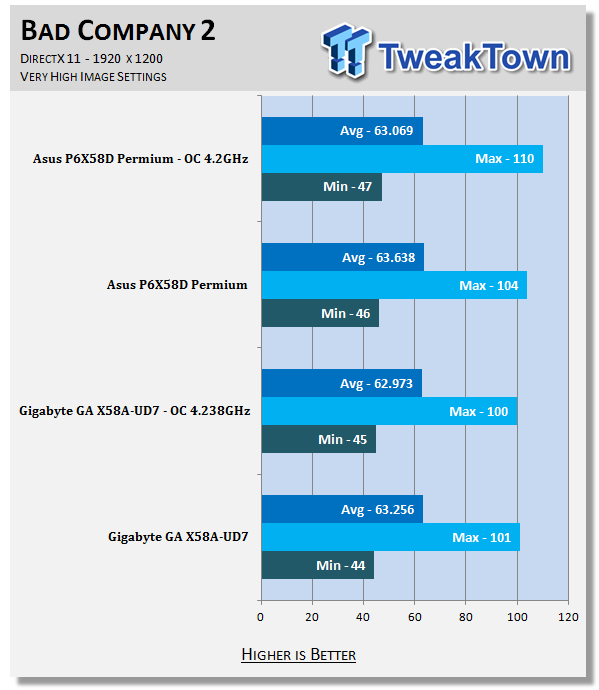
Again the performance is almost spot on identical. Not really much to say here.
Gaming Conclusion
Our gaming experience with the GIGABYTE X58A-UD7 was a positive one. We did not have any issues with lag, stutter or any noticeable audio problems. Granted, our test sampling is a very small number of games, but overall we do not see where you would have any problems using the X58A-UD7 as a gaming platform.
Power Usage and Heat Tests
Power Consumption
We are now able to find out what kind of power is being used by our test system and the associated graphics cards installed. Keep in mind; it tests the complete system (minus LCD monitor, which is plugged directly into an AC wall socket).
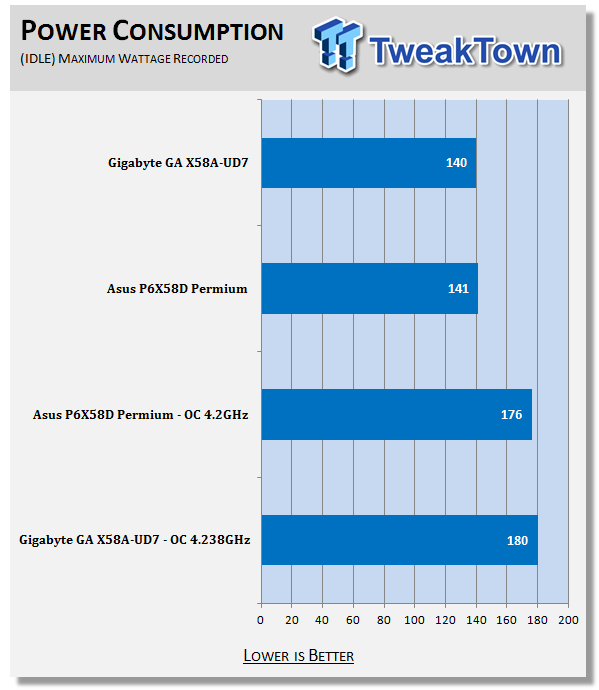
Idle power consumption was not too bad for an X58 with a six core CPU and an AMD HD 5870.
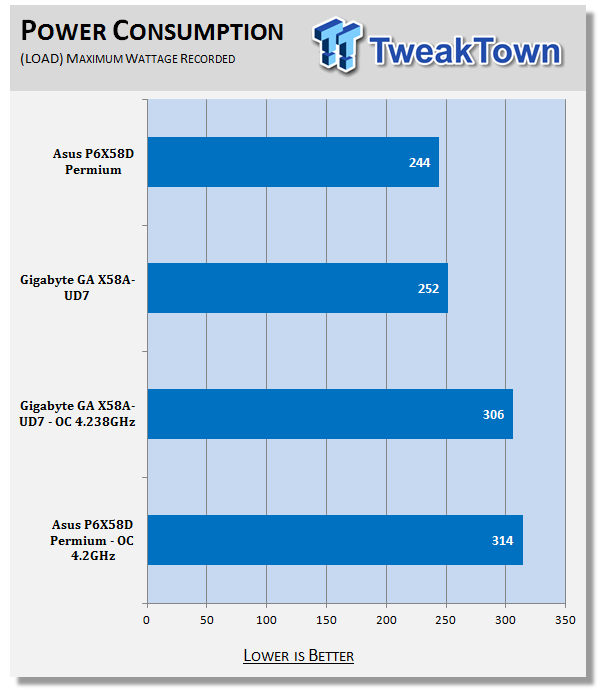
Load power consumption is a little bit on the high end. It makes us realize that you can get great power savings from newer boards when they are not in use, but once you start making them work they are still going to push up your power bill.
Heat Generation
As a new measure, we are now monitoring the heat generation from the key components on the motherboard; this being the Northbridge, Southbridge (if it contains one) as well as the Mosfets around the CPU. The results are recorded at idle and load during the power consumption tests.
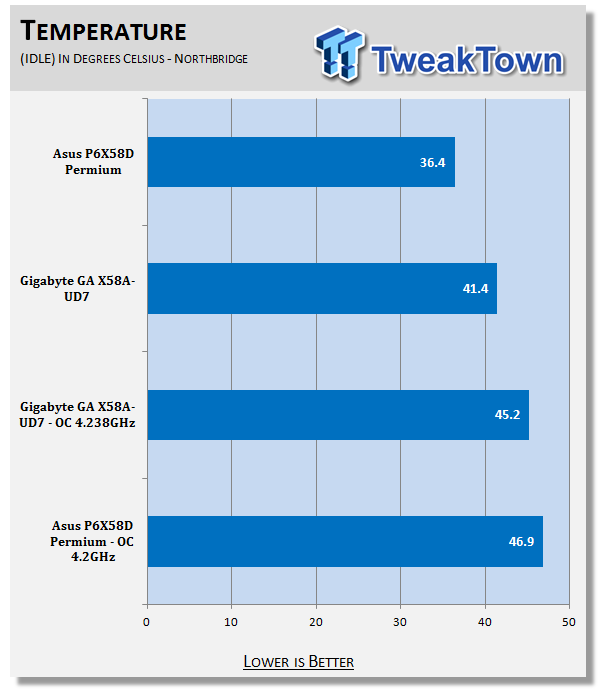
At idle even the overclocked boards were not pushing the limits. GIGABYTE's cooling system does pretty well even outside a case where there is not much direct airflow over the extended heatsink.
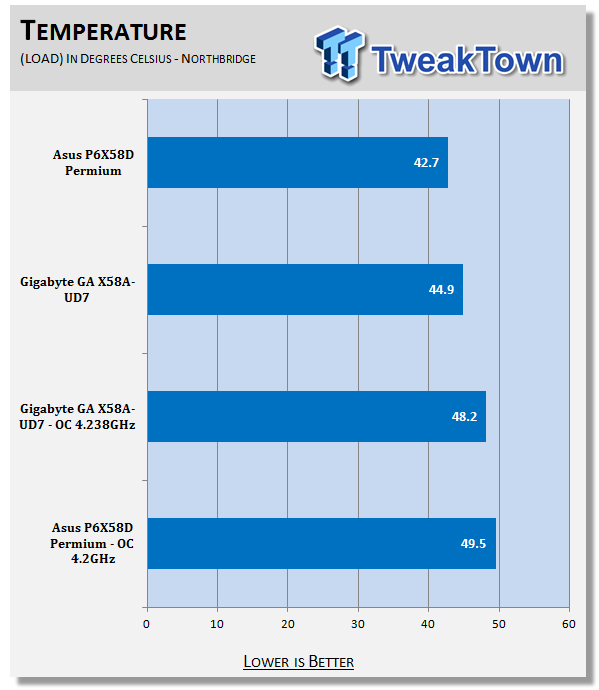
Under load the X58A-UD7 gets a little hotter. This is more than likely due to the testing environment. In a case with adequate airflow you should have lower temperatures than what we are seeing here.
Final Thoughts
The GIGABYTE X58A-UD7 is a nice board. It looks cool in your system (if you have a window) and is clearly capable of some good performance. However, we did not see that on the bench. But, I would not give up on the X58A-UD7. According to the overclocker "Hi Cookie" there is a new BIOS on the way that greatly improves performance with the 32nm Gulftown CPU. At the time of testing (and writing) we did not have access to this BIOS, but we do hope to return to the X58A once it is out and see what we find.
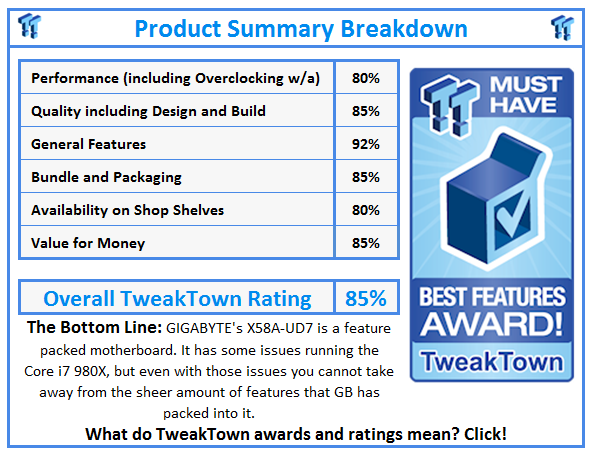
Overall, we found the X58A-UD7 to be a well-rounded board. The inclusion of dual GBe LAN ports, SATA 3.0 (With RAID), XHD RAID, USB 3.0, multiple choices for cooling the board, 24-power phases and a great overclocking utility (EasyTune 6) make it an excellent choice as long as you are not looking to drop a Gulftown CPU in there right away.
We do hope that the F7 BIOS that is in the works will correct the performance issues we saw with our synthetic tests, but as not a ton of people are going to be dropping the $1000 Core i7 980X into this board we can feel fairly confident that it will do what you ask it to. Considering the $350 price tag at NewEgg.com, we think that the X58A-UD7 certainly should be doing that.
Our Latest Socket LGA 1366 Review Coverage

 ASRock Z890 Taichi Aqua Motherboard Review - Flagship features without the flagship price
 GIGABYTE Z890I AORUS Ultra Motherboard Review - Mini-ITX with surprisingly good thermals
 GIGABYTE Z890 AORUS Elite WiFi7 Plus Motherboard Review - Right in the sweet spot
 ASUS ROG Strix X870E-E Gaming WiFi7 NEO - A Crosshair by any other name
 MSI MAG B850 Tomahawk Max WiFi II Motherboard Review - Leveling up
 Kingdom Hearts IV release date possibly leaked online following Switch 2 confirmation
 Anthropic releases state-of-the-art AI model Claude Fable 5, and it's safe to use
 Nintendo showcase FromSoftware's next title 'The Duskbloods' in new mysterious trailer
 Razer Seiren V3 Pro is a new professional-grade microphone for gamers and creators
 Xbox is rethinking its Project Helix strategy as memory prices continue to soar
 Control Resonant arrives in September with DLSS 4.5 and Path Tracing on PC
 NZXT unveils aesthetically pleasing cases, fans and coolers at Computex 2026
 NVIDIA GeForce Hotfix 610.52 driver released, fixes issues related to G-SYNC, Smooth Motion, and stability
 3DMark adds native Windows on Arm support for ray-tracing benchmarks
 MSI showcases its next-gen GPU cooling tech and it could be for the GeForce RTX 60 Series
 Navman MiVue Smart True 4K Surround Dashcam Review - Seeing In All Directions At Once
 IQUNIX Magi96 Pro Aluminum Low Profile Mechanical Keyboard Review - Premium Build, Satisfying Sound
 Asetek Forte S-Series Racing Simulator Bundle Review
 Razer Pro Type Ergo Wireless Split Ergonomic Keyboard Review - Built for Comfort and Support
 ASUS ROG Strix Morph 96 Wireless Gaming Keyboard Review - Great Performance, More Affordable
 SAPPHIRE Radeon RX 9070 GRE PULSE OC Review - A New 1440p Challenger Has Arrived
 NZXT H6 RGB+ Compact Dual-Chamber Chassis Review
 ASRock Radeon RX 9070 GRE Steel Legend Review - The RDNA 4 Mid-Range Reshuffle
 The PowerToys utilities I keep enabled on every Windows 11 PC, and the ones I turned off within a week
 TweakTown's Best of Computex 2026 Awards - The Best Hardware, Gaming Gear, and AI
 Phison E37T SSD Controller Exclusive Preview - The Fastest DRAMless SSD Platform Yet
 USB Ports Not Working in Windows 11? Try These Fixes
 ASUS WiFi Routers and Networking Solutions Deliver Long-term Security and Reliability with No Additional Cost
 Second Monitor Not Detected in Windows 11? Try These Fixes
 Turn Your Old Smartphone Into a Dedicated Webcam for Your Windows PC
 The Send To menu is the right-click feature on Windows 11 that nobody bothers to customize
 Windows 11 will not let you pin a folder to the taskbar, but a 30-second workaround does
 ASUS ProArt Displays Unlock Creativity with Professional Monitors for Everyone