

Introduction

When you are putting together a high-end system your choice of memory is usually second or third on your list of parts. This is even more so true now that both sides of the house have memory controllers built directly into the CPU. After all, without good, stable and fast memory your expensive CPU can become an annoyance rather than a joy.
So, what do we look for these days from our RAM? Well, if you were looking for a Socket 775 CPU you wanted the fastest RAM you could find. This helped to overcome the issue of having the memory controller in the NorthBridge.
If you are looking for an AMD CPU you want the best balance of speed and latency. This is now also true of the Nehalem, as the internal memory controller is as fast as the CPU bus, but can be seriously affected by latency.
So we see that looking for the right memory is an interesting process, especially with the advent of dual channel, triple channel, Intel's XMP Profiles and of course manufacturers "certifying" everything for this or that platform.
Today we take a look at Corsair's Dominator GT for Lynnfield.This is a PC3-12800 (DDR3-1600) 8GB kit (4x 2GB) that offers some stylish looks and some good performance. The one thing that it has over many other kits in the same line is lower stock latency. This means that the SPD (Serial Presence Device) will tell the motherboard and memory controller that it is CL8 from the moment you drop it in.
Let's take a look and see if this kit can give you a performance edge at stock speeds and also what it is capable of when we push it a little.
The Package, Modules & Cooler
The Package
We did not have the full retail packaging so unfortunately we cannot comment on how it is laid out or how well it would protect the Dominator or fan that we were sent.
Each of the modules sent to us arrived in a plastic clamshell that did a good job of protecting them from shipping damage.
The Modules

The actual Dominator GT modules are interesting looking. They are bulky and quite weighty for RAM, but all of that is in the name of cooling. The outer shell is ridged and thick to allow for efficient transfer of heat from the actual chips to the sink.

On top of each is a row of short and thick fins. These do a good job of maintaining a stable operating temperature and add a bit of flare with their "Intel" blue coloring.


The Dominator GTs that we received are labeled as 1600MHz and having timings of 8-8-8-24. The operating voltage at 1600MHz is 1.65v These samples are also labeled as Version 3.1 This means that they do not have the Elpida chips that caused so much of a headache before. All of the 3.X series have Micron chips under the spreaders which should give a decent and stable overclock.

According to few sources the 3.1 will not clock as high as the 3.2 (which can reach as high as 1900MHz) so we are expecting around 1800MHz stable once we get them on the bench.
The Cooler
Corsair also included a cooling fan intended to make sure that your RAM keeps cool at high overclocks. This is also a very industrial looking item with large visible bolts, two fans and a blocky design.


There is a down side (well, more than one) to using this cooler, though. The first problem has to do with the way most boards are laid out. If you are using any kind of high performance tower cooler you are not going to be able to place the fan over the RAM properly. Of course, this is true with almost all of the coolers out there including the one from Kingston.


The second is that the Corsair cooler is simply loud. As the fans are small and high speed they make a high pitched sound that can get quite annoying. This is one cooler that would certainly benefit from a fan controller.
Overclocking
Overclocking RAM has two schools of thought. The first and most common is looking for the fastest speed you can get. This is what most people think of when you mention overclocking. But there is a second method that has been around for a while and is growing in momentum. This is finding the tightest timings you can get and is actually more important with an internal memory controller than just simply pushing the MHz up as high as you can get.
For our testing we tried out both methods and then checked to see what the performance difference was (if any).
For sheer speed we managed 1866 MHz with timings of 9-9-9-24 2T. This was at 1.64 volts and while stable, was hindered by the loser timings.
On the other end of the spectrum we were able to get 1600MHz at 7-8-8-22 1T which seemed to give us the best performance. We included all of our overclocking results with the performance results below.
In other testing the Corsair Dominator GT did allow us to get an 8th place mark in SuperPi Mod 1.5 (from Xtreme Systems) for the hardware used and a high point benchable OC of 4426MHz on our Core i5 750.

Important Editor Note: Our maximum overclocking result is the best result we managed in our limited time of testing the memory. Due to time constraints we weren't able to tweak the motherboard to the absolute maximum and find the highest possible FSB, as this could take days to find properly. We do however spend at least a few hours overclocking every motherboard to try and find the highest possible overclock in that time frame. You may or may not be able to overclock higher if you spend more time tweaking, or as new BIOS updates are released. "Burn-in" time might also come into play if you believe in that.
Test System Setup and Comments
Test System Setup
Processor: Intel Core i5 750
Mainboard ASRock P55 Deluxe (P130 BIOS) (Supplied by ASRock)
Memory: Corsair Dominator GT CMD8GX3M4A1600C8 (Supplied by Corsair)
Hard Disk: Kingston SSD Now M (Intel X25-M 80GB SSD) (Supplied by Kingston)
Graphics Card: Zotac GTX 285 AMP! Edition 1GB (flashed to stock BIOS) (Supplied by Zotac)
Cooling: ThermalRight MUX-120 (Supplied by ThermalRight)
Operating System: Microsoft Windows 7 Ultimate RTM
Drivers: Intel INF 9.1.1.1015, ForceWare 190.62

Comments
With our testing we wanted to make sure the CPU stayed at its rated speed while we kicked up the speed on the RAM. We did this using the easy settings found on the ASRock P55. However, as with any testing that changes the internal core clock of the CPU you will see a performance increase over stock speeds. For our timings testing we predominantly played with the Latency and Command rate as they have the most direct effect on performance and stability.
Performance Testing
wPrime
Version and / or Patch Used: 2.0
Developer Homepage: http://www.wprime.net/
Product Homepage: http://www.wprime.net/
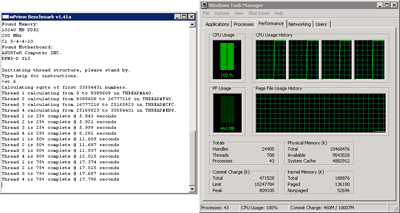
wPrime uses a recursive call of Newton's method for estimating functions, with f(x)=x2-k, where k is the number we're sqrting, until Sgn(f(x)/f'(x)) does not equal that of the previous iteration, starting with an estimation of k/2. It then uses an iterative calling of the estimation method a set amount of times to increase the accuracy of the results. It then confirms that n(k)2=k to ensure the calculation was correct. It repeats this for all numbers from 1 to the requested maximum.

Interestingly enough the Dominator GT is not as fast as the Kingston offering at stock speeds (and with looser timings) in this test, although the time difference is measured in 100ths of a second. When we push the Corsair up to 1600MHz and drop the CL to 7 and the command rate to 1T we do see an improvement, but again it is a very small gain over the Corsair and a slight drop from what the SPD sets that RAM at.
EVEREST
Version and / or Patch Used: Ultimate Edition
Developer Homepage: http://www.lavalys.com/
Product Homepage: http://www.lavalys.com/products/overview.php?pid=3&ps=UE&lang=en
Buy It Here
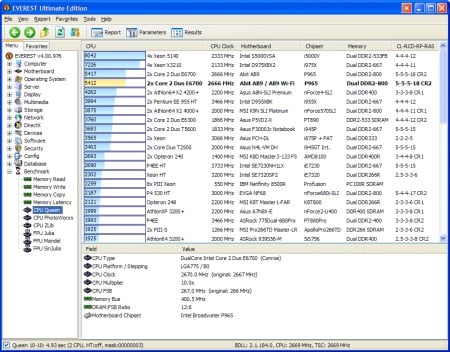
EVEREST Ultimate Edition is an industry leading system diagnostics and benchmarking solution for enthusiasts PC users, based on the award-winning EVEREST Technology. During system optimizations and tweaking it provides essential system and overclock information, advanced hardware monitoring and diagnostics capabilities to check the effects of the applied settings. CPU, FPU and memory benchmarks are available to measure the actual system performance and compare it to previous states or other systems. Furthermore, complete software, operating system and security information makes EVEREST Ultimate Edition a comprehensive system diagnostics tool that offers a total of 100 pages of information about your PC.

Our EVEREST numbers are all over the place. At stock speeds the Corsair Dominator RAM is a hair slower in reads and writes, but faster at copying data from one portion of RAM to another. When pushed to 1600MHz the Corsair wins read speed, but not at write or copy.
It is interesting to see how each type of memory usage is impacted at different speeds and timings. In all the best overall performance comes from the Corsair Dominator GT running at 1600MHZ with a CL of 7 and Command rate of 1T.
Performance Testing II
SiSoft Sandra
Version and / or Patch Used: Professional Home
Developer Homepage: http://www.sisoftware.co.uk
Product Homepage: http://sisoftware.jaggedonline.com/index.php?location=home&a=TTA&lang=en
Buy It Here
SiSoft Sandra (System ANalyser, Diagnostic and Reporting Assistant) is a synthetic Windows benchmark that features different tests used to evaluate different PC subsystems.

Here we see a good indication of speed (MHz) not being as important and tighter timings. The Corsair Dominator GT performs horribly at 1866MHz with a CL of 9 and a Command rate of 2T. It is at its best running at the slower speed of 1600MHz with a CL of 7 and a command rate of 1T.
HyperPi 0.99b
HyperPi 0.99b is a front end that allows for multiple instances of SuperPi to be run on a system. SuperPi is a mathematical program designed to calculate the number Pi to a specific number of decimal places. In terms of memory testing it is stressful as it runs one instance per physical or logical core. This means that your system memory has to buffer the calculations for the number of cores (in this case 4) available on your CPU. For our testing we use a 32M run. This means that the system memory is trying to buffer four Pi calculations out to 32 million decimal places.

Our HyperPi testing shows us again that higher clock speeds are not much of an improvement if you have to loosen timings to get there. Our best performance was again at 1600MHz, CL7, 1T.
Performance Testing Gaming
Far Cry 2
Version and / or Patch Used: 1.01
Timedemo or Level Used: Recon and Rescue Mission
Developer Homepage: http://www.ubi.com/
Product Homepage: http://www.farcry2.com/
Buy It Here

The Dunia Engine was built specifically for Far Cry 2 by the award-winning Ubisoft Montreal development team. It delivers the most realistic destructible environments, amazing special effects such as dynamic fire propagation and storm effects, real-time night-and-day cycle, dynamic music system, non-scripted enemy A.I. and so much more.


Memory in gaming is not a big factor in terms of performance. With more complex and GPU centric gaming engines system memory only plays a part in terms of size and not speed. Our testing showed almost no performance difference between the two brands and at any of the speeds tested. We saw the biggest "hit" at 1866 with a massive loss of 1.25FPS.
Final Thoughts
The Corsair Dominator GT is some good RAM. Without too much effort we were able to get a decently high overclock in terms of speed, but found that we had to loosen the timings too much for it to be of any performance value. On the other hand, the tighter than normal timings at stock and labeled speed gave us a nice performance boost that was noticeable for most of our testing.
Pricewise it was not the most expensive kit we found, but it was also not the cheapest. Newegg are currently listing it for $244.99 U.S. with free shipping. This is good value if you are looking for a good 8GB kit of RAM that has potential for some decent overclocking. Still, there were some downsides (as we mentioned). The fan is quite loud and not exactly something I would want to listen to for an extended period of time.
All in all, the Corsair Dominator GT 8GB kit for Lynnfield is a pretty good buy. For anyone running a Microsoft based 32-bit OS it is going to be useless, but as we move towards 64-bit computing this will be seen less and less. If you are in need of a ton of RAM with good speed for your new Lynnfield, this would not be a bad choice.

 United
States: Find other tech and computer products like this
over at
United
States: Find other tech and computer products like this
over at  United
Kingdom: Find other tech and computer products like this
over at
United
Kingdom: Find other tech and computer products like this
over at  Australia:
Find other tech and computer products like this over at
Australia:
Find other tech and computer products like this over at  Canada:
Find other tech and computer products like this over at
Canada:
Find other tech and computer products like this over at  Deutschland:
Finde andere Technik- und Computerprodukte wie dieses auf
Deutschland:
Finde andere Technik- und Computerprodukte wie dieses auf  LG's 32-inch gaming OLED monitor with 480Hz refresh rate is imminent, with pre-orders live now
 Google Pixel 8a leak boasts 7 years of security updates but leaves one question unanswered
 Apple has plummeted from first to fifth place in the Chinese smartphone market, analysts warn
 You can blame Tim Cook for 8GB Macs, it seems
 Apple removes three AI apps capable of creating nude images of people from the App Store
 SteelSeries Arctis Nova 4X Wireless Gaming Headset Review
 ACEMAGIC AD08 "Core i9 11900H" Mini PC Review
 Lenovo ThinkPad X1 Carbon Gen 12 Review
 ASUS ROG Swift Pro PG248QP Gaming Monitor Review - Frames, frames, and more frames
 FlexiSpot C7B-Mesh Ergonomic Office Chair Review
 Samsung G8 34-inch QD-OLED Gaming Monitor Review - 175Hz for $900
 ASRock NUCBOX-155H Mini PC Review
 NuPhy Air96 V2 Wireless Mechanical Keyboard Review
 TEAM T-FORCE Siren DUO360 RGB Liquid CPU Cooler Review
 AVerMedia Live Streamer ULTRA HD Review
 Building the Ultimate Home Entertainment Server with an ASUSTOR NAS and Viper Gaming NVMe SSDs
 Everything you need to know about the latest ASUS NUC Mini PCs - NUC 14 Pro and ROG NUC
 How to Overclock Your GPU and Boost Your PC Gaming with ASUS GPU Tweak III
 ASUS's AMD Radeon RX 7000 Series GPU lineup has something for every gamer
 ASUS OLED Premium Care defends the ROG Swift OLED PG32UCDM gaming monitor from burn-in