












Introduction
Using old router as a DIY wireless Access Point
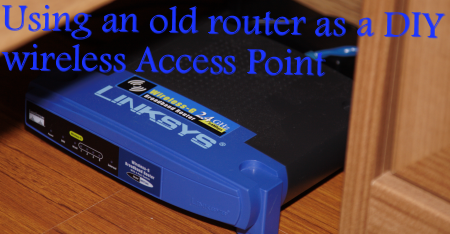
If you are anything like me, you have probably been through your fair share of wireless routers. You may even have a collection of them growing in your storage room, if you haven't gotten around to selling them on the second hand market yet.
I recently moved into a new place and it is a relatively big three story town house. It is about 20 years old and has nice big thick concrete walls and they are just great for wireless networking... almost as great as a car with no wheels. I use a D-Link 802.11n Extreme wireless router for the first floor and it is great for using notebooks and other wireless devices, on the first floor. However once you start to venture past the second floor and onto the third floor, where we spend quite a bit of time, the D-Link router really struggles to provide a strong wireless radio signal in that part of the house. We are able to connect to the D-Link router from the third floor but the connection is flaky at best - it will connect for a while and then drop out without warning. Surfing the Internet feels like we are back on a ten year old 56k dial-up connection, even though, the main router is connected to an ADSL2 modem.
In this guide you will learn how to make very good use of an old wireless router which is otherwise sitting around doing nothing. You will learn how to turn it into a DIY wireless access point and save money in the process by not having to go out and buy a brand new wireless access point or wireless range extender, which will set you back $100 USD or more. I guess you could say it is an exercise in recycling old computer parts and that makes us feel pretty good about ourselves, but even better by not having to fork over cash on new products unnecessarily.
Let's get this guide underway and begin our journey in having a house with multiple wireless connections. It's not that hard, so don't be scared, go forth and head on over to the next page.
The parts that you will need
Before we actually get into setting up the new wireless connection, we should first cover what parts you will need for the project.
1) Old wireless router - it really doesn't matter what type of router you use, as long as it includes wireless and any radio mode (802.11a, b, g or n), that will do. Just make sure your notebooks and other wireless devices use the same radio mode. If you want the fastest speed possible, hunt around for a high-end 802.11n draft 2.0 wireless router.
As I mentioned in the introduction, I have a bunch of old wireless routers hanging around doing nothing much at all. I decided to use a Linksys WRT54G Wireless-G broadband router, which worked very well during our testing for this guide. It was chosen mostly due to the fact that its wireless radio operates at 54Mbps (or 6.75MB/s) and at close range (within the same room), we should go pretty close to hitting that speed or at least around 36 - 48Mbps (or 4.5 - 6MB/s), which is enough to stream audio and even 720p HD movies. We had issues streaming 1080p HD movies properly without losing frames, and that is something that you should keep in mind.

You can buy one of these Linksys WRT54G routers refurbished for as low as $35 USD (at the time of writing) from our shopping comparison website.
2) Network Ethernet cable - connecting the main router to the old wireless router. You can use CAT5, CAT5e or CAT6 depending on your speed requirements and how much money you have to spend. Use CAT6 cabling if you can afford it as it provides the best performance of all three cable options.
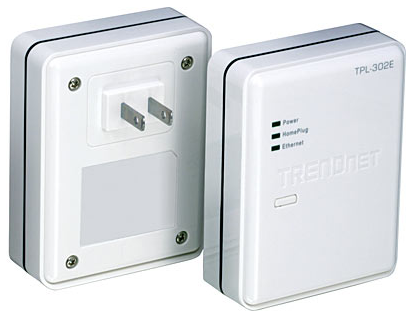
If your house is not already wired up with Ethernet cabling or you don't want to run cables over your floors, you can consider investing in a HomePlug AV power line kit, such as the TRENDnet product we reviewed recently. We will be using this product in this guide. You can buy one of these TRENDnet power line kits for around $120 USD (at the time of writing) from our shopping comparison website.
That's all you need, just two things. Now let's get going and tell you how it is done.
Setting up the old wireless router
Now that you've gotten the parts needed for the project, we will show you how to setup your old wireless router.
- Deciding on a location
First of all, you need to decide where to place the router. If you are in a three floor town house like us, you should ideally have the main router (which is connected to the Internet) on the first floor and the second (or third, if your place is that big) on the third floor. I placed the router under our bed on the third floor and that way it covers the second floor too, with ease, as well as all of the third floor and the balcony with full coverage.

Once you've decided on a location for the router, power it on and run a cable from your notebook or PC to one of the spare LAN ports on the back of the old router. Now you need to login to the old router - refer to your manual to do so if you are having issues. Most routers are configured using a local IP of either 192.168.0.1 or 192.168.1.1. Type the old routers IP address into your Internet browser and then login to it using your username and password. By default, most ship with the factory default username of "admin" and a blank password.
- Old Router Settings
Now that we've logged into your old router, we are ready to begin changing the required settings. First up you need to disable the DHCP server, as you can see in the screenshot below. It does not matter if the DHCP server on the main router is enabled or disabled - if you want the main router to automatically assign IPs for your wireless devices on the first floor (or in range of the main router) so that you don't need to configure them manually, then enable it.

This is where things start to become a little more difficult. Now you need to find out what IP your main router is using and to do this you'll need to login to that router and write it down. Our D-Link main router is using the IP address of 192.168.0.1, so we set the IP address of the old router to 192.168.0.2 - this is an important step, so that both routers can talk to each other without any conflicts. Also ensure that the subnet mask on both routers is the same - as you can see from the screenshot above, both routers we used were set to the subnet of 255.255.255.0, which is the default setting.
Okay, now that your old router has its own unique IP address and you've disabled DHCP, we need to change some more settings...

Next up you need to disable UPnP on the old router - this option can usually be found under the admin section or advanced settings in most common routers.

Now we are going to disable the firewall of the old router since we already have a firewall in place provided by the main router. Head to the security section settings of the old router and disable it.
- Configuring Wireless Settings
Now let's configure the all important wireless settings of the old router. We set the WRT54G to the wireless mode of "G-Only", as this mode provides the best performance. If you set any router to mixed mode, they usually see at least a slight drop in performance, as they need to negotiate between the two modes.

Next up we setup the SSID (or wireless network name) and we changed the name to "Bedroom (3rd floor)" so that it is easy to identify when selecting a network from the list - it doesn't matter if you enable SSID broadcasting or not. It just means that if it is disabled, it will be hidden, and you'll need to manually enter in the wireless connection details on your PC or network device.
Most new routers have the ability to auto scan and select the wireless channel (or frequency) which is best to use but older ones such as the WRT54G do not. For the best results, you should chose one unique channel for the main router (we used channel 6 that uses 2.437GHz) and a different channel for the old router, as you can see we used channel 11 that uses 2.462GHz.

It's up to you whether or not you decide to enable wireless security on the old router but it is highly recommended, unless you want to share your Internet connection with all of the world and its dogs. We have found during testing that WPA2 Personal (with the AES only cipher) provides the best performance and have hence used that. For added security, use an uncommon password unrelated to you with a mixture of letters, numbers and symbols. It will be very hard to break.
- Finishing up with the old router
Now that the old router is fully setup and ready to go, run the Ethernet cable from a spare LAN port on the main router (or via a power line device) and plug the other end into one of the spare LAN ports (don't plug into the WAN port, as it will not work) on the back of the old router and then we are ready to move onto setting up the devices connecting to the old router.
Setting up devices connecting to old router
Now we are starting to get somewhere here - your old router finally sees some life and is all setup and ready to go - well, almost.
- Connecting to the new wireless network
Let's now try connecting to the old router that you've just finished setting up. Depending on where you are in your house or office, you should see at least two wireless networks that you are able to connect to, just like you can see in the screenshot above. Connect to the newly created wireless network, in our case it's called "Bedroom (3rd floor)".

Once you first connect, nothing will happen and it will assign you an IP address of something along the lines of 169.x.x.x. You won't be able to access the LAN or Internet yet, but don't worry - read on.
- Setting a manual LAN IP address
What we need to do now is setup a manually configured LAN IP address, as you will remember, we disabled the DHCP server of the old router. Go to the properties of your network connection, click Properties, Internet Protocol Version 4 and then click Properties again. Now you need to select "Use the following IP address" and now you are able to enter in your manually selected IP address.
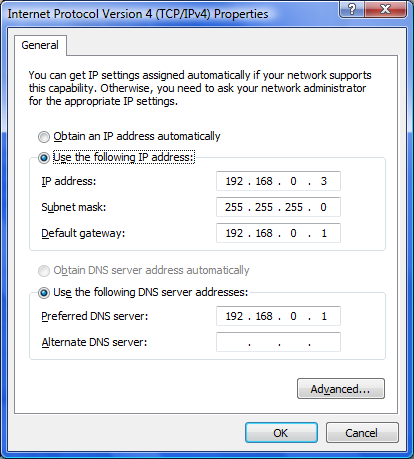
Previously in this guide you set a local IP address for your old router, we used 192.168.0.2. If this is the first device connecting to the old router, you should use an IP address of anything above that such as 192.168.0.3. Other devices wanting to connect should use 192.168.0.4, 192.168.0.5 and so on.
Listen up here... the last number cannot go above 256 OR wherever the DHCP IP range on the main router begins at. Our D-Link router begins its DHCP IP range at 192.168.0.100 to 192.168.0.199, so don't select an IP in the range between 100 and 199, to avoid conflicts with other networked devices. Set the subnet mask as 255.255.255.0, although it should do that for you automatically, once you've entered in the IP.
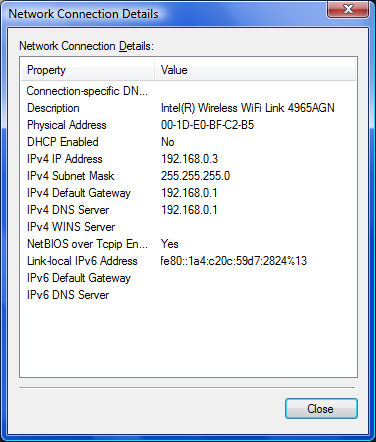
Finally, we need to enter in the default gateway and this is the IP address that provides us with the lovely Internet access, in other words, the main router which has your modem connected to it. Here you should enter in the IP address of the main router and in our case it is 192.168.0.1. Also set the preferred DNS server to the same IP as your main router. Apply these settings and wait a few seconds for the network to initialize and then you should be connected and ready to go.
Hay presto, we're done?!

Once we've finished all that, you should be able to access your network and the Internet at full speed, as if you were connected to the main router, which is normally out of range.
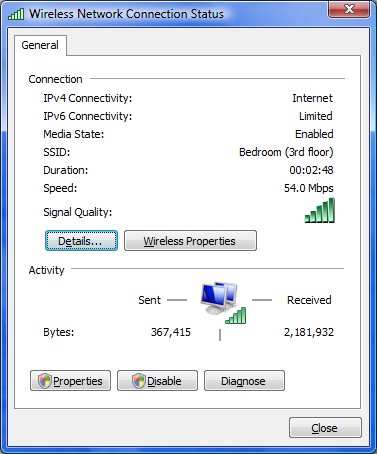
Brilliant - huh? We thought you would like!
Troubleshooting and Support
If you cannot use the Internet or see other computers on your network, you haven't followed this guide properly or your old wireless router may be broken or not working, as it should. You may also have missed one or two steps that make all the difference, so go back and check again.
As a quick test, open up a command prompt by clicking start, Run and then type in "cmd". In the command prompt, try and ping the main router by typing in "ping 192.168.0.1" (or whatever IP address your main router is set to use). If you do not get a ping response right away, it means you've done something wrong and you need to go back and check all the settings discussed in this guide. Also make sure that your Ethernet cables are plugged in and also in the proper spots - for instance, LAN port to LAN port from main router to the other router.
Please do not email us with questions as we do not answer over email; instead, direct your questions to our forums where our members would be more than happy to assist you!
Our Latest TweakTown Guides
- Printer Not Working in Windows? How to fix detection, print queues and drivers
- The Ultimate Guide to Personalizing Your Windows 11 Taskbar
- How to Turn Your Windows Laptop Into a Second Monitor with Miracast and Wireless Display in Minutes
- 6 Mistakes to Avoid When Buying a Windows Laptop
- I capped Windows Update's bandwidth with Delivery Optimization, and my downloads stopped choking


 Printer Not Working in Windows? How to fix detection, print queues and drivers
 The Ultimate Guide to Personalizing Your Windows 11 Taskbar
 How to Turn Your Windows Laptop Into a Second Monitor with Miracast and Wireless Display in Minutes
 6 Mistakes to Avoid When Buying a Windows Laptop
 I capped Windows Update's bandwidth with Delivery Optimization, and my downloads stopped choking
 007 First Light ditches Denuvo DRM just as first patch arrives packing a ton of bug fixes and some new content
 Microsoft's still working on Windows 11 File Explorer improvements, and it's now making deleting large files speedier
 Hacking group Anonymous targets Sony over deciding to kill PlayStation discs
 Top 5 PS Store pre-orders in US are all $100+ games
 Anthropic responds after Claude conversations appeared in Google Search results
 Steam Workshop maps infected players with malware and took over a 100,000-member Discord
 MSI launches compact PRO MAX EDGE AI+ desktops, with up to Ryzen AI Max+ 395 and 128GB of memory
 ASRock launches new 27-inch QHD QD-OLED Phantom Gaming monitors
 Framework says current memory prices are 'far beyond anything we're able to absorb'
 US data centers on track to use up 20% of the entire country's power by 2035
 Thrustmaster T.Flight HOTAS 5 MSFS Edition Review
 SteelSeries Arctis Nova Pro Omni Wireless Headset Review - One Headset to Rule Them All
 SteelSeries Arctis Nova 7 Wireless Gen 2 Headset Review - New and Improved, But Is It Enough?
 AMD Ryzen 7 7700X3D Review - Days of Future Past
 Samsung 990 2TB SSD Review - Ninth Gen QLC at PCIe Gen4 Speeds
 ASUS ExpertBook Ultra (Panther Lake) 14" Business Laptop Review
 ASUS ROG Raikiri II Xbox Wireless Controller Review - Ready to Take Control
 MOZA FMP18 Panel Bundle Review: authentic F/A-18 Hornet cockpit controls for flight sims
 Micron 6600 ION 245.76TB Enterprise SSD Review - Best in Class Programming Speeds
 MOZA MA3F EFCM Flight Control Module Review: authentic Airbus A320 autopilot panel for simulators
 I use this decade-old free tool that finds files faster than Windows Search does
 I install and update most of my apps with this Windows command now, and I stopped downloading sketchy installers
 Hisense U6SF 65-inch MiniLED TV: High Performance Meets Leisurely Convenience
 I stopped digging through Windows menus after I set up this one folder
 Don't sell your Windows laptop until you do these things