


Introduction
 9
9I still remember when Steam was first teased, everyone thought it would fail - then it launched, and the Internet was set alight with people bagging it left, right and center. There were jokes made out of the steam picture and the back side of a person - and that it would see a timely death. Well, they were wrong.
Steam is the powerhouse of PC gaming, and one of the only reasons PC gaming is as serious as it is now. Valve has used Steam to launch some fantastic games such as Half-Life 2, Left 4 Dead, Team Fortress 2 and the newer CounterStrike games. Not only that, they allow other developers and companies to release their games on its software, giving them the ultimate power against consoles.
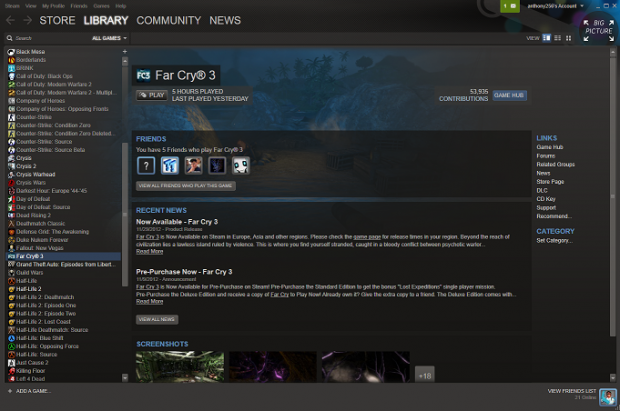
Steam has slowly had its feature set increased, with new features being baked in every few months, but we're here to talk about the latest feature - Big Picture. Big Picture provides a TV-capable user interface that looks great when upscaled on a large TV.
All it requires is for your PC to be hooked up to a TV (or just your normal monitor) and to click Big Picture in the top right hand corner of the Steam window. From here you receive a large UI, capable of looking quite good on a huge TV - a foray into the lounge room, Valve's next logical step.
I used a Samsung 55-inch Smart LED TV and my PC of which parts have been provided by Corsair, Sapphire and ASRock. Let's take a look at what Big Picture is all about.
The Look, Feel and Navigation of Big Picture
I'll admit when I first began hearing about Big Picture, I wasn't all that thrilled. I first thought that Valve were just trying to play catch up with the Xbox 360 and PlayStation 3 by offering a TV friendly UI, but it's so much more than that.
My initial apprehension of Big Picture comes from my childhood of first-person shooters, like Quake and Unreal. I grew up in a time when FPS games were born, and the technological advances were huge every twelve months - I never really gamed too much outside of the FPS genre apart from some RTS and driving games here and there.
Once I was out of that frame of mind - I saw that Valve could achieve a great deal by offering a user interface for the TV, that wasn't just "Steam for the TV".
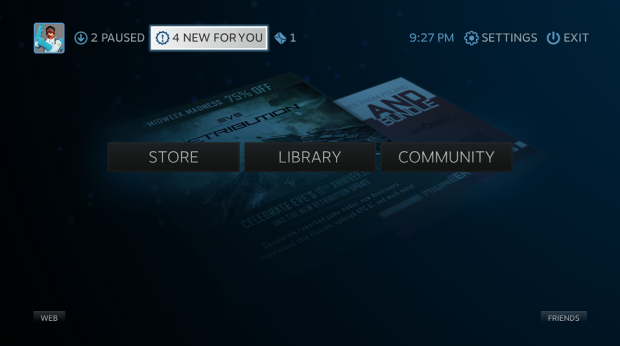
Diving into Big Picture, it looks great - it slides into operation, providing us with a splash screen of the Steam logo, and then we're greeted by a menu with three options - STORE, LIBRARY and COMMUNITY. Each of these sections are self-explanatory. Up the top left we have your personal profile (I hope you enjoy my profile picture), your DOWNLOADS, INBOX and in the top right we have SETTINGS and EXIT on the right.
 9
9Sitting in the bottom left is a critical piece of Big Picture, WEB. Steam has, for a long time now, an included web browser - but BPM's web browser is much, much better. We'll get into that a little later.
The feel of the UI is amazing - it's fluid, crisp and fast. Shift-TAB will bring you out of your game and into Big Picture, just like it would take you out of the game and into the Steam overlay before Big Picture launched. You can access everything from here, from the web browser to purchasing games or chatting to friends - it really feels like an entire Steam OS is overlayed, but in a very beautiful fashion this time around.
 9
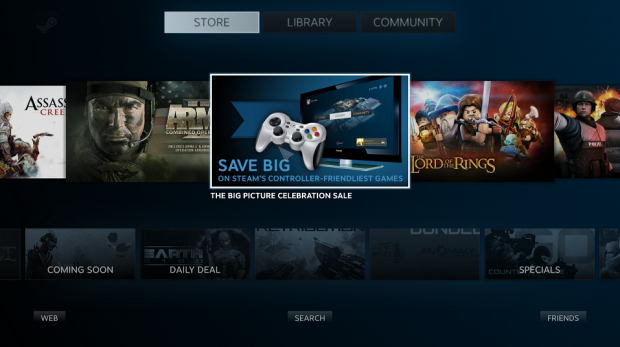
9When dragging your mouse cursor over a highlighted item - which could be a friend or a game - it enlarges in size, a benefit of Big Picture for your TV. Normally I wouldn't like this much magnification, but for a TV, this is great. For Valve's first shot at something like this - amazing.
I've also taken a quick video so you can see me navigate through the menus, to get a feel for Steam's Big Picture mode.
Features
Big Picture doesn't throw the kitchen sink into the mix, but it does offer some nifty features and it's only going to grow in the future as it's developed further. There's a new web browser, a Daisywheel to type with your controller and more.
The Web Browser
 9
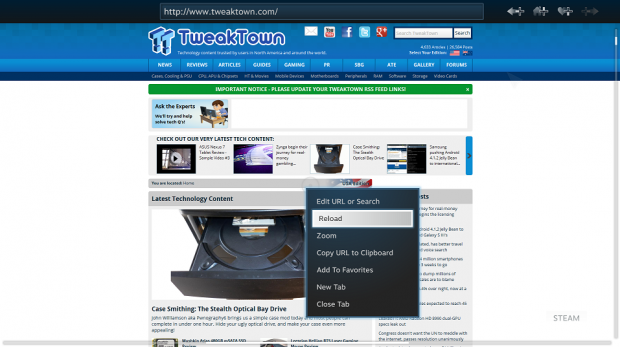
9I found the web browser to be a great addition to Big Picture mode - and not something I would use as a main source of web browsing as I have Windows running in the background. But I can see where Valve is going with this - as it's mainly destined for the TV. The user interface is perfect for it, and it is built from the ground up to support a controller for navigation.
 9
9The included web browser sports a reticle-based navigation system, tabbed browsing and saves your favorites from the browser into Steam's cloud.
Daisywheel
This is one thing I couldn't test as I don't have a wired Xbox 360 controller, or any other controller for that matter, to use with Steam. Valve have explained Daisywheel as "QWERTY is for keyboards. Daisywheel is for controllers". This sums it up quite well.
Daisywheel is Big Picture's tool for typing and looks pretty good judging from what I've seen - hopefully we can get this tested in the near future with a controller.
Input methods
Multiple input methods being on offer only extend Valve's awesomeness more so. Want to game with the traditional keyboard + mouse setup? Go ahead. Want to game with a controller? Go ahead. Want to do both and switch between? Sure!
The usual suspects
The usual features of Steam are all here behind the scenes - purchasing games, chatting with friends, voice chatting with friends, and more. All of the greatness you're used to with Steam is now just readjusted for the big screen.
Chat
 9
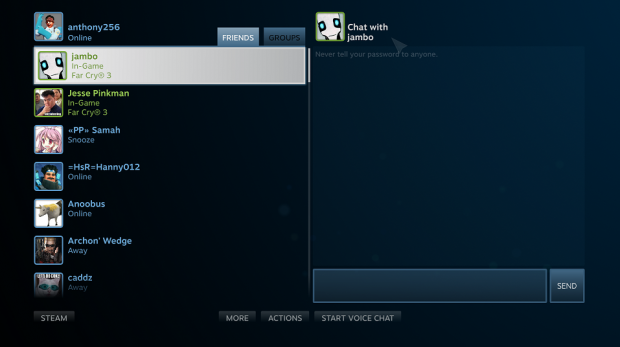
9I found the chat much better on the big screen than I thought it would be - and quite enjoyed the experience in doing so. I'm not much of a gamer on the big screen - being an owner of triple 120Hz 1080p-capable screens - but the chat mode on the big 55-inch TV I have was actually great.
It was clear, and the chat UI is intuitive - I expect nothing less from Valve by now. The chat window sits on the right and takes up one half of the screen, where the left half of the screen is taken up by your friends list. Both at the top and the bottom of the chat window are options like FRIENDS, GROUPS and down the bottom, there's a shortcut to STEAM and to the right of that we have MORE, ACTIONS and START VOICE CHAT.
I'm sure you've noticed by now that I type these as uppercase - because that's how Valve has done it with Big Picture - it really stands out. Especially on the TV when you're sitting a few feet away compared to an arm's length from your monitor.
The Future of Steam and Final Thoughts
 9
9This is probably the most important part of this look at Big Picture - the future of Steam, and Valve. I've talked about this before in that the gaming world needs a new hero - and Valve could do this with "Steam Box ", their version of a console.
I think that Big Picture is a tease of things to come of the UI of their console, and having it work with controllers and TVs pretty much cements that they could definitely be working on a console that hooks up to your TV.
Imagine that - the entire Steam library, Steam Box games that simultaneously release on the PC at the same time. The next-gen Xbox and PlayStation simply can't keep up with that - sure, they have their Halo, Gears of War, Unchartered and so forth, but they're no match to Half-Life, CounterStrike, Team Fortress and Left 4 Dead in the community's eyes.
Valve has always looked after the community, and they know that the community will look after them - in the form of buying a console from Steam if they were to make it different to the usual way of buying consoles. What we have now is a down payment for the console at around $500-$600, then around $50-$100 per game depending on the country you're living in.
From there, we have monthly access to Xbox Live, but the PlayStation Network is free. Controllers and accessories have to be pretty much console-exclusive, but the Steam Box could go in an entirely new direction.
USB support would be offered through its Linux-based OS, and it would play every game that is on Steam - which is a lot of games. There's no need to tout "backward compatibility" when it would offer the ability to pretty much play anything on PC, as well as community-made games. This is another factor of Steam; it's newly unveiled "Greenlight". Greenlight allows the community to vote for which games get released by smaller, indie developers - another sign that Valve isn't some monolithic, shareholder-pleasing company. Valve are a private company and don't need to bend over to the share market and continue to drive revenues to make its business look like it's continuously doing well - Valve just release groundbreaking games at its own pace.
Imagine if Gabe Newell took the stage of E3 next year, and said he has something to show us - the screen behind him goes blank, and a crowbar comes up - 5 minutes of absolutely eye-bursting Half-Life 3 comes up in Source 2.0, built completely from the ground up for next-gen. The crowd goes crazy... and Newell says next - available on our Steam Box. The stage lights up and there's a box in front of him - motion controllers, normal controllers, USB peripherals - the works. He states it'll be a $20 per month fee for two years for the Steam Box, or a once off payment of $399. It comes with Half-Life 3 in the box.
How many units do you think Valve would sell in six months? Five million? Ten million? It could be more than the next-gen consoles combined if Valve were to offer something insane like Half-Life 3 with it. This could be the entire reason they've pushed Half-Life 3 back so far... or maybe I'm dreaming. I predict we'll see some form of hardware from Valve next year - and I'd be shocked if we didn't. I'm excited at the possibilities.
 United
States: Find other tech and computer products like this
over at
United
States: Find other tech and computer products like this
over at  United
Kingdom: Find other tech and computer products like this
over at
United
Kingdom: Find other tech and computer products like this
over at  Australia:
Find other tech and computer products like this over at
Australia:
Find other tech and computer products like this over at  Canada:
Find other tech and computer products like this over at
Canada:
Find other tech and computer products like this over at  Deutschland:
Finde andere Technik- und Computerprodukte wie dieses auf
Deutschland:
Finde andere Technik- und Computerprodukte wie dieses auf  LG's 32-inch gaming OLED monitor with 480Hz refresh rate is imminent, with pre-orders live now
 Google Pixel 8a leak boasts 7 years of security updates but leaves one question unanswered
 Apple has plummeted from first to fifth place in the Chinese smartphone market, analysts warn
 You can blame Tim Cook for 8GB Macs, it seems
 Apple removes three AI apps capable of creating nude images of people from the App Store
 SteelSeries Arctis Nova 4X Wireless Gaming Headset Review
 ACEMAGIC AD08 "Core i9 11900H" Mini PC Review
 Lenovo ThinkPad X1 Carbon Gen 12 Review
 ASUS ROG Swift Pro PG248QP Gaming Monitor Review - Frames, frames, and more frames
 FlexiSpot C7B-Mesh Ergonomic Office Chair Review
 Samsung G8 34-inch QD-OLED Gaming Monitor Review - 175Hz for $900
 ASRock NUCBOX-155H Mini PC Review
 NuPhy Air96 V2 Wireless Mechanical Keyboard Review
 TEAM T-FORCE Siren DUO360 RGB Liquid CPU Cooler Review
 AVerMedia Live Streamer ULTRA HD Review
 Building the Ultimate Home Entertainment Server with an ASUSTOR NAS and Viper Gaming NVMe SSDs
 Everything you need to know about the latest ASUS NUC Mini PCs - NUC 14 Pro and ROG NUC
 How to Overclock Your GPU and Boost Your PC Gaming with ASUS GPU Tweak III
 ASUS's AMD Radeon RX 7000 Series GPU lineup has something for every gamer
 ASUS OLED Premium Care defends the ROG Swift OLED PG32UCDM gaming monitor from burn-in