











Introduction and Overclocking
Introduction

NVIDIA jumped to the top of our TPR graphs when we posted our GTX 580 in SLI article. It wasn't a surprise, as in single form the GTX 580 1536MB is faster than the HD 6970 2GB. Scaling for NVIDIA has always been strong and while I think AMD have pretty much caught up with both companies offering nearly 100% gains in some areas, NVIDIA still has the raw power of the GTX 580 on their side.
We came to two conclusions really when we tested the GTX 580 in SLI. It's DAMN FAST! - And it's going to play pretty much anything you throw at it, at any resolution, at any level of detail.
So you ask; why bother overclocking a setup so fast? Well, for starters, because we can. Mainly, though, for the simple reason we love power. Overclocking gives us more of that and we want to find out exactly how much more. For so many people a single GTX 580, GTX 570, or HD 6900 series is probably more than enough performance at stock. We ultimately overclock for the same reason people buy two, three or even four of these high end models. We love performance!
br>
Overclocking
When we overclocked the MSI GTX 580 by itself we ended up with a core clock of 900MHz and memory clock of 4200MHz QDR. Now, we know that when we add a second card into the mix we tend not to be able to get the same kind of overclock due to the added heat from running two cards together.
Just for the fun of it, though, we made that our starting point and thought we'd work backwards.
When we set that and ran a full loop of Vantage without an issue, we were pleasantly surprised. Just to make sure everything was ok, I fired up Heaven. This is a great benchmark for testing overclocks; the large pressure on the tessellation engine and just the general intensity of the benchmark means if it can pass this, it'll pass everything.
1680 x 1050 and 1920 x 1200 both completed without an issue. Moving higher on the clocks, we ran into some problems, but at the same clocks we got for the single card, the setup ran perfectly.
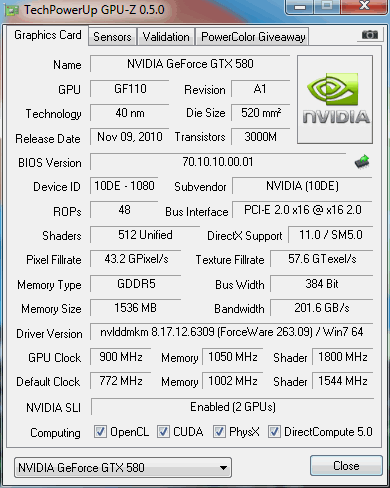
What we ended up with were the same clocks which are 900 MHz on the core, 1800 MHz on the Shader and 4200 MHz QDR on the 1536MB of GDDR5 memory; a nice increase from the reference 772 MHz / 1544 MHz / 4008 MHz QDR setup.
Of course, we like to double check that SLI is enabled and you can see in the above GPU-Z screenshot it is. Hopefully the overclock will help yield us a nice performance increase, so let's get into our test system to find out.
Test System Setup and 3DMark 11
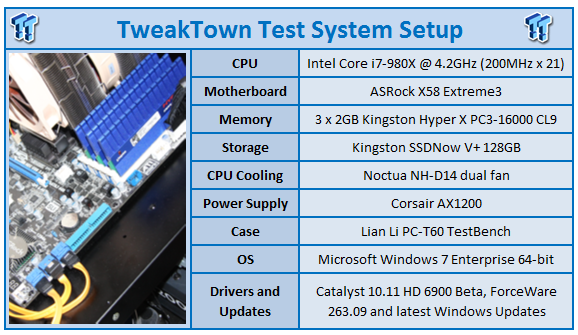
We would like to thank the following companies for supplying and supporting us with our test system hardware and equipment: Intel, ASRock, Kingston, Mittoni, Noctua and Corsair.
The setups we're looking at today are almost identical to when we looked at the GTX 580 1536MB in SLI. The only difference here is we've removed the GTX 570 GLH Edition from Gainward.
What's here includes the GTX 580 1536MB in SLI at stock speeds, MSI GTX 580 by itself and the HD 6970, HD 6950, HD 6870 and HD 6850 all in Crossfire.
Let's get started!
br>
3DMark 11
Version and / or Patch Used: 1.0
Developer Homepage: http://www.futuremark.com
Product Homepage: http://www.3dmark.com/3dmark11/
Buy It Here
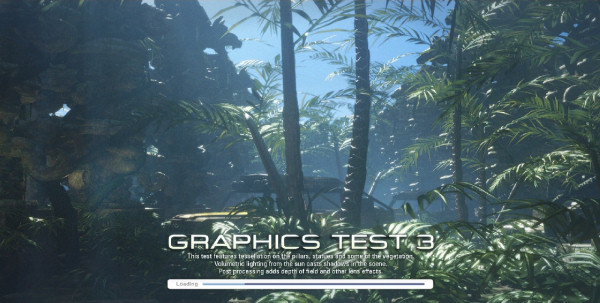
3DMark 11 is the latest version of the world's most popular benchmark. Designed to measure your PC's gaming performance 3DMark 11 makes extensive use of all the new features in DirectX 11 including tessellation, compute shaders and multi-threading. Trusted by gamers worldwide to give accurate and unbiased results, 3DMark 11 is the best way to consistently and reliably test DirectX 11 under game-like loads.
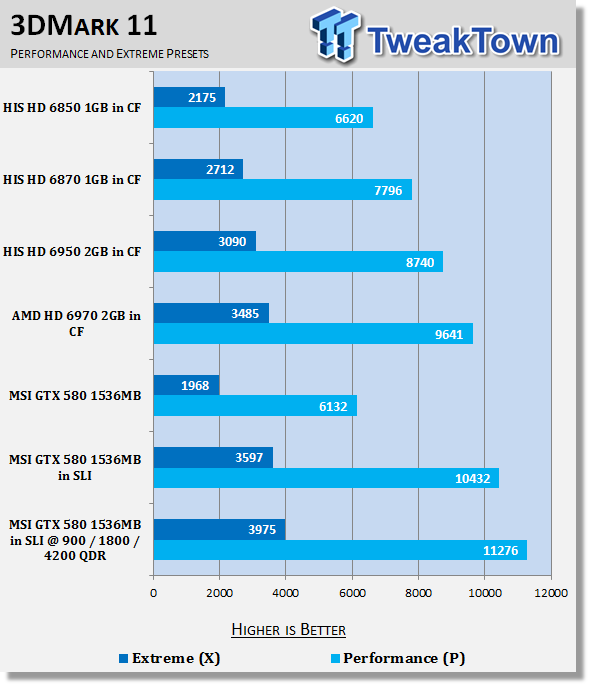
Straight away we see a really nice increase in both presets with that overclock.
3DMark Vantage
Version and / or Patch Used: 1.0.1
Developer Homepage: http://www.futuremark.com
Product Homepage: http://www.futuremark.com/products/3dmarkvantage/
Buy It Here
3DMark Vantage is the new industry standard PC gaming performance benchmark from Futuremark, newly designed for Windows Vista and DirectX10. It includes two new graphics tests, two new CPU tests, several new feature tests, and support for the latest hardware.
3DMark Vantage is based on a completely new rendering engine, developed specifically to take full advantage of DirectX10, the new graphics API from Microsoft.
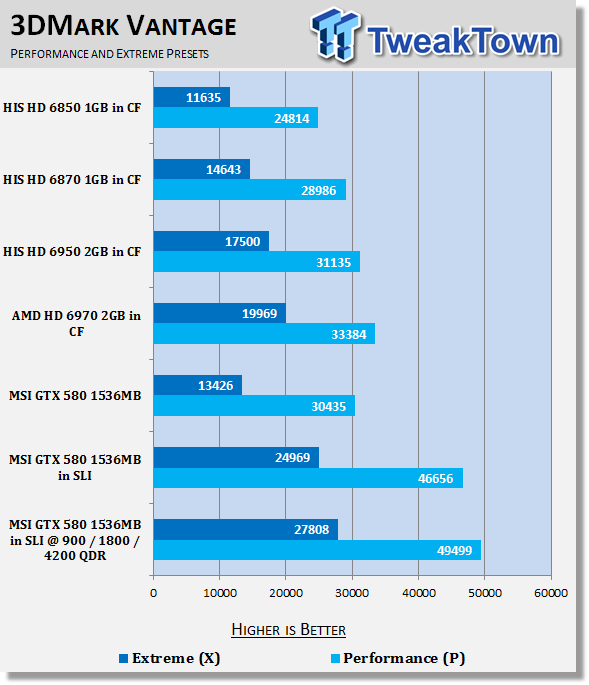
Vantage sees some great gains with our Performance preset hitting almost 50k.
Unigine Heaven Benchmark
Version and / or Patch Used: 2
Developer Homepage: http://www.unigine.com
Product Homepage: http://unigine.com/press-releases/091022-heaven_benchmark//
New benchmark grants the power to unleash the DirectX 11 potential in the gift wrapping of impressively towering graphics capabilities. It reveals the enchanting magic of floating islands with a tiny village hidden in the cloudy skies. With the interactive mode emerging experience of exploring the intricate world is ensured within reach. Through its advanced renderer, Unigine is one of the first to set precedence in showcasing the art assets with tessellation, bringing compelling visual finesse, utilizing the technology to the full extend and exhibiting the possibilities of enriching 3D gaming.
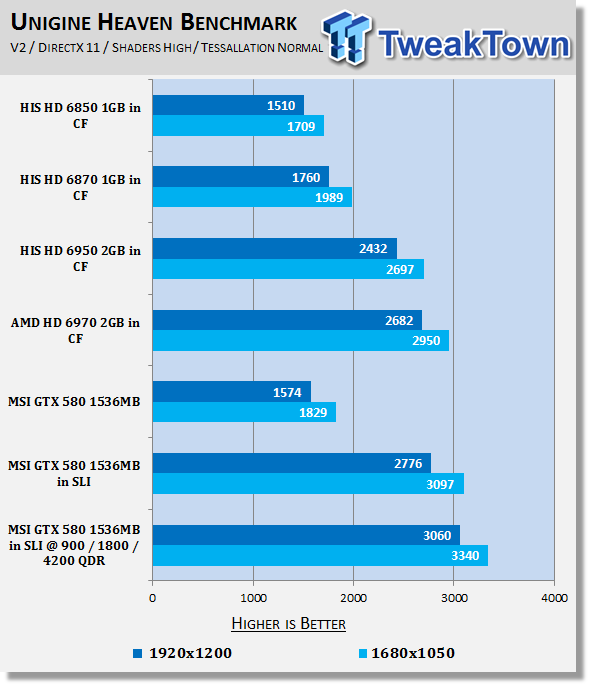
Firing up Heaven which makes use of all that Tessellation power on offer, we continue to see a good jump forward on the stock clocked setup.
Benchmarks - Resident Evil 5
Resident Evil 5
Version and / or Patch Used: Demo Benchmark
Developer Homepage: www.residentevil.com/
Product Homepage: http://www.residentevil.com/
Resident Evil 5 is a survival horror video game developed and published by Capcom. The game is the seventh installment in the Resident Evil survival horror series, and was released on September 18. Resident Evil 5 revolves around Chris Redfield and Sheva Alomar as they investigate a terrorist threat in Kijuju, a fictional town in Africa.
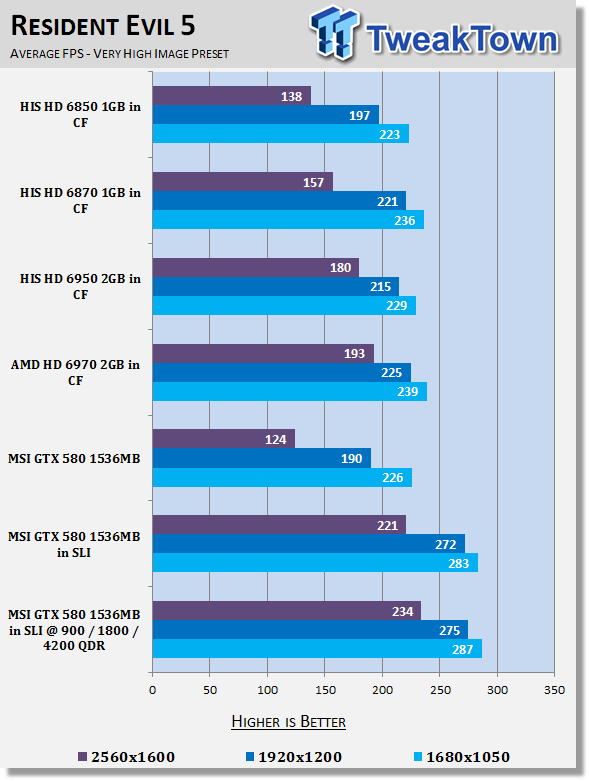
Getting into our games, we continue to see gains, but they're not quite as strong here. Hopefully the numbers become a bit more impressive as we get into some more intensive ones.
Benchmarks - Tom Clancy's H.A.W.X. 2
Tom Clancy's H.A.W.X.2
Version and / or Patch Used: Benchmark Demo
Timedemo or Level Used: Built-in Test
Developer Homepage: http://www.ubi.com/UK/default.aspx
Product Homepage: http://www.hawxgame.com/
Tom Clancy's H.A.W.X. 2 is an arcade-style flight action game developed by Ubisoft Romania and published by Ubisoft. The game is the sequel to Tom Clancy's H.A.W.X., released in 2009.
The game begins with Colonel David Crenshaw participating in a routine patrol mission in the Middle East. After halting an insurgent attack, a volley of missiles is fired at the Air Force base that Crenshaw was stationed at, with one of the missiles disabling Crenshaw's aircraft, resulting Crenshaw being in enemy captivity. A joint strike force composed of the U.S. Navy, U.S. Air Force, and a Ghost Recon squad executes an operation to rescue Crenshaw. In Scotland, Royal Navy Pilot Colin Munro encounters an unidentified passenger aircraft that explodes from an on-board bomb when undergoing training exercise. In Russia, an air force squadron led by Colonel Denisov and Captain Dmitri Sokov engages separatist aircraft but is ordered to retreat from the region after numerous Russian military installations have been attacked.
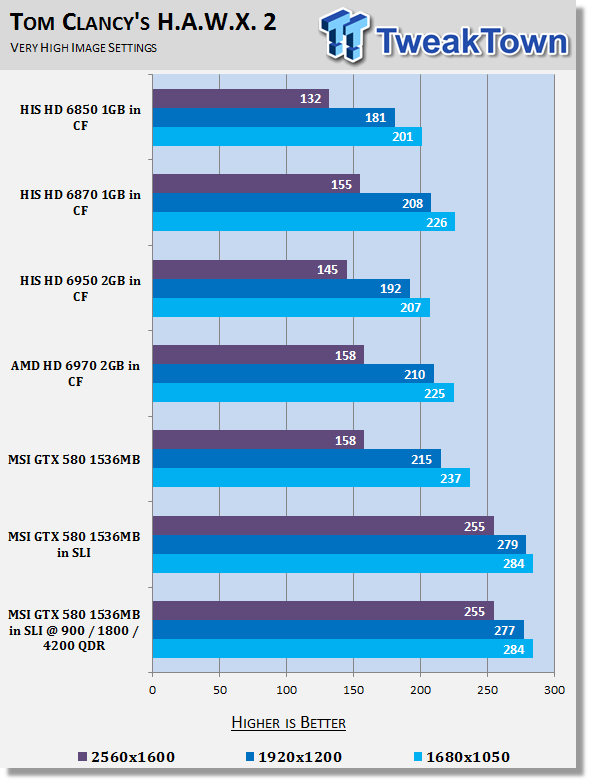
Under H.A.W.X. 2 we see that when overclocked we get no extra FPS. In fact, 1920 x 1200 jumped back just a few FPS. Fortunately we're already seeing some great numbers here, so we're not worried about the drop or lack of increase in frames.
Benchmarks - Mafia II
Mafia II
Version and / or Patch Used: Latest Steam Update
Timedemo or Level Used: Built in Benchmark
Developer Homepage: http://www.2kczech.com/
Product Homepage: http://www.mafia2game.com/
Buy It Here
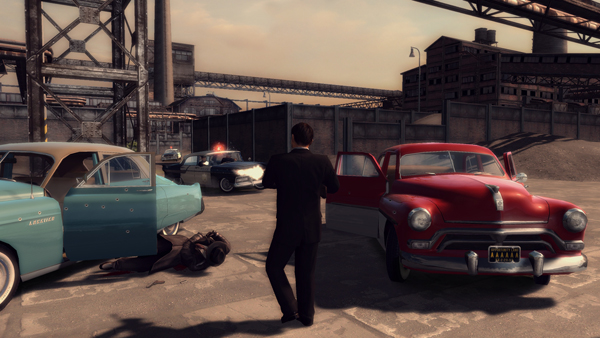
Mafia II is a third-person action-adventure video game, the sequel to Mafia: The City of Lost Heaven. It is developed by 2K Czech, previously known as Illusion Softworks, and is published by 2K Games. The game is set from 1943 to 1951 in Empire Bay (the name is a reference to New York's state nickname "The Empire State"), a fictional city based on San Francisco and New York City, with influences from Chicago and Detroit. The game features a completely open-ended game map of 10 square miles. No restrictions are included from the start of the game. There are around 50 vehicles in the game, as well as licensed music from the era.
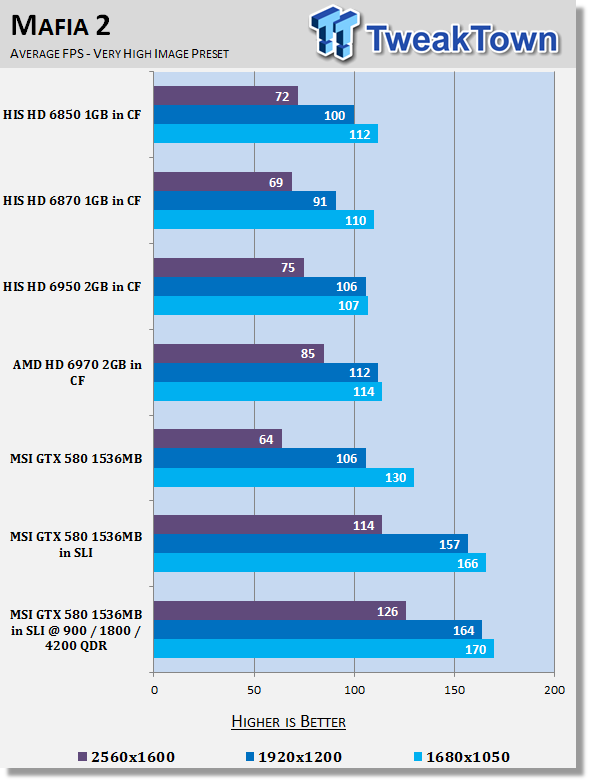
Getting into something a bit more intensive and we start to see some nicer gains. At 2560 x 1600 an extra 12 FPS equates to an increase of over 10%.
Benchmarks - Lost Planet 2
Lost Planet 2
Version and / or Patch Used: Benchmark Demo
Timedemo or Level Used: Built in Benchmark - Test A Scene 1
Developer Homepage: http://www.capcom.com/
Product Homepage: http://www.lostplanet2game.com/
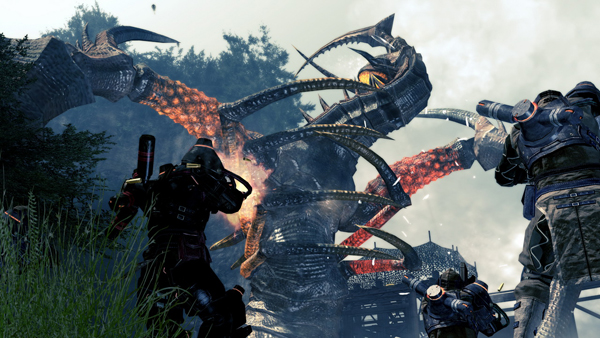
Lost Planet 2 is a third-person shooter video game developed and published by Capcom. The game is the sequel to Lost Planet: Extreme Condition which is also made by Capcom, taking place ten years after the events of the first game, on the same fictional planet. The story takes place back on E.D.N. III 10 years after the events of the first game. The snow has melted to reveal jungles and more tropical areas that have taken the place of more frozen regions. The plot begins with Mercenaries fighting against Jungle Pirates. After destroying a mine, the Mercenaries continue on to evacuate the area, in which a Category-G Akrid appears and attacks them. After being rescued, they find out their evacuation point (Where the Category-G appeared) was a set-up and no pick up team awaited them. The last words imply possible DLC additions to the game, "There's nothing to be gained by wiping out snow pirates... unless you had some kind of grudge."
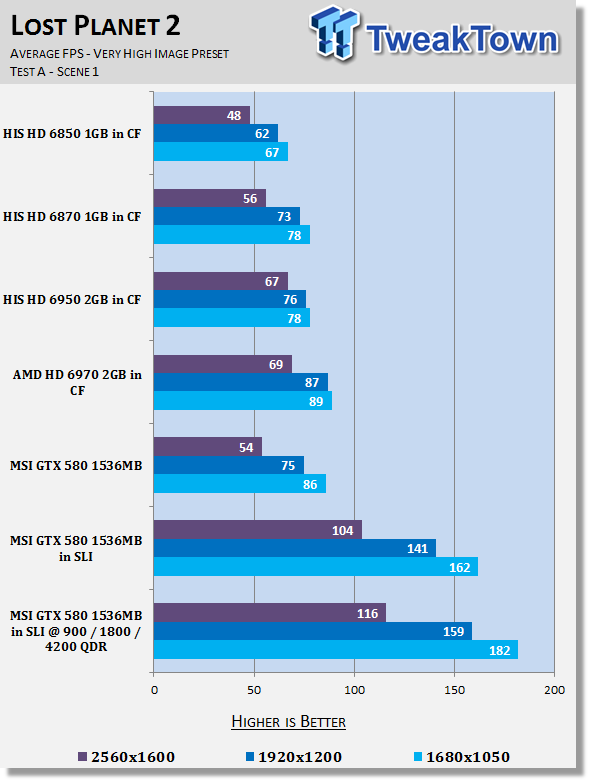
Lost Planet 2 manages to see some great gains as well. Sure, we're seeing high numbers, but 1920 x 1200 numbers are very important to people who are thinking of, or own 120Hz monitors and are really looking for an average of around 120 FPS to make sure everything is silky smooth.
Benchmarks - Aliens vs. Predator
Aliens vs. Predator
Version and / or Patch Used: Standalone Benchmark
Timedemo or Level Used: Built in Benchmark
Developer Homepage: http://www.rebellion.co.uk/
Product Homepage: http://www.sega.com/games/aliens-vs-predator/
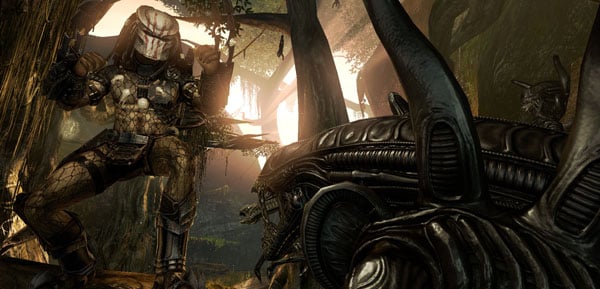
Aliens vs. Predator is a science fiction first-person shooter video game, developed by Rebellion Developments, the team behind the 1999 original PC game, and published by Sega for Microsoft Windows, the PlayStation 3 and the Xbox 360. The game is based on the Alien vs. Predator franchise, a combination of the characters and creatures of the Alien franchise and the Predator franchise. There are three campaigns in the game, one for each race/faction (the Predators, the Aliens and the Colonial Marines), that, while separate in terms of individual plot and gameplay, form one overarching storyline.
Following the storyline of the campaign modes comes the multiplayer aspect of the game. In this Multiplayer section of the game, players face off in various different gametypes in various different ways.
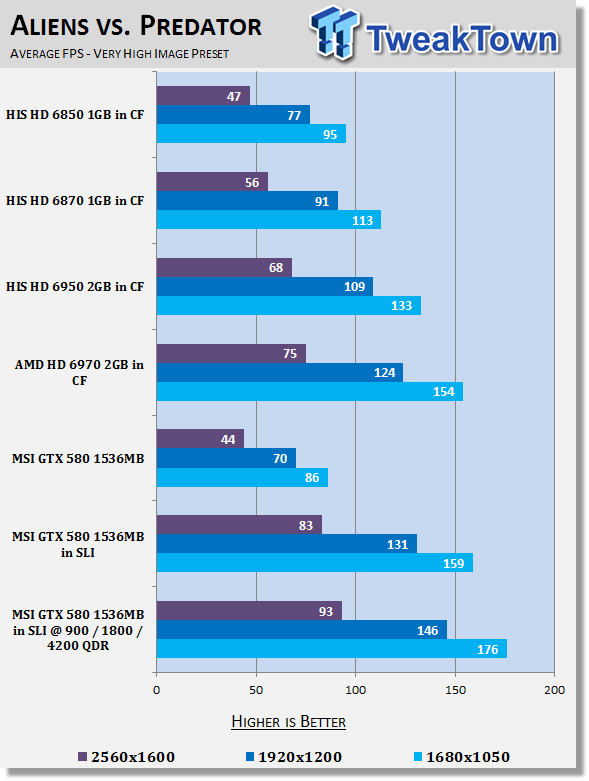
Aliens vs. Predator is a super intensive game and again at the highest resolution we see extra FPS that equate to gains of more than 10%, which is some great free performance.
Benchmarks - Street Fighter IV
Street Fighter IV
Version and / or Patch Used: Standalone Benchmark
Timedemo or Level Used: Built in Benchmark
Developer Homepage: http://www.capcom.com/
Product Homepage: http://www.streetfighter.com/
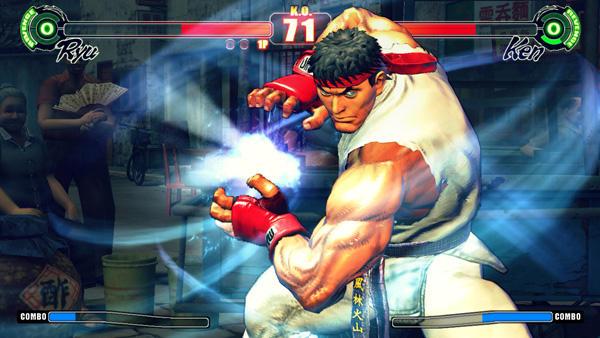
While Street Fighter IV features models and backgrounds rendered in 3D, the gameplay remains on a traditional 2D plane, with the camera having freedom to move in 3D at certain times during fights, for dramatic effect. Producer Yoshinori Ono has stated that he wanted to keep the game closer to Street Fighter II. A new system called "Focus Attacks" ("Saving Attack" for the Japanese version) has been introduced, as well as Ultra moves. The traditional six-button control scheme returns, with new features and special moves integrated into the input system, mixing classic gameplay with additional innovations.
All the characters and environments in Street Fighter IV are rendered as 3D models with polygons, similar to the Street Fighter EX sub-series Capcom produced with Arika. However, there are a couple of key differences. Art director and character designer Daigo Ikeno, who previously worked on Street Fighter III 3rd Strike, opted for non-photorealistic rendering to give them a hand-drawn look, with visual effects accented in calligraphic strokes, ink smudges and ink sprays during the fights.
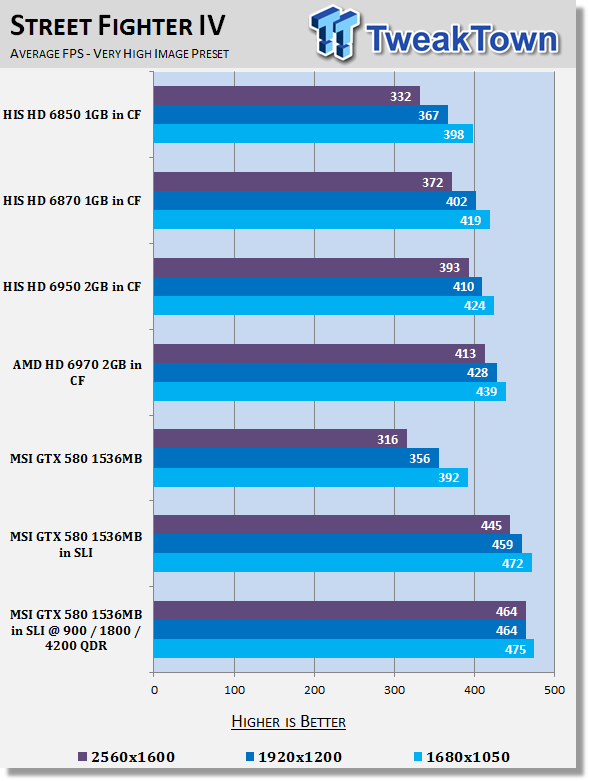
We see a little bit of movement here, but not heaps which comes as no surprise as we deal with averages in excess of 450 FPS.
Benchmarks - Far Cry 2
Far Cry 2
Version and / or Patch Used: 1.01
Timedemo or Level Used: Ranch Long
Developer Homepage: http://www.ubi.com/
Product Homepage: http://www.farcry2.com/
Buy It Here
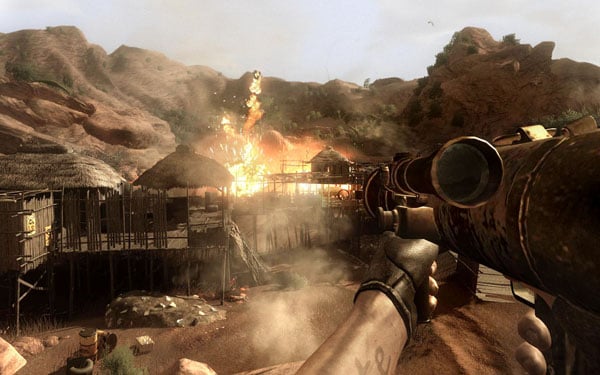
The Dunia Engine was built specifically for Far Cry 2 by the award-winning Ubisoft Montreal development team. It delivers the most realistic destructible environments, amazing special effects such as dynamic fire propagation and storm effects, real-time night-and-day cycle, dynamic music system, non-scripted enemy A.I. and so much more.
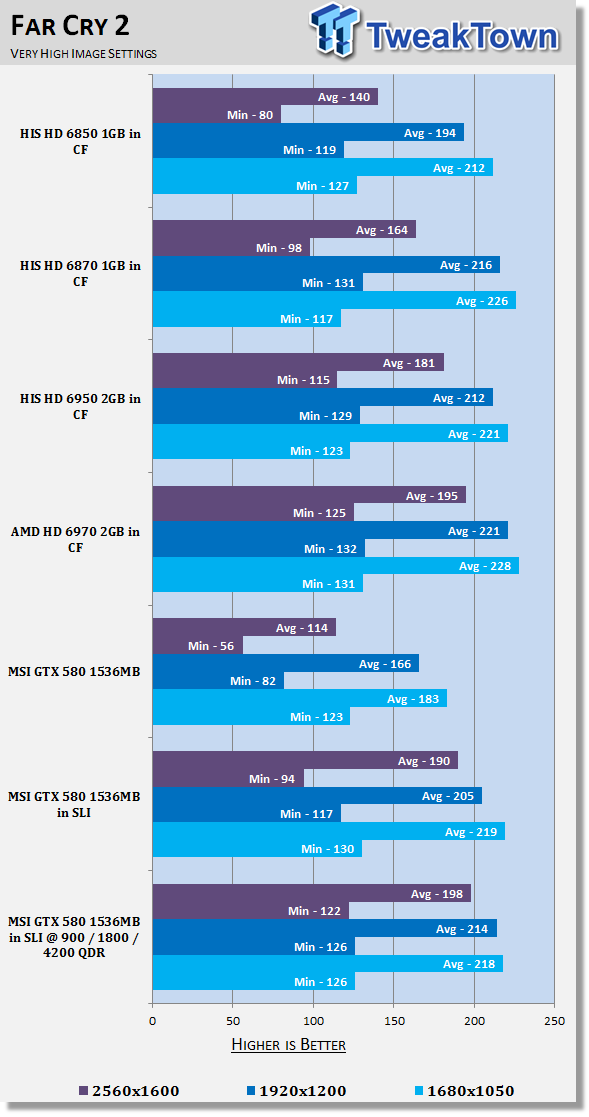
FC2 performance across the board is very strong and you can see we're pretty much hitting a wall in the minimum department with the amount of FPS we're able to get.
Benchmarks - Batman Arkham Asylum
Batman Arkham Asylum
Version and / or Patch Used: 1.1
Timedemo or Level Used: Built-in Test
Developer Homepage: http://www.batmanarkhamasylum.com/
Product Homepage: http://www.batmanarkhamasylum.com/
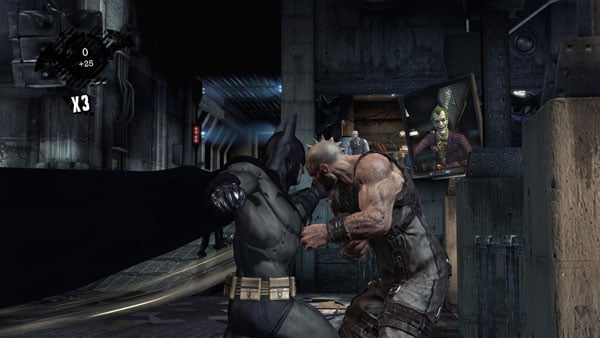
Batman: Arkham Asylum exposes players to a unique, dark and atmospheric adventure that takes them to the depths of Arkham Asylum - Gotham's psychiatric hospital for the criminally insane. Gamers will move in the shadows, instigate fear amongst their enemies and confront The Joker and Gotham City's most notorious villains who have taken over the asylum.
Using a wide range of Batman's gadgets and abilities, players will become the invisible predator and attempt to foil The Joker's demented scheme.
Batman: Arkham Asylum features an original story penned exclusively for the game by famous Batman author and five-time Emmy award winner Paul Dini, whose credits include Lost season one and Batman: The Animated Series.
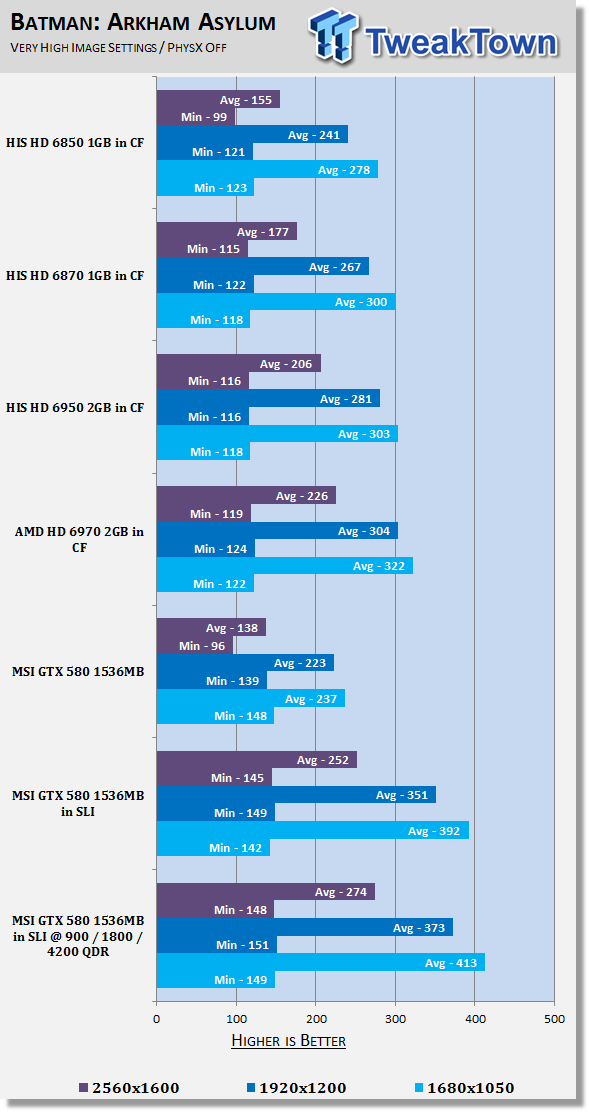
Sure, the numbers are above what we need and the minimums don't really move, but we see the averages get a nice jump with some Street Fighter 4ish numbers of over 400 FPS at 1680 x 1050.
Benchmarks - High Quality AA and AF
High Quality AA and AF
Our high quality tests let us separate the men from the boys and the ladies from the girls. If the cards weren't struggling before they will start to now.
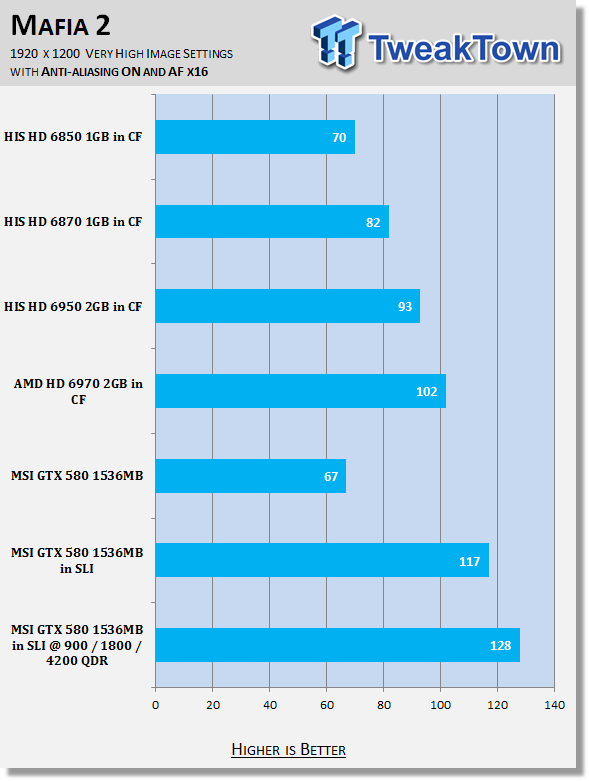
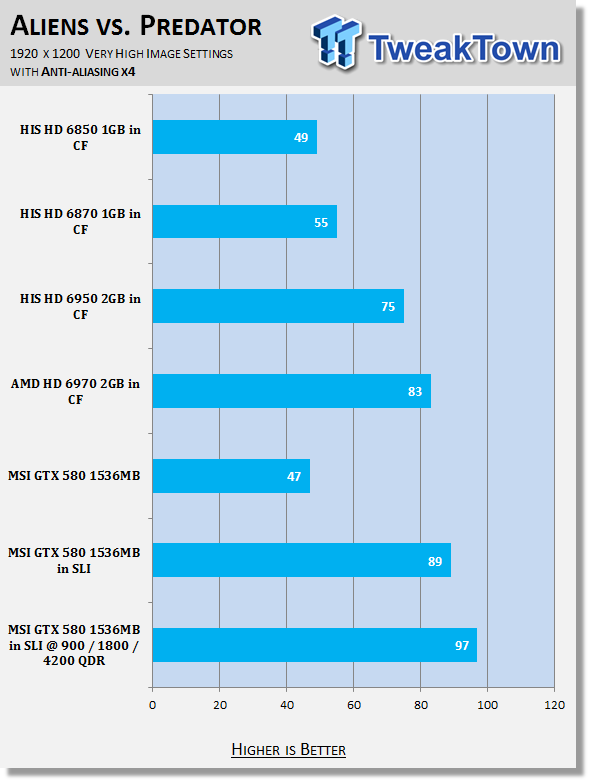
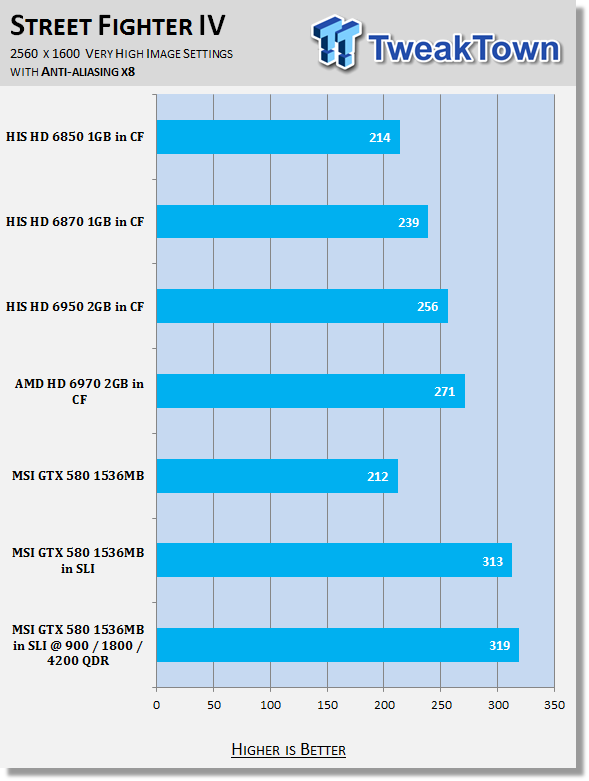
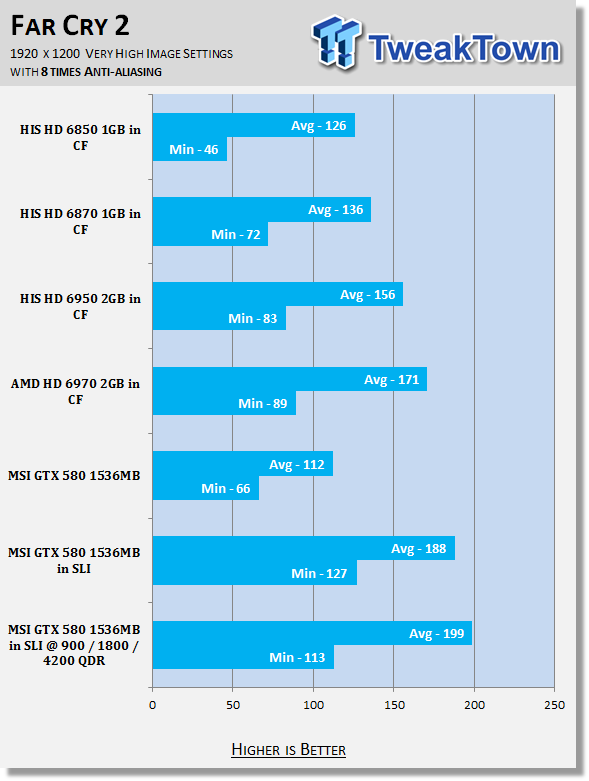
Apart from a little bit of an odd number in the Far Cry 2 minimum, we see some really nice gains again when we overclock these setups, especially in those more intensive tests like Mafia II and Aliens vs. Predator.
Benchmarks - PhysX Tests
PhysX Tests
Here we're able to find out when PhysX is turned on in games that support it what kind of frame rates we're able to get. We always set PhysX to the highest possible in game settings while also keeping detail at its highest.
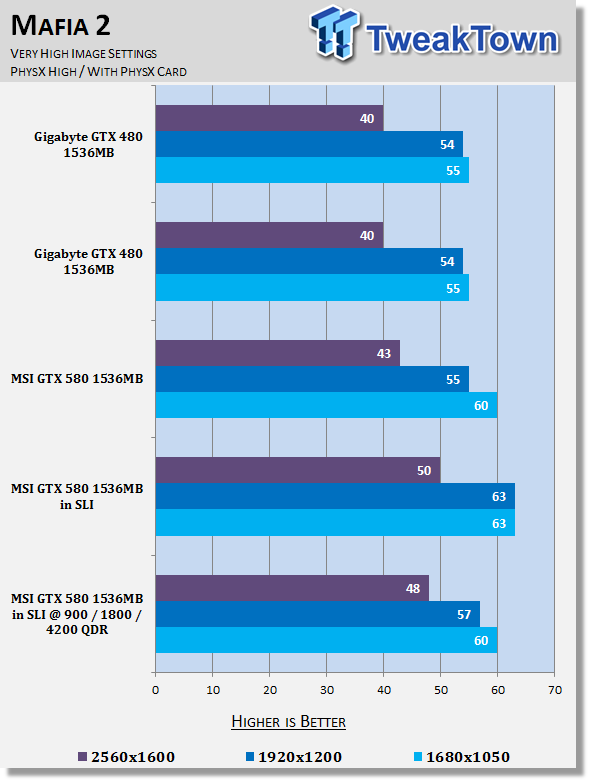
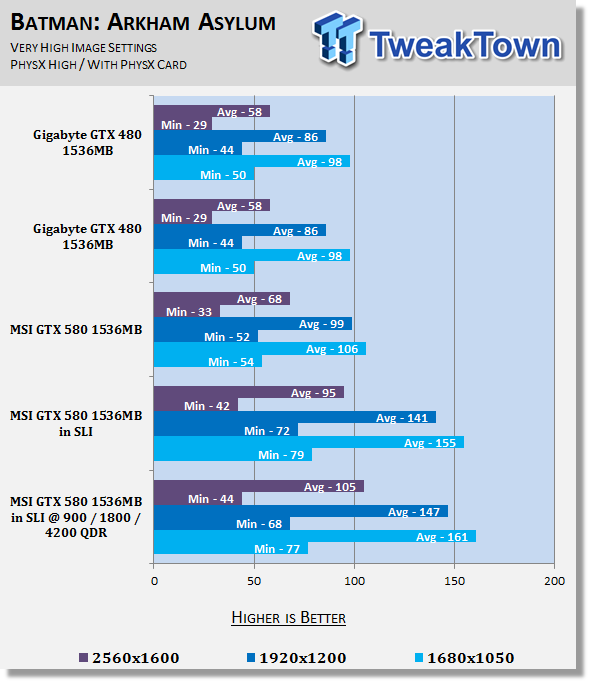
Under PhysX tests we see that the extra MHz really does very little for overall performance. Under Mafia II the performance is actually a little negative and this isn't the first time we've seen this when overclocking NVIDIA cards and testing PhysX based games.
Temperature Test
Temperature Tests

The temperature of the core is pulled from MSI Afterburner with the max reading used after a completed run off 3DMark Vantage and the Performance preset.
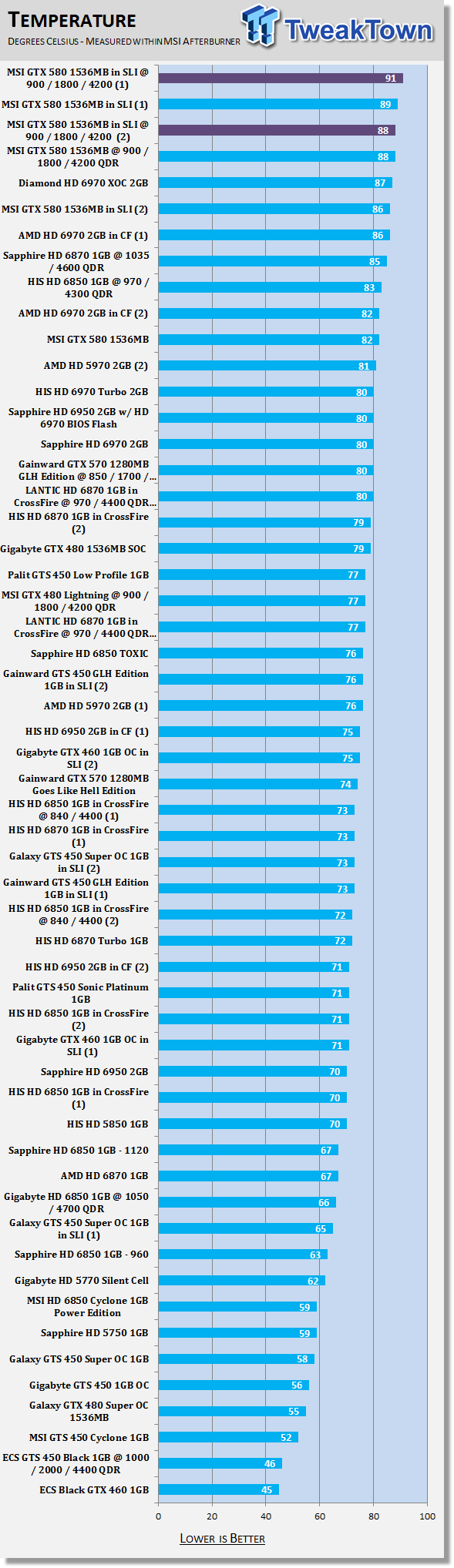
With extra voltage running through the cards it comes as no surprise that they're going to run a little hotter, but an increase of the hottest card going from 89c to 91c isn't something we're worried about.
Sure, it's getting a little on the toasty side, but like we said in our non-overclocked SLI article, we're not seeing those 100c+ temperatures that the GTX 400 series gave us.
Sound Test
Sound Tests

Pulling out the TES 1350A Sound Level Meter we find ourselves quickly yelling into the top of it to see how loud we can be.
After five minutes of that we get a bit more serious and place the device two CM away from the fan on the card to find the maximum noise level of the card when idle (2D mode) and in load (3D mode).
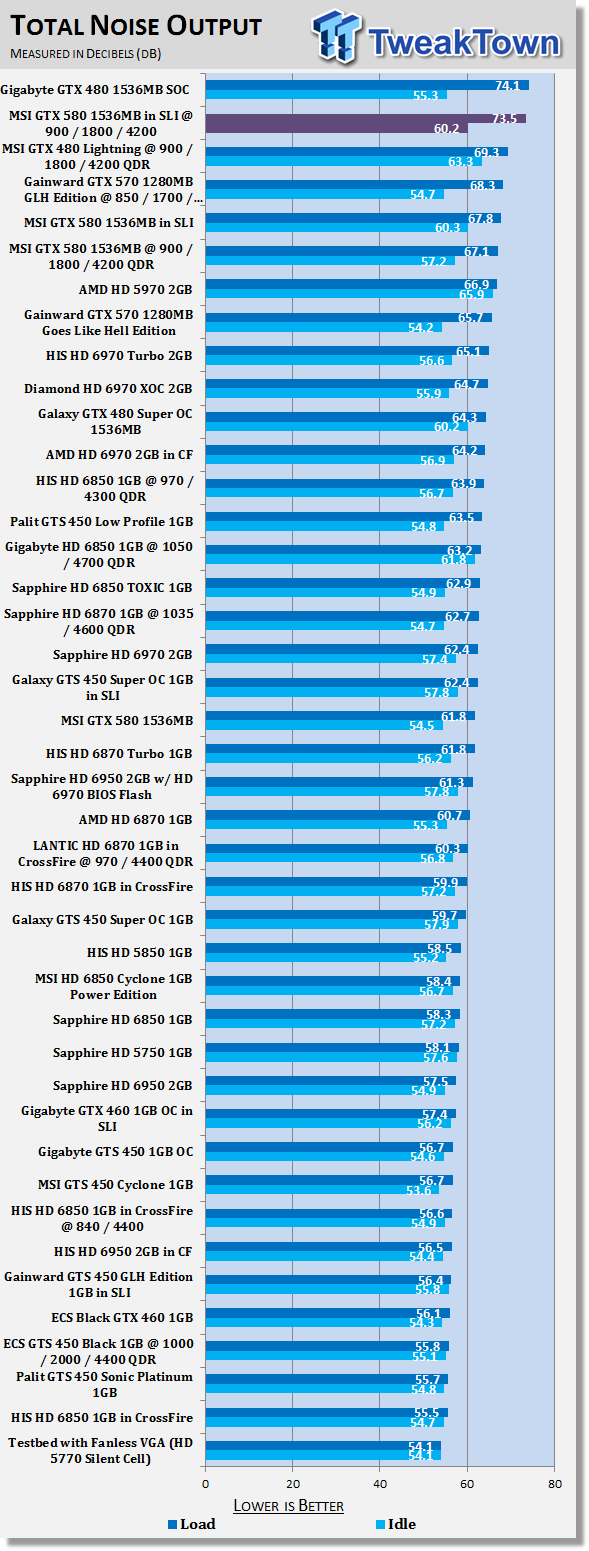
While heat increases only slightly, it seems to be because the fan is working a bit harder and pumping out a bit more nose. At over 70 dB the cards are clearly audible, but the most important thing to remember is that you're only going to get these kinds of noise levels if you choose to not only overclock your cards, but overclock them with the help of more voltage.
Power Consumption Tests

Using our new PROVA Power Analyzer WM-01 or "Power Thingy" as it has become quickly known as to our readers, we are now able to find out what kind of power is being used by our test system and the associated graphics cards installed. Keep in mind; it tests the complete system (minus LCD monitor, which is plugged directly into AC wall socket).
There are a few important notes to remember though; while our maximum power is taken in 3DMark06 at the same exact point, we have seen in particular tests the power being drawn as much as 10% more. We test at the exact same stage every time; therefore tests should be very consistent and accurate.
The other thing to remember is that our test system is bare minimum - only a SSD hard drive is used with a single CD ROM and minimal cooling fans.
So while the system might draw 400 watts in our test system, placing it into your own PC with a number of other items, the draw is going to be higher.
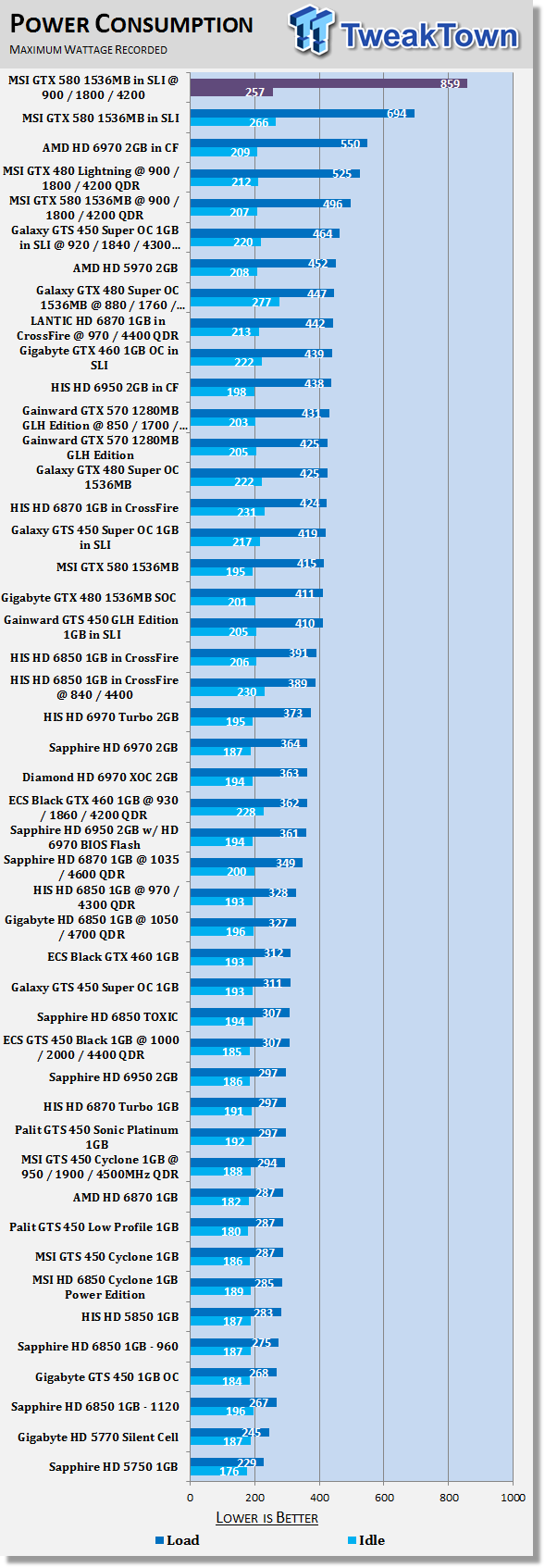
859 Watts of power is a serious number and at first I had to check a few times to make sure it was correct with it being an extra 150 watts of power draw. Looking at overclocking with one card, we saw an increase of over 80 watts and when you add another card to the picture and overclock it to the same level, it comes as no surprise that the power draw moves up 150 Watts+.
It's not a worrying number for the simple reason that anyone who chooses to spend this kind of money should have a more than capable 1000+ Watt well branded PSU, but it's something you really take note of, as that's a fair bit of extra power draw.
Total Performance Rating (TPR)
Total Performance Rating
The TPR graph is a combination of all our benchmarks in which NVIDIA and AMD are on an even playing field.
The TPR number is a combination of:
3DMark 11, Heaven Benchmark V2, Resident Evil 5, Tom Clancy's H.A.W.X.2, Mafia 2 (PhysX Off), Lost Planet 2, Aliens vs. Predator, Street Fighter IV, Far Cry 2, Batman: Arkham Asylum (PhysX Off) and our four High Quality tests which include Mafia 2, Aliens vs. Predator, Street Fighter IV and Far Cry 2.
All of the benchmark results achieved are then combined into a single number. As this graph will grow over time and cards won't be re-tested, next to each model you'll find the driver version that was used when the card was benchmarked.
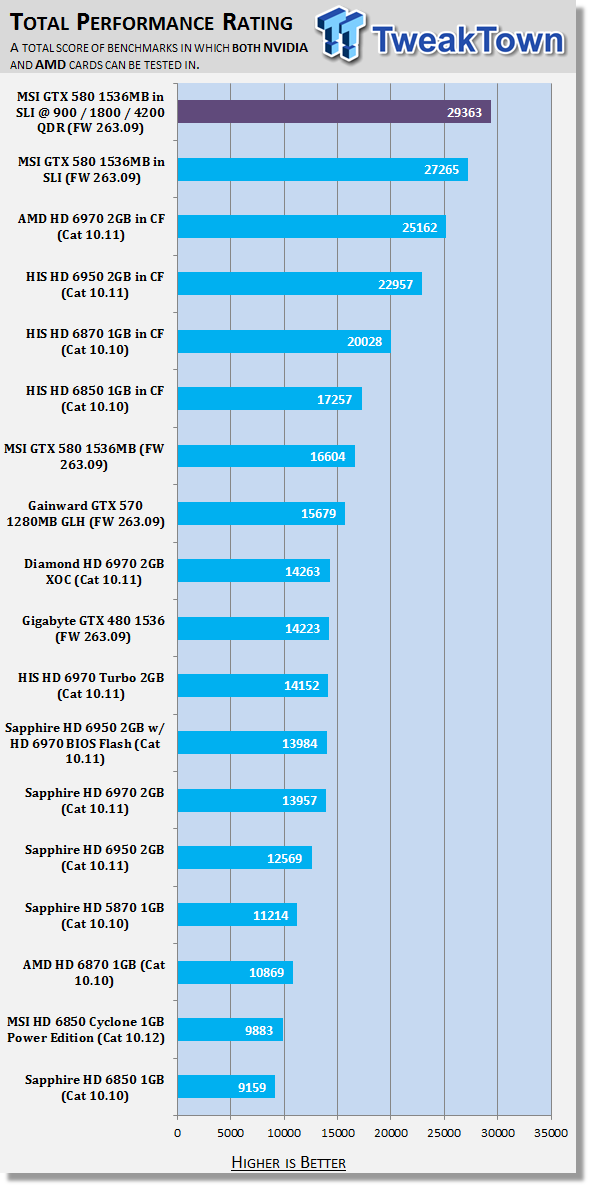
Overall that overclock really gives us a nice boost in our score with our TPR graph sitting on the edge of almost 30,000 here.
Total Value Rating (TVR)
Total Value Rating
The TVR graph is the TPR score divided by the price of the video card. The price of the video card is based on the list price of the model on Newegg.com. In the event the card isn't listed, it will be based on the U.S. $ MSRP given to us by the manufacturer.
In the event we can't source a price from either, the product will not receive a TVR rating. As with our TPR graph, the amount of video cards on the list will grow over time and the price of the model won't change from what it was when first reviewed. For this reason the U.S. $ price that the card is based off will be included next to the name of the model.
In the event you want to find the TVR rating yourself based on the current price, all you have to do is simply divide the TPR number by the list price.
TVR numbers are rounded to the nearest whole number; 100.3 will be 100; 100.8 will be 101 and 100.5 will be rounded down to 100.
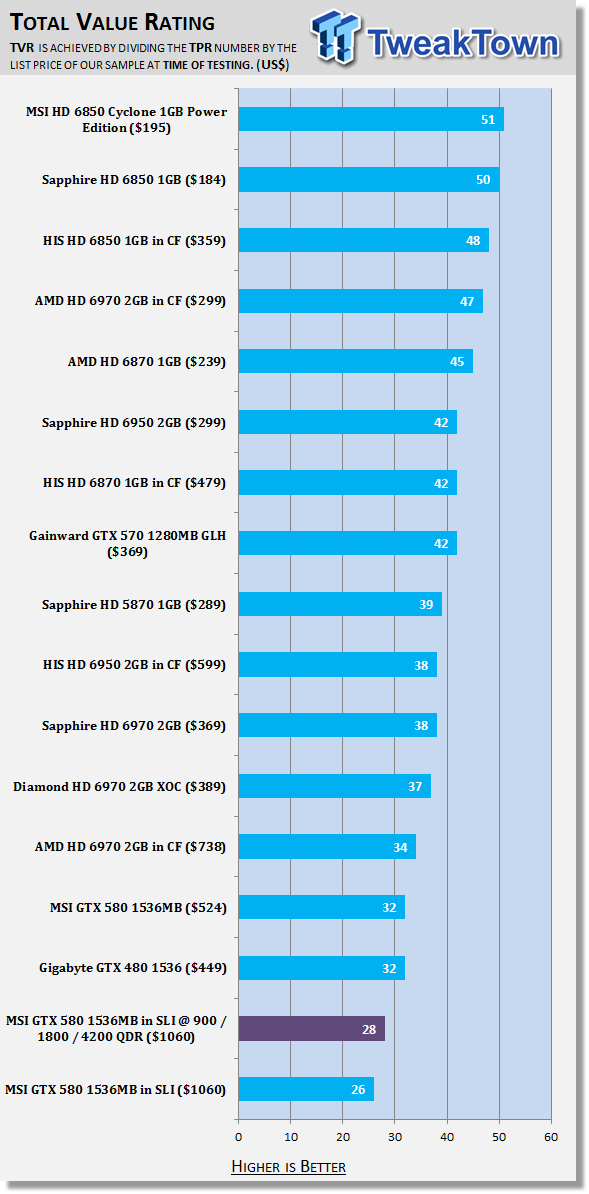
Value of course goes up as we get more performance from the overclock and the price stays exactly the same, but there's no denying this setup is going to cost you.
Final Thoughts
For most the GTX 580 by itself is going to offer more power than they need. Combine two of them and you've just got an absolute mammoth amount of performance on offer due to the excellent scaling we're seeing with dual card technology these days.
Take those two cards, though, add some extra voltage to the cores and move the clocks of both the core and memory north, and you're just talking about a huge amount of performance that makes any game playable at any single screen resolution, and while a lot of people say that the benefits of AA aren't nearly as strong as we climb up to these massive resolutions, there's still a difference and what this kind of setup does it give you the ability to make sure you can crank up every aspect of detail.
At 1920 x 1200 with 4x AA we can't get a single card to offer us a 60 FPS average, which is exactly what most gamers are going to aim for. People who have opted for a 120Hz monitor instead of the standard 60Hz offering are going to want even more with FPS averages closer to that 120 FPS mark.
With the GTX 580 in SLI and overclocked, we're only three FPS away from an average of 100 FPS and while our 980X at 4.2GHz might be overkill for most people, much like this setup, if you're dropping more than $1,000 on video cards the chances are you're going to have a rig running similar clocks to us, if not higher.
If that wasn't enough for people to understand the reasoning behind why people buy setups like these, you can then of course bring multi monitor setups into the mix which opens a whole new need for power.
Sure, you've got some insane power on offer here, but the bottom line is it's power that people are able to make use of if they play the right games or run the right resolutions. If you're on a single 1680 x 1050 screen it's no doubt overkill, but if you demand FPS in excess of 100 for that 120Hz monitor you've got or want maximum detail at 2560 x 1600, this is going to be the kind of setup that grabs your attention and that's why you go this setup and then proceed to overclock it. Because as we all know, you can never have too much performance!
Our Latest NVIDIA SLI Articles Article Coverage
 SAPPHIRE Radeon RX 9070 GRE PULSE OC Review - A New 1440p Challenger Has Arrived
 ASRock Radeon RX 9070 GRE Steel Legend Review - The RDNA 4 Mid-Range Reshuffle
 ASUS ROG Strix GeForce RTX 5070 Ti 16GB OC Edition Review - Premium Design, Premium Performance
 SAPPHIRE Radeon RX 9070 XT NITRO+ PhantomLink Review - RDNA 4's Beast Mode
 COLORFUL iGame GeForce RTX 5070 Ultra OC Review - When Style and Performance Meet
 Giveaway: 12 Winners Will Score MONTECH NX400 and NX600 CPU Coolers
 Assassin's Creed Odyssey becomes the highest-rated entry in the franchise, thanks to Nolan's 'The Odyssey'
 PlayStation gamers' planned week-long 'PS Blackout' begins today
 Nintendo Switch 2 will rise to £419.99 in the UK, starting September 1
 One retailer says 91% of attempts to buy DDR5 memory are coming from bots
 Jensen Huang signed NVIDIA RTX Pro 6000 graphics card sells for $57,450 at auction
 GTA 6 leaks have reportedly led to a morale drop at Rockstar, with Netflix frustrated as well
 The Blood of Dawnwalker won't hit 60 FPS on any console, PS5 Pro tops out at 40 FPS
 AMD claws back ground against Intel in the CPU market, climbs to 35% share in desktop CPUs
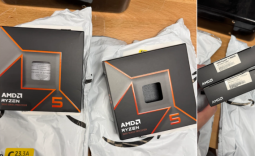 Redditor receives not one but TWO empty boxes of Ryzen 5 9600X from Amazon
 Xbox Series X25 Limited Edition Console is priced at $900, arrives November 2026
 Cooler Master MasterFan A120 Fan Review
 GIGABYTE MO27Q2A Gaming Monitor Review: 1440p, 280Hz, and QD-OLED is a winning combination
 Cooler Master V8 ACE 3DHP BLACK CPU Cooler Review
 ASUS ROG Strix XG129C Review: A $199 Gaming Monitor You Don't Play Games On
 Cooler Master HAF II 500 Mid-Tower Chassis Review
 Corsair HS35 v3 Wireless Gaming Headset Review - An Affordable Winner
 D-Link F518 5G Wi‑Fi 6 AX1800 Mobile Hotspot Review: All-Day Mobile Hotspot
 Bose Lifestyle Ultra Speaker Review - Impressively Detailed Room-Filling Sound
 MSI Z890 Gaming Plus WIFI6E Review - Z890 for under $200
 Mortal Kombat (1995) 4K Ultra HD Blu-ray Review
 Using Multiple Monitors? Change these Windows settings for a Better Experience
 Windows Sandbox is The Windows Security Feature Most People Never Use
 I ditched the Windows 11 context menu for this open-source tool, and here's why
 Windows 11 may be encrypting your drive already, and I checked where my recovery key went
 GIGABYTE's 40 Days of INFINITY celebrates 40 Years of Innovation with stunning GeForce RTX graphics cards and rewards
 I swapped File Explorer for this free file manager and finally got the layout I wanted
 How to tell if someone has been using your Windows PC without your permission
 6 Task Manager tips for troubleshooting Windows performance problems
 ASUS ROG's 20th Anniversary Line-up of Premium PC Gaming Gear has Arrived - Here's Everything You Need to Know
 Six File Explorer tips every Windows user should know