Introduction and Setup
Introduction

SLI, CrossFire and just multi card setups in general have held little value over the past few years. But while it hasn't really changed for AMD, it has for NVIDIA; the GTX 400 series has brought with it some exceptional value when it comes to SLI and the main reason for that is NVIDIA has done an exceptional job lately when it comes to increasing the scaling ability with two cards.
We had always hoped that adding a second card into the mix would carry gains of almost 100% and these days we're almost there with 100% gains; in some cases even being met in certain games.
When we started to throw overclocking into the mix, we really began to see some great value from the GTX 470 when in SLI. Some extra voltage and a nice bump in clocks saw the model perform exceptionally well. Jump forward to the GTX 460 and you're getting amazing performance out of the model in SLI; especially when you're talking about setups costing easily under $500. The setup kills the GTX 480 in performance and at the same time offers us support for Surround Vision.
Today it's time to find out how the GTS 450 goes in this configuration. It's got the price, but has it got the performance?
Setting up SLI
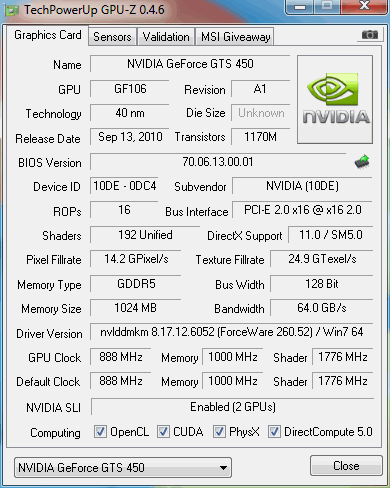
Setting up SLI is really a breeze these days. We slot both cards in, run the install suite for the drivers and once we've rebooted into Windows we open the NVIDIA control panel and enable SLI. Once that's done we just double check in GPU-Z and as you can see on the bottom line, SLI is enabled.
Test System Setup and 3DMark Vantage
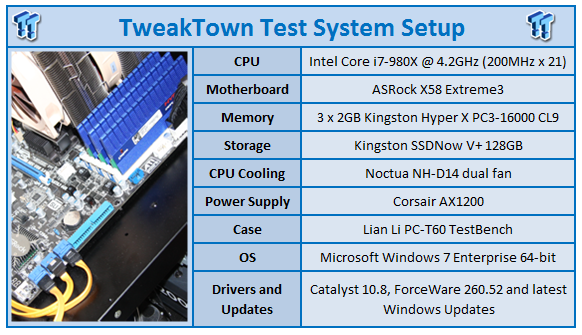
We would like to thank the following companies for supplying and supporting us with our test system hardware and equipment: Intel, ASRock, Kingston, Mittoni, Noctua and Corsair.
As we mentioned recently, we've just undergone some changes with the testbeds and for that reasons we don't have as many results as we're used to. And while we're filling them up quickly, currently most of the models we're looking at are mid range ones.
With that said, we'll be comparing the Galaxy GTS 450 Super OC in SLI against just the one Galaxy GTS 450, the MSI GTS 450 at 950MHz, the HD 5770 and the ECS Black GTX 460 1GB.
Let's get started!
3DMark Vantage
Version and / or Patch Used: 1.0.1
Developer Homepage: http://www.futuremark.com
Product Homepage: http://www.futuremark.com/products/3dmarkvantage/
Buy It Here
3DMark Vantage is the new industry standard PC gaming performance benchmark from Futuremark, newly designed for Windows Vista and DirectX10. It includes two new graphics tests, two new CPU tests, several new feature tests, and support for the latest hardware.
3DMark Vantage is based on a completely new rendering engine, developed specifically to take full advantage of DirectX10, the new graphics API from Microsoft.
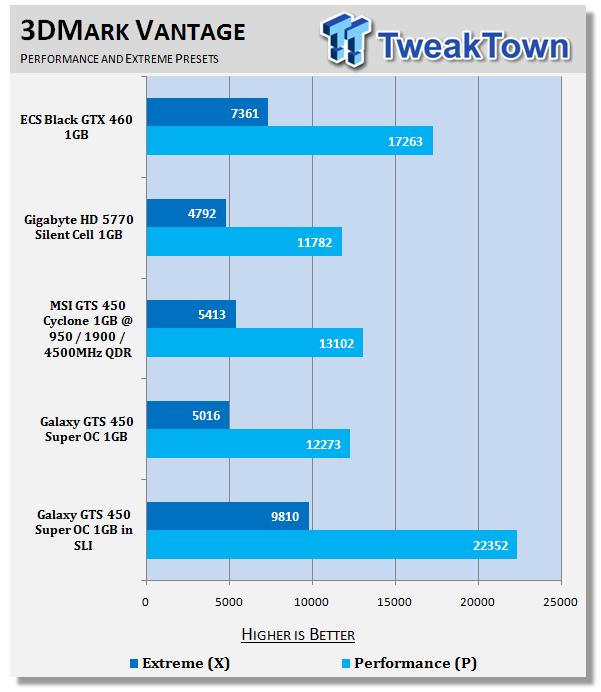
Straight off the bat we can see how strong SLI performance is. Not only does it offer a good jump over the ECS Black GTX 460 which carries with it an overclock, but its scaling is fantastic with performance being almost double under 3DMark Vantage.
Unigine Heaven Benchmark
Version and / or Patch Used: 2
Developer Homepage: http://www.unigine.com
Product Homepage: http://unigine.com/press-releases/091022-heaven_benchmark//
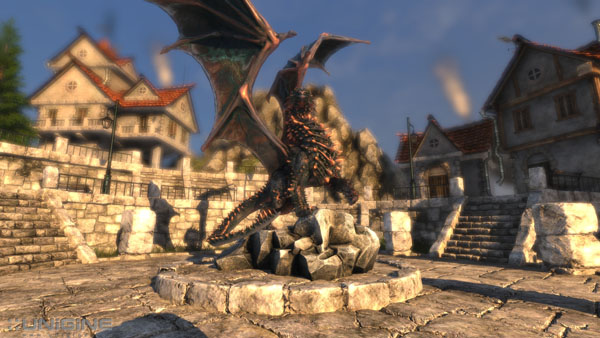
New benchmark grants the power to unleash the DirectX 11 potential in the gift wrapping of impressively towering graphics capabilities. It reveals the enchanting magic of floating islands with a tiny village hidden in the cloudy skies. With the interactive mode emerging experience of exploring the intricate world is ensured within reach. Through its advanced renderer, Unigine is one of the first to set precedence in showcasing the art assets with tessellation, bringing compelling visual finesse, utilizing the technology to the full extend and exhibiting the possibilities of enriching 3D gaming.
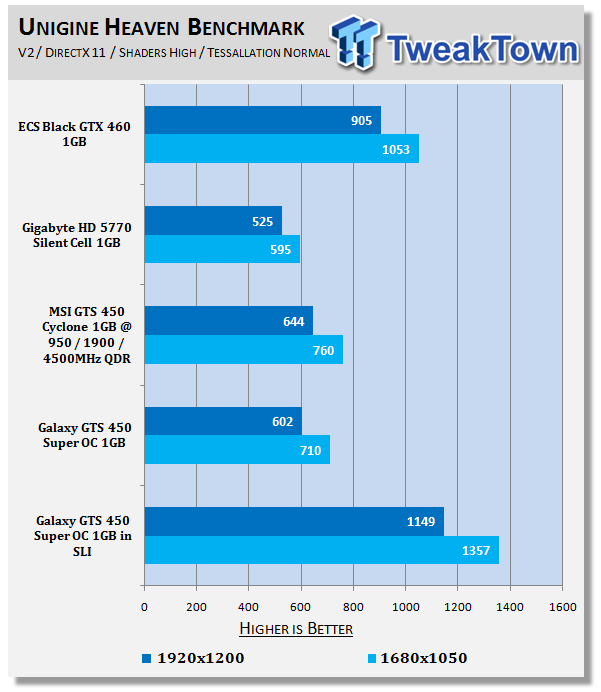
Heaven like Vantage shows some very strong performance; both when compared to the GTX 460, and just to the single Galaxy GTS 450 Super OC.
Benchmarks - Resident Evil 5
Resident Evil 5
Version and / or Patch Used: Demo Benchmark
Developer Homepage: www.residentevil.com/
Product Homepage: http://www.residentevil.com/
Resident Evil 5 is a survival horror video game developed and published by Capcom. The game is the seventh installment in the Resident Evil survival horror series, and was released on September 18. Resident Evil 5 revolves around Chris Redfield and Sheva Alomar as they investigate a terrorist threat in Kijuju, a fictional town in Africa.
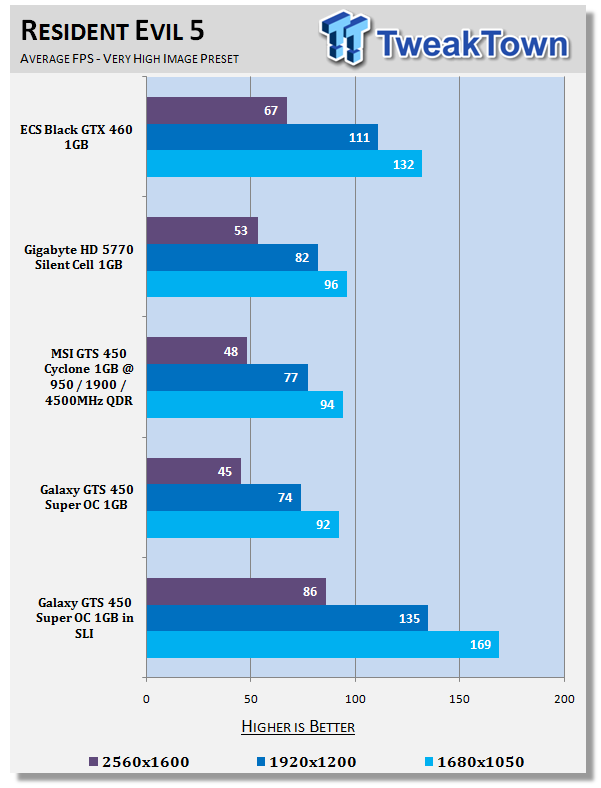
Getting stuck into the games, we see the setup really shine. You can see 2560 x 1600 wasn't an option before, but it's a different story here with us getting well above the 60 FPS average we need.
Benchmarks - Tom Clancy's H.A.W.X.
Tom Clancy's H.A.W.X.
Version and / or Patch Used: Benchmark Demo
Timedemo or Level Used: Built-in Test
Developer Homepage: http://www.ubi.com/UK/default.aspx
Product Homepage: http://www.hawxgame.com/
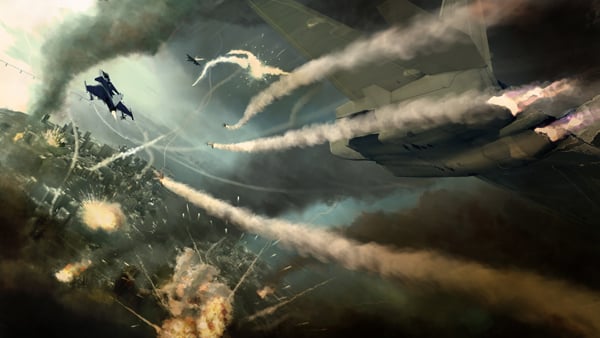
Tom Clancy's H.A.W.X is an arcade-style flight simulator video game developed by Ubisoft Romania and published by Ubisoft for Microsoft Windows, Xbox 360, PlayStation 3, and iPhone OS.
The fundamental gameplay mechanics are similar to those of other console-based flight series. Players take on enemies with over 50 aircraft available. Each mission is at real world locations in environments created with commercial satellite data. A cockpit, first person, and third person view are selectable. The third person view gives the player an external view of both their plane and the target.
Set above the skies of a near-future world, increasingly dependent on private military companies with elite mercenaries who have a relaxed view on the law. As these non-governmental organizations gain power, global conflict erupts with one powerful PMC attacking the United States.
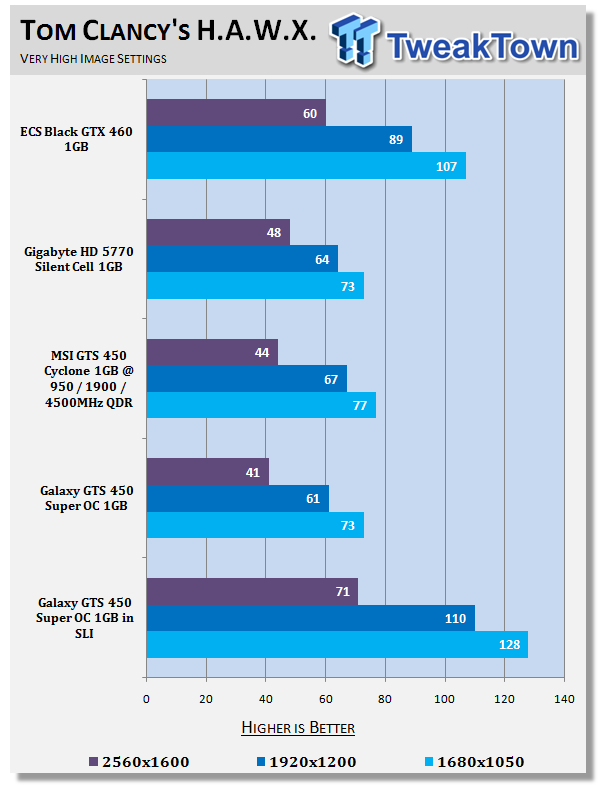
Across the board we've got very strong performance, excellent scaling, and you can see we've gone from a single card that could just scrape over that 60 FPS average at 1920 x 1200 to a setup that gives us a solid performance at 2560 x 1600.
Benchmarks - Mafia II
Mafia II
Version and / or Patch Used: Latest Steam Update
Timedemo or Level Used: Built in Benchmark
Developer Homepage: http://www.2kczech.com/
Product Homepage: http://www.mafia2game.com/
Buy It Here
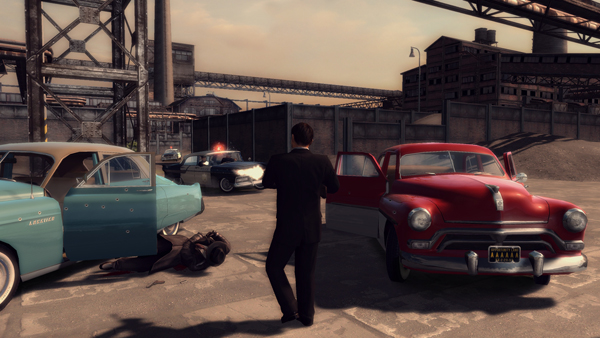
Mafia II is a third-person action-adventure video game, the sequel to Mafia: The City of Lost Heaven. It is developed by 2K Czech, previously known as Illusion Softworks, and is published by 2K Games. The game is set from 1943 to 1951 in Empire Bay (the name is a reference to New York's state nickname "The Empire State"), a fictional city based on San Francisco and New York City, with influences from Chicago and Detroit. The game features a completely open-ended game map of 10 square miles. No restrictions are included from the start of the game. There are around 50 vehicles in the game, as well as licensed music from the era.
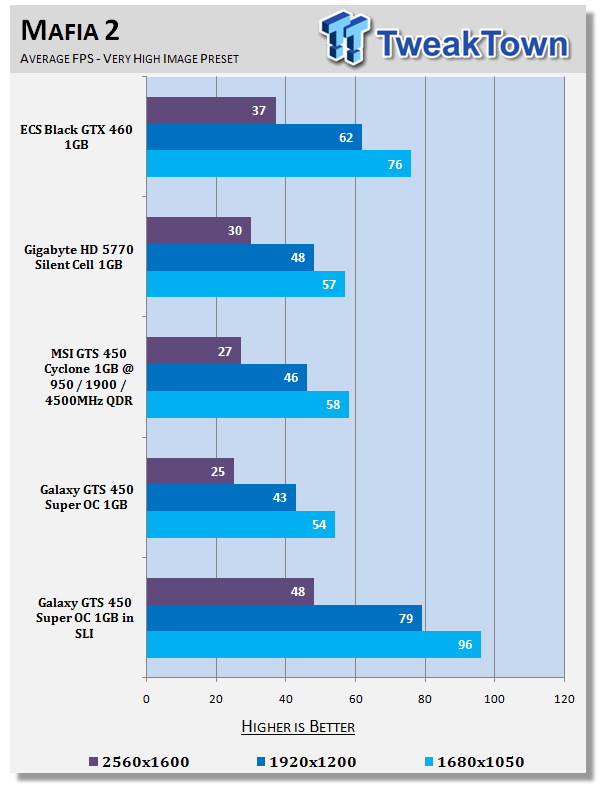
Across the board we saw that most of the cards struggled under Mafia II at all resolutions. The only card that gave us a bit of hope was the GTX 460. Here we again see the performance is extremely strong with the setup having no problems at 1920 x 1200. Hitting up the detail a little, you could probably get smooth game play at 2560 x 1600 as well.
Benchmarks - Lost Planet 2
Lost Planet 2
Version and / or Patch Used: Benchmark Demo
Timedemo or Level Used: Built in Benchmark - Test A Scene 1
Developer Homepage: http://www.capcom.com/
Product Homepage: http://www.lostplanet2game.com/
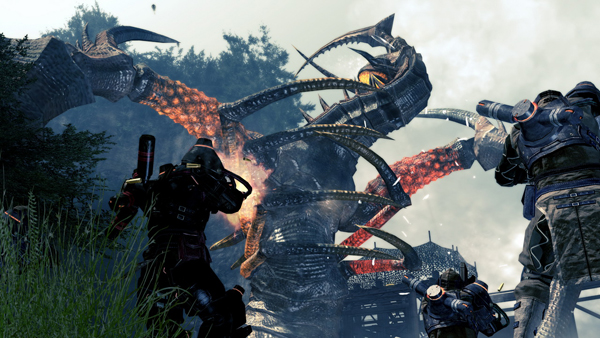
Lost Planet 2 is a third-person shooter video game developed and published by Capcom. The game is the sequel to Lost Planet: Extreme Condition which is also made by Capcom, taking place ten years after the events of the first game, on the same fictional planet. The story takes place back on E.D.N. III 10 years after the events of the first game. The snow has melted to reveal jungles and more tropical areas that have taken the place of more frozen regions. The plot begins with Mercenaries fighting against Jungle Pirates. After destroying a mine, the Mercenaries continue on to evacuate the area, in which a Category-G Akrid appears and attacks them. After being rescued, they find out their evacuation point (Where the Category-G appeared) was a set-up and no pick up team awaited them. The last words imply possible DLC additions to the game, "There's nothing to be gained by wiping out snow pirates... unless you had some kind of grudge."
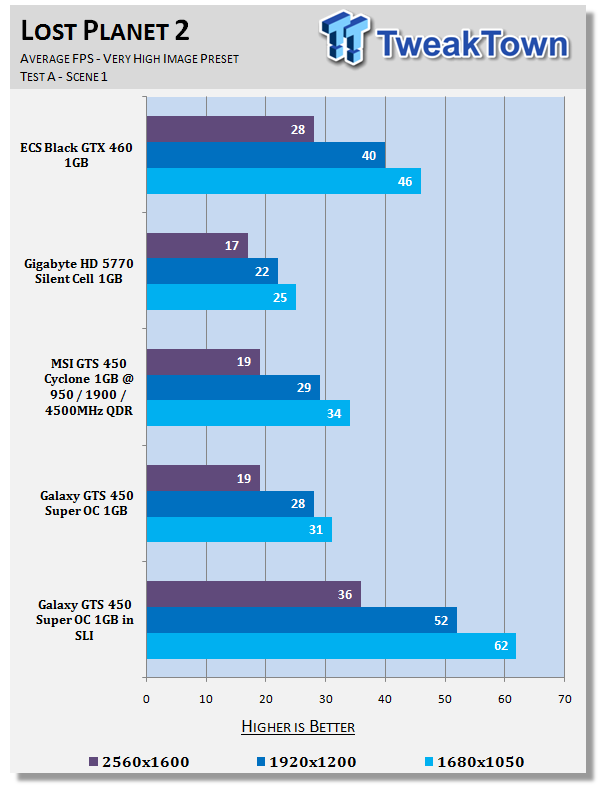
While we again see the GTS 450 SLI setup struggles under Lost Planet, it's the only one to break the 60 FPS average we want. Its 1920 x 1200 performance is even stronger than the single GTX 460 at 1680 x 1050.
Benchmarks - Aliens vs. Predator
Aliens vs. Predator
Version and / or Patch Used: Standalone Benchmark
Timedemo or Level Used: Built in Benchmark
Developer Homepage: http://www.rebellion.co.uk/
Product Homepage: http://www.sega.com/games/aliens-vs-predator/
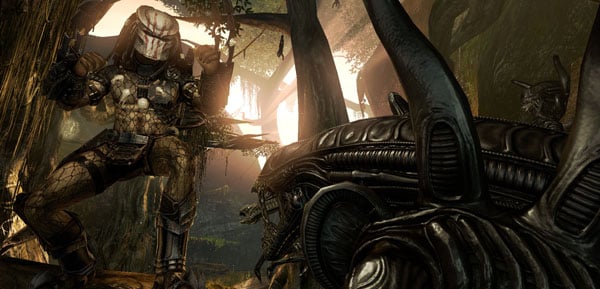
Aliens vs. Predator is a science fiction first-person shooter video game, developed by Rebellion Developments, the team behind the 1999 original PC game, and published by Sega for Microsoft Windows, the PlayStation 3 and the Xbox 360. The game is based on the Alien vs. Predator franchise, a combination of the characters and creatures of the Alien franchise and the Predator franchise. There are three campaigns in the game, one for each race/faction (the Predators, the Aliens and the Colonial Marines), that, while separate in terms of individual plot and gameplay, form one overarching storyline.
Following the storyline of the campaign modes comes the multiplayer aspect of the game. In this Multiplayer section of the game, players face off in various different gametypes in various different ways.
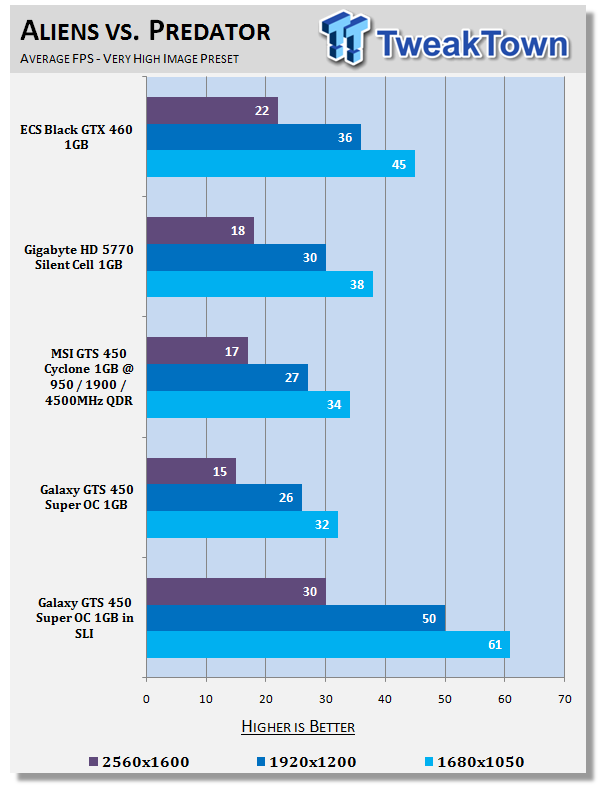
We again see like Lost Planet the GTS 450 SLI setup struggles again, but it's the only setup here that's able to break the 60 FPS average in this very intensive game.
Benchmarks - Final Fantasy XIV
Final Fantasy XIV
Version and / or Patch Used: Standalone Benchmark
Timedemo or Level Used: Built in Benchmark - Elezen (Male)
Developer Homepage: http://www.square-enix.com/
Product Homepage: http://www.finalfantasyxiv.com/
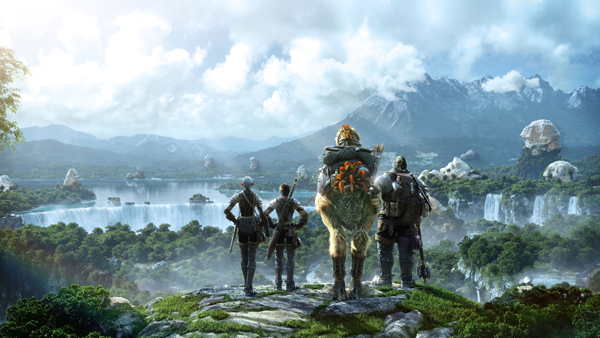
Final Fantasy XIV, also known as Final Fantasy XIV Online, is the fourteenth installment in the Final Fantasy series. The game is a massively multiplayer online role-playing game and is developed and published by Square Enix. The game takes place in a land called Hydaelyn, mainly in a region named Eorzea, which will have a contemporaneously aesthetic blend of science fiction and classic fantasy elements.
The battle and job systems will be different from the one previously used in Final Fantasy XI, which utilized experience points and level-based progression. Final Fantasy XIV is being designed to utilize a skill-based progression[15] system similar to that of Final Fantasy II. Character races will resemble and allow players to create avatars similar to ones in Final Fantasy XI. Group play has been de-emphasized, and now solo and group play have been balanced. Weapon use will alter "character development".
Note: Final Fantasy XIV gives us a score and not a normal FPS rating, our understanding is that anything around 2000 points or above is considered playable.
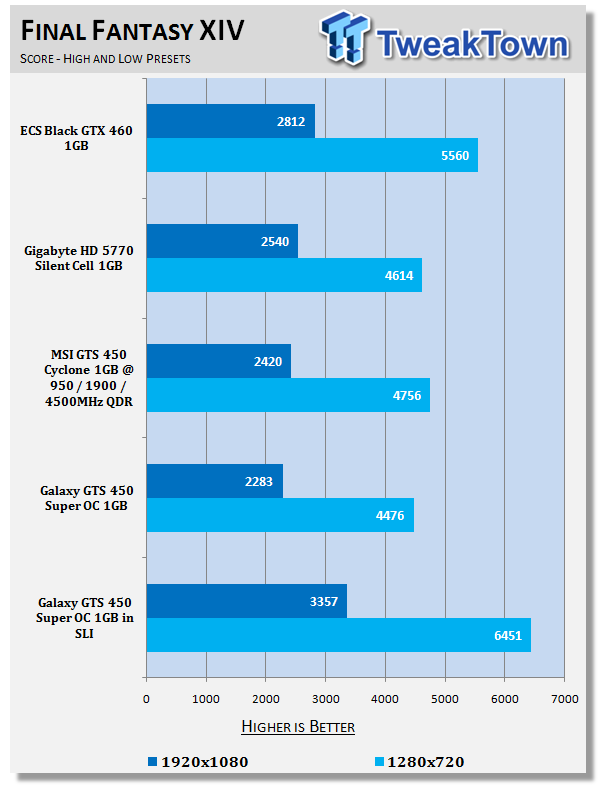
Final Fantasy XIV performance is strong. Its scaling isn't as strong as some of the other games we've looked at, though.
Benchmarks - Street Fighter IV
Street Fighter IV
Version and / or Patch Used: Standalone Benchmark
Timedemo or Level Used: Built in Benchmark
Developer Homepage: http://www.capcom.com/
Product Homepage: http://www.streetfighter.com/
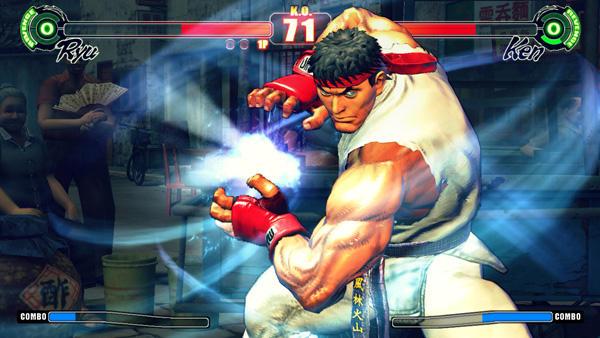
While Street Fighter IV features models and backgrounds rendered in 3D, the gameplay remains on a traditional 2D plane, with the camera having freedom to move in 3D at certain times during fights, for dramatic effect. Producer Yoshinori Ono has stated that he wanted to keep the game closer to Street Fighter II. A new system called "Focus Attacks" ("Saving Attack" for the Japanese version) has been introduced, as well as Ultra moves. The traditional six-button control scheme returns, with new features and special moves integrated into the input system, mixing classic gameplay with additional innovations.
All the characters and environments in Street Fighter IV are rendered as 3D models with polygons, similar to the Street Fighter EX sub-series Capcom produced with Arika. However, there are a couple of key differences. Art director and character designer Daigo Ikeno, who previously worked on Street Fighter III 3rd Strike, opted for non-photorealistic rendering to give them a hand-drawn look, with visual effects accented in calligraphic strokes, ink smudges and ink sprays during the fights.
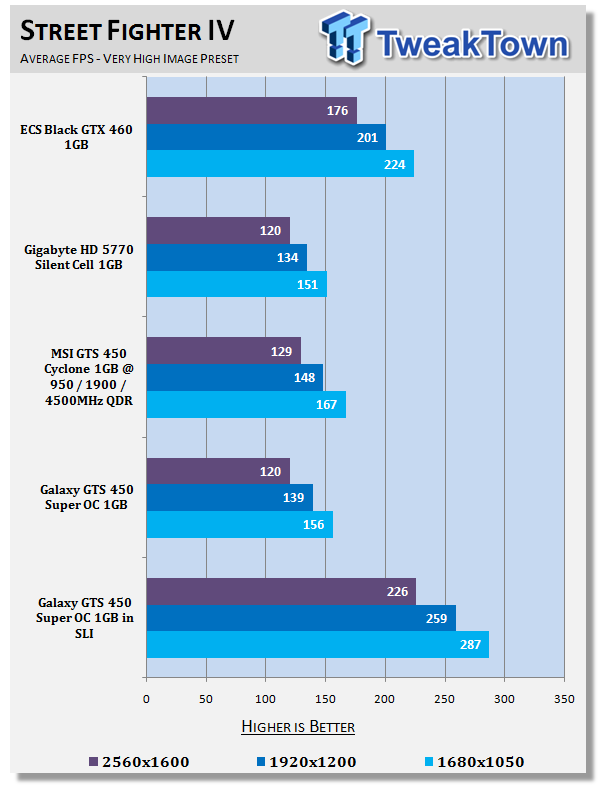
Across the board we could see that all our cards averaged over 120 FPS at 2560 x 1600, so it's no surprise that we're seeing huge numbers here when in SLI.
Benchmarks - Far Cry 2
Far Cry 2
Version and / or Patch Used: 1.01
Timedemo or Level Used: Ranch Long
Developer Homepage: http://www.ubi.com/
Product Homepage: http://www.farcry2.com/
Buy It Here
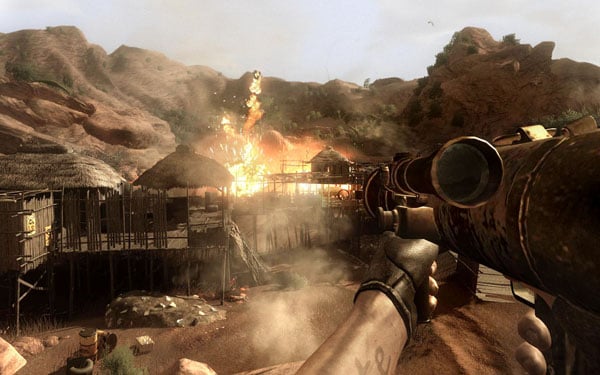
The Dunia Engine was built specifically for Far Cry 2 by the award-winning Ubisoft Montreal development team. It delivers the most realistic destructible environments, amazing special effects such as dynamic fire propagation and storm effects, real-time night-and-day cycle, dynamic music system, non-scripted enemy A.I. and so much more.
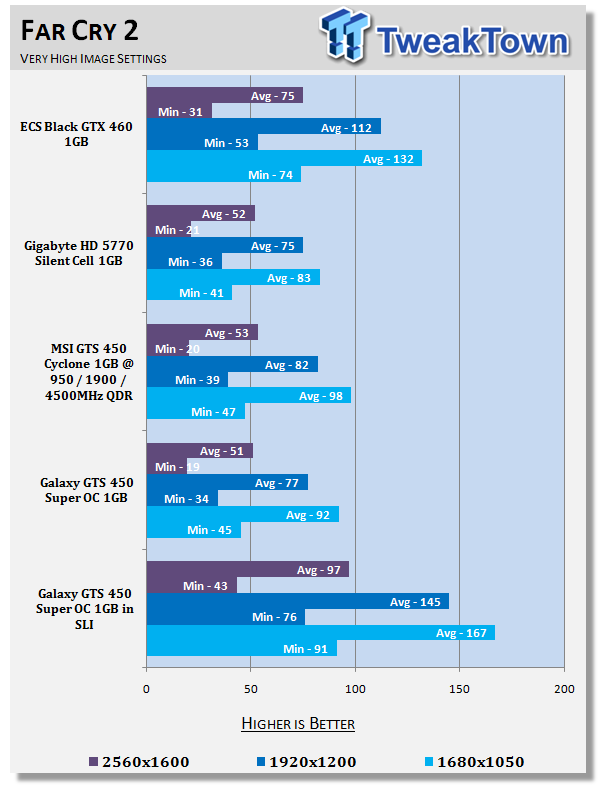
Across the board, just mammoth gains here. It's the fastest setup at 2560 x 1600 and more importantly is well and truly playable at that resolution.
Benchmarks - Batman Arkham Asylum
Batman Arkham Asylum
Version and / or Patch Used: 1.1
Timedemo or Level Used: Built-in Test
Developer Homepage: http://www.batmanarkhamasylum.com/
Product Homepage: http://www.batmanarkhamasylum.com/
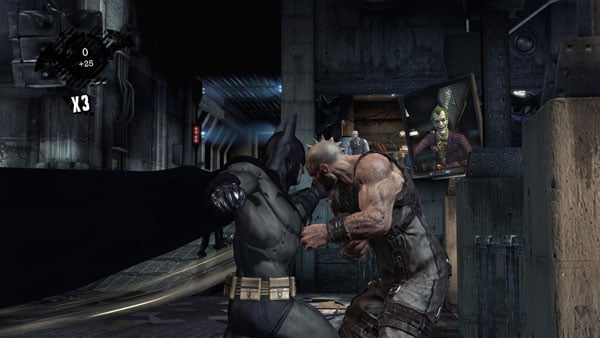
Batman: Arkham Asylum exposes players to a unique, dark and atmospheric adventure that takes them to the depths of Arkham Asylum - Gotham's psychiatric hospital for the criminally insane. Gamers will move in the shadows, instigate fear amongst their enemies and confront The Joker and Gotham City's most notorious villains who have taken over the asylum.
Using a wide range of Batman's gadgets and abilities, players will become the invisible predator and attempt to foil The Joker's demented scheme.
Batman: Arkham Asylum features an original story penned exclusively for the game by famous Batman author and five-time Emmy award winner Paul Dini, whose credits include Lost season one and Batman: The Animated Series.
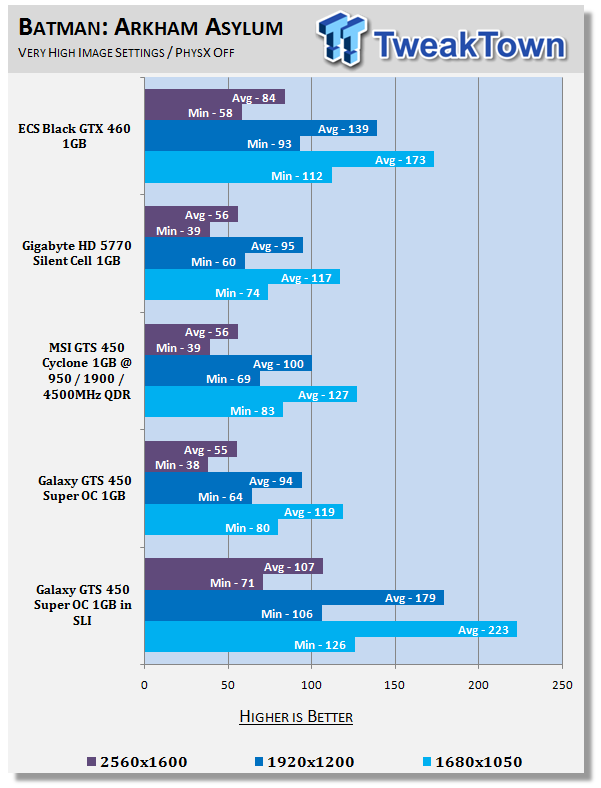
We saw the Galaxy GTS 450 Super OC perform strong under Batman AA in single card form; in SLI those numbers are just improved.
Benchmarks - High Quality AA and AF
High Quality AA and AF
Our high quality tests let us separate the men from the boys and the ladies from the girls. If the cards weren't struggling before they will start to now.
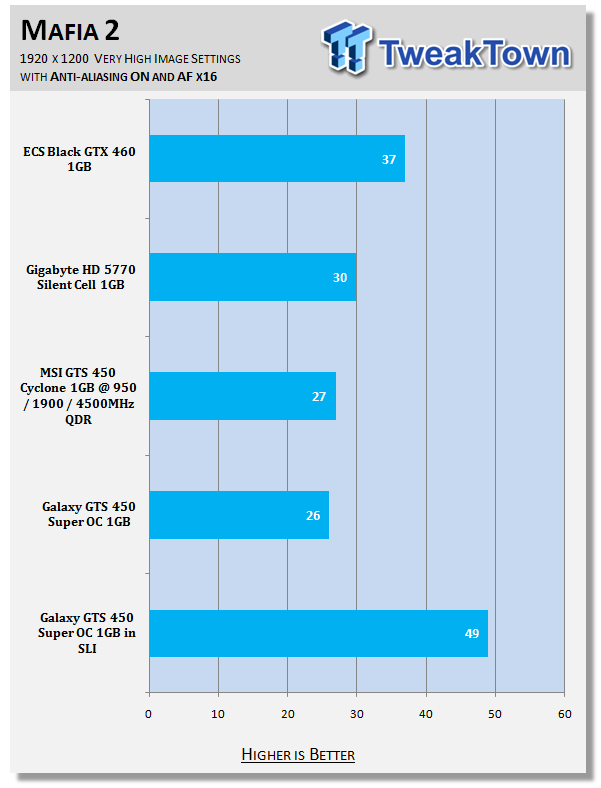
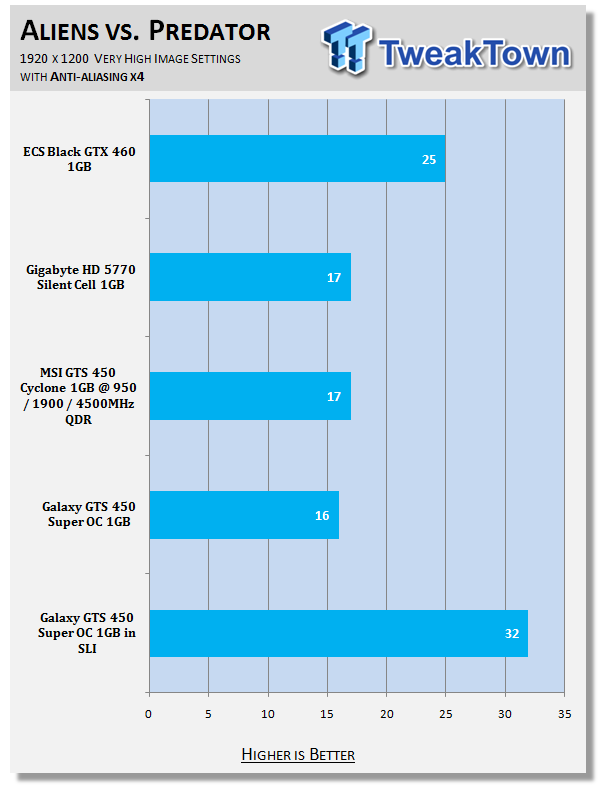
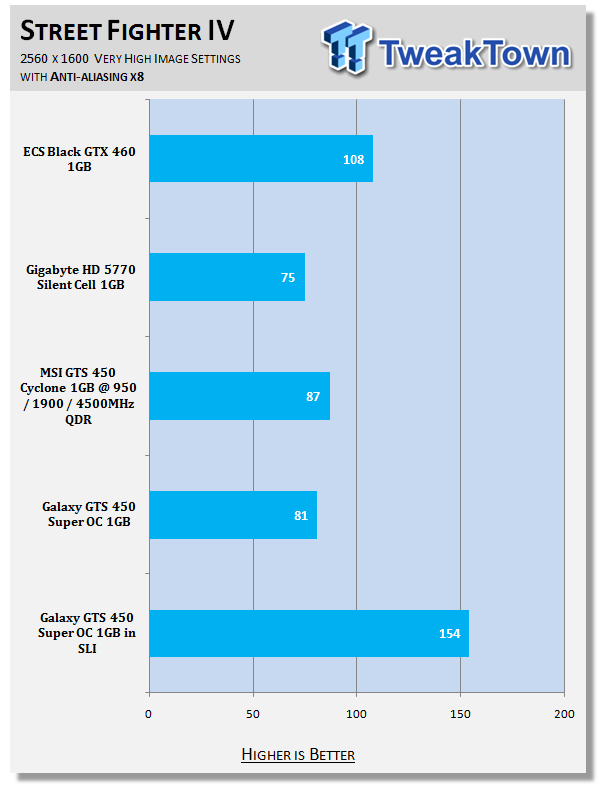
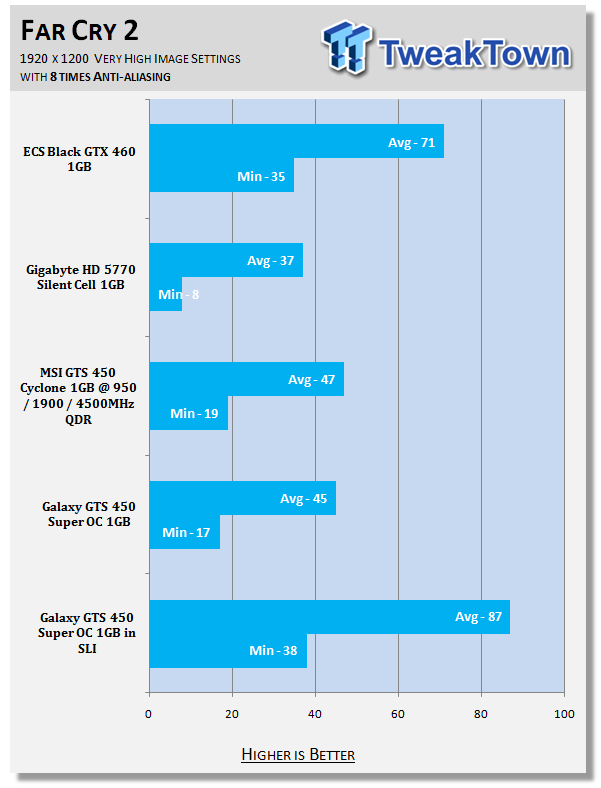
While Mafia II and AvP have trouble still with AA and Street Fighter IV continues to be strong, we can see that under Far Cry 2 we're able to get over that 30 FPS minimum which is so important.
Benchmarks - PhysX Tests
PhysX Tests
Here we're able to find out when PhysX is turned on in games that support it what kind of frame rates we're able to get. We always set PhysX to the highest possible in game settings while also keeping detail at its highest.
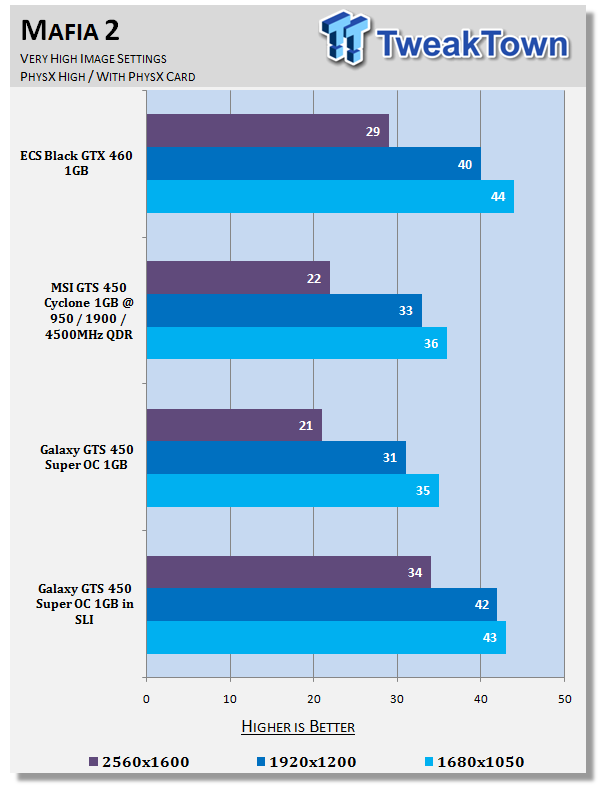
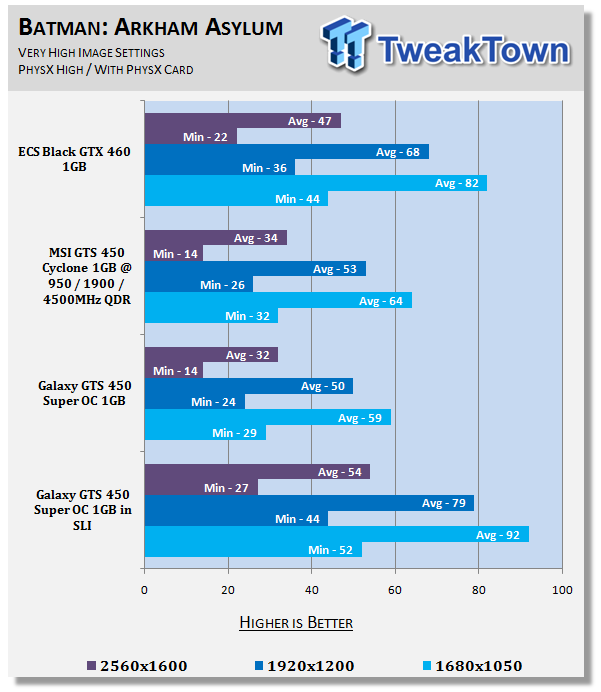
With PhysX on the scaling just isn't as strong under Mafia II and we're still below that 60 FPS average we need at all resolutions. Batman AA on the other hand is strong and we're well and truly playable at 1920 x 1200. With 2560 x 1600 performance we're falling a bit short, but those few extra FPS wouldn't be hard to pick up.
Temperature Test

The temperature of the core is pulled from MSI Afterburner with the max reading used after a completed run off 3DMark Vantage and the Performance preset.
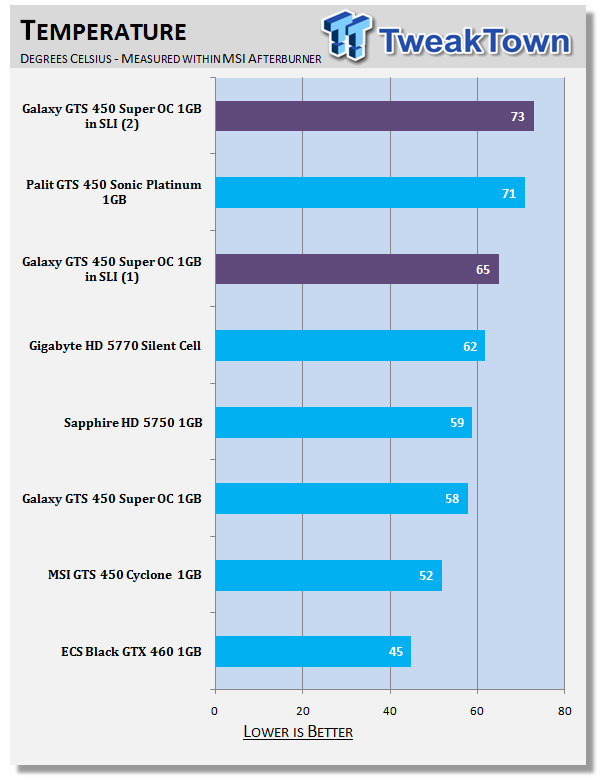
It comes as no surprise that when you start cramming the cards together they get a bit warmer, but it's nothing to really be worrying about.
Sound Test

Pulling out the TES 1350A Sound Level Meter we find ourselves quickly yelling into the top of it to see how loud we can be.
After five minutes of that we get a bit more serious and place the device two CM away from the fan on the card to find the maximum noise level of the card when idle (2D mode) and in load (3D mode).
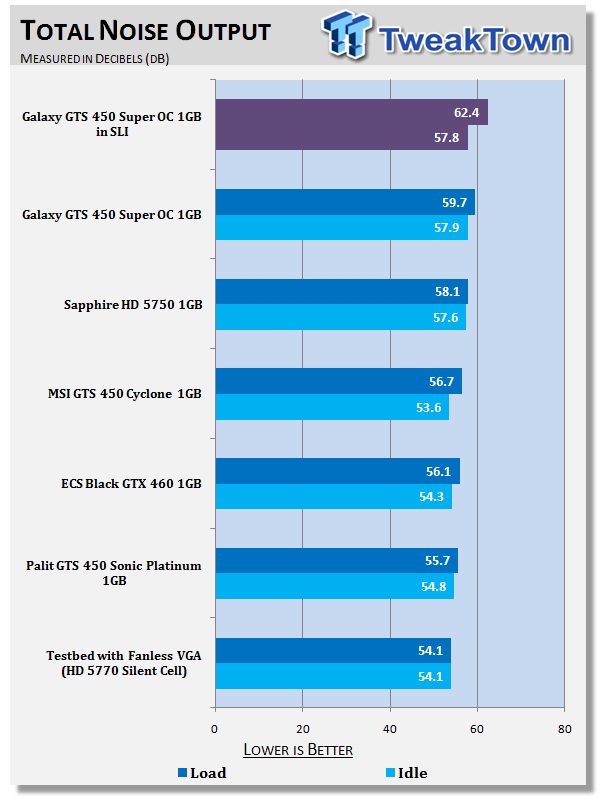
Noise levels are a little louder, but nothing major at all. The difference with the second card added is hardly noticeable.
Power Consumption Tests

Using our new PROVA Power Analyzer WM-01 or "Power Thingy" as it has become quickly known as to our readers, we are now able to find out what kind of power is being used by our test system and the associated graphics cards installed. Keep in mind; it tests the complete system (minus LCD monitor, which is plugged directly into AC wall socket).
There are a few important notes to remember though; while our maximum power is taken in 3DMark06 at the same exact point, we have seen in particular tests the power being drawn as much as 10% more. We test at the exact same stage every time; therefore tests should be very consistent and accurate.
The other thing to remember is that our test system is bare minimum - only a SSD hard drive is used with a single CD ROM and minimal cooling fans.
So while the system might draw 400 watts in our test system, placing it into your own PC with a number of other items, the draw is going to be higher.
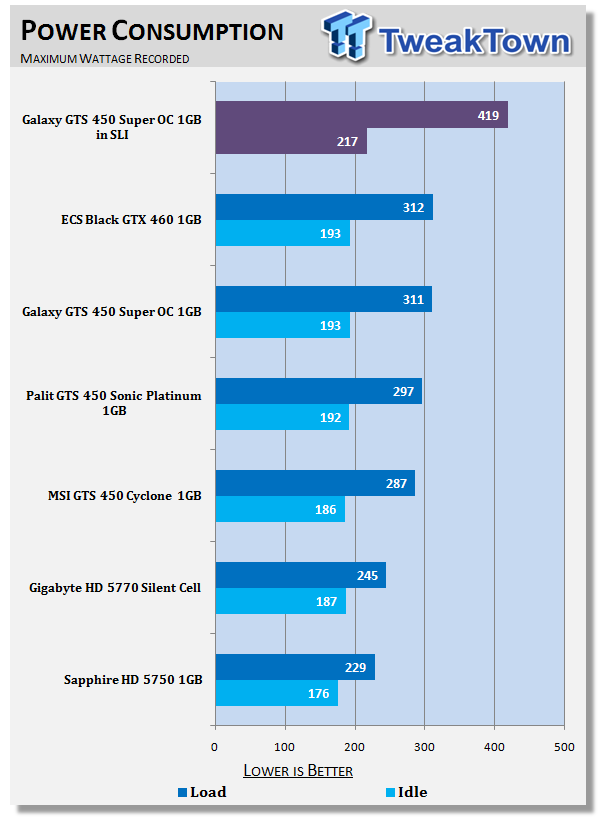
Power draw does indeed go up, but its number is still relatively low and any decent 600+ Watt power supply wouldn't run into any problems.
Total Performance Rating (TPR)
Total Performance Rating
The TPR graph is a combination of all our benchmarks in which NVIDIA and ATI are on an even playing field.
The TPR number is a combination of:
3DMark Vantage, Heaven Benchmark V2, Resident Evil 5, Tom Clancy's H.A.W.X., Mafia 2 (PhysX Off), Lost Planet 2, Aliens vs. Predator, Final Fantasy XIV, Street Fighter IV, Far Cry 2, Batman: Arkham Asylum (PhysX Off) and our four High Quality tests which include Mafia 2, Aliens vs. Predator, Street Fighter IV and Far Cry 2.
All of the benchmark results achieved are then combined into a single number. As this graph will grow over time and cards won't be re-tested, next to each model you'll find the driver version that was used when the card was benchmarked.
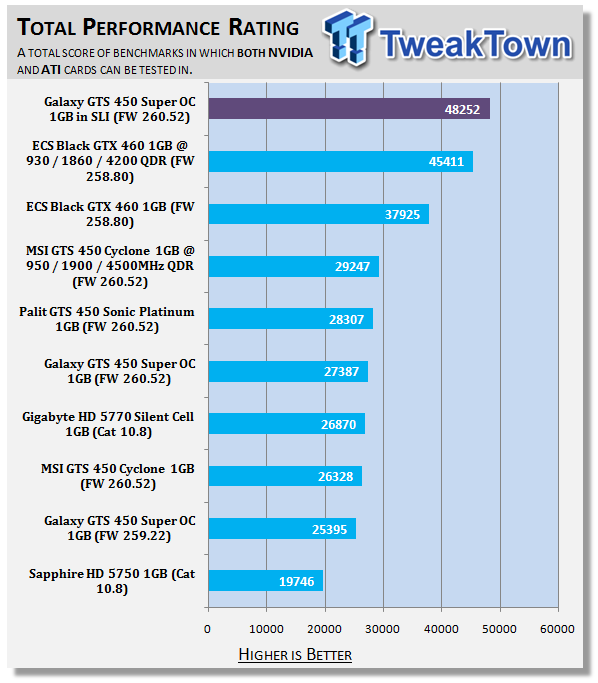
It comes as no surprise that the setup slides into top spot on our new TPR graphs and ignoring the ECS GTX 460 Black at 930MHz, you can really see that compared to the card at stock clocks the performance jump here is really strong.
Total Value Rating (TVR)
Total Value Rating
The TVR graph is the TPR score divided by the price of the video card. The price of the video card is based on the list price of the model on Newegg.com. In the event the card isn't listed, it will be based on the U.S. $ MSRP given to us by the manufacturer.
In the event we can't source a price from either, the product will not receive a TVR rating. As with our TPR graph, the amount of video cards on the list will grow over time and the price of the model won't change from what it was when first reviewed. For this reason the U.S. $ price that the card is based off will be included next to the name of the model.
In the event you want to find the TVR rating yourself based on the current price, all you have to do is simply divide the TPR number by the list price.
TVR numbers are rounded to the nearest whole number; 100.3 will be 100; 100.8 will be 101 and 100.5 will be rounded down to 100.
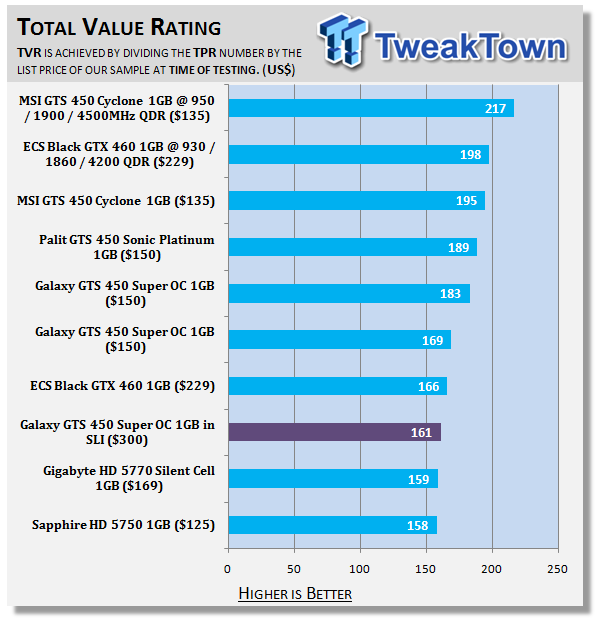
With our new TVR graph being very dominated with NVIDIA mid range cards at the moment, the overall value of the setup doesn't look as strong as some of the other cards. If this was on our older TVR graph, though, it would look a lot more impressive. The value of this setup is still exceptional, nonetheless.
Final Thoughts
The performance you're getting out of a $300 US setup here is just amazing and considering that the GTX 460 is well into the $200 US price bracket, running a pair of these in SLI is a very worthwhile setup.
Something else that's fantastic about these mid range SLI setups is that while they're not as fast as a GTX 480 SLI setup, you don't run into the same problems with CPU limitation being an issue, so you can really get the most out of the cards, and really get some amazing performance.
The price of the Galaxy GTS 450 Super OC combined with the effort that NVIDIA has put in on the scaling of SLI means that this is again another weapon of a setup. For the past six months when people would talk about CrossFire HD 5770s, people would ask why? Why not just buy a HD 5850? or HD 5870? In the end the latter cards offered a much better all round deal. The GTX 460 and GTS 450 in SLI aren't like that; it's a fantastic option when compared to buying a card like the GTX 470 and GTX 480.
NVIDIA has now shown its hand when it comes to the mid-range market and we've been told that AMD has its eyes firmly set on the GTX 460 when it starts launching the HD 6000 series from October. A single card setup is only going to paint part of the picture. Unless AMD can offer a card for similar prices that perform much better, or scale considerably better than they do at the moment, AMD could continue to be in trouble when it comes to performance users who don't have the budget to buy GTX 480s and HD 5970s.
The massive price difference between the GTX 460 and GTS 450 make this SLI setup something to consider, especially when you consider the fact that we've looked at cards that retail for around $15 US less, which would bring an SLI setup to around $270 US; a price that really isn't all that much higher than the GTX 460.
AMD seem to think the HD 5770 is a safe card, as compared to a stock GTS 450 it continues to win, but it's more expensive. Partners are clearly interested in overclocking the model, but the HD 5770s overclocking potential isn't nearly as strong and two HD 5770s in CrossFire seems like a bit of a waste of money; a perception that's not being seen with these new mid range 400 series cards from NVIDIA.
Adding a second card into the mix is game changing. You're talking about a card that blitzes through just about anything now at 1680 x 1050 with maximum image quality, and a setup that can easily play a lot of games at 2560 x 1600. You've also got a setup that allows Surround Vision and if you look at three 1680 x 1050 monitors which offer only about 25% more strain on the GPUs versus a single output at 2560 x 1600, it's clear that you're going to be able to run games at 5040 x 1050 with few dramas, if not the only problem being you might have to move from Very High image quality to High or Medium in some cases.
Our Latest NVIDIA SLI Articles Article Coverage