












Hands-on with Sony Bravia 3D TV
Last night I had the pleasure of a hands-on experience with the first complete 3D Sony Bravia LCD TV, said to be the only one of its kind currently in Australia. Whilst other '3D ready' pre-production Sony units such as the KDL-HX900 have been previously demonstrated, this Sony roadshow represents the first time that a complete 3D packaged KDL-LX900 model has been unveiled. Unlike '3D ready' units that require a connected synchronization dongle (similar to the sensor bar on the Nintendo Wii console), the LX900 has this unit built in, minimizing clutter.
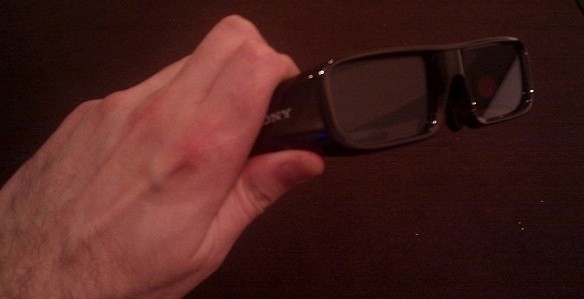
First up; the 3D glasses. They feel slightly weightier than I expected, but more sturdy in construction. They wrap around the head more completely than a standard pair of sunglasses, working to block out peripheral light, fully adjustable for viewers who wear prescription glasses. Each pair of glasses is powered by one disposable CR2032 button cell battery, which lasts approximately 100 hours. At this point, simply screw off the battery compartment and users can insert a replacement.
[img]2[/img]
The LX900 will come with four sets of 3D glasses, with additional units available separately at a cost to be determined. There is no limit as to how many can be synchronized with the screen at any given time. Unlike the Samsung LCD 3D TV currently on the market right now, the polarisation is done on the LCD screen itself, rather than the glasses. This is said to present viewers with a brighter image than competitors. I have not seen the Samsung unit, so as yet I cannot compare the two.
[img]3[/img]
Now to the unit itself. With non-3D content, the LCD looks as unassuming as any other LCD TV from the Sony range. Despite the screen featuring a polarisation film, it appeared to be no darker on standard content than a traditional LCD screen. Of course, we are all here to hear how it performs with 3D content, so I'll deliberate no longer.
In short, it's fairly impressive stuff. Sony had on hand a PlayStation 3 with a Blu-ray disc of movie content, documentary footage and PlayStation 3 game footage. There was a curiosity with the disc of footage, but more on that shortly. I found the 3D effect to be very similar to the RealD cinema experience. That is, it takes the human eye a few minutes to adjust to the image; until that point I felt a little eye strain, more pronounced than I find in the cinema.
The best of the footage from the demonstration reel was some seemingly custom shot footage of wildlife. There were three distinct fields in view. But rather than just a simple background and foreground effect, I found sloping fields very impressive; animals grazing on a green rolling hill made for a great example. Other shots of sea life swimming into camera moved into the foreground very effectively, until they took up the entire frame and seemed to lose context. I found a little bit of ghosting in this footage, a little more than I see during a RealD cinema experience, but not enough to be distracting.
Due to the limited amount of content available, I don't have a complete assurance, but I do suspect that the level of ghosting was more inherent in the different content and how it was produced. Sony was keen to darken the viewing environment, as brightness does in fact minimise the 3D effect, of which I verified. It doesn't destroy it, but it does adversely alter the immersion factor.
Hands-on with Sony Bravia 3D TV - Continued
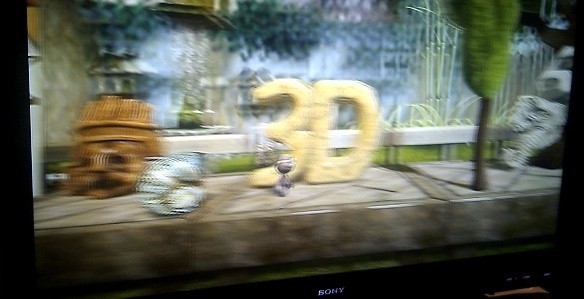
The demonstrated 3D gaming content included non-playable footage of PlayStation 3D exclusives including "Super StarDust HD", "Wipeout HD", "Motorstorm: Pacific Rift" and "Little Big Planet". Of these, only the latter two featured real, in-game footage (the former appeared to be 3D converted release trailers). From these, I found the demonstration of "Little Big Planet" the most impressive. The game lends itself to a 3D display so spectacularly and it appears that this feature will improve the actual gameplay tenfold.
For readers familiar with it, the objective is to control the main character on a scrolling platform and intermingle between objects placed in the background and the foreground, searching for hidden items and finding ways to traverse obstacles in your way. The 3D version of the game looks to not only make playing the game more immersive and enjoyable, but more intuitive.
Interestingly, I snuck an 'unofficial' peek at the PlayStation 3 on demonstration and in particular the version of firmware it was running. The version; 3.01, is not the most recent firmware. In fact, it's rather old, being released in September 2009 and certainly not the latest firmware 3.30 released last month which touted the introduction of 3D capabilities.
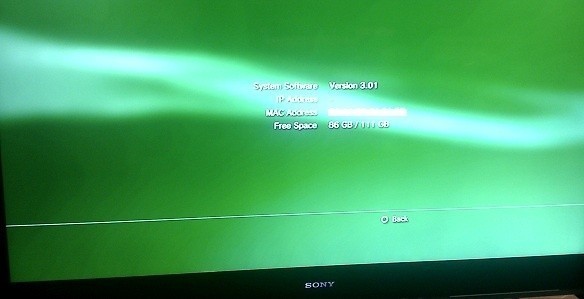
Notably, this firmware only featured 'system stability' in the release notes and in no way referred to any 3D features. Additionally, the demo disc was encoded as a game, not a properly authored Blu-ray disc that will work in a traditional Blu-ray player. This may have been done to protect Sonys content from being played on rival manufacturer 3D Blu-ray players, but strange nonetheless.
In short, I found the 3D feature of Sony's first 3D TV to be a winner. However, as I noted in my recent article "3D: The Home Theater Revolution", the technology will ultimately live or die by the content. However, my biggest complaint is not likely to be rectified soon, as it can't be without changing the way we watch television and most viewers will be unable to do so.
In a cinema, the sheer size of the screen and the placement of the viewer are done so as to block out peripheral vision and immerse the viewer. Most TV watchers at home have a 40 inch screen (101cm) measured diagonally. Additionally, most also sit four to seven metres back from the TV, as to facilitate lounge chairs and to enable conversation between family members.
Remember, most people watch TV in a far different way than they do at the cinema, with tiered, rowed seating right in front of the screen. As such, our peripheral vision is taken up with much more than just the TV screen. This diminishes, if not destroys the immersive 3D effect which looks so fabulous on a cinema screen. Whilst it is true that screen sizes are exponentially increasing to sizes of 46 and 52 inches and above, I can't foresee a time that we will ever watch TV in the same manner as we do at the cinema and as such, its long term viability will remain in question for some time yet.
But you, dear reader, can make up your own mind when the unit is available in Australia this July, for an as yet undetermined price. I sincerely hope you enjoyed TweakTowns first look at Sony 3D TV; we will be sure to look further at the technology at its launch and review the first 3D Blu-rays as they hit the Australian market.
Our Latest Editorials Article Coverage


 Mortal Kombat (1995) 4K Ultra HD Blu-ray Review
 The Super Mario Galaxy Movie (2026) 4K Ultra HD Blu-ray Review
 Speed Racer (2008) 4K Ultra HD Blu-ray Review: a stunning remaster of the cult classic
 The Super Mario Galaxy Movie Cinema Review
 Teenage Mutant Ninja Turtles III (1993) 4K Ultra HD Blu-ray Review
 Giveaway: 12 Winners Will Score MONTECH NX400 and NX600 CPU Coolers
 IQUNIX launches premium EC75 Hall Effect keyboard with 0.01mm Rapid Trigger
 AVerMedia announces new pro-grade HDMI capture devices with up to 4K RGB24 True Color support
 Beyerdynamic announces new affordable MMX 100 and MMX 130 wireless gaming headsets with studio-grade sound
 AMD's latest Radeon driver adds support for Star Wars Zero Company, Call of Duty, and Radeon RX 9050 4GB GPU
 Razer's new Huntsman is the 'world's first low-profile analog optical esports keyboard'
 GTA 6 appears to have leaked from Rockstar India, also suspected to be a PC version
 Xbox struggles to move physical discs, accounts for only 4% of disc sales in the US this year
 Samsung Foundry raises manufacturing prices, may impact the Nintendo Switch 2
 Modder manages to run DOOM on a 16-year-old Canon EOS 550D DSLR Camera
 Leaked Steam Frame unboxing video hints at an imminent launch
 GIGABYTE MO27Q2A Gaming Monitor Review: 1440p, 280Hz, and QD-OLED is a winning combination
 Cooler Master V8 ACE 3DHP BLACK CPU Cooler Review
 ASUS ROG Strix XG129C Review: A $199 Gaming Monitor You Don't Play Games On
 Cooler Master HAF II 500 Mid-Tower Chassis Review
 Corsair HS35 v3 Wireless Gaming Headset Review - An Affordable Winner
 D-Link F518 5G Wi‑Fi 6 AX1800 Mobile Hotspot Review: All-Day Mobile Hotspot
 Bose Lifestyle Ultra Speaker Review - Impressively Detailed Room-Filling Sound
 MSI Z890 Gaming Plus WIFI6E Review - Z890 for under $200
 CPS PCCOOLER YS1200 ATX 3.1 80 PLUS Gold PSU Review
 Using Multiple Monitors? Change these Windows settings for a Better Experience
 Windows Sandbox is The Windows Security Feature Most People Never Use
 I ditched the Windows 11 context menu for this open-source tool, and here's why
 Windows 11 may be encrypting your drive already, and I checked where my recovery key went
 GIGABYTE's 40 Days of INFINITY celebrates 40 Years of Innovation with stunning GeForce RTX graphics cards and rewards
 I swapped File Explorer for this free file manager and finally got the layout I wanted
 How to tell if someone has been using your Windows PC without your permission
 6 Task Manager tips for troubleshooting Windows performance problems
 ASUS ROG's 20th Anniversary Line-up of Premium PC Gaming Gear has Arrived - Here's Everything You Need to Know
 Six File Explorer tips every Windows user should know