












Introduction
Eee PC 701 4G in ASUS' words is "Easy to Learn, Easy to Work, Easy to Play". What am I on about? Well it's ASUS' new mini laptop already on sale in Taiwan, and due out elsewhere towards the end of the year. As far as we know, they are working closely with Microsoft to get a Vista PC up and ready soon.
The current one on sale has a Generic ASUS-customized Xandros Linux with "Easy" and "Standard" GUI modes that has all the essentials preloaded, including special draw programs similar to Paint, chat programs such as MSN and Skype and ICQ to name a few; and of course it has the mandatory word clone called AbiWord that works with Linux. All these programs are designed to make the Eee PC perfectly suited as a very cheap and affordable PC desktop replacement. It's ideal for new users as the interface is very intuitive and works in a similar way to a cell phone with an icon populated desktop linking to all the above-mentioned essentials and more.
We decided that once the finalized product is out, there will be streams of people out there doing similar types of reviews, telling you how fast it runs and what its benefits are along with how it should be used. I can already sum that up in two sentences. It's cheap, it's functional and it doesn't take up a lot of space. It can fulfill the basics that you need a PC for, and it is wireless so you can connect to the web easily. What more do you need?
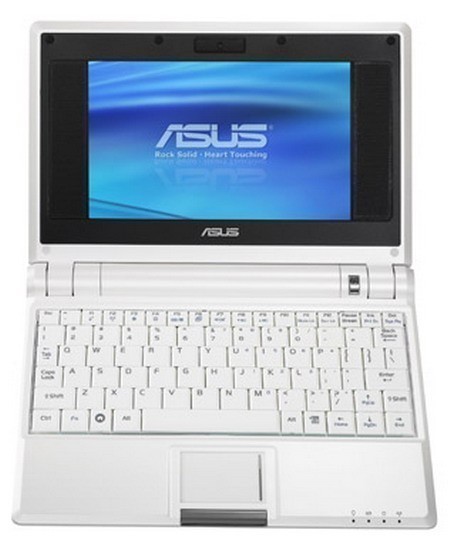
What indeed? So to make this review more interesting we have decided to look under the Eee PC's skirt to see what makes her so cute and sexy. We have taken the Eee PC apart to the component level and we are going to divulge each and every bulge. Read on and feast your eyes. Please note the content is slightly risque.
Here we have the full kit, manuals and all. This picture is for your reference as we strip the Eee PC down and lay her secrets out.

The kit includes a 104 page manual, a handy charger, a support DVD (You need an external DVD-ROM) and a quick-start guide. Also included is a very nice neoprene protective case that comfortably covers the Eee PC all in black.
Let The Strip Commence!
Starting with a complete PC, I was tempted to see the breaking threshold and jump straight in with a sledge hammer effect. Luckily for the Eee PC I remembered I was going to delicately reveal her secrets, so I decided to go the calm and collected route. In a methodical and painstaking (emphasis on painstaking) way I'll gently part each layer to see what hides underneath. But first I thought I'd give you all a quick view of the Eee PC from behind.

Now I'm sure this rear entry is going to be painful for her, but in my deepest heart I hope not, and of course I hope it will be simple with no complications. With tools in hand and all the focus on my dear Eee PC; everything is poised for the strip.
My favorite part of the whole process was breaking the membrane of the warranty seal (yes, you can breathe a sigh of relief, I wasn't thinking x-rated).

Eighteen screws later (the stainless steel variety) taken out in a matter of minutes and I was satisfied. Sadly this is an article and if I'm to be applauded I have to do the job properly. Satisfaction aside, I reached for my tools; I was going to have to go in deeper.

A Deeper Look Inside
With the top layer off I was ready to put down my tools and get the camera snap shots. Check out these gorgeous pictures. The Eee PC is opened up and if you zoom in you can see the backside of the motherboard. The central white crevasse in the middle is the slot where the DDR2 RAM fits in.

If you look closely you can see the CMOS battery (Battery life: 3.5 hours, 4-cell Li-ion: 7.4V, 5200mAh) delicately stuck on with tape covering some chip tops. We shall start with exposing them. Here come the close ups.
First up we have the 4GB Hynix NAND flash memory (non-upgradeable), this commonly found in portable media players. This is the SSD hard drive and replaces a HDD that would ordinarily have moving parts like a spinning disk and read-write heads. This HDD replacement definitely takes up less space and should you ever drop the Eee PC, at least your data is safely stored in the static Solid State memory. It consists of 4x 1GB modules. Click the picture below to get a better look at all four modules on the PCB.

The graphics chip is integrated into the chipset and consists of the Intel GMA 900 with an additional VGA-out connecter.

The Chipset & CPU
The Chipset Schematic and CPU
The physical chipset is based on the 910 GML Express chipset series and below we have a schematic courtesy of Intel. This schematic is a representation of possible layouts vendors can initiate.

The actual Celeron M CPU within the Eee PC looks like this:

The Intel Celeron M CPU runs at 900MHz with 9x clock multiplier. The L1 cache is 64KB, the L2 cache size is 512KB and the Bus speed is rated at 400MHz (100x4). The processor is manufactured with the 90nm technology and works from a 479-ball lead free Micro-FCBGA. This particular model is from the B1 stepping, with a CPUID of 06D6h. The CPU draws 0.94Volts and supports multimedia instruction sets-MMX, SSE, SSE2. The TDP of the chip is a very low 5.5W. This low heat signature makes it ideal for a platform of this type.
The Chipset Up Close
Starting with our Mobile Intel 910GML Express Chipset, we can check out the integrated graphics chip called the Intel GMA 900.
The Intel GMA 900 Chip
It supports the memory controller for the DDR2 512MB 667MHz memory module as well as offering the graphics core for the LCD and external VGA port.

The graphics core runs at 166MHz/160MHz @ 1.05V, and the 8MB video memory supports dual independent displays at up to 1600x1280.
The LCD Graphics port is shown here below, and links with a ribbon cable directly to the LCD:
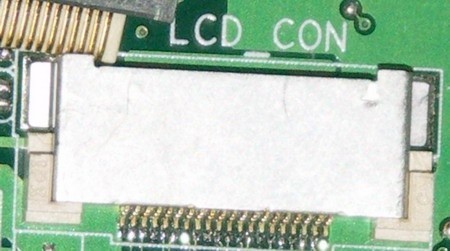
The GMA 900 chipset's supported memory is DDR2-400MHz as stipulated by the system bus speed, however ASUS has provided DDR2-512MB rated at 667MHz.

The Intel CH6-M Chip

The ICH6-M Southbridge incorporates a conduit to a majority of the other functions found on the Eee PC. Some of those capabilities are listed here: 3x USB ports, Realtek sound chip (ALC6628) giving 5.1-channel High Definition sound, Built-in stereo speakers, MMC(plus)/SD(HC) card reader, Microphone, Keyboard, Mouse pad, 10/100 Mbps Ethernet, V.92 56K modem and several other functions such as the mini PCI-E slots which support the WiFi card. There is also a vacant mini PCI-E port for future expansion options and it is easily accessible through a secured hatch at the bottom of the Eee PC.
Extra Component Pictures
Extra component pictures
Some of these components are depicted below.
The Realtek ALC6628 chipset giving 5.1 Channel High Definition Audio:

Here we have the 7" Optronics Display having a WVGA resolution of 800x480. The TFT-LCD has built-in stereo speakers and a microphone.

The Eee PC 701 4G also ships with a Webam capable of VGA (640x480) at up to 30 FPS (Omnivision sensor).

The Wireless communications card is an Azure 802.11b/g Wi-Fi PCI-E card with speculation about possible Bluetooth integration at launch.

Extra Component Pictures - Cont.
Extra Component Pictures - Cont.]
The BIOS is American Megatrends, Inc. (AMI):

Included is also an MMC(plus)/SD(HC) card reader:

Also present are the microphone and headphone jacks:

Now that you have seen the deepest darkest secrets of all that the beautiful Eee PC has to offer, are you going to embrace her sweet feminine curves, her glossy plastic shell?
Or will your heart seek out a deeper understanding of what makes her tick? If so, I hope I have helped you define at least a part of what the ASUS Eee PC has to offer. For a last glance before she is restored to her prim and proper state I give you a glimpse of her complete naked inventory.

Conclusion
The Eee PC is not for everyone; but having said that, it also seems to have a bit of everything (except a Microsoft OS, but they are working on that). It comes in a neat little package (Dimensions: 22.5 x 16.4 x 2.15~3.5 cm) with five different colors available, from the pastel green, blue or pink, to white or black. In the eastern countries it is already selling as fast as they can get them onto the market. The west however would be a little more circumspect and perhaps needs some time to grow into them.
Unfortunately I was unable to play with the software provided because it was all in Chinese. However, what I did see seemed extremely intuitive, and therefore I would recommend it for kids who were just learning to use a PC, or adults without much exposure to PCs.
It's a great starting platform. The fact that it is small and light (Weight: 0.92 Kg ), capable, functional and "cute" means that in general it should do really well once it launches worldwide. The goal of keeping the price below $500 USD will be a challenge, especially if they include a Microsoft OS. Right now at the current price point, it is perfectly positioned to prevail.
Sadly. because the product has not been released as a "completed" package means we cannot give it a score in our ratings.
Look for an update once the product is mature!
Our Latest Standard Laptops Article Coverage
 Dell XPS 14 (2026) Laptop Review - Premium Quality, Impressive Performance
 HP OmniBook 7 (Panther Lake) 16" Laptop Review
 GEEKOM GeekBook X14 Pro (Intel Core Ultra Series 1) Laptop Review
 HP OmniBook 5 14" AI PC (Snapdragon X) Laptop Review
 HP Omen 16 (Core i9-14900HX + RTX 5070) Gaming Laptop Review
 Assassin's Creed Hexe to be revealed 'relatively soon' according to insider
 LG claims that you can improve your aim by up to 38% by playing on a 480Hz OLED monitor
 Pixel 11 Pro Fold leak may reveal Google's next big foldable upgrade
 Sony's $500 million lawsuit heats up after choice to end PlayStation disc production
 Spacecraft confirmed to be approaching one of Earth's seven mysterious 'quasi-moons'
 AI models could soon get cheaper as OpenAI, Meta, and xAI enter a new price war
 SAP escapes EU penalty by easing customer lock-in concerns
 Cursor builds AI agent 'Sand' to rival Anthropic's Claude Cowork
 PocketMage is a distraction-free pocket computer with a wizard-themed operating system
 Samsung is holding your health data hostage to train its AI
 MOZA FMP18 Panel Bundle Review: authentic F/A-18 Hornet cockpit controls for flight sims
 Micron 6600 ION 245.76TB Enterprise SSD Review - Best in Class Programming Speeds
 MOZA MA3F EFCM Flight Control Module Review: authentic Airbus A320 autopilot panel for simulators
 Turtle Beach Stealth Pro II Wireless Gaming Headset Review - Premium Sound, Fantastic Features
 MOZA MGX1000 Instrument Panel Review: a realistic Garmin G1000 replica for immersive flight sims
 Simagic Zeus Formula Steering Wheel Review: premium build and advanced inputs for F1 racing
 GIGABYTE X870E Aero X3D Dark Wood Review - A woody goody
 The Super Mario Galaxy Movie (2026) 4K Ultra HD Blu-ray Review
 KTC H49S66 5K2K (5120x1440) 49-inch 180Hz Gaming Monitor Review
 HighPoint Rocket 1604L Gen5 x16 NVMe Software RAID AIC Review: half the price with full 59 GB/s speed
 I stopped digging through Windows menus after I set up this one folder
 Don't sell your Windows laptop until you do these things
 6 PC cleaning mistakes to avoid for safer hardware maintenance
 Phison and Intel Take Aim at Local AI's Memory Wall with aiDAPTIV
 How to Remap Keyboard Keys in Windows using Microsoft PowerToys
 7 tips to organize your Windows files for faster, easier access
 Intel Arc G3 Extreme first impressions with MSI's Claw 8 EX AI+ - Incredible power for an extreme price
 How to fix Wi-Fi Adapter Not Working on Windows laptops: troubleshooting tips
 Hisense U7SG 4K TV: Modern Entertainment for the New Age
 6 underrated Microsoft Word features worth using to boost your productivity