Introduction
Backup Guide - Online and Hardware Solutions Examined
There are plenty of lessons to be learnt from not backing up your data. According to most surveys floating around the Internet, there are less than 20% of computer users who actually backup their data. Considering our hard drives are usually chocked full of important information, that's a staggering figure, especially since we are still working with electrical components with moving parts (bring on solid state storage!) that are prone to failure. A large amount of people are putting a huge amount of faith in their hard drives and computer systems but is that entirely wise? Not really!
Last year I personally suffered major data loss through a broken RAID - it was a RAID 0 array that went bad because one of the drives in the array decided to die without any warning and being this type of array (without any form of redundancy) it makes it a very hard job to get the data back. While it's not an impossible task, for the average user, it will be near impossible unless you have plenty of money to spend on data recovery.
After reading a newspaper article recently, we discovered there are plenty of online backup sites which will store your data for you on their servers - some free and some are paid services. There are also more expensive hardware backup solutions, such as the Freedom9 freeStor 4020, which we will be taking a closer look at today in this guide. These types of devices are designed more for SOHO and business users but if your data is important to you, it is money well spent no matter who you are. We'll also look at some cheaper alternatives if you don't wish to spend as much money.
Let's change those backup percentage figures - today we'll give you a rundown of those online backup services, the hardware solutions and generally good practices in preventing data loss through measures such as using RAID arrays with redundancy, Anti-Virus and Anti-Spyware software.
Online Solutions - Free and Paid
Online Backup Solutions
Let's start with the online backup solutions. These types of solutions are good in that they let you retrieve your backed up data from anywhere in the world. So, if you're on a business trip or on holidays, you can access your data wherever you are and hopefully your data is being held in a very safe and protected environment - data integrity should be very high, indeed.
The down side is that you will need a fast Internet connection and that's not something which everyone has. Some paid online services allow you to backup as much as 30GB and others are even unlimited but realistically unless you have a super fast connection (along with the host); it's not practical to backup huge amounts of data online, especially if you are always modifying the data. Keep in mind that most services will compress the data (and encrypt it in the process) that is to be uploaded or downloaded but it's not going to be a quick process for large amounts of data.
Nevertheless, if you only need to backup smaller amounts of data, an online solution might be the way for you to go, especially if you need to access that data anywhere. It's usually very simple, which makes it great for the average Joe. Some services even allow you to mirror a hard drive on your computer and you simply drag and drop files into an application which you download, nice and simple. Others allow you to setup a shared folder which you can use to share photos and what not with friends on the Internet. Some are less feature-rich than others, so make sure you look around before pulling out your credit card.
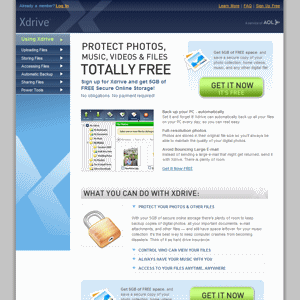
As far as pricing goes, it varies quite a lot. One service by AOL called Xdrive allows you to backup 5GB of data for free, just as long as you have an AOL or AIM screen name. iStorage by Iomega let's you backup a total of 25GB using one of their professional plans but that will cost you $99.99 per month or $1079.89 per year with a 10% discount - so not exactly cheap! Mozy is one solution which seems to be popular and for good reason, it's much cheaper than the others. Mozy allows you to backup 50GB of data for just $4.95 per month (or $54.45 per year) and even comes with automatic Microsoft Outlook file detection and backup. This works out to be around 10 cents per GB or a little over one buck per GB each year. As far as bang for buck goes, Mozy was the best we could find and it would be our choice if we were to use online backup.
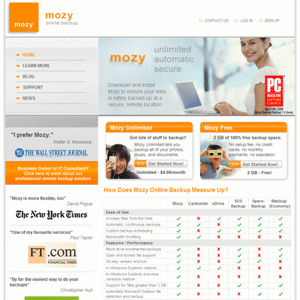
There are cheaper (read: free) online backup options out there but always remember you get what you pay for and quality isn't something you want to be sacrificing when it comes to data backup! For comparison sakes, say you buy a 320GB Seagate 7200.10 SATA drive, which costs about $100 USD. You are paying a little over 30 cents per GB but with iStorage you are paying $4 per GB, every month or $48 per GB, each year. Granted you still need to buy an external HDD enclosure for your Seagate drive or maybe a more advanced backup solution but still you are paying a huge price premium for online storage in some cases. Of course though, that comes with its advantages such as being able to access that data anywhere and they are (hopefully) protected it well for you without the need for you to be worrying about theft in your office, for instance.
Now that we've ventured into the world of online backup, let's check out some of the offline hardware backup solutions that are on the market.
Hardware Solutions - General
Hardware Backup Solutions
Now that we've checked out the online solutions, let's take a closer look at some of the offline hardware backup solutions which are available. We'll start with the most simple (cheap) of devices and work out way up to the Freedom9 freeStor 4020 NAS.
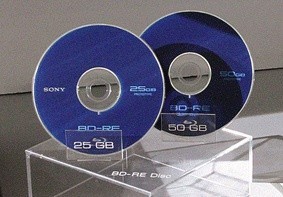
In the years past, storage technology wasn't as advanced as it is today. You had removable storage backup options such as backing up to tape drives or CD / DVD but these days the amount of storage space available from these types of products is just not enough. I have never been a fan of backing up to CD or DVD as the transfer is not that fast and there is always the chance that the media will get scratched (or lost) and therefore useless. If you've got big bucks to spend, you could invest in a HD-DVD or Blu-ray burner and backup around 50GB per disk but make sure you look after the media in a safe place.
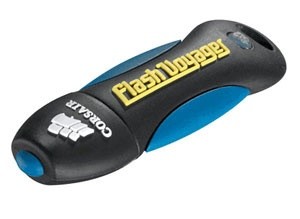
Depending on your backup needs, you might get away with just a pure and simple USB pen drive. Corsair recently announced their 16GB Flash Voyager pen drives, which is one of the biggest capacities from any company that we have seen, so far. This is very portable storage which is safe and secure since you can take it with you but even though 16GB is massive for a pen drive, it might not be enough for everyone. Pen drives use flash (solid state) memory which is very reliable as there are no moving parts and as technology proceeds we will see solid state storage capacities gradually increase and replace the traditional hard drive but for now if you want large amounts of storage space, the good old hard disk drive is your only option.
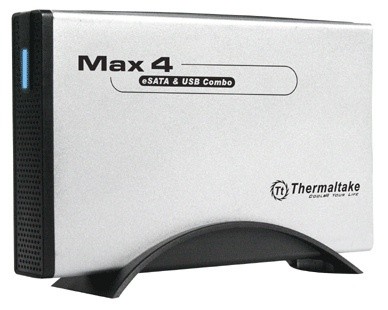
If you want to backup all of your data or a fair portion of it anyway, you might want to look at an external caddie. There are a lot of these products on the market and each basically performs the same function but just looks different. Buy an extra hard drive and put it inside the caddie and connect by either USB or Firewire and even e.SATA now. While they don't typically offer any forms of automatic backup, they are good if you want to move particular files or folders to the caddie. Once connected to your computer, it will appear in Windows as another drive as if connected internally, so copying to and from it is simple.
Hard drives worst enemy is heat so when you're buying one of these caddies, don't just buy the cheapest one you can find - try and buy one that is made of aluminum and better still, has cooling fans! Thermaltake has their MAX4 e.SATA and USB 2.0 N0003US combo caddie which looks quite good and even allows you to use faster SATA hard drives but just make sure your motherboard has a spare SATA port for it. This thing will cost you around $45 USD, which is quite reasonable, but remember you still need to buy a separate SATA hard drive and it doesn't come with any included automated backup software.
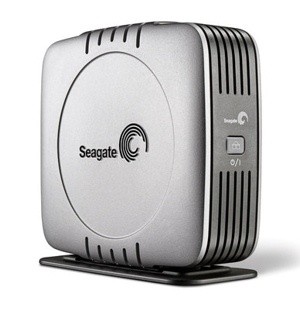
Stepping it up a notch and quite a few more dollars is the Pushbutton Backup external hard drive from Seagate. You can buy these devices from Seagate in capacities from 200GB all the way up to 750GB and are connected to your system by either USB 2.0 or Firewire. Seagate has a similar e.SATA version although it seems to lack the BounceBack Express backup software but you could always buy that separately, I guess.
Once you've installed the included BounceBack Express software by CMS you can use the advanced backup software to create all sorts of backups of your data. You can even backup your complete system and if your system crashed or hard drive dies, you still have a copy of your operating system and settings as the software will back all that up too. You can even synchronize data between multiple computers and hard drives to make sure you always have the most current backup of your data. Being the most advanced backup solution we've checked out so far, it will end up costing you around $350 USD for the 750GB version but that does include the hard drive and the software, so it's not such a bad deal at all.
Now we've finished looking at some of the hardware backup solutions, we're going to take a close look at the star of the show, the freeStor 4020 NAS, which was sent to us from Freedom9. It has all the features of the Seagate Pushbutton Backup but expands on it quite a lot.
Hardware Solutions - freeStor 4020
Freedom9 freeStor 4020 NAS
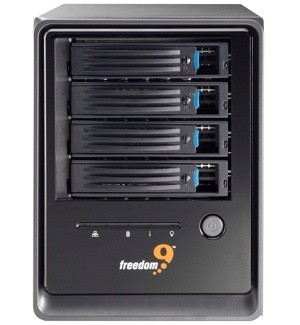
Originally designed for Intel by a networking company in Taiwan called Lanner, we have the star of the show with us here right now. It's the Freedom9 freeStor 4020 which expands on all the previous hardware backup solutions we have looked at so far in this guide. For one, it is a network attached storage (NAS) device - basically that means it connects to your local area network, which enables a lot of extra features over a typical storage device that is connected via USB or Firewire or e.SATA. It's an actual computer system based on a Linux operating system, which makes it very powerful in its abilities and is perfect for SOHO or small businesses.
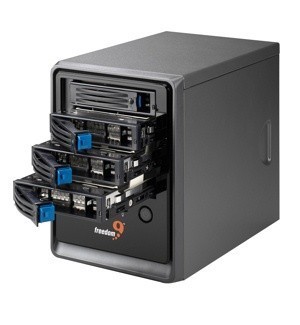
The freeStor 4020 allows for very flexible storage options. It supports up to four SATA hard drives (IDE is not supported) and there are a lot of officially supported (tested to work) drives but most should work just fine but 750 GB drives are apparently supported only in RAID 5 + hot spare configuration. Installation of the drives is as simple as screwing each into the provided drive racks and sliding them into the system. They then easily connect to the PCB board inside the system with a little push - then lock them into place, in case anyone decides it would be fun to try pulling the drives out. You can setup your drives in RAID 0 for best performance but that doesn't provide any redundancy or if you need redundancy (and that would be recommended for a device like this) you can choose from RAID 1, 5 or 10, depending on how many drives you intend on using.
We tried setting up three drives in RAID 5 and it was a very quick and simple process. Once you've connected the freeStor 4020 to your LAN, just login and visit the appropriate section of the web interface. It's a simple interface and everything is well documented and works well. From there you can control the system completely, setup which files and folders you want to be shared on the network and so on.
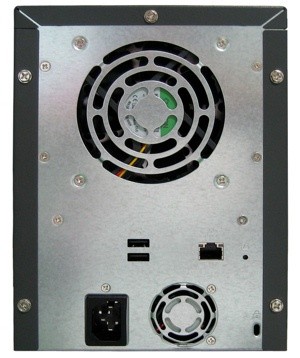
It comes with two USB ports on the back of the system which allows you to add extra storage to the system from a USB pen drive, for example. The system is even able to act as a print server which is handy if you don't want to keep one of your other computer systems on in your house, all of the time. As you can see at the back, there is a single 60mm Sunon fan which provides the hard drives with cooling - it's quiet and seems to provide good cooling inside the case. The fan at the bottom of the unit is the power supply fan. Speaking of which, the PSU is Seventeam 204 watt maximum unit with a total of 168 watts on the 12v rails, which is used for the hard drives. Considering most 7,200 RPM SATA hard drives don't draw more than 25 watts of power, the PSU should be able to provide a more than adequate power supply.
One of the most impressive aspects of the freeStor 4020 system is the software which it comes with. The included Disk Safe Express software (doesn't work in Windows Vista yet but a new version should be out soon) allows for very impressive backup of data and recovery of your system. The software will monitor your data and you can schedule it to backup, say, every day at 3.00am. It will even detect what data has changed since the last backup and make a copy of it. You can even choose to do a complete system backup which takes a full system backup.
I think many of us have been in the situation where we have installed some new software or overclocked the system too far, reboot and then discover in horror that your MBR or some Windows system files have been corrupted. Simply hook the freeStor 4020 up to your computer via network cable and as long as your motherboard supports it (boot from LAN), you can be up and running very quickly. This will allow you to continue working and recover your data stored on the freeStor 4020 later.

Since this is not actually a review but more of a look at the product as a backup solution in this guide, we're not going to provide a rating but we are going to give it out TweakTown "MUST HAVE" Best Features Award as it is the best backup solution we've ever used. It's not cheap at around $650 USD but as we always say, you get what you pay for and you're getting a lot with the freeStor 4020.
Maintaining Data Integrity
Now that we've finished talking about the online and offline backup solutions, we want to provide some general tips in maintaining data integrity. Even though you've got the data backed up, there are still some practices that should be followed to help avoid data loss.
These tips are for new computers users and most of our regular readers could skip this page.
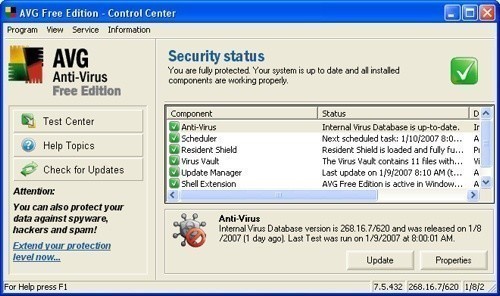
#1 Tip - Anti-Virus and Anti-Spyware If you aren't running Anti-Virus software on your system you are making the first mistake in risking your data. Although most viruses are relatively harmless, there are plenty out there that will make a mess of your system in quick time. Many of the writers at TweakTown including myself use AVG Free which is a brilliant virus scanner which is free and is updated with new virus definitions almost every day.
There are a lot of anti-spyware programs out on the market now but one which I have personally been using for a long time is Spybot: Search and Destroy. It's one of the oldest anti-spyware programs out there and also one of the best. Give it a try - just make sure you try and run it at least every few days and keep it updated!
Generally speaking, just watch what you are doing on the Internet - don't just download anything without knowing if the source is reliable. When you get email with unusual attachments, don't open them. Make sure you know who you are allowing to access your network - there are network viruses which can infect all computers on your network very quickly.
#2 Tip - Be careful with your drives I rarely see or hear anyone caution new computer users about being careful with their hard drives. They are very sensitive and are not at all susceptible to being dropped or whatever else. If impact is caused on the drive, you have a strong chance of breaking the drives internals and rendering the drive useless. Common sense should prevail, just be careful and gentle - treat them like your new born!
Equally important is heat - always make sure your drives are operating in a cool environment. Back a few years ago, IBM produced a bunch of drives now named "Death Star" which were prone to failure one month after use if not actively cooled with cooling fans. While things seem to be better now in the HDD industry, the cooler you can have your drives operating, the better - they'll pay you back by lasting long and not starting to make strange sounds at you. Just make sure your computer case has adequate cooling and try not to place the drives too close together, as that will reduce air flow. If you can add extra cooling fans, that is the best idea.
#3 - Learn about RAID arrays If you are going to use a RAID array and your data is important, make sure you take some time to learn about the technology and how it works. RAID 0, while offering increased performance, provides a huge risk if one of the drives in the array happens to fail. If it fails, your data will be extremely hard to recover since the data is split between both drives. Some of the data will be recoverable but only data with file sizes that are less than the stripe size, which is usually 128kb or less.
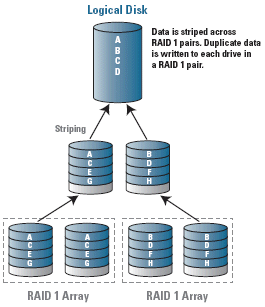
If your data is important to you and you want to be protected, the best RAID arrays are 1, 5 and 10. RAID 1 is simple storage technology in that drive a will mirror everything to drive b - it doesn't provide any performance benefits but you've always got a complete backup in case one drive goes bad. RAID 5 is more complex in that it combines data striping (RAID 0) with distributed parity for data protection. That means, if you have three drives in a RAID 5 array, one drive can fail and your data is still safe. RAID 10 is a mixture of RAID 0 and RAID 1 in one (hence the name) and it is designed if you want the performance benefits of RAID 0 but with the safety of RAID 1. It is a set of drives combined into a striped array (RAID 0) and then the striped array is mirrored (RAID 1) to another identical set of striped drives.
Summarizing it up, if you only have three spare drives available for your RAID array, RAID 5 is your best option. If you have four spare drives available for your RAID array then RAID 10 will be best.
That's all folks!
That's the end of our article. Don't take the risk - just about anyone's data is valuable or important in one or another. Back up your data and avoid the nightmares and frustrations of data loss!
We would love to hear your opinion on what methods you use to protect your data. Will you try the new era of online backup? Let us know by commenting below or in our forums!
Our Latest Guides Article Coverage
- The Complete Windows 11 Tweaking Guide for 2026: What to Change and What to Avoid
- Using Multiple Monitors? Change these Windows settings for a Better Experience
- Windows Sandbox is The Windows Security Feature Most People Never Use
- I ditched the Windows 11 context menu for this open-source tool, and here's why
- Windows 11 may be encrypting your drive already, and I checked where my recovery key went