









Introduction and Package
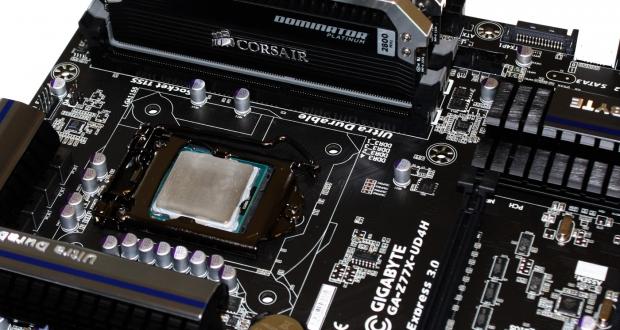
Since we're roughly five months away from a massive influx of new motherboards via the Haswell platform, we're seeing companies promote the current crop of Z77 motherboards quite heavily at the moment. The latest motherboard to arrive comes from GIGABYTE and continues the line of strong Z77 based motherboards.
Recently we had a chance to look at the Z77X-UP7 which impressed us with strong features, good performance and a fantastic look. While not for everyone, the cheaper Z77X-UD5H could be a better option, as it won't bust the bank account open quite as much.
Today we look at an even cheaper option in the Z77X-UD4H. So what does the cheaper price tag bring to the table? Well, we can only find out by doing one thing and that's getting a closer look at the motherboard.
The first thing we need to do is look at the package and bundle before we move onto the actual board itself. We'll then head into the BIOS area to see what's going on before looking at our testbed, the overclocking side of things and finally of course the performance of the board at both stock speeds and overclocked speeds.
Package
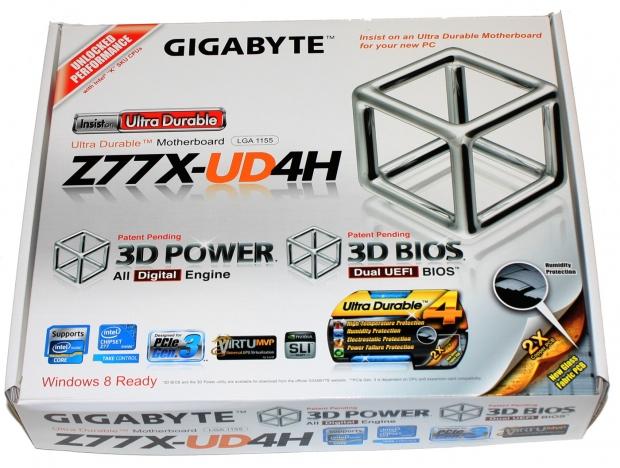
Looking at the box it's not quite as full on as other more expensive boards with information as the Z77X-UP7 which opens up to reveal the board and a whole lot more. Looking above, though, you can see some of the main features are covered with a big push on the 3D Power and 3D BIOS features being mentioned on the front. You can also see that we've got PCIe Gen 3, Virtu MVP and SLI support.
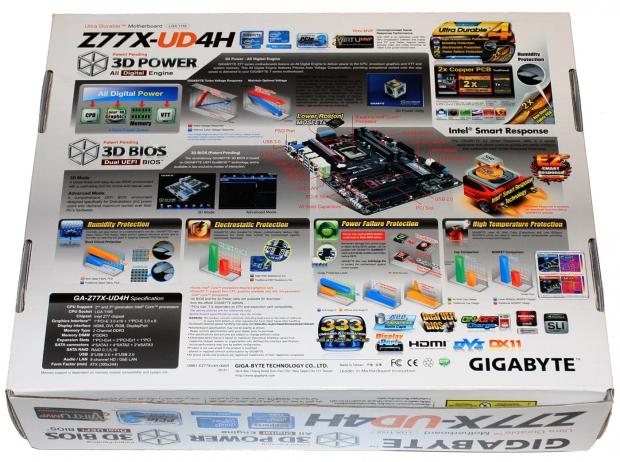
Turning over to the back of the box you can see we get more detail on what exactly 3D Power and 3D BIOS brings to the table along with some detail on the Ultra Durable 4 side of things. As always we've got a fairly strong looking board, but until we get into the down and dirty, we won't know exactly what we're dealing with.
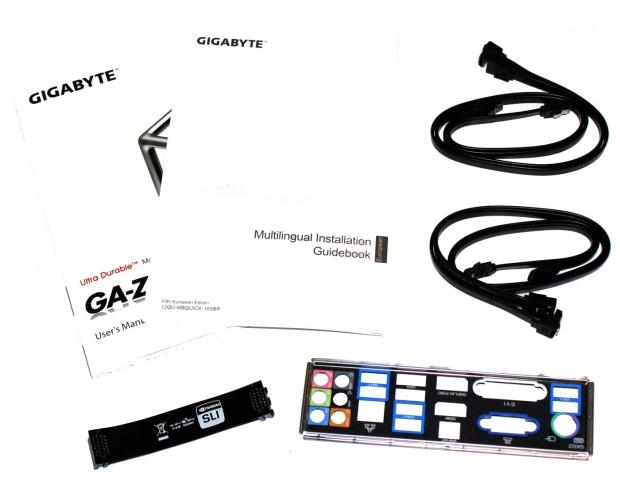
Being a cheaper UD4H motherboard means that the bundle side of things is a little lighter than other more expensive boards. Above you can see the manuals along with four SATA cables, SLI bridge and an I/O Panel to round everything off. Due to the nature of getting the board a little earlier before volume shipping, we didn't get a driver CD, but you will see this in the retail offerings on the street.
Our Latest Socket LGA 1155 Review Coverage
GIGABYTE Z77X-UD4H Motherboard
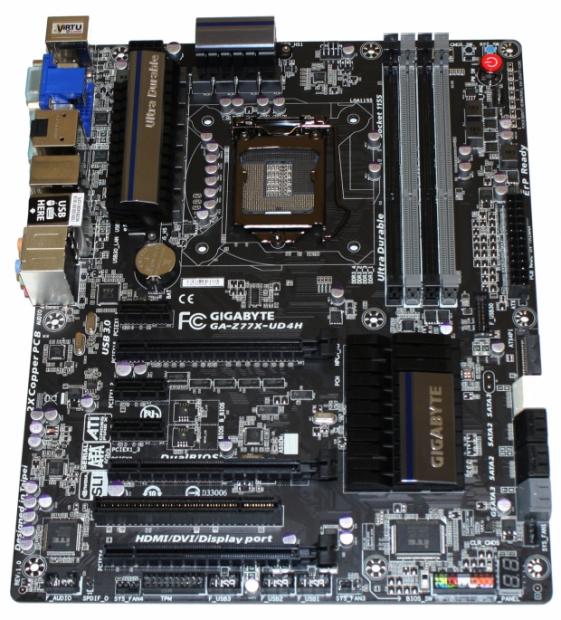
Moving onto the board the first thing we notice is the killer matte black color scheme that GIGABYTE has implemented. Just because we're dealing with a cheaper board, it doesn't mean we have to deal with an ugly one. You can also see the heatsink setup and the general layout.
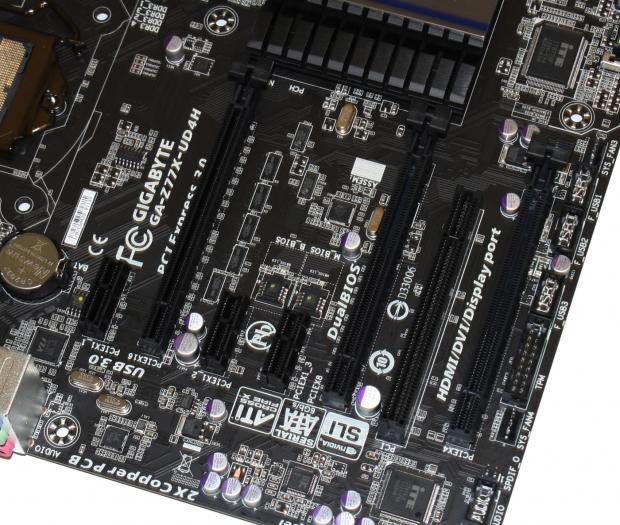
Moving in a bit closer you can see the expansion slots. We've got three PCIe x1 slots along with three PCIe x16 slots in an x16 / x8 /4 configuration, which offers support for both SLI and CrossFire. Finally you can see that GIGABYTE has also thrown in an older legacy PCI slot.

As we move across to the bottom of the board we see most of the usual headers here including front audio, three USB 2.0, TPM and a couple of fan headers. On the right side you can see the BIOS switch next to the front panel connector and finally a LED debug reader on the right that helps solving any boot up problems easier.
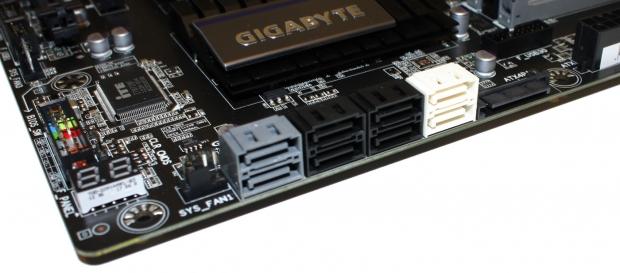
As we turn the corner you can see we've got a total of eight SATA ports on offer. In the middle we've got four black SATA II ports which run off the Intel Z77 chip. Either side we've got two SATA III ports - two run off the same Intel Z77 chipset, while the other two run off the Marvell 88SE9172 chip. We can also see a fan header to the left and to the right a power header that helps provide some extra power to the board if you need it.
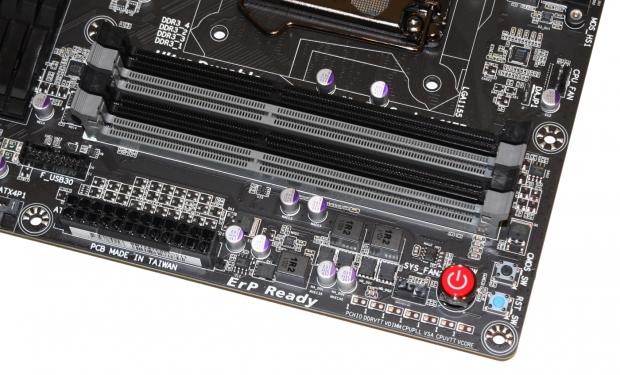
Moving towards the top half of the board we can see four DIMM slots which support up to 32GB of DDR3 at speeds ranging from 1066MHz DDR to 2800MHz DDR via overclocking. Across the bottom we have to the left a USB 3.0 header, main 24-pin ATX power connector along with a few buttons on the right which include power, reset and clear CMOS.
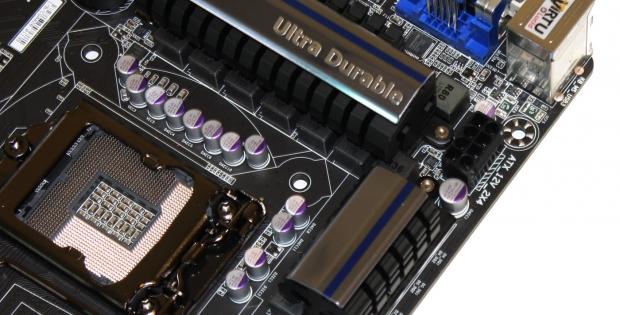
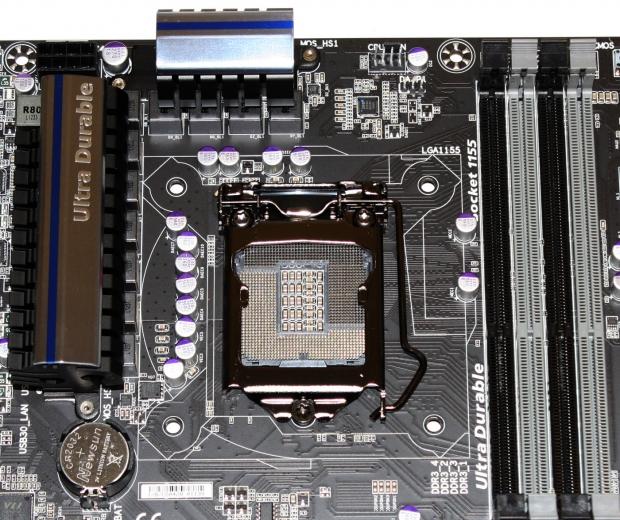
As we head on over to the CPU area you can see the main 8-pin ATX power connector and moving back a bit you can see our socket and heatsink setup. There's a really clean setup going on here that should have no problem with big coolers.
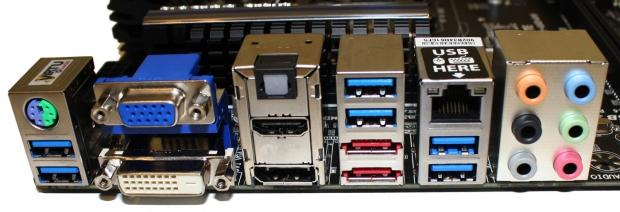
Finally we finish off our look at the motherboard with the I/O side of things which includes a combo PS/2 port and six USB 3.0 ports that run off a combination of the Intel Z77 chipset and the VIA VL800 Chip. Video out is offered via VGA, DVI-D, HDMI and Display Port. The two eSATA 6GB/s ports run off the Marvell 88SE9172 controller. We've also got Gigabit networking off the Realtek controller and finally we've got six auxiliary ports and an optical out running off the Realtek ALC892.
BIOS
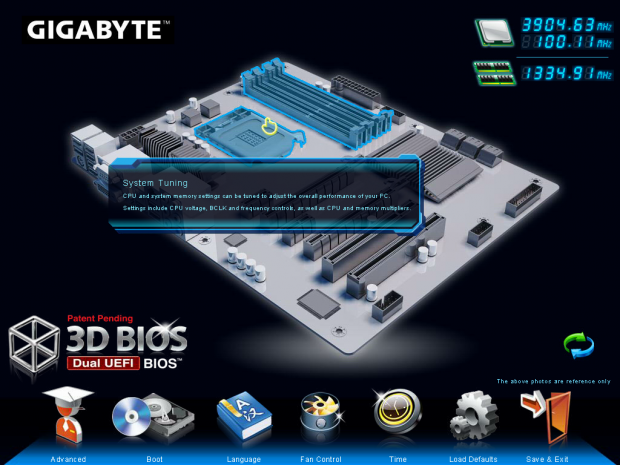
After we updated the BIOS to the latest version we were greeted with the 3D BIOS option. As cool as it is, I'm not really a huge fan of it.
If you're more new to the BIOS side of things, it might be handy, but for the most part, we find it slower as we work our way the options. Instead we simply jump into the advanced area where we're so much more confortable.
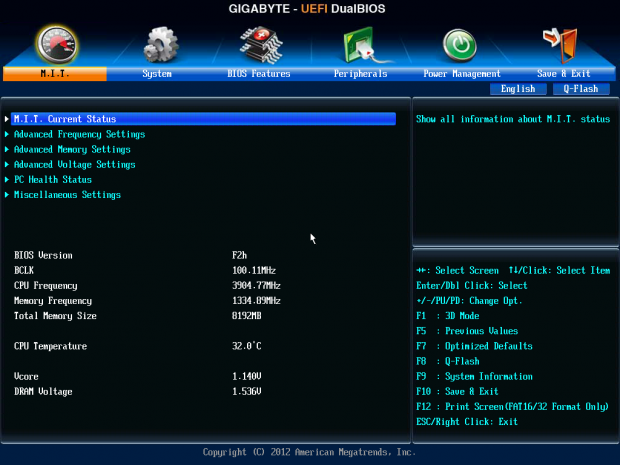
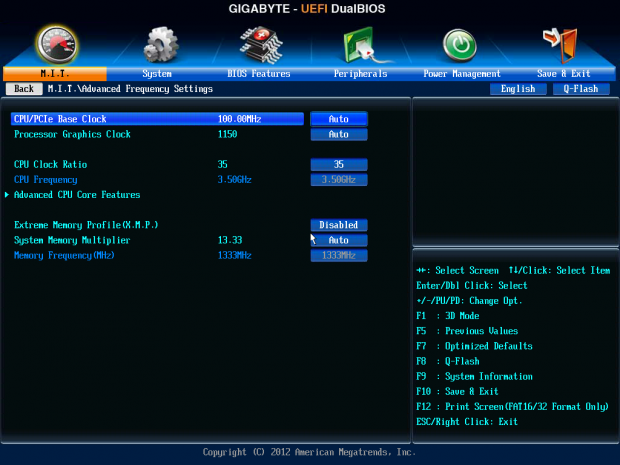
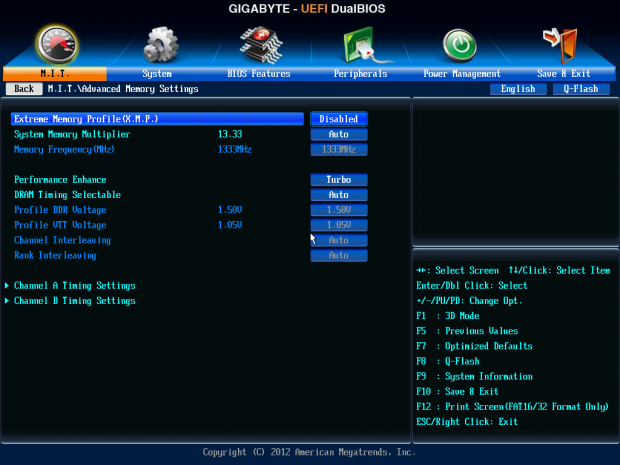
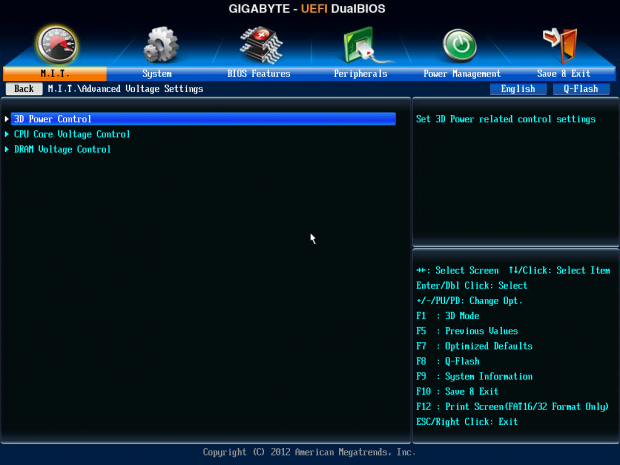
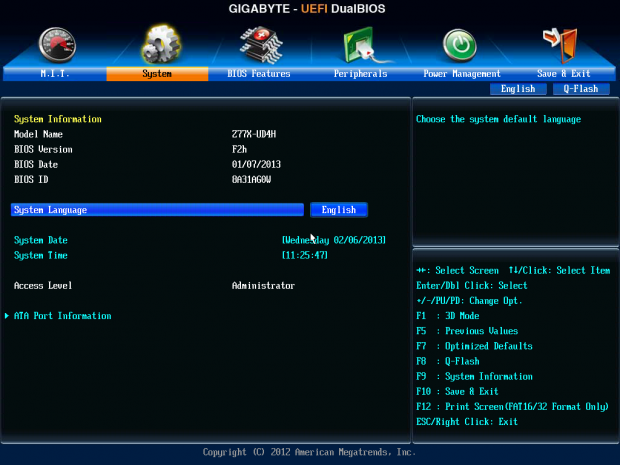
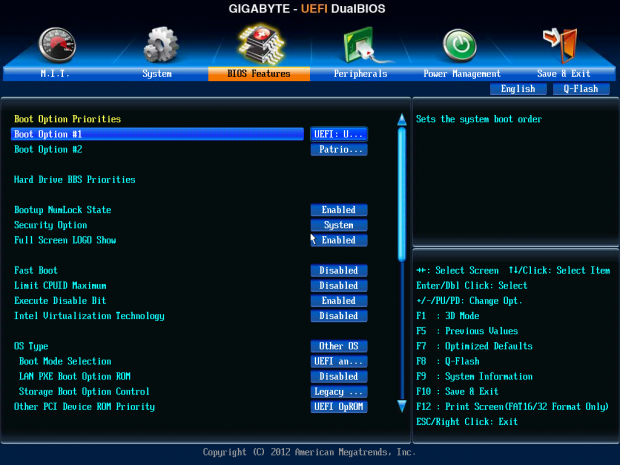
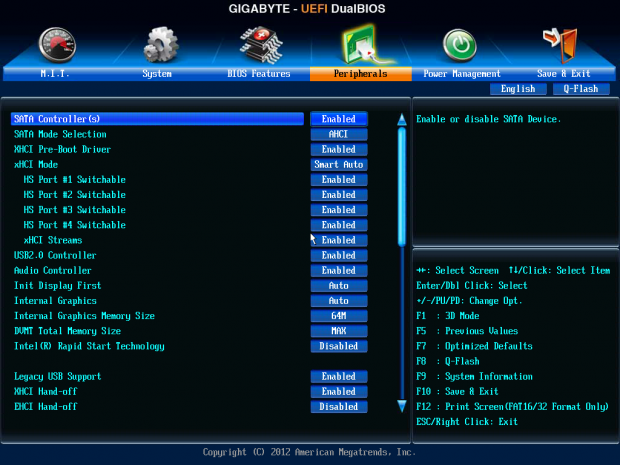
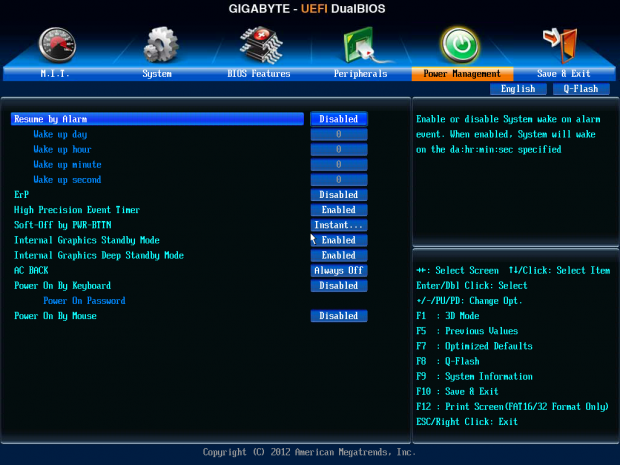
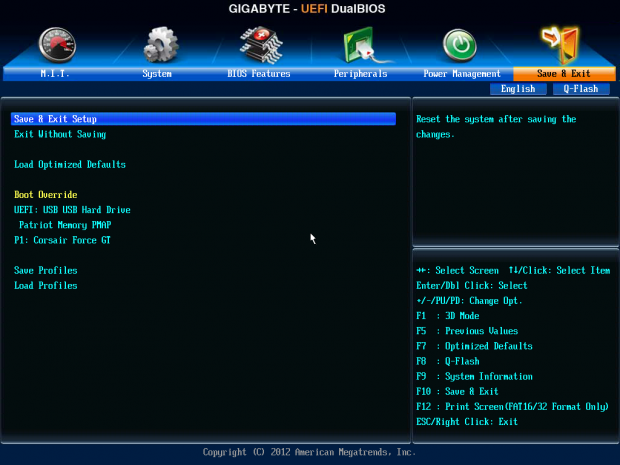
Once in the advanced area you'll find yourself in fairly familiar territory if you've been into overclocking your computer for some years. If you're going to do anything with overclocking you're going to find yourself going through the M.I.T. area. Here you've got all the normal options to adjust dividers, BCLK, RAM speed and voltage to name just a few of the features.
Moving across you're going to get the rest of the options like enabling or disabling certain features along with the ability to save profiles and all that other fun stuff. If you want to update your BIOS, you simply hit F8, and that will take you into Q-Flash.
Benchmarks - Test System Setup and Overclocking
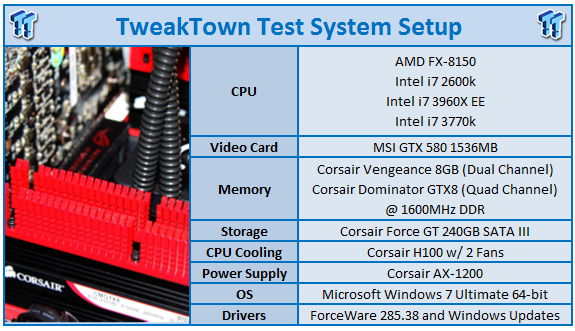
We would like to thank the following companies for supplying and supporting us with our test system hardware and equipment: Intel, ASUS, MSI, Western Digital, MemoRight and Corsair.
As always you can see most of our testbed information above and for that reason we won't get into it. Quickly, though, before we get into the overclocking side of things, we'll go over the boards that you'll see in our graphs today. To start with we have the GIGABYTE Z77X-UD4H that will be running at both stock speeds and overclocked speeds (which we'll cover in just a moment).
Alongside the GIGABYTE board we've also got the ASRock Z77 OC Formula board, MSI Z77 MPower and ASUS Maximus V GENE to round off the Z77 options. We've also got the X79 represented here in the form of the ASRock X79 Extreme4, which is using an Intel Core i7 3960X Extreme Edition CPU.
Before we get into the testing side of things we need to cover the overclocking. Heading into the BIOS we adjusted our voltages to the levels they need to be and then proceed to bump up the multiplier. We moved straight to a 47x multiplier which brought us in at 4.7GHz. While our machine booted with no issue, as soon as we started to run MediaEspresso, we ran into some problems.
Heading back into the BIOS we moved to a 46x multiplier and headed back into Windows. With no issue completing a MediaEspresso encode we decided to head back into the BIOS to adjust the BCLK slightly to see if we could get anything else out of it.
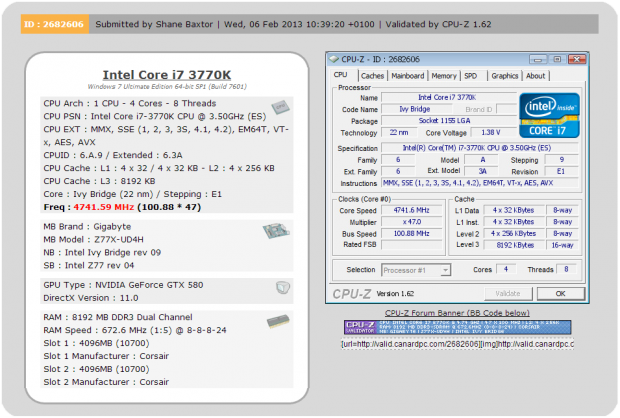
Looking above you can see we ended up with a 100.88 BCLK which brought our final CPU speed in at 4741MHz. While 4.7GHz wouldn't work with a straight up 47x multiplier, you can see above with the lower multiplier and the increased BCLK, we managed to hit that number and slightly higher. This is a good overclock from a board that comes in at the mid $100 mark. It should yield some strong performance over the stock out of the box settings.
CPU Benchmarks
HyperPi 0.99
Version and / or Patch Used: 0.99
Developer Homepage: www.virgilioborges.com.br
Product Homepage: www.virgilioborges.com.br
HyperPi is a front end for SuperPi that allows for multiple concurrent instances of SuperPi to be run on each core recognized by the system. It is very dependent on CPU to memory to HDD speed. The faster these components, the faster it is able to figure out the number Pi to the selected length.
For our testing we use the 32M run. This means that each of the four physical and four logical cores for the i7 and the four physical cores of the i5 is trying to calculate the number Pi out to 32 million decimal places. Each "run" is a comparative to ensure accuracy and any stability or performance issues in the loop mentioned above will cause errors in calculation.
AIDA64
Version and / or Patch Used: 1.00.1035BETA
Developer Homepage: http://www.aida64.com
Product Homepage: http://www.AIDA64.com
Replacing Everest in our labs is AIDA64. This new testing suite is from the core development team from Lavalys and continues that tradition. The guys have thrown in better support for multithreaded CPUs as well as full 64 bit support. We use this to test memory and HDDs for now, but may find ourselves opening this up to other areas of the motherboard.
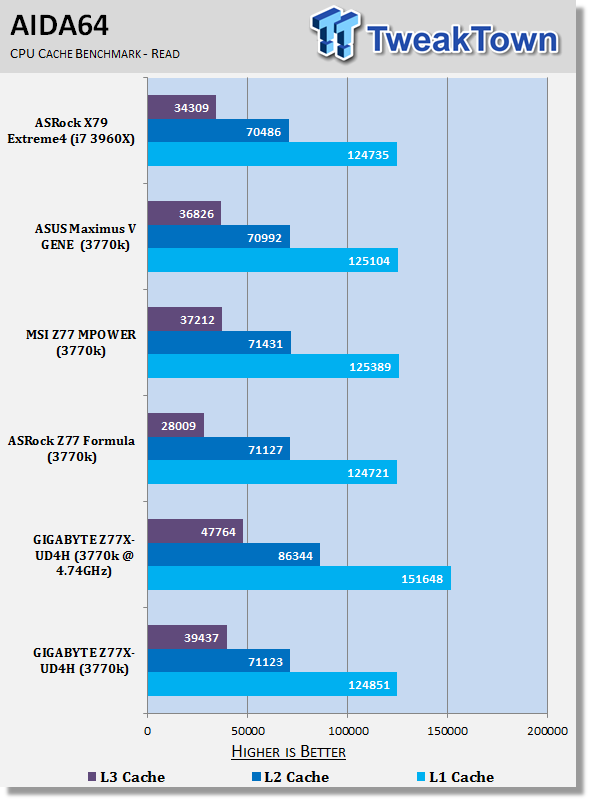
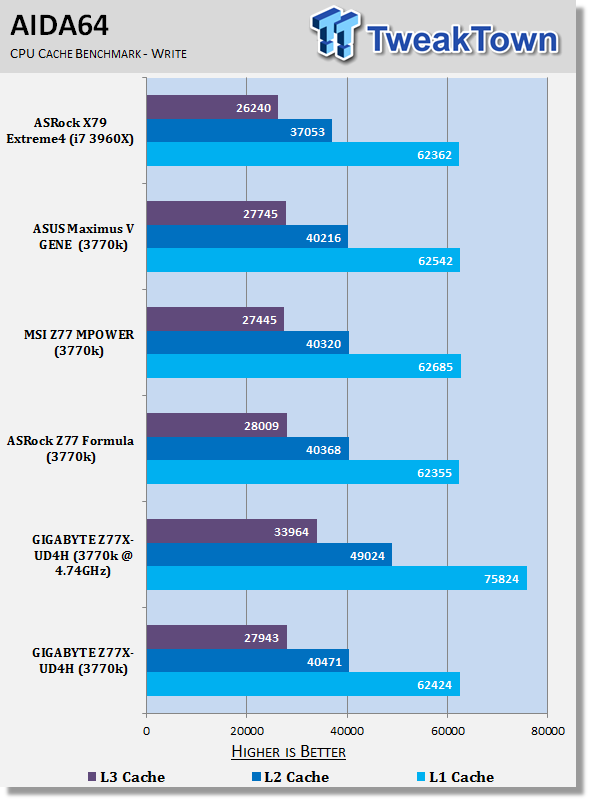
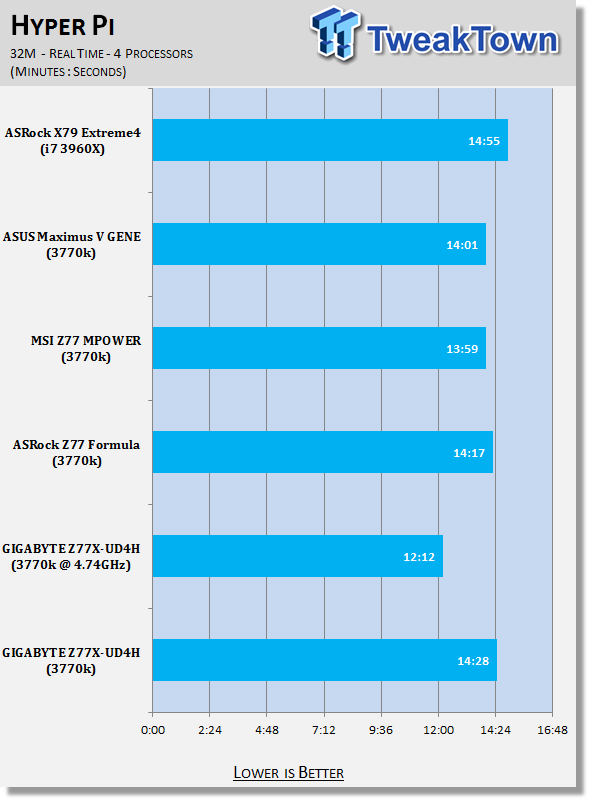
Straight out the gate we see fairly typical performance from the Z77X-UD4H.
It lags slightly behind in Hyper PI, but not by much. We see a strong gain in overclocking with the Hyper PI time coming in at just over 12 minutes when overclocked.
System Benchmarks
PCMark 7
Version and / or Patch Used: 1.04
Developer Homepage: http://www.pcmark.com
Product Homepage: http://www.pcmark.com
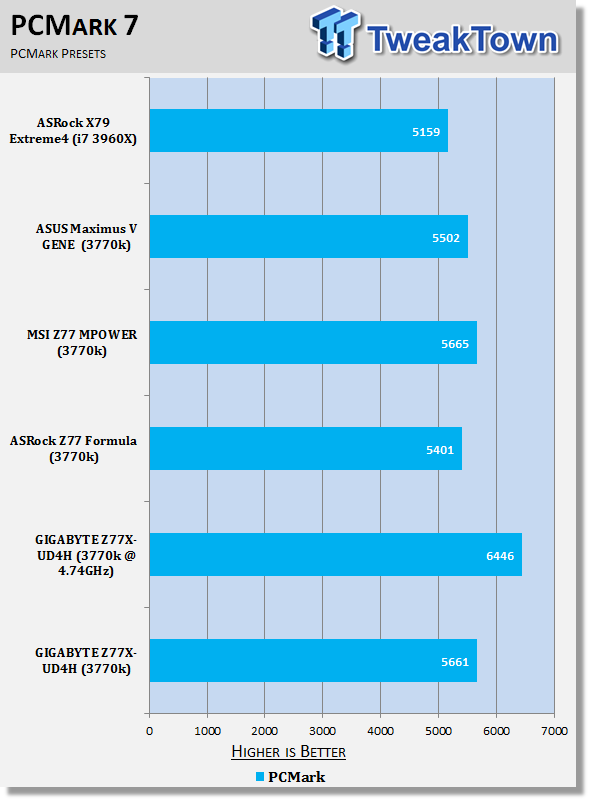
PCMark 7 includes a range of tests that give different views of your system's performance. In the Advanced Edition you can choose which tests to run. The common use and hardware component tests are unavailable in the Basic Edition.
Overall system performance is measured by the PCMark test. This is the only test that returns an official PCMark score. The Lightweight test measures the system capabilities of entry-level systems and mobility platforms unable to run the PCMark test, but it does not generate a PCMark score. Common use performance is measured by the scenario tests - Entertainment, Creativity and Production - each of which results in a scenario score. Hardware component performance is measured by the hardware tests - Computation and Storage - each of which results in a hardware score.
MediaEspresso
Version and / or Patch Used: 6.5
Developer Homepage: http://www.cyberlink.com/
Product Homepage: http://www.cyberlink.com/products/mediaespresso/overview_en_AU.html?fileName=overview&r=1
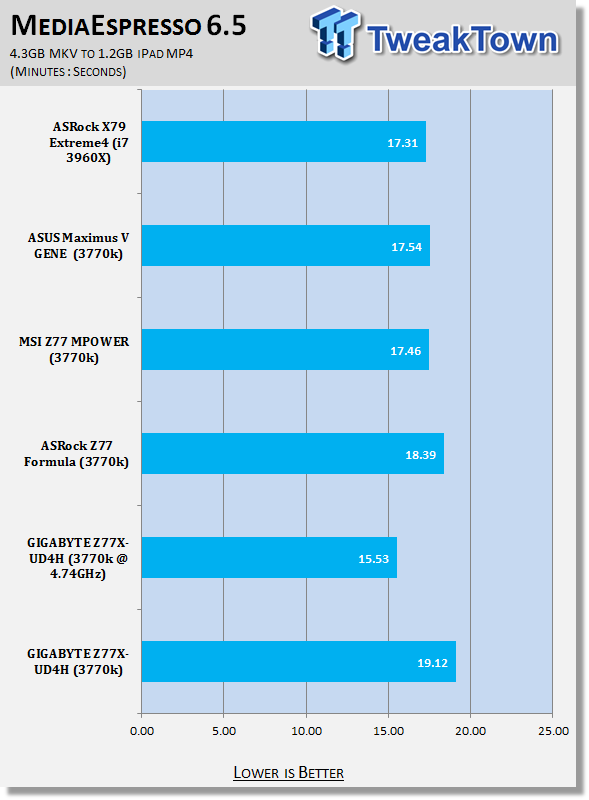
MediaEspresso is a blazingly fast media universal converter that can transcode your videos, photos and music files and out put them to a huge range of portable devices including mobile phones, portable media players and even game consoles. With technologies like Smart Detect, Direct Sync and CyberLink's TrueTheater™ video enhancements, you can not only forget about complicated format, resolution and output settings, but your converted file will come out the other side looking better than when it went in!
PCMark 7 performance looks good out the box and you can see it sits only a few points behind the MSI offering and a few points ahead of the ASUS and ASRock options.
MediaEspresso performance on the other hand sits back slightly. Again, when overclocked, we see a really nice boost in performance with some real-world gains being seen when it comes to encoding.
USB 2.0 and 3.0 Benchmarks
AIDA64
Version and / or Patch Used: 1.70.1400
Developer Homepage: http://www.aida64.com
Product Homepage: http://www.AIDA64.com
Replacing Everest in our labs is AIDA64. This new testing suite is from the core development team from Lavalys and continues that tradition. The guys have thrown in better support for multithreaded CPUs as well as full 64 bit support. We use this to test memory and HDDs for now, but may find ourselves opening this up to other areas of the motherboard.
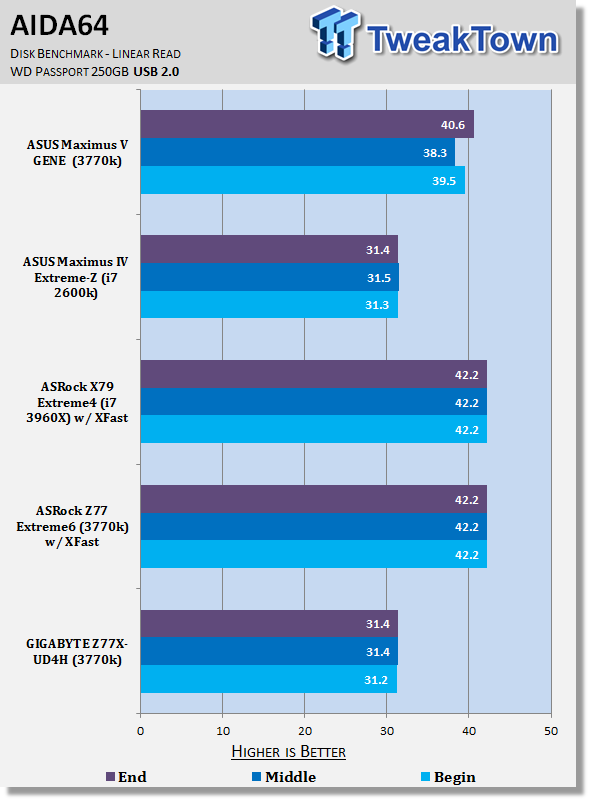
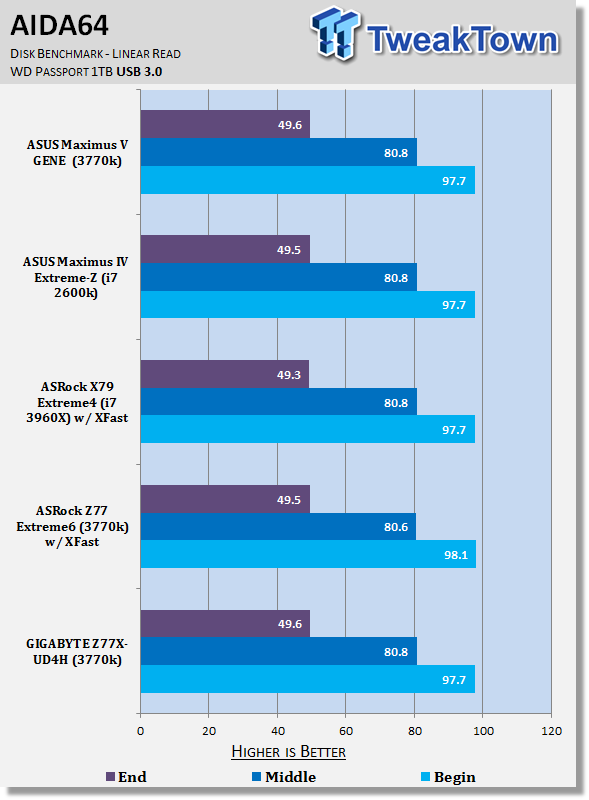
Our USB performance numbers are fairly typical with the USB 2.0 numbers lining up with other non-XFast based boards and USB 3.0 performance across the board being similar.
SSD Benchmarks
AIDA64
Version and / or Patch Used: 1.70.1400
Developer Homepage: http://www.aida64.com
Product Homepage: http://www.AIDA64.com
Replacing Everest in our labs is AIDA64. This new testing suite is from the core development team from Lavalys and continues that tradition. The guys have thrown in better support for multithreaded CPUs as well as full 64 bit support. We use this to test memory and HDDs for now, but may find ourselves opening this up to other areas of the motherboard.
HD Tune Pro
Version and / or Patch Used: 4.61
Developer Homepage: http://www.hdtune.com
Product Homepage: http://www.hdtune.com
HD Tune Pro gives us accurate read, write and access time results and for the last couple of years has been gaining popularity amongst reviewers. It is now considered a must have application for storage device testing.
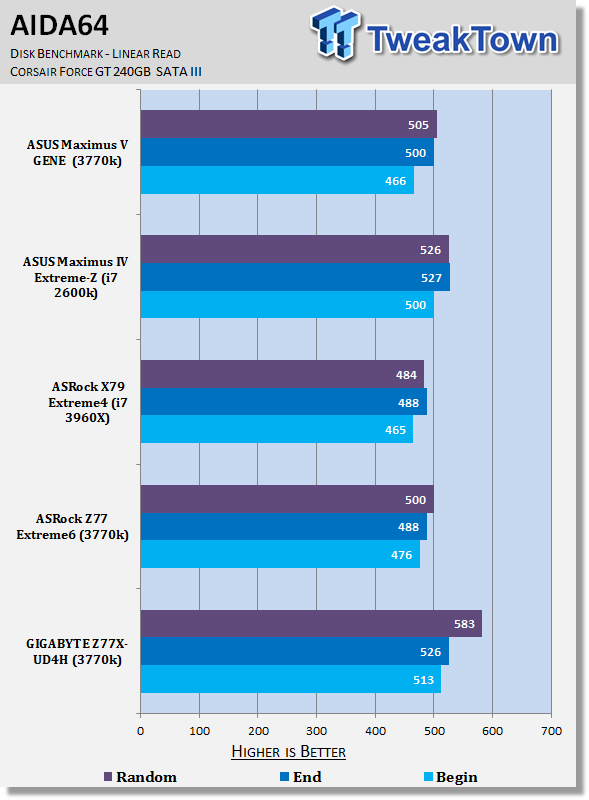
SSD performance under AIDA64 is strong and you can see it manages to sneak ahead of the competition - especially with random read speeds.
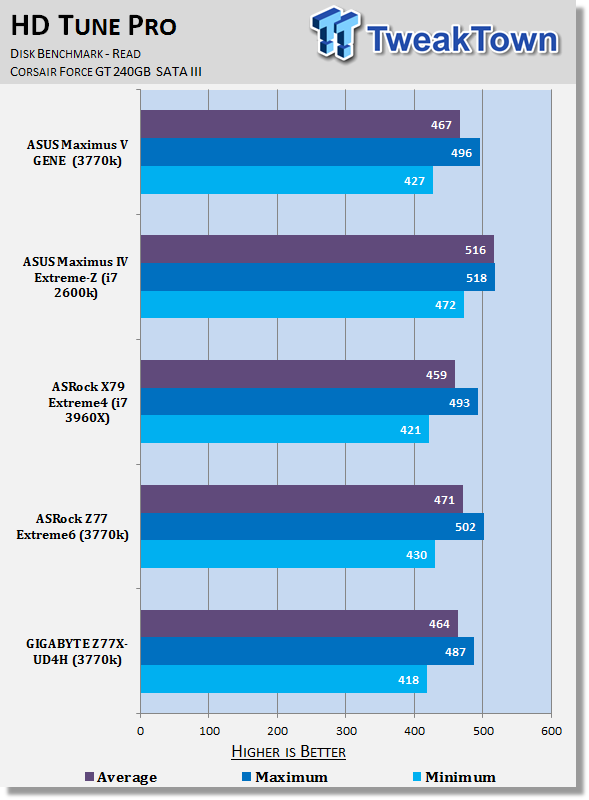
HD Tune Pro doesn't show quite the same performance increase, but across the board we still see solid numbers.
Memory Benchmarks
AIDA64
Version and / or Patch Used: 1.00.1035BETA
Developer Homepage: http://www.aida64.com
Product Homepage: http://www.AIDA64.com
Replacing Everest in our labs is AIDA64. This new testing suite is from the core development team from Lavalys and continues that tradition. The guys have thrown in better support for multithreaded CPUs as well as full 64 bit support. We use this to test memory and HDDs for now, but may find ourselves opening this up to other areas of the motherboard.
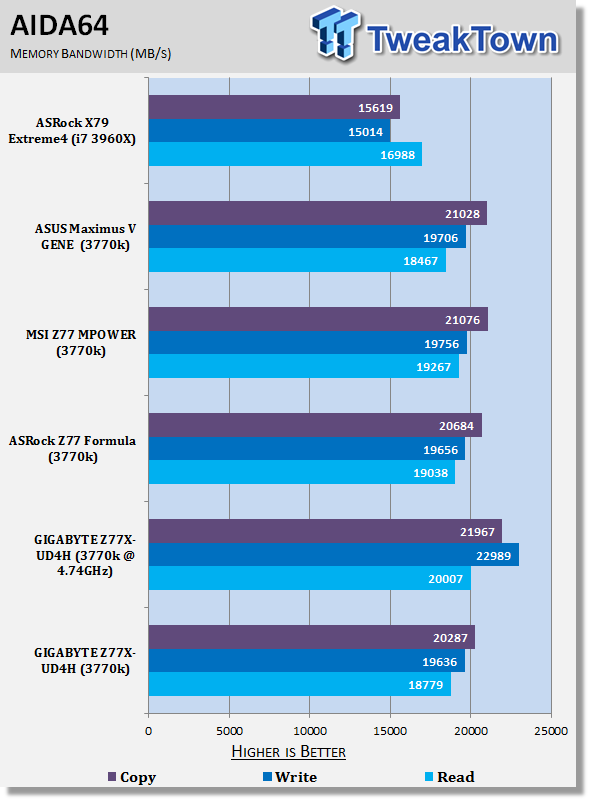
Memory numbers are fairly standard out of the box. When overclocked we see a decent boost thanks to the increased CPU speed with the best gains being seen in the write department.
Gaming Benchmarks
3DMark 11
Version and / or Patch Used: 1.0
Developer Homepage: http://www.futuremark.com
Product Homepage: http://www.3dmark.com/3dmark11/
3DMark 11 is the latest version of the world's most popular benchmark. Designed to measure your PC's gaming performance 3DMark 11 makes extensive use of all the new features in DirectX 11 including tessellation, compute shaders and multi-threading. Trusted by gamers worldwide to give accurate and unbiased results, 3DMark 11 is the best way to consistently and reliably test DirectX 11 under game-like loads.
Metro 2033
Version and / or Patch Used: Latest Steam Update
Timedemo or Level Used: Built in Benchmark
Developer Homepage: http://www.4a-games.com//
Product Homepage: http://www.thqnordic.com/
Metro 2033 is an action-oriented video game with a combination of survival horror and first-person shooter elements. The game is based on the novel Metro 2033 by Russian author Dmitry Glukhovsky. It was developed by 4A Games in Ukraine and released in March 2010 for Microsoft Windows and Xbox 360.[3] In March 2006, 4A Games announced a partnership with Glukhovsky to collaborate on the game.[4] The game was announced at the 2009 Games Convention in Leipzig;[5] a first trailer came along with the announcement.[6] A sequel was announced, currently titled Metro: Last Light.
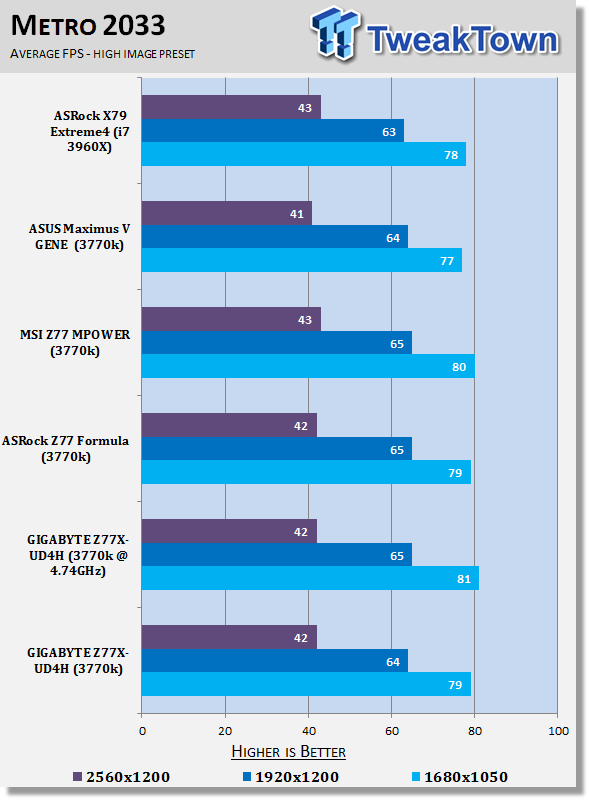
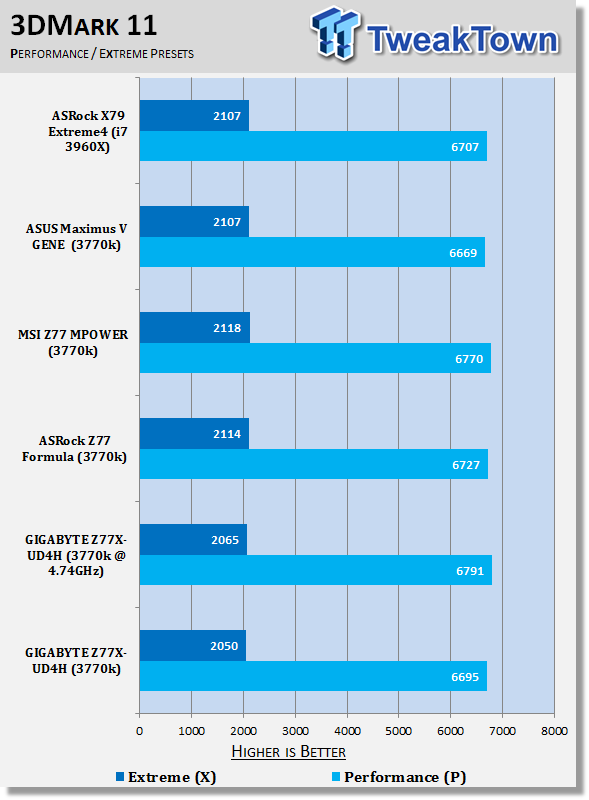
Very typical gaming numbers are seen above. We see a slight boost in the Performance preset and 1680 x 1050 Metro 2033 numbers, but apart from that, there's not much between all setups.
Temperature and Power
Power Consumption
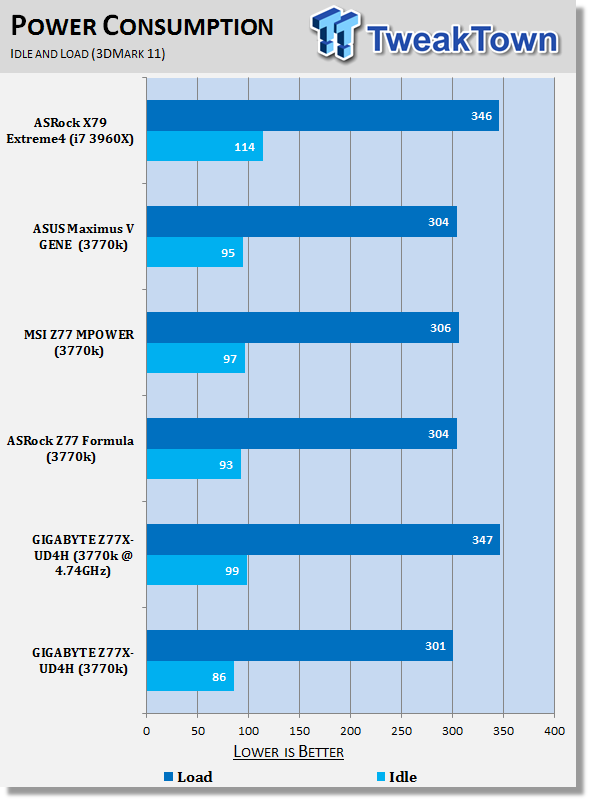
Power draw numbers are strong with idle numbers being the lowest out of the bunch and load numbers also coming in slightly lower. Of course when we overclock you see a jump in both these areas, but idle still continues to sit just under 100 watts - impressive!
Core Temperature
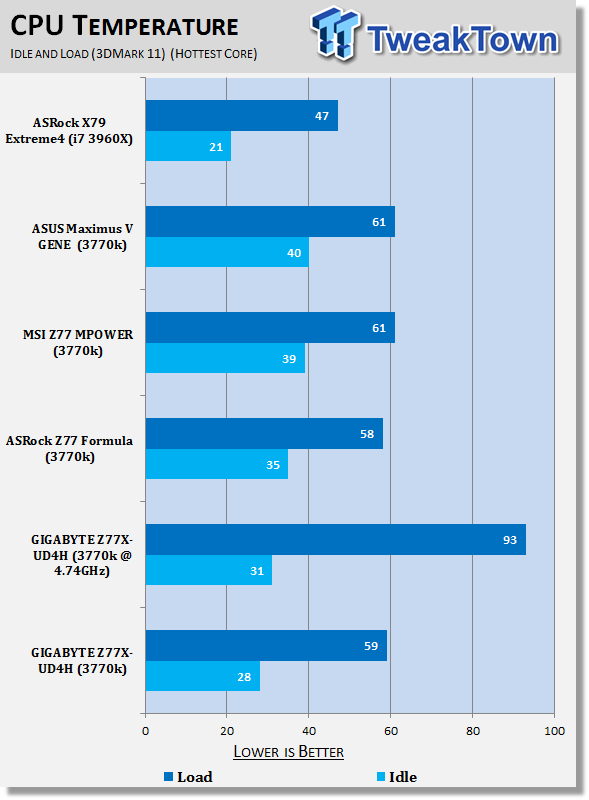
Temperature numbers are also very good. Idle numbers are excellent at both stock and overclocked coming in below the competition. Load numbers are within a few degrees of the other boards at stock, and overclocked of course sees quite a jump, as you'd expect, since we increase the voltages and clock speeds.
Pricing, Availability and Final Thoughts
At $164.99 the GIGABYTE Z77X-UD4H is a really well priced motherboard that can be bought now. GIGABYTE does an excellent job of reminding us that you don't have to break the bank to get a board that looks great. The matte black look on this board is fantastic and with a couple of highlight colors throughout, you end up with something that's going to look really nice inside any case.
Priced at less than half that of the recently looked at Z77X-UP7, you're going to be of course missing a fair few features when compared to its much bigger brother. While we might be lacking stuff like WLAN, dual Gigabit networking and mSATA support to name just a few of the features, you still end up with a lot of features on this more affordable option.
Considering the price point you're probably going to end up with everything you need with a single Gigabit port on offer, SLI and CrossFire support available, a bunch of video and audio ports and some great out of the box performance. If the out of the box performance isn't enough for you, though, you can get into the BIOS and bring even more performance to the table.
Looking at the numbers you can see that the overclock we achieved was actually slightly higher than that of the more expensive Z77X-UP7. As surprising as this might sound, it's not the biggest shock to us. Quite often we see these boards that offer less on board actually give us slightly stronger overclocks.
The other area the board lacks in is the bundle, but again that's due to the more aggressive price point. You really do have everything you'll need to get up and running, so there shouldn't be too much concern here.
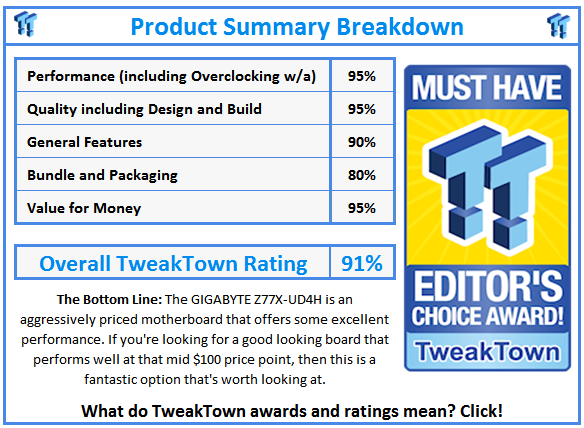
The Z77X-UD4H is a really nice option for people who want to find a board that sits around the mid $100 price bracket, but still want something that looks great. The performance of the board is strong out of the box and the overclocking performance and features are also solid for this price point. All in all it's a fantastic option for people who are interested in spending this kind of money on a new motherboard.

 GIGABYTE Z890 AORUS Elite WiFi7 Plus Motherboard Review - Right in the sweet spot
 ASUS ROG Strix X870E-E Gaming WiFi7 NEO - A Crosshair by any other name
 MSI MAG B850 Tomahawk Max WiFi II Motherboard Review - Leveling up
 Sapphire Pure X870A WiFi 7 Motherboard Review - Premium looks at a bargain price
 GIGABYTE X870E Aero X3D Wood Motherboard Review - A touch of wood adds a touch of class
 For the first time, AMD has overtaken Intel in data center revenue for Q1
 ASUS's new ROG Strix XG129C is a tiny 12.3-inch touchscreen that can serve as a sidekick to your main display
 Google Chrome silently downloads a 4GB AI model on your PC without asking
 Intel is reportedly making chips for Apple again in a preliminary deal that reunites two old partners
 Apple reportedly orders fresh A18 Pro silicon as MacBook Neo demand surges, $599 price point may be at risk
 58% of gamers don't want DLSS 5 altering their games, while others await real-world results
 New Windows 11 feature may speed up app launches by maxing out CPU frequency
 Samsung is reportedly preparing a 'Chromebook' variant of the Exynos 2800 to rival Apple's M7
 Xbox Mode on Windows 11 does not support multiple monitors, full screen gaming mode disables secondary screens when active
 GeIL brings plug-and-play DDR5 memory, offering 8000MT/s speeds without EXPO or XMP needed
 COLORFUL iGame GeForce RTX 5070 Ultra OC Review - When Style and Performance Meet
 PNY GeForce RTX 5080 Slim OC Review - A Compact 4K Powerhouse
 HP OmniBook 7 (Panther Lake) 16" Laptop Review
 Cooler Master Cosmos Alpha Full-Tower Chassis Review
 Thrustmaster T598 Direct Axial Drive Force Feedback Racing Wheel Bundle Review
 MSI GeForce RTX 5060 Ti 16G VENTUS 2X OC PLUS Review
 MSI GeForce RTX 5070 Ti VENTUS 3X PZ OC Review - Hidden Cable, Visible Performance
 I automated 5 annoying Windows maintenance tasks, and my PC basically runs itself
 How to Fix Windows 11 Black Screen on Boot or After Login
 The first 8 settings I disable on every fresh Windows 11 install in 2026
 Is Your Ethernet Performance Slower Than Wi-Fi? Here's How to Fix It
 MSI's Project Zero Delivers a Stunning Cable-Free Look to More Gamers
 How to Fix "We Couldn't Find a Fingerprint Sensor Compatible With Windows Hello" in Windows 11
 Why Is My Mouse Moving on Its Own? Here's How to Fix It
 Windows Using Too Much RAM? Here's How to Fix It
 Windows 11 is secretly throttling your apps - here's how to catch it
 Best Windows 11 Productivity Tips to Save Time Every Day