


Introduction
 22
22With my last fan controller review for BitFenix, I covered the basics on what makes for a good fan controller in my opinion. Those are things like controls that aren't easily bumped changing your preferred settings, sleek looks and the controller has to at least be capable of doing the basic job of giving users a one stop place to adjust any fan inside the chassis. BitFenix didn't stop when they brought out the more plainly designed Hydra Pro with its slider style controls, LED lighting controls and an LED to show you that the unit it on. Oh no, they took a huge step further.
In this design, BitFenix does away with the knobs, heck even most of the bezel that gives the Hydra Pro its style. This is all cut out and room is made for a digital touch screen to allow you to have not only a boss looking controller in your chassis, but it certainly does away with any accidental bumps changing fan speeds. I have seen fan controllers like this before, as some NZXT design come to mind. As if it weren't cool enough to offer a digital controller, BitFenix said to themselves, well how else can we make this easier to use? What they came up with is almost ingenious.
With the use of a pair of USB connections, this controller is now directly connected to the PC for communication. This allows for a web based application that will allow you to adjust them from any PC in the house on the same network. Even here BitFenix again take it one step further and offers a smartphone app that will also allow you to control things via the phone. This makes great sense on two levels. One, if the PC isn't in reach, you can just log in and change them from where you are. Two; since everything has an app for it these days, why not do it for their fan controller?
The fan controller we are going to be delving into on the next few pages is the Recon from BitFenix. I pretty much let all of the cats out of the bag in the previous paragraph, so without further ado, let's jump right in with both feet and see just what the Recon has in store for us.
Specifications, Availability and Pricing
 22
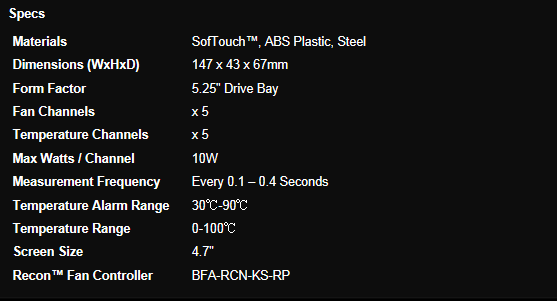
22Looking at the Recon as if it were in the case, you are given a thin black bezel that is given the SofTouch treatment. The top left has BitFenix painted in white and the bottom right has the Recon name, also in white paint. Taking the vast majority of the area up is the 4.7" touch screen. The screen has a glossy finish so it will be easy to clean and once powered leaves complete control of your PC's cooling at the touch of a finger. Keeping the theme going, when the Recon is powered, the white LEDs of the information it displays keeps the black and white thing going throughout the whole design. On this screen you have control of five channels with ten watts going to each of them. There is auto controls that allow the PWM circuitry to do its thing or a manual override to allow finite control of each fan on the controller. It will display temperatures from its sensors, fan RPMs, which channel you are reading or adjusting and an image of a fan in motion or not depending on settings, even an icon for the alarms and a power icon.
Along with being able to keep track of the fans speeds, temperatures from included probes or let the Recon do it all for you with the auto setting, the trick that really sets this controller apart is all attached to the PCB that contains all of the power circuitry. There you will find two unusual things for a fan controller. The first is a pair of dual USB 2.0 connections (9-pin) to connect to the motherboard; these allow communication to the second oddity on this controller. There is an ELAN EM78P520NL44S chip and the ATMEL211 chip which I believe is onboard memory for the profiles. These take controlling fans to the levels of being able to do so from either a phone or any PC on the network; it simply doesn't get any better than this.
As for where you can one get this trick bit of kit? Well in the US there are currently only three listings. One listing was at Newegg, but I don't believe stock has arrived yet as they are shown as Out Of Stock, priced at $37.99 with shipping included. The other two locations are within a dollar of each other. Those are Xoide and Outletpc with a $42.90 and $41.93 shipped pricing, respectively.
Considering the cost of the Hydra Pro and the lack of features compared to this being sold at $35, it almost kills the Hydra unless you demand a high powered controller and in my mind is the only reason to go with the Hydra Pro over this really amazing amount of tech packed into what appears to be an ordinary touch fan controller. Even compared to other digital or touch controllers, the $42 US dollars it is going to cost is just a drop in the hat once this thing is all set up and running.
Packaging
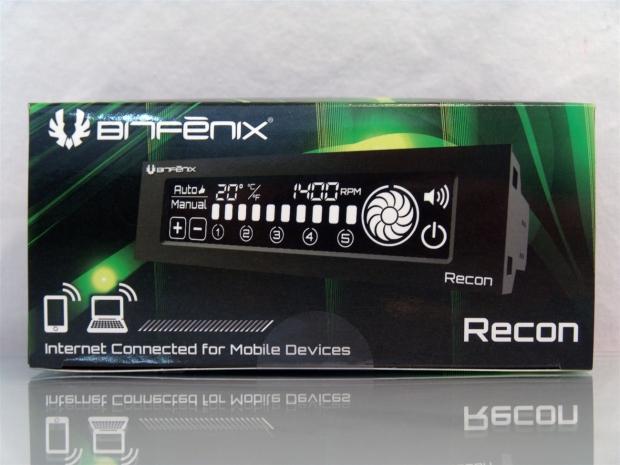
22On the front of the packaging there are no punches pulled as BitFenix displays the Recon in its powered glory with the "internet connected for mobile devices" line making this controller jump right ahead of the others on the shelf or web page.
 22
22With more of the green lighting strewn about over the black background, this panel only offers the Recon naming and the web address to search for more information on this controller at the point of purchase.
 22
22On the bottom of the box is where BitFenix decided to add the specifications for the Recon as well as showing the BFR-RCN-KS-RP model number for the Recon.
 22
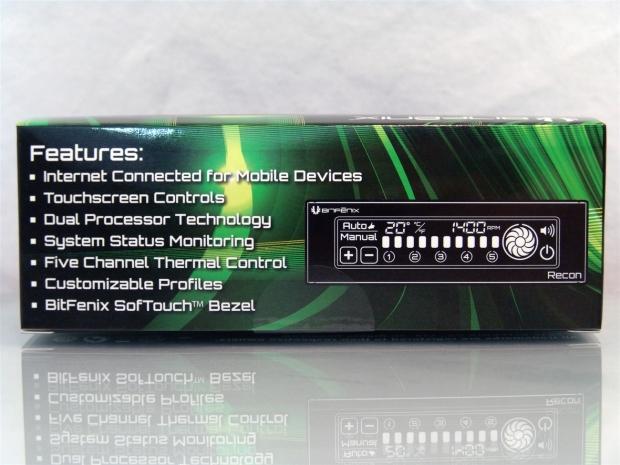
22This little list is what will grab the buyers by the masses. The features like being internet connected, having a touch screen, dual processor technology, status monitoring with alarm, five channels, profiles and of course the sleek looking SofTouch finish.
 22
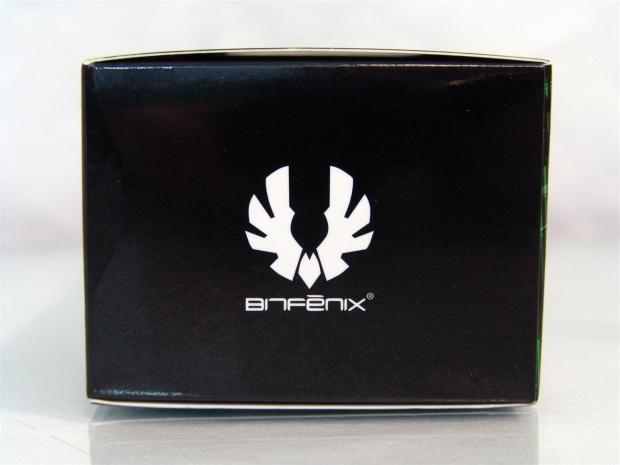
22The ends of the box are quite small to offer much information, but they do display the company name and logo on both ends to spruce things up over leaving it blank.
 22
22Just under the paperwork is the accessories and hardware with the Recon packed at the bottom.
 22
22Just like with the Hydra Pro, the Recon arrives in a red plastic bag and gets some additional lateral support from the foam caps at each end. Both controllers were shipped inside of a larger box, but this packaging will stand up to some pretty good abuse if it needed to. However, I don't think any e-tailer would ship this too your door in the factory packaging alone.
BitFenix Recon Fan Controller
 22
22Without power to the Recon, you can get a sense of the areas that are touch sensitive, but the lighter shaped that can be seen through the screen at this time. Other than the screen, what you see on the front is a thin bezel with BitFenix and Recon painted on it.
 22
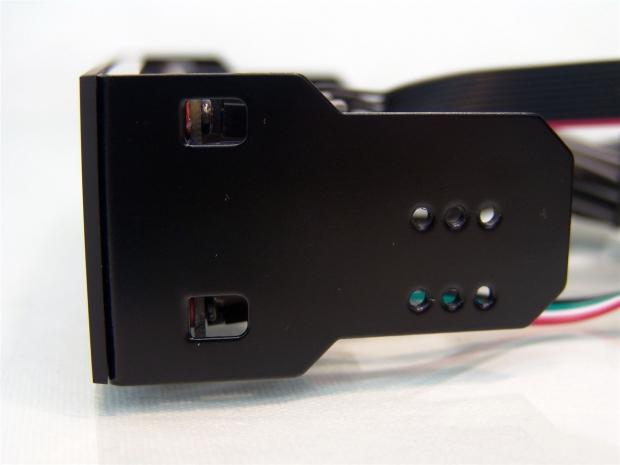
22There is a steel plate that supports the touch screen and PCB, and it is bent on both sides and ends with tabs like this. Depending on the depth of the bezel on the chassis, there are three depths to choose from when installing the Recon.
 22
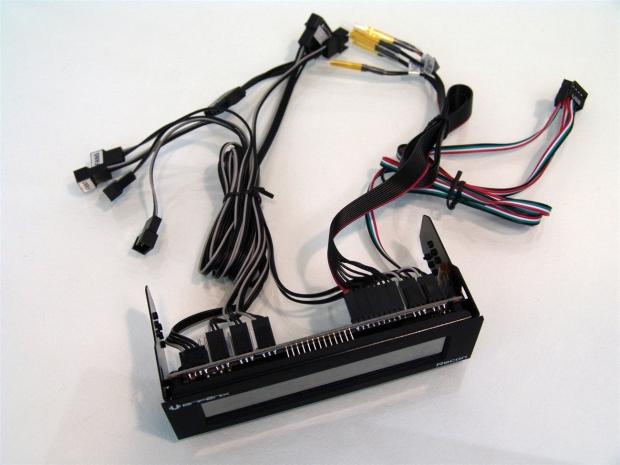
22The left half of the unit has connections for the 4-pin Molex for power that is 24" long, and three of the five fan headers, all of which are also 24" long. You then hit the ribbon cable of five temperature probes which is 26" long, the other two fan cables, and the USB 2.0 lead that is 26" long, and then it piggy packs into another USB 2.0 connection on 26" more of wire.
 22
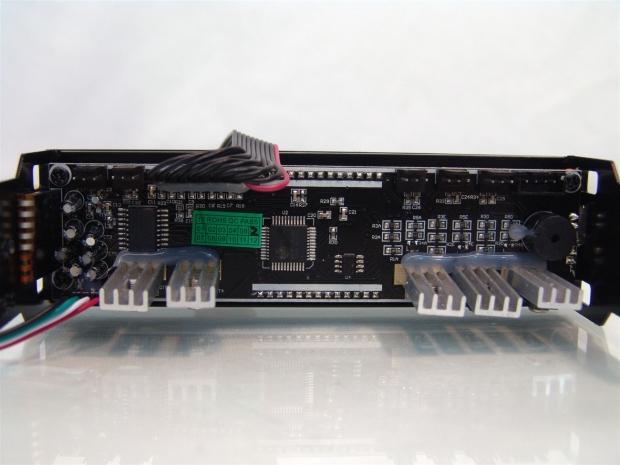
22Getting most of the wiring out of view you can see a bit of what goes on back here. There are the large heatsinks for each of the five channels along with a few things you don't typically see on a fan controller.
 22
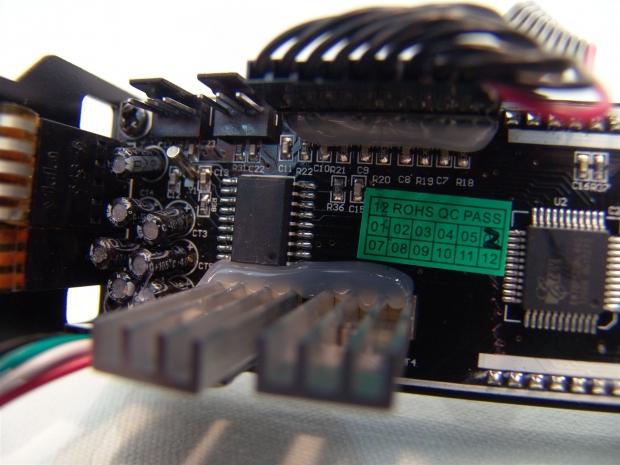
22On the left side of the back of the controller there is a jumble of capacitors and two of the five fan headers at the top. The eighteen legged chip here has no naming on it, but is the controller chip for the basic functions of the Recon.
 22
22The larger chip in the last image controls the functionality of the device. Whereas this ELAN chip allows devices to connect to it via USB along with what I believe to be the onboard memory for storing profiles through the software of sorts.
 22
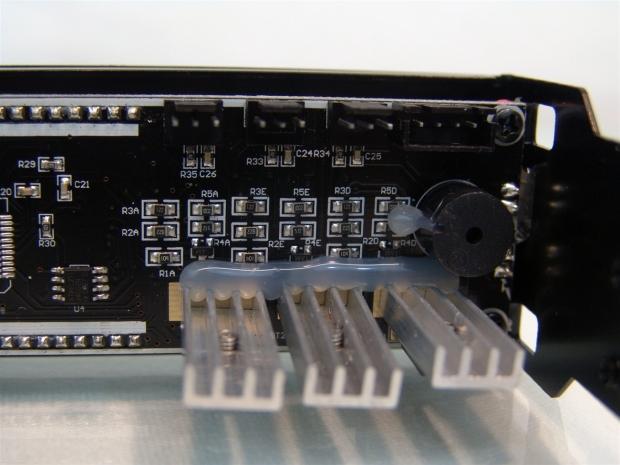
22On the right are three fan connections and the power connections at the top. On the far right is the speaker/buzzer that will sound if an alarm is triggered. The rest of the room is taken by resistors and the trio of glued on heat sinks for these three fan channels.
 22
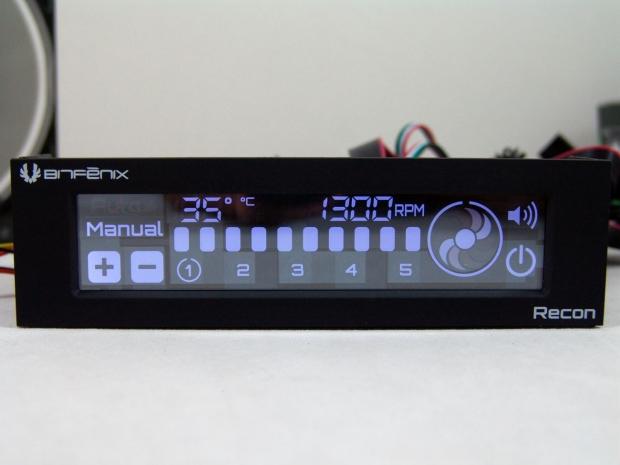
22The magic begins when you power on the Recon and see the screen come to life. I am in manual mode playing around with things, but you can see the ambient temperature of 35°C under the lights, the current RPM of the fan, what channel of the five I am programming and the fan indicator in stopped motion showing the fan is spinning, along with the alarm and power buttons.
Accessories and Documentation
 22
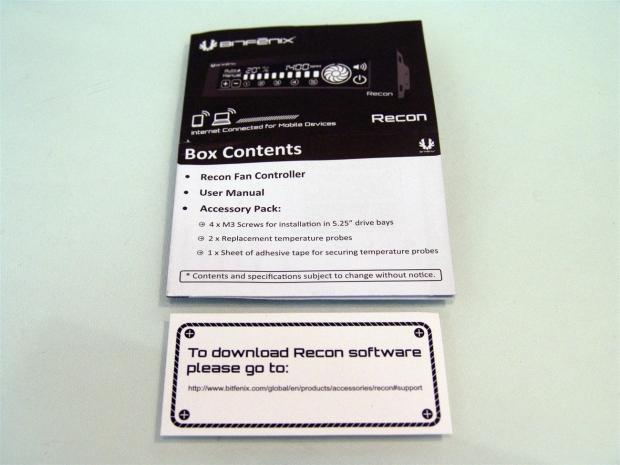
22Unfolding the manual shows on the front of it what comes in the kit. You should have the fan controller, four M3, screws, and the miscellaneous bits of the accessory package inside. The card at the bottom shows you where to go to get access to your Recon over the internet.
 22
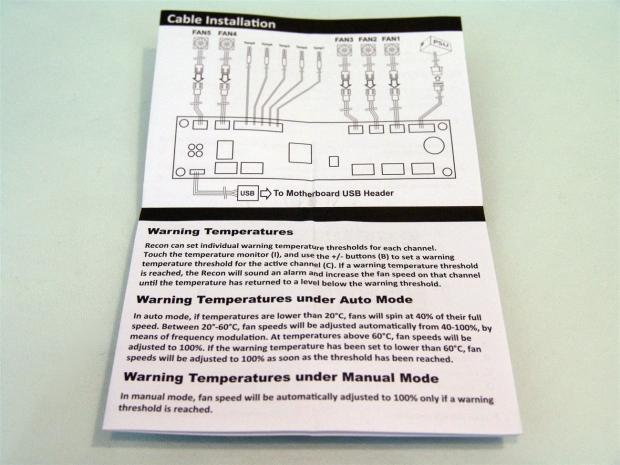
22In the manual you will see a wiring diagram that shows what connections go to the fans, which are the thermal probes, and that you need to plug in one of the USB 2.0 connections to get this device to function via the "software". Without it plugged in you can still use the Recon, just not from another device.
 22
22Inside the manual it shows you images of the software for both the PC and iPhone. It also shows what all of the functions are for each of the usages and explains how to set and use the profile system.
 22
22This section covers the layout of the control panel on the face of the Recon. It shows all of the functional buttons, but it just gets you into the basics, some of the buttons are what allow you to adjust things in manual mode as well.
 22
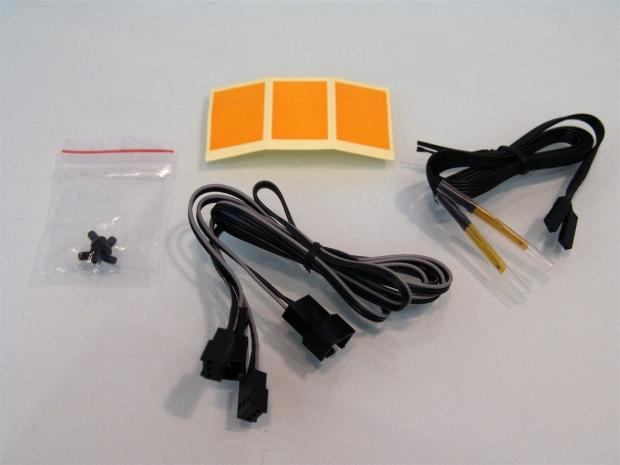
22I mentioned an accessory kit and here is what you also get with the Recon. There are of course the mounting screws, but you also get two extra fan leads and two additional thermal probes, I assume in case you only control two fans or lose some along the way. You also get nine yellow stickers to attach to the thermal probes to make them adhere to what you want to monitor.
Final Thoughts
As I sit here and think of how to downplay my excitement about this fan controller until much closer to the end, I just can't help but do so anyways. Aesthetically the Recon is super clean, streamlined and is a sweet looking addition to any rig. Functionally, the Recon is the fan controller that just keeps giving. Not only does it have the sleek touch screen to simplify controlling the device as a standalone unit, not to mention easy to clean from use with powder from you favorite snacks all over your fingers. On top of the simplicity and ease of use the control panel offers, if you are really lazy or just want to show off to your friends, you can open the browser and dial into the device from any other PC in the house. Even then that isn't the limit of this thing. You can be at a family reunion, knowing it is hot enough to fry eggs out and you have a scheduled gaming session in 30 minutes, grab an iPhone or a tablet, really anything with a browser and dial up the PC, max out the fan controls and enjoy coming home to a pre-cooled environment ready for the demands your gaming is about to do to the PC.
All of the cabling is pretty much enough to get around behind the motherboard while still connecting to the chassis fans, USB port and even powering the unit can be hidden pretty well. If I was to fault this unit at all and the fact that the cables are black helps, but the thermal probes are somewhat limited as to where they can run cleanly. They got to the CPU and GPU fine and I could hide those away, but if you want to get the temperature of airflow through an AIO hanging in the back, you are going to route the wire straight across the main compartment of the case. I know this may be an extreme example, but there is software out there for the CPU, GPU and even my memory, so I had to get creative with what I was finding out about my chassis cooling setup.
With only one thing to pick on the Recon about and even then that is a personal thing, two feet of cabling is fine for most case builds, I just don't typically have average builds or cases in use. That being said, I almost think that the release of the Hydra is almost to make you stand and think a moment before moving right into what the Recon delivers to the realm of fan controlling. As I said, if you need a high powered unit, the Hydra Pro is likely your answer from BitFenix, but for the average man without some serious demands in power, just the desire for the ultimate in fan control, the BitFenix Recon is your ticket.
With options upon options, offering the latest and greatest in what a 5.25" fan controller can offer its users, the Recon is getting my full support and recommendation any time I see anyone asking about a sleek fan controller that will leave them wanting nothing by the time they sort through all of the features.

 United
States: Find other tech and computer products like this
over at
United
States: Find other tech and computer products like this
over at  United
Kingdom: Find other tech and computer products like this
over at
United
Kingdom: Find other tech and computer products like this
over at  Australia:
Find other tech and computer products like this over at
Australia:
Find other tech and computer products like this over at  Canada:
Find other tech and computer products like this over at
Canada:
Find other tech and computer products like this over at  Deutschland:
Finde andere Technik- und Computerprodukte wie dieses auf
Deutschland:
Finde andere Technik- und Computerprodukte wie dieses auf  Commodore 64 PC runs AI to generate images: 20 minutes per 90 iterations for 64 pixels
 Synopsys and Samsung achieve production tapeout of next-gen Exynos SoC on new 3nm process node
 Windows 11 could get some big changes: Start menu 'companions' and Copilot in Settings
 The iPhone 16 Pro could have a 20% brighter display than your boring old iPhone 15 Pro
 New iPhone 16 dummy unit leak shows off its refreshed camera design and more
 Corsair 6500X Mid-Tower Dual Chamber Chassis Review
 Corsair MP700 Pro SE 4TB SSD Review - As Fast as They Come
 Corsair MP600 Mini 2024 Edition 1TB SSD Review - Fastest Tiny Drive on the Planet
 Lexar SL500 1TB Portable SSD Review - The best of native USB
 Corsair Platform:6 Elevate Modular Desk Review
 True Lies (1997) 4K Blu-ray Review
 Fractal Design North XL Full-Tower Chassis Review
 Western Digital WD Gold 24TB HDD Review - High-Capacity Masterpiece
 AOC U27G3X 27-inch Gaming Monitor Review - 4K 160Hz for $500
 MSI Vector GP68HX Gaming Laptop Review
 Building the Ultimate Home Entertainment Server with an ASUSTOR NAS and Viper Gaming NVMe SSDs
 Everything you need to know about the latest ASUS NUC Mini PCs - NUC 14 Pro and ROG NUC
 How to Overclock Your GPU and Boost Your PC Gaming with ASUS GPU Tweak III
 ASUS's AMD Radeon RX 7000 Series GPU lineup has something for every gamer
 ASUS OLED Premium Care defends the ROG Swift OLED PG32UCDM gaming monitor from burn-in