

Introduction

Having already looked at the HD 5970, we know what to expect when it comes to performance of the model. If you want a fast graphics card, the chances are you're trying to get a hold of a HD 5800 or HD 5900 series card from ATI. I spoke recently about my theory behind the lack of supply, but it's beginning to look better now as word came through the other day that ATI partners have received their design kits.
Today we'll be looking at GIGABYTEs HD 5970 and straight off the bat we're going to say that with the stock cooler and stock clocks there's not going to be much of a surprise when it comes to the out of the box numbers. What we've done is spend a bit more time with the card and overclock the model hopefully higher than the previous HD 5970 we looked at.
What we'll do with those results is compare them against the card at stock along with comparing it to the HD 5870 in CrossFire which is a faster setup than the HD 5970 out of the box.
What we'll do first up is have a quick look at the package and have a closer look at the card. We'll then have a look at the stock clocks of the model while also taking the time to see what clocks we achieved when we spent a bit of time overclocking the model. From there, only one thing matters; we'll test the card in its stock and overclocked form and see what kind of performance we can get from the model.
Let's get stuck into the GIGABYTE HD 5970 and see what exactly we have going on here.
The Package


There's not a whole lot going on in this GIGABYTE package. We haven't got any games. Instead we've just got the standard manual and driver CD along with some cables which include the Mini DisplayPort to DisplayPort convertor.
Video Card
Having a look at the card, you can see that there's nothing that we haven't seen before. As we mentioned in the past, the HD 5970 cooler is essentially a larger version of the HD 5870 one with the same overall design on the cooler being seen.

That doesn't mean that GIGABYTE haven't done anything. As usual we can see they've added their own sticker to the cooler which lets us know the model and brand. Hopefully the fact that the design kits have gone out to ATI partners recently means we'll begin to see companies mix up the model in the near future with new coolers and big overclocks.


Doing a quick spin around the card, we can see our two power connectors that sit up the top towards the back. Here we have a single 6-Pin connector along with a single 8-Pin one. Staying across the top but moving closer to the front, we can see our single CrossFire connector that lets us run a second one of these cards together.

Looking at the I/O side of things, we've got two Dual-Link DVI connectors along with a single Mini DisplayPort connector. If you missed the last page and you're concerned about the fact that your monitor doesn't have a Mini Display port, you'll be glad to know that a convertor to standard DisplayPort is included in the bundle.
Specifications
As we mentioned, the card we're looking at today from GIGABYTE carries with it the stock HD 5970 clocks. What this means is that the core comes in at 725MHz and the 2GB of GDDR5 carries with it a clock speed of 4000MHz QDR.
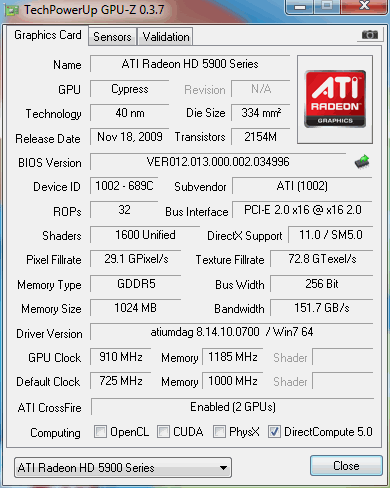
While that's all good and well, we've taken the time to let the model breathe a bit better. In turn we've been able to increase the core to 910MHz and the memory to 4740MHz QDR. Now, we don't really have to say how impressive that is compared to the stock model, so we're not going to. Instead we'll get stuck into having a quick look at our test system before seeing what these increased numbers do for us.
Test System Setup and 3DMark Vantage
Test System Setup
Processor(s): Intel Core i7 920 @ 3.8GHz (190MHz x 20)
Cooling: Noctua NH-U12P (Supplied by Noctua)
Motherboard(s): GIGABYTE EX58-UD5 (Supplied by GIGABYTE)
Memory: 3 X 2GB Kingston Hyper X PC3-16000 2000MHz DDR CL9 (Supplied by Kingston)
Hard Disk(s): Western Digital 300GB Velicorapter (Supplied by Western Digital)
Operating System: Windows 7
Drivers: ATI Catalyst 9.10, 8.663.1 Beta4 Hemlock VistaWin7 Nov6
As we've already mentioned in our introduction, we'll be taking a look at the GIGABYTE HD 5970 in both stock and overclocked form. For the numbers we achieved when it came to overclocking, you can jump back a page or see them on our graphs.
What we'll also be throwing into the mix is the HD 5870 CF setup. Out of the box this setup is faster than the HD 5970 thanks to the higher clock speeds. What we intend to see today, though, is what the overclock does for us when compared to the HD 5870 CF setup.
Let's get started!
3DMark Vantage
Version and / or Patch Used: 1.0.1
Developer Homepage: http://www.futuremark.com
Product Homepage: http://www.futuremark.com/products/3dmarkvantage/
Buy It Here

3DMark Vantage is the new industry standard PC gaming performance benchmark from Futuremark, newly designed for Windows Vista and DirectX10. It includes two new graphics tests, two new CPU tests, several new feature tests, and support for the latest hardware.
3DMark Vantage is based on a completely new rendering engine, developed specifically to take full advantage of DirectX10, the new graphics API from Microsoft.
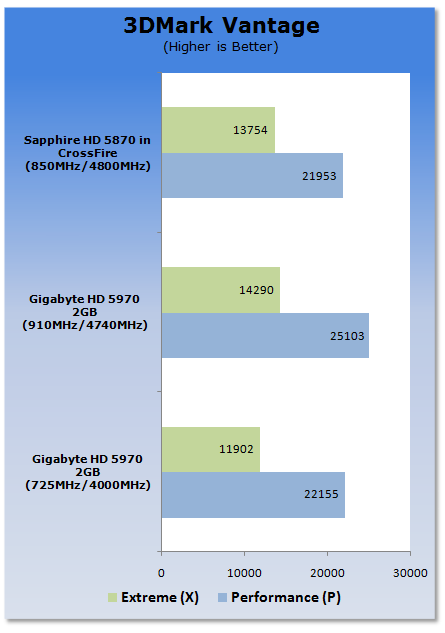
Straight away you can see a massive improvement when it comes to comparing the overclocked setup to the stock one. You can see what the extra MHz does is give us more performance than the HD 5870 CF setup.
Unigine Heaven Benchmark (DX10 & DX11)
Unigine Heaven Benchmark
Version and / or Patch Used: 1
Developer Homepage: http://www.unigine.com
Product Homepage: http://unigine.com/press-releases/091022-heaven_benchmark/
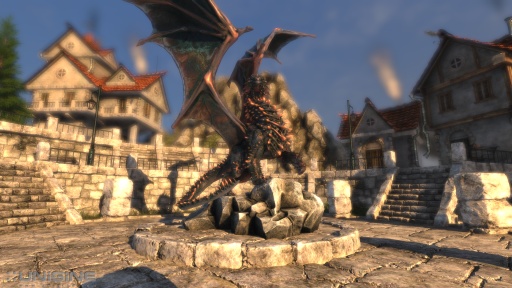
New benchmark grants the power to unleash the DirectX 11 potential in the gift wrapping of impressively towering graphics capabilities. It reveals the enchanting magic of floating islands with a tiny village hidden in the cloudy skies. With the interactive mode emerging experience of exploring the intricate world is ensured within reach. Through its advanced renderer, Unigine is one of the first to set precedence in showcasing the art assets with tessellation, bringing compelling visual finesse, utilizing the technology to the full extend and exhibiting the possibilities of enriching 3D gaming.
Note: If a card doesn't support DirectX 11 the benchmark will be left out, if it does it will be included along with the DirectX 10 results.
DirectX 10
DirectX 11
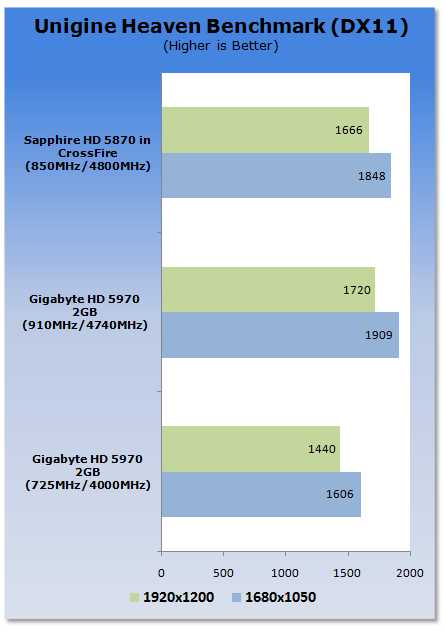
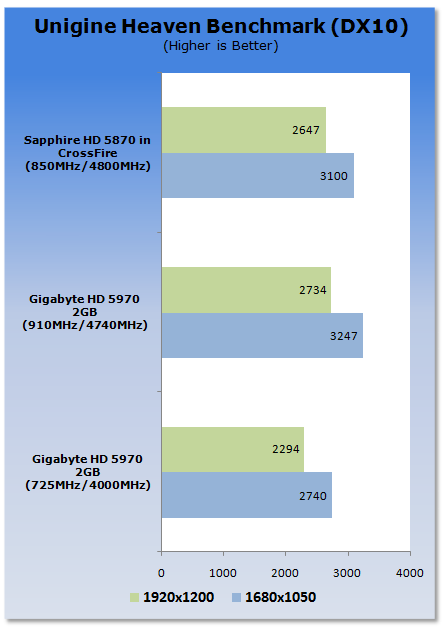
We can see under both the DX10 and DX11 test the extra MHz on offer from the overclocked GIGABYTE HD 5970 means the card is able to pull out a win at both resolutions.
Benchmarks - CINEBENCH R10
CINEBENCH R10
Version and / or Patch Used: Release 10
Developer Homepage: http://www.maxon.net/
Product Homepage: http://www.maxon.net

CINEBENCH is a real-world test suite that assesses your computer's performace capabilities. MAXON CINEBENCH is based on MAXON's award-winning animation software, CINEMA 4D, which is used extensively by studios and production houses worldwide for 3D content creation. MAXON software has been used in blockbuster movies such as Spider-Man, Star Wars, The Chronicles of Narnia and many more.
MAXON CINEBENCH runs several tests on your computer to measure the performance of the main processor and the graphics card under real world circumstances. The benchmark application makes use of up to 16 CPUs or CPU cores and is available for Windows (32-bit and 64-Bit) and Macintosh (PPC and Intel-based).
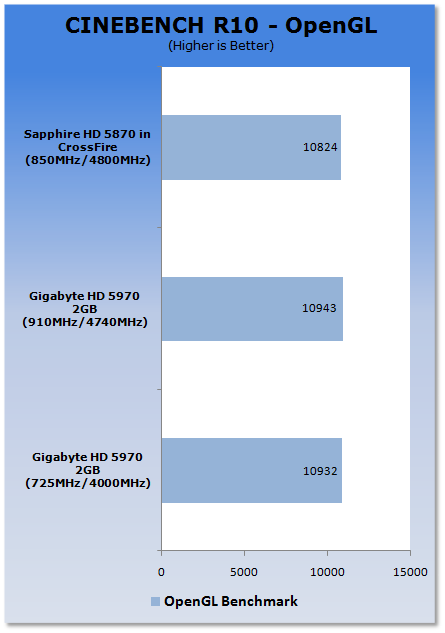
Not making any real use of CrossFire or increased clock speeds, we can see that all three setups perform quite close to each other.
Benchmarks - Resident Evil 5
Resident Evil 5
Version and / or Patch Used: Demo Benchmark
Developer Homepage: www.residentevil.com/
Product Homepage: http://www.residentevil.com/
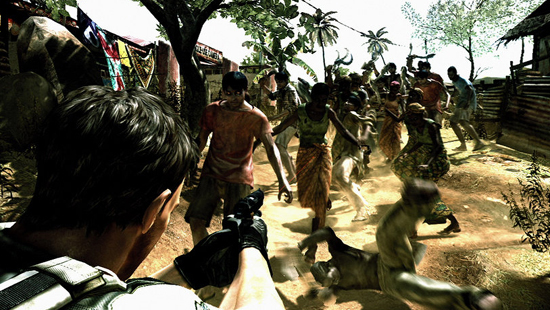
Resident Evil 5 is a survival horror video game developed and published by Capcom. The game is the seventh installment in the Resident Evil survival horror series, and was released on September 18. Resident Evil 5 revolves around Chris Redfield and Sheva Alomar as they investigate a terrorist threat in Kijuju, a fictional town in Africa.
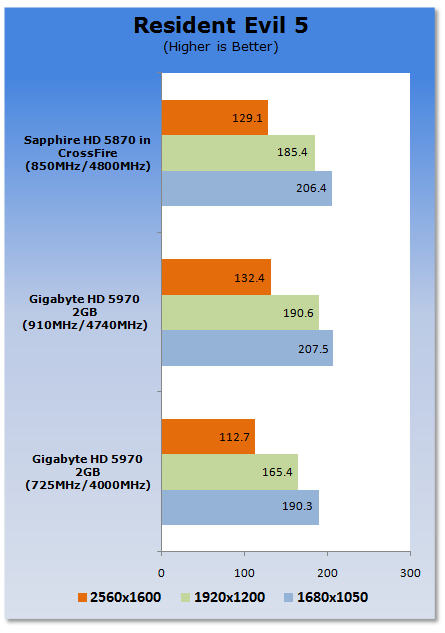
With the HD 5970 from GIGABYTE being given some more breathing room, we can see the model is again able to outperform the HD 5870 CF setup at all resolutions. In saying that, the performance the model offers out of the box is hardly something you would yawn at.
Benchmarks - Far Cry 2
Far Cry 2
Version and / or Patch Used: 1.01
Timedemo or Level Used: Ranch Long
Developer Homepage: http://www.ubi.com/
Product Homepage: http://www.farcry2.com/
Buy It Here

The Dunia Engine was built specifically for Far Cry 2 by the award-winning Ubisoft Montreal development team. It delivers the most realistic destructible environments, amazing special effects such as dynamic fire propagation and storm effects, real-time night-and-day cycle, dynamic music system, non-scripted enemy A.I. and so much more.
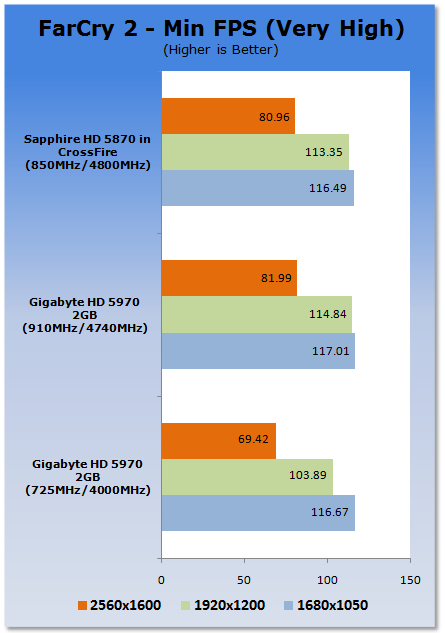
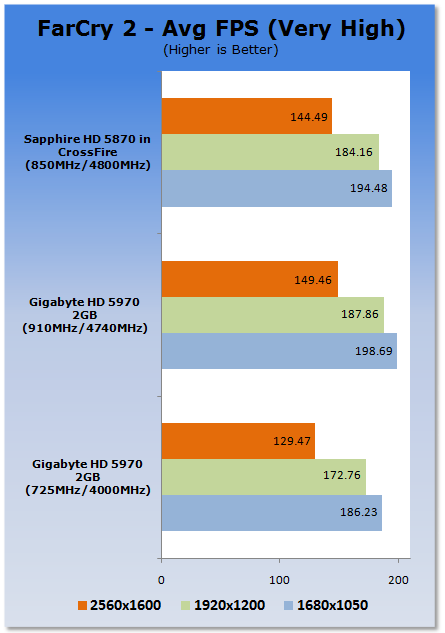
Far Cry 2 sees a good performance increase with the card overclocked. While the card is able to outperform the HD 5870 CF setup at all resolutions when overclocked, you can see that when compared to the card at stock the best gains are seen at the highest resolution which is fantastic news for people with large monitors.
Benchmarks - World in Conflict
World in Conflict
Version and / or Patch Used: 1.0.0.10
Timedemo or Level Used: Built-in Test
Developer Homepage: http://www.massive.se
Product Homepage: http://www.worldinconflict.com

World in Conflict is a real-time strategy video game by Massive Entertainment and to be published by Sierra Entertainment for Windows (DX9 and DX10).
The game is set in 1989 where economic troubles cripple the Soviet Union and threaten to dissolve it. However, the title pursues a "what if" scenario where, in this case, the Soviet Union does not collapse and instead pursues a course of war to remain in power. It is an intensive new game is sure to put plenty of stress on even the latest graphics cards and we use the built-in benchmarking for our testing.
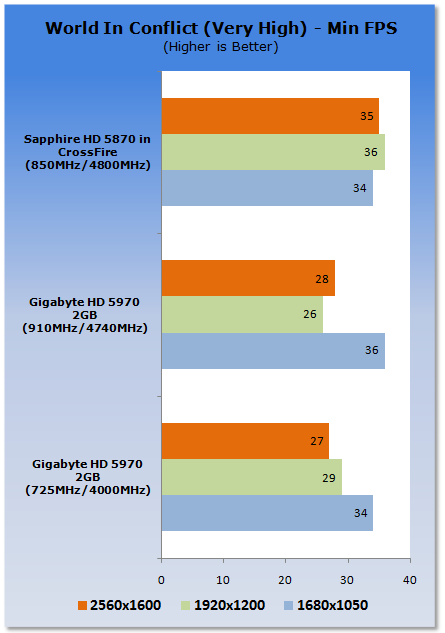
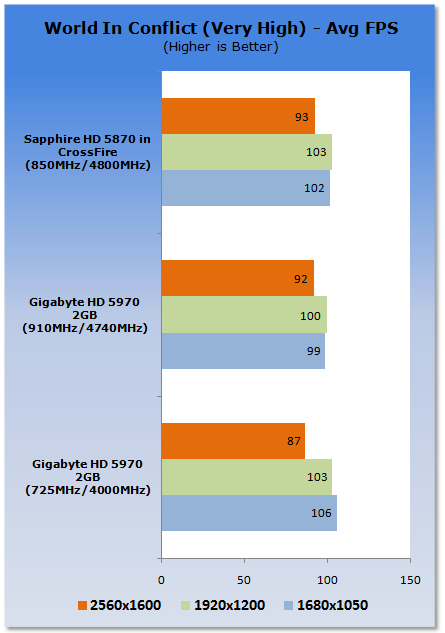
WIC has never been nice to an overclocked card. We're not sure what it is, but once you start overclocking the numbers begin to go a bit all over the place.
Benchmarks - Batman Arkham Asylum
Batman Arkham Asylum
Version and / or Patch Used: 1.1
Timedemo or Level Used: Built-in Test
Developer Homepage: http://www.batmanarkhamasylum.com/
Product Homepage: http://www.batmanarkhamasylum.com/

Batman: Arkham Asylum exposes players to a unique, dark and atmospheric adventure that takes them to the depths of Arkham Asylum - Gotham's psychiatric hospital for the criminally insane. Gamers will move in the shadows, instigate fear amongst their enemies and confront The Joker and Gotham City's most notorious villains who have taken over the asylum.
Using a wide range of Batman's gadgets and abilities, players will become the invisible predator and attempt to foil The Joker's demented scheme.
Batman: Arkham Asylum features an original story penned exclusively for the game by famous Batman author and five-time Emmy award winner Paul Dini, whose credits include Lost season one and Batman: The Animated Series.
Note: With support for PhysX NVIDIA based cards will be tested with the technology on and off, ATI cards will be tested with the technology off due to it not being supported on their cards.
Without PhysX
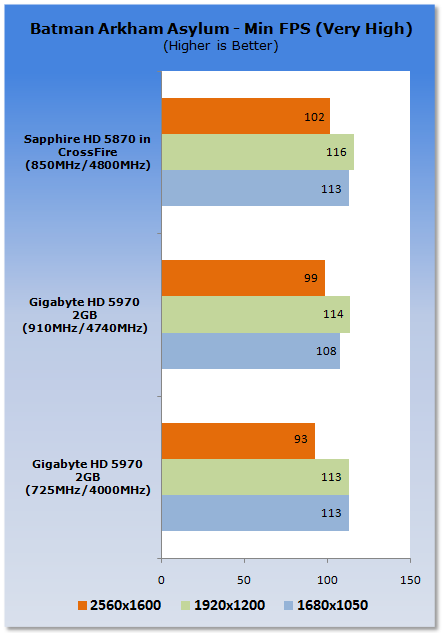
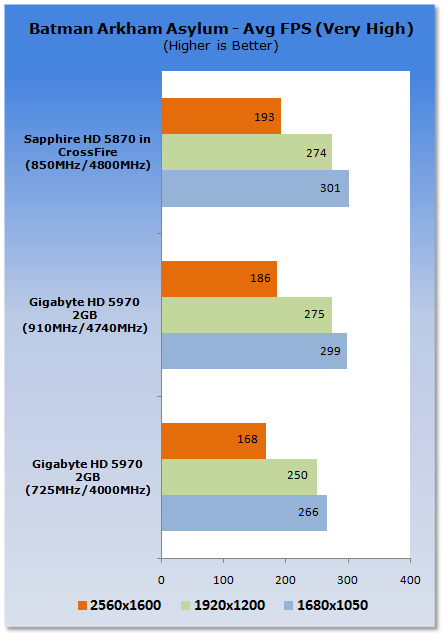
With the GIGABYTE HD 5970 overclocked we can see again a nice little boost in performance. Compared to the HD 5870 CF setup we can see that both setups sit very close to each other.
Benchmarks - Darkest of Days
World in Conflict
Version and / or Patch Used: 1.4
Timedemo or Level Used: Built-in Test
Developer Homepage: http://www.darkestofdays.com/index.php
Product Homepage: http://www.darkestofdays.com/index.php
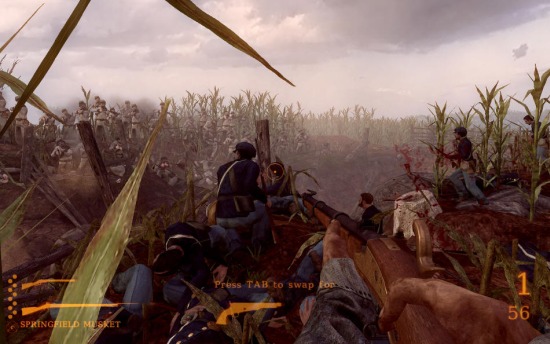
Darkest of Days takes the player through time into historic battles in an effort to save key individuals from certain death. The battles range from Custer's Last Stand at the Battle of the Little Bighorn in 1876 to fighting in Pompeii as ash and fire rain down from an erupting Mt. Vesuvius in 79 AD. Other locations include the battles of Antietam and Tannenberg, and a German World War II P.O.W. camp. There are different missions in every time period and the game takes about 4 hours to complete.
The game features over twenty weapons, both from the original time period as well as those brought back from the future. In addition, there are artillery weapons from different time periods to assist in battle.
Note: With the PhysX set to Medium or High Darkest of Days take advantage of the NVIDIA PhysX abilities. For that reason we will test ATI cards at the Low preset, NVIDIA based cards though will be tested at Low and High.
PhysX set to Low w/out PhysX based Card
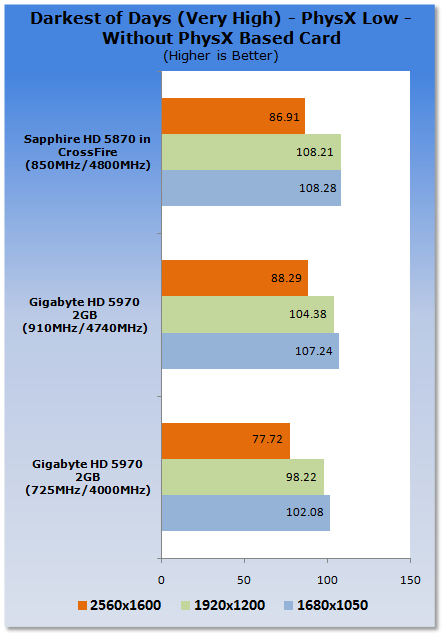
We again see across the board the GIGABYTE HD 5970 overclocked gives us a nice little boost. Like Far Cry 2 the best performance gain is seen at the highest resolution; it's also here that the card overtakes the HD 5870 CF setup.
Benchmarks - BattleForge
BattleForge
Version and / or Patch Used: Auto Patched at Load
Timedemo or Level Used: Built-in Test
Developer Homepage: http://www.battleforge.com/
Product Homepage: http://www.battleforge.com/
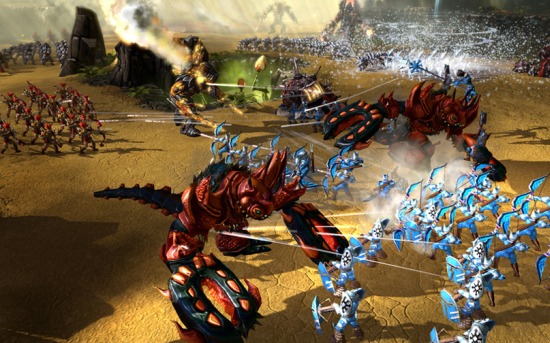
The Gods have disappeared and the old sun has died, letting a vile twilight engulf the world of Nyn. In exchange for all treasures the mortals possessed, the evil giants agreed to forge a new sun and hurl it into the sky.
But the deal was betrayed, the treasure stolen and now the mortals flee the wrath of the giants. Under the light of a new sun the mortals stumble into a world changed and twisted by an age of twilight. The long journey home has become a conquest of survival.
Note: Supporting DirectX 11 we have seperated the graphs for NVIDIA and ATI cards. While the numbers between the two brands can be compared you have to make note that ATI based HD 5000 series cards are running DirectX 11.
DirectX 11 (ATI HD 5000 Series Only)
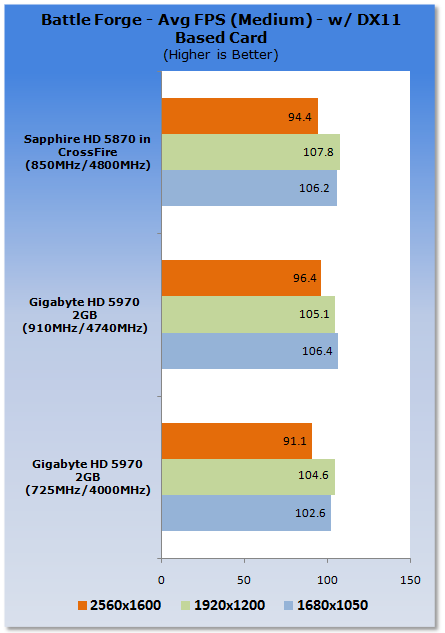
There's not a huge difference across the board when it comes to BattleForge numbers. We can see when overclocked the HD 5970 performs best at the highest resolution with it again pulling out a win against the HD 5870 CF setup.
Benchmarks - High Quality AA and AF
High Quality AA and AF
Our high quality tests let us separate the men from the boys and the ladies from the girls. If the cards weren't struggling before they will start to now.
Resident Evil 5
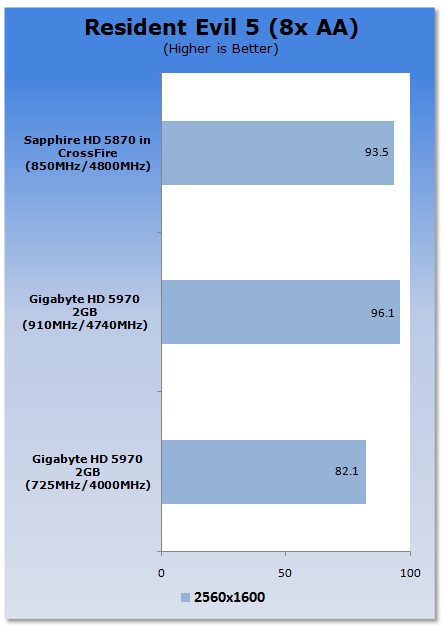
Looking at only three bars, we can clearly see the performance increase that the HD 5970 receives when it's overclocked, especially under these super intensive settings. More importantly, the card again manages to pull out a win against the HD 5870 CF setup.
Far Cry 2
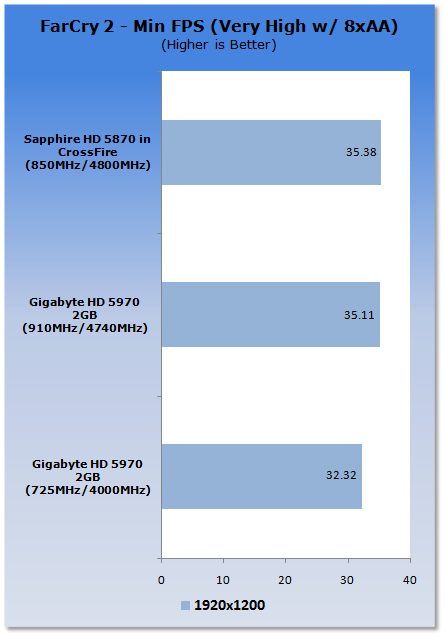
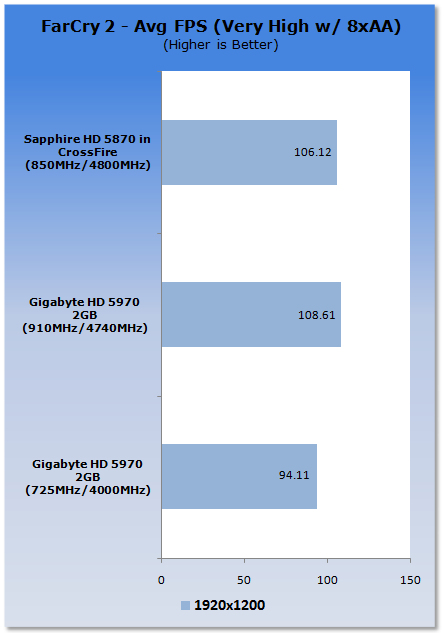
Under these extremely intensive settings we can see that the HD 5970 manages to just scrape past the 30 FPS minimum. When overclocked we get a bit more breathing room with the minimum sitting in line with the HD 5870 CF setup. As for the average, though, we see the HD 5970 from GIGABYTE when overclocked comes out slightly ahead.
World In Conflict
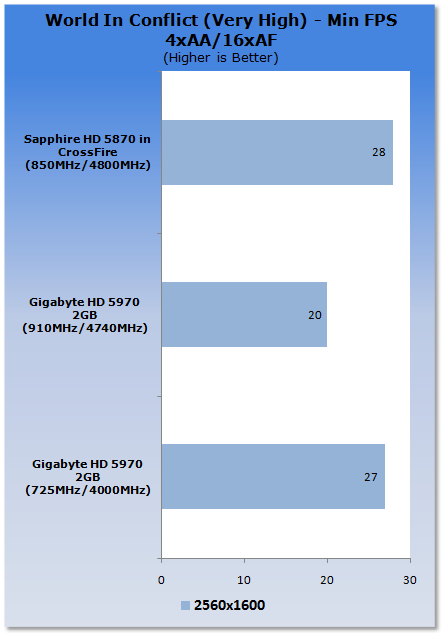
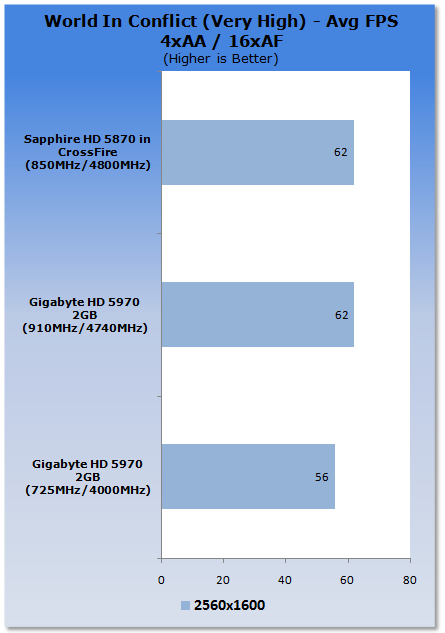
Again WIC starts to act a bit stupid with our overclocked card. Performance is nothing to get excited about here. Fortunately, this is the only game that we test which reacts this way with an overclocked card.
Temperature and Sound Tests
Temperature Tests

With the TES 1326 Infrared Thermometer literally in hand we found ourselves getting real-world temperatures from the products we test at load (3D clock speeds).
There are two places we pull temperature from - the back of the card directly behind the core and if the card is dual slot and has an exhaust point we also pull a temperate from there, as seen in the picture.
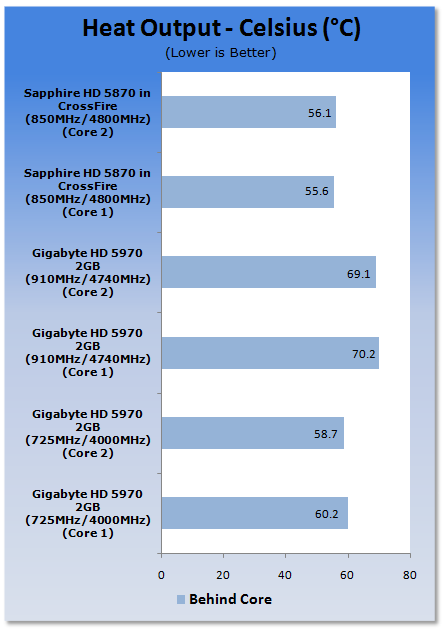
Increasing the voltage and cranking up the core speeds causes the card to run a bit warmer. It comes as no serious surprise since we are pumping extra voltage through the cores.
Sound Tests

Pulling out the TES 1350A Sound Level Meter we find ourselves quickly yelling into the top of it to see how loud we can be.
After five minutes of that we get a bit more serious and place the device two CM away from the fan on the card to find the maximum noise level of the card when idle (2D mode) and in load (3D mode).
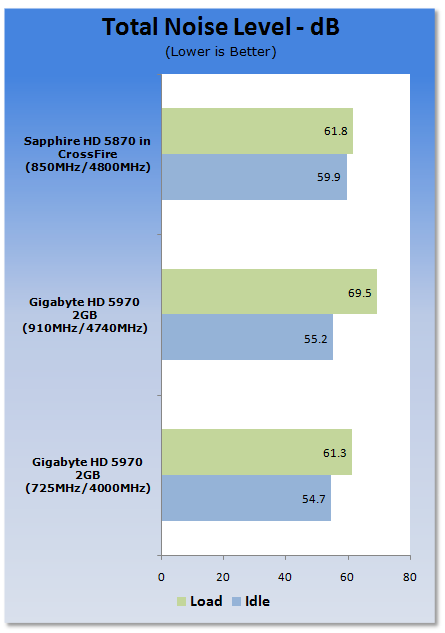
To help combat the heat, the fan decides to spin a bit faster which makes the card run a little louder. It's a small price to pay for the extra performance we receive and when idle the noise level falls in line with the stock clocked setup.
Power Consumption Tests

Using our new PROVA Power Analyzer WM-01 or "Power Thingy" as it has become quickly known as to our readers, we are now able to find out what kind of power is being used by our test system and the associated graphics cards installed. Keep in mind; it tests the complete system (minus LCD monitor, which is plugged directly into AC wall socket).
There are a few important notes to remember though; while our maximum power is taken in 3DMark06 at the same exact point, we have seen in particular tests the power being drawn as much as 10% more. We test at the exact same stage every time; therefore tests should be very consistent and accurate.
The other thing to remember is that our test system is bare minimum - only a 7,200RPM SATA-II single hard drive is used without CD ROM or many cooling fans.
So while the system might draw 400 watts in our test system, placing it into your own PC with a number of other items, the draw is going to be higher.
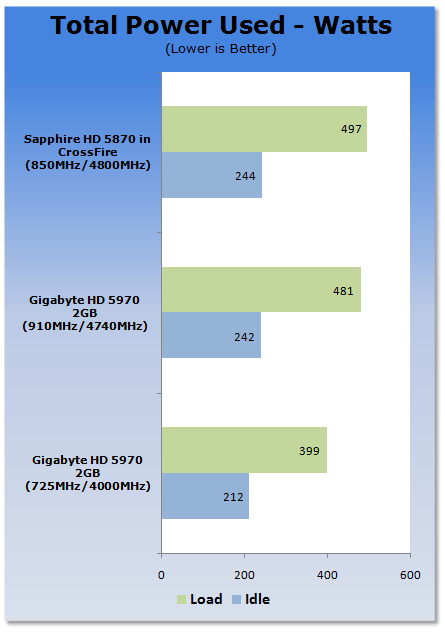
When it comes to overclocking and adjusting the voltages the HD 5970 seems to jump a bit when it comes to power draw. There's very little to worry about, however, as we like to think that anyone purchasing such an expensive card will have their hands on a good quality 800 watt+ power supply.
Final Thoughts
At $624.99 over at Newegg, the GIGABYTE HD 5970 falls in line with most of the other HD 5970s listed. If anything, it sits on the cheaper side. Stock of the model is only getting better and it seems that more stock was shipped from suppliers in the final week of November which is great news if you want one of these cards.
While the bundle might be a bit lacking when it comes to extra games, there's everything that you really need to get the card up and running. The chances are you already have some games in mind to play anyway.
Performance on the model is just awesome; out of the box you really can't find yourself disappointed with the model. The good news is it only gets better if you take the time to try the OverVolt utility and get stuck into Overdrive which is included in the Catalyst suite.
What you might find is that while you don't need the extra power today, come six months time and some new game releases, with a tweak of the core and memory clock you can continue to play those brand new intensive games just as well, if not better than the games you're playing today.
At the moment it's a bit of 'you'll take what you can get' when it comes to the HD 5970. Supply is only going to get better and it seems that recently it's beginning to get more and more positive. There's no denying that to make the best of the card you have to overclock, but don't let this scare you off. The whole process is pretty easy and on a whole fairly quick.
If you're getting some time off over the holidays and you're in need of a new graphics card, the HD 5970 from GIGABYTE is no doubt going to bring a smile to your face. The hardest thing about the purchase of this card is trying to explain it to the other half or your accountant. And to be honest, I feel like my *MS Word is running better with the HD 5970, so that sounds like a perfect excuse.
*My MS Word isn't really running better, but that's what I say when the accountant asks why I spent $600 on only one part of a whole computer.

 United
States: Find other tech and computer products like this
over at
United
States: Find other tech and computer products like this
over at  United
Kingdom: Find other tech and computer products like this
over at
United
Kingdom: Find other tech and computer products like this
over at  Australia:
Find other tech and computer products like this over at
Australia:
Find other tech and computer products like this over at  Canada:
Find other tech and computer products like this over at
Canada:
Find other tech and computer products like this over at  Deutschland:
Finde andere Technik- und Computerprodukte wie dieses auf
Deutschland:
Finde andere Technik- und Computerprodukte wie dieses auf 


 AMD's new Strix Point APU are reportedly called Ryzen AI 9 HX 170, big name changes with Zen 5
 Sam Altman says AI will be able to 'know absolutely everything' about you
 US government officially pays $285 million for the creation of virtual clones
 Helldivers 2 staffer almost fired for telling players to review bomb and refund the game
 Hades 2 got a surprise Early Access release and it already has more content than the original
 Corsair Platform:6 Elevate Modular Desk Review
 True Lies (1997) 4K Blu-ray Review
 Fractal Design North XL Full-Tower Chassis Review
 Western Digital WD Gold 24TB HDD Review - High-Capacity Masterpiece
 AOC U27G3X 27-inch Gaming Monitor Review - 4K 160Hz for $500
 MSI Vector GP68HX Gaming Laptop Review
 Dell UltraSharp 40 5K Curved Thunderbolt Hub Monitor (U4025QW) Review
 XPG Core Reactor II VE 850w 80 PLUS Gold ATX 3.0 PSU Review
 SteelSeries Arctis Nova 4X Wireless Gaming Headset Review
 ACEMAGIC AD08 "Core i9 11900H" Mini PC Review
 Building the Ultimate Home Entertainment Server with an ASUSTOR NAS and Viper Gaming NVMe SSDs
 Everything you need to know about the latest ASUS NUC Mini PCs - NUC 14 Pro and ROG NUC
 How to Overclock Your GPU and Boost Your PC Gaming with ASUS GPU Tweak III
 ASUS's AMD Radeon RX 7000 Series GPU lineup has something for every gamer
 ASUS OLED Premium Care defends the ROG Swift OLED PG32UCDM gaming monitor from burn-in