They see me rollin'
Today on the slab we have a treat from a HTPC and Media Centre specialist company called VidaBox.
Quite often is the case that you have spent a large sum on that shiny new HTPC sitting under your TV or in your HI-FI rack, but neglect it as more than a music and movie playback means because you lack that bridge between your grubby mits and the desktop.
I'm talking about keyboard and mouse combinations of course! Your 1080p native screen has more than enough real-estate to display webpages and play games, so why shouldn't you use that awesome setup to do more than just watch Finding Nemo...
Step up Vidabox - With your compact but functional keyboard and trackball combo, a nifty oversized laptop style keyboard with a USB RF dongle, meaning you do not need to maintain line-of-sight with your PC all the time.

Included also is a non-descript black bag to protect the keyboard when you shove it down the side of the couch.
Looking at the layout, it's a standard QWERTY design with laptop style micro-switched keys and the trackball and buttons in the opposing top corners.

Looking closely at the function keys included along the top, there is added functionality for media applications to help you get around quickly.

The trackball is gloss black and about the size of a standard marble and is tracked with a laser for better precision and response.

The left and right mouse buttons are in the left corner and feel easy to use when holding the keyboard in its mouse mode.

The shallow key design is like most laptop keyboards, however, the key-spread is larger than some laptops so you won't feel like it's too cramped to use for long periods of time.
Chillin' in the lounge

Putting this keyboard into action on my HTPC setup, I notice that there is no driver disc for this device and true to its word it's a plug and play dongle with all the relevant drivers already being part of Microsoft's architecture.
The trackball performs a bit too well at times and I found myself having to dial down the sensitivity along with pointer acceleration thanks to the precise tracking.
That being said, if you try to spin the ball it will simply not register and while this initially seems annoying if you wanted to move the pointer to one edge very quickly, it is really there to help you keep your movements with the ball refined and controlled.
It's unusual going back to a trackball after years of touchpads and optical mice, but after a couple of hours playing you find yourself falling back into your trackball style of control and it becomes intuitive very quickly.
The keyboard itself is lightweight and nicely shaped to rest on your legs and the keys are evenly spaced to give a natural feel. Typing is pretty easy and few mistakes are made once you re-adjust to the keyboards slightly smaller size.
Style-wise, the rack does not win many points, with generic looking black plastic and grey keys;it will go with everything but is not winning any beauty contests sorry to say.
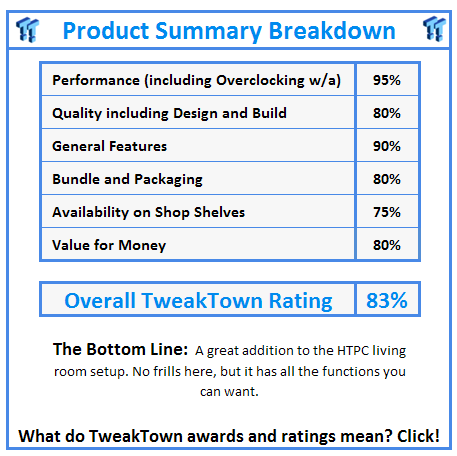
If anyone is looking for a solid keyboard and mouse combination the VidaBox has you covered with all the features you would expect for the money and the no-frills design, meaning less annoyances.
Driverless setup is a bonus, however, and it works great with Windows 7, too.
Our Latest Keyboards Review Coverage
- Corsair CLIPPER PRO MINI 60 Hall Effect Gaming Keyboard Review - Small and Mighty
- Logitech G316 X 98 Wired Gaming Keyboard Review - Retro-Inspired Board that Falls a Little Short
- Logitech G512 X 98 Analog Mechanical Gaming Keyboard Review - An Innovative Two-in-One
- IQUNIX Magi96 Pro Aluminum Low Profile Mechanical Keyboard Review - Premium Build, Satisfying Sound
- Razer Pro Type Ergo Wireless Split Ergonomic Keyboard Review - Built for Comfort and Support