

Introduction
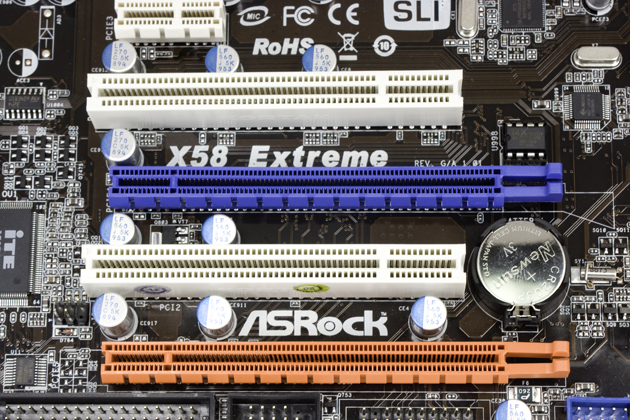
ASRock has often been neglected by the enthusiast community where the big names of ASUS, GIGABYTE and MSI tend to take the lead. But recently ASRock has caused many to turn their attention to this small ASUS owned company. While many know that with the X58 Supercomputer, many people had to take note of what ASRock was doing with the help of ASUS engineers.
Originally ASRock was to help in the entry to mainstream market while ASUS would concentrate on the high-end and enthusiast market. This worked very well at first, but it is becoming more and more a standard to integrate high-performance features and overclocking into even your basic boards.
After all, we see enthusiast aimed SFF and integrated mainboards from ASUS and others now, so it only stands to reason that companies like ASRock will begin pushing overclocking into their boards as well.
The X58 Extreme is one of these boards; it is meant for the Core i7, features overclocking and also high-performance memory support. It is also a subtle jab at GIGABYTE who has their own X58 Extreme mainboard. The X58 Extreme is a scaled down version of the X58 Supercomputer from ASRock, with a correspondingly scaled price.
The Box and What's Inside
Package and Contents

Let's first take a look at the packaging that the X58 Extreme ships in. Right away I have a complaint; I simply do not like the reflective surfaces that companies are putting on their packaging. Not only does it make it a pain to photograph, but it makes it a pain to actually read what is on the box as well. Still, after being annoyed by the reflective coating on the box, you will be able to tell that the X58 Extreme has a few interesting features.

The top of the box shows the usual CPU support logos and has the addition of a Windows 7 ready logo. Down at the bottom we find information about the power regulation on the board. The X58 sports an 8-Phase power set up (listed as V8 on the box). You also get powered E-SATA as well as SLI and Crossfire (something that is pretty much standard on the X58).

The back of the box has the usual jumble of images bragging about the features available on the board.


Inside ASRock has provided enough to get you going. There are the usual four SATA cables, two Molex to SATA adapters, a floppy and PATA cable, SLI bridge (single) manual, driver CD and I/O port shield.
The Motherboard
The Board

The ASRock X58 Extreme is a fairly clean board in terms of layout. Granted there is not really much different or new between boards these days. You will see slight differences in the tracing layouts and power designs, but for the most part ATX is ATX. Just looking at the ASRock X58, you can see the ASUS inspired design. In fact, you can even fit an ASUS fan on the power regulator cooler. True, it will not do you any good, but it will fit.

Starting our walk around at the top of the board, we see a typical layout in terms of memory slots, ATX power and CPU socket. Again, this is pretty much the standard in ATX design now, so I am not surprised. The one thing that does make this area stand out is the USB, FireWire and front panel headers. This makes it much easier to install in an enclosure with a top mounted front panel. The CPU area is not overly cluttered and with the exception of a choke that is a little too close to the upper left hand mounting hole, should fit most CPU coolers.

There are a couple of places that might get a little difficult to connect; one is the front panel audio header. It is squashed into a small area between the I/O ports and the heatsink for the NorthBridge. The other spot is the connection for the 8-pin auxiliary ATX power connector. This is in the typical place, but will probably give you some trouble once the board is mounted in a case. The top PCI-E slot is very close to the NB heatsink as well and could be a cause for concern.


Moving down to the lower half of the X58 Extreme, we see a very typical ATX layout. There is honestly not much to say about what is going on down on this end that the pictures cannot convey. You do get diagnostic LEDs, onboard power and reset buttons and an option for a TPM module.


Taking a look at the I/O ports now, we see the usual suspects here as well. There is a nice exception, though; we see a new port. This is the powered E-SATA port. This combines a USB 2.0 port with an E-SATA port. The USB side provides power and, well, you know the other.

Overall, the design is clean and easy to use. I especially like the removal of the PCI-E clips that are found on many boards. This makes installation and removal of add-in cards much easier.
BIOS and Overclocking
BIOS
The BIOS on the ASRock X58 Extreme is pretty straight forward. It will look familiar to ASUS owners as it follows the same lines as the typical ASUS BIOS. For testing I usually like to use the shipping BIOS unless I run into issues with it. In this case I found that the shipping BIOS had some memory issues. I found that I was not able to use our standard Kingston DDR3 2000 kit (KHX160003K3/3GX) and even with a more compatible KHX12800D3T1K3/6GX DDR3 1600 the board would only see two out of the three modules.

After a quick update using the ASRock Instant Flash application, the system could see all three modules, but still would not post with our Kingston KHX160003K3/3GX.

Another item that is noteworthy between the two BIOS' is that in the shipping BIOS you have a menu titled Smart. This is where all of the overclocking options are, but also the options to set default values are here. With the update the entire menu was replaced with one called OC Tweaker.

As you can see, OC Tweaker has a considerably larger number of overclocking options and is a much more refined page.

The rest of the BIOS has your usual options for hardware monitoring etc. - If you pick up this board I would highly recommend updating the BIOS for memory compatibility and also for the extra performance tweaking features.
Overclocking

Overclocking the ASRock X58 Extreme was pretty easy. I was able to attain a stable OC of 3.8GHz (190x20) using only the EZ OC profiles. This makes for a decent 500MHz jump over stock speeds. At 3.9GHz I was able to get into Windows and record a CPU-Z shot but, any of the system tests I use would cause the system to lock up. These results are not that great considering we have had this particular i7 up to 4.1GHz stable and a suicide run at 4.3GHz on different boards.
You can see the validation here.
As all overclocking results are dependent on the hardware you use, your results may vary.
Results of our overclocking tests are included in the performance section with the stock scores.
Important Editor Note: Our maximum overclocking result is the best result we managed in our limited time of testing the motherboard. Due to time constraints we weren't able to tweak the motherboard to the absolute maximum and find the highest possible FSB, as this could take days to find properly. We do however spend at least a few hours overclocking every motherboard to try and find the highest possible overclock in that time frame. You may or may not be able to overclock higher if you spend more time tweaking or as new BIOS updates are released. "Burn-in" time might also come into play if you believe in that.
Test System Setup and Comments
Test System
Processor: Intel Core i7 975
Memory: 6GB Kingston KHX12800D3T1K3/6GX (Supplied by Kingston)
Hard Disk: Kingston SSD Now M (Intel X25-M 80GB SSD) (Supplied by Kingston)
Graphics Card: Zotac GTX 280 AMP! Edition 1GB (Supplied by Zotac)
Cooling: Cooler Master Hyper 212 (with an extra fan) (Supplied by Cooler Master)
Operating System: Microsoft Windows 7 Ultimate RC-1
Drivers: Intel INF 9.1.0.1007, ForceWare 190.38

Comments
As I mentioned in the BIOS section, I had a few issues with memory. I could not use the normal 3GB kit we use for testing and had to test with a 6GB kit instead. But I also noted a few boot issues. Often after the test system was shut down for a few hours it would not POST properly. You could hear the board recycling in an attempt to POST.
The usual error code for the restart was D8, which according to the ASRock manual is when the runtime module is pushed to memory and the CPUID is stored into memory.
This would seem to point to some memory stability issues with this board, at least at POST.
The ASRock X58 Extreme lists Tri-SLI support; this was something that I was unable to get working at all. With three GTX 280s in the system the board would not post. It would shutdown at error code 83 and that was that. Even standard SLI was a problem; it would often take a few tries to get the system booted.
Synthetic Tests - Part I
With any system you will want to see a combination of synthetic testing and real-world. Synthetics give you a static, easily repeatable testing method that can be compared across multiple platforms. For our synthetic tests we use EVEREST Ultimate, Si-Soft Sandra, Futuremark's 3D Mark Vantage and PCMark Vantage, CINEBENCH as well as HyperPi. Each of these covers a different aspect of performance or a different angle of a certain type of performance.
Memory Bandwidth
Memory is a big part of current system performance. In most systems slow of flaky memory performance will impact almost every type of application you run.
To test memory we use a combination of Si-Soft Sandra, EVEREST and HyperPi 0.99.
EVEREST Ultimate
Version and / or Patch Used: 5.02.1789
Developer Homepage: http://www.lavalys.com
Product Homepage: http://www.lavalys.com
Buy It Here
EVEREST Ultimate is a suite of tests and utilities that can be used for system diagnostics and testing. For our purposes here we use their memory bandwidth test and see what the theoretical performance is.

Stock Memory Performance

Overclocked Memory Performance
Si-Soft Sandra
Version and / or Patch Used: 2009 SP3c
Developer Homepage: http://www.sisoftware.net
Product Homepage: http://www.sisoftware.net
Buy It Here

Stock Memory Performance

Overclocked Memory Performance
The synthetic memory performance of the ASRock X58 Extreme is pretty good. At stock we see it is right below the reference for Sandra, but when overclocked we see a nice jump to first place.
HyperPi 0.99
Version and / or Patch Used: 0.99
Developer Homepage: www.virgilioborges.com.br
Product Homepage: www.virgilioborges.com.br
Download It Here
HyperPi is a front end for SuperPi that allows for multiple concurrent instances of SuperPi to be run on each core recognized by the system. It is very dependent on CPU to memory to HDD speed. The faster these components the faster it is able to figure out the number Pi to the selected length. For our testing we use the 32M run. This means that each of the four physical and four logical cores for the i7 is trying to calculate the number Pi out to 32 million decimal places. Each "run" is a comparative to ensure accuracy, and any stability or performance issues in the loop mentioned above will cause errors in calculation.

Stock Performance

Overclocked Performance
As you can see above, the times come in just under the norm for this CPU. The average is about 18 minutes for the 32M run. The ASRock X58 Extreme shows good performance here; much of this is due to the fast SSD and RAM used. When we OC'd the i7 975 we dropped our times into the 14 minute range. This is an excellent time for this run.
Synthetic Tests - Part II
Disk Drive Controller
The system drive controller is an important part of system performance. In most modern boards your drive controller will run off of the PCI-e bus. The PCI-e bus performance can be affected by poor trace layout as well as many other design choices that show up on different boards.
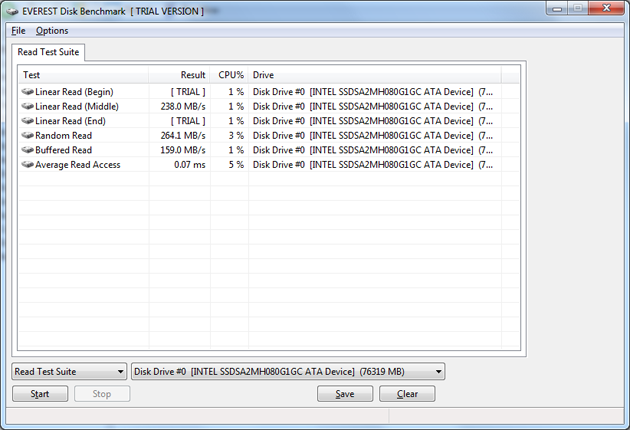
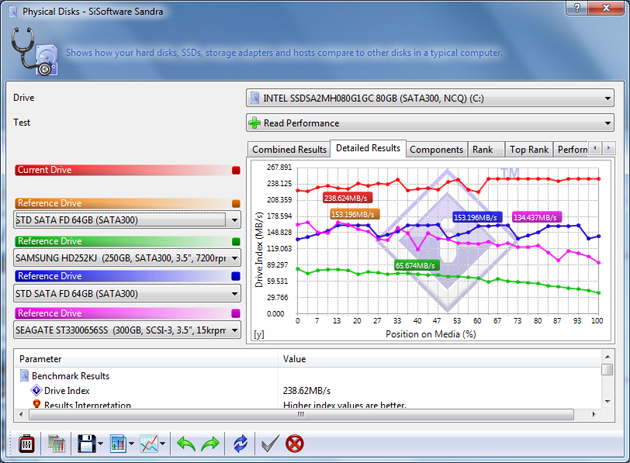
For testing we use both EVEREST and Si-Soft's Sandra.
EVEREST
Stock Memory Performance

Overclocked Memory Performance
Sandra
Stock Memory Performance

Overclocked Memory Performance
Interestingly we get some decent results from the ASRock x58 Extreme. Normally drive performance does not increase with an overclock unless you increase the PCI-e bus speed. This is something that was not done with our overclock. So it would seem that the read performance increase here is all down to improved memory performance. But, although we do get a nice boost when we overclock the board, it is still in the realm of performance you would expect from a Solid State Drive.
Synthetic Tests - Part III
PCMark Vantage
Version and / or Patch Used: 1.0.0.0
Developer Homepage: http://www.futuremark.com/
Product Homepage: www.futuremark.com
Buy It Here
For overall system performance we use PCMark Vantage. This is run in both x86 and x64 mode to give the best indication of performance.

The X58 Extreme holds its own here with the performance you would expect from a system using an SSD.
For synthetic gaming tests we used the industry standard and overlockers bragging tool, 3DMark Vantage. This is a test that strives to mimic the impact modern games have on a system. FutureMark went a long way to change from the early days of graphics driven tests to a broader approach including physics, AI and more advanced graphics simulations.
3DMark Vantage uses the DX10 API in addition to having support for PhysX. Due to the PhysX support and our use of an NVIDIA GPU, we run with PhysX enabled and disabled to give you the best indication of real system performance. For testing we use the Performance test run.
3DMark Vantage
Version and / or Patch Used: 1.0.1
Developer Homepage: http://www.futuremark.com/
Product Homepage: www.futuremark.com
Buy It Here

Again, we see good performance from the X58 Extreme. Note the drastic drop in CPU score when we turn PhysX support off. We also see the actual score drop by about 1,000 points.
CINEBENCH R10 x64
Version and / or Patch Used: R10
Developer Homepage: http://www.maxon.net/
Product Homepage: www.maxon.net
Download It Here
CINEBENCH is a synthetic rendering tool developed by Maxon. Maxon is the same company that developed Cinema4D another industry leading 3D Animation application. CINEBENCH R10 tests your systems ability to render across single and multiple CPU cores. It also tests your systems ability to process OpenGL information.


Real-World Tests Part I
Real-world testing allows us to see how well a product will perform when used in the same manner as it would be in your house or office. It is an important side to performance testing as it can uncover hidden glitches in the way a product performs.
It is especially true when testing a mainboard; there are so many components of a board that have to interact that any problems between parts can cause a failure of the whole.
For real-world testing we use some common applications and functions. We test with LightWave 3D for rendering performance, AutoGK for transcoding from DVD to AVI and two games for gaming testing.
Rendering
Rendering of 3D animation is a system intensive endeavor. You need a good CPU, memory and HDD speed to get good rendering times. For our testing we use LightWave 3D. This software from Newtek is an industry standard and has several pre loaded scenes for us to use.
LightWave 3D
Version and / or Patch Used: 9.6
Developer Homepage: http://www.newtek.com
Product Homepage: http://www.newtek.com/lightwave/
Buy It Here


The rendering tests here are a very slow for an X58 system. Normally with the 975 at stock you would see render times at about 2.5 minutes for a 1080 HD quality frame. The X58 was almost double that time at 4:34. This is not the board you would want to use if you are looking to do 3D animation.
A jump of 2 minutes per frame adds two hours to a 60 frame render. At 2 minutes per frame x 60 frames, if you are keeping to a 29 FPS standard you are looking at adding two hours for a little over 2 seconds of playback time. Not a good thing at all. Even when overclocked the X58 Extreme still cannot keep up with other boards at stock.
AutoGK
Version and / or Patch Used: 2.55
Developer Homepage: http://www.autogk.me.uk/
Product Homepage: http://www.autogk.me.uk/
Download It Here
AutoGK stands for Auto Gordian Knot; it is a suite of transcoding tools that are compiled into an easy to install and use utility. It allows you to transcode non-protected DVDs and other media to Xvid or DivX format. For our testing purposes we use a non-DRM restricted movie that is roughly 2 hours in length. This is transcoded to a single Xvid AVI at 100% quality.


The ASRock X58 Extreme does very well with this test at stock speed. However, it slows down when overclocked. This is an odd occurrence, but could be due to some of the memory instabilities we noted earlier.
Real-World Tests Part II
Here we have our real gaming tests. Each of the games we chose use multiple cores and GPUs. They are able to stress the system through use of good AI. Both have decent positional audio that adds impact to the sound subsystem of the board. We ran each game through the level or parts listed and recorded frames per second using FRAPS. This brings the whole game into play.
Cryostasis: Sleep of Reason
Version and / or Patch Used: 1.0
Timedemo or Level Used: From Ship Entry until third Spirit Journey
Developer Homepage: http://www.505games.co.uk
Product Homepage: http://cryostasis-game.com
Buy It Here
Cryostasis : Sleep of Reason is an interesting game. It is heavy on PhysX so to play it properly you will really want an NVIDIA GPU. However, that aside, it can be immersive. Imagine Myst with guns and monsters. One of the cool concepts is the spirit journeys. These allow you to enter the past of lost souls. You have to change their past to change your future. Each one makes for a nice diversion and requires you to think about what you are doing and how it will affect the outcome of the game. The settings we used are shown below.


As you can see, single card performance was more than acceptable if you account for the human eye only being able to register 32FP/s, so you have full fluid motion with this game even at 1920x1200 and all the eye candy turned on.
Far Cry 2
Version and / or Patch Used: V1.00
Timedemo or Level Used: Clearing the Safe house through to the Rescue
Developer Homepage: http://www.ubi.com
Product Homepage: http://farcry.us.ubi.com
Buy It Here
Far Cry 2 is a large sandbox style game. There are no levels here, so as you move about the island you are on you do not have to wait for the "loading" sign to go away. It is mission driven so each mission is what you would normally think of as the next "Level". In the game you take the role of a mercenary who has been sent to kill the Jackal. Unfortunately your malaria kicks in and you end up being found by him. Long story short, you become the errand boy for a local militia leader and run all over the island doing his bidding. Settings we used for testing are shown below.


Again, our testing with Far Cry 2 shows that they X58 Extreme will not hold you back in gaming.
Power Usage and Heat Tests
Power Consumption
We are now able to find out what kind of power is being used by our test system and the associated graphics cards installed. Keep in mind; it tests the complete system (minus LCD monitor, which is plugged directly into an AC wall socket).
The power consumption of the X58 Extreme from ASRock with the i7 975 at idle was not too bad. It is actually a little less than what I have seen from a Core 2 Quad running on an X48 board. What is a little bothersome is the huge delta between idle and load power consumption. We saw the power draw from the wall jump over 130 watts in each case. So the X58 Extreme is power efficient when it is resting, but not so much when you need to put it to work.

Heat Generation
As a new measure, we are now monitoring the heat generation from the key components on the motherboards; this being the Northbridge, Southbridge (if it contains one) as well as the Mosfets around the CPU. The results are recorded at idle and load during the power consumption tests.
Heat is not too bad here and is about what you would expect given the cooling system used. Bear in mind that these readings were taken on an open system. Once you put the X58 Extreme into a case and close it up these temps will certainly go up. This is especially true if you chose to use water cooling as the heat pipe system will have to rely on air movement from any case fans you may have.
<

Final Thoughts
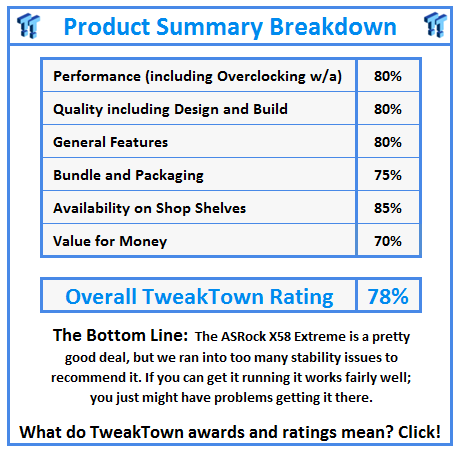
The ASRock X58 Extreme is a mixed bag to be sure. It is a decent board when it comes to normal usage. However, it has some issues with memory as well as some POST and boot issues that we were not able to resolve. Tri-SLI did not work and SLI was also a hit or miss item. Overclocking was pretty simple, but behind where it should be for a normal X58 based board.
For overall layout the X58 Extreme is done well with a few minor hits for cluttered design. Heat and power draw were average with the exception of the high delta change for power draw from idle to load.
Single GPU gaming was very good; there were no issues with sound, video or anything else. We did not test for dual GPU performance with the X58 due to the issues with POSTing and a few other boot problems.
Pricewise, the X58 Extreme from ASRock is about right with a price of around $170. Still, this is not an enthusiast board by any means; it can get you a semi-decent OC and game pretty well, but the problems we saw does not endear it to us. If you are looking for a low cost board to get you into the Core i7 playing field, you might consider the ASRock X58 Extreme. However, I would caution you to be prepared for some bumps.
 United
States: Find other tech and computer products like this
over at
United
States: Find other tech and computer products like this
over at  United
Kingdom: Find other tech and computer products like this
over at
United
Kingdom: Find other tech and computer products like this
over at  Australia:
Find other tech and computer products like this over at
Australia:
Find other tech and computer products like this over at  Canada:
Find other tech and computer products like this over at
Canada:
Find other tech and computer products like this over at  Deutschland:
Finde andere Technik- und Computerprodukte wie dieses auf
Deutschland:
Finde andere Technik- und Computerprodukte wie dieses auf  Synopsys and Samsung achieve production tapeout of next-gen Exynos SoC on new 3nm process node
 Windows 11 could get some big changes: Start menu 'companions' and Copilot in Settings
 The iPhone 16 Pro could have a 20% brighter display than your boring old iPhone 15 Pro
 New iPhone 16 dummy unit leak shows off its refreshed camera design and more
 Analysts expect an iPad Pro sales slowdown despite new models, here's why
 Corsair 6500X Mid-Tower Dual Chamber Chassis Review
 Corsair MP700 Pro SE 4TB SSD Review - As Fast as They Come
 Corsair MP600 Mini 2024 Edition 1TB SSD Review - Fastest Tiny Drive on the Planet
 Lexar SL500 1TB Portable SSD Review - The best of native USB
 Corsair Platform:6 Elevate Modular Desk Review
 True Lies (1997) 4K Blu-ray Review
 Fractal Design North XL Full-Tower Chassis Review
 Western Digital WD Gold 24TB HDD Review - High-Capacity Masterpiece
 AOC U27G3X 27-inch Gaming Monitor Review - 4K 160Hz for $500
 MSI Vector GP68HX Gaming Laptop Review
 Building the Ultimate Home Entertainment Server with an ASUSTOR NAS and Viper Gaming NVMe SSDs
 Everything you need to know about the latest ASUS NUC Mini PCs - NUC 14 Pro and ROG NUC
 How to Overclock Your GPU and Boost Your PC Gaming with ASUS GPU Tweak III
 ASUS's AMD Radeon RX 7000 Series GPU lineup has something for every gamer
 ASUS OLED Premium Care defends the ROG Swift OLED PG32UCDM gaming monitor from burn-in