









Introduction

ASRock has been one of the up and comers in the motherboard market. Originally slated to be an OEM only producer, ASRock found that just building plain boring boards may make you a few bucks, but mainstream users are now wanting more and more on their systems and are turning more towards high-end and enthusiast boards. To this end the ASRock company has started to put a lot of investment into producing new and more impressive boards.
ASRock has a lot of Intel boards now, but equally they have supported AMD just as much and today we have a new board for the AM3 based processors using DDR3 memory and powered by AMD's mainstream 790GX chipset, which has a lot of goodies in itself such as an IGP for budget users.
ASRock has positioned this board at the cheap end of the mainstream boards, coming in with a light price tag of 114.99 USD over at Newegg which makes it one of the cheapest ATX 790GX boards out there.
The Box and What's Inside
Package and Contents

ASRock has packed the M3A790GXH-128M in a rather attractive box. The theme is red in colour which we can only assume is to compliment the ATI part since AMD has gone all green. On the front ASRock has some nice artwork along with the model number and product support info.

On the back ASRock simply has a plethora of award logos that they have won for their past motherboards along with very basic info on AMD's Overdrive with ACC setup; nothing really specific to the board itself.

ASRock supplies a single user manual which isn't as thick as most, but it does cover the major setup and functions of the board as well as some basic software setup and information. Two separate CD's are included, one containing drivers and software for XP and XP-64 and the other containing drivers and software for Vista and Vista-64. A single DVD would have been a better more logical option, however.

Included in the accessories are four SATA data cables, a single Molex to SATA power converter, IDE cable and FDD cable with a rear I/O shield.
The Motherboard
The Board

Coming to the board itself now, ASRock uses a blue 6 layer PCB; not quite as bright blue as the GIGABYTE PCB, but still nice to have a bit of a different design now and then. The board is a full ATX design and follows the perfect layout with the 24-pin ATX power connector behind the four memory slots and the 4/8 pin power connector at the top left of the board just behind the PS/2 ports.

Progressing down the right hand edge of the board, the single IDE port controlled by the SB750 chip is located just below the memory slots on a horizontal axis, making it a bit of nightmare if you have a large graphics card to be installed and need to use the IDE port. It's not impossible, but it's a routing nightmare.
On the very bottom of the board are the SATA ports. There are five red ports and a orange port. All six ports are controlled by the SB750, but if you want to use the eSATA port on the rear of the board you need to bridge a cable from the orange port to another orange SATA port at the back of the rear I/O shield.

ASRock has kept the CPU area clean of high rise components, so those who want to use large aftermarket heatsinks can do so without worries. The CPU is given a 5 phase voltage regulation system which is comprised of all solid state capacitors and Iron Ferrite Chokes, giving it a cleaner voltage signal for overclocking as well as reducing leak current and reduction in heat generation.

The rear I/O ports are pretty well standard; we have three video out ports for the IGP which are CRT, DVI-I and HDMI. S/PDIF audio is handled through the Toslink audio port and analogue 7.1 audio through the six analogue ports. You can clearly see the eSATA port on the rear and the orange bridge port if you want to use it. It's not a switch over job; it's a manual setup.
Speaking of manual setups, ASRock doesn't make it any easier to setup Crossfire. Rather than digital switches to steal 8 lanes from the first PCIe x16 slot, you are given a paddle card like what was first used with the nForce 4 and SLI setups. The very same technique is needed here; one way gives you 16 lanes to the top x16 slot and one lane to the lower x16 slot and in the other direction you have eight lanes per slot. A third red x16 slot is provided which is x4 electrically and run off the SB750's four spare lanes with a single x1 slot at the top of the board and two PCI slots making up the compliment of expansion slots.
BIOS and Overclocking
BIOS

ASRock uses the same designed BIOS as ASUS does; we call it the tab BIOS as it's a different setup to the straight down menus of the traditional Award BIOS setup. If you're an ASUS user you will know how to navigate; it's not that hard.

Under the Advanced menu there are several sub menus; the overclocking takes place in the CPU Configuration menu.

Under the CPU Configuration menu you can adjust FSB, PCIe clocks, memory ratios, HT Link ratios and speeds as well as various voltages.
Overclocking
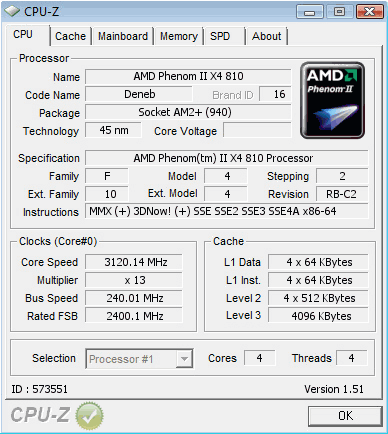
It was a definite surprise to us that ASRock managed to pump out 240MHz FSB stable where SAPPHIRE's board stumbled when going above 220MHz. This was only a crude overclock; 245MHz became unstable, but with more time, voltages and some more tweaking we could possibly get 250+MHz out of this board considering how easy it went to 240MHz.
Important Editor Note: Our maximum overclocking result is the best result we managed in our limited time of testing the motherboard. Due to time constraints we weren't able to tweak the motherboard to the absolute maximum and find the highest possible FSB, as this could take days to find properly. We do however spend at least a few hours overclocking every motherboard to try and find the highest possible overclock in that time frame. You may or may not be able to overclock higher if you spend more time tweaking, or as new BIOS updates are released. "Burn-in" time might also come into play if you believe in that.
Test System Setup and Memory Performance
Test System
Processor: AMD Phenom II x4 810 (13x 200MHz)
Memory: 2x 2GB DDR3-1600 Corsair Dominator (Supplied by Corsair)
Hard Disk: Intel X25-M 80GB SSD (Supplied by Intel)
Graphics Card: GIGABYTE 9800GX2 1GB (Supplied by GIGABYTE)
Cooling: GIGABYTE 3D Galaxy II Water cooling
Operating System: Microsoft Windows Vista X64 SP1
Drivers: Intel INF 9.0.0.1008, ForceWare 180.24
On the chopping block today we have the ASRock M3A790GXH-128M against our baseline board, the Sapphire PURE 790GX which is our default for 790GX chipset comparison. Our tests again were done at stock and overclocked specs; here we will see if any advantage is given to the ASRock board with a 20MHz higher bus clock.
EVEREST Ultimate Edition
Version and / or Patch Used: 2006
Developer Homepage: http://www.lavalys.com
Product Homepage: http://www.lavalys.com
Buy It Here
EVEREST Ultimate Edition is an industry leading system diagnostics and benchmarking solution for enthusiasts PC users, based on the award-winning EVEREST Technology. During system optimizations and tweaking it provides essential system and overclock information, advanced hardware monitoring and diagnostics capabilities to check the effects of the applied settings. CPU, FPU and memory benchmarks are available to measure the actual system performance and compare it to previous states or other systems.
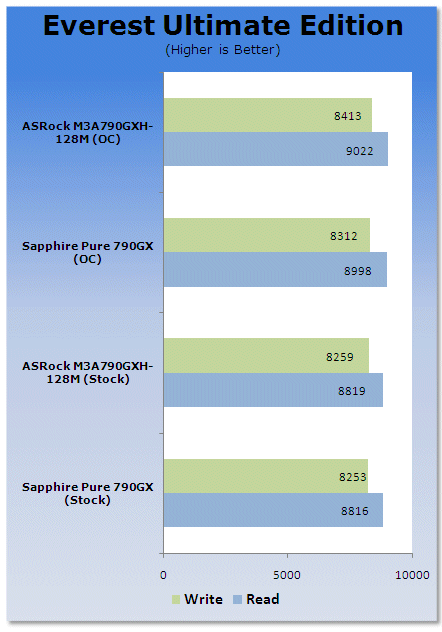
EVEREST at stock speeds puts the two boards just about dead even. It seems that ASRock has done some extra tweaking to the board to get a few more points out of it. However, when we overclock due to the 20MHz increase in the base clock of the board we see a gap start to appear.
Benchmarks - PCMark Vantage
PCMark Vantage
Version and / or Patch Used: Unpatched
Developer Homepage: http://www.futuremark.com
Product Homepage: http://www.futuremark.com/benchmarks/pcmark-vantage//
Buy It Here

PCMark Vantage is the first objective hardware performance benchmark for PCs running 32 and 64 bit versions of Microsoft Windows Vista. PCMark Vantage is perfectly suited for benchmarking any type of Microsoft Windows Vista PC from multimedia home entertainment systems and laptops to dedicated workstations and high-end gaming rigs. Regardless of whether the benchmarker is an artist or an IT Professional, PCMark Vantage shows the user where their system soars or falls flat, and how to get the most performance possible out of their hardware. PCMark Vantage is easy enough for even the most casual enthusiast to use yet supports in-depth, professional industry grade testing.
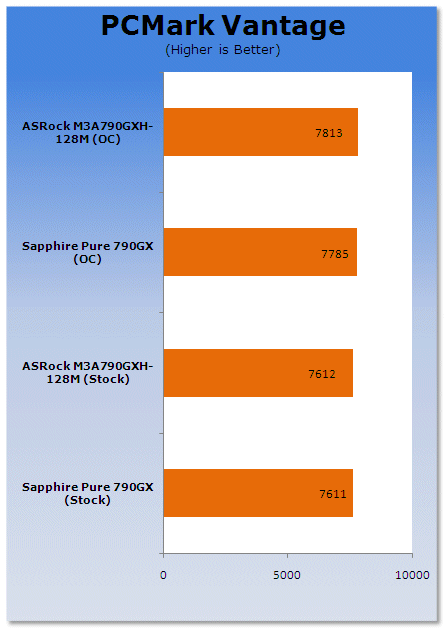
Stock results are just about dead even here, but it's when we overclock that ASRock pulls away; this not only due to a higher memory clock but the CPU has also been boosted beyond 3GHz with this clock, making it quite a bit quicker.
Benchmarks - SYSmark 2007 Preview
SYSmark 2007
Version and / or Patch Used: 1.04
Developer Homepage: http://www.bapco.com/
Product Homepage: http://www.bapco.com/products/sysmark2007preview/>

SYSmark 2007 Preview is the latest version of the premier performance metric that measures and compares PC performance based on real world applications.
SYSmark 2007 Preview extends the SYSmark family, which has been widely accepted by IT Managers, PC OEMs, press and analysts worldwide to support Windows Vista™.
SYSmark 2007 Preview allows users to directly compare platforms based on Windows Vista™ to those based on Windows XP Professional and Home.
The new release also incorporates numerous new features and enhancements such as an improved GUI allowing streamlined start-up and run along with a heads-up-display (HUD) and automated error reporting.
SYSmark 2007 Preview is an application-based benchmark that reflects usage patterns of business users in the areas of Video creation, E-learning, 3D Modeling and Office Productivity. This new release includes a robust and refreshed set of applications.
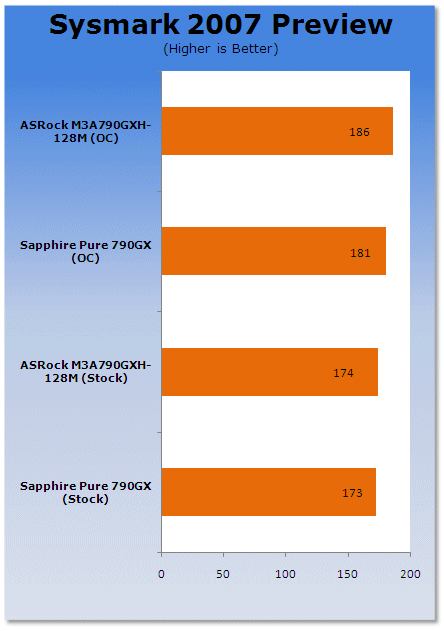
In real world applications we see that the increased speed at overclocked doesn't make a mile of difference to these office tests.
Benchmarks - 3DMark Vantage
3DMark Vantage
Version and / or Patch Used: 1.01
Developer Homepage: http://www.futuremark.com
Product Homepage: http://www.futuremark.com/products/3dmarkvantage/
Buy It Here

3DMark Vantage is the new industry standard PC gaming performance benchmark from Futuremark, newly designed for Windows Vista and DirectX10. It includes two new graphics tests, two new CPU tests, several new feature tests, and support for the latest hardware.
3DMark Vantage is based on a completely new rendering engine, developed specifically to take full advantage of DirectX10, the new graphics API from Microsoft.
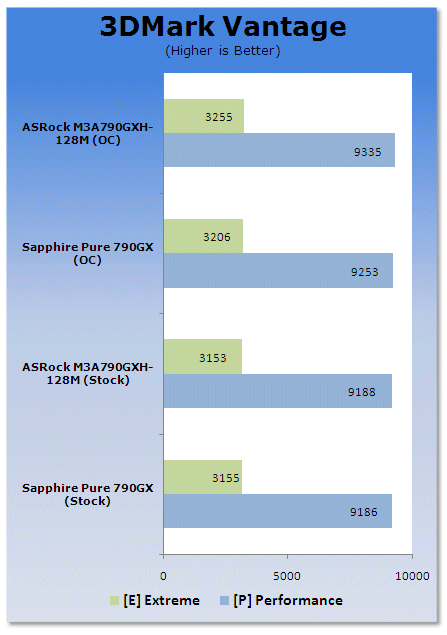
Synthetic gaming shows the increase in speed as the clock rates go up.
Benchmarks - Crysis
Crysis
Version and / or Patch Used: 1.1
Timedemo or Level Used: Custom Timedemo
Developer Homepage: http://www.crytek.com/
Product Homepage: http://www.ea.com/crysis/
Buy It Here

From the makers of Far Cry, Crysis offers FPS fans the best-looking, most highly-evolving gameplay, requiring the player to use adaptive tactics and total customization of weapons and armor to survive in dynamic, hostile environments including Zero-G.
Real time editing, bump mapping, dynamic lights, network system, integrated physics system, shaders, shadows and a dynamic music system are just some of the state of-the-art features the CryENGINE™ 2 offers. The CryENGINE™ 2 comes complete with all of its internal tools and also includes the CryENGINE™ 2 Sandbox world editing system.
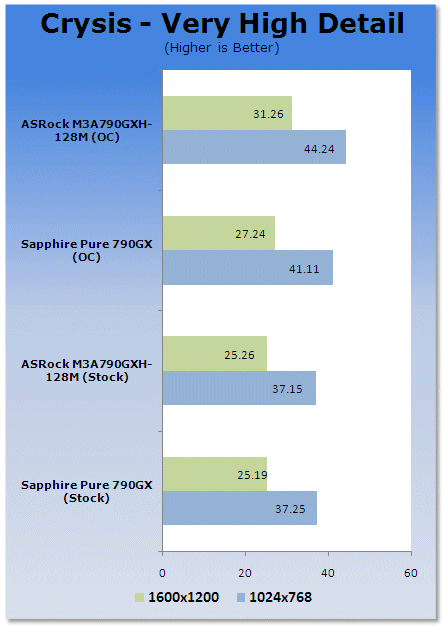
Crysis in real world gaming also shows quite a bit of improvement when overclocking comes into play.
Power Usage and Heat Tests
Power Consumption
We are now able to find out what kind of power is being used by our test system and the associated graphics cards installed. Keep in mind; it tests the complete system (minus LCD monitor, which is plugged directly into an AC wall socket).
There are a few important notes to remember though; while our maximum power is taken in 3DMark06 at the same exact point, we have seen in particular tests the power being drawn as much as 10% more. We test at the exact same stage every time; therefore tests should be very consistent and accurate.
The other thing to remember is that our test system is bare minimum - only a 7,200RPM SATA-II single hard drive is used without CD-ROM or many cooling fans.
So while the system might draw 400 watts in our test system, placing it into your own PC with a number of other items, the draw is going to be higher.
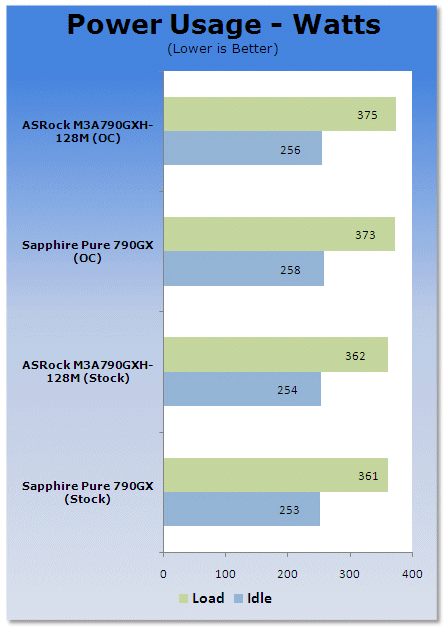
Both Sapphire and ASRock run a pretty matched setup when it comes to power consumption.
Heat Generation
As a new measure, we are now monitoring the heat generation from the key components on the motherboards, this being the Northbridge, Southbridge (if it contains one) as well as the Mosfets around the CPU. The results are recorded at idle and load during the power consumption tests.
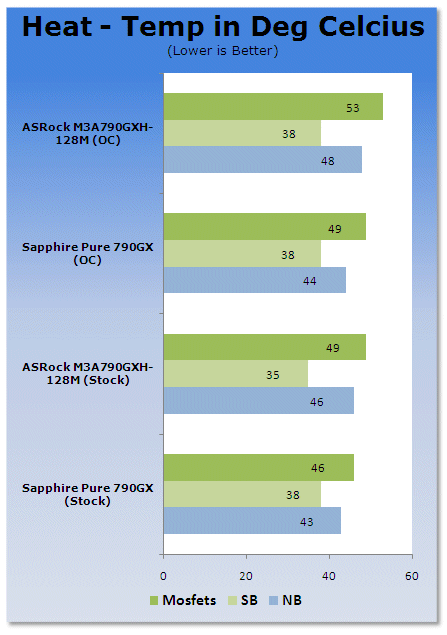
Sapphire runs a bit cooler thanks to a slightly better cooling setup on its voltage regulators.
Final Thoughts
ASRock sure are surprising us with newer and better boards from a relatively new comer to overclocking. Sure, they have had a few boards now and then that handle a respectable level of overclocking, but their latest generation of mainstream boards really show some promise, especially in this field. Some of the high-end boards have trouble making 240MHz FSB, but with a few small tweaks 240MHz was stable and with more time I am sure you could get a lot more out of it.
Not only does it overclock, it's also packed with plenty for your gaming PC needs including Hybrid Crossfire support when using selected Radeon cards as well as a really attractive price tag, just hitting the 115 USD mark and it really is the ultimate AMD board for the price.

Our Latest Socket AM3/AM3+ Review Coverage

 ASRock Z890 Taichi Aqua Motherboard Review - Flagship features without the flagship price
 GIGABYTE Z890I AORUS Ultra Motherboard Review - Mini-ITX with surprisingly good thermals
 GIGABYTE Z890 AORUS Elite WiFi7 Plus Motherboard Review - Right in the sweet spot
 ASUS ROG Strix X870E-E Gaming WiFi7 NEO - A Crosshair by any other name
 MSI MAG B850 Tomahawk Max WiFi II Motherboard Review - Leveling up
 Kingdom Hearts IV release date possibly leaked online following Switch 2 confirmation
 Anthropic releases state-of-the-art AI model Claude Fable 5, and it's safe to use
 Nintendo showcase FromSoftware's next title 'The Duskbloods' in new mysterious trailer
 Razer Seiren V3 Pro is a new professional-grade microphone for gamers and creators
 Xbox is rethinking its Project Helix strategy as memory prices continue to soar
 Control Resonant arrives in September with DLSS 4.5 and Path Tracing on PC
 NZXT unveils aesthetically pleasing cases, fans and coolers at Computex 2026
 NVIDIA GeForce Hotfix 610.52 driver released, fixes issues related to G-SYNC, Smooth Motion, and stability
 3DMark adds native Windows on Arm support for ray-tracing benchmarks
 MSI showcases its next-gen GPU cooling tech and it could be for the GeForce RTX 60 Series
 Navman MiVue Smart True 4K Surround Dashcam Review - Seeing In All Directions At Once
 IQUNIX Magi96 Pro Aluminum Low Profile Mechanical Keyboard Review - Premium Build, Satisfying Sound
 Asetek Forte S-Series Racing Simulator Bundle Review
 Razer Pro Type Ergo Wireless Split Ergonomic Keyboard Review - Built for Comfort and Support
 ASUS ROG Strix Morph 96 Wireless Gaming Keyboard Review - Great Performance, More Affordable
 SAPPHIRE Radeon RX 9070 GRE PULSE OC Review - A New 1440p Challenger Has Arrived
 NZXT H6 RGB+ Compact Dual-Chamber Chassis Review
 ASRock Radeon RX 9070 GRE Steel Legend Review - The RDNA 4 Mid-Range Reshuffle
 The PowerToys utilities I keep enabled on every Windows 11 PC, and the ones I turned off within a week
 TweakTown's Best of Computex 2026 Awards - The Best Hardware, Gaming Gear, and AI
 Phison E37T SSD Controller Exclusive Preview - The Fastest DRAMless SSD Platform Yet
 USB Ports Not Working in Windows 11? Try These Fixes
 ASUS WiFi Routers and Networking Solutions Deliver Long-term Security and Reliability with No Additional Cost
 Second Monitor Not Detected in Windows 11? Try These Fixes
 Turn Your Old Smartphone Into a Dedicated Webcam for Your Windows PC
 The Send To menu is the right-click feature on Windows 11 that nobody bothers to customize
 Windows 11 will not let you pin a folder to the taskbar, but a 30-second workaround does
 ASUS ProArt Displays Unlock Creativity with Professional Monitors for Everyone