

Introduction

Hunan RUNCORE Innovation Technology CO, LTD is going to be a new name for many of our readers, but don't be fooled, RunCore was founded on 10 years of research at the National University of Defense Technology and currently offers three solid-state storage series products aimed at optimizing and harnessing speed, quality, value, simplicity and power for prosumer, industrial and military solid-state drive markets. These products are electronic solid-state hard disks, E-drive speed disks and the run-storage solid-state storage arrays which are used in military equipment, industrial control, commercial servers, embedded computers and personal computers.
For the past two weeks TweakTown has worked with RunCore giving them feedback on their solid state mini PCIe drive developed for the Dell Mini 9 and new Pro IV SSD products. Today we will be looking at the new RunCore Pro IV SSD built with the Indilinx controller that is currently taking the SSD market by storm. The plan was to test and report on the entire product range from the top to the bottom, 32, 64, 12 and 256GB capacities, but a small mix up in shipping took the 32GB off of the table and left us with matching 128GB drives for a RAID 0 article to come in a couple of days.
We have been playing with several drives that use the new Indilinx controller in the lab for the last few weeks and the results have all been very positive. It is important to remember that just because two products use the same chipset that their performance is generally not identical. Just like when Intel makes a chipset, companies try to work their magic to meet different goals. DFI is generally not looking to accomplish the same thing as say ECS. Even though all of the Indilinx controller drives we have tested have been fast, some are faster than others and the Pro IV fits into that category. Let's now have a look and see what RunCore's Pro IV is all about.
Specifications, Availability and Pricing
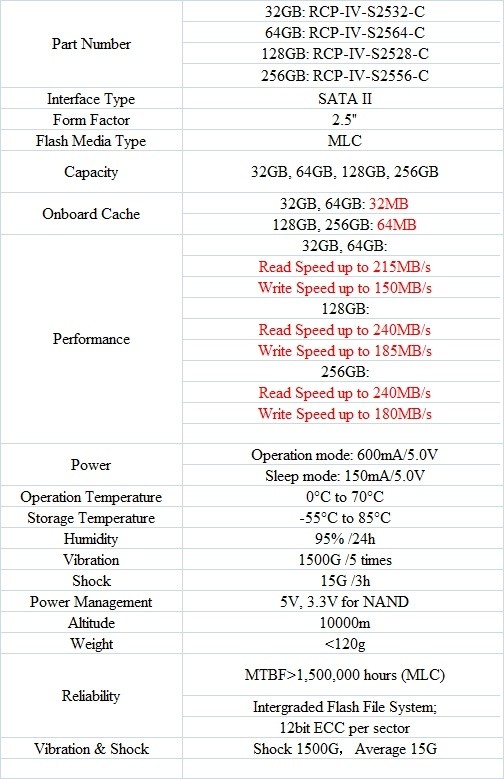
In the specifications we will be looking at four different part numbers that make up the Pro IV Series products. As you can see, these can be broken down into two groups, the smaller 32 and 64GB drives that feature 32MB of cache and the two larger drives, the 128 and 256GB variants that use 64MB of cache. The main difference between all of the drives other than cache size is speed. The fastest of the four drives is the 128GB version and it outperforms the 256GB drive by a small margin in write speed.
Obviously price is going to play a significant role in your purchasing decision. The MSRP for the new Pro IV drives break down to 149.99 (23GB), 259.99 (64GB), 599.99 (128GB) and 999.99 (256GB). At the last minute we received the street prices from My Digital Discount, a large U.S. seller of RunCore products and their prices will be closer to 139.99 (32GB), 249.99 (64GB), 479.99 (128GB) and 899.99 (256GB). Over time I hope to see the drives decrease even more for the consumer market, but only time will tell. As more of RunCore's resellers start to get products in we may see further reductions. It is important to remember that the Pro IV is still a prosumer product built with tighter tolerances than most SSDs yet competes with the OCZ Vertex on price and performance.
RunCore has managed to add additional value to their Pro IV series by including an external hard disk enclosure with each drive. We didn't receive an enclosure with our samples since they are still being manufactured. Also included is a USB 2.0 cable and a 15 Day evaluation of Acronis software. Acronis is used to clone your current boot drive and works very well. Hardware reviewers have been using it for years and it is considered one of the key tools of the trade. Essentially what Runcore has done is made it extremely easy for you to plug the drive into your notebook or desktop, run the software and ten minutes later be ready to swap the drives.
The Packaging and Pro IV Drive

Like many prosumer products the RunCore Pro IV comes in a standard white box with the drives wrapped in antistatic bags. We were in for a surprise once we started testing the 32GB drive and found that it was actually a 128GB drive, so the 32GB version will not be tested today.

RunCore has gone to great lengths to produce an outstanding package for the Pro IV. They are very solid and look like they could withstand a bullet if need be.

On the back of the Pro IV drive is where you will find the part and serial numbers.

Here we see that everything is in place so the Pro IV will be at home in your notebook or SATA enclosure.

The same is true with the mounting screw holes on the side.
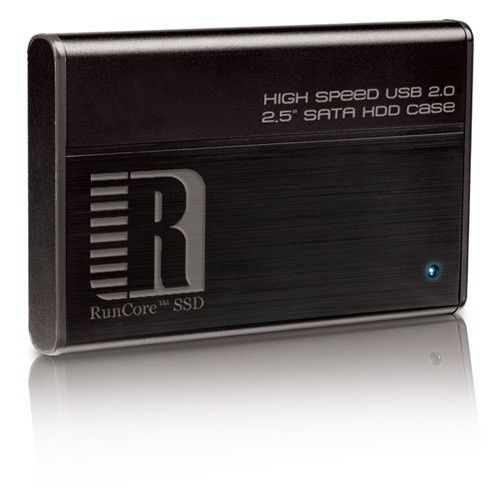
We were able to get a picture of what the enclosure looks like that Runcore will be bundling with the Pro IV. From the looks of it the enclosure will have the same high level of quality as the drive.
Test System Setup
Test System
Processors: AMD Opteron 2356 (2.3GHz Quad-Core) x2
Motherboard: Tyan S2915-E (Supplied by Tyan)
Memory: Kingston KVR667D2S4P5/2G x4 (Supplied by Kingston)
Graphics Card: XFX 8800 GTX (Supplied by XFX USA)
Enclosure: Lian Li V2000
Cooling: Noctua NH-U12DO (Supplied by Noctua)
SATA Controller: Areca ARC-1231ML (Supplied by Areca)
SAS Controller: Areca ARC-1680i (Supplied by Areca)
Operating System: Microsoft Windows Vista Ultimate X64
Today we are comparing the RunCore Pro IV MLC SSD to other 2.5 inch drives that we've reviewed in the past.
All of the drives tested were performed on the listed system under identical conditions to ensure true apples to apples performance results for comparison.
Benchmarks - HD Tune Pro
HD Tune Pro
Version and / or Patch Used: 3.00
Developer Homepage: http://www.efdsoftware.com
Product Homepage: http://www.hdtune.com
HD Tune is a Hard Disk utility which has the following functions:
- Benchmark: measures the performance
- Info: shows detailed information
- Health: checks the health status by using SMART
- Error Scan: scans the surface for errors
- Temperature display
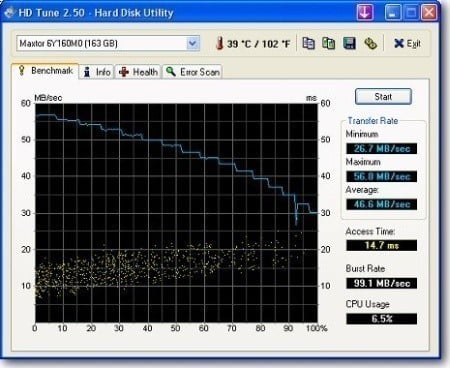
HD Tune Pro gives us accurate read, write and access time results and for the last couple of years has been gaining popularity amongst reviewers. It is now considered a must have application for storage device testing.
Read Tests

The read speeds of the three Pro IV models show that it competes with Intel's X25-M with the first version of the firmware and the Kingston X25-M with the latest Intel firmware. I am amazed at how fast the latest SSDs have been compared to drives we reviewed just three months ago.
Write Tests

The JMicron drives have always had an issue with write speeds, even the drives with dual JMicron controllers. RunCore chose to use Indilinx for their controller in the Pro IV and it looks like the results have paid off. Here we see that the Pro IV is twice as fast at writing data to disk than the Intel drives; very impressive.
Benchmarks - EVEREST Random Access Time
EVEREST Random Access Time
Version and / or Patch Used: 4.60
Developer Homepage: http://www.lavalys.com
Product Homepage: http://www.lavalys.com
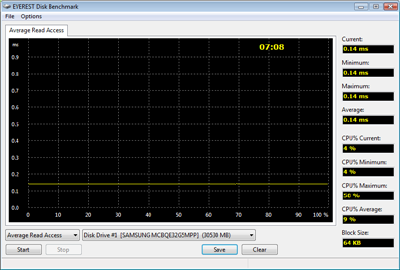
Everest Ultimate and Corporate Edition offer several different benchmarks for testing and optimizing your system or network. The Random Access test is one of very few if not only that will measure hard drives random access times in hundredths of milliseconds as oppose to tens of milliseconds.
Read Tests

Here we see why SSDs are so well suited for boot drive and application data. The access times are very fast since the rotational delay is eliminated. The Pro IV does a good job with data access times.
Write Tests

When I tested the early consumer drives with the Indilinx controller I feared that they would all suffer from high write access times like the G.Skill Falcon did on our test bench. RunCore was able to eliminate this in their custom firmware and as you can see here the write access times were all very low like we like to see.
Let's see how all of these synthetic benchmarks relate to real world applications.
Benchmarks - PCMark Vantage Hard Disk Tests
PCMark Vantage - Hard Disk Tests
Version and / or Patch Used: 1.0.0
Developer Homepage: http://www.futuremark.com
Product Homepage: http://www.futuremark.com/benchmarks/pcmark-vantage/
Buy It Here

PCMark Vantage is the first objective hardware performance benchmark for PCs running 32 and 64 bit versions of Microsoft Windows Vista. PCMark Vantage is perfectly suited for benchmarking any type of Microsoft Windows Vista PC from multimedia home entertainment systems and laptops to dedicated workstations and high-end gaming rigs. Regardless of whether the benchmarker is an artist or an IT Professional, PCMark Vantage shows the user where their system soars or falls flat, and how to get the most performance possible out of their hardware. PCMark Vantage is easy enough for even the most casual enthusiast to use yet supports in-depth, professional industry grade testing.
FutureMark has developed a good set of hard disk tests for their PCMark Vantage Suite. These tests are based on real world applications that many of us use daily.

HDD1 - Windows Defender
HDD2 - Gaming
HDD3 - Windows Photo Gallery
HDD4 - Vista Startup
HDD5 - Windows Movie Maker
HDD6 - Windows Media Center
HDD7 - Windows Media Player
HDD8 - Application Loading
The RunCore Pro IV produced some of the fastest numbers we have seen to date in our real world application tests designed to mimic consumer applications. One of the biggest gains was in the Media Center application; this also carries over into pro applications like Protools, Cakewalk and Vegas Video. These are applications where the Pro IV was designed to perform the best. The Pro IV is still a very fast drive for standard consumer applications, but in a pro environment is where you will get the most out of the drive.
Benchmarks - Passmark
Passmark Advanced Multi-User Tests
Version and / or Patch Used: 6.1
Developer Homepage: http://www.passmark.com
Test Homepage: http://www.passmark.com
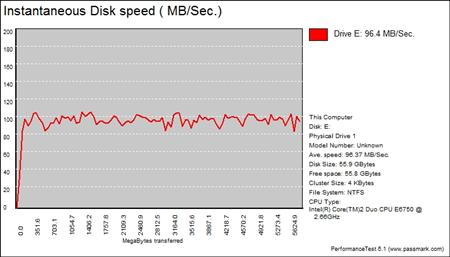
Many users complain that I/O Meter is too complicated of a benchmark to replicate results so my quest to find an alternative was started. Passmark has added several multi-user tests that measure a hard drives ability to operate in a multi-user environment.

The tests use different settings to mimic basic multi-user operations as they would play out on your server. Variances is read / write percentage as well as random / sequential reads are common in certain applications, Web Servers read nearly 100% of the time while Database Servers write a small amount of data.
The Workstation test is the only single user environment and will be similar to how you use your system at home.

Our File, Web Server and Database tests still go to Intel, but when it comes to Workstation the Pro IV is able to outperform the X25-M drives hands down. For most users the Workstation test is where their concern sits since it resembles what most enthusiasts and prosumers use on a daily basis as far as access patterns.
Final Thoughts
The new Indilinx controller is shaping up to be the next big thing in SSD technology and RunCore have used the chip well. The new Pro IV Series of drives are remarkable performers in both synthetic and real world benchmarks. A few days ago I cloned my Intel X25-M that has been used in my notebook and replaced it with the Pro IV 256GB drive and the results have been amazing, even coming from such a fast HDD. To be honest it feels like my Lenovo T61p has an SLC drive installed in it again, this time with much more capacity!
RunCore's inclusion of the external drive carrier does go a long way in adding to the value of the Pro IV. As of right now the drive does come at a premium, but then again we are talking about solid state and the latest technology for it. As the availability increases and we start to see RunCore products sold in more locations I think the cost will go down, hopefully soon rather than later.
That pretty much leads us to availability. There are two shops that carry the RunCore brand in the U.S., one being the official store of RunCore and the other My Digital Discount. Both carry the full RunCore lineup so you will not have a problem getting the latest bits from them, but we would like to see a little more price competition happening.
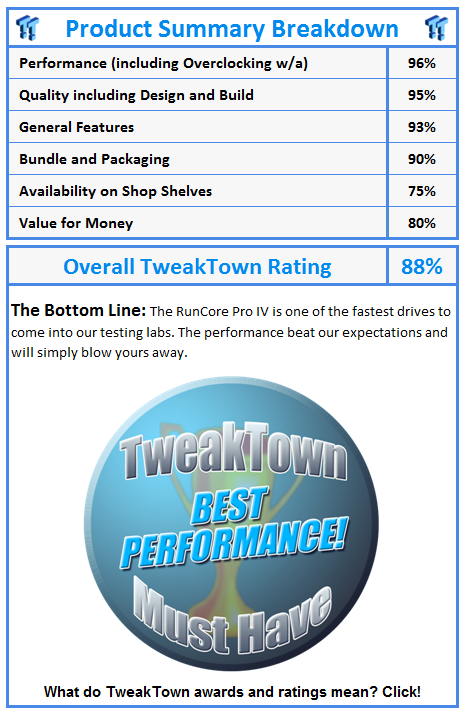
All things considered, the RunCore Pro IV is a hell of a drive that is able to cross over into several market segments; consumer, prosumer and enterprise. The Pro IV is fast, one of the fastest on the market, but that speed comes at a cost and that is really where our only issue sits.
 United
States: Find other tech and computer products like this
over at
United
States: Find other tech and computer products like this
over at  United
Kingdom: Find other tech and computer products like this
over at
United
Kingdom: Find other tech and computer products like this
over at  Australia:
Find other tech and computer products like this over at
Australia:
Find other tech and computer products like this over at  Canada:
Find other tech and computer products like this over at
Canada:
Find other tech and computer products like this over at  Deutschland:
Finde andere Technik- und Computerprodukte wie dieses auf
Deutschland:
Finde andere Technik- und Computerprodukte wie dieses auf 


 The iPhone 16 Pro could have a 20% brighter display than your boring old iPhone 15 Pro
 New iPhone 16 dummy unit leak shows off its refreshed camera design and more
 Analysts expect an iPad Pro sales slowdown despite new models, here's why
 WhatsApp announces a design refresh for its iPhone and Android apps
 Apple's new 13-inch M2 iPad Air has a brighter display than its smaller 11-inch sibling
 Corsair 6500X Mid-Tower Dual Chamber Chassis Review
 Corsair MP700 Pro SE 4TB SSD Review - As Fast as They Come
 Corsair MP600 Mini 2024 Edition 1TB SSD Review - Fastest Tiny Drive on the Planet
 Lexar SL500 1TB Portable SSD Review - The best of native USB
 Corsair Platform:6 Elevate Modular Desk Review
 True Lies (1997) 4K Blu-ray Review
 Fractal Design North XL Full-Tower Chassis Review
 Western Digital WD Gold 24TB HDD Review - High-Capacity Masterpiece
 AOC U27G3X 27-inch Gaming Monitor Review - 4K 160Hz for $500
 MSI Vector GP68HX Gaming Laptop Review
 Building the Ultimate Home Entertainment Server with an ASUSTOR NAS and Viper Gaming NVMe SSDs
 Everything you need to know about the latest ASUS NUC Mini PCs - NUC 14 Pro and ROG NUC
 How to Overclock Your GPU and Boost Your PC Gaming with ASUS GPU Tweak III
 ASUS's AMD Radeon RX 7000 Series GPU lineup has something for every gamer
 ASUS OLED Premium Care defends the ROG Swift OLED PG32UCDM gaming monitor from burn-in