Introduction
The last time that memory latencies and possible impacts of using memory with higher latencies was only really emphasised back when the Intel Pentium 3 was available from the retail stores.
Intel's Pentium 4 architecture was one of the most bandwidth hungry - if you shoved DDR into it with a 400MHz rate with extremely low latencies, the system would perform worse then if it had 433MHz memory with higher latencies. Pentium 4 was just so memory hungry that higher MHz was better than lower latencies.
AMD's Athlon 64 processors on Socket 939 however were not a CPU where bandwidth was an issue. Due to the on CPU memory controller, the lower the latencies, the more power you would get out of the Athlon 64 platform.
Now Intel has finally scrapped the Netburst architecture in favour of something that actually performs, namely the Core architecture. Today we are going to do some more testings on our Core 2 processor to see if running with lower latencies helps on the Core 2 over higher clocked with higher latencies.
What has Intel done this time? Let's find out as we aim to provide you with a guide into Conroe memory settings.
DDR-2 and how it differs from DDR
DDR-2 in a bit of detail
While it has been covered on a few other sites, we really haven't touched on it here at TweakTown in terms of the improvements that DDR-2 has over DDR.
Speed

DDR used a simple technique - take the existing SDRAM memory and use both the rising and falling edges of the clock cycle to transmit data rather than just the falling of SDRAM. This allowed the memory buffer to send 2 bits of data per clock rather than 1.
DDR-2 uses a 4 bit buffer, so rather than sending 2 bits from the memory cell to the memory buffer, it sends 4. This is why DDR-2 manages to scale so far. To get 400MHz out of DDR, you need the memory cell to be running at 200MHz. To get 400MHz out of DDR-2, the memory cell only runs at 100MHz. This is why we have DDR-2 800 already. We are using the same 200MHz clocked cells, only for DDR-2 this equates to a rating of 800MHz.
Clearer Signalling

DDR-2 was setup for speed from the beginning, in order to ensure a cleaner data signal; a new feature was added to DDR-2, called On-Die Termination. In DDR, the terminating resistors for signal rebound and noise dissipation were put on the board itself next to the DDR slots. This can and did result in some boards having memory signal issues due to cross talk - the longer the trace path has to go, the more it is susceptible to noise (errors).
DDR-2 modules have a series of resistors built directly into the memory chip that acts as the terminating system. This means there is very little chance of external noise interfering with the memory signal as there are no traces for the termination system external to the chips.
When you look at the actual package of the DDR and DDR-2 modules, they almost look identical. This is where things end; DDR uses a 168-pin interface to connect the memory to the board and DDR-2 uses 240 pins. Electrically these modules are also totally different - DDR uses a 2.5v signal and DDR-2 drops this to 1.8v.
DDR-2 is here to stay with both AMD and Intel ratifying DDR2-800 standards for their latest processors and chipsets, with a total of 6.4GB from a single channel DDR2-800 module, that doubles to 12GB with Dual Channel, its clear to see DDR-2 ahs the advantages. We'll see DDR-3 soon but that is still some time away from being released into the market.
Benchmarks - Test System Setup and Sandra
Test System Setup
Processor: Intel Core 2 Extreme X6800 (Supplied by Intel)
Motherboard: Gigabyte P965-DQ6 (Supplied by Gigabyte)
Memory: 2x 1GB DDR2-1066 Corsair (Supplied by Corsair)
Hard Disk: 500GB Seagate 7200.9 SATA (Supplied by Seagate)
Graphics Card: nVidia GeForce 7800GT
Cooling: Gigabyte Neon775 (Supplied by Gigabyte)
Operating System: Microsoft Windows XP Professional SP2
Drivers: Intel INF 8.1.1.1002, nVidia ForceWare 91.31 and DX9c

Our test system setup comprised of the new Intel Core 2 Extreme CPU. This processor allows us to freely adjust the CPU multiplier to any division we want which allows us to have a much better control of the CPU core clock than the Core 2 Duo series.
First we ran the memory at DDR2-667 speeds with SPD timings and then we tightened the timings up to lower CAS latencies to give the memory a more aggressive profile. We then set the memory to DDR2-800 speeds and returned the CAS timings to SPD to allow them to slacken off and recorded the difference in speed that the system reported. At all times the CPU clock speed was at 2.93GHz - we only changed the memory clock speeds and SPD. SPD was 5-5-5-15 and tight timings were 4-4-4-12.
The aim of our testing here today is to find out if you need more bandwidth (higher clock speeds) or if reducing the latency with slower memory will do the same job. What does the new Conroe processors like? Let's take a look!
SiSoft Sandra
Version and / or Patch Used: 2007
Developer Homepage: http://www.sisoftware.co.uk
Product Homepage: http://sisoftware.jaggedonline.com/index.php?location=home&a=TTA&lang=en
Buy It Here
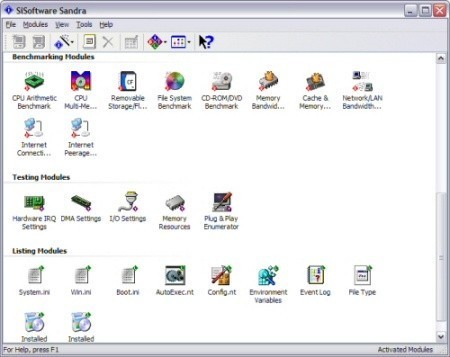
SiSoft Sandra (System ANalyser, Diagnostic and Reporting Assistant) is a synthetic Windows benchmark that features different tests used to evaluate different PC subsystems.
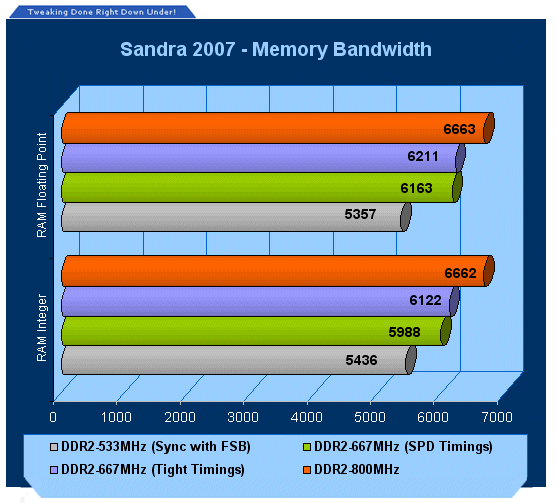
The amount of bandwidth increases when switching from DDR-2 667 to 800. When running lower timings at 667 there is little difference between the 667 results.
Benchmarks - PCMark05
PCMark
Version and / or Patch Used: 1.1.0
Developer Homepage: http://www.futuremark.com
Product Homepage: http://www.futuremark.com/products/pcmark04/
Buy It Here
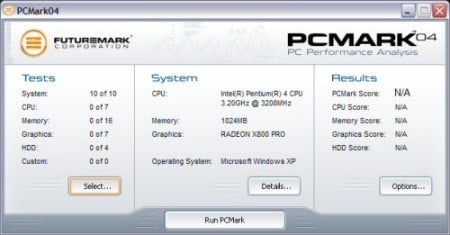
PCMark is a multipurpose benchmark, suited for benchmarking all kinds of PCs, from laptops to workstations, as well as across multiple Windows operating systems. This easy-to-use benchmark makes professional strength benchmarking software available even to novice users. PCMark consists of a series of tests that represent common tasks in home and office programs. PCMark also covers many additional areas outside the scope of other MadOnion.com benchmarks.
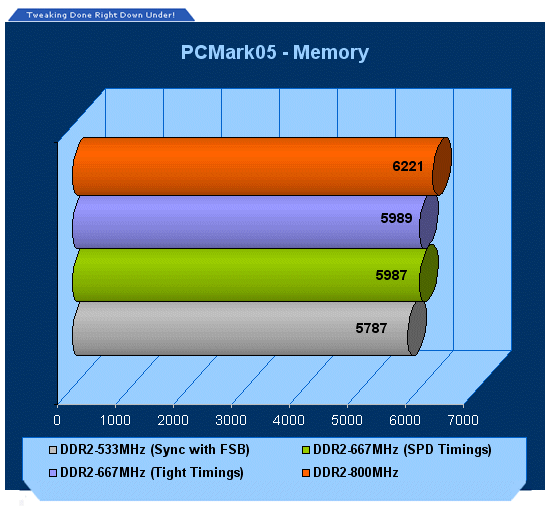
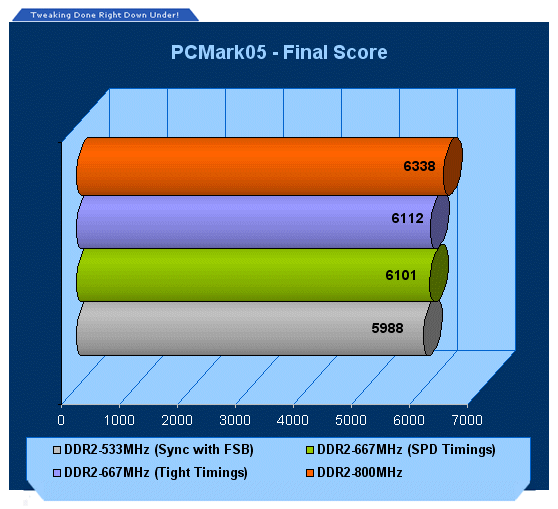
PCMark shows a slight increase between 667 SPD and 667 tight timings, when going to DDR2-800 we see a slightly higher score again.
Benchmarks - ScienceMark 2.0
ScienceMark 2.0
ScienceMark 2.0 is a mathematical program designed to stress the memory subsystems of both desktop/workstation and server environments to determine the read/write latency as well as the overall memory bandwidth available between the CPU and the memory controller.
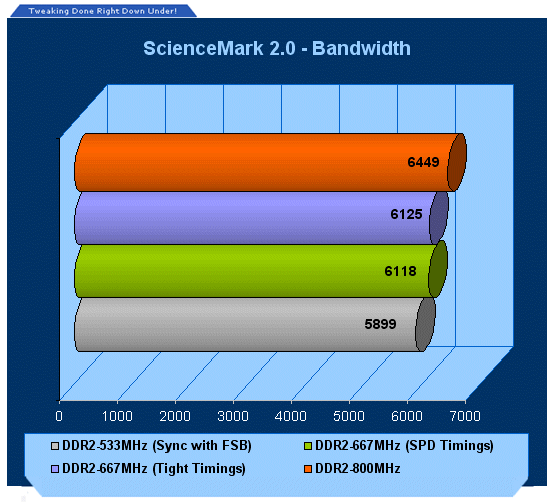
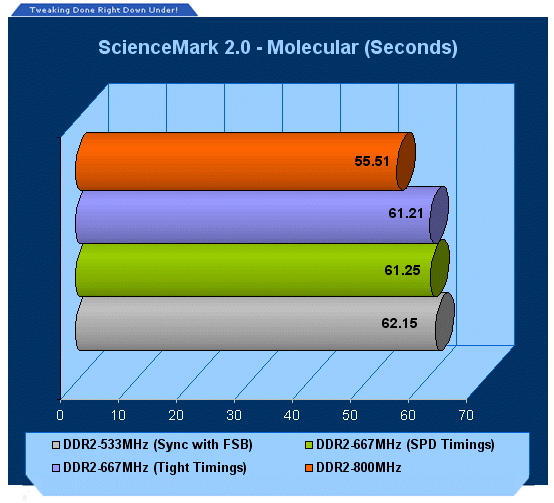
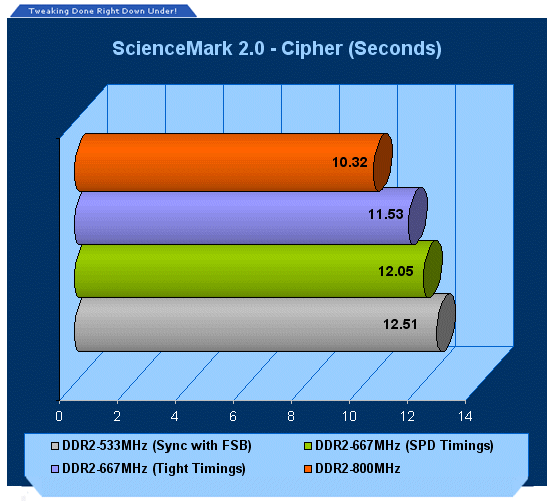
ScienceMark shows that when running loose timings compared to tight timings, they don't make much difference. When running DDR2-800 we can see a jump in performance again, the biggest win is in the overall bandwidth.
Benchmarks - 3DMark05
3DMark05
Version and / or Patch Used: Build 120
Developer Homepage: http://www.futuremark.com
Product Homepage: http://www.futuremark.com/products/3dmark05/
Buy It Here

3DMark05 is now the second latest version in the popular 3DMark "Gamers Benchmark" series. It includes a complete set of DX9 benchmarks which tests Shader Model 2.0 and above.
For more information on the 3DMark05 benchmark, we recommend you read our preview here.
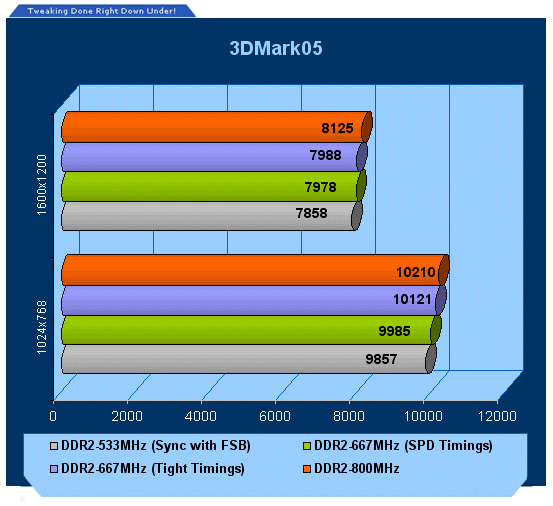
3DMark05 doesn't give much to the tighter timings at 667MHz over the SPD timed 667MHz results. DDR2-800 shows the best overall performance.
Benchmarks - 3DMark06
3DMark06
Version and / or Patch Used: Build 102
Developer Homepage: http://www.futuremark.com
Product Homepage: http://www.futuremark.com/products/3dmark06/
Buy It Here

3DMark06 is the very latest version of the "Gamers Benchmark" from FutureMark. The newest version of 3DMark expands on the tests in 3DMark05 by adding graphical effects using Shader Model 3.0 and HDR (High Dynamic Range lighting) which will push even the best DX9 graphics cards to the extremes.
3DMark06 also focuses on not just the GPU but the CPU using the AGEIA PhysX software physics library to effectively test single and Dual Core processors.
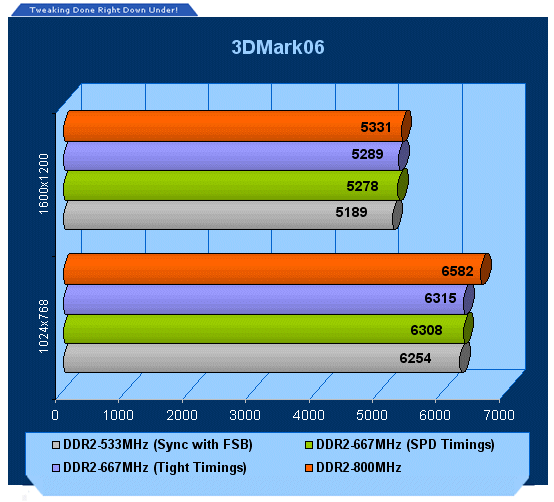
With more stress placed on the system we don't see much difference compared to the 3DMark05 results.
Benchmarks - Doom 3
Doom 3
Version and / or Patch Used: 1.1
Timedemo or Level Used: Custom Timedemo
Developer Homepage: http://www.idsoftware.com
Product Homepage: http://www.doom3.com
Buy It Here
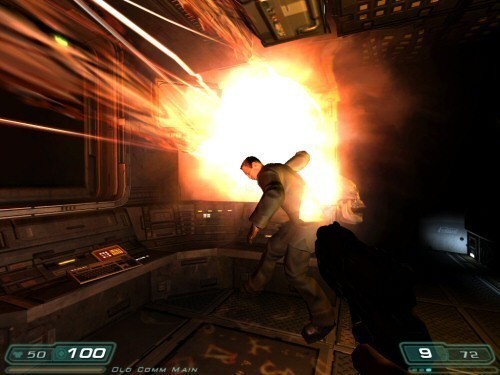
Doom 3 is still one of the most popular games at the moment and is quite intensive in the 3D department, even though it is starting to age. With our own custom time demo we are able to give a realistic rating on what kind of FPS you will be achieving.
For more information on benchmarking Doom 3 we recommend you check out our extensive article regarding it here.
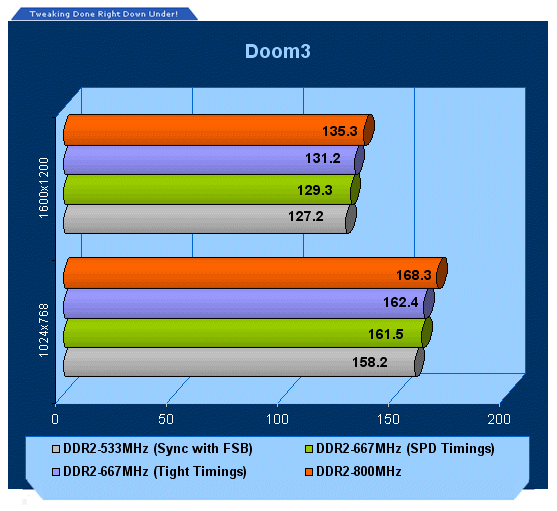
It seems that in the real world, Core 2 is fed enough memory at 667MHz to keep it happy until the FSB is increased.
Benchmarks - Quake 4
Quake 4
Version and / or Patch Used: Unpatched
Timedemo or Level Used: Custom Timedemo
Developer Homepage: http://www.idsoftware.com
Product Homepage: http://www.quake4game.com
Buy It Here
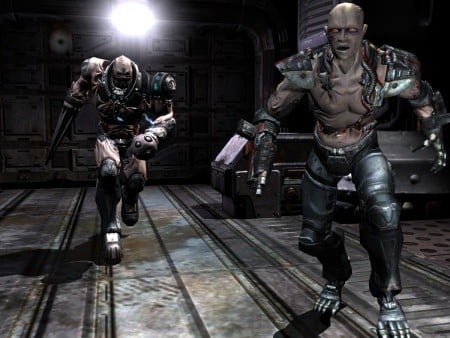
Quake 4 is one of the latest new games to be added to our benchmark suite. It is based off the popular Doom 3 engine and as a result uses many of the features seen in Doom. However, Quake 4 graphics are more intensive than Doom 3 and should put more strain on different parts of the system.
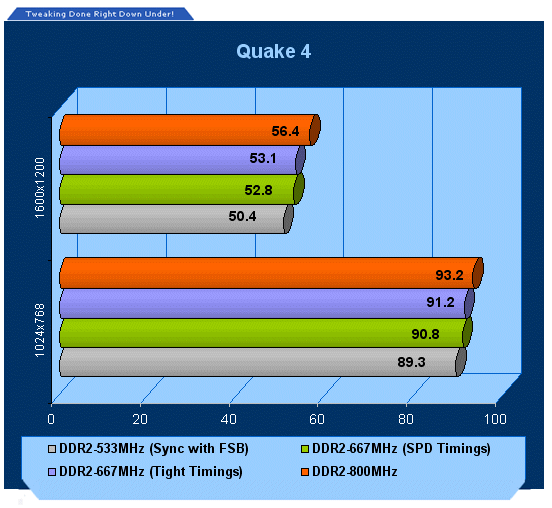
Quake 4 shows similar results as Doom 3 as it's based on the exact same engine.
Benchmarks - F.E.A.R.
F.E.A.R.
Version and / or Patch Used: Unpatched
Timedemo or Level Used:Custom Timedemo
Developer Homepage: http://www.vugames.com
Product Homepage: http://www.whatisfear.com/us/
Buy It Here
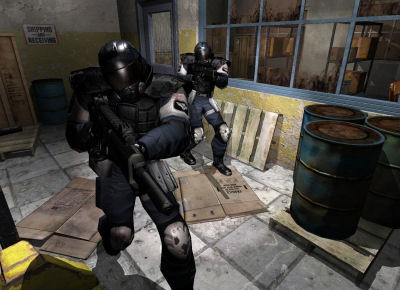
F.E.A.R. (First Encounter Assault Recon) is an intense combat experience with rich atmosphere and a deeply intense paranormal storyline presented entirely in first person. Be the hero in your own spine-tingling epic of action, tension, and terror...and discover the true meaning of F.E.A.R.
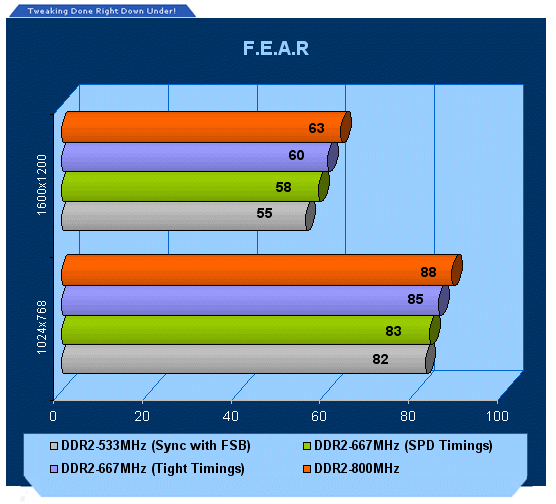
Our last test shows us that DDR2-800 is clearly in front with the tight timings DDR2-667 not too far behind.
Final Thoughts
From our testing here today, it can be said that Core 2 processors using a default Front Side Bus of 266MHz are fed enough memory bandwidth at 667MHz to keep them running strong in most applications and games. It's not until the bus is overclocked that the need for faster memory is required - this is evident that at 266MHz, DDR2-800 modules don't provide much extra performance, just a few extra frames per second.
Now the question of memory timings, do they play a role? In Synthetic tests the lower timings do help slightly, but in reality, Core 2 is still based on some of the Netburst architecture crossed with the Pentium M architecture. Netburst didn't matter if it was tight timed or loose, bandwidth played the critical role. Core 2 seems to follow slightly in the Pentium 4's footsteps (but not in the processor performance footsteps) - you'll get an ever so slight boost in system performance but it is clear that Conroe likes the higher memory clock speeds.
If you're wondering what to do - tight timings or faster RAM - it's all a matter of preference. Faster clocked memory will allow you to gain some extra bus speed when overclocking (especially if running FSB and memory at 1:1), and that seems to be the big thing, get the most out of your hard earned hardware dollars. Tight timings are something that AMD really has the handle on due to the on die memory controller but it doesn't seem to be too important for Conroe.
Our Latest Guides Article Coverage
- I almost uninstalled 7-Zip after File Explorer learned RAR, and then I hit the gaps
- Your Windows PC is enforcing policies you never set, and one command lists them
- Here's the four Windows 11 components I only add when a job calls for them
- I stopped reaching behind my monitors after PowerToys added this brightness control
- I stopped trusting the Startup apps tab after I opened this utility on my PC