

Introduction
 21
21We first got the chance to check out the latest in Lucid technology a couple of weeks back at a motherboard manufacturers HQ. For a lot of us Lucid is a bit of a dirty word that reminds us of this almost useless kind of technology that let us combine NVIDIA and AMD video cards together for added performance.
It never really kicked off for the most part and we haven't heard heaps about them for a little bit. Lucid Virtu MVP, though, is the latest technology from the company and it's something we're starting to see motherboard manufacturers promote. Today we're going to check out what it's about while also see what it does on the performance side of things.
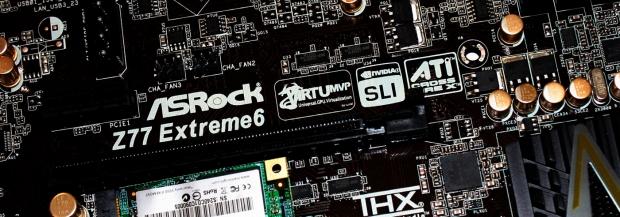
Because there's no real formula to what we're doing today the first thing we're going to do is take a look at the motherboard we're going to be using in the article today. In this case it's the ASRock Z77 Extreme6 which we'll look at in full detail a little later on.
Once we've done that we'll then take the time to check out the new Lucid Virtu MVP software and cover the main technology we're looking at today; HyperFormance. Once we've done that we'll quickly go over our test machine before we have a look at a smaller line up of games to see what HyperFormance can bring to the table.
There's not much more that really needs to be said, I think we're pretty safe to take a quick look at the ASRock Z77 Extreme6 before we move on. So, let's get into it and see just what Lucid and ASRock is bringing to the table today.
ASRock Z77 Extreme6 Motherboard
 21
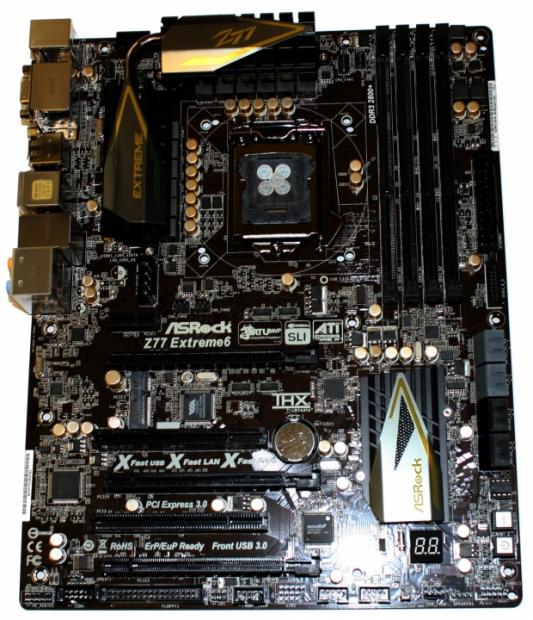
21Looking straight on the new ASRock Z77 Extreme6 doesn't look too different to other ASRock boards we've seen lately with the sweet black and gold color scheme. Let's move in a little closer, though, to see what exactly we're dealing with here today.
 21
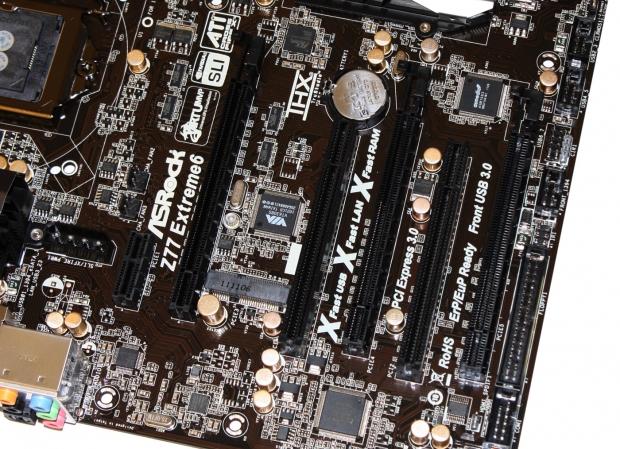
21Having a look here we can see on the far left we've got an extra power connector for when you're going to make use of SLI / CrossFire. On the expansion slot front we've got two legacy PCI slots, one PCIe x1 slot and three PCIe x16 slots. Towards the middle we can also see an mSATA slot. While we won't be using it today, it's something we'll be making use of soon enough in future content.
 21
21Moving to the bottom of the board you can see we've got a HD Audio port on the left followed by a COM1 port and surprisingly a floppy connector. Moving across we've got Firewire, two USB 2.0 headers, clear CMOS header, speaker header and our main front panel header.
 21
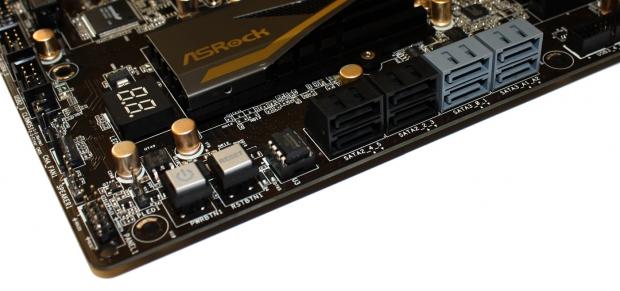
21Turning the corner you can see we've got a power and reset button in the bottom left corner and just behind that you can see our LED Debug reader which helps us diagnose any problems we might run into.
On the SATA front we've got a total of eight ports. We've got four black SATA II ports that run of the Intel controller along with two blue SATA III ports that run off the same controller. Furthermore we've got another two blue SATA III ports which run off the ASMedia ASM1061 controller.
 21
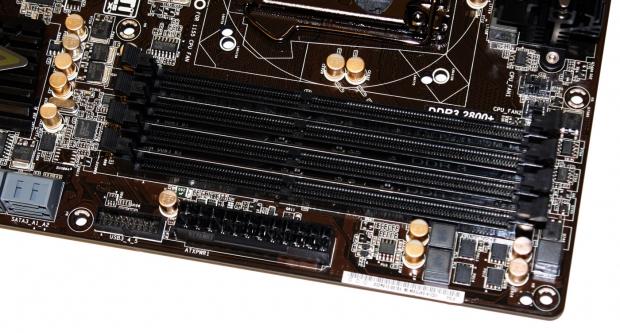
21Moving away from the bottom of the board and heading towards the top end we've got the main 24-pin ATX power connector and next to that you can see the USB 3.0 header. We've also got four DDR3 DIMM slots which support memory running at over 2800MHz via overclocking.
 21
21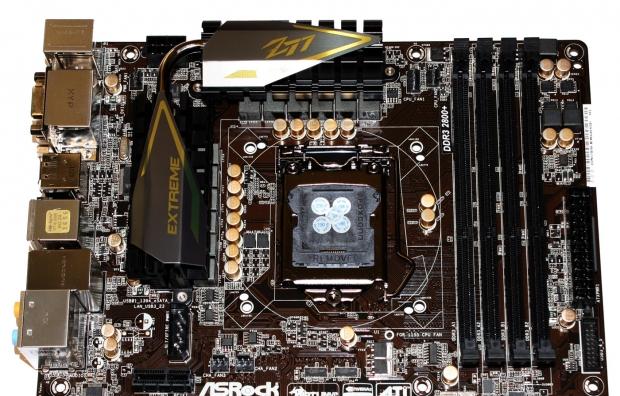 21
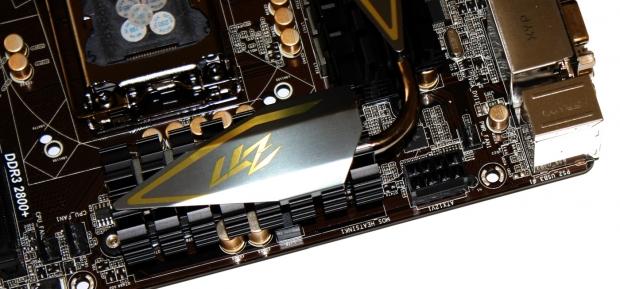
21Towards the top of the board you can see the main 8-pin CPU power connector and moving back a little we can see we've got a fairly clean CPU area as we see from most motherboards these days. We can also see the pretty nice heatsink setup around the CPU area.
 21
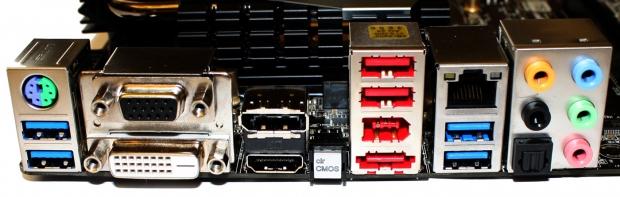
21Moving over to the I/O panel you can see we start off with two USB 3.0 ports that are native to the Z77 chipset along with a combo PS/2 port. Next to that we've got VGA, DVI, HDMI and DisplayPort for video outs alongside a clear CMOS button.
Moving over again we've got two USB 2.0 ports, FireWire and a combo USB / eSATA port. Gigabit LAN is provided via the Broadcom BCM57781 controller and two more USB 3.0 ports are provided via the Etron EJ168A controller. Finally we finish off with the audio side of things which consist of an optical out and five auxiliary jacks running off the Realtek ALC898 codec.
Lucid Virtu MVP Quick Overview
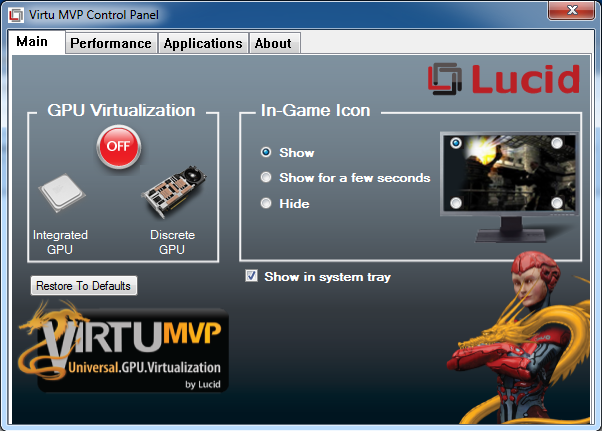
Before we get into the performance side of things we want to just quickly cover the Virtu MVP Control Panel and go over some of the highlights that are present. Looking below is the main screen and the main piece of information here is the "GPU Virtualization" piece.
 21
21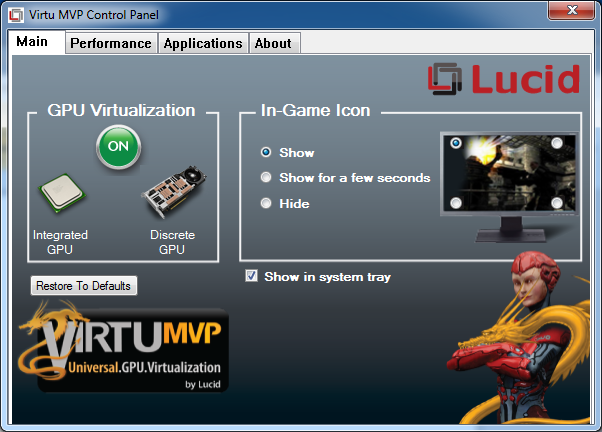 21
21Turning "GPU Virtualization" on we're able to combine the integrated GPU with the discrete GPU which in turn should bring with it more performance. On the right side you can see we've got the ability to have Lucid branding within our games if that is something you want to display when you're gaming.
 21
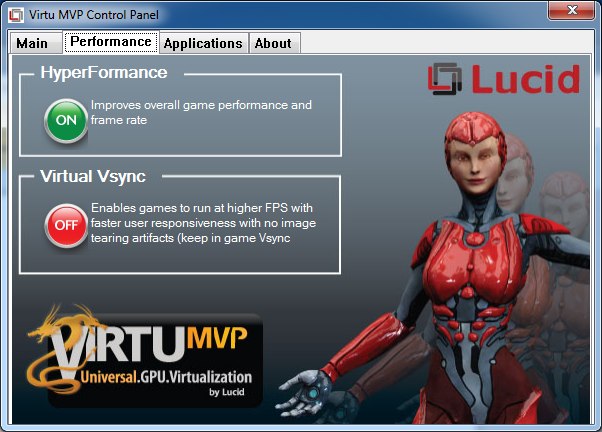
21With "GPU Virtualization" on we're able to enable two features under the Performance tab. The first one is HyperFormance - the main one we'll be concentrating on today. The technology behind it is actually quite complicated, but talking to some people the best way to explain it is that Virtu MVP has the ability to make use of unused CPU cycles to help increase overall video performance. Before today we've seen it work and work well, but we'll be exploring it a bit more very soon in detail.
The other big feature that Virtu MVP brings is "Virtual Vsync" which allows us to have sync enabled, but move past the 60 FPS limitation that is present. By offering us higher FPS we're able to get smoother gameplay without the effect of tearing. We won't be exploring this today, but we've seen this used and it's a really cool technology.
HyperFormance is definitely the more interesting feature of the two and the one we'll be looking at.
 21
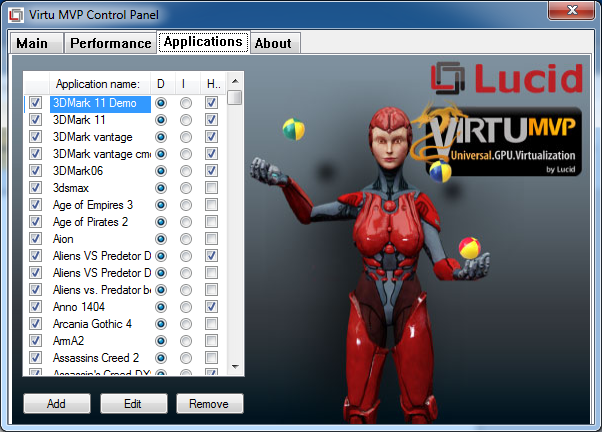
21The final screen we want to look at is the Applications tab and you can see that it has a bunch of games listed. This is similar to the way AMD and NVIDIA work with their CrossFire and SLI profiles. New versions of the software will bring support for more games and bug fixes.
Benchmarks - Test System Setup
 21
21We would like to thank the following companies for supplying and supporting us with our test system hardware and equipment: Intel, ASRock, Sapphire, Palit and Corsair.
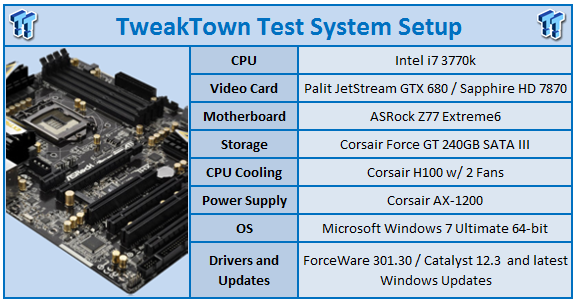
Having a look above you can see our main testbed which we'll be using today.
While we've already focused on the ASRock Z77 Extreme6 motherboard we'll be using the soon to be released i7 3770k Ivy Bridge processor. Most of the other components you'll see in our regular articles. The main thing we are focusing on, though, are the video cards we'll be using.
We've opted to use two video cards here today. The first is the brand new high-end Palit JetStream GTX 680 2GB that we found ourselves extremely impressed with. Alongside that we've opted for something a bit more mid-range and in that case we're using the Sapphire HD 7870 2GB.
The main thing we want to know is what kind of extra performance HyperFormance brings to the table. We'll be cutting down our benchmarks a little today, but we'll be including all our usual resolutions including 1680 x 1050, 1920 x 1200 and 2560 x 1600.
Let's get started!
The FPS Numbers Explained
When we benchmark our video cards and look at the graphs, we aim to get to a certain level of FPS which we consider playable. While many may argue that the human eye can't see over 24 FPS or 30 FPS, any true gamer will tell you that as we climb higher in Frames Per Seconds (FPS), the overall gameplay feels smoother. There are three numbers we're looking out for when it comes to our benchmarks.
30 FPS - It's the minimum number we aim for when it comes to games. If you're not dropping below 30 FPS during games, you're going to have a nice and smooth gaming experience. The ideal situation is that even in a heavy fire fight, the minimum stays above 30 FPS making sure that you can continue to aim easily or turn the corner with no dramas.
60 FPS - It's the average we look for when we don't have a minimum coming at us. If we're getting an average of 60 FPS, we should have a minimum of 30 FPS or better and as mentioned above, it means we've got some smooth game play happening.
120 FPS - The new number that we've been hunting down over recent months. If you're the owner of a 120 Hz monitor, to get the most out of it you want to get around the 120 FPS mark. Moving from 60 FPS / 60 Hz to 120 FPS / 120 Hz brings with it a certain fluidity that can't really be explained, but instead has to be experienced. Of course, if you're buying a 120 Hz monitor to take advantage of 3D, an average of 120 FPS in our benchmark means that in 3D you will have an average of 60 FPS, which again means you should expect some smooth gameplay.
Benchmarks - 3DMark 11
3DMark 11
Version and / or Patch Used: 1.1
Developer Homepage: http://www.futuremark.com
Product Homepage: http://www.3dmark.com/3dmark11/
3DMark 11 is the latest version of the world's most popular benchmark. Designed to measure your PC's gaming performance 3DMark 11 makes extensive use of all the new features in DirectX 11 including tessellation, compute shaders and multi-threading. Trusted by gamers worldwide to give accurate and unbiased results, 3DMark 11 is the best way to consistently and reliably test DirectX 11 under game-like loads.
 21
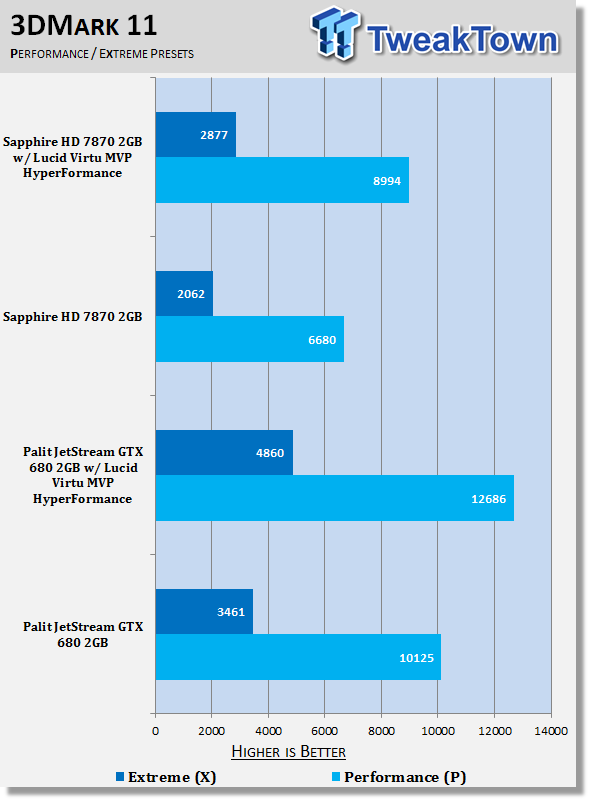
21Straight away under 3DMark 11 you can see what HyperFormance is bringing to the table.
You have to remember there's no overclocking or anything being done here. It's simply just two buttons pressed. You can see the kind of gains you're able to get in both presets and on both video cards.
Benchmarks - Unigine Heaven Benchmark
Unigine Heaven Benchmark
Version and / or Patch Used: 2.5
Developer Homepage: http://www.unigine.com
Product Homepage: http://unigine.com/press-releases/091022-heaven_benchmark//
New benchmark grants the power to unleash the DirectX 11 potential in the gift wrapping of impressively towering graphics capabilities. It reveals the enchanting magic of floating islands with a tiny village hidden in the cloudy skies. With the interactive mode emerging experience of exploring the intricate world is ensured within reach. Through its advanced renderer, Unigine is one of the first to set precedence in showcasing the art assets with tessellation, bringing compelling visual finesse, utilizing the technology to the full extend and exhibiting the possibilities of enriching 3D gaming.
 21
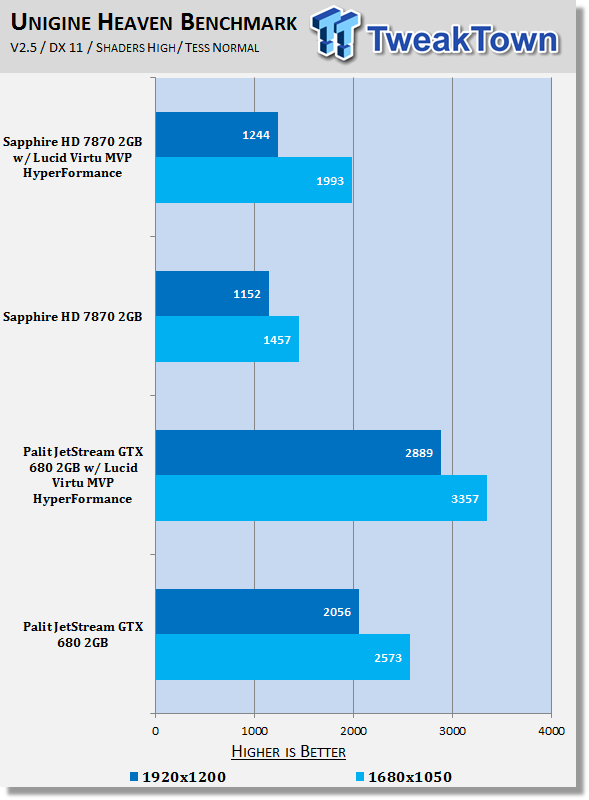
21Moving into Heaven we can see some awesome performance again out of both of the setups here. Saying that we can see the 1920 x 1200 results on the HD 7870 doesn't quite show the same gains as some of the others.
You can see for example the 1920 x 1200 GTX 680 result is an extra 40%. The HD 7870 at the same resolution is seeing only around 8% gains.
Benchmarks - Mafia II
Mafia II
Version and / or Patch Used: Latest Steam Update
Timedemo or Level Used: Built in Benchmark
Developer Homepage: http://www.2kczech.com/
Product Homepage: http://www.mafia2game.com/

Mafia II is a third-person action-adventure video game, the sequel to Mafia: The City of Lost Heaven. It is developed by 2K Czech, previously known as Illusion Softworks, and is published by 2K Games. The game is set from 1943 to 1951 in Empire Bay (the name is a reference to New York's state nickname "The Empire State"), a fictional city based on San Francisco and New York City, with influences from Chicago and Detroit. The game features a completely open-ended game map of 10 square miles. No restrictions are included from the start of the game. There are around 50 vehicles in the game, as well as licensed music from the era.
 21
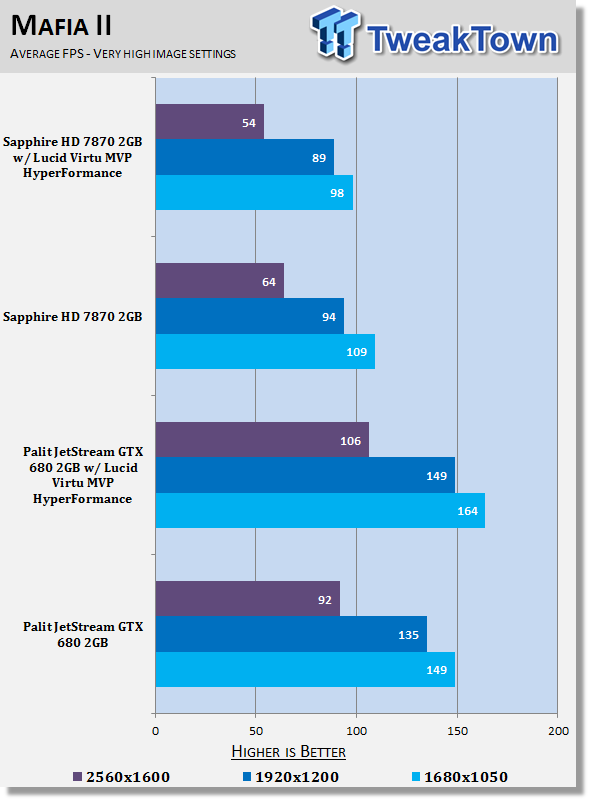
21The results in Mafia 2 are really interesting. Looking at the GTX 680 we can see across the board we've got performance gains at every resolution. The HD 7870 is similar as well at 1680 x 1050 and 1920 x 1200. At the 2560 x 1600, though, it gets interesting. Not only do we see no gain, but we see a negative increase in performance.
What makes this worse is that the FPS is needed most at this resolution. If we saw the same 40 - 50% gains that we see at the lower resolution, our average would've gone from 47 FPS to around 60 FPS bringing us up to playable levels. It's here that we really need the extra FPS and unfortunately we're just not able to get it in this case.
The results aren't an error either, once we saw it we re-tested multiple times and each time we were within a FPS of the numbers we received.
Benchmarks - Lost Planet 2
Lost Planet 2
Version and / or Patch Used: Benchmark Demo
Timedemo or Level Used: Built in Benchmark - Test A Scene 1
Developer Homepage: http://www.capcom.com/
Product Homepage: http://www.lostplanet2game.com/
Lost Planet 2 is a third-person shooter video game developed and published by Capcom. The game is the sequel to Lost Planet: Extreme Condition which is also made by Capcom, taking place ten years after the events of the first game, on the same fictional planet. The story takes place back on E.D.N. III 10 years after the events of the first game. The snow has melted to reveal jungles and more tropical areas that have taken the place of more frozen regions. The plot begins with Mercenaries fighting against Jungle Pirates. After destroying a mine, the Mercenaries continue on to evacuate the area, in which a Category-G Akrid appears and attacks them. After being rescued, they find out their evacuation point (Where the Category-G appeared) was a set-up and no pick up team awaited them. The last words imply possible DLC additions to the game, "There's nothing to be gained by wiping out snow pirates... unless you had some kind of grudge."
 21
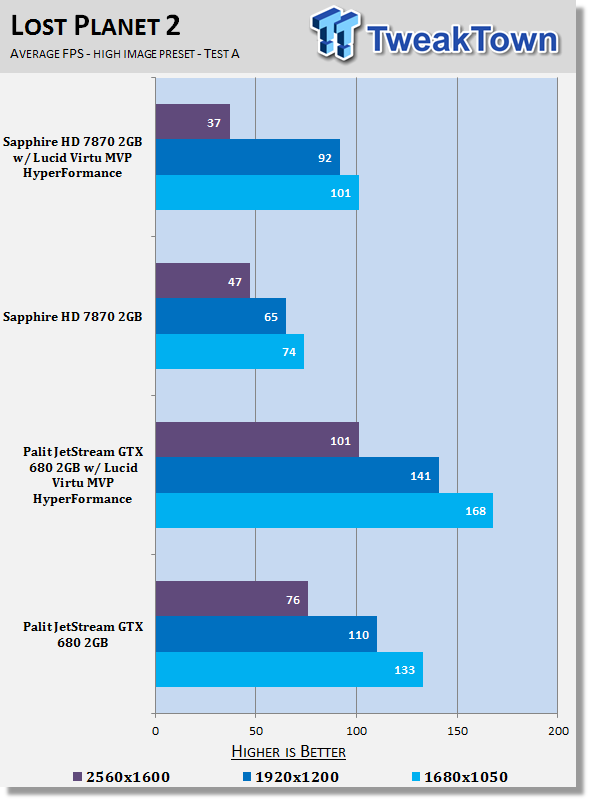
21Moving to Lost Planet 2 we can see the GTX 680 gets a nice boost in performance across the board from some already very playable numbers. The HD 7870 also sees some nice gains at 1680 x 1050 and 1920 x 1200 with the 1920 x 1200 increase bringing us some nice breathing room.
You can see at the highest resolution, though, we get this dip in performance again, though.
Benchmarks - Metro 2033
Metro 2033
Version and / or Patch Used: Latest Steam Update
Timedemo or Level Used: Built in Benchmark
Developer Homepage: http://www.4a-games.com/
Product Homepage: http://www.thqnordic.com/
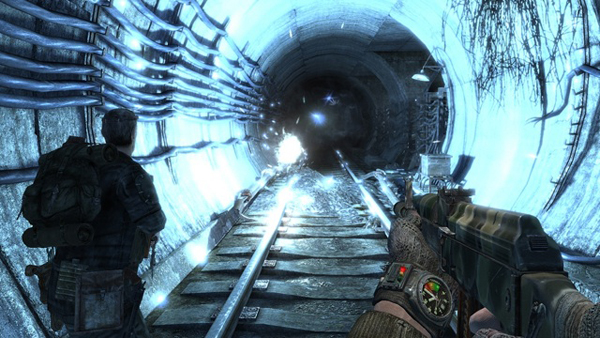
Metro 2033 is an action-oriented video game with a combination of survival horror and first-person shooter elements. The game is based on the novel Metro 2033 by Russian author Dmitry Glukhovsky. It was developed by 4A Games in Ukraine and released in March 2010 for Microsoft Windows and Xbox 360.[3] In March 2006, 4A Games announced a partnership with Glukhovsky to collaborate on the game.[4] The game was announced at the 2009 Games Convention in Leipzig;[5] a first trailer came along with the announcement.[6] A sequel was announced, currently titled Metro: Last Light.
 21
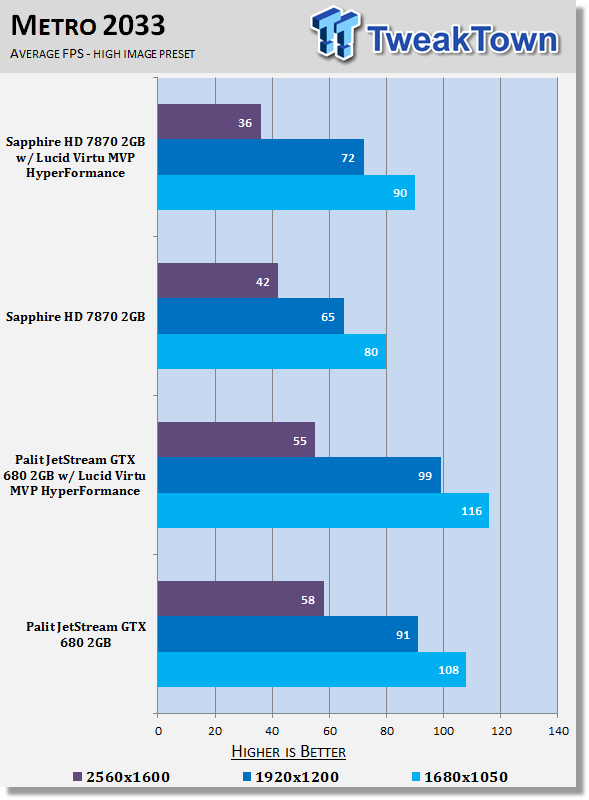
21Metro 2033 is a really intensive engine and we've got some interesting results. At the less intensive resolutions we can see a slight gain in performance. Not the kind of numbers we've seen from the other games, though.
What's interesting is that we again see a negative impact at the highest resolution where the extra FPS is needed as both cards struggle to hit that 60 FPS mark.
Benchmarks - Dirt 3
Dirt 3
Version and / or Patch Used: Latest Steam Update
Timedemo or Level Used: Built in Benchmark
Developer Homepage: http://www.codemasters.com/
Product Homepage: http://www.dirt3game.com/
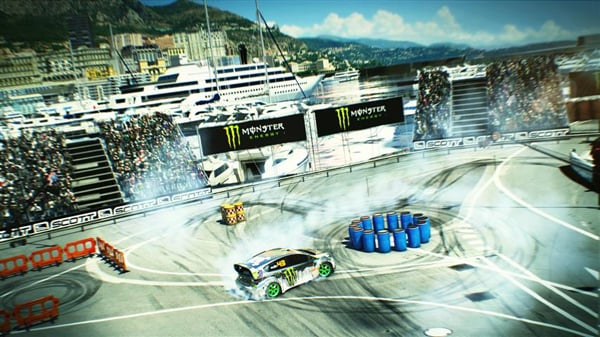
DiRT 3 boasts more cars, more locations, more routes and more events than any other game in the series, including over 50 rally cars representing the very best from five decades of the sport. With more than double the track content of 2009's hit, DiRT 3 will see players start at the top as a professional driver, with a top-flight career in competitive off-road racing complimented by the opportunity to express themselves in Gymkhana-style showpiece driving events.
 21
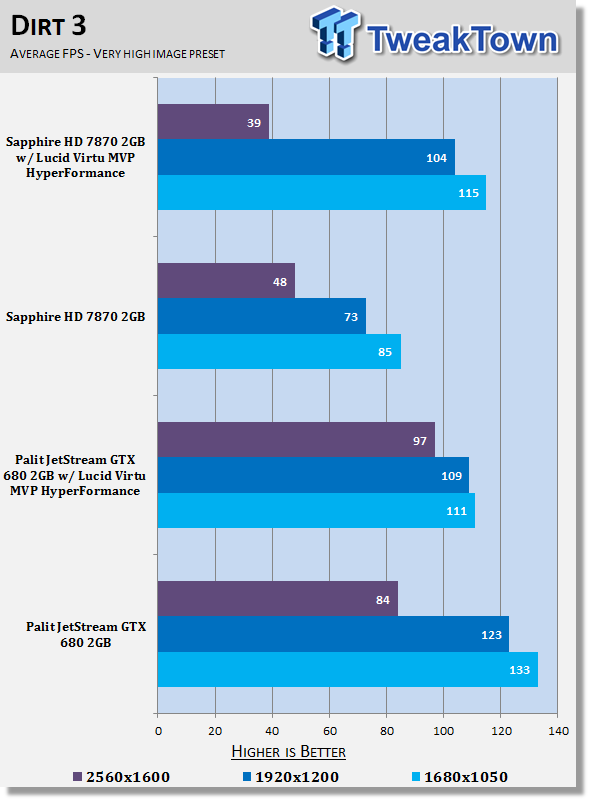
21Under Dirt 3 we can see the results are a little more reversed here for the GTX 680. We see the lower resolution take a slight hit in performance while the highest resolution sees a gain.
The biggest issue is that we see a drop at 2560 x 1600 with the HD 7870, and it's again in the place where we need it (an increase in FPS) most.
Final Thoughts
Lucid Virtu MVP while being an exciting technology is not one without its flaws at the moment. We are finding that the cons are outweighing the pros at the moment and let me cover them. The thing we love is the added performance, some of the gains you see are simply amazing considering nothing is being overclocked. To see gains of 50% at a click of a button or two is really quite amazing.
Let's cover the issues we have with the technology in this early stage of Virtu MVP's life. The first is that when we really need the extra FPS in certain areas, not only do we not see it, but we're seeing a negative impact in performance in some cases. As always we aim for that 60 FPS mark and under Mafia II for example, we see our 74 FPS average move to 101 FPS at 1680 x 1050. This is great, but I'd say we're already at a playable level with a strong 14 FPS over that 60 FPS average being seen. At 2560 x 1600, though, we move from 47 FPS, a number we consider unplayable, to 37 FPS, not only still an unplayable number, but a lower number! It's not just Mafia II either; in our small sample pool here you can see that when we need the extra FPS in important areas, we don't get it.
Another issue is that I've never had to reboot my system more times for testing than I have in the two days it took to test this. It's reminiscent a bit like in the early days of SLI and CrossFire and their profiles. It just feels like it's not all there yet.
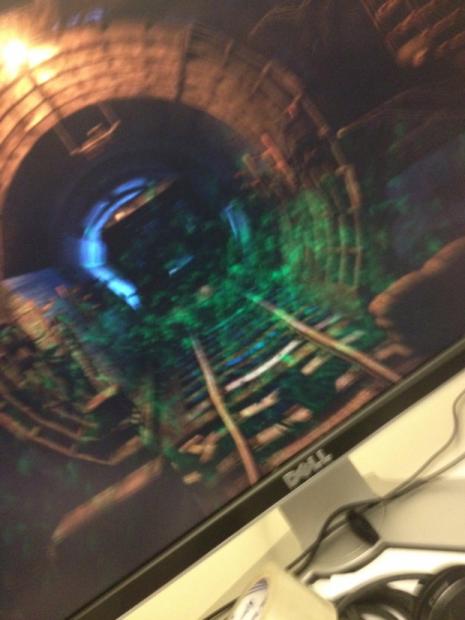
The other thing is during Metro 2033 when we ran our benchmark we got weird graphics corruption that was only seen when HyperFormance was set to on. You can see it below.
 21
21You'll have to excuse the image quality; it was taken in haste with my iPhone when I saw it pop up on the screen. It helps give you an idea of what was going on with it. There wasn't really anything else that stood out as clear as this in our other tests, but I really felt like the shadows in Mafia II were acting a little weird, too.
The other issue is that of course the applications list doesn't have all the games you might be playing. Sometimes when we'd try to add an ".exe" as well, the software would crash out.
Something else that I need to mention is that we haven't contacted Lucid about these issues because we know that the back and forth nature of the conversation would drag this article out. The simple fact is that the technology worked so we knew that there wasn't really anything "wrong" with it or our setup. I know that over the coming days, though, we're going to hear from not only Lucid, but some motherboard partners as well.
When we first had a chance to look at the technology we were shown the Street Fighter IV benchmark. Not only is it a little old, but it's not very taxing on your system. I remember walking out and turning to Cameron saying, "that's great, but what about a game which actually needs the extra FPS". When moving from 250 FPS to 350 FPS, while sounding impressive, is ultimately useless and a waste of time, as to begin with, the game was already perfectly playable.
What I thought would happen with the technology then was proven today. When we need the gains, we just don't get them. Unfortunately at the moment we're getting a bit of a negative effect. It seems that "HyperFormance" helps remove stuff like your CPU bottleneck. The issue is, at 2560 x 1600 under really intensive games, there is no CPU bottleneck - it's all a VGA bottleneck.
Under something like 3DMark 11 and Unigine Heaven the performance increase is cool, but at the moment it seems that HWBot, the standard for record keeping when it comes to benchmarking, is choosing not to embrace Virtu MVP. While it also seems that Futuremark is choosing to embrace it, we'll probably head down a path of when Futuremark chose to embrace PhysX. We'll end up testing with the technology switched off to make for an even playing field.
Rumor has it that NVIDIA are also going to put a stop to the technology being able to work in future driver releases. The thing is, based on 3DMark 11 scores, you could see how all of a sudden cheaper and last generation video cards could make new more expensive cards seem like a waste of money. If you really examine it, though, there's more to it, in the times we need the extra performance, it just doesn't exist. The problem is, any half decent marketing company can run with certain numbers and make the technology sound amazing. Going from 100 FPS to 150 FPS, though, doesn't help gamers. It does sound impressive, though, and that can be an issue for both AMD and NVIDIA.
Virtu MVP and HyperFormance is both interesting and quite spectacular. It's not there yet, and I'm not sure how it will go in the long run. It seems Lucid have got a step in the right direction when it comes to motherboard partners, but they need software partners as well, and I'm not sure how they're going to do in that department.
Of course the Virtual Vsync technology is great where we can see more than 60 FPS on a 60Hz monitor without any tearing. It's not the stand out feature to Virtu MVP, though. The coming six to nine months will be interesting as we see the technology mature and move forward. We have all intensions of keeping an eye on it and will keep you updated with what's going on. For now, though, we're excited about Virtu MVP in one sense, but not all that interested in making use of it at the end of the day, at its current maturity.
 United
States: Find other tech and computer products like this
over at
United
States: Find other tech and computer products like this
over at  United
Kingdom: Find other tech and computer products like this
over at
United
Kingdom: Find other tech and computer products like this
over at  Australia:
Find other tech and computer products like this over at
Australia:
Find other tech and computer products like this over at  Canada:
Find other tech and computer products like this over at
Canada:
Find other tech and computer products like this over at  Deutschland:
Finde andere Technik- und Computerprodukte wie dieses auf
Deutschland:
Finde andere Technik- und Computerprodukte wie dieses auf  Annoying Windows 11 pop-up pushing Bing on Chrome users is apparently doing the rounds again
 New iOS 18 leak hints at more iPhone AI capabilities including upgraded Siri and Spotlight
 Here's what Apple definitely won't announce at its May 7 iPad event
 iPhone 16 leak hints at a revamped MagSafe setup for the upcoming iPhones
 ASUS ROG Ally 2 inbound for 2024? Nope, but rumor has it an updated handheld is due this year
 Fractal Design North XL Full-Tower Chassis Review
 Western Digital WD Gold 24TB HDD Review - High-Capacity Masterpiece
 AOC U27G3X 27-inch Gaming Monitor Review - 4K 160Hz for $500
 MSI Vector GP68HX Gaming Laptop Review
 Dell UltraSharp 40 5K Curved Thunderbolt Hub Monitor (U4025QW) Review
 XPG Core Reactor II VE 850w 80 PLUS Gold ATX 3.0 PSU Review
 SteelSeries Arctis Nova 4X Wireless Gaming Headset Review
 ACEMAGIC AD08 "Core i9 11900H" Mini PC Review
 Lenovo ThinkPad X1 Carbon Gen 12 Review
 ASUS ROG Swift Pro PG248QP Gaming Monitor Review - Frames, frames, and more frames
 Building the Ultimate Home Entertainment Server with an ASUSTOR NAS and Viper Gaming NVMe SSDs
 Everything you need to know about the latest ASUS NUC Mini PCs - NUC 14 Pro and ROG NUC
 How to Overclock Your GPU and Boost Your PC Gaming with ASUS GPU Tweak III
 ASUS's AMD Radeon RX 7000 Series GPU lineup has something for every gamer
 ASUS OLED Premium Care defends the ROG Swift OLED PG32UCDM gaming monitor from burn-in